




Helm 是 Deis 开发的一个用于 Kubernetes 应用的包管理工具,主要用来管理 Charts。有点类似于 Linux 中的 APT 或 YUM。Helm Chart 是用来封装 Kubernetes 原生应用程序的一系列 YAML 文件。可以在你部署应用的时候自定义应用程序的一些 Metadata,以便于应用程序的分发。对于应用发布者而言,可以通过 Helm 打包应用、管理应用依赖关系、管理应用版本并发布应用到软件仓库。对于使用者而言,使用 Helm 后不用需要编写复杂的应用部署文件,可以以简单的方式在 Kubernetes 上查找、安装、升级、回滚、卸载应用程序。
摘自互联网
作为 Kubernetes 的包管理工具,绝大部分软件都是选择 Helm 来作为应用的打包交付方式在 Kubernetes 上运行,而 Helm 已经成为了 Kubernetes 事实上的应用分发标准。
除了 Helm 之外,其实 Operator 与 Helm 干的事情也差不多,Operator 是通过 Kubernetes API 增加自定义功能,更好地发布和管理应用。对于 Operator 而言,Helm 的门槛和成本更低,不需要进行开发,但 Operator 的概念更酷。
在 Helm3 版本中已经移除了 Tiller ,现在的 Helm3 客户端跟 kubectl 一样,使用 kubeconfig 作为认证信息直接连接到 Kubernetes APIServer 。
Helm 概念
Chart 代表着 Helm 包。它包含在 Kubernetes 集群内部运行应用程序,工具或服务所需的所有资源定义。可以把它看作是 Ubuntu 中 apt install 安装的 DEB 包 或者 CentOS 中 yum install 安装的 RPM 包。
Repository (仓库) 是用来存放和共享 charts 的地方。它就像 Ubuntu 中的 apt 源或 CentOS 中 yum 源。
Release 是运行在 Kubernetes 集群中的 chart 的实例。一个 chart 通常可以在同一个集群中安装多次。每一次安装都会创建一个新的 release。以 MySQL chart 为例,如果你想在你的集群中运行两个数据库,你可以安装该 chart 两次。每一个数据库都会拥有它自己的 release 和 release name。
Helm3 安装
官方提供了各大主流系统的二进制包,直接下载即可。
[root@k8s-test-master01 ~]# wget https://get.helm.sh/helm-v3.5.3-linux-amd64.tar.gz
[root@k8s-test-master01 ~]# tar -zxvf helm-v3.5.3-linux-amd64.tar.gz
linux-amd64/
linux-amd64/helm
linux-amd64/LICENSE
linux-amd64/README.md
[root@k8s-test-master01 ~]# mv linux-amd64/helm /usr/local/bin/helm
[root@k8s-test-master01 ~]# helm version
version.BuildInfo{Version:"v3.5.3", GitCommit:"041ce5a2c17a58be0fcd5f5e16fb3e7e95fea622", GitTreeState:"dirty", GoVersion:"go1.15.8"}
[root@k8s-test-master01 ~]#
注: Helm 默认使用 ~/.kube/config 连接 kubernetes
开启 tab 补齐命令
# 需要安装 bash-completion 包
# 在 ~/.bash_profile 或 /etc/profile 文件加入下面配置
source /usr/share/bash-completion/bash_completion
source <(helm completion bash)
# source ~/.bash_profile 或 /etc/profile 使环境变量生效
[root@k8s-test-master01 ~]# helm
completion  dependency  get         history     lint        package     pull        rollback    show        template    uninstall   verify
create      env         help        install     list        plugin      repo        search      status      test        upgrade     version
[root@k8s-test-master01 ~]# helm
Helm 使用命令这里就不展开了,如果不了解的读者可以到官网查看。
创建第一个模板
创建一个名为 mychart 的 chart
[root@k8s-test-master01 ~]# helm create mychart
Creating mychart
Helm 会生成一个名为 mychart 的文件夹
[root@k8s-test-master01 ~]# tree mychart
mychart
├── charts                                # charts 依赖的其他 charts
├── Chart.yaml                            # 描述 Chart 名字、描述信息、版本的等信息
├── templates
│   ├── deployment.yaml
│   ├── _helpers.tpl                      # 放置可以通过chart复用的模板辅助对象
│   ├── hpa.yaml
│   ├── ingress.yaml
│   ├── NOTES.txt                         # chart的"帮助文本"。这会在你的用户执行helm install时展示
│   ├── serviceaccount.yaml
│   ├── service.yaml
│   └── tests
│       └── test-connection.yaml
└── values.yaml                           # 模板变量

3 directories, 10 files
[root@k8s-test-master01 ~]#
现在我们把 Helm 生成的模板删掉,开始编写我们的 ConfigMap 资源模板。
rm -rf mychart/templates/*
删除 values.yaml 中的默认内容,仅设置一个参数,使用 --set 传递参数。
[root@k8s-test-master01 ~]# cat mychart/values.yaml
favoriteDrink: default
创建 configmap 资源模板,使用 {{ .Release.Name }} 在模板中插入版本名称
[root@k8s-test-master01 ~]# cat mychart/templates/configmap.yaml
apiVersion: v1
kind: ConfigMap
metadata:
  name: {{ .Release.Name }}-configmap
data:
  myvalue: "Hello World"
  drink: {{ .Values.favoriteDrink }}
当我们想测试模板渲染但又不想安装任何内容时,可以使用 --dry-run 。
# 版本名称为 release-v1
[root@k8s-test-master01 ~]# helm install --debug --dry-run release-v1 ./mychart
install.go:173: [debug] Original chart version: ""
install.go:190: [debug] CHART PATH: /root/mychart

NAME: release-v1
LAST DEPLOYED: Sat Mar 27 18:45:52 2021
NAMESPACE: default
STATUS: pending-install
REVISION: 1
TEST SUITE: None
USER-SUPPLIED VALUES:
{}

COMPUTED VALUES:
favoriteDrink: default

HOOKS:
MANIFEST:
---
# Source: mychart/templates/configmap.yaml
apiVersion: v1
kind: ConfigMap
metadata:
  name: release-v1-configmap
data:
  myvalue: "Hello World"
  drink: default

[root@k8s-test-master01 ~]#
再使用 --set 传递参数测试,drink 的值已被覆盖。
# 版本名称为 release-v1
[root@k8s-test-master01 ~]# helm install --debug --dry-run release-v1 ./mychart --set favoriteDrink=helm
install.go:173: [debug] Original chart version: ""
install.go:190: [debug] CHART PATH: /root/mychart

NAME: release-v1
LAST DEPLOYED: Sat Mar 27 18:49:51 2021
NAMESPACE: default
STATUS: pending-install
REVISION: 1
TEST SUITE: None
USER-SUPPLIED VALUES:
favoriteDrink: helm

COMPUTED VALUES:
favoriteDrink: helm

HOOKS:
MANIFEST:
---
# Source: mychart/templates/configmap.yaml
apiVersion: v1
kind: ConfigMap
metadata:
  name: release-v1-configmap
data:
  myvalue: "Hello World"
  drink: helm

[root@k8s-test-master01 ~]#
安装资源
[root@k8s-test-master01 ~]# helm install release-v1   ./mychart --set favoriteDrink=helm
NAME: release-v1
LAST DEPLOYED: Sat Mar 27 18:53:59 2021
NAMESPACE: default
STATUS: deployed
REVISION: 1
TEST SUITE: None
[root@k8s-test-master01 ~]#
查看安装的资源
[root@k8s-test-master01 ~]# kubectl get cm
NAME                   DATA   AGE
kube-root-ca.crt       1      39d
release-v1-configmap   2      92s
test-emqx-acl          1      38d
test-emqx-env          3      38d
[root@k8s-test-master01 ~]# helm list
NAME            NAMESPACE       REVISION        UPDATED                                 STATUS          CHART           APP VERSION
release-v1      default         1               2021-03-27 18:53:59.836359719 +0800 CST deployed        mychart-0.1.0   1.16.0
# 可以运行helm get manifest {{.Release NAME}} 查看生成的完整的YAML。
[root@k8s-test-master01 ~]# helm get manifest release-v1
---
# Source: mychart/templates/configmap.yaml
apiVersion: v1
kind: ConfigMap
metadata:
  name: release-v1-configmap
data:
  myvalue: "Hello World"
  drink: helm

[root@k8s-test-master01 ~]#
创建 NGINX+PHP CHART
创建一个名为 lnp 的 chart 。
[root@k8s-test-master01 ~]# helm create lnp
Creating lnp
Helm 生成 chart 的文件夹实际上是一个 nginx 模板,我们可以参考下该模板。
values 文件如下,定义全局变量,为了简洁,相同部分也可以共用同一个变量。
# Default values for lnp.
# This is a YAML-formatted file.
# Declare variables to be passed into your templates.
nginx:
  replicaCount: 1
  image:
    repository: nginx
    pullPolicy: IfNotPresent
    # Overrides the image tag whose default is the chart appVersion.
    tag: "1.19.9-alpine"

  imagePullSecrets: []
  nameOverride: ""
  fullnameOverride: ""

  serviceAccount:
    # Specifies whether a service account should be created
    create: true
    # Annotations to add to the service account
    annotations: {}
    # The name of the service account to use.
    # If not set and create is true, a name is generated using the fullname template
    name: ""

  podAnnotations: {}

  service:
    type: ClusterIP
    port: 80
    nodeport: 8080

#  resources: {}
  resources:
    # We usually recommend not to specify default resources and to leave this as a conscious
    # choice for the user. This also increases chances charts run on environments with little
    # resources, such as Minikube. If you do want to specify resources, uncomment the following
    # lines, adjust them as necessary, and remove the curly braces after 'resources:'.
    limits:
      cpu: 100m
      memory: 128Mi
    requests:
      cpu: 100m
      memory: 128Mi

php:
  replicaCount: 1
  image:
    repository: php
    pullPolicy: IfNotPresent
    tag: "8.0.3-fpm"
  imagePullSecrets: []
  nameOverride: ""
  fullnameOverride: ""

  service:
    type: ClusterIP
    port: 9000
    nodeport: 9000

  resources:
    limits:
      cpu: 100m
      memory: 128Mi
    requests:
      cpu: 100m
      memory: 128Mi

livenessprobe:
  tcpSocket:
    port: http
  initialDelaySeconds: 30
  periodSeconds: 60
readinessprobe:
  httpGet:
    path: /
    port: http
  initialDelaySeconds: 30
  periodSeconds: 60

autoscaling:
  enabled: false
  minReplicas: 1
  maxReplicas: 100
  targetCPUUtilizationPercentage: 80
  # targetMemoryUtilizationPercentage: 80

nodeSelector: {}

tolerations: []

affinity:
  nodeAffinity:
    requiredDuringSchedulingIgnoredDuringExecution:
      nodeSelectorTerms:
      - matchExpressions:
        - key: node-role.kubernetes.io/edge
          operator: NotIn
          values:
          - ""
以 nginx-deployment.yaml 为例,通过 values 文件中定义的变量传递值。
apiVersion: apps/v1
kind: Deployment
metadata:
  name: {{ include "lnp.fullname" . }}-nginx
  labels:
    {{- include "lnp.labels" . | nindent 4 }}
spec:
  {{- if not .Values.autoscaling.enabled }}
  replicas: {{ .Values.nginx.replicaCount }}
  {{- end }}
  selector:
    matchLabels:
      {{- include "lnp.nginx.selectorLabels" . | nindent 6 }}
  template:
    metadata:
      {{- with .Values.nginx.podAnnotations }}
      annotations:
        {{- toYaml . | nindent 8 }}
      {{- end }}
      labels:
        {{- include "lnp.nginx.selectorLabels" . | nindent 8 }}
    spec:
      {{- with .Values.affinity }}
      affinity:
        {{- toYaml . | nindent 8 }}
      {{- end }}
      {{- with .Values.nginx.imagePullSecrets }}
      imagePullSecrets:
        {{- toYaml . | nindent 8 }}
      {{- end }}
      serviceAccountName: {{ include "lnp.serviceAccountName" . }}
      containers:
        - name: nginx
          image: "{{ .Values.nginx.image.repository }}:{{ .Values.nginx.image.tag | default .Chart.AppVersion }}"
          imagePullPolicy: {{ .Values.nginx.image.pullPolicy }}
          ports:
            - name: http
              containerPort: 80
              protocol: TCP
          livenessProbe:
            {{- toYaml .Values.livenessprobe | nindent 12 }}
          readinessProbe:
            {{- toYaml .Values.readinessprobe | nindent 12 }}
          resources:
            {{- toYaml .Values.nginx.resources | nindent 12 }}
          volumeMounts:
          - mountPath: /etc/nginx/nginx.conf
            name: nginx-config
            subPath: path/to/nginx.conf
      volumes:
      - name: nginx-config
        configMap:
          name: {{ .Release.Name }}-nginx-config
          items:
          - key: nginx.conf
            path: path/to/nginx.conf
      {{- with .Values.nodeSelector }}
      nodeSelector:
        {{- toYaml . | nindent 8 }}
      {{- end }}
      {{- with .Values.tolerations }}
      tolerations:
        {{- toYaml . | nindent 8 }}
      {{- end }}
判断 service 的类型,当类型为 NodePort 时,设置 nodePort 的端口为 values 文件中默认的值,也可以通过 --set 传递参数,--set 的优先级大于 values 文件。
apiVersion: v1
kind: Service
metadata:
  name: {{ include "lnp.fullname" . }}
  labels:
    {{- include "lnp.labels" . | nindent 4 }}
spec:
  type: {{ .Values.nginx.service.type }}
  ports:
    - port: {{ .Values.nginx.service.port }}
      targetPort: http
      protocol: TCP
      name: http
      {{- if contains "NodePort" .Values.nginx.service.type }}
      nodePort: {{ .Values.nginx.service.nodeport }}
      {{- end }}
  selector:
    {{- include "lnp.nginx.selectorLabels" . | nindent 4 }}
最终的文件如下
[root@k8s-test-master01 ~]# tree lnp/
lnp/
├── charts
├── Chart.yaml
├── templates
│   ├── _helpers.tpl
│   ├── nginx-configmap.yaml
│   ├── nginx-deployment.yaml
│   ├── nginx-serviceaccount.yaml
│   ├── nginx-service.yaml
│   ├── NOTES.txt
│   ├── php-deployment.yaml
│   └── php-service.yaml
└── values.yaml

2 directories, 10 files
通过 --dry-run 命令,查看渲染后的 yaml 文件
[root@k8s-test-master01 ~]#  helm install --debug --dry-run demo  ./lnp
install.go:173: [debug] Original chart version: ""
install.go:190: [debug] CHART PATH: /root/lnp

NAME: demo
LAST DEPLOYED: Thu Apr  1 04:05:52 2021
NAMESPACE: default
STATUS: pending-install
REVISION: 1
TEST SUITE: None
USER-SUPPLIED VALUES:
{}

COMPUTED VALUES:
affinity:
  nodeAffinity:
    requiredDuringSchedulingIgnoredDuringExecution:
      nodeSelectorTerms:
      - matchExpressions:
        - key: node-role.kubernetes.io/edge
          operator: NotIn
          values:
          - ""
autoscaling:
  enabled: false
  maxReplicas: 100
  minReplicas: 1
  targetCPUUtilizationPercentage: 80
livenessprobe:
  initialDelaySeconds: 30
  periodSeconds: 60
  tcpSocket:
    port: http
nginx:
  fullnameOverride: ""
  image:
    pullPolicy: IfNotPresent
    repository: nginx
    tag: 1.19.9-alpine
  imagePullSecrets: []
  nameOverride: ""
  podAnnotations: {}
  replicaCount: 1
  resources:
    limits:
      cpu: 100m
      memory: 128Mi
    requests:
      cpu: 100m
      memory: 128Mi
  service:
    nodeport: 8080
    port: 80
    type: ClusterIP
  serviceAccount:
    annotations: {}
    create: true
    name: ""
nodeSelector: {}
php:
  fullnameOverride: ""
  image:
    pullPolicy: IfNotPresent
    repository: php
    tag: 8.0.3-fpm
  imagePullSecrets: []
  nameOverride: ""
  podAnnotations: {}
  replicaCount: 1
  resources:
    limits:
      cpu: 100m
      memory: 128Mi
    requests:
      cpu: 100m
      memory: 128Mi
  service:
    nodeport: 9000
    port: 9000
    type: ClusterIP
  serviceAccount:
    annotations: {}
    create: true
    name: ""
readinessprobe:
  httpGet:
    path: /
    port: http
  initialDelaySeconds: 30
  periodSeconds: 60
tolerations: []

HOOKS:
---
# Source: lnp/templates/nginx-configmap.yaml
apiVersion: v1
kind: ConfigMap
metadata:
  name: demo-nginx-config
  annotations:
    # This is what defines this resource as a hook. Without this line, the
    # job is considered part of the release.
    "helm.sh/hook": post-install
    "helm.sh/hook-weight": "5"
data:
  nginx.conf: |
    user  nginx;
    worker_processes  2;

    error_log  /var/log/nginx/error.log warn;
    pid        /var/run/nginx.pid;


    events {
        worker_connections  1024;
    }


    http {
        include       /etc/nginx/mime.types;
        default_type  application/octet-stream;

        log_format  main  '$remote_addr - $remote_user [$time_local] "$request" '
                          '$status $body_bytes_sent "$http_referer" '
                          '"$http_user_agent" "$http_x_forwarded_for"';

        access_log  /var/log/nginx/access.log  main;

        sendfile        on;
        #tcp_nopush     on;

        add_header Access-Control-Allow-Origin *;
        keepalive_timeout  65;
        fastcgi_connect_timeout 300s;
        fastcgi_send_timeout 300s;
        fastcgi_read_timeout 300s;
        fastcgi_buffer_size 256k;
        fastcgi_buffers 2 256k;
        fastcgi_busy_buffers_size 256k;
        fastcgi_temp_file_write_size 256k;

        #gzip  on;
        gzip on;
        gzip_buffers 32 4K;
        gzip_comp_level 6 ;
        gzip_min_length 4000;
        gzip_types text/css text/xml apploation/x-javascript text/htm;
        client_max_body_size 50m;

        include /etc/nginx/conf.d/*.conf;
        server {
            listen 80 default_server;
            listen [::]:80 default_server ipv6only=on;

            root /usr/share/nginx/html;
            index index.php index.html index.htm;

            server_name 0.0.0.0;
            client_max_body_size 50m;

            location / {
                try_files $uri $uri/ /index.php?_url=$uri&$args;
                client_max_body_size 50m;
            }

            location ~ \.php$ {
                try_files $uri /index.php =404;
                #fastcgi_pass  php.default.svc.cluster.local:9000;
                fastcgi_pass  demo-lnp-php:9000;
                fastcgi_index index.php;
                fastcgi_param SCRIPT_FILENAME /var/www/html/$fastcgi_script_name;
                include fastcgi_params;
                client_max_body_size 50m;
            }

            location ~ /\.ht {
                deny all;
                client_max_body_size 50m;
            }
        }
    }
MANIFEST:
---
# Source: lnp/templates/nginx-serviceaccount.yaml
apiVersion: v1
kind: ServiceAccount
metadata:
  name: demo-lnp
  labels:
    helm.sh/chart: lnp-0.1.0
    app.kubernetes.io/name: nginx
    app.kubernetes.io/instance: demo
    app.kubernetes.io/version: "v1"
    app.kubernetes.io/managed-by: Helm
---
# Source: lnp/templates/nginx-service.yaml
apiVersion: v1
kind: Service
metadata:
  name: demo-lnp
  labels:
    helm.sh/chart: lnp-0.1.0
    app.kubernetes.io/name: nginx
    app.kubernetes.io/instance: demo
    app.kubernetes.io/version: "v1"
    app.kubernetes.io/managed-by: Helm
spec:
  type: ClusterIP
  ports:
    - port: 80
      targetPort: http
      protocol: TCP
      name: http
  selector:
    app.kubernetes.io/name: nginx
    app.kubernetes.io/instance: demo
---
# Source: lnp/templates/php-service.yaml
apiVersion: v1
kind: Service
metadata:
  name: demo-lnp-php
  labels:
    helm.sh/chart: lnp-0.1.0
    app.kubernetes.io/name: php
    app.kubernetes.io/instance: demo
    app.kubernetes.io/version: "v1"
    app.kubernetes.io/managed-by: Helm
spec:
  type: ClusterIP
  ports:
    - port: 9000
      targetPort: http
      protocol: TCP
      name: http
  selector:
    app.kubernetes.io/name: php
    app.kubernetes.io/instance: demo
---
# Source: lnp/templates/nginx-deployment.yaml
apiVersion: apps/v1
kind: Deployment
metadata:
  name: demo-lnp-nginx
  labels:
    helm.sh/chart: lnp-0.1.0
    app.kubernetes.io/name: nginx
    app.kubernetes.io/instance: demo
    app.kubernetes.io/version: "v1"
    app.kubernetes.io/managed-by: Helm
spec:
  replicas: 1
  selector:
    matchLabels:
      app.kubernetes.io/name: nginx
      app.kubernetes.io/instance: demo
  template:
    metadata:
      labels:
        app.kubernetes.io/name: nginx
        app.kubernetes.io/instance: demo
    spec:
      affinity:
        nodeAffinity:
          requiredDuringSchedulingIgnoredDuringExecution:
            nodeSelectorTerms:
            - matchExpressions:
              - key: node-role.kubernetes.io/edge
                operator: NotIn
                values:
                - ""
      serviceAccountName: demo-lnp
      containers:
        - name: nginx
          image: "nginx:1.19.9-alpine"
          imagePullPolicy: IfNotPresent
          ports:
            - name: http
              containerPort: 80
              protocol: TCP
          livenessProbe:
            initialDelaySeconds: 30
            periodSeconds: 60
            tcpSocket:
              port: http
          readinessProbe:
            httpGet:
              path: /
              port: http
            initialDelaySeconds: 30
            periodSeconds: 60
          resources:
            limits:
              cpu: 100m
              memory: 128Mi
            requests:
              cpu: 100m
              memory: 128Mi
          volumeMounts:
          - mountPath: /etc/nginx/nginx.conf
            name: nginx-config
            subPath: path/to/nginx.conf
      volumes:
      - name: nginx-config
        configMap:
          name: demo-nginx-config
          items:
          - key: nginx.conf
            path: path/to/nginx.conf
---
# Source: lnp/templates/php-deployment.yaml
apiVersion: apps/v1
kind: Deployment
metadata:
  name: demo-lnp-php
  labels:
    helm.sh/chart: lnp-0.1.0
    app.kubernetes.io/name: php
    app.kubernetes.io/instance: demo
    app.kubernetes.io/version: "v1"
    app.kubernetes.io/managed-by: Helm
spec:
  replicas: 1
  selector:
    matchLabels:
      app.kubernetes.io/name: php
      app.kubernetes.io/instance: demo
  template:
    metadata:
      labels:
        app.kubernetes.io/name: php
        app.kubernetes.io/instance: demo
    spec:
      affinity:
        nodeAffinity:
          requiredDuringSchedulingIgnoredDuringExecution:
            nodeSelectorTerms:
            - matchExpressions:
              - key: node-role.kubernetes.io/edge
                operator: NotIn
                values:
                - ""
      containers:
        - name: php
          image: "php:8.0.3-fpm"
          imagePullPolicy: IfNotPresent
          ports:
            - name: http
              containerPort: 9000
              protocol: TCP
          livenessProbe:
            initialDelaySeconds: 30
            periodSeconds: 60
            tcpSocket:
              port: http
          resources:
            limits:
              cpu: 100m
              memory: 128Mi
            requests:
              cpu: 100m
              memory: 128Mi

NOTES:
1. Get the application URL by running these commands:
  export POD_NAME=$(kubectl get pods --namespace default -l "app.kubernetes.io/name=lnp,app.kubernetes.io/instance=demo" -o jsonpath="{.items[0].metadata.name}")
  export CONTAINER_PORT=$(kubectl get pod --namespace default $POD_NAME -o jsonpath="{.spec.containers[0].ports[0].containerPort}")
  echo "Visit http://127.0.0.1:8080 to use your application"
  kubectl --namespace default port-forward $POD_NAME 8080:$CONTAINER_PORT
安装
[root@k8s-test-master01 lnp]# helm install demo ./ --set nginx.service.type=NodePort
NAME: demo
LAST DEPLOYED: Thu Apr  1 02:57:30 2021
NAMESPACE: default
STATUS: deployed
REVISION: 1
TEST SUITE: None
NOTES:
1. Get the application URL by running these commands:
  export NODE_PORT=$(kubectl get --namespace default -o jsonpath="{.spec.ports[0].nodePort}" services demo-lnp)
  export NODE_IP=$(kubectl get nodes --namespace default -o jsonpath="{.items[0].status.addresses[0].address}")
  echo http://$NODE_IP:$NODE_PORT
[root@k8s-test-master01 lnp]#
[root@k8s-test-master01 lnp]# kubectl get po,svc -l 'app.kubernetes.io/instance=demo'
NAME                                 READY   STATUS    RESTARTS   AGE
pod/demo-lnp-nginx-b7b84d47b-h58lt   1/1     Running   0          3m18s
pod/demo-lnp-php-7c5d5bd5f5-ddhlr    1/1     Running   0          3m18s

NAME                   TYPE        CLUSTER-IP       EXTERNAL-IP   PORT(S)       AGE
service/demo-lnp       NodePort    10.254.251.218   <none>        80:8080/TCP   3m18s
service/demo-lnp-php   ClusterIP   10.254.42.201    <none>        9000/TCP      3m18s
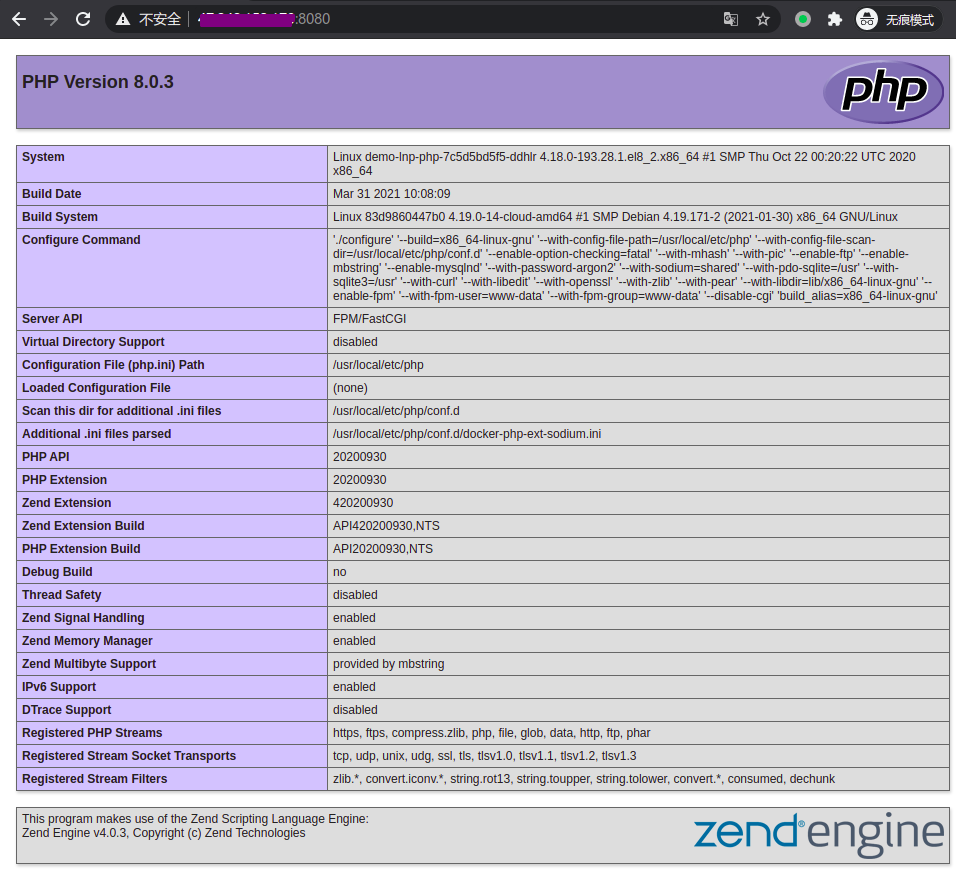
创建测试解析文件 index.php
[root@k8s-test-master01 lnp]# kubectl exec -it demo-lnp-php-7c5d5bd5f5-ddhlr  -- bash
root@demo-lnp-php-7c5d5bd5f5-ddhlr:/var/www/html# echo "<?php phpinfo();?>" > index.php
root@demo-lnp-php-7c5d5bd5f5-ddhlr:/var/www/html# exit
exit
[root@k8s-test-master01 lnp]# kubectl exec -it demo-lnp-nginx-b7b84d47b-h58lt  -- sh
/ # echo "<?php phpinfo();?>" >/usr/share/nginx/html/index.php
/ # exit
[root@k8s-test-master01 lnp]#
NGINX + PHP 环境正常解析
使用 MinIO 创建 Helm 仓库
创建 bucket
[root@k8s-test-master01 ~]# mc mb myminio/minio-helm-repo
Bucket created successfully `myminio/minio-helm-repo`.
允许匿名下载
[root@k8s-test-master01 repo]#  mc policy set download myminio/minio-helm-repo
Access permission for `myminio/minio-helm-repo` is set to `download`
打包 chart
[root@k8s-test-master01 ~]# helm package lnp
Successfully packaged chart and saved it to: /root/lnp-0.1.0.tgz
创建 index.html 并上传包
[root@k8s-test-master01 ~]# mkdir lnp-0.1.0
[root@k8s-test-master01 ~]# helm repo index lnp-0.1.0/ --url http://10.254.170.34:9000/minio-helm-repo
[root@k8s-test-master01 ~]# cd lnp-0.1.0/
[root@k8s-test-master01 lnp-0.1.0]# ls -lrt
total 8
-rw-r--r-- 1 root root 4060 Apr  1 04:25 lnp-0.1.0.tgz
-rw-r--r-- 1 root root  418 Apr  1 04:34 index.yaml
[root@k8s-test-master01 lnp-0.1.0]# mc cp index.yaml myminio/minio-helm-repo
index.yaml:                         418 B / 418 B ┃▓▓▓▓▓▓▓▓▓▓▓▓▓▓▓▓▓▓▓▓▓▓▓▓▓▓▓▓▓▓▓▓▓▓▓▓▓▓▓▓▓▓▓▓▓▓▓▓▓▓▓▓▓▓▓▓▓▓▓▓▓▓▓▓▓▓▓▓▓▓▓▓▓▓▓▓▓▓▓▓▓▓▓▓▓▓▓▓▓▓▓▓▓▓▓▓▓▓▓▓▓▓▓▓▓▓▓▓▓▓▓▓▓▓▓▓▓▓▓▓▓▓▓▓▓▓▓▓┃ 55.96 KiB/s 0s
[root@k8s-test-master01 lnp-0.1.0]# mc cp lnp-0.1.0.tgz myminio/minio-helm-repo
lnp-0.1.0.tgz:                      3.96 KiB / 3.96 KiB ┃▓▓▓▓▓▓▓▓▓▓▓▓▓▓▓▓▓▓▓▓▓▓▓▓▓▓▓▓▓▓▓▓▓▓▓▓▓▓▓▓▓▓▓▓▓▓▓▓▓▓▓▓▓▓▓▓▓▓▓▓▓▓▓▓▓▓▓▓▓▓▓▓▓▓▓▓▓▓▓▓▓▓▓▓▓▓▓▓▓▓▓▓▓▓▓▓▓▓▓▓▓▓▓▓▓▓▓▓▓▓▓▓▓▓▓▓▓▓▓▓▓┃ 345.67 KiB/s 0s
添加仓库并验证
[root@k8s-test-master01 lnp-0.1.0]# helm repo add lnp http://10.254.170.34:9000/minio-helm-repo
"lnp" has been added to your repositories
[root@k8s-test-master01 lnp-0.1.0]# helm repo list
NAME                    URL
emqx                    https://repos.emqx.io/charts
prometheus-community    https://prometheus-community.github.io/helm-charts
stable                  https://charts.helm.sh/stable
lnp                     http://10.254.170.34:9000/minio-helm-repo
[root@k8s-test-master01 lnp-0.1.0]#
[root@k8s-test-master01 lnp-0.1.0]# helm search  repo lnp
NAME    CHART VERSION   APP VERSION     DESCRIPTION
lnp/lnp 0.1.0           v1              A Helm chart for Kubernetes
如果熟悉 kubernetes 的 yaml 文件,创建 chart 是没啥难度的,Helm 还有一些高级的用法,如 Hook 机制。也可以参考一些开源的软件的 chart 包。
参考文档:
https://helm.sh/docs/
