我们在启动Docker容器时,默认情况下容器所使用的资源是没有限制的,这样就会存在部分特别耗资源的容器会占用大量系统资源,从而导致其他容器甚至整个服务器性能降低,为此,Docker提供了一系列参数方便我们对容器的CPU、内存、IO等进行限制。
为了方便演示,我们这里使用progrium/stress镜像,这个镜像内置一个压力测试工具,通过它我们可以很方便进行实验。首先我们拉取此镜像:
$ sudo docker pull progrium/stressUsing default tag: latestlatest: Pulling from progrium/stressImage docker.io/progrium/stress:latest uses outdated schema1 manifest format. Please upgrade to a schema2 image for better future compatibility. More information at https://docs.docker.com/registry/spec/deprecated-schema-v1/a3ed95caeb02: Pull complete871c32dbbb53: Pull completedbe7819a64dd: Pull completed14088925c6e: Pull complete58026d51efe4: Pull complete7d04a4fe1405: Pull complete1775fca35fb6: Pull complete5c319e267908: Pull completeDigest: sha256:e34d56d60f5caae79333cee395aae93b74791d50e3841986420d23c2ee4697bfStatus: Downloaded newer image for progrium/stress:latestdocker.io/progrium/stress:latest
一、容器内存限制
与操作系统类似,容器可使用的内存包括两部分:物理内存,Swap交换空间,因此Docker通过以下两个参数对内存资源进行限制:
-m或--memroy:设置内存使用限额
--memory-swap:设置内存和交换空间总大小,如果只设置-m而不设置此参数,则默认内存和交换空间总大小是-m的两倍
例如我们按如下配置启动容器:我们设置内存为200M,内存与Swap总共300M,那么Swap就是100M。
sudo docker run -it -m 200M --memory-swap=300M progrium/stress --vm 1 --vm-bytes 280M
这里我们对stress进行设置:
--vm 1:启动一个工作线程
--vm-bytes:每个工作线程分配280M内存
$ sudo docker run -it -m 200M --memory-swap=300M progrium/stress --vm 1 --vm-bytes 280MWARNING: Your kernel does not support swap limit capabilities or the cgroup is not mounted. Memory limited without swap.stress: info: [1] dispatching hogs: 0 cpu, 0 io, 1 vm, 0 hddstress: dbug: [1] using backoff sleep of 3000usstress: dbug: [1] --> hogvm worker 1 [7] forkedstress: dbug: [7] allocating 293601280 bytes ...stress: dbug: [7] touching bytes in strides of 4096 bytes ...stress: dbug: [7] freed 293601280 bytesstress: dbug: [7] allocating 293601280 bytes ...stress: dbug: [7] touching bytes in strides of 4096 bytes ...stress: dbug: [7] freed 293601280 bytesstress: dbug: [7] allocating 293601280 bytes ...
我们可以看到stress容器启动后不断在申请内存,释放内存,由于我们设置--vm-bytes 280M,所以它每次会申请280M内存空间,大家可能会注意到,容器启动后有一段告警信息:
WARNING: Your kernel does not support swap limit capabilities or the cgroup is not mounted. Memory limited without swap.
这是因为我这边宿主机使用Ubuntu,在Ubuntu上默认是没有开启Swap限制的,这样就会导致容器的swap限制不生效,为了解决这个问题,我们需要先修改/etc/default/grub file 文件:
$ sudo vim etc/default/grub file
添加如下内容:
GRUB_CMDLINE_LINUX="cgroup_enable=memory swapaccount=1"
使用 sudo update-grub 更新系统的GRUB,并重启系统。
$ sudo update-grubSourcing file `/etc/default/grub'Sourcing file `/etc/default/grub.d/50-curtin-settings.cfg'Generating grub configuration file ...Found linux image: boot/vmlinuz-4.15.0-159-genericFound initrd image: boot/initrd.img-4.15.0-159-genericFound linux image: boot/vmlinuz-4.15.0-158-genericFound initrd image: boot/initrd.img-4.15.0-158-genericFound linux image: boot/vmlinuz-4.15.0-156-genericFound initrd image: /boot/initrd.img-4.15.0-156-genericFound linux image: /boot/vmlinuz-4.15.0-154-genericFound initrd image: /boot/initrd.img-4.15.0-154-genericdone
OK,解决了这个问题后我们继续内存限额的实现,我们这次将vm-bytes设置为310M,看看会有什么样的效果:
$ sudo docker run -it -m 200M --memory-swap=300M progrium/stress --vm 1 --vm-bytes 310Mstress: info: [1] dispatching hogs: 0 cpu, 0 io, 1 vm, 0 hddstress: dbug: [1] using backoff sleep of 3000usstress: dbug: [1] --> hogvm worker 1 [7] forkedstress: dbug: [7] allocating 325058560 bytes ...stress: dbug: [7] touching bytes in strides of 4096 bytes ...stress: FAIL: [1] (416) <-- worker 7 got signal 9stress: WARN: [1] (418) now reaping child worker processesstress: FAIL: [1] (422) kill error: No such processstress: FAIL: [1] (452) failed run completed in 0s
我们可以看到,当线程每次申请的内存大于300M的时候会stress线程报错,容器退出。
二、容器的CPU限制
默认情况下,所有容器都可以平等使用宿主机的CPU而没有限制,Docker提供-c或--cpu-share参数用于设置容器的CPU权重,如果不指定则默认为1024。与内存限制不同,-c设置的并不是容器使用CPU的核的数量,而是相对的权重值,某个容器最终能分配到的CPU资源取决于它的cpu share占所有容器cpu share总和的比例,也就是说-c可以决定容器CPU优先级。
我们首先启动containerA,cpu share为1024:
$ sudo docker run --name containerA -it -c 1024 progrium/stress --cpu 2stress: info: [1] dispatching hogs: 2 cpu, 0 io, 0 vm, 0 hddstress: dbug: [1] using backoff sleep of 6000usstress: dbug: [1] --> hogcpu worker 2 [8] forkedstress: dbug: [1] using backoff sleep of 3000usstress: dbug: [1] --> hogcpu worker 1 [9] forked
接着启动containerB,cpu share为512:
$ sudo docker run --name containerB -it -c 512 progrium/stress --cpu 2stress: info: [1] dispatching hogs: 2 cpu, 0 io, 0 vm, 0 hddstress: dbug: [1] using backoff sleep of 6000usstress: dbug: [1] --> hogcpu worker 2 [8] forkedstress: dbug: [1] using backoff sleep of 3000usstress: dbug: [1] --> hogcpu worker 1 [9] forked
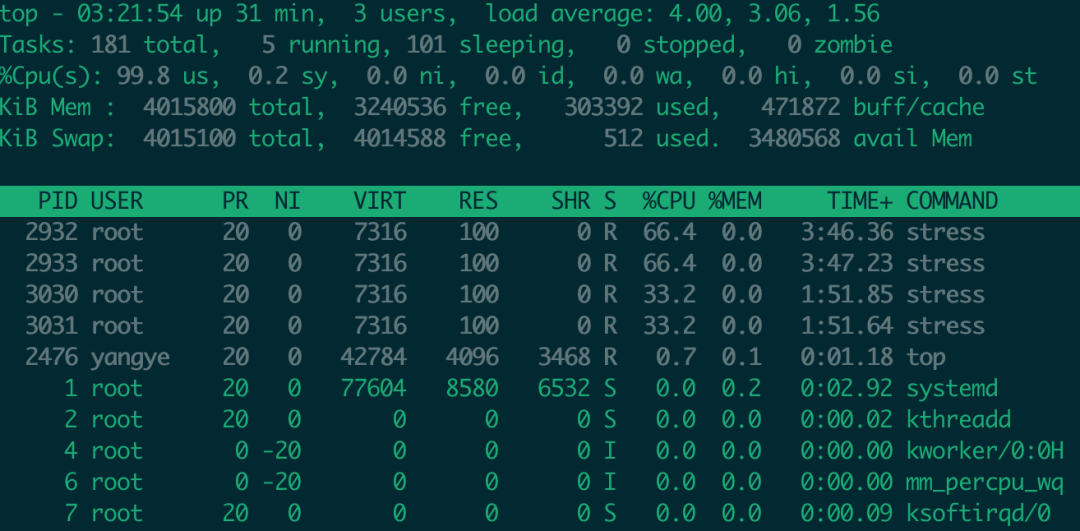
PS:注意我们要确保stress容器能够将host的cpu拉满这样才能确保实验效果,所以大家在实验时要注意看自己的宿主机CPU有多少个,例如我的机器cpu为2,所以在启动stress容器时--cpu也设置为2。
我们在宿主机上通过top命令能够明显看出效果:containerA消耗的CPU是containerB的两倍: