



1、检查数据库XML Database组件状态
SQL> select comp_name, status, version from DBA_REGISTRY where comp_name='Oracle XML Database'; COMP_NAME STATUS VERSION -------------------- ------- ----------- Oracle XML Database VALID 11.2.0.4.0 |
SQL> select count(*) from dba_objects where owner='XDB' and status='INVALID';
COUNT(*) ---------- 0 |
2、配置XDB的FTP和HTTP
简述XDB(Oracle XML DB)

2.1 配置http端口
SQL> execute dbms_xdb.sethttpport(8888);
PL/SQL procedure successfully completed. |
SQL> select dbms_xdb.GETHTTPPORT() from dual;
DBMS_XDB.GETHTTPPORT() ---------------------- 8888 |
2.2 配置ftp端口
SQL> execute dbms_xdb.setftpport(9999);
PL/SQL procedure successfully completed. |
SQL> select dbms_xdb.GETFTPPORT() from dual;
DBMS_XDB.GETFTPPORT() --------------------- 9999 |
3、dispatchers参数是oracle自动配置的,service_name=db_nameXDB
SQL> show parameter dispatchers;
NAME TYPE VALUE ------------------- ----------- ----------------------- dispatchers string (PROTOCOL=TCP) (SERVICE=zldb4XDB) max_dispatchers integer |
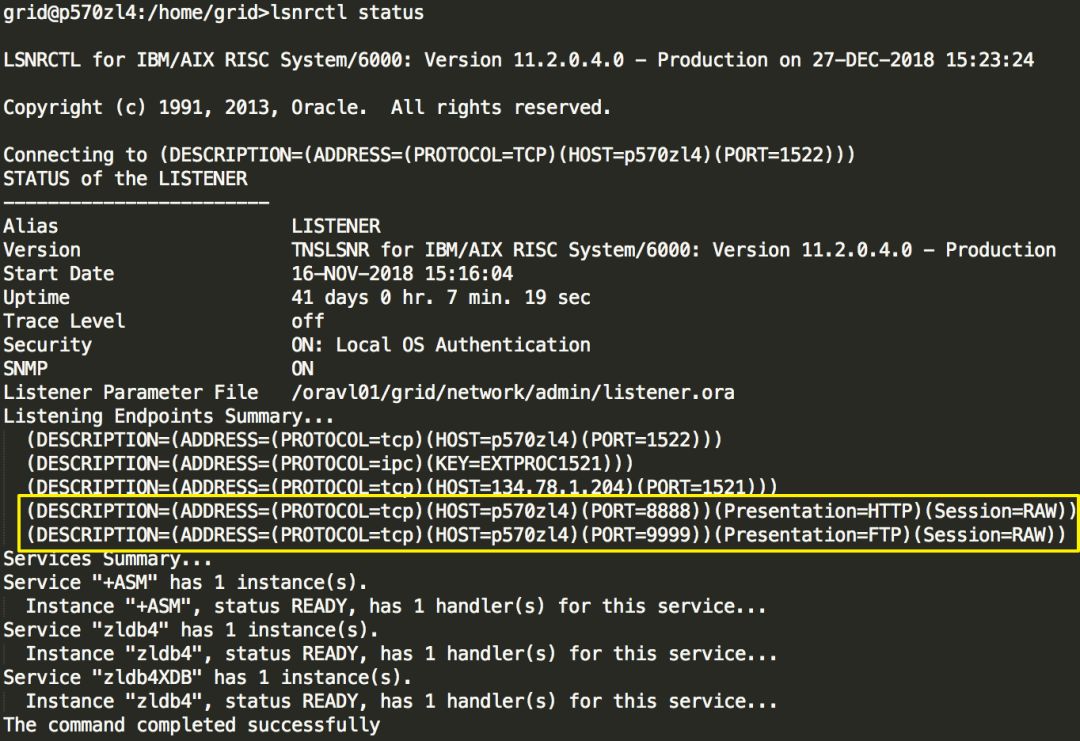
4、此时的监听状态会多出来两个,如果没有,需要手动添加并重启监听
5、登陆FTP,端口是9999
$ ftp -n ftp> open p570zl4 9999 Connected to p570zl4. 220- p570zl4 Unauthorised use of this FTP server is prohibited and may be subject to civil and criminal prosecution. 220 p570zl4 FTP Server (Oracle XML DB/Oracle Database) ready. ftp> user system infra_1234 331 pass required for SYSTEM 230 SYSTEM logged in |
6、获取文件
ftp> ls 200 PORT Command successful 150 ASCII Data Connection OLAP_XDS home images olap_data_security public sys xdbconfig.xml xds 226 ASCII Transfer Complete ftp> cd sys 250 CWD Command successful ftp> ls 200 PORT Command successful 150 ASCII Data Connection acloids acls apps asm log oid principals schemas version workspaces xs 226 ASCII Transfer Complete ftp> cd xs 250 CWD Command successful ftp> ls 200 PORT Command successful 150 ASCII Data Connection drolerc.xml frolerc.xml rolerc.xml roles rolesetrc.xml scrc.xml securityclasses userrc.xml users xdserc.xml 226 ASCII Transfer Complete ftp> cd .. 250 CWD Command successful ftp> ls 200 PORT Command successful 150 ASCII Data Connection acloids acls apps asm log oid principals schemas version workspaces xs 226 ASCII Transfer Complete ftp> cd asm 250 CWD Command successful ftp> ls 200 PORT Command successful 150 ASCII Data Connection ZLDB4_DATA1 ARCH_ZLDB4 226 ASCII Transfer Complete ftp> cd ZLDB4_DATA1 250 CWD Command successful ftp> ls 200 PORT Command successful 150 ASCII Data Connection ASM ZLDB4 226 ASCII Transfer Complete ftp> cd ZLDB4 250 CWD Command successful ftp> ls 200 PORT Command successful 150 ASCII Data Connection controlfile ONLINELOG DATAFILE TEMPFILE PARAMETERFILE spfilezldb4.ora 226 ASCII Transfer Complete ftp> cd datafile 250 CWD Command successful ftp> ls 200 PORT Command successful 150 ASCII Data Connection SYSTEM.260.923458579 SYSAUX.261.923458581 UNDOTBS1.262.923458583 USERS.264.923458593 temp_1.dbf TS_ZHILING_DATA.267.923461207 ts_zhiling_data1.dbf TS_ZHILING_INDEX.268.923461261 ts_zhiling_index1.dbf TS_ZHILING_PARAM.269.923461339 ts_zhiling_param1.dbf TS_ZHILING_DATA.270.923461433 ts_zhiling_data2.dbf TS_ZHILING_DATA.271.923461487 ts_zhiling_data3.dbf TS_ZHILING_DATA.272.923461539 ts_zhiling_data4.dbf TS_ZHILING_DATA.273.923461593 ts_zhiling_data5.dbf TS_ZHILING_DATA.274.959013509 ts_zhiling_data6.dbf TEST_DATA.275.965471119 SMALL_DATA.277.965562827 SMALL_DATA.278.965565127 SMALL_DATA.279.965565267 test_data_20170116 BIG_DATA.280.965566361 SMALL_DATA.281.965566743 TEST_DATA.282.966450905 READONLY.286.967321597 226 ASCII Transfer Complete ftp> binary <<<<< 使用二进制模式传输 200 Type set to I. ftp> get READONLY.286.967321597 200 PORT Command successful 150 BIN Data Connection 226 BIN Transfer Complete 10493952 bytes received in 0.1945 seconds (5.269e+04 Kbytes/s) local: READONLY.286.967321597 remote: READONLY.286.967321597 ftp> quit 221 QUIT Goodbye. $ ls -lrt -rw-r--r-- 1 orauser oinstall 10493952 Dec 27 15:36 READONLY.286.967321597 |
