



1、确定控制文件当前位置

2、关闭数据库并启动数据库到nomount状态
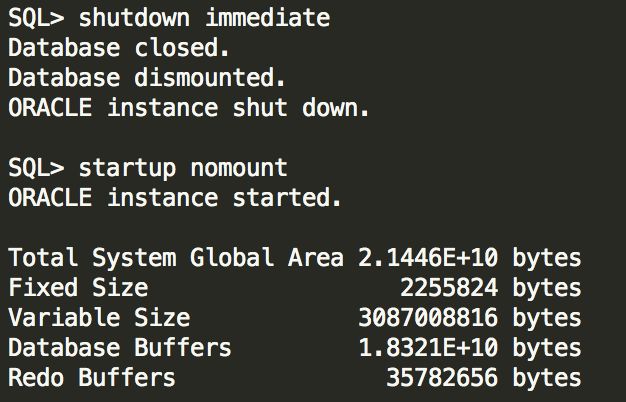
3、使用RMAN将控制文件移动到ASM磁盘组

4、在ASM磁盘组中查看移动过来的文件
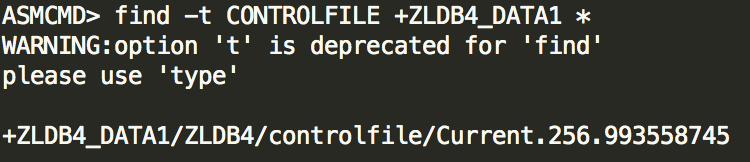
关于在ASM中查找文件的命令find,有以下介绍
This command searches the specified directory and all subdirectories below it in the directory tree for the supplied name. name can be a directory name or a filename, and can include wildcard characters. dir may also include wildcards. In the output of the command, directory names are suffixed with the slash character (/) to distinguish them from filenames.
You use the -t flag to find all the files of a particular type (specified as type). For example, you can search for control files by specifying type as CONTROLFILE. Valid values for type are the following:
CONTROLFILE
DATAFILE
ONLINELOG
ARCHIVELOG
TEMPFILE
BACKUPSET
DATAFILE
PARAMETERFILE
DATAGUARDCONFIG
FLASHBACK
CHANGETRACKING
DUMPSET
AUTOBACKUP
XTRANSPORT
5、修改参数文件
如果使用pfile启动数据库,需要修改pfile文件里control_files参数;如果使用spfile启动数据库,需要执行如下指令(nomount阶段执行即可)。这里是单实例环境,如果是RAC环境,需要使用sid='*'
alter system set control_files='+ZLDB4_DATA1/ZLDB4/controlfile/Current.256.993558745' scope=spfile; |
6、重启数据库
SQL> shutdown immediate; SQL> startup; |
