



一、前言
在前面的文章里已经介绍过,目前我们内部的业务系统都是从单体拆分成微服务架构,并且是前后端分离部署的,后端用的容器服务,前端是用nginx部署vue。当我在研究skywalking源码时,发现前后端原来是可以合并部署的,所以简单了看了下部署原理:一般的做法是前端项目打包完,将打包文件复制到后端项目工程的src\main\resources\static目录下,再进行后端工程项目打包,所以今天就带大家学习下。
二、实践
先看下项目的整体结构:
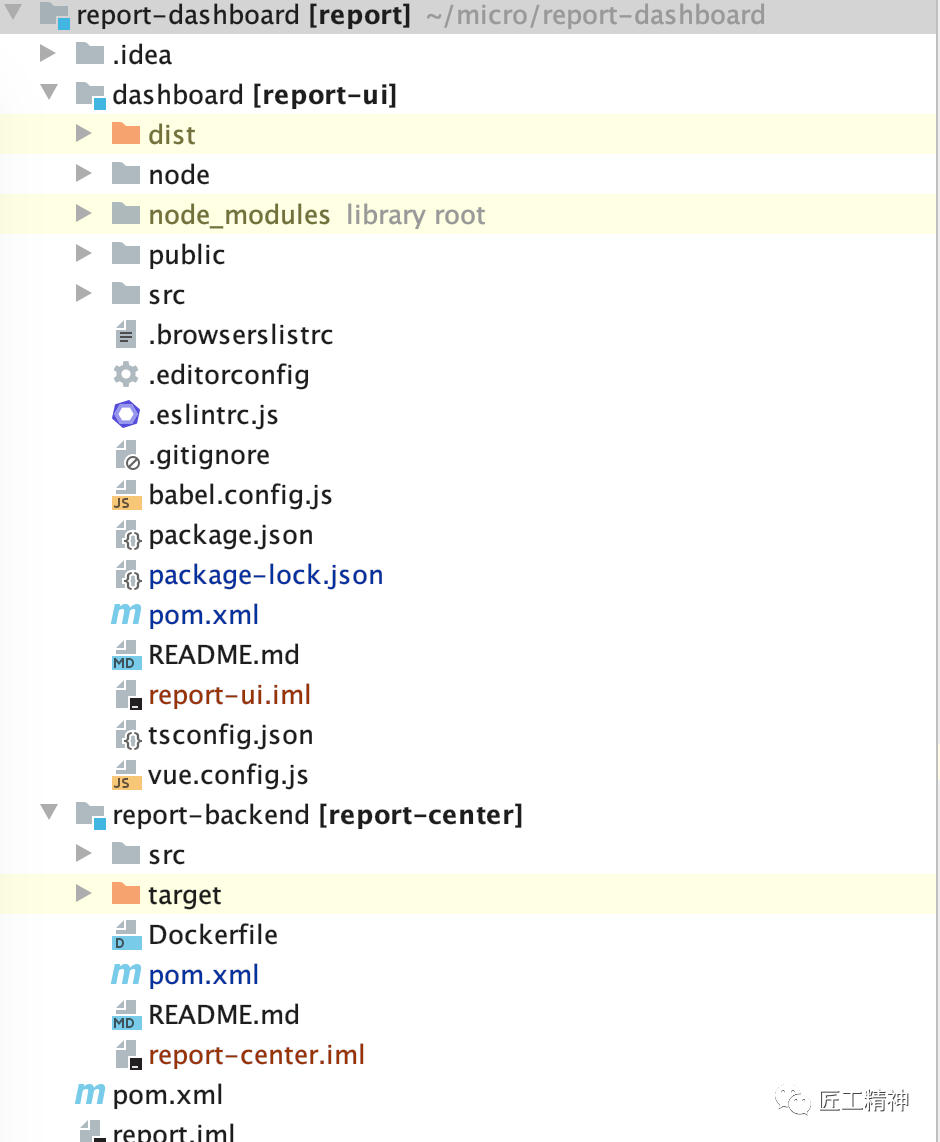
典型的maven多module项目结构,父子模块结构:
父工程pom:
<?xml version="1.0" encoding="UTF-8"?>
<project xmlns="http://maven.apache.org/POM/4.0.0"
         xmlns:xsi="http://www.w3.org/2001/XMLSchema-instance"
         xsi:schemaLocation="http://maven.apache.org/POM/4.0.0 http://maven.apache.org/xsd/maven-4.0.0.xsd">
    <modelVersion>4.0.0</modelVersion>

    <groupId>com.charleskeith.report</groupId>
    <artifactId>report</artifactId>
    <packaging>pom</packaging>
    <version>1.0.0</version>

    <parent>
        <groupId>org.springframework.boot</groupId>
        <artifactId>spring-boot-starter-parent</artifactId>
        <version>2.0.8.RELEASE</version>
        <relativePath/> <!-- lookup parent from repository -->
    </parent>

    <modules>
        <!-- spring boot后端工程,作为子工程 -->
        <module>report-backend</module>
        <!-- Vue前端工程,作为子工程 -->
        <module>dashboard</module>
    </modules>

    <dependencies>

    </dependencies>

    <build>
        <plugins>
            <plugin>
                <groupId>org.springframework.boot</groupId>
                <artifactId>spring-boot-maven-plugin</artifactId>
                <version>2.0.7.RELEASE</version>
                <executions>
                    <execution>
                        <goals>
                            <goal>repackage</goal><!--可以把依赖的包都打包到生成的Jar包中-->
                        </goals>
                    </execution>
                </executions>
            </plugin>
            <plugin>
                <groupId>org.apache.maven.plugins</groupId>
                <artifactId>maven-compiler-plugin</artifactId>
                <version>3.7.0</version>
                <configuration>
                    <source>1.8</source>
                    <target>1.8</target>
                </configuration>
            </plugin>
        </plugins>
    </build>

</project>
子module的vue端pom:
对应Vue项目而言,pom.xml对它而言是不存在的,也是毫无意义的,此文件可以不要。在此体现出来,只是为了配置子父工程而已,凸显出Vue工程属于父工程的子工程而已,便于IDE导入呈现展示而已。
<?xml version="1.0" encoding="UTF-8"?>
<project xmlns="http://maven.apache.org/POM/4.0.0"
         xmlns:xsi="http://www.w3.org/2001/XMLSchema-instance"
         xsi:schemaLocation="http://maven.apache.org/POM/4.0.0 http://maven.apache.org/xsd/maven-4.0.0.xsd">
    <parent>
        <artifactId>report</artifactId>
        <groupId>com.charleskeith.report</groupId>
        <version>1.0.0</version>
    </parent>
    <modelVersion>4.0.0</modelVersion>

    <groupId>com.charleskeith.front.vue.ui</groupId>
    <artifactId>report-ui</artifactId>

</project>
后端工程的pom:
<?xml version="1.0" encoding="UTF-8"?>
<project xmlns="http://maven.apache.org/POM/4.0.0" xmlns:xsi="http://www.w3.org/2001/XMLSchema-instance"
   xsi:schemaLocation="http://maven.apache.org/POM/4.0.0 http://maven.apache.org/xsd/maven-4.0.0.xsd">
   <modelVersion>4.0.0</modelVersion>

   <groupId>com.charleskeith</groupId>
   <artifactId>report-center</artifactId>
   <version>0.0.1-SNAPSHOT</version>
   <packaging>jar</packaging>

   <name>demo-spring-boot-webflux</name>
   <description>Demo project for Spring Boot</description>

    <parent>
        <artifactId>report</artifactId>
        <groupId>com.charleskeith.report</groupId>
        <version>1.0.0</version>
    </parent>

   <properties>
      <project.build.sourceEncoding>UTF-8</project.build.sourceEncoding>
      <project.reporting.outputEncoding>UTF-8</project.reporting.outputEncoding>
      <java.version>1.8</java.version>
      <swagger2.version>2.8.0</swagger2.version>
      <log4jdbc.version>1.16</log4jdbc.version>
      <druid.version>1.1.22</druid.version>
      <docker.image.prefix>139.196.193.146/charleskeith</docker.image.prefix>
      <docker.image.deploy.version>2.0-SNAPSHOT</docker.image.deploy.version>
      <org.mapstruct.version>1.4.1.Final</org.mapstruct.version>
   </properties>

   <dependencies>
      <dependency>
         <groupId>org.springframework.boot</groupId>
         <artifactId>spring-boot-starter-webflux</artifactId>
      </dependency>

<!--      <dependency>-->
<!--         <groupId>org.springframework.boot</groupId>-->
<!--         <artifactId>spring-boot-starter-web</artifactId>-->
<!--      </dependency>-->
<!--      <dependency>-->
<!--         <groupId>org.springframework.boot</groupId>-->
<!--         <artifactId>spring-boot-starter-test</artifactId>-->
<!--         <scope>test</scope>-->
<!--      </dependency>-->
<!--      <dependency>-->
<!--         <groupId>io.projectreactor</groupId>-->
<!--         <artifactId>reactor-test</artifactId>-->
<!--         <scope>test</scope>-->
<!--      </dependency>-->
      <dependency>
         <groupId>com.zaxxer</groupId>
         <artifactId>HikariCP</artifactId>
         <version>2.6.1</version>
      </dependency>
      <dependency>
         <groupId>org.apache.httpcomponents</groupId>
         <artifactId>httpclient</artifactId>
         <version>4.3.1</version>
      </dependency>
      <dependency>
         <groupId>commons-beanutils</groupId>
         <artifactId>commons-beanutils</artifactId>
         <version>1.9.2</version>
      </dependency>
      <dependency>
         <groupId>org.springframework.boot</groupId>
         <artifactId>spring-boot-autoconfigure</artifactId>
         <scope>compile</scope>
      </dependency>
      <!-- druid数据源驱动 -->
      <dependency>
         <groupId>com.alibaba</groupId>
         <artifactId>druid-spring-boot-starter</artifactId>
         <version>${druid.version}</version>
      </dependency>
      <dependency>
         <groupId>com.github.pagehelper</groupId>
         <artifactId>pagehelper-spring-boot-starter</artifactId>
         <version>1.3.0</version>
      </dependency>
      <!--监控sql日志-->
      <dependency>
         <groupId>org.bgee.log4jdbc-log4j2</groupId>
         <artifactId>log4jdbc-log4j2-jdbc4.1</artifactId>
         <version>${log4jdbc.version}</version>
      </dependency>
      <dependency>
         <groupId>commons-lang</groupId>
         <artifactId>commons-lang</artifactId>
         <version>2.6</version>
      </dependency>
      <dependency>
         <groupId>com.google.code.gson</groupId>
         <artifactId>gson</artifactId>
         <version>2.6.2</version>
      </dependency>
      <dependency>
         <groupId>org.apache.httpcomponents</groupId>
         <artifactId>httpmime</artifactId>
         <version>4.3.1</version>
      </dependency>
      <dependency>
      <groupId>org.apache.httpcomponents</groupId>
      <artifactId>httpcore</artifactId>
      <version>4.3.1</version>
      </dependency>
      <!--<dependency>-->
         <!--<groupId>org.springframework.boot</groupId>-->
         <!--<artifactId>spring-boot-starter-jdbc</artifactId>-->
         <!--<exclusions>-->
            <!--<exclusion>-->
               <!--<groupId>org.apache.tomcat</groupId>-->
               <!--<artifactId>tomcat-jdbc</artifactId>-->
            <!--</exclusion>-->
         <!--</exclusions>-->
      <!--</dependency>-->
      <dependency>
         <groupId>org.springframework.boot</groupId>
         <artifactId>spring-boot-starter-data-mongodb-reactive</artifactId>
      </dependency>
      <!--<dependency>-->
         <!--<groupId>org.springframework.boot</groupId>-->
         <!--<artifactId>spring-boot-starter-data-jpa</artifactId>-->
      <!--</dependency>-->
      <dependency>
         <groupId>mysql</groupId>
         <artifactId>mysql-connector-java</artifactId>
         <scope>runtime</scope>
      </dependency>
      <dependency>
         <groupId>org.projectlombok</groupId>
         <artifactId>lombok</artifactId>
         <scope>compile</scope>
      </dependency>

      <dependency>
         <groupId>org.quartz-scheduler</groupId>
         <artifactId>quartz</artifactId>
         <!--<version>2.2.1</version>-->
      </dependency>
      <dependency>
         <groupId>org.quartz-scheduler</groupId>
         <artifactId>quartz-jobs</artifactId>
         <version>2.2.1</version>
      </dependency>
      <dependency>
         <groupId>org.springframework</groupId>
         <artifactId>spring-context-support</artifactId>
      </dependency>

      <dependency>
         <groupId>com.google.zxing</groupId>
         <artifactId>core</artifactId>
         <version>3.1.0</version>
      </dependency>
      <dependency>
         <groupId>com.google.zxing</groupId>
         <artifactId>javase</artifactId>
         <version>3.1.0</version>
      </dependency>

      <dependency>
         <groupId>org.mybatis.spring.boot</groupId>
         <artifactId>mybatis-spring-boot-starter</artifactId>
         <version>2.1.3</version>
      </dependency>
      <dependency>
         <groupId>com.microsoft.sqlserver</groupId>
         <artifactId>sqljdbc4</artifactId>
         <version>4.0</version>
      </dependency>
      <dependency>
         <groupId>com.yilimaizi.flow</groupId>
         <artifactId>business-flow-spring-boot-starter</artifactId>
         <version>1.0.0-SNAPSHOT</version>
      </dependency>

        <dependency>
            <groupId>com.charleskeith</groupId>
            <artifactId>core-framework</artifactId>
            <version>1.1</version>
        </dependency>
      <dependency>
         <groupId>org.mapstruct</groupId>
         <artifactId>mapstruct</artifactId>
         <version>${org.mapstruct.version}</version>
      </dependency>
      <dependency>
         <groupId>org.mapstruct</groupId>
         <artifactId>mapstruct-processor</artifactId>
         <version>${org.mapstruct.version}</version>
      </dependency>

   </dependencies>

   <build>
      <plugins>
         <plugin>
            <groupId>org.springframework.boot</groupId>
            <artifactId>spring-boot-maven-plugin</artifactId>
         </plugin>
<!--         <plugin>-->
<!--            <groupId>com.spotify</groupId>-->
<!--            <artifactId>dockerfile-maven-plugin</artifactId>-->
<!--            <version>1.4.4</version>-->
<!--            <executions>-->
<!--               <execution>-->
<!--                  <id>default</id>-->
<!--                  <goals>-->
<!--                     <goal>build</goal>-->
<!--                     <goal>push</goal>-->
<!--                  </goals>-->
<!--               </execution>-->
<!--            </executions>-->
<!--            <configuration>-->
<!--               <repository>${docker.image.prefix}/${project.artifactId}</repository>-->
<!--               <tag>${docker.image.deploy.version}</tag>-->
<!--               <useMavenSettingsForAuth>true</useMavenSettingsForAuth>-->
<!--            </configuration>-->
<!--         </plugin>-->
         <!-- 插件maven-clean-plugin,用于在编译前,清除之前编译的文件、文件夹等,避免残留之前的内容 -->
         <plugin>
         <groupId>org.apache.maven.plugins</groupId>
         <artifactId>maven-clean-plugin</artifactId>
         <version>3.1.0</version>
         <configuration>
            <filesets>
               <fileset>
                  <!-- 前端资源目录,即:存放前端包目录-->
                  <directory>src/main/resources/static</directory>
               </fileset>
               <fileset>
                  <!-- Vue项目打包自动生成的dist目录 -->
                  <directory>${project.parent.basedir}/dashboard/dist</directory>
               </fileset>
            </filesets>
         </configuration>
         </plugin>

         <!--frontend-maven-plugin为项目本地下载/安装Node和NPM,运行npm install命令-->
         <plugin>
            <groupId>com.github.eirslett</groupId>
            <artifactId>frontend-maven-plugin</artifactId>
            <version>1.6</version>
            <configuration>
               <workingDirectory>${project.parent.basedir}/dashboard</workingDirectory>
            </configuration>
            <executions>
               <execution>
                  <id>install node and npm</id>
                  <goals>
                     <goal>install-node-and-npm</goal>
                  </goals>
                  <configuration>
                     <nodeVersion>v12.18.2</nodeVersion>
                     <npmVersion>7.19.0</npmVersion>
                  </configuration>
               </execution>
               <!-- Install all project dependencies -->
               <execution>
                  <id>npm install</id>
                  <goals>
                     <goal>npm</goal>
                  </goals>
                  <phase>generate-resources</phase>
                  <configuration>
                     <arguments>install</arguments>
                  </configuration>
               </execution>
               <!-- Build and minify static files -->
               <execution>
                  <id>npm run build</id>
                  <goals>
                     <goal>npm</goal>
                  </goals>
                  <configuration>
                     <arguments>run build</arguments>
                  </configuration>
               </execution>
            </executions>
         </plugin>

         <!--资源插件,主要为了从前端项目里复制打包好的文件到springboot项目-->
         <plugin>
         <groupId>org.apache.maven.plugins</groupId>
         <artifactId>maven-resources-plugin</artifactId>
         <version>3.1.0</version>
         <executions>
            <execution>
               <id>copy static</id>
               <phase>generate-resources</phase>
               <goals>
                  <goal>copy-resources</goal>
               </goals>
               <configuration>
                  <!-- 复制前端打包文件到这里 -->
                  <outputDirectory>src/main/resources/static</outputDirectory>
                  <overwrite>true</overwrite>
                  <resources>
                     <resource>
                        <!-- 从前端打包的目录dist进行指定文件、文件夹内容的复制-->
                        <directory>${project.parent.basedir}/dashboard/dist</directory>
                        <includes>
                           <!-- 具体根据实际前端代码、及目录结构进行配置-->
                           <include>css/</include>
                           <include>fonts/</include>
                           <include>img/</include>
                           <include>js/</include>
                           <include>favicon.ico</include>
                           <include>index.html</include>
                        </includes>
                     </resource>
                  </resources>
               </configuration>
            </execution>
         </executions>
         </plugin>


         <plugin>
            <groupId>com.google.cloud.tools</groupId>
            <artifactId>jib-maven-plugin</artifactId>
            <version>1.7.0</version>
            <configuration>
               <from>
                  <image>139.196.193.146/charleskeith/openj9:v1</image>
               </from>
               <to>
                  <image>139.196.193.146/charleskeith/dockerjib:20191122</image>
               </to>
               <container>
                  <useCurrentTimestamp>true</useCurrentTimestamp>
               </container>
               <allowInsecureRegistries>true</allowInsecureRegistries>
            </configuration>
            <executions>
               <execution>
                  <phase>package</phase>
                  <goals>
                     <goal>build</goal>
                  </goals>
               </execution>
            </executions>
         </plugin>
      </plugins>
   </build>

   <repositories>
      <repository>
         <id>spring-snapshots</id>
         <name>Spring Snapshots</name>
         <url>https://repo.spring.io/snapshot</url>
         <snapshots>
            <enabled>true</enabled>
         </snapshots>
      </repository>
      <repository>
         <id>spring-milestones</id>
         <name>Spring Milestones</name>
         <url>https://repo.spring.io/milestone</url>
         <snapshots>
            <enabled>false</enabled>
         </snapshots>
      </repository>
   </repositories>

   <pluginRepositories>
      <pluginRepository>
         <id>spring-snapshots</id>
         <name>Spring Snapshots</name>
         <url>https://repo.spring.io/snapshot</url>
         <snapshots>
            <enabled>true</enabled>
         </snapshots>
      </pluginRepository>
      <pluginRepository>
         <id>spring-milestones</id>
         <name>Spring Milestones</name>
         <url>https://repo.spring.io/milestone</url>
         <snapshots>
            <enabled>false</enabled>
         </snapshots>
      </pluginRepository>
   </pluginRepositories>


</project>
重点说明两个plugin:
frontend-maven-pluginmaven-resources-plugin
在pom里已有中文注释。
三、打包
至此,基于上述的pom.xml配置,已经整合了前后端项目的Maven自动打包,打包时,只需关注后端项目(spring-boot子工程)打包即可,就会将前端、后端一起打包到后端成功中。
在子工程后端工程中,执行打包命令mvn clean package -Dmaven.test.skip=true, 或采用IDE中相应的Maven直接打包。
文章转载自匠工精神,如果涉嫌侵权,请发送邮件至:contact@modb.pro进行举报,并提供相关证据,一经查实,墨天轮将立刻删除相关内容。
