翻译:尚凯
审核:魏波
我们已经熟悉PostgreSQL的索引引擎和访问方法的接口,并讨论了哈希索引,B树,GiST和SP-GiST索引。并且本文将介绍GIN索引。
GIN
«Gin?.. Gin is, it seems, such an American liquor?..»«I'm not a drink, oh, inquisitive boy!» again the old man flared up, again he realized himself and again took himself in hand. «I am not a drink, but a powerful and undaunted spirit, and there is no such magic in the world that I would not be able to do.»— Lazar Lagin, «Old Khottabych».
(Gin)代表广义倒置索引,应被视为精灵,而非酒水。
一般概念
GIN是通用倒排索引的缩写,简称倒排索引。它操作的数据类型的值不是原子的,而是由元素组成的。我们将这些类型称为复合类型。这些不是被索引的值,而是单独的元素;每个元素都引用它所在的值。
这种方法的一个很好的类比是书末的索引,该索引为每个术语提供了该术语出现的页面列表。访问方法必须确保快速搜索索引元素,就像书中的索引一样。因此,这些元素存储为熟悉的B树(为此使用了一个不同的,更简单的实现,但是在这种情况下并不重要)。对包含元素的复合值的表行有序引用集链接到每个元素。有序性对于数据检索不重要(TID的排序顺序意义不大),但对于索引的内部结构却很重要。
元素永远不会从GIN索引中删除。可以认为包含元素的值可以消失,出现或变化,但是组成它们的元素集或多或少是稳定的。该解决方案极大地简化了多个进程使用索引并发工作的算法。
如果TID列表很小,则可以与该元素放入同一页面(称为《发布列表》)。但是,如果列表很大,则需要更有效的数据结构,并且我们已经意识到了它是B-树。这样的树位于单独的数据页上(称为《发布树》)。
因此,GIN索引由元素的B树组成,并且B树或TID的平面列表链接到该B树的叶行。
就像前面讨论的GiST和SP-GiST索引一样,GIN为应用程序开发人员提供了支持对复合数据类型的各种操作的接口。
全文检索
GIN方法的主要应用领域是加速全文检索,因此,在对该索引进行更详细的讨论时,可以合理地将其用作示例。
与GiST相关的文章已经提供了全文搜索的简短介绍。在此,我们只讲一点:在全文搜索中,复合值是文档,而这些文档的元素是词素。
让我们来看与GiST相关的文章中的示例:
postgres=# create table ts(doc text, doc_tsv tsvector);postgres=# insert into ts(doc) values('Can a sheet slitter slit sheets?'),('How many sheets could a sheet slitter slit?'),('I slit a sheet, a sheet I slit.'),('Upon a slitted sheet I sit.'),('Whoever slit the sheets is a good sheet slitter.'),('I am a sheet slitter.'),('I slit sheets.'),('I am the sleekest sheet slitter that ever slit sheets.'),('She slits the sheet she sits on.');postgres=# update ts set doc_tsv = to_tsvector(doc);postgres=# create index on ts using gin(doc_tsv);
图中显示了该索引的结构:
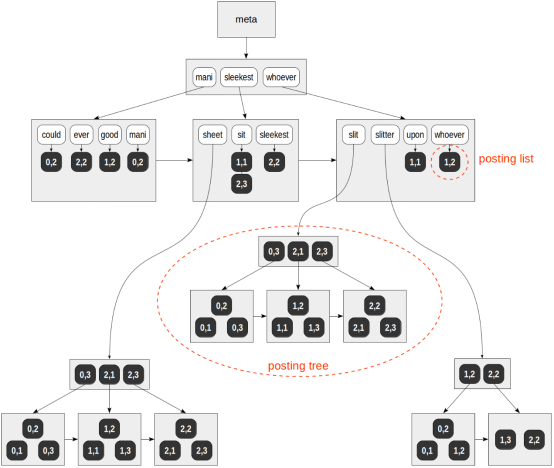
与之前相关图示不同的是,在深色背景上对表行(TID)的引用用数字表示页面编号和页面位置,不用箭头表示。
postgres=# select ctid, left(doc,20), doc_tsv from ts;ctid | left | doc_tsv-------+----------------------+---------------------------------------------------------(0,1) | Can a sheet slitter | 'sheet':3,6 'slit':5 'slitter':4(0,2) | How many sheets coul | 'could':4 'mani':2 'sheet':3,6 'slit':8 'slitter':7(0,3) | I slit a sheet, a sh | 'sheet':4,6 'slit':2,8(1,1) | Upon a slitted sheet | 'sheet':4 'sit':6 'slit':3 'upon':1(1,2) | Whoever slit the she | 'good':7 'sheet':4,8 'slit':2 'slitter':9 'whoever':1(1,3) | I am a sheet slitter | 'sheet':4 'slitter':5(2,1) | I slit sheets. | 'sheet':3 'slit':2(2,2) | I am the sleekest sh | 'ever':8 'sheet':5,10 'sleekest':4 'slit':9 'slitter':6(2,3) | She slits the sheet | 'sheet':4 'sit':6 'slit':2(9 rows)
在此推测性示例中,TID列表适合所有词素(但不包括«sheet»,«slit»和«slitter»)的常规页面。这些词素出现在许多文档中,并且它们的TID列表已放入单独的B树中。
顺便说一句,我们如何找出包含一个词素的文档数量?对于一张小表,可以使用下面所示的«direct»技术,但是我们将进一步学习如何处理较大的表。
postgres=# select (unnest(doc_tsv)).lexeme, count(*) from tsgroup by 1 order by 2 desc;lexeme | count----------+-------sheet | 9slit | 8slitter | 5sit | 2upon | 1mani | 1whoever | 1sleekest | 1good | 1could | 1ever | 1(11 rows)
还要注意,与常规B树不同,GIN索引的页面是通过单向列表而不是双向列表连接的。这已足够,因为树遍历只有一种方式。
查询示例
对于我们的示例,将如何执行以下查询?
postgres=# explain(costs off)select doc from ts where doc_tsv @@ to_tsquery('many & slitter');QUERY PLAN---------------------------------------------------------------------Bitmap Heap Scan on tsRecheck Cond: (doc_tsv @@ to_tsquery('many & slitter'::text))-> Bitmap Index Scan on ts_doc_tsv_idxIndex Cond: (doc_tsv @@ to_tsquery('many & slitter'::text))(4 rows)
首先从查询中提取单个词素(搜索键):«mani» 和 «slitter»。这是由专门的API函数完成的,该函数考虑了运算符类决定的数据类型和策略:
postgres=# select amop.amopopr::regoperator, amop.amopstrategyfrom pg_opclass opc, pg_opfamily opf, pg_am am, pg_amop amopwhere opc.opcname = 'tsvector_ops'and opf.oid = opc.opcfamilyand am.oid = opf.opfmethodand amop.amopfamily = opc.opcfamilyand am.amname = 'gin'and amop.amoplefttype = opc.opcintype;amopopr | amopstrategy-----------------------+--------------@@(tsvector,tsquery) | 1 matching search query@@@(tsvector,tsquery) | 2 synonym for @@ (for backward compatibility)(2 rows)
接下来,在词素的B树中,找到这两个键,并浏览完整的TID列表。我们得到:
«mani»—(0,2)。
«slitter»—(0,1),(0,2),(1,2),(1,3),(2,2)。
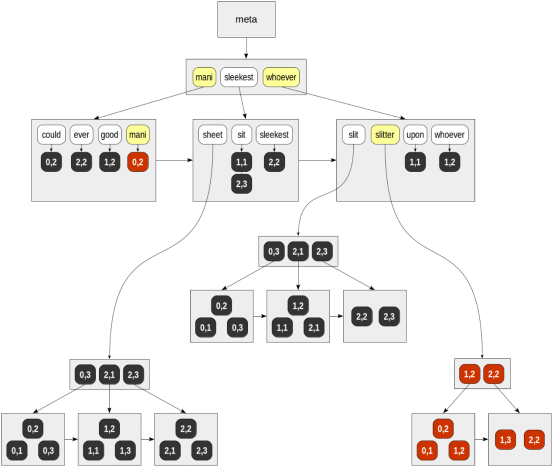
最后,对于找到的每个TID,将调用API一致性函数,该函数必须确定找到的哪些行与搜索查询匹配。由于查询中的词素由布尔«and»连接,因此返回的唯一行是(0,2):
| | | consistency| | | functionTID | mani | slitter | slit & slitter-------+------+---------+----------------(0,1) | f | T | f(0,2) | T | T | T(1,2) | f | T | f(1,3) | f | T | f(2,2) | f | T | f
结果是:
postgres=# select doc from ts where doc_tsv @@ to_tsquery('many & slitter');doc---------------------------------------------How many sheets could a sheet slitter slit?(1 row)
如果将这种方法与已经针对GiST讨论过的方法进行比较,则GIN在全文搜索中的优势显而易见。这其中还有比我们看到的更多内容。
更新缓慢的问题
事实是,GIN索引中的数据插入或更新非常慢。每个文档通常包含许多要索引的词素。因此,当仅添加或更新一个文档时,我们必须大量更新索引树。
另一方面,如果同时更新多个文档,则它们的某些词素可能是相同的,并且总工作量将小于逐个更新文档时的工作量。
GIN索引具有«fastupdate»存储参数,我们可以在创建索引时指定它,并在稍后更新:
postgres=# create index on ts using gin(doc_tsv) with (fastupdate = true);
启用此参数后,更新将累积在单独的无序列表中(在各个连接的页面上)。当此列表足够大时或在清理期间,所有累积的更新将立即对索引进行。要考虑«large enough»的列表由配置参数«gin_pending_list_limit»或索引同名存储参数决定。
但是这种方法有缺点:首先,搜索速度变慢(因为除了树之外还需要浏览无序列表)。其次,如果无序列表溢出,则下一次更新可能会意外地花费大量时间。
部分匹配的搜索
我们可以在全文搜索中使用部分匹配。例如,考虑以下查询:
gin=# select doc from ts where doc_tsv @@ to_tsquery('slit:*');doc--------------------------------------------------------Can a sheet slitter slit sheets?How many sheets could a sheet slitter slit?I slit a sheet, a sheet I slit.Upon a slitted sheet I sit.Whoever slit the sheets is a good sheet slitter.I am a sheet slitter.I slit sheets.I am the sleekest sheet slitter that ever slit sheets.She slits the sheet she sits on.(9 rows)
该查询将查找包含以«slit»开头的词素的文档。在此示例中,这样的词素是«slit» 和 «slitter»。
即使没有索引,查询当然也可以工作,但是GIN可以加快以下搜索的速度:
postgres=# explain (costs off)select doc from ts where doc_tsv @@ to_tsquery('slit:*');QUERY PLAN-------------------------------------------------------------Bitmap Heap Scan on tsRecheck Cond: (doc_tsv @@ to_tsquery('slit:*'::text))-> Bitmap Index Scan on ts_doc_tsv_idxIndex Cond: (doc_tsv @@ to_tsquery('slit:*'::text))(4 rows)
在这里,所有在搜索查询中指定了前缀的词素都在树中查找,并由布尔值«or»连接。
频繁和不频繁的词素
为了观察索引如何处理实时数据,让我们以«pgsql-hacker»电子邮件的归档为例,我们在讨论GiST时已经使用过它。此版本的存档包含356125条消息,其中包含发送日期,主题,作者和文本。
fts=# alter table mail_messages add column tsv tsvector;fts=# update mail_messages set tsv = to_tsvector(body_plain);NOTICE: word is too long to be indexedDETAIL: Words longer than 2047 characters are ignored....UPDATE 356125fts=# create index on mail_messages using gin(tsv);
让我们考虑一下出现在许多文档中的词素。使用«unnest»的查询将无法处理如此大的数据量,科学的做法是使用«ts_stat»函数,该函数提供有关词素,出现它们的文档数以及出现的总数信息。
fts=# select word, ndocfrom ts_stat('select tsv from mail_messages')order by ndoc desc limit 3;word | ndoc-------+--------re | 322141wrote | 231174use | 176917(3 rows)
让我们选择«wrote»。
而且我们会用一些开发人员的电子邮件中很少出现的字眼,例如«tattoo»:
fts=# select word, ndoc from ts_stat('select tsv from mail_messages') where word = 'tattoo';word | ndoc--------+------tattoo | 2(1 row)
是否有文档同时出现这两个词汇?
fts=# select count(*) from mail_messages where tsv @@ to_tsquery('wrote & tattoo');count-------1(1 row)
结果是肯定的。
出现一个问题,如何执行此查询。如上所述,如果我们获得两个词素的TID列表,则搜索显然效率低下:我们必须遍历20多万个值,只剩下其中一个。幸运的是,通过使用计划程序统计信息,该算法可以了解到«wrote»词素经常出现,而«tatoo»则很少出现。因此,将执行不经常使用的词素的搜索,然后检查检索到的两个文档中是否存在«wrote»词素。从查询中可以很容易地看出这一点,它可以快速执行:
fts=# \timing onfts=# select count(*) from mail_messages where tsv @@ to_tsquery('wrote & tattoo');count-------1(1 row)Time: 0,959 ms
仅搜索«wrote»会花费更长的时间:
fts=# select count(*) from mail_messages where tsv @@ to_tsquery('wrote');count--------231174(1 row)Time: 2875,543 ms (00:02,876)
当然,这种优化不仅适用于两个词素,而且在更复杂的情况下也适用。
限制查询结果
GIN访问方法的一个特点是,结果总是以位图的形式返回:该方法不能按TID返回结果。因此,本文中的所有查询计划都使用位图扫描。
因此,使用LIMIT子句限制索引扫描结果的效率不是很高。注意操作的预计成本(«Limit»节点的«cost»字段):
fts=# explain (costs off)select * from mail_messages where tsv @@ to_tsquery('wrote') limit 1;QUERY PLAN-----------------------------------------------------------------------------------------Limit (cost=1283.61..1285.13 rows=1)-> Bitmap Heap Scan on mail_messages (cost=1283.61..209975.49 rows=137207)Recheck Cond: (tsv @@ to_tsquery('wrote'::text))-> Bitmap Index Scan on mail_messages_tsv_idx (cost=0.00..1249.30 rows=137207)Index Cond: (tsv @@ to_tsquery('wrote'::text))(5 rows)
估计成本为1285.13,比构建整个位图的成本1249.30(位图索引扫描节点的«cost»字段)稍大。
因此,索引具有限制结果数量的特殊功能。该阈值在配置参数《gin_fuzzy_search_limit》中指定,并且默认情况下等于零(没有限制)。我们可以选择设置阈值:
fts=# set gin_fuzzy_search_limit = 1000;fts=# select count(*) from mail_messages where tsv @@ to_tsquery('wrote');count-------5746(1 row)fts=# set gin_fuzzy_search_limit = 10000;fts=# select count(*) from mail_messages where tsv @@ to_tsquery('wrote');count-------14726(1 row)
正如我们所看到的,查询返回的行数对于不同的参数值是不同的(如果使用索引访问)。但限制并不严格:可以返回多于指定行的行,这证明参数名称的«fuzzy»部分是合理的。
紧凑的表示
GIN索引由于其紧凑性表现良好。首先,如果在多个文档中出现相同的词素,通常它仅在索引中存储一次。其次,TID以有序的方式存储在索引中,这使我们能够使用一种简单的压缩方式:实际上存储列表中的每个TID都与上一个TID不同;这通常是一个很小的数字,与完整的六字节TID相比,所需的位数要少得多。
为了了解其大小,让我们从消息文本构建B树。但肯定不会是公平的比较:
· GIN建立在不同的数据类型上(«tsvector»而不是«text»),该数据类型较小,
· 同时,B树的消息大小必须缩短到大约2 KB。
尽管如此,让我们继续下去:
fts=# create index mail_messages_btree on mail_messages(substring(body_plain for 2048));
我们还将建立GiST索引:
fts=# create index mail_messages_gist on mail_messages using gist(tsv);
«vacuum full»的索引大小:
fts=# select pg_size_pretty(pg_relation_size('mail_messages_tsv_idx')) as gin,pg_size_pretty(pg_relation_size('mail_messages_gist')) as gist,pg_size_pretty(pg_relation_size('mail_messages_btree')) as btree;gin | gist | btree--------+--------+--------179 MB | 125 MB | 546 MB(1 row)
由于表示的紧凑性,我们可以尝试在从Oracle迁移过程中使用GIN索引来代替位图索引,在此不做详细介绍,仅提供一个Lewis文章链接,供好奇的人参考。
https://jonathanlewis.wordpress.com/2006/11/29/bitmap-indexes/
通常,位图索引用于唯一值很少的字段,这对于GIN也非常有用。而且,如第一篇文章所示,PostgreSQL可以基于任何索引(包括GIN)动态构建位图。
GiST or GIN?
对于许多数据类型,GiST和GIN都可以使用运算符类,这引起了使用哪个索引的问题。也许,我们已经可以得出一些结论。
一方面,GIN在准确性和搜索速度上均胜过GiST。如果数据更新不频繁并且需要快速搜索,则建议选择GIN。
另一方面,如果对数据进行密集更新,则更新GIN的开销成本可能太大,此时建议选择GiST。
我们需要从这两个方面考虑,根据索引特征更好地平衡选择。
数组
使用GIN的另一个示例是数组的索引。在这种情况下,数组元素进入索引,这可以加快对数组的许多操作:
postgres=# select amop.amopopr::regoperator, amop.amopstrategyfrom pg_opclass opc, pg_opfamily opf, pg_am am, pg_amop amopwhere opc.opcname = 'array_ops'and opf.oid = opc.opcfamilyand am.oid = opf.opfmethodand amop.amopfamily = opc.opcfamilyand am.amname = 'gin'and amop.amoplefttype = opc.opcintype;amopopr | amopstrategy-----------------------+--------------&&(anyarray,anyarray) | 1 intersection@>(anyarray,anyarray) | 2 contains array<@(anyarray,anyarray) | 3 contained in array=(anyarray,anyarray) | 4 equality(4 rows)
我们的演示数据库有关于航班信息的视图«routes»。此视图包含数组列«days_of_week»,表示航班工作日。例如,从Vnukovo飞往Gelendzhik的航班在星期二,星期四和星期日出发:
demo=# select departure_airport_name, arrival_airport_name, days_of_weekfrom routeswhere flight_no = 'PG0049';departure_airport_name | arrival_airport_name | days_of_week------------------------+----------------------+--------------Vnukovo | Gelendzhik | {2,4,7}(1 row)
为了建立索引,让我们将视图«materialize»物化到表中:
demo=# create table routes_t as select * from routes;demo=# create index on routes_t using gin(days_of_week);
现在,我们可以使用该索引来了解在星期二,星期四和星期日出发的所有航班:
demo=# explain (costs off) select * from routes_t where days_of_week = ARRAY[2,4,7];QUERY PLAN-----------------------------------------------------------Bitmap Heap Scan on routes_tRecheck Cond: (days_of_week = '{2,4,7}'::integer[])-> Bitmap Index Scan on routes_t_days_of_week_idxIndex Cond: (days_of_week = '{2,4,7}'::integer[])(4 rows)
以下结果显示有六个航班:
demo=# select flight_no, departure_airport_name, arrival_airport_name, days_of_week from routes_t where days_of_week = ARRAY[2,4,7];flight_no | departure_airport_name | arrival_airport_name | days_of_week-----------+------------------------+----------------------+--------------PG0005 | Domodedovo | Pskov | {2,4,7}PG0049 | Vnukovo | Gelendzhik | {2,4,7}PG0113 | Naryan-Mar | Domodedovo | {2,4,7}PG0249 | Domodedovo | Gelendzhik | {2,4,7}PG0449 | Stavropol | Vnukovo | {2,4,7}PG0540 | Barnaul | Vnukovo | {2,4,7}(6 rows)
该查询如何执行?与上述方法完全相同:
1. 从此处起搜索查询作用的数组{2,4,7}中提取元素(搜索关键字)。显然,这些是«2»,«4»和«7»的值。
2. 在元素树中,找到提取的键,并为每个键选择TID列表。
3. 在找到的所有TID中,一致性功能从查询中选择与运算符匹配的TID。对于运算符“=”,只有那些TID与所有三个列表中出现的TID匹配(换句话说,初始数组必须包含所有元素)。但这还不够:数组还需要它不包含任何其他值,并且我们无法使用索引检查此条件。因此,在这种情况下,访问方法要求索引引擎重新检查与表一起返回的所有TID。
有趣的是,有些策略(例如,«contained in array»)无法检查任何内容,而必须重新检查在表中找到的所有TID。
但是,如果我们需要知道周二,周四和周日从莫斯科起飞的航班怎么办?索引不支持附加条件,该条件将进入«Filter»列。
demo=# explain (costs off)select * from routes_t where days_of_week = ARRAY[2,4,7] and departure_city = 'Moscow';QUERY PLAN-----------------------------------------------------------Bitmap Heap Scan on routes_tRecheck Cond: (days_of_week = '{2,4,7}'::integer[])Filter: (departure_city = 'Moscow'::text)-> Bitmap Index Scan on routes_t_days_of_week_idxIndex Cond: (days_of_week = '{2,4,7}'::integer[])(5 rows)
在这里可以(索引只选择六行),但是在附加条件增加了选择能力的情况下,希望有这样的支持。但是,我们不能只创建索引:
demo=# create index on routes_t using gin(days_of_week,departure_city);ERROR: data type text has no default operator class for access method "gin"HINT: You must specify an operator class for the index or define a default operator class for the data type.
扩展名“ btree_gin ”会有所帮助,它添加了GIN运算符类来模拟常规B树的工作。
demo=# create extension btree_gin;demo=# create index on routes_t using gin(days_of_week,departure_city);demo=# explain (costs off)select * from routes_t where days_of_week = ARRAY[2,4,7] and departure_city = 'Moscow';QUERY PLAN---------------------------------------------------------------------Bitmap Heap Scan on routes_tRecheck Cond: ((days_of_week = '{2,4,7}'::integer[]) AND(departure_city = 'Moscow'::text))-> Bitmap Index Scan on routes_t_days_of_week_departure_city_idxIndex Cond: ((days_of_week = '{2,4,7}'::integer[]) AND(departure_city = 'Moscow'::text))(4 rows)
JSONB
具有内置GIN支持复合数据类型的另一个示例是JSON。为了使用JSON值,目前定义了许多运算符和函数,其中一些可以使用索引加速:
postgres=# select opc.opcname, amop.amopopr::regoperator, amop.amopstrategy as strfrom pg_opclass opc, pg_opfamily opf, pg_am am, pg_amop amopwhere opc.opcname in ('jsonb_ops','jsonb_path_ops')and opf.oid = opc.opcfamilyand am.oid = opf.opfmethodand amop.amopfamily = opc.opcfamilyand am.amname = 'gin'and amop.amoplefttype = opc.opcintype;opcname | amopopr | str----------------+------------------+-----jsonb_ops | ?(jsonb,text) | 9 top-level key existsjsonb_ops | ?|(jsonb,text[]) | 10 some top-level key existsjsonb_ops | ?&(jsonb,text[]) | 11 all top-level keys existjsonb_ops | @>(jsonb,jsonb) | 7 JSON value is at top leveljsonb_path_ops | @>(jsonb,jsonb) | 7(5 rows)
如我们所见,有两个运算符类:«jsonb_ops»和«jsonb_path_ops»。
默认情况下,使用第一个运算符类《 jsonb_ops》。所有键,值和数组元素都将作为初始JSON文档的元素到达索引。将属性添加到每个元素中,以指示该元素是否为键(«exists»策略需要此属性,以区分键和值)。
例如,让我们将«routes»中的几行表示为JSON,如下所示:
demo=# create table routes_jsonb asselect to_jsonb(t) routefrom (select departure_airport_name, arrival_airport_name, days_of_weekfrom routesorder by flight_no limit 4) t;demo=# select ctid, jsonb_pretty(route) from routes_jsonb;ctid | jsonb_pretty-------+-------------------------------------------------(0,1) | { +| "days_of_week": [ +| 1 +| ], +| "arrival_airport_name": "Surgut", +| "departure_airport_name": "Ust-Ilimsk" +| }(0,2) | { +| "days_of_week": [ +| 2 +| ], +| "arrival_airport_name": "Ust-Ilimsk", +| "departure_airport_name": "Surgut" +| }(0,3) | { +| "days_of_week": [ +| 1, +| 4 +| ], +| "arrival_airport_name": "Sochi", +| "departure_airport_name": "Ivanovo-Yuzhnyi"+| }(0,4) | { +| "days_of_week": [ +| 2, +| 5 +| ], +| "arrival_airport_name": "Ivanovo-Yuzhnyi", +| "departure_airport_name": "Sochi" +| }(4 rows)demo=# create index on routes_jsonb using gin(route);
该索引可能如下所示:
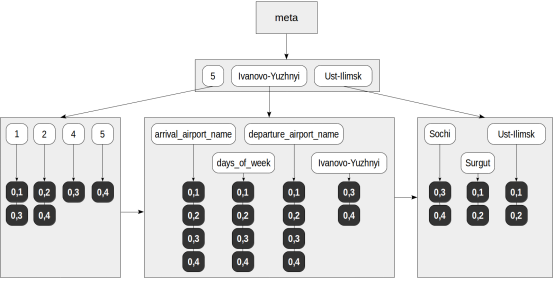
现在,可以使用该索引执行例如下面的查询:
demo=# explain (costs off)select jsonb_pretty(route)from routes_jsonbwhere route @> '{"days_of_week": [5]}';QUERY PLAN---------------------------------------------------------------Bitmap Heap Scan on routes_jsonbRecheck Cond: (route @> '{"days_of_week": [5]}'::jsonb)-> Bitmap Index Scan on routes_jsonb_route_idxIndex Cond: (route @> '{"days_of_week": [5]}'::jsonb)(4 rows)
从JSON文档的根目录开始,@>操作符检查是否发生了指定的路由("days_of_week": [5])。在这里查询将返回一行:
demo=# select jsonb_pretty(route) from routes_jsonb where route @> '{"days_of_week": [5]}';jsonb_pretty------------------------------------------------{ +"days_of_week": [ +2, +5 +], +"arrival_airport_name": "Ivanovo-Yuzhnyi",+"departure_airport_name": "Sochi" +}(1 row)
查询执行如下:
1. 在搜索查询("days_of_week": [5])中,提取元素(搜索关键字):«days_of_week»和«5»。
2. 在元素树中找到提取的键,并为每个键选择TID列表:对于«5»—(0,4),对于«days_of_week»—(0,1),(0,2 ),(0,3),(0,4)。
3. 在找到的所有TID中,一致性函数从查询中选择与运算符匹配的TID。对于@>运算符,不能肯定地包含或不包含搜索查询中所有元素的文档,因此只剩下(0,4)。但是,我们仍然需要重新检查表左侧的TID,因为从索引中无法清楚找到元素在JSON文档中的出现顺序。
除了用于处理JSON的常规操作外,«jsquery»扩展名早已可用,该扩展名定义了一种具有更丰富功能的查询语言(当然,还支持GIN索引)。此外,2016年发布了新的SQL标准,该标准定义了自己的一组操作和查询语言«SQL/JSON path»。该标准的实现已经完成,它会出现在PostgreSQL 11中。
SQL/JSON路径补丁最终提交到PostgreSQL12,而其他补丁仍在进行中。希望我们能在PostgreSQL13中看到完全实现的功能。
内部结构
我们可以使用扩展名“ pageinspect ”查看GIN索引。
fts=# create extension pageinspect;
来自元页面中的信息显示了常规统计信息:
fts=# select * from gin_metapage_info(get_raw_page('mail_messages_tsv_idx',0));-[ RECORD 1 ]----+-----------pending_head | 4294967295pending_tail | 4294967295tail_free_size | 0n_pending_pages | 0n_pending_tuples | 0n_total_pages | 22968n_entry_pages | 13751n_data_pages | 9216n_entries | 1423598version | 2
页面结构提供了一个特殊的区域,访问方法可以在其中存储其信息。区域«opaque»服务于普通程序,例如vacuum等。函数«gin_page_opaque_info»显示此GIN数据。例如,我们可以了解索引页面集:
fts=# select flags, count(*)from generate_series(1,22967) as g(id), -- n_total_pagesgin_page_opaque_info(get_raw_page('mail_messages_tsv_idx',g.id))group by flags;flags | count------------------------+-------{meta} | 1 meta page{} | 133 internal page of element B-tree{leaf} | 13618 leaf page of element B-tree{data} | 1497 internal page of TID B-tree{data,leaf,compressed} | 7719 leaf page of TID B-tree(5 rows)
函数«gin_leafpage_items»提供有关存储在页面{data,leaf,compressed}上的TID的信息:
fts=# select * from gin_leafpage_items(get_raw_page('mail_messages_tsv_idx',2672));-[ RECORD 1 ]---------------------------------------------------------------------first_tid | (239,44)nbytes | 248tids | {"(239,44)","(239,47)","(239,48)","(239,50)","(239,52)","(240,3)",...-[ RECORD 2 ]---------------------------------------------------------------------first_tid | (247,40)nbytes | 248tids | {"(247,40)","(247,41)","(247,44)","(247,45)","(247,46)","(248,2)",......
在此请注意,TID树的叶子页面实际上包含指向表行的小型压缩指针列表,而不是单个指针。
属性
让我们看一下GIN访问方法的属性(已经提供了查询结果)。
amname | name | pg_indexam_has_property--------+---------------+-------------------------gin | can_order | fgin | can_unique | fgin | can_multi_col | tgin | can_exclude | f
有趣的是,GIN支持创建多列索引。但是,与常规B树不同,多列索引仍将存储单个元素,而不是复合键,并且将为每个元素指定列号。
以下索引层属性可用:
name | pg_index_has_property---------------+-----------------------clusterable | findex_scan | fbitmap_scan | tbackward_scan | f
注意,不支持按TID(索引扫描)返回结果TID;只能进行位图扫描。
也不支持反向扫描:此功能仅对索引扫描必不可少,而对位图扫描则不必需。以下是列层属性:
name | pg_index_column_has_property--------------------+------------------------------asc | fdesc | fnulls_first | fnulls_last | forderable | fdistance_orderable | freturnable | fsearch_array | fsearch_nulls | f
这里没有可用的内容:没有排序(很清楚),没有使用索引作为覆盖(因为文档本身没有存储在索引中),没有对NULL的操作(因为对于复合类型的元素没有意义) 。
其他数据类型
还有一些扩展可以添加对某些数据类型的GIN支持。
· “ pg_trgm ”使我们能够通过比较可用的相等的三个字母序列(三元组)来确定单词的“相似度” «likeness» 。添加了两个运算符类,《 gist_trgm_ops》和《 gin_trgm_ops》,它们支持各种运算符,包括通过LIKE和正则表达式进行比较。我们可以将此扩展名与全文搜索一起使用,以建议使用word选项来修复拼写错误。
· “ hstore ”实现《键-值》存储。对于此数据类型,可以使用各种访问方法(包括GIN)进行操作。但是,随着«jsonb»数据类型的引入,没有特殊的原因不会使用«hstore»。
· “ intarray ”扩展了整数数组的功能。索引支持包括GiST和GIN(«gin__int_ops»运算符类)。
上面已经提到了这两个扩展:
· “ btree_gin ”增加了对常规数据类型的GIN支持,以便它们与复合类型一起在多列索引中使用。
· “ jsquery ”定义了用于JSON查询的语言和用于对该语言进行索引支持的运算符类。此扩展未包含在标准PostgreSQL版本中。
预告:RUM索引扩展了GIN基础的概念,并使我们能够更快地执行全文搜索。RUM是外部扩展,标准PostgreSQL版本中未包含。
作者的往期文章