



背景
网络安全在目前这个万物互联时代可谓相当重要,了解一些安全隐患对我们来说也是必要的基础,周末君接下来会给大家介绍一些安全相关内容。首先我们最常用的就是手机了,所以今天给大家介绍一下Android通信里面的安全小知识
在介绍证书校验之前,我们先来看一下数字证书长啥样:
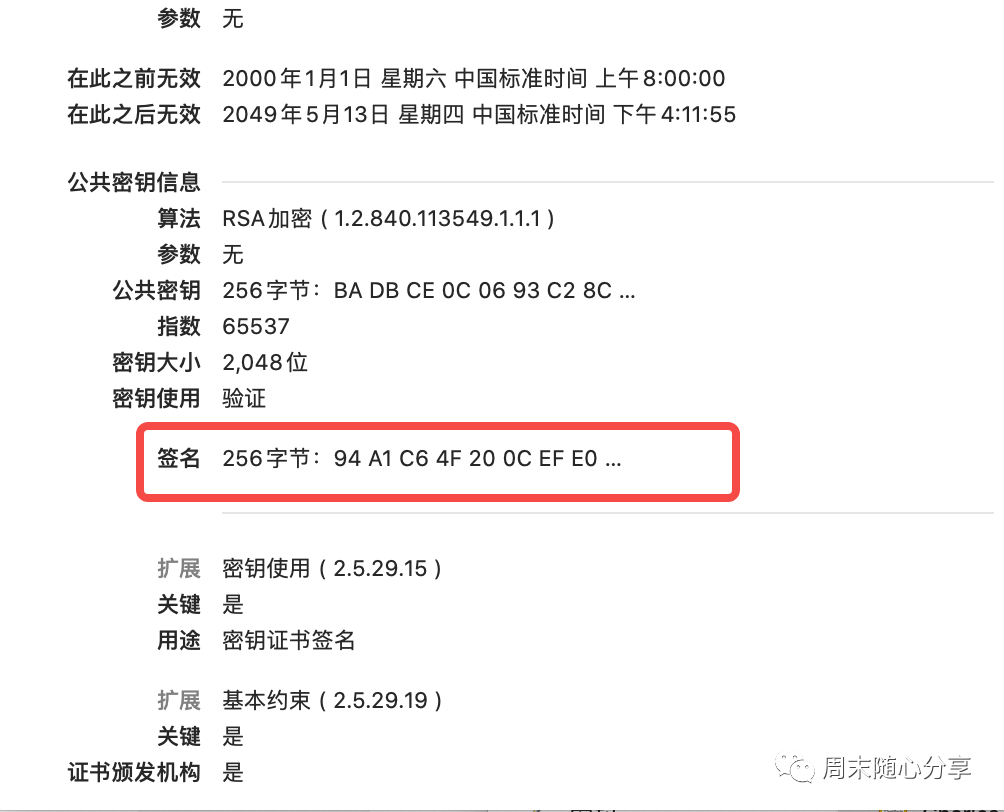
公钥和私钥:公钥是与私钥算法一起使用的密钥对的非秘密一半。公钥通常用于加密会话密钥、验证数字签名,或加密可以用相应的私钥解密的数据。公钥和私钥是通过一种算法得到的一个密钥对(即一个公钥和一个私钥),其中的一个向外界公开,称为公钥;另一个自己保留,称为私钥
数字签名:
TBSCertList ::= SEQUENCE {version Version OPTIONAL,-- if present, must be v2signature AlgorithmIdentifier,issuer Name,thisUpdate ChoiceOfTime,nextUpdate ChoiceOfTime OPTIONAL,revokedCertificates SEQUENCE OF SEQUENCE {userCertificate CertificateSerialNumber,revocationDate ChoiceOfTime,crlEntryExtensions Extensions OPTIONAL-- if present, must be v2} OPTIONAL,crlExtensions [0] EXPLICIT Extensions OPTIONAL-- if present, must be v2}
有了上面基础知识介绍,我们具体来看一下如何校验证书链:
/*** Verifies that this CRL was signed using the* private key that corresponds to the given public key,* and that the signature verification was computed by* the given provider.** @param key the PublicKey used to carry out the verification.* @param sigProvider the name of the signature provider.** @exception NoSuchAlgorithmException on unsupported signature* algorithms.* @exception InvalidKeyException on incorrect key.* @exception NoSuchProviderException on incorrect provider.* @exception SignatureException on signature errors.* @exception CRLException on encoding errors.*/public synchronized void verify(PublicKey key, String sigProvider)throws CRLException, NoSuchAlgorithmException, InvalidKeyException,NoSuchProviderException, SignatureException {if (sigProvider == null) {sigProvider = "";}if ((verifiedPublicKey != null) && verifiedPublicKey.equals(key)) {// this CRL has already been successfully verified using// this public key. Make sure providers match, too.if (sigProvider.equals(verifiedProvider)) {return;}}if (signedCRL == null) {throw new CRLException("Uninitialized CRL");}Signature sigVerf = null;if (sigProvider.length() == 0) {sigVerf = Signature.getInstance(sigAlgId.getName());} else {sigVerf = Signature.getInstance(sigAlgId.getName(), sigProvider);}sigVerf.initVerify(key);if (tbsCertList == null) {throw new CRLException("Uninitialized CRL");}sigVerf.update(tbsCertList, 0, tbsCertList.length);if (!sigVerf.verify(signature)) {throw new SignatureException("Signature does not match.");}verifiedPublicKey = key;verifiedProvider = sigProvider;}
sigVerf.initVerify是设置公钥给校验类
sigVerf.update作用是将证书摘要信息设置给校验类
sigVerf.verify是真正开始校验数字签名,参数就是证书里解析到的数字签名
最后我们来看一下校验函数的一些说明:
/*** Verifies the passed-in signature.** <p>A call to this method resets this signature object to the state* it was in when previously initialized for verification via a* call to {@code initVerify(PublicKey)}. That is, the object is* reset and available to verify another signature from the identity* whose public key was specified in the call to {@code initVerify}.** @param signature the signature bytes to be verified.** @return true if the signature was verified, false if not.** @exception SignatureException if this signature object is not* initialized properly, the passed-in signature is improperly* encoded or of the wrong type, if this signature algorithm is unable to* process the input data provided, etc.*/public final boolean verify(byte[] signature) throws SignatureException {if (state == VERIFY) {return engineVerify(signature);}throw new SignatureException("object not initialized for " +"verification");}
整理证书链:从用户证书开始往前找到第一个与系统信任证书列表里公钥相同的证书作为证书链的根证书
校验整理好的证书链:从用户证书开始,每个证书拿它上一个证书的公钥解密它的数字签名,将解密结果与证书摘要生成的指纹进行对比,两者一致以及其他校验都通过就认为该级证书是安全的
判断证书是否合法:如果整个证书链校验都没问题,且证书链根证书也存在于系统受信任证书列表,那么就返回校验成功,否则校验失败
Android 证书校验相关文章网上非常多,但是也众说纷纭,周末君干脆去看源码弄个清楚,有时候真正想了解一个实现原理还是直接看它实现比较直接,当然看不懂时可以去网上搜索一番会更有选择性^_^
文章转载自周末随心分享,如果涉嫌侵权,请发送邮件至:contact@modb.pro进行举报,并提供相关证据,一经查实,墨天轮将立刻删除相关内容。
