



介绍:
Redis是一个开源的使用C语言编写的高性能的key-value数据库.redis和memcached类似但更强大.在部分场景中可以对关系数据库起到很好的补充作用.提供了各种语言的版本客户端使用很方便.
redis(win)
1.启动
redis-server.exe redis.windows.conf如果想方便的话,可以把 redis 的路径加到系统的环境变量里,这样就省得再输路径了,后面的那个 redis.windows.conf 可以省略,如果省略,会启用默认的。输入之后,会显示如下界面:
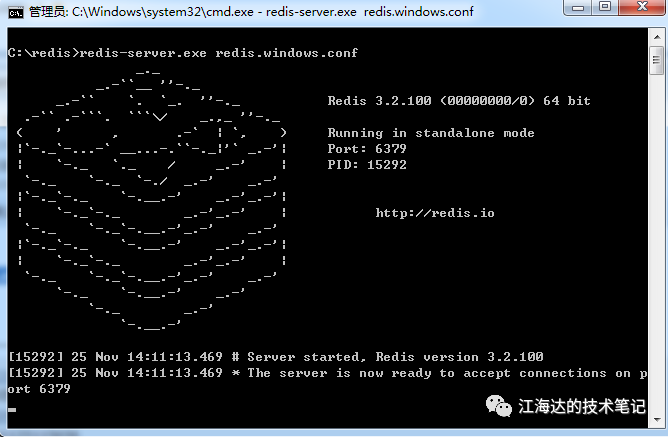
2.关闭
如果是前台启动则直接Ctrl+C关闭。
如果是后台启动,即上面客户端连接成功后,首先输入exit退出redis客户端,然后进入到bin目录下,输入 ./redis-cli shutdown
3.连接
redis-cli.exe -h 127.0.0.1 -p 63794.使用
 设置键值对:
 set myKey abc
 取出键值对:
 get myKey
5.报错处理
Redis启动报错 creating server tcp listening socket 127.0.0.1:6379: bind No error 解决方法
 1. redis-cli.exe
 2. shutdown
 3. exit
 4. redis-server.exe redis.windows.conf
Linux(ubuntu18)
1. 安装
From the official Ubuntu PPA
You can install the latest stable version of Redis from the redislabs/redis
package repository. Add the repository to the apt
index, update it and install:
 //添加官方ppa
 $ sudo add-apt-repository ppa:redislabs/redis
 //更新仓库
 $ sudo apt-get update
 运行安装命令
 $ sudo apt-get install redis/redis-server
1.2配置
使用vim打开redis配置文件
 sudo vim etc/redis/redis.conf
 //找到
 supervised no
 //修改为
 supervised systemd
上面的步骤是为了可以对redis使用systemctl
命令
解决报错(可选,如果没有报错就万事大吉了)
安装过程有可能报如下错误
解决方法:
打开redis.service文件
sudo vim etc/systemd/system/redis.service在
ExecStop=/bin/kill -s TERM $MAINPID下面添加一行
ExecStartPost=/bin/sh -c "echo $MAINPID > var/run/redis/redis.pid"载入并重启redis
 sudo systemctl daemon-reload
 sudo systemctl restart redis
如果使用systemctl
命令时报如下错的话
Unit redis.service could not be found.就需要使用如下命令创建一个symlink
sudo systemctl enable redis-server输出如下结果说明成功了:
 Synchronizing state of redis-server.service with SysV service script with lib/systemd/systemd-sysv-install.
 Executing: lib/systemd/systemd-sysv-install enable redis-server
 Created symlink etc/systemd/system/redis.service → lib/systemd/system/redis-server.service.
重新执行载入并重启的命令
 sudo systemctl daemon-reload
 sudo systemctl restart redis
重启后使用如下命令查看redis状态
sudo systemctl status redis如果报类似如下错误
 ● redis-server.service - Advanced key-value store
    Loaded: loaded (/lib/systemd/system/redis-server.service; enabled; vendor preset: enabled)
    Active: failed (Result: protocol) since Sun 2021-01-03 18:07:00 CST; 1min 3s ago
      Docs: http://redis.io/documentation,
            man:redis-server(1)
  Process: 2171 ExecStop=/bin/kill -s TERM $MAINPID (code=exited, status=1/FAILURE)
  Process: 2170 ExecStartPost=/bin/sh -c echo $MAINPID > var/run/redis/redis.pid (code=exited, status=0/SUCCESS)
  Process: 2167 ExecStart=/usr/bin/redis-server etc/redis/redis.conf (code=exited, status=0/SUCCESS)
  Main PID: 1983 (code=exited, status=0/SUCCESS)

  redis-server.service: Control process exited, code=exited status=1
  redis-server.service: Failed with result 'protocol'.
  Failed to start Advanced key-value store.
  redis-server.service: Service hold-off time over, scheduling restart.
  redis-server.service: Scheduled restart job, restart counter is at 5.
  Stopped Advanced key-value store.
  redis-server.service: Start request repeated too quickly.
  redis-server.service: Failed with result 'protocol'.
  Failed to start Advanced key-value store.
可能是你的机器不支持IPV6
解决方法:
打开redis配置文件,
sudo vim etc/redis/redis.conf找到
bind: bind 127.0.0.1 ::1修改为
bind 127.0.0.1后,重启redis
sudo systemctl restart redis2. 启动/关闭
systemctl 命令
 //载入
 sudo systemctl daemon-reload
 //重启
 sudo systemctl restart redis
 //启动
 sudo systemctl restart redis
 //关闭
 sudo systemctl restart redis
server 命令
 //启动 redis 服务:
 sudo service redis start
 //关闭 redis 服务:
 sudo service redis stop
 //重启 redis 服务:
 sudo service redis restart
redis 客户端连接
在命令行中输入如下命令来登陆进 redis 客户端
$ redis-cli3. 连接
本地测试
使用如下命令连接redis服务器
sudo redis-cliping服务器
 127.0.0.1:6379> ping
 PONG
服务器回应你PONG
就说明安装成功了,恭喜你。因为你乒的一下把球打给了Redis,它乓的一下回给了你…
远程连接
Redis 默认是不允许远程连接的,要想实现远程连接,必须对其进行配置
打开redis配置文件:
sudo vim /etc/redis/redis.conf找到
bind 127.0.0.1在其后面添加上你服务器的公务IP
bind 127.0.0.1 你服务器的公网IP然后重启Redis即可
到此你就可以使用如下命令远程连接了
sudo redis-cli -h 你的IP或者域名 -p 你的端口号(默认6379)4. 使用
配置文件 : /etc/redis/redis.conf
设置密码
5. 报错处理
Redis (error) NOAUTH Authentication required.解决方法 127.0.0.1:6379> auth "yourpassword"
//例如密码是‘root’,当出现认证问题时候,输入“auth ‘root’”即可
//例如密码是‘root’,当出现认证问题时候,输入“auth ‘root’”即可
