



You can't sit around and wait for others to arrange your life; if you want something, fight for it yourself.(宫崎骏 《猫的报恩》)
You can't sit around and wait for others to arrange your life; if you want something, fight for it yourself.(宫崎骏 《猫的报恩》)
Arthas(阿尔萨斯) 能为你做什么?
https://arthas.aliyun.com/doc/
这个类从哪个 jar 包加载的?为什么会报各种类相关的 Exception?我改的代码为什么没有执行到?难道是我没 commit?分支搞错了?遇到问题无法在线上 debug,难道只能通过加日志再重新发布吗?线上遇到某个用户的数据处理有问题,但线上同样无法 debug,线下无法重现!是否有一个全局视角来查看系统的运行状况?有什么办法可以监控到JVM的实时运行状态?怎么快速定位应用的热点,生成火焰图?怎样直接从JVM内查找某个类的实例?
第一步 安装
curl -O https://arthas.aliyun.com/arthas-boot.jarwget https://arthas.aliyun.com/arthas-boot.jar
第二步 启动
java -jar arthas-boot.jar

第三步 选择应用java进程
[root@301 home]# java -jar arthas-boot.jar[INFO] arthas-boot version: 3.5.2[INFO] Found existing java process, please choose one and input the serial number of the process, eg : 1. Then hit ENTER.* [1]: 70963 a.jar[2]: 70961 b.jar
b进程是第2个,则输入2,再输入回车/enter
。Arthas会attach到目标进程上,并输出日志:
[INFO] Try to attach process 70961[INFO] Attach process 71560 success.[INFO] arthas-client connect 127.0.0.1 3658,---. ,------. ,--------.,--. ,--. ,---. ,---.O \ | .--. ''--. .--'| '--' | O \ ' .-'| .-. || '--'.' | | | .--. || .-. |`. `-.| | | || |\ \ | | | | | || | | |.-' |`--' `--'`--' '--' `--' `--' `--'`--' `--'`-----'wiki: https://arthas.aliyun.com/docversion: 3.0.5.20181127201536pid: 70961time: 2021-07-05 21:16:24
第四步 常规排查使用
Linux 没配网卡这里使用windows演示了 ,离线linux参考插曲二
1、查看dashboard
输入dashboard,按回车/enter
,会展示当前进程的仪表盘信息,按ctrl+c
可以中断执行。
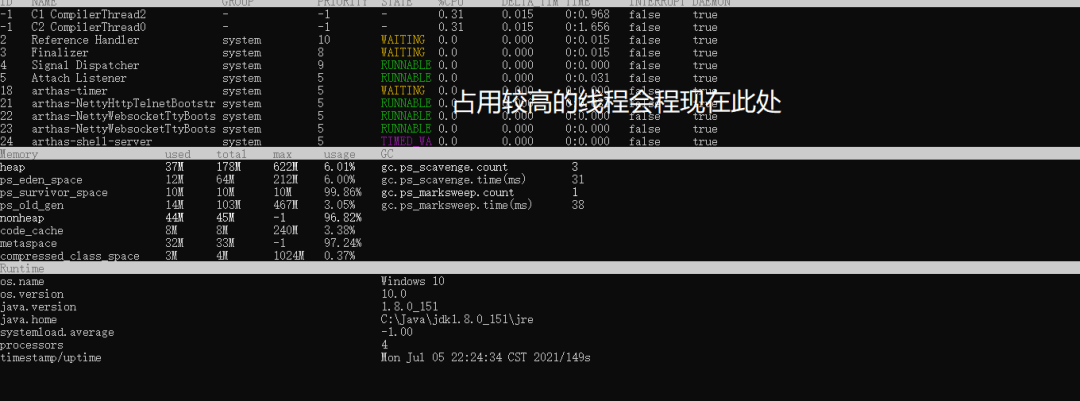
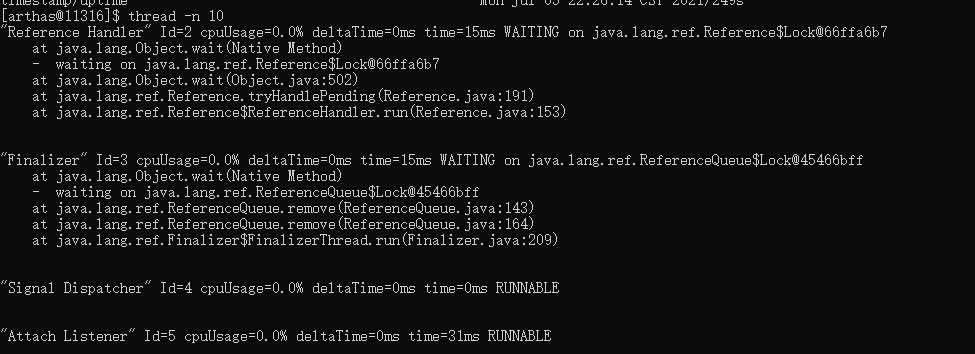
2、查看占用CPU资源前十的线程
thread -n 10
3、退出arthas
stop

好了,当前左羊常用的操作就在这了,大家需要更详细的信息请去观看arthas官网.
小插曲-1 OpenJDK汇报如下错误,将其改为Oracle JDK即可
[INFO] Can not find java process. Try to run `jps` command lists the instrumented Java HotSpot VMs on the target system.Please select an available pid.

一、卸载openjdk
1、查看已有的openjdk版本
rpm -qa|grep jdk

2、卸载OpenJDK
yum -y remove copy-jdk-configs-3.3-10.el7_5.noarch
3、查看是否卸载完成
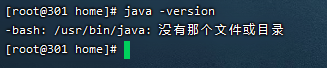
二、安装JDK1.8
1、程序地址
链接:https://pan.baidu.com/s/17FSt1al0RWcVtmvPT5omVQ提取码:1okq
2、将程序上传/home下

3、创建JVM目录
mkdir /usr/lib/jvm
4、解压程序包到
tar zxvf ./jdk-8u40-linux-x64.gz -C /usr/lib/jvm
5、修改环境变量,执行命令:vi ~/.bashrc
6、在文件内容的末尾添加以下内容:
export JAVA_HOME=/usr/lib/jvm/jdk1.8.0_40export JRE_HOME=${JAVA_HOME}/jreexport CLASSPATH=.:${JAVA_HOME}/lib:${JRE_HOME}/libexport PATH=${JAVA_HOME}/bin:$PATH
然后保存退出。
7、输入命令使之立即生效:
source ~/.bashrc
8验证

小插曲2

Arthas能不能离线使用问题,参考如下链接
https://arthas.aliyun.com/doc/download.html
本文引自Arthas官网文档,侵删!!!

文章转载自左羊公社,如果涉嫌侵权,请发送邮件至:contact@modb.pro进行举报,并提供相关证据,一经查实,墨天轮将立刻删除相关内容。
