



kubelet 的组件
kubelet 本身,也是按照“控制器”模式来工作的。它实际的工作原理,可以用如下所示的一幅示意图来表示清楚。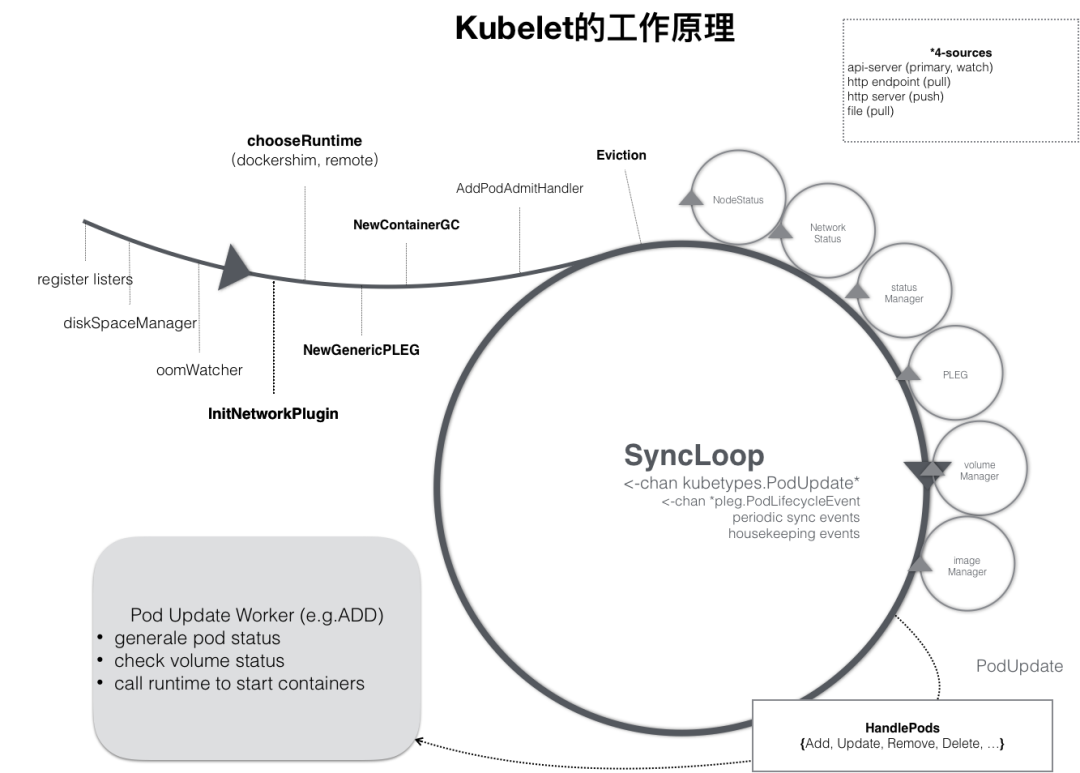
Kubelet Server 对外提供 API,供 kube-apiserver、metrics-server 等服务调用。比如 kubectl exec 时需要通过 Kubelet API exec/{token} 与容器进行交互; Container Manager 管理容器的各种资源,比如 CGroups、QoS、cpuset、device 等; Volume Manager 管理容器的存储卷,比如格式化磁盘、挂载到 Node 本地、最后再将挂载路径传给容器; Eviction 负责容器的驱逐,比如在资源不足时驱逐优先级低的容器,保证高优先级容器的运行; cAdvisor 负责为容器提供 Metrics; Metrics 和 stats 提供容器和节点的度量数据,比如 metrics-server 通过 stats/summary 提取的度量数据是 HPA 自动扩展的依据; Generic Runtime Manager 是容器运行时的管理者,负责与CRI 交互,完成容器和镜像的管理;
CRI中定义了容器和镜像的服务的接口,因为容器运行时与镜像的生命周期是彼此隔离的,因此需要定义两个服务。该接口使用Protocol Buffer,基于gRPC,在Kubernetes v1.10+版本中是在pkg/kubelet/apis/cri/runtime/v1alpha2的api.proto中定义的。
CRI架构
Kubernetes 中的容器运行时组成
按照不同的功能可以分为四个部分:
(1)kubelet 中容器运行时的管理,kubeGenericRuntimeManager,它管理与 CRI shim 通信的客户端,完成容器和镜像的管理(代码位置:pkg/kubelet/kuberuntime/kuberuntime_manager.go);
(2)容器运行时接口 CRI,包括了容器运行时客户端接口与容器运行时服务端接口;
(3)CRI shim 客户端,kubelet 持有,用于与 CRI shim 服务端进行通信;(4)CRI shim 服务端,即具体的容器运行时实现,包括 kubelet 内置的 dockershim (代码位置:pkg/kubelet/dockershim)以及外部的容器运行时remote。如 cri-containerd(用于支持容器引擎containerd)、rktlet(用于支持容器引擎rkt)等。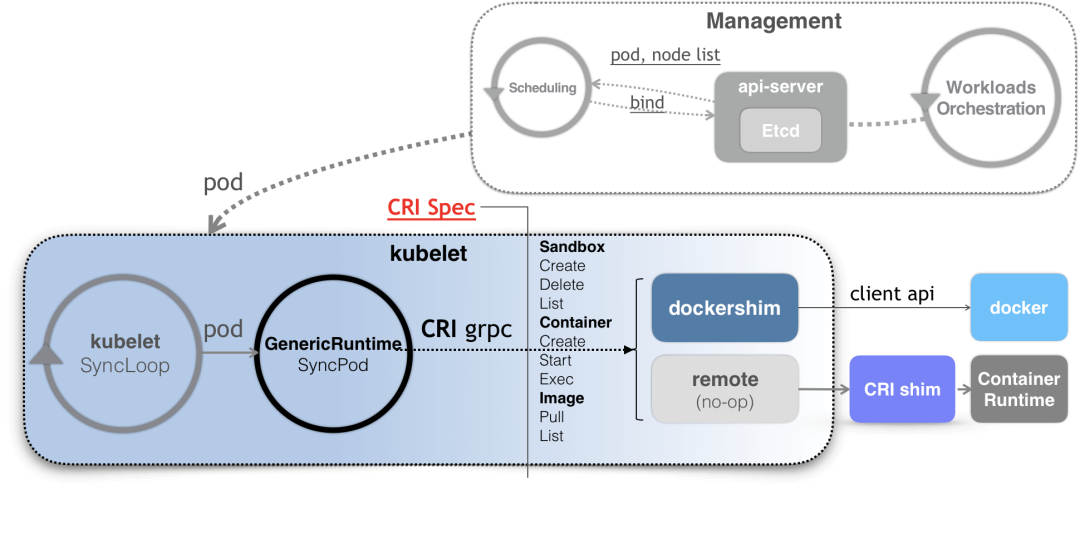 更普遍的场景,就是你需要在每台宿主机上单独安装一个负责响应 CRI 的组件。这个组件,一般被称作 CRI shim。顾名思义,CRI shim 的工作,就是扮演 kubelet 与容器项目之间的“垫片”(shim)。所以它的作用非常单一,那就是实现 CRI 规定的每个接口,然后把具体的 CRI 请求“翻译”成对后端容器项目的请求或者操作。如下所示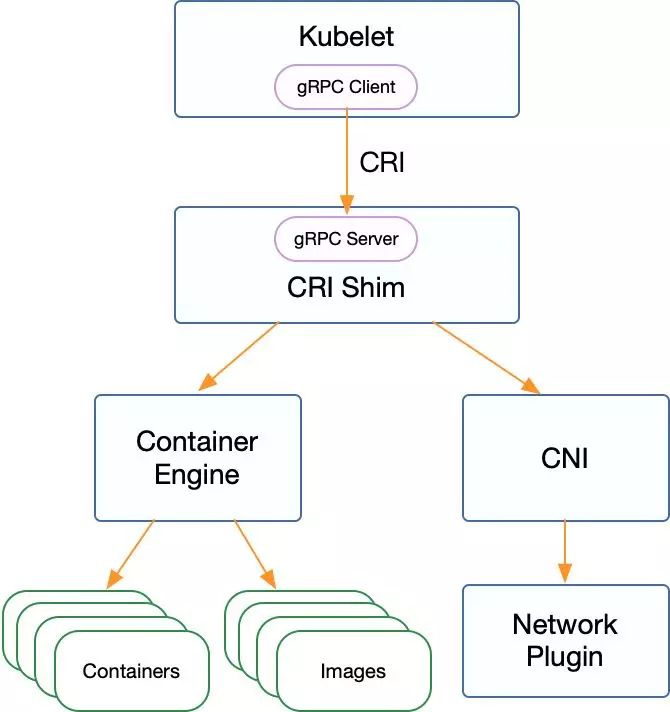
CRI gRPC Server的具体实现
Container Runtime实现了CRI gRPC Server,包括RuntimeService和ImageService。该gRPC Server需要监听本地的Unix socket,而kubelet则作为gRPC Client运行。CRI 接口包括 RuntimeService 和 ImageService 两个服务,这两个服务可以在一个 gRPC server 中实现,也可以分开成两个独立服务。目前社区的很多运行时都是将其在一个 gRPC server 里面实现。这其中包含了两个gRPC服务: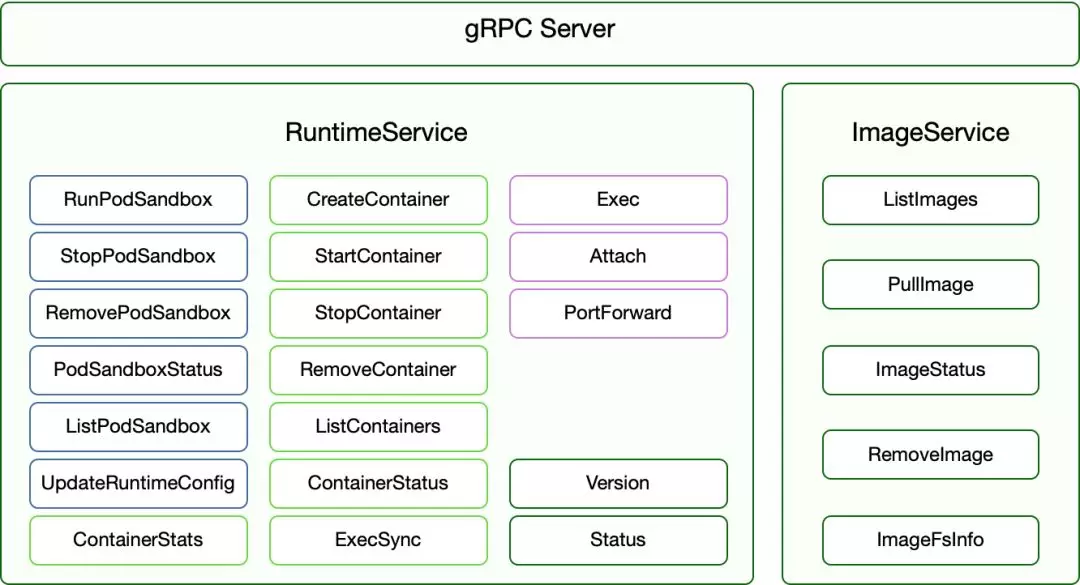
看一下源码,Kubernetes 1.20中的CRI接口在api.proto中的定义如下:
// Runtime service defines the public APIs for remote container runtimesservice RuntimeService {     Version returns the runtime name, runtime version, and runtime API version.    rpc Version(VersionRequest) returns (VersionResponse) {}     RunPodSandbox creates and starts a pod-level sandbox. Runtimes must ensure     the sandbox is in the ready state on success.    rpc RunPodSandbox(RunPodSandboxRequest) returns (RunPodSandboxResponse) {}     StopPodSandbox stops any running process that is part of the sandbox and     reclaims network resources (e.g., IP addresses) allocated to the sandbox.     If there are any running containers in the sandbox, they must be forcibly     terminated.     This call is idempotent, and must not return an error if all relevant     resources have already been reclaimed. kubelet will call StopPodSandbox     at least once before calling RemovePodSandbox. It will also attempt to     reclaim resources eagerly, as soon as a sandbox is not needed. Hence,     multiple StopPodSandbox calls are expected.    rpc StopPodSandbox(StopPodSandboxRequest) returns (StopPodSandboxResponse) {}     RemovePodSandbox removes the sandbox. If there are any running containers     in the sandbox, they must be forcibly terminated and removed.     This call is idempotent, and must not return an error if the sandbox has     already been removed.    rpc RemovePodSandbox(RemovePodSandboxRequest) returns (RemovePodSandboxResponse) {}     PodSandboxStatus returns the status of the PodSandbox. If the PodSandbox is not     present, returns an error.    rpc PodSandboxStatus(PodSandboxStatusRequest) returns (PodSandboxStatusResponse) {}     ListPodSandbox returns a list of PodSandboxes.    rpc ListPodSandbox(ListPodSandboxRequest) returns (ListPodSandboxResponse) {}     CreateContainer creates a new container in specified PodSandbox    rpc CreateContainer(CreateContainerRequest) returns (CreateContainerResponse) {}     StartContainer starts the container.    rpc StartContainer(StartContainerRequest) returns (StartContainerResponse) {}     StopContainer stops a running container with a grace period (i.e., timeout).     This call is idempotent, and must not return an error if the container has     already been stopped.     The runtime must forcibly kill the container after the grace period is     reached.    rpc StopContainer(StopContainerRequest) returns (StopContainerResponse) {}     RemoveContainer removes the container. If the container is running, the     container must be forcibly removed.     This call is idempotent, and must not return an error if the container has    / already been removed.
    rpc RemoveContainer(RemoveContainerRequest) returns (RemoveContainerResponse) {}
    // ListContainers lists all containers by filters.
    rpc ListContainers(ListContainersRequest) returns (ListContainersResponse) {}
    // ContainerStatus returns status of the container. If the container is not
    // present, returns an error.
    rpc ContainerStatus(ContainerStatusRequest) returns (ContainerStatusResponse) {}
    // UpdateContainerResources updates ContainerConfig of the container.
    rpc UpdateContainerResources(UpdateContainerResourcesRequest) returns (UpdateContainerResourcesResponse) {}
    // ReopenContainerLog asks runtime to reopen the stdout/stderr log file
    // for the container. This is often called after the log file has been
    // rotated. If the container is not running, container runtime can choose
    // to either create a new log file and return nil, or return an error.
    // Once it returns error, new container log file MUST NOT be created.
    rpc ReopenContainerLog(ReopenContainerLogRequest) returns (ReopenContainerLogResponse) {}

    // ExecSync runs a command in a container synchronously.
    rpc ExecSync(ExecSyncRequest) returns (ExecSyncResponse) {}
    // Exec prepares a streaming endpoint to execute a command in the container.
    rpc Exec(ExecRequest) returns (ExecResponse) {}
    // Attach prepares a streaming endpoint to attach to a running container.
    rpc Attach(AttachRequest) returns (AttachResponse) {}
    // PortForward prepares a streaming endpoint to forward ports from a PodSandbox.
    rpc PortForward(PortForwardRequest) returns (PortForwardResponse) {}

    // ContainerStats returns stats of the container. If the container does not
    // exist, the call returns an error.
    rpc ContainerStats(ContainerStatsRequest) returns (ContainerStatsResponse) {}
    // ListContainerStats returns stats of all running containers.
    rpc ListContainerStats(ListContainerStatsRequest) returns (ListContainerStatsResponse) {}

    // PodSandboxStats returns stats of the pod. If the pod sandbox does not
    // exist, the call returns an error.
    rpc PodSandboxStats(PodSandboxStatsRequest) returns (PodSandboxStatsResponse) {}
    // ListPodSandboxStats returns stats of the pods matching a filter.
    rpc ListPodSandboxStats(ListPodSandboxStatsRequest) returns (ListPodSandboxStatsResponse) {}

    // UpdateRuntimeConfig updates the runtime configuration based on the given request.
    rpc UpdateRuntimeConfig(UpdateRuntimeConfigRequest) returns (UpdateRuntimeConfigResponse) {}

    // Status returns the status of the runtime.
    rpc Status(StatusRequest) returns (StatusResponse) {}
}

// ImageService defines the public APIs for managing images.
service ImageService {
    // ListImages lists existing images.
    rpc ListImages(ListImagesRequest) returns (ListImagesResponse) {}
    // ImageStatus returns the status of the image. If the image is not
    // present, returns a response with ImageStatusResponse.Image set to
    // nil.
    rpc ImageStatus(ImageStatusRequest) returns (ImageStatusResponse) {}
    // PullImage pulls an image with authentication config.
    rpc PullImage(PullImageRequest) returns (PullImageResponse) {}
    // RemoveImage removes the image.
    // This call is idempotent, and must not return an error if the image has
    // already been removed.
    rpc RemoveImage(RemoveImageRequest) returns (RemoveImageResponse) {}
    // ImageFSInfo returns information of the filesystem that is used to store images.
    rpc ImageFsInfo(ImageFsInfoRequest) returns (ImageFsInfoResponse) {}
}
RuntimeService
RuntimeService 则提供了更多的接口,按照功能可以划分为四组:
PodSandbox 的管理接口:PodSandbox 是对 Kubernete Pod 的抽象,用来给容器提供一个隔离的环境(比如挂载到相同的 CGroup 下面),并提供网络等共享的命名空间。PodSandbox 通常对应到一个 Pause 容器或者一台虚拟机; Container 的管理接口:在指定的 PodSandbox 中创建、启动、停止和删除容器; Streaming API 接口:包括 Exec、Attach 和 PortForward 等三个和容器进行数据交互的接口,这三个接口返回的是运行时 Streaming Server 的 URL,而不是直接跟容器交互; 状态接口:包括查询 API 版本和查询运行时状态。
ImageService
管理镜像的 ImageService 提供了 5 个接口:
查询镜像列表; 拉取镜像到本地; 查询镜像状态; 删除本地镜像; 查询镜像占用空间等。
这些都很容易映射到 Docker API 或者CRI上面。
CRI相关初始化
跟容器最相关的一个 Manager 是 Generic Runtime Manager,就是一个通用的运行时管理器。我们可以看到目前 dockershim 还是存在于 Kubelet 的代码中的,它是当前性能最稳定的一个容器运行时的实现。remote 指的就是 CRI 接口。CRI 接口主要包含两个部分:
一个是 CRI Server,即通用的比如说创建、删除容器这样的接口; 另外一个是流式数据的接口 Streaming Server,比如 exec、port-forward 这些流式数据的接口。
CNI(容器网络接口)也是在 CRI 进行操作的,因为我们在创建 Pod 的时候需要同时创建网络资源然后注入到 Pod 中。接下来就是我们的容器和镜像。我们通过具体的容器创建引擎来创建一个具体的容器。kubelet中CRI相关初始化逻辑如下:
(1)当kubelet选用dockershim作为容器运行时,则初始化并启动容器运行时服务端dockershim(初始化dockershim过程中也会初始化网络插件CNI)。
如果是外部外部容器运行时的时候,需要在每台宿主机上单独安装一个负责响应 CRI 的组件。这个组件就是CRI shim,需要包含网络插件CNI。比如支持containerd的CRI-Containerd的shim。到了 containerd 1.1 版本后就去掉了 CRI-Containerd 这个 shim,直接把适配逻辑作为插件的方式集成到了 containerd 主进程中,所以我们现在可以直接使用--container-runtime-endpoint=unix:///run/containerd/containerd.sock这个套接字,就可以无缝切换的containerd。
(2)初始化容器运行时CRI shim客户端(用于调用CRI shim服务端:内置的容器运行时dockershim或remote容器运行时);
(3)初始化Generic Runtime Manager,用于容器运行时的管理。初始化完成后,后续kubelet对容器以及镜像的相关操作都会通过该结构体持有的CRI shim客户端,与CRI shim服务端进行通信来完成。
下面来简单分析几个比较重要的CRI相关启动参数:(1)--container-runtime:指定kubelet要使用的容器运行时,可选值docker、remote、rkt (deprecated),默认值为docker,即使用kubelet内置的容器运行时dockershim。当需要使用外部容器运行时,该参数配置为remote,并设置--container-runtime-endpoint参数值为监听的 unix socket位置。(2)--runtime-cgroups:容器运行时使用的cgroups,可选值。(3)--docker-endpoint:docker暴露服务的socket地址,默认值为unix:///var/run/docker.sock,该参数配置当且仅当--container-runtime参数值为docker时有效。(4)--pod-infra-container-image:pod sandbox的镜像地址,默认值为k8s.gcr.io/pause:3.5,该参数配置当且仅当--container-runtime参数值为docker时有效。(5)--image-pull-progress-deadline:容器镜像拉取超时时间,默认值为1分钟,该参数配置当且仅当--container-runtime参数值为docker时有效。(6)--experimental-dockershim:设置为true时,启用dockershim模式,只启动dockershim,默认值为false,该参数配置当且仅当--container-runtime参数值为docker时有效。(7)--experimental-dockershim-root-directory:dockershim根目录,默认值为/var/lib/dockershim,该参数配置当且仅当--container-runtime参数值为docker时有效。(8)--container-runtime-endpoint:容器运行时的endpoint,linux中默认值为unix:///var/run/dockershim.sock,注意与上面的--docker-endpoint区分开来。
unix:///var/run/dockershim.sock unix:///run/containerd/containerd.sock,即使用本地的containerd作为容器运行时。 默认是unix:///var/run/dockershim.sock,即默认使用本地的docker作为容器运行时。
(简单介绍一下socket通信之Unix domain socket:Unix domain socket 又叫 IPC(inter-process communication 进程间通信。用于实现同一主机上的进程间通信。socket 原本是为网络通讯设计的,但后来在 socket 的框架上发展出一种 IPC 机制,就是 UNIX domain socket。虽然网络 socket 也可用于同一台主机的进程间通讯(通过 loopback 地址 127.0.0.1),但是 UNIX domain socket 用于 IPC 更有效率:不需要经过网络协议栈,不需要打包拆包、计算校验和、维护序号和应答等,只是将应用层数据从一个进程拷贝到另一个进程。这是因为,IPC 机制本质上是可靠的通讯,而网络协议是为不可靠的通讯设计的。)
(9)--image-service-endpoint:镜像服务的endpoint,linux中默认值为unix:///var/run/dockershim.sock。
当前支持的CRI后端
我们最初在使用Kubernetes时通常会默认使用Docker作为容器运行时,其实从Kubernetes 1.5开始已经开始支持CRI,目前是处于Alpha版本,通过CRI接口可以指定使用其它容器运行时作为Pod的后端,docker、containerd、CRI-O、Frakti、pouch,它们衔接Kubelet与运行时方式对比如下: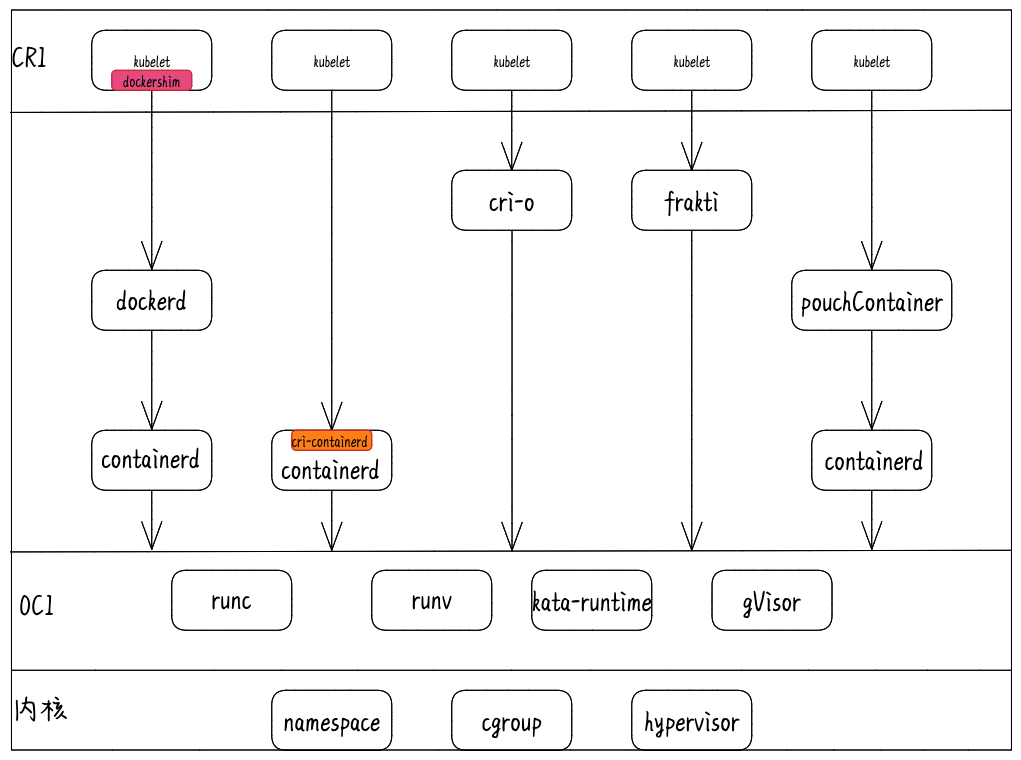
弃用 docker 后到底会产生什么影响
正常的 K8s 用户不会有任何影响
生产环境中高版本的集群只需要把运行时从 docker 切换到 containerd即可。containerd 是 docker 中的一个底层组件,主要负责维护容器的生命周期,跟随 docker 经历了长期考验。同时 2019年初就从 CNCF 毕业,可以单独作为容器运行时用在集群中。到了 containerd 1.1 版本后就去掉了 CRI-Containerd 这个 shim,直接把适配逻辑作为插件的方式集成到了 containerd 主进程中,所以我们现在可以直接使用--container-runtime-endpoint=unix:///run/containerd/containerd.sock这个套接字,就可以无缝切换的containerd。因此把 runtime 从 docker 转换到 containerd 是一个基本无痛的过程。
开发环境中通过docker build构建出来的镜像依然可以在集群中使用镜像一直是容器生态的一大优势,虽然人们总是把镜像称之为“docker镜像”,但镜像早就成为了一种规范了。具体规范可以参考image-spec。在任何地方只要构建出符合 Image Spec 的镜像,就可以拿到其他符合 Image Spec 的容器运行时上运行。如果你是一名开发/运维人员,你依旧可以继续使用 Docker 来构建镜像,以相同的方式将镜像推送到 Registry,并且将这些镜像部署到你的 Kubernetes 中;如果你是运行和操作集群的用户,你只需要将 Docker 切换成你需要的containerd 容器运行时即可。
在 Pod 中使用 DinD(Docker in Docker)的用户会受到影响
有些使用者会把 docker 的 socket (/run/docker.sock)挂载到 Pod 中,并在 Pod 中调用 docker 的 api 构建镜像或创建编译容器等,官方在这里的建议是使用 Kaniko、Img 或 Buildah。
2.我们可以通过把 docker daemon 作为 DaemonSet 或者给想要使用 docker 的 Pod 添加一个 docker daemon 的 sidecar 的方式在任意运行时中使用 DinD 的方案。
3.同一集群中docker 节点与 containerd 节点共存,通过按节点标签调度,保 证这类业务调度到 docker 节点没有通过上述方案。
预告
后期会围绕runc,shim等探索容器的底层实现与管理API的暴露。敬请期待!!!!
reference
https://feisky.xyz/posts/kubernetes-container-runtime/https://jimmysong.io/kubernetes-handbook/concepts/cri.htmlhttps://github.com/kubernetes/enhancements/tree/master/keps/sig-node/2221-remove-dockershimhttps://kubernetes.io/zh/docs/setup/production-environment/container-runtimes/https://www.qikqiak.com/post/containerd-usage/https://kubernetes.io/zh/blog/2020/12/02/dockershim-faq/https://github.com/containerdhttps://www.zhihu.com/question/324124344
