




前言
通常在程序开发过程中难免会出现bug,这是在所难免,特别是已上线的项目来说,有些隐藏的Bug会莫名突发,这种情况下,排错只能依赖于日志进行定位。
而对于日志来分来说我们通常分几类的日志,从低到高分别是:
DEBUG 详细的信息,用于诊断问题上 INFO 一般信息的记录 WARNING 经过日志错误信息,可能会出现,可能预期存在错误的告警 ERROR 错误级别的日志 CRITICAL 更严重的错误
对于日志的输出,通常我们的再开发阶段,一般可以选择在控制台输出,方便快速的定位,而线上的我们的日志只能保存在文件中,这样便于我们的来去日志文件分析进行定位。
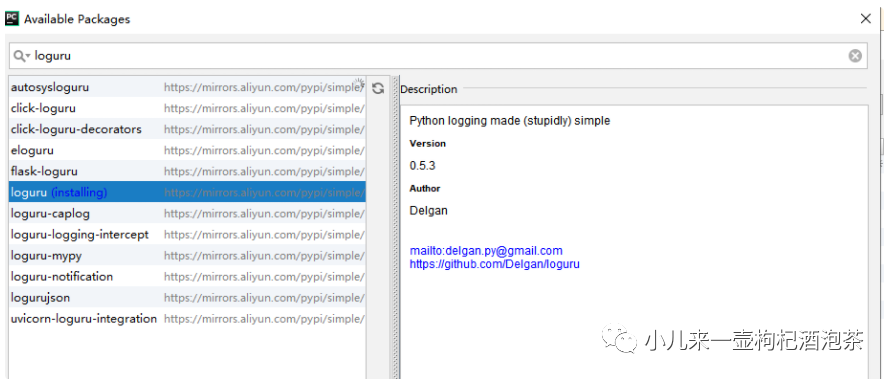
虽然python自定logging是挺好用的,但是使用上我个人觉得不够简洁易用。配置 Handler、Formatter等比较繁琐, 所以这里我引用了第三方库loguru。
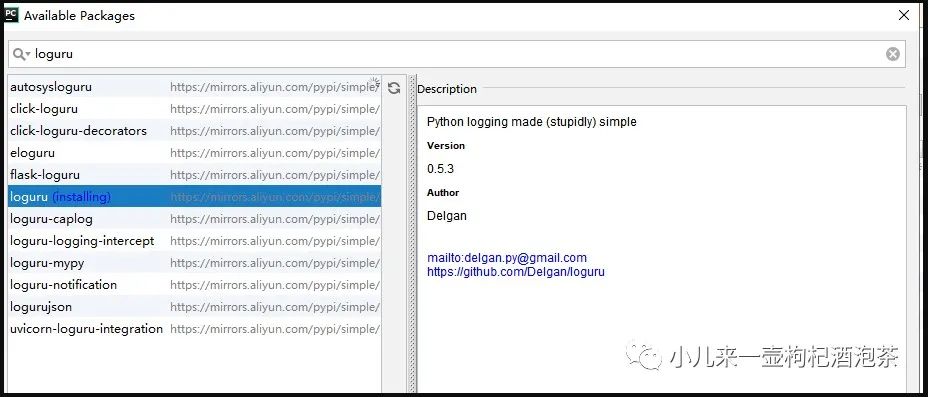
安装loguru
简单使用 loguru
if __name__ == '__main__':
    app = create_app()

    from loguru import logger

    logger.info('this is a info message')
    logger.debug('this is a debug message')

    app.run(host='127.0.0.1', port='8808', debug=True)
控制台里看到启动的相关服务后日志输出: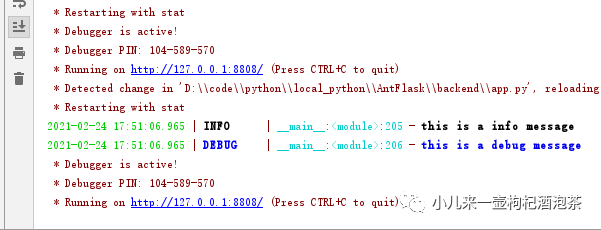
深入使用 loguru
loguru 支持输出到文件,甚至是支持输出到多个文件,且是可以分级别输出,对于一些文件日志的大小控制,和切割,过久自动删除等等。
loguru 中的一个add方法
loguru 中的一个add方法类似原始自动配置一个Handler。
 format = " {time:YYYY-MM-DD HH:mm:ss:SSS} | process_id:{process.id} process_name:{process.name} | thread_id:{thread.id} thread_name:{thread.name} | {level} |\n {message}"

 logger.add(err_log_file_path, format=format, rotation='00:00', encoding='utf-8', level='ERROR', enqueue=True)  # Automatically rotate too big file
一些日志格式说明 add函数中一些参数说明可以指定日志的输出格式format,这个参数可以输出很多有用的信息,如下:
%(level)s: 打印日志级别名称 %(time)s: 打印日志的时间 %(thread_id)d: 打印线程ID %(thread_name)s: 打印线程名称 %(process_name)d: 打印进程ID名称 %(process_id)d: 进程ID %(message)s: 打印日志信息
enqueue=True表示 开启异步写入
使用 rotation 参数实现定时创建 log 文件,可以实现每天 0 点新创建一个 log 文件输出了
定义独立的插件进行使用
线上我们只需要记录Info和错误的文件。所以我们可以创建两个处理器。
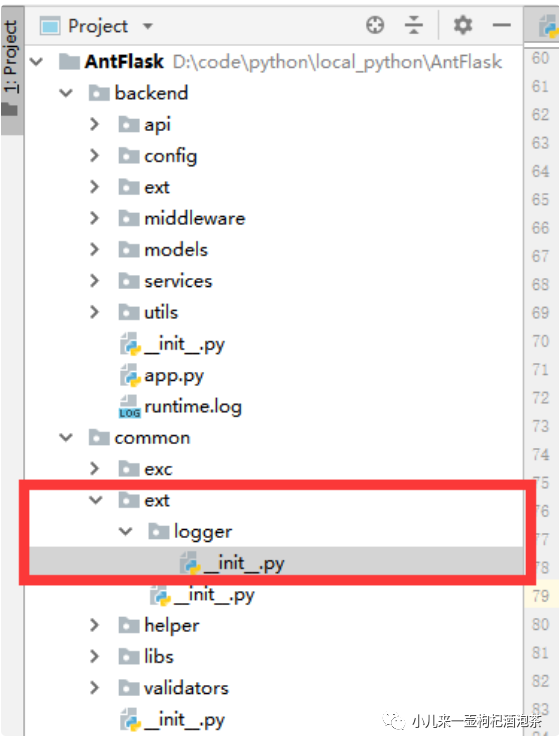
1.新增日志模块
在common的ext插件包里新增一个日志logger模块:
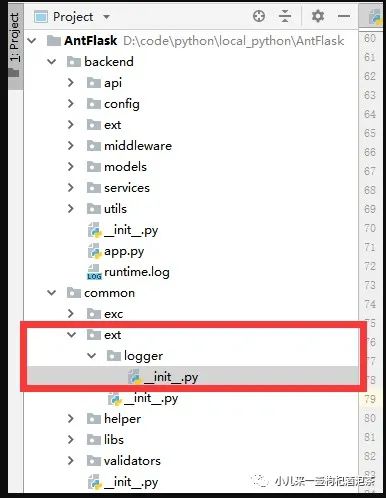
定义初始化处理器的和日志存放文件的位置的函数:
#!/usr/bin/evn python
# coding=utf-8
import time
# 封装一下关于记录序号的日志记录用于全链路的日志请求的日志
from datetime import datetime
from loguru import logger

def creat_customize_log_loguru(pro_path=None):

    '''
    :param pro_path:  当前需要生产的日志文件的存在路径
    :return:
    '''
    import os
    if not pro_path:
        # BASE_DIR = os.path.dirname(os.path.dirname(os.path.abspath(__file__)))
        pro_path = os.path.split(os.path.realpath(__file__))[0]
    # 定义info_log文件名称
    log_file_path = os.path.join(pro_path, 'log/info_{time:YYYYMMDD}.log')
    # 定义err_log文件名称
    err_log_file_path = os.path.join(pro_path, 'log/error_{time:YYYYMMDD}.log')

    # 错误日志不需要压缩
    format = " {time:YYYY-MM-DD HH:mm:ss:SSS} | process_id:{process.id} process_name:{process.name} | thread_id:{thread.id} thread_name:{thread.name} | {level} |\n {message}"
    # enqueue=True表示 开启异步写入
    # 使用 rotation 参数实现定时创建 log 文件,可以实现每天 0 点新创建一个 log 文件输出了
    logger.add(err_log_file_path, format=format, rotation='00:00', encoding='utf-8', level='ERROR', enqueue=True)  # Automatically rotate too big file
    # 对应不同的格式
    format2 = " {time:YYYY-MM-DD HH:mm:ss:SSS} | process_id:{process.id} process_name:{process.name} | thread_id:{thread.id} thread_name:{thread.name} | {level} | {message}"

    # 记录的充值通知的日志
    # enqueue=True表示 开启异步写入
    # 使用 rotation 参数实现定时创建 log 文件,可以实现每天 0 点新创建一个 log 文件输出了
    logger.add(log_file_path, format=format2, rotation='00:00', compression="zip", encoding='utf-8', level='INFO', enqueue=True)  # Automatically rotate too big file
分析定义:
 # 错误日志不需要压缩
    format = " {time:YYYY-MM-DD HH:mm:ss:SSS} | process_id:{process.id} process_name:{process.name} | thread_id:{thread.id} thread_name:{thread.name} | {level} |\n {message}"
    # enqueue=True表示 开启异步写入
    # 使用 rotation 参数实现定时创建 log 文件,可以实现每天 0 点新创建一个 log 文件输出了
    logger.add(err_log_file_path, format=format, rotation='00:00', encoding='utf-8', level='ERROR', enqueue=True)  # Automatically rotate too big file
format: 定义了日志记录的格式,其中记录的时候包含了相关时间,进程ID,进程名称,线程ID,线程名称,日志记录登记和具体日志内容信息:
err_log_file_path:表示日志文件的存放路径
rotation: 表示日志旋转切割时间
level :记录的日志登记
enqueue: 是否异步写入
上面我们定义两个日志处理器,一个用于记录err_log_file_path的错误日志,一个是记录Info类型的日志。
2.日志模块初始化操作
在我们的app.py内进行修改__register_customize_log_loguru的并引入creat_customize_log_loguru函数,进行日志文件生成
def __register_customize_log_loguru():
   '''
   配置日志路径和配置信息--定义到当前项目目录内进行创建log文件
   :return:
   '''
   pass
   # 引入函数和对应的日对象
   from common.ext.logger import creat_customize_log_loguru, logger
   creat_customize_log_loguru(pro_path=os.path.split(os.path.realpath(__file__))[0])
   # 写入日志
   logger.info('日志对象初始化完成!')
启动服务,看到我们的日志文件生产我们的模块内了:
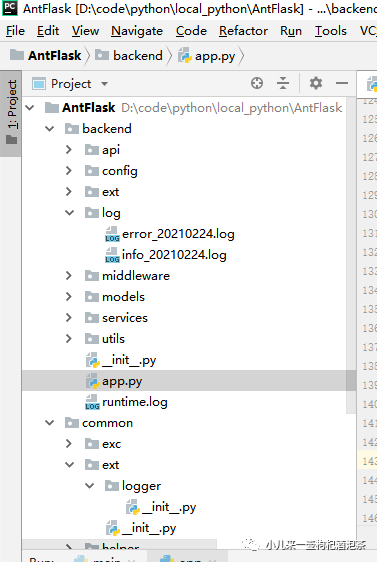 查看具体的日志文件内容信息:
 2021-02-24 18:12:09:671 | process_id:37476 process_name:MainProcess | thread_id:36596 thread_name:MainThread | INFO | 日志对象初始化完成!
 2021-02-24 18:12:09:675 | process_id:37476 process_name:MainProcess | thread_id:36596 thread_name:MainThread | INFO | this is a info message
 2021-02-24 18:12:11:016 | process_id:36344 process_name:MainProcess | thread_id:37036 thread_name:MainThread | INFO | 日志对象初始化完成!
 2021-02-24 18:12:11:020 | process_id:36344 process_name:MainProcess | thread_id:37036 thread_name:MainThread | INFO | this is a info message
 2021-02-24 18:13:24:111 | process_id:17016 process_name:MainProcess | thread_id:32508 thread_name:MainThread | INFO | 日志对象初始化完成!
 2021-02-24 18:13:24:116 | process_id:17016 process_name:MainProcess | thread_id:32508 thread_name:MainThread | INFO | this is a info message
 2021-02-24 18:13:25:491 | process_id:15896 process_name:MainProcess | thread_id:26780 thread_name:MainThread | INFO | 日志对象初始化完成!
 2021-02-24 18:13:25:495 | process_id:15896 process_name:MainProcess | thread_id:26780 thread_name:MainThread | INFO | this is a info message
3,制造异常的情况如何记录错误异常信息。
第1种异常方式,使用@logger.catch进行函数的装饰来实现异常捕获:
定义一个测试异常的路由请求地址http://127.0.0.1:8808/ceshiyichang, 在里面故意隐藏一个整除的异常!
if __name__ == '__main__':
   app = create_app()

   from loguru import logger
   logger.add('runtime.log', format="{time} {level} {message}", filter="my_module", level="INFO")
   logger.info('this is a info message')
   logger.debug('this is a debug message')


   @app.route('/ceshiyichang')
   @logger.catch
   def ceshiyichang():
       # 制造异常
       5665/0
       return 'ok'

   app.run(host='127.0.0.1', port='8808', debug=True)
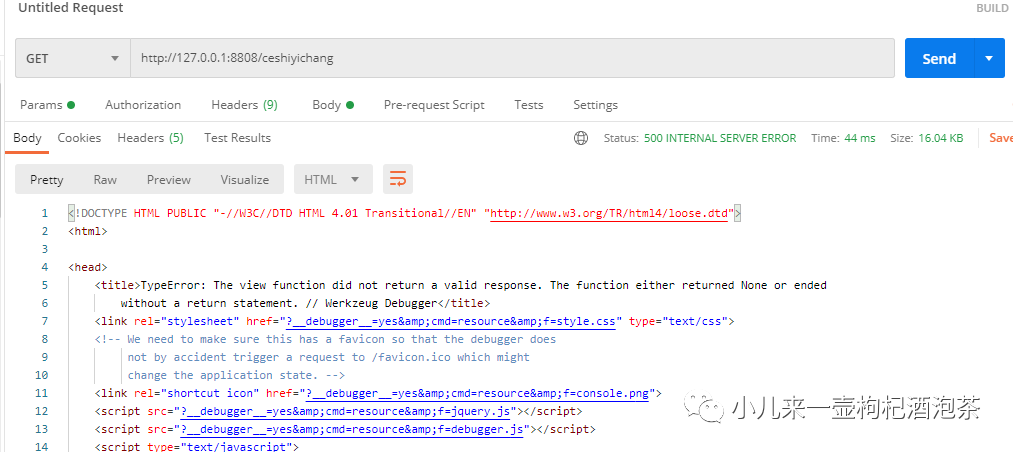
最终结果:
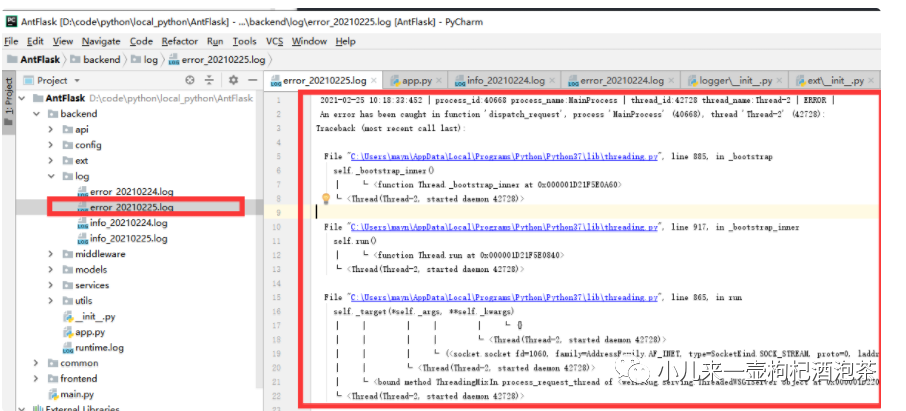
查看我们的错误日志文件:
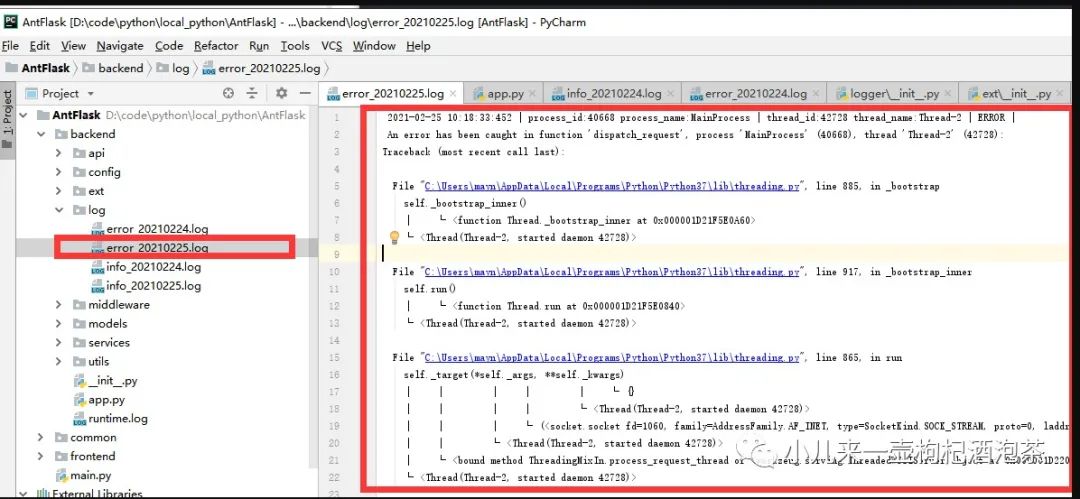
上面的这种异常机制导致了我们的异常直接的被logger拦截了,无法进入上一期我们的说的全局异常错误处理函数中进行处理。所以这方式我一般不用。
第2种异常方式,在全局异常处理函数中进行异常捕获:
修改我们的测试异常路由:
if __name__ == '__main__':
   app = create_app()

   from loguru import logger
   logger.add('runtime.log', format="{time} {level} {message}", filter="my_module", level="INFO")
   logger.info('this is a info message')
   logger.debug('this is a debug message')


   @app.route('/ceshiyichang')
   def ceshiyichang():
       # 制造异常
       5665/0
       return 'ok'

   app.run(host='127.0.0.1', port='8808', debug=True)
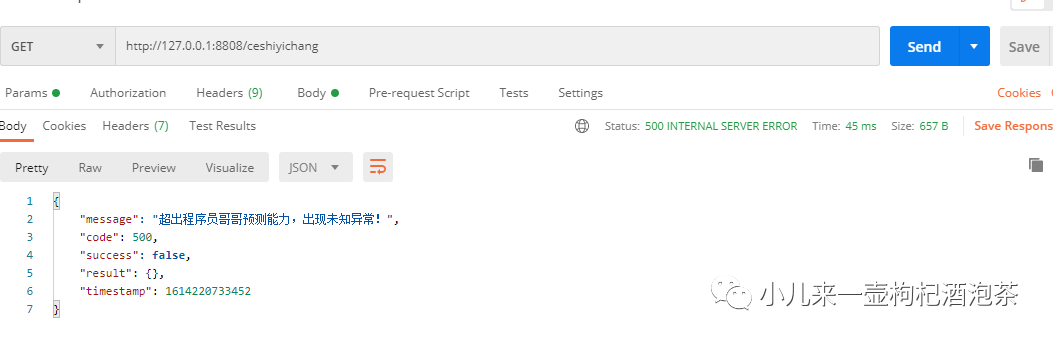
导入 logger到app.py,然后在我们的全局异常中进行异常记录,新增 logger.error(e)
def __init_error_handlers(app):
   pass

   # 自定义404错误码的返回信息异常的处理
   @app.errorhandler(Exception)
   def custom_error_handler(e):

       if isinstance(e, ApiAdminJsonResponse):
           # 直接的再次的返回,这样在From中也可以直接的返回了!
           # 如果还需要其他自定义的返回提示,可以再这里再进行判断,比如,我想直接返回200的响应体信息的话
           return e
       if isinstance(e, HTTPException):
           if e.code == 429:
               limt = LimiterResException()
               limt.msg = limt.msg + ' ' + e.description
               return limt
           if e.code == 404:
               return NotfoundException()
           if e.code == 404:
               return NotfoundException()

           # 其他错误处理------------------ 它跑到了全局了去
           code = e.code
           msg = e.description
           api_code = 20000
           return OtherException(message=msg, code=code, api_code=api_code)
       else:
           # 如果是Debug
           if not app.config['DEBUG']:
               return InternalErrorException()
           else:
               print("异常")
               # raise e
               logger.error(e)
               # import traceback
               # app.logger.error(traceback.format_exc())
               return UnknownException()
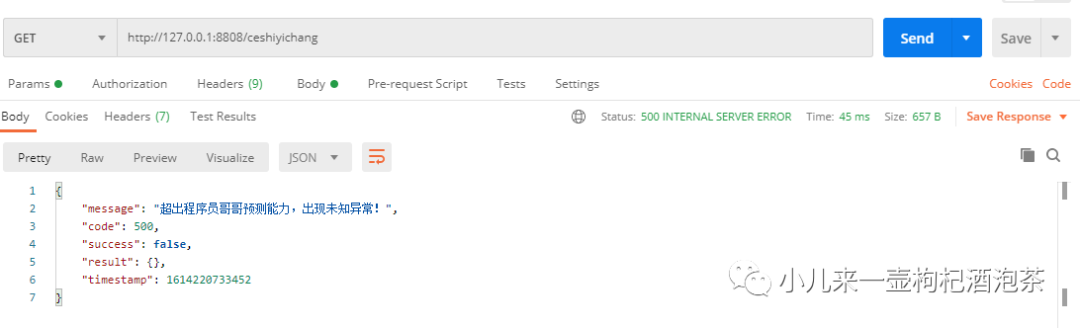
测试异常请求:
查看异常日志:
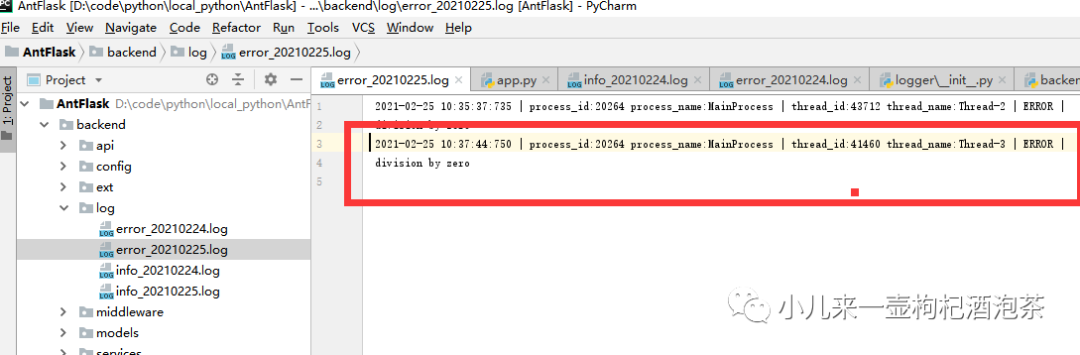
确定,这种错误异常日志不够详情,需要继续修改。记录到更精确的异常信息。修改我们的logger.error(e)为logger.exception(e),再测试异常信息:我们的日志文件则记录到详细的错误异常了:
 2021-02-25 10:38:57:868 | process_id:42880 process_name:MainProcess | thread_id:32188 thread_name:Thread-2 | ERROR |
 division by zero
Traceback (most recent call last):

  File "C:\Users\mayn\AppData\Local\Programs\Python\Python37\lib\threading.py", line 885, in _bootstrap
    self._bootstrap_inner()
    │    └ <function Thread._bootstrap_inner at 0x000001B4E72E0A60>
    └ <Thread(Thread-2, started daemon 32188)>

  File "C:\Users\mayn\AppData\Local\Programs\Python\Python37\lib\threading.py", line 917, in _bootstrap_inner
    self.run()
    │    └ <function Thread.run at 0x000001B4E72E0840>
    └ <Thread(Thread-2, started daemon 32188)>

  File "C:\Users\mayn\AppData\Local\Programs\Python\Python37\lib\threading.py", line 865, in run
    self._target(*self._args, **self._kwargs)
    │    │        │    │        │    └ {}
    │    │        │    │        └ <Thread(Thread-2, started daemon 32188)>
    │    │        │    └ (<socket.socket fd=972, family=AddressFamily.AF_INET, type=SocketKind.SOCK_STREAM, proto=0, laddr=('127.0.0.1', 8808), raddr=...
    │    │        └ <Thread(Thread-2, started daemon 32188)>
    │    └ <bound method ThreadingMixIn.process_request_thread of <werkzeug.serving.ThreadedWSGIServer object at 0x000001B4E83B7A58>>
    └ <Thread(Thread-2, started daemon 32188)>

  File "C:\Users\mayn\AppData\Local\Programs\Python\Python37\lib\socketserver.py", line 650, in process_request_thread
    self.finish_request(request, client_address)
    │    │              │        └ ('127.0.0.1', 59119)
    │    │              └ <socket.socket fd=972, family=AddressFamily.AF_INET, type=SocketKind.SOCK_STREAM, proto=0, laddr=('127.0.0.1', 8808), raddr=(...
    │    └ <function BaseServer.finish_request at 0x000001B4E7840E18>
    └ <werkzeug.serving.ThreadedWSGIServer object at 0x000001B4E83B7A58>

  File "C:\Users\mayn\AppData\Local\Programs\Python\Python37\lib\socketserver.py", line 360, in finish_request
    self.RequestHandlerClass(request, client_address, self)
    │    │                   │        │               └ <werkzeug.serving.ThreadedWSGIServer object at 0x000001B4E83B7A58>
    │    │                   │        └ ('127.0.0.1', 59119)
    │    │                   └ <socket.socket fd=972, family=AddressFamily.AF_INET, type=SocketKind.SOCK_STREAM, proto=0, laddr=('127.0.0.1', 8808), raddr=(...
    │    └ <class 'werkzeug.serving.WSGIRequestHandler'>
    └ <werkzeug.serving.ThreadedWSGIServer object at 0x000001B4E83B7A58>

  File "C:\Users\mayn\AppData\Local\Programs\Python\Python37\lib\socketserver.py", line 720, in __init__
    self.handle()
    │    └ <function WSGIRequestHandler.handle at 0x000001B4E7E5DEA0>
    └ <werkzeug.serving.WSGIRequestHandler object at 0x000001B4E83C3080>

  File "C:\Users\mayn\.virtualenvs\AntFlask\lib\site-packages\werkzeug\serving.py", line 345, in handle
    BaseHTTPRequestHandler.handle(self)
    │                      │      └ <werkzeug.serving.WSGIRequestHandler object at 0x000001B4E83C3080>
    │                      └ <function BaseHTTPRequestHandler.handle at 0x000001B4E7955A60>
    └ <class 'http.server.BaseHTTPRequestHandler'>

  File "C:\Users\mayn\AppData\Local\Programs\Python\Python37\lib\http\server.py", line 426, in handle
    self.handle_one_request()
    │    └ <function WSGIRequestHandler.handle_one_request at 0x000001B4E7E620D0>
    └ <werkzeug.serving.WSGIRequestHandler object at 0x000001B4E83C3080>

  File "C:\Users\mayn\.virtualenvs\AntFlask\lib\site-packages\werkzeug\serving.py", line 379, in handle_one_request
    return self.run_wsgi()
           │    └ <function WSGIRequestHandler.run_wsgi at 0x000001B4E7E5DE18>
           └ <werkzeug.serving.WSGIRequestHandler object at 0x000001B4E83C3080>

  File "C:\Users\mayn\.virtualenvs\AntFlask\lib\site-packages\werkzeug\serving.py", line 323, in run_wsgi
    execute(self.server.app)
    │       │    │      └ <werkzeug.debug.DebuggedApplication object at 0x000001B4E83619E8>
    │       │    └ <werkzeug.serving.ThreadedWSGIServer object at 0x000001B4E83B7A58>
    │       └ <werkzeug.serving.WSGIRequestHandler object at 0x000001B4E83C3080>
    └ <function WSGIRequestHandler.run_wsgi.<locals>.execute at 0x000001B4E83D1C80>

  File "C:\Users\mayn\.virtualenvs\AntFlask\lib\site-packages\werkzeug\serving.py", line 314, in execute
    for data in application_iter:
                └ <generator object DebuggedApplication.debug_application at 0x000001B4E8395ED0>

  File "C:\Users\mayn\.virtualenvs\AntFlask\lib\site-packages\werkzeug\debug\__init__.py", line 304, in debug_application
    app_iter = self.app(environ, start_response)
               │    │   │        └ <function WSGIRequestHandler.run_wsgi.<locals>.start_response at 0x000001B4E83D1B70>
               │    │   └ {'wsgi.version': (1, 0), 'wsgi.url_scheme': 'http', 'wsgi.input': <_io.BufferedReader name=972>, 'wsgi.errors': <_io.TextIOWr...
               │    └ <Flask 'app'>
               └ <werkzeug.debug.DebuggedApplication object at 0x000001B4E83619E8>

  File "C:\Users\mayn\.virtualenvs\AntFlask\lib\site-packages\flask\app.py", line 2464, in __call__
    return self.wsgi_app(environ, start_response)
           │    │        │        └ <function WSGIRequestHandler.run_wsgi.<locals>.start_response at 0x000001B4E83D1B70>
           │    │        └ {'wsgi.version': (1, 0), 'wsgi.url_scheme': 'http', 'wsgi.input': <_io.BufferedReader name=972>, 'wsgi.errors': <_io.TextIOWr...
           │    └ <function Flask.wsgi_app at 0x000001B4E809BD08>
           └ <Flask 'app'>

  File "C:\Users\mayn\.virtualenvs\AntFlask\lib\site-packages\flask\app.py", line 2447, in wsgi_app
    response = self.full_dispatch_request()
               │    └ <function Flask.full_dispatch_request at 0x000001B4E809B488>
               └ <Flask 'app'>

> File "C:\Users\mayn\.virtualenvs\AntFlask\lib\site-packages\flask\app.py", line 1950, in full_dispatch_request
    rv = self.dispatch_request()
         │    └ <function Flask.dispatch_request at 0x000001B4E809B400>
         └ <Flask 'app'>

  File "C:\Users\mayn\.virtualenvs\AntFlask\lib\site-packages\flask\app.py", line 1936, in dispatch_request
    return self.view_functions[rule.endpoint](**req.view_args)
           │    │              │    │           │   └ {}
           │    │              │    │           └ <Request 'http://127.0.0.1:8808/ceshiyichang' [GET]>
           │    │              │    └ 'ceshiyichang'
           │    │              └ <Rule '/ceshiyichang' (HEAD, GET, OPTIONS) -> ceshiyichang>
           │    └ {'static': <bound method _PackageBoundObject.send_static_file of <Flask 'app'>>, 'backend_health': <function __health_chcek_r...
           └ <Flask 'app'>

  File "D:\code\python\local_python\AntFlask\backend\app.py", line 219, in ceshiyichang
    5665/0

ZeroDivisionError: division by zero
END
以上是关于第三方日志库的使用。
小钟同学 | 文 【原创】【转载请联系本人】| QQ:308711822
前言
通常在程序开发过程中难免会出现bug,这是在所难免,特别是已上线的项目来说,有些隐藏的Bug会莫名突发,这种情况下,排错只能依赖于日志进行定位。
而对于日志来分来说我们通常分几类的日志,从低到高分别是:
DEBUG 详细的信息,用于诊断问题上 INFO 一般信息的记录 WARNING 经过日志错误信息,可能会出现,可能预期存在错误的告警 ERROR 错误级别的日志 CRITICAL 更严重的错误
对于日志的输出,通常我们的再开发阶段,一般可以选择在控制台输出,方便快速的定位,而线上的我们的日志只能保存再文件中,这样便于我们的来去日志文件分析进行定位。
虽然python自定logging是挺好用的,但是使用上我个人觉得不够简洁易用。配置 Handler、Formatter等比较繁琐, 来进所以这里我引用了第三方库loguru。
安装loguru
简单使用 loguru
if __name__ == '__main__':
    app = create_app()

    from loguru import logger

    logger.info('this is a info message')
    logger.debug('this is a debug message')

    app.run(host='127.0.0.1', port='8808', debug=True)
控制台里看到启动的相关服务后日志输出:
深入使用 loguru
loguru 支持输出到文件,甚至是支持输出到多个文件,且是可以分级别输出,对于一些文件日志的大小控制,和切割,过久自动删除等等。
loguru 中的一个add方法
loguru 中的一个add方法类似原始自动配置一个Handler。
 format = " {time:YYYY-MM-DD HH:mm:ss:SSS} | process_id:{process.id} process_name:{process.name} | thread_id:{thread.id} thread_name:{thread.name} | {level} |\n {message}"

 logger.add(err_log_file_path, format=format, rotation='00:00', encoding='utf-8', level='ERROR', enqueue=True)  # Automatically rotate too big file
一些日志格式说明 add函数中一些参数说明可以指定日志的输出格式format,这个参数可以输出很多有用的信息,如下:
%(level)s: 打印日志级别名称 %(time)s: 打印日志的时间 %(thread_id)d: 打印线程ID %(thread_name)s: 打印线程名称 %(process_name)d: 打印进程ID名称 %(process_id)d: 进程ID %(message)s: 打印日志信息
enqueue=True表示 开启异步写入
使用 rotation 参数实现定时创建 log 文件,可以实现每天 0 点新创建一个 log 文件输出了
定义独立的插件进行使用
线上我们只需要记录Info和错误的文件。所以我们可以创建两个处理器。
1.新增日志模块
在common的ext插件包里新增一个日志logger模块:
定义初始化处理器的和日志存放文件的位置的函数:
#!/usr/bin/evn python
# coding=utf-8
import time
# 封装一下关于记录序号的日志记录用于全链路的日志请求的日志
from datetime import datetime
from loguru import logger

def creat_customize_log_loguru(pro_path=None):

    '''
    :param pro_path:  当前需要生产的日志文件的存在路径
    :return:
    '''
    import os
    if not pro_path:
        # BASE_DIR = os.path.dirname(os.path.dirname(os.path.abspath(__file__)))
        pro_path = os.path.split(os.path.realpath(__file__))[0]
    # 定义info_log文件名称
    log_file_path = os.path.join(pro_path, 'log/info_{time:YYYYMMDD}.log')
    # 定义err_log文件名称
    err_log_file_path = os.path.join(pro_path, 'log/error_{time:YYYYMMDD}.log')

    # 错误日志不需要压缩
    format = " {time:YYYY-MM-DD HH:mm:ss:SSS} | process_id:{process.id} process_name:{process.name} | thread_id:{thread.id} thread_name:{thread.name} | {level} |\n {message}"
    # enqueue=True表示 开启异步写入
    # 使用 rotation 参数实现定时创建 log 文件,可以实现每天 0 点新创建一个 log 文件输出了
    logger.add(err_log_file_path, format=format, rotation='00:00', encoding='utf-8', level='ERROR', enqueue=True)  # Automatically rotate too big file
    # 对应不同的格式
    format2 = " {time:YYYY-MM-DD HH:mm:ss:SSS} | process_id:{process.id} process_name:{process.name} | thread_id:{thread.id} thread_name:{thread.name} | {level} | {message}"

    # 记录的充值通知的日志
    # enqueue=True表示 开启异步写入
    # 使用 rotation 参数实现定时创建 log 文件,可以实现每天 0 点新创建一个 log 文件输出了
    logger.add(log_file_path, format=format2, rotation='00:00', compression="zip", encoding='utf-8', level='INFO', enqueue=True)  # Automatically rotate too big file
分析定义:
 # 错误日志不需要压缩
    format = " {time:YYYY-MM-DD HH:mm:ss:SSS} | process_id:{process.id} process_name:{process.name} | thread_id:{thread.id} thread_name:{thread.name} | {level} |\n {message}"
    # enqueue=True表示 开启异步写入
    # 使用 rotation 参数实现定时创建 log 文件,可以实现每天 0 点新创建一个 log 文件输出了
    logger.add(err_log_file_path, format=format, rotation='00:00', encoding='utf-8', level='ERROR', enqueue=True)  # Automatically rotate too big file
format: 定义了日志记录的格式,其中记录的时候包含了相关时间,进程ID,进程名称,线程ID,线程名称,日志记录登记和具体日志内容信息:
err_log_file_path:表示日志文件的存放路径
rotation: 表示日志旋转切割时间
level :记录的日志登记
enqueue: 是否异步写入
上面我们定义两个日志处理器,一个用于记录err_log_file_path的错误日志,一个是记录Info类型的日志。
2.日志模块初始化操作
在我们的app.py内进行修改__register_customize_log_loguru的并引入creat_customize_log_loguru函数,进行日志文件生成
def __register_customize_log_loguru():
   '''
   配置日志路径和配置信息--定义到当前项目目录内进行创建log文件
   :return:
   '''
   pass
   # 引入函数和对应的日对象
   from common.ext.logger import creat_customize_log_loguru, logger
   creat_customize_log_loguru(pro_path=os.path.split(os.path.realpath(__file__))[0])
   # 写入日志
   logger.info('日志对象初始化完成!')
启动服务,看到我们的日志文件生产我们的模块内了:
查看具体的日志文件内容信息:
 2021-02-24 18:12:09:671 | process_id:37476 process_name:MainProcess | thread_id:36596 thread_name:MainThread | INFO | 日志对象初始化完成!
 2021-02-24 18:12:09:675 | process_id:37476 process_name:MainProcess | thread_id:36596 thread_name:MainThread | INFO | this is a info message
 2021-02-24 18:12:11:016 | process_id:36344 process_name:MainProcess | thread_id:37036 thread_name:MainThread | INFO | 日志对象初始化完成!
 2021-02-24 18:12:11:020 | process_id:36344 process_name:MainProcess | thread_id:37036 thread_name:MainThread | INFO | this is a info message
 2021-02-24 18:13:24:111 | process_id:17016 process_name:MainProcess | thread_id:32508 thread_name:MainThread | INFO | 日志对象初始化完成!
 2021-02-24 18:13:24:116 | process_id:17016 process_name:MainProcess | thread_id:32508 thread_name:MainThread | INFO | this is a info message
 2021-02-24 18:13:25:491 | process_id:15896 process_name:MainProcess | thread_id:26780 thread_name:MainThread | INFO | 日志对象初始化完成!
 2021-02-24 18:13:25:495 | process_id:15896 process_name:MainProcess | thread_id:26780 thread_name:MainThread | INFO | this is a info message
3,制造异常的情况如何记录错误异常信息。
第1种异常方式,使用@logger.catch进行函数的装饰来实现异常捕获:
定义一个测试异常的路由请求地址http://127.0.0.1:8808/ceshiyichang, 在里面故意隐藏一个整除的异常!
if __name__ == '__main__':
   app = create_app()

   from loguru import logger
   logger.add('runtime.log', format="{time} {level} {message}", filter="my_module", level="INFO")
   logger.info('this is a info message')
   logger.debug('this is a debug message')


   @app.route('/ceshiyichang')
   @logger.catch
   def ceshiyichang():
       # 制造异常
       5665/0
       return 'ok'

   app.run(host='127.0.0.1', port='8808', debug=True)
最终结果:
查看我们的错误日志文件:
上面的这种异常机制导致了我们的异常直接的被logger拦截了,无法进入上一期我们的说的全局异常错误处理函数中进行处理。所以这方式我一般不用。
第2种异常方式,在全局异常处理函数中进行异常捕获:
修改我们的测试异常路由:
if __name__ == '__main__':
   app = create_app()

   from loguru import logger
   logger.add('runtime.log', format="{time} {level} {message}", filter="my_module", level="INFO")
   logger.info('this is a info message')
   logger.debug('this is a debug message')


   @app.route('/ceshiyichang')
   def ceshiyichang():
       # 制造异常
       5665/0
       return 'ok'

   app.run(host='127.0.0.1', port='8808', debug=True)
导入 logger到app.py,然后在我们的全局异常中进行异常记录,新增 logger.error(e)
def __init_error_handlers(app):
   pass

   # 自定义404错误码的返回信息异常的处理
   @app.errorhandler(Exception)
   def custom_error_handler(e):

       if isinstance(e, ApiAdminJsonResponse):
           # 直接的再次的返回,这样在From中也可以直接的返回了!
           # 如果还需要其他自定义的返回提示,可以再这里再进行判断,比如,我想直接返回200的响应体信息的话
           return e
       if isinstance(e, HTTPException):
           if e.code == 429:
               limt = LimiterResException()
               limt.msg = limt.msg + ' ' + e.description
               return limt
           if e.code == 404:
               return NotfoundException()
           if e.code == 404:
               return NotfoundException()

           # 其他错误处理------------------ 它跑到了全局了去
           code = e.code
           msg = e.description
           api_code = 20000
           return OtherException(message=msg, code=code, api_code=api_code)
       else:
           # 如果是Debug
           if not app.config['DEBUG']:
               return InternalErrorException()
           else:
               print("异常")
               # raise e
               logger.error(e)
               # import traceback
               # app.logger.error(traceback.format_exc())
               return UnknownException()
测试异常请求:
查看异常日志:
确定,这种错误异常日志不够详情,需要继续修改。记录到更精确的异常信息。修改我们的logger.error(e)为logger.exception(e),再测试异常信息:我们的日志文件则记录到详细的错误异常了:
 2021-02-25 10:38:57:868 | process_id:42880 process_name:MainProcess | thread_id:32188 thread_name:Thread-2 | ERROR |
 division by zero
Traceback (most recent call last):

  File "C:\Users\mayn\AppData\Local\Programs\Python\Python37\lib\threading.py", line 885, in _bootstrap
    self._bootstrap_inner()
    │    └ <function Thread._bootstrap_inner at 0x000001B4E72E0A60>
    └ <Thread(Thread-2, started daemon 32188)>

  File "C:\Users\mayn\AppData\Local\Programs\Python\Python37\lib\threading.py", line 917, in _bootstrap_inner
    self.run()
    │    └ <function Thread.run at 0x000001B4E72E0840>
    └ <Thread(Thread-2, started daemon 32188)>

  File "C:\Users\mayn\AppData\Local\Programs\Python\Python37\lib\threading.py", line 865, in run
    self._target(*self._args, **self._kwargs)
    │    │        │    │        │    └ {}
    │    │        │    │        └ <Thread(Thread-2, started daemon 32188)>
    │    │        │    └ (<socket.socket fd=972, family=AddressFamily.AF_INET, type=SocketKind.SOCK_STREAM, proto=0, laddr=('127.0.0.1', 8808), raddr=...
    │    │        └ <Thread(Thread-2, started daemon 32188)>
    │    └ <bound method ThreadingMixIn.process_request_thread of <werkzeug.serving.ThreadedWSGIServer object at 0x000001B4E83B7A58>>
    └ <Thread(Thread-2, started daemon 32188)>

  File "C:\Users\mayn\AppData\Local\Programs\Python\Python37\lib\socketserver.py", line 650, in process_request_thread
    self.finish_request(request, client_address)
    │    │              │        └ ('127.0.0.1', 59119)
    │    │              └ <socket.socket fd=972, family=AddressFamily.AF_INET, type=SocketKind.SOCK_STREAM, proto=0, laddr=('127.0.0.1', 8808), raddr=(...
    │    └ <function BaseServer.finish_request at 0x000001B4E7840E18>
    └ <werkzeug.serving.ThreadedWSGIServer object at 0x000001B4E83B7A58>

  File "C:\Users\mayn\AppData\Local\Programs\Python\Python37\lib\socketserver.py", line 360, in finish_request
    self.RequestHandlerClass(request, client_address, self)
    │    │                   │        │               └ <werkzeug.serving.ThreadedWSGIServer object at 0x000001B4E83B7A58>
    │    │                   │        └ ('127.0.0.1', 59119)
    │    │                   └ <socket.socket fd=972, family=AddressFamily.AF_INET, type=SocketKind.SOCK_STREAM, proto=0, laddr=('127.0.0.1', 8808), raddr=(...
    │    └ <class 'werkzeug.serving.WSGIRequestHandler'>
    └ <werkzeug.serving.ThreadedWSGIServer object at 0x000001B4E83B7A58>

  File "C:\Users\mayn\AppData\Local\Programs\Python\Python37\lib\socketserver.py", line 720, in __init__
    self.handle()
    │    └ <function WSGIRequestHandler.handle at 0x000001B4E7E5DEA0>
    └ <werkzeug.serving.WSGIRequestHandler object at 0x000001B4E83C3080>

  File "C:\Users\mayn\.virtualenvs\AntFlask\lib\site-packages\werkzeug\serving.py", line 345, in handle
    BaseHTTPRequestHandler.handle(self)
    │                      │      └ <werkzeug.serving.WSGIRequestHandler object at 0x000001B4E83C3080>
    │                      └ <function BaseHTTPRequestHandler.handle at 0x000001B4E7955A60>
    └ <class 'http.server.BaseHTTPRequestHandler'>

  File "C:\Users\mayn\AppData\Local\Programs\Python\Python37\lib\http\server.py", line 426, in handle
    self.handle_one_request()
    │    └ <function WSGIRequestHandler.handle_one_request at 0x000001B4E7E620D0>
    └ <werkzeug.serving.WSGIRequestHandler object at 0x000001B4E83C3080>

  File "C:\Users\mayn\.virtualenvs\AntFlask\lib\site-packages\werkzeug\serving.py", line 379, in handle_one_request
    return self.run_wsgi()
           │    └ <function WSGIRequestHandler.run_wsgi at 0x000001B4E7E5DE18>
           └ <werkzeug.serving.WSGIRequestHandler object at 0x000001B4E83C3080>

  File "C:\Users\mayn\.virtualenvs\AntFlask\lib\site-packages\werkzeug\serving.py", line 323, in run_wsgi
    execute(self.server.app)
    │       │    │      └ <werkzeug.debug.DebuggedApplication object at 0x000001B4E83619E8>
    │       │    └ <werkzeug.serving.ThreadedWSGIServer object at 0x000001B4E83B7A58>
    │       └ <werkzeug.serving.WSGIRequestHandler object at 0x000001B4E83C3080>
    └ <function WSGIRequestHandler.run_wsgi.<locals>.execute at 0x000001B4E83D1C80>

  File "C:\Users\mayn\.virtualenvs\AntFlask\lib\site-packages\werkzeug\serving.py", line 314, in execute
    for data in application_iter:
                └ <generator object DebuggedApplication.debug_application at 0x000001B4E8395ED0>

  File "C:\Users\mayn\.virtualenvs\AntFlask\lib\site-packages\werkzeug\debug\__init__.py", line 304, in debug_application
    app_iter = self.app(environ, start_response)
               │    │   │        └ <function WSGIRequestHandler.run_wsgi.<locals>.start_response at 0x000001B4E83D1B70>
               │    │   └ {'wsgi.version': (1, 0), 'wsgi.url_scheme': 'http', 'wsgi.input': <_io.BufferedReader name=972>, 'wsgi.errors': <_io.TextIOWr...
               │    └ <Flask 'app'>
               └ <werkzeug.debug.DebuggedApplication object at 0x000001B4E83619E8>

  File "C:\Users\mayn\.virtualenvs\AntFlask\lib\site-packages\flask\app.py", line 2464, in __call__
    return self.wsgi_app(environ, start_response)
           │    │        │        └ <function WSGIRequestHandler.run_wsgi.<locals>.start_response at 0x000001B4E83D1B70>
           │    │        └ {'wsgi.version': (1, 0), 'wsgi.url_scheme': 'http', 'wsgi.input': <_io.BufferedReader name=972>, 'wsgi.errors': <_io.TextIOWr...
           │    └ <function Flask.wsgi_app at 0x000001B4E809BD08>
           └ <Flask 'app'>

  File "C:\Users\mayn\.virtualenvs\AntFlask\lib\site-packages\flask\app.py", line 2447, in wsgi_app
    response = self.full_dispatch_request()
               │    └ <function Flask.full_dispatch_request at 0x000001B4E809B488>
               └ <Flask 'app'>

> File "C:\Users\mayn\.virtualenvs\AntFlask\lib\site-packages\flask\app.py", line 1950, in full_dispatch_request
    rv = self.dispatch_request()
         │    └ <function Flask.dispatch_request at 0x000001B4E809B400>
         └ <Flask 'app'>

  File "C:\Users\mayn\.virtualenvs\AntFlask\lib\site-packages\flask\app.py", line 1936, in dispatch_request
    return self.view_functions[rule.endpoint](**req.view_args)
           │    │              │    │           │   └ {}
           │    │              │    │           └ <Request 'http://127.0.0.1:8808/ceshiyichang' [GET]>
           │    │              │    └ 'ceshiyichang'
           │    │              └ <Rule '/ceshiyichang' (HEAD, GET, OPTIONS) -> ceshiyichang>
           │    └ {'static': <bound method _PackageBoundObject.send_static_file of <Flask 'app'>>, 'backend_health': <function __health_chcek_r...
           └ <Flask 'app'>

  File "D:\code\python\local_python\AntFlask\backend\app.py", line 219, in ceshiyichang
    5665/0

ZeroDivisionError: division by zero
END
以上是关于日志记录,和延伸出来的统一记录一个请求的日志链路追踪关键点。
小钟同学 | 文 【原创】【转载请联系本人】| QQ:308711822
