




前言
通常一个Http请求进来之后,需要记录下用户提交相关参数信息和请求头信息等,还可以记录此次记录接口响应接口信息,方便后续的问题排查。 但是通常web服务请求在高并发的情况下,可能日志写入是异步的,所以可能存在乱序的情况,为统一核查我日志,需要做一个‘’所谓的链路追踪‘’,(其实就是给每一个请求生成唯一ID),这样方便归类分析请求日志。
根据之前学习的钩子函数和中间件的相关知识做一个关于日志的链路中间件。来记录日志请求开始,请求过程,请求结束等一个完整请求链路的日志记录。
关于日志追踪一些需求分析:
需要有一个可以追溯到的追踪ID,即traceid 最好又一个追溯索引index,记录日志事件发生的顺序,即trace_index 需要确保这个即traceid和trace_index是线程安全,每个请求都是独立隔离和安全的。 需要明确记录的内容详细信息, 记录的信息最好是包含记录,请求来源IP,请求开始,请求耗时,请求返回结果,请求过程中第三方请求的参数和结果等 对部分非必须的记录的URL最好进行过滤,不需要记录的日志则过滤,如/favicon.ico等请求 最好的建立一个过滤请求URL白名单,这样可以统一管理
1.定义模块trace_logger
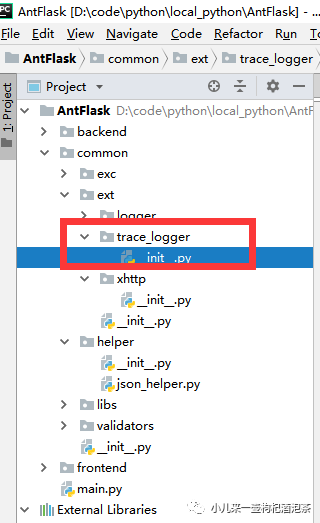 在common的ext包中定义一个模块trace_logger,模块的主要职责是:
定义一个请求开始的时候的函数,用于初始化追踪链路ID和索引和请求初始相关参数信息的记录 定义一个请求结束的时候函数,用于请求结束的日志响应报文收尾记录。 定义一个函数,用于写入我们的具体需要记录日志内容。
#!/usr/bin/evn python
# coding=utf-8

from flask import request
from loguru import logger
import time
from datetime import datetime
from common.helper import json_helper


def get_uuid():
    """
    随机生成uuid
    :return: 生成好的uuid
    """
    import uuid
    return str(uuid.uuid4()).replace('-', '')


# 封装一下关于记录序号的日志记录用于全链路的日志请求的日志
def trace_add_log_record(event_des='',msg_dict={},remarks=''):
    '''

    :param event_des: 日志记录事件描述
    :param msg_dict: 日志记录信息字典
    :param remarks: 日志备注信息
    :return:
    '''
    # request.request_links_index = request.request_links_index + 1
    request.trace_links_index = request.trace_links_index + 1
    log = {
        # 自定义一个新的参数复制到我们的请求上下文的对象中
        'traceid': request.traceid,
        # 定义链路所以序号
        'trace_index':request.trace_links_index,
        # 日志时间描述
        'event_des': event_des,
        # 日志内容详情
        'msg_dict': msg_dict,
        # 日志备注信息
        'remarks': remarks
    }
    #  为少少相关记录,删除不必要的为空的日志内容信息,
    if not remarks:
        log.pop('remarks')
    if not msg_dict:
        log.pop('msg_dict')
    try:
        log_msg = json_helper.dict_to_json_ensure_ascii(log)  # 返回文本
        logger.info(log_msg)
    except:
        logger.info(request.traceid+ ':索引:'+str(request.trace_links_index)+ ':日志信息写入异常')

def trace_start_log_record_handler():
    '''
    请求记录初始化
    :return:
    '''
    path_info = request.environ.get("PATH_INFO")
    if path_info not in ['/favicon.ico'] and 'websocket' not in path_info:
        if request.method != 'OPTIONS':
            # 追踪索引
            request.trace_links_index = 0
            # 追踪ID
            request.traceid = get_uuid()
            # 计算时间
            request.request_start_time = time.time()
            request.request_time = lambda: "%.5f" % (time.time() - g.request_start_time)
            log_msg = {
                # 'headers': str(request.headers),
                # 'user_agent': str(request.user_agent),
                # 记录请求头信息
                'headers': request.headers if str(request.headers) else '',
                # 记录请求URL信息
                'url': request.url,
                # 记录请求方法
                'method': request.method,
                # 记录请求来源IP
                'ip': request.remote_addr if not request.headers.get("X-Real-IP") else request.headers.get("X-Real-IP"),
                # 'path': request.path,
                # 记录请求提交的参数信息
                'params': {
                    'args': '' if not request.args else request.args,
                    'form': '' if not request.form else request.form,
                    # 'json': '' if not request.json else request.json,
                    'json': '' if not request.get_json(silent=True) else None,
                },
                # 记录请求的开始时间
                'start_time': str(datetime.fromtimestamp(request.request_start_time)),
            }

            # 执行写入--日志具体的内容信息
            trace_add_log_record(event_des='请求开始', msg_dict=log_msg)


def trace_end_log_record_handler(response):
    # 日志记录----对于找不到的请求地址不做记录信息
    print("sssssssssss",response.status)
    if response.status_code==404:
        return None
    # 过滤不必要的请求URL
    path_info = request.environ.get("PATH_INFO")
    if path_info not in ['/favicon.ico'] and 'websocket' not in path_info:
        if request.method != 'OPTIONS':
            def json_loads_responsedata():
                try:
                    # 保持中文的输出
                    # json.loads()是将一个JSON编码的字符串(字典形式)转换为一个Python数据结构
                    new_dict = json_helper.json_to_dict(response.data);  # 主要是读json文件时,需要用到
                except:
                    # 输出中文的编码
                    new_dict = str(response.data,encoding='utf-8')
                return new_dict

            # link_add_log_record(event_des='请求结束')
            request.request_time = (float("%.2f" % (time.time() - request.request_start_time)) * 1000) + 5
            log_msg = {
               # 记录请求耗时
               'cost_time': str(request.request_time) + 'ms',
               #  记录请求响应的最终报文信息
               'rsp_data': json_loads_responsedata()
            }
            trace_add_log_record(event_des='请求结束', msg_dict=log_msg)
2.定义middleware_trace_logger中间件
关于中间件,之前有相关的介绍,我们可以充分理由中间件的洋葱模型的特性来处理我们的日志请求。
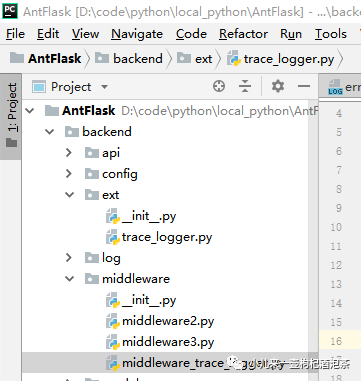
middleware_trace_logger中间件的主要职责是:
负责请求初始化的时候,追踪链路信息ID和index初始化和请求的参数信息记录。 负责请求接收结束时候的响应报文内容信息记录。
#!/usr/bin/evn python
# coding=utf-8
from common.ext.trace_logger import trace_start_log_record_handler,trace_end_log_record_handler
from flask import request
# 链路追踪中间件
class MiddlewareTraceLogger():

    def __init__(self, *args, **kwargs):
        pass

    def init_app(self, app, _is_handlers_aout=True):
        self.app = app
        if _is_handlers_aout:
            self.register_handlers()
        return self

    def __before_request(self):
        pass
        print('MiddlewareTraceLogger-----before_request')
        # 追踪日志初始化
        trace_start_log_record_handler()

    def __after_request(self, response):
        pass
        print('MiddlewareTraceLogger-----after_request=')
        # 追踪日志收尾
        trace_end_log_record_handler(response)
        return response

    def teardown_request(self, exc):
        '''
        请求结束的时候提交相关的日志
        :param exc:
        :return:
        '''
        pass

    def register_handlers(self):
        self.app.before_request(self.__before_request)
        self.app.after_request(self.__after_request)
        self.app.teardown_request(self.teardown_request)
3.测试日志追踪效果
定义个测试用的路由
if __name__ == '__main__':
    app = create_app()

    @app.route('/ceshitrace')
    def ceshitrace():
        return 'ok'

    app.run(host='127.0.0.1', port='8808', debug=True)
请求访问测试地址:http://127.0.0.1:8808/ceshitrace 查看请求日志文件:
 2021-02-25 12:03:46:581 | process_id:43944 process_name:MainProcess | thread_id:30468 thread_name:Thread-3 | INFO | {"traceid": "2329bad2c80649f1bd304025e54a2c0c", "trace_index": 1, "event_des": "请求开始", "msg_dict": {"headers": {"User-Agent": "PostmanRuntime/7.26.8", "Accept": "*/*", "Cache-Control": "no-cache", "Postman-Token": "9a67809c-7608-414d-96cf-8364ab8fcddb", "Host": "127.0.0.1:8808", "Accept-Encoding": "gzip, deflate, br", "Connection": "keep-alive", "Content-Type": "multipart/form-data; boundary=--------------------------878434958925007658822869", "Content-Length": "168"}, "url": "http://127.0.0.1:8808/ceshitrace", "method": "GET", "ip": "127.0.0.1", "params": {"args": "", "form": {"name": "xiaozhong"}, "json": ""}, "start_time": "2021-02-25 12:03:46.581635"}}
 2021-02-25 12:03:46:582 | process_id:43944 process_name:MainProcess | thread_id:30468 thread_name:Thread-3 | INFO | {"traceid": "2329bad2c80649f1bd304025e54a2c0c", "trace_index": 2, "event_des": "请求结束", "msg_dict": {"cost_time": "5.0ms", "rsp_data": "ok"}}
日志文件已经能按我们的之前的预定的完成相关的日志的记录。
4.扩展到第三方请求也添加到日志里面
一个接口的请求过程,有可能也会存在和第三方接口的进行通信可能,这时候我也需要定义访问第三方接口相关的信息的时候,我们需要在我们的请求第三方上也添加上我们的日志记录信息。
定义第三方的请求工具类
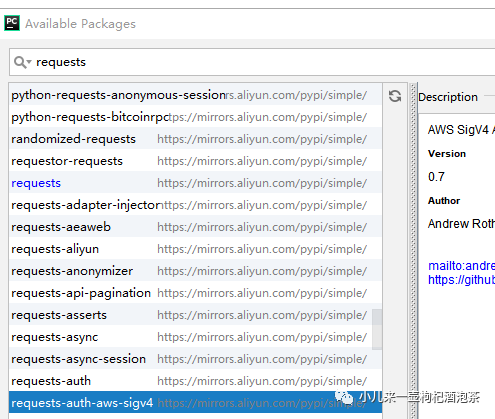
1.安装requests请求库
2.封装我们的请求工具类
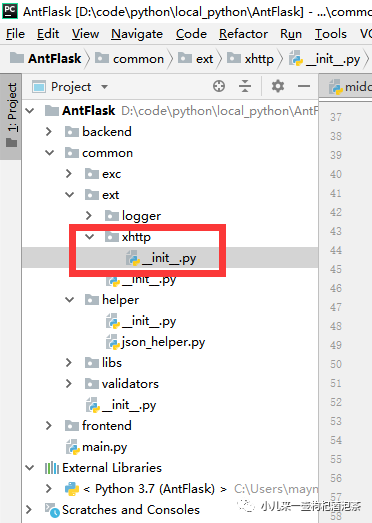 XHtt工具类的主要职责是:访问第三的接口请求的时候顺便要记录下相关第三放的请求信息。
#!/usr/bin/evn python
# coding=utf-8
# + + + ++ + + ++ + + ++ + + ++ + + ++ + + ++ + + ++ + + ++ + + ++ + + ++ + + ++ + + ++ + + ++ + + ++ + + +
# ┏┓ ┏┓+ +
# ┏┛┻━━━┛┻┓ + +
# ┃ ┃
# ┃ ━ ┃ ++ + + +
# ████━████ ┃+
# ┃ ┃ +
# ┃ ┻ ┃
# ┃ ┃ + +
# ┗━┓ ┏━┛
# ┃ ┃
# ┃ ┃ + + + +
# ┃ ┃ Codes are far away from bugs with the animal protecting
# ┃ ┃ + 神兽保佑,代码无bug
# ┃ ┃
# ┃ ┃ +
# ┃ ┗━━━┓ + +
# ┃ ┣┓
# ┃ ┏┛
# ┗┓┓┏━┳┓┏┛ + + + +
# ┃┫┫ ┃┫┫
# ┗┻┛ ┗┻┛+ + + +
# + + + ++ + + ++ + + ++ + + ++ + + ++ + + ++ + + ++ + + ++ + + ++ + + ++ + + ++ + + ++ + + ++ + + ++ + + +"""
"""
# 版权说明
# + + + ++ + + ++ + + ++ + + ++ + + ++ + + ++ + + ++ + + ++ + + ++ + + ++ + + ++ + + ++ + + ++ + + ++ + + +
Licensed under the Apache License, Version 2.0 (the "License");
you may not use this file except in compliance with the License.
You may obtain a copy of the License at
xhttp://www.apache.org/licenses/LICENSE-2.0
Unless required by applicable law or agreed to in writing, software
distributed under the License is distributed on an "AS IS" BASIS,
WITHOUT WARRANTIES OR CONDITIONS OF ANY KIND, either express or implied.
See the License for the specific language governing permissions and
limitations under the License.
# + + + ++ + + ++ + + ++ + + ++ + + ++ + + ++ + + ++ + + ++ + + ++ + + ++ + + ++ + + ++ + + ++ + + ++ + + +
# @Time : 2020/3/10 10:49
# @Author : mayn
# @Project : ZBotte
# @FileName: __init__.py.py
# @Software: PyCharm
# 作者:小钟同学
# 著作权归作者所有
# 文件功能描述:
"""
import requests
import urllib3
import json
from common.ext.trace_logger import trace_add_log_record
# 禁用安全请求警告 py3
urllib3.disable_warnings(urllib3.exceptions.InsecureRequestWarning)
from loguru import logger
# 导入信号处理库
import datetime
def get_datetime_heng():
"""获取年月日时分秒毫秒共10位数的字符串"""
return datetime.datetime.now().strftime("%Y-%m-%d %H:%M:%S")
class XHttp:
@staticmethod
def post(url=None, params=None, headers=None, params_is_json=False, isback_json=True, verify=False, timeout=15,is_log = True,is_send_wx_exceptions =False):
"""向指定接口发送Post请求"""
result = {}
r = ''
remarks = ''
request_ok = False
if not headers:
headers = {"Content-Type": "application/x-www-form-urlencoded"}
try:
if params_is_json:
r = requests.post(url, json=params, headers=headers, verify=verify, timeout=timeout)
else:
r = requests.post(url, data=params, headers=headers, verify=verify, timeout=timeout)
if r.content and r.encoding is None:
result = r.content.decode('utf-8')
elif r.content and r.encoding.lower() == 'gbk':
result = r.content.decode('gbk')
elif r.content and r.encoding.lower() == 'gb2312' or r.apparent_encoding == 'GB2312':
result = r.content.decode('gb2312')
elif r.content:
result = r.content.decode('utf-8')
else:
result = {}
if r.status_code == 502 or r.status_code == 500:
remarks = '第三方接口请求【FAIL】,status_code:%s 错误' % (r.status_code)
elif r.status_code >= 400 and r.status_code <= 499:
# return return_msg(r.status_code, '语法格式有误,服务器无法理解此请求', result)
remarks = '第三方接口请求【FAIL】,status_code:%s 错误' % (r.status_code)
else:
# 把字典转换成为string
try:
if isback_json:
result = json.loads(result)
# 返回josn
remarks = '第三方接口请求【OK】'
request_ok = True
except Exception as e:
logger.exception(e)
result = {}
remarks = '第三方接口请求内容转化JSON,请检测返回内容是否是JSON格式'
except requests.exceptions.ReadTimeout:
result = {}
# 读取超时
remarks = '第三方接口请求【FAIL】,服务器在指定时间内没有应答,服务超时(ReadTimeout)'
except requests.exceptions.ConnectTimeout:
# 服务器在指定时间内没有应答,链接超时
result = {}
remarks = '第三方接口请求【FAIL】,服务器在指定时间内没有应答,链接超时(ConnectTimeout)'
except requests.exceptions.ConnectionError:
# 未知的服务器
result = {}
remarks = '第三方接口请求【FAIL】,未知的服务器(ConnectionError)'
except requests.exceptions.ChunkedEncodingError:
result = {}
remarks = '第三方接口请求【FAIL】,ChunkedEncodingError异常'
except requests.exceptions.Timeout:
result = {}
remarks = '第三方接口请求【FAIL】,Timeout异常'
except:
result = {}
remarks = '第三方接口请求【FAIL】,其他异常(ChunkedEncodingError)'
finally:
info_interface = {
'url': url,
'method': 'POST',
'params':params ,
'params_str': str(params),
'this_time_out': str(timeout) + 's',
'req_stime': str(get_datetime_heng()),
'cost_time': r.elapsed.microseconds / 1000,
'state_code': str(r.status_code),
'result': result,
}
if is_log:
trace_add_log_record(event_des='第三方接口请求日志', msg_dict=info_interface, remarks=remarks)
# 第三方接口请求异常的时候是否发送广播通知到微信中
# if not request_ok and is_send_wx_exceptions:
# signal_send('wx_notify_third_inters_error', source='ThirdInternalErrorException', traceback=info_interface)
return request_ok, result, remarks
# return request_ok,result
@staticmethod
def get(url=None, params=None, headers=None, isback_json=True, verify=False, timeout=15,is_log = True,is_send_wx_exceptions =False):
"""向指定接口发送Get请求"""
result = {}
r = ''
remarks = ''
request_ok = False
if not headers:
headers = {"Content-Type": "application/x-www-form-urlencoded"}
try:
r = requests.get(url, params=params, headers=headers, verify=verify, timeout=timeout)
if r.content and r.encoding is None:
result = r.content.decode('utf-8')
elif r.content and r.encoding.lower() == 'gbk':
result = r.content.decode('gbk')
elif r.content and r.encoding.lower() == 'gb2312' or r.apparent_encoding == 'GB2312':
result = r.content.decode('gb2312')
elif r.content:
result = r.content.decode('utf-8')
else:
result = {}
if r.status_code == 502 or r.status_code == 500:
remarks = '第三方接口请求【FAIL】,status_code:%s 错误' % (r.status_code)
elif r.status_code >= 400 and r.status_code <= 499:
# return return_msg(r.status_code, '语法格式有误,服务器无法理解此请求', result)
remarks = '第三方接口请求【FAIL】,status_code:%s 错误'%(r.status_code)
if isback_json and r.status_code==400:
try:
result = json.loads(result)
remarks = '第三方接口请求【FAIL】,status_code:%s; %s 错误'%(r.status_code,result.get('error_desc') if 'error_desc' in result else '')
except Exception:
remarks = '第三方接口请求【FAIL】,status_code:%s 错误' % (r.status_code)
else:
# 将返回内容转为json
try:
if isback_json:
result = json.loads(result)
# 返回josn
remarks = '第三方接口请求【OK】'
request_ok = True
except Exception as e:
logger.exception(e)
result = {}
remarks = '第三方接口请求内容转化JSON,请检测返回内容是否是JSON格式'
except requests.exceptions.ReadTimeout:
result = {}
# 读取超时
remarks = '第三方接口请求【FAIL】,服务器在指定时间内没有应答,服务超时(ReadTimeout)'
except requests.exceptions.ConnectTimeout:
# 服务器在指定时间内没有应答,链接超时
result = {}
remarks = '第三方接口请求【FAIL】,服务器在指定时间内没有应答,链接超时(ConnectTimeout)'
except requests.exceptions.ConnectionError:
# 未知的服务器
result = {}
remarks = '第三方接口请求【FAIL】,未知的服务器(ConnectionError)'
except requests.exceptions.ChunkedEncodingError:
result = {}
remarks = '第三方接口请求【FAIL】,ChunkedEncodingError异常'
except requests.exceptions.Timeout:
result = {}
remarks = '第三方接口请求【FAIL】,Timeout异常'
except:
result = {}
remarks = '第三方接口请求【FAIL】,其他异常(ChunkedEncodingError)'
finally:
info_interface = {
'url': url,
'method':'GET',
'params': params,
'params_str': str(params),
'this_time_out':str(timeout)+'s',
'req_stime': str(get_datetime_heng()),
'cost_time': r.elapsed.microseconds / 1000,
'state_code': str(r.status_code),
'result': result,
}
if is_log:
# print("第三方接口请求日志")
trace_add_log_record(event_des='第三方接口请求日志', msg_dict=info_interface, remarks=remarks)
# if logger:
# from common.helper.json_helper import dict_to_json_ensure_ascii
# log_msg = dict_to_json_ensure_ascii(info_interface,ensure_ascii=False) # 返回文本
# logger.info(log_msg)
# 第三方接口请求异常的时候是否发送广播通知到微信中
# if not request_ok and is_send_wx_exceptions:
# signal_send('wx_notify_third_inters_error', source='ThirdInternalErrorException', traceback=info_interface)
return request_ok, result, remarks
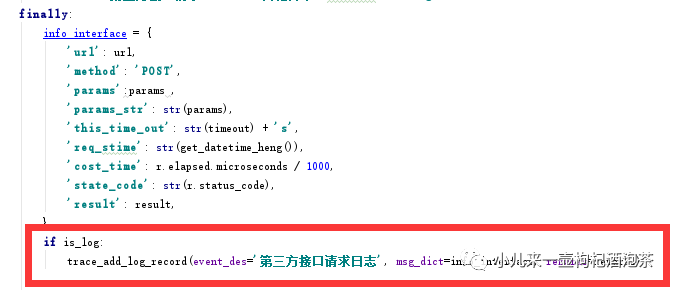
引入日志请求的关键地方是:
测试我们的第三方请求接口,新增 XHttp.get(url='http://www.baidu.com',is_log=True):
# from apicore.ext.celery_flask import make_celery
from common.ext.xhttp import XHttp
if __name__ == '__main__':
    app = create_app()

    @app.route('/ceshitrace')
    def ceshitrace():
        XHttp.get(url='http://www.baidu.com',is_log=True)
        return 'ok'

    app.run(host='127.0.0.1', port='8808', debug=True)
访问:http://127.0.0.1:8808/ceshitrace 查看我们的日志文件内容信息:
 2021-02-25 12:33:40:382 | process_id:42708 process_name:MainProcess | thread_id:43360 thread_name:Thread-2 | INFO | {"traceid": "395ae77ce15d48afb5c2ee046412d000", "trace_index": 1, "event_des": "请求开始", "msg_dict": {"headers": {"User-Agent": "PostmanRuntime/7.26.8", "Accept": "*/*", "Cache-Control": "no-cache", "Postman-Token": "96e340e4-2feb-4f8e-a423-f9653cd42011", "Host": "127.0.0.1:8808", "Accept-Encoding": "gzip, deflate, br", "Connection": "keep-alive", "Content-Type": "multipart/form-data; boundary=--------------------------597319188707565004369539", "Content-Length": "168"}, "url": "http://127.0.0.1:8808/ceshitrace", "method": "GET", "ip": "127.0.0.1", "params": {"args": "", "form": {"name": "xiaozhong"}, "json": ""}, "start_time": "2021-02-25 12:33:40.381505"}}
 2021-02-25 12:33:40:413 | process_id:42708 process_name:MainProcess | thread_id:43360 thread_name:Thread-2 | INFO | {"traceid": "395ae77ce15d48afb5c2ee046412d000", "trace_index": 2, "event_des": "第三方接口请求日志", "msg_dict": {"url": "http://www.baidu.com", "method": "GET", "params": null, "params_str": "None", "this_time_out": "15s", "req_stime": "2021-02-25 12:33:40", "cost_time": 14.831, "state_code": "200", "result": {}}, "remarks": "第三方接口请求【FAIL】,其他异常(ChunkedEncodingError)"}
 2021-02-25 12:33:40:414 | process_id:42708 process_name:MainProcess | thread_id:43360 thread_name:Thread-2 | INFO | {"traceid": "395ae77ce15d48afb5c2ee046412d000", "trace_index": 3, "event_des": "请求结束", "msg_dict": {"cost_time": "35.0ms", "rsp_data": "ok"}}
日志记录到的请求第三的返回出现了异常,修改我们的代码,因为我们的内容返回不是JSON格式的,所以转化的时候出现了异常 修改:isback_json=False
# from apicore.ext.celery_flask import make_celery
from common.ext.xhttp import XHttp
if __name__ == '__main__':
    app = create_app()

    @app.route('/ceshitrace')
    def ceshitrace():
        XHttp.get(url='http://www.baidu.com',isback_json=False,is_log=True)
        return 'ok'

    app.run(host='127.0.0.1', port='8808', debug=True)
再查看我们的日志内容:
2021-02-25 12:41:46:560 | process_id:42632 process_name:MainProcess | thread_id:38944 thread_name:Thread-2 | INFO | {"traceid": "b13e4c3cd407437ab6363d03fb093b10", "trace_index": 1, "event_des": "请求开始", "msg_dict": {"headers": {"User-Agent": "PostmanRuntime/7.26.8", "Accept": "*/*", "Cache-Control": "no-cache", "Postman-Token": "d59d3238-cb1b-407f-a3fb-1ff04ae081d7", "Host": "127.0.0.1:8808", "Accept-Encoding": "gzip, deflate, br", "Connection": "keep-alive", "Content-Type": "multipart/form-data; boundary=--------------------------183698309619172828924182", "Content-Length": "168"}, "url": "http://127.0.0.1:8808/ceshitrace", "method": "GET", "ip": "127.0.0.1", "params": {"args": "", "form": {"name": "xiaozhong"}, "json": ""}, "start_time": "2021-02-25 12:41:46.560959"}}
2021-02-25 12:41:46:612 | process_id:42632 process_name:MainProcess | thread_id:38944 thread_name:Thread-2 | INFO | {"traceid": "b13e4c3cd407437ab6363d03fb093b10", "trace_index": 2, "event_des": "第三方接口请求日志", "msg_dict": {"url": "http://www.baidu.com", "method": "GET", "params": null, "params_str": "None", "this_time_out": "15s", "req_stime": "2021-02-25 12:41:46", "cost_time": 42.524, "state_code": "200", "result": "<!DOCTYPE html>\r\n<!--STATUS OK--><html> <head><meta http-equiv=content-type content=text/html;charset=utf-8><meta http-equiv=X-UA-Compatible content=IE=Edge><meta content=always name=referrer><link rel=stylesheet type=text/css href=http://s1.bdstatic.com/r/www/cache/bdorz/baidu.min.css><title>百度一下,你就知道</title></head> <body link=#0000cc> <div id=wrapper> <div id=head> <div class=head_wrapper> <div class=s_form> <div class=s_form_wrapper> <div id=lg> <img hidefocus=true src=//www.baidu.com/img/bd_logo1.png width=270 height=129> </div> <form id=form name=f action=//www.baidu.com/s class=fm> <input type=hidden name=bdorz_come value=1> <input type=hidden name=ie value=utf-8> <input type=hidden name=f value=8> <input type=hidden name=rsv_bp value=1> <input type=hidden name=rsv_idx value=1> <input type=hidden name=tn value=baidu><span class=\"bg s_ipt_wr\"><input id=kw name=wd class=s_ipt value maxlength=255 autocomplete=off autofocus></span><span class=\"bg s_btn_wr\"><input type=submit id=su value=百度一下 class=\"bg s_btn\"></span> </form> </div> </div> <div id=u1> <a href=http://news.baidu.com name=tj_trnews class=mnav>新闻</a> <a href=http://www.hao123.com name=tj_trhao123 class=mnav>hao123</a> <a href=http://map.baidu.com name=tj_trmap class=mnav>地图</a> <a href=http://v.baidu.com name=tj_trvideo class=mnav>视频</a> <a href=http://tieba.baidu.com name=tj_trtieba class=mnav>贴吧</a> <noscript> <a href=http://www.baidu.com/bdorz/login.gif?login&tpl=mn&u=http%3A%2F%2Fwww.baidu.com%2f%3fbdorz_come%3d1 name=tj_login class=lb>登录</a> </noscript> <script>document.write('<a href=\"http://www.baidu.com/bdorz/login.gif?login&tpl=mn&u='+ encodeURIComponent(window.location.href+ (window.location.search === \"\" ? \"?\" : \"&\")+ \"bdorz_come=1\")+ '\" name=\"tj_login\" class=\"lb\">登录</a>');</script> <a href=//www.baidu.com/more/ name=tj_briicon class=bri style=\"display: block;\">更多产品</a> </div> </div> </div> <div id=ftCon> <div id=ftConw> <p id=lh> <a href=http://home.baidu.com>关于百度</a> <a href=http://ir.baidu.com>About Baidu</a> </p> <p id=cp>©2017 Baidu <a href=http://www.baidu.com/duty/>使用百度前必读</a> <a href=http://jianyi.baidu.com/ class=cp-feedback>意见反馈</a> 京ICP证030173号 <img src=//www.baidu.com/img/gs.gif> </p> </div> </div> </div> </body> </html>\r\n"}, "remarks": "第三方接口请求【OK】"}
2021-02-25 12:41:46:612 | process_id:42632 process_name:MainProcess | thread_id:38944 thread_name:Thread-2 | INFO | {"traceid": "b13e4c3cd407437ab6363d03fb093b10", "trace_index": 3, "event_des": "请求结束", "msg_dict": {"cost_time": "55.0ms", "rsp_data": "ok"}}
END
以上是关于日志记录,和延伸出来的统一记录一个请求的日志链路追踪关键点。
小钟同学 | 文 【原创】【转载请联系本人】| QQ:308711822
