




前言
之前我们相关的API测试都是零散的启动的时候里面去,但是正是线上的Api一般是分模块的。
比如我们的后台权限管理系统,每个文件就是一个Aai入口,比如Aai下我们的用 系统模块,系统下面包含了用户相关接口还有角色相关的接口,还有权限相关的接口。
如图示:
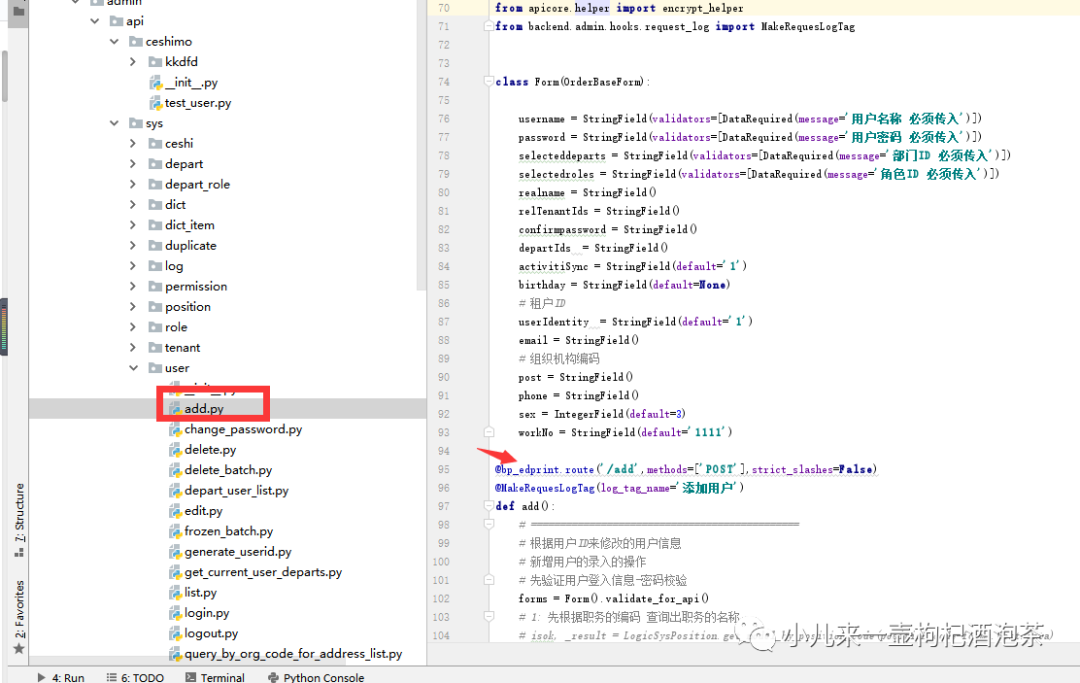
之前我们的使用蓝图就是为了方便的管理我们的Api,但是使用的时候,我们必须手动一个一个的去注册我们的蓝图模块。
如代码:
app = Flask(__name__)
#注册蓝图(注册goods模块下的蓝图对象,就可以访问相应的路径)
app.register_blueprint(app_goods,url_prefix='/sys_route')
app.register_blueprint(article,url_prefix='/user_route')
那如果是非常的多的蓝图或接口# 的情况如何让我们的蓝图自动的挂载的我们的API下,然后我们的Flask app只需要查询发现新增的模块就可以自动的导入呐?
蓝图的方式自动导入Api模块
Api模块的规划和分组
│  role.py 角色蓝图模块
│  __init__.py
│
├─sys  系统蓝图模块
│      get_sys_info.py 系统蓝图模块--get_sys_info接口
│      get_sys_list.py 系统蓝图模块--get_sys_list接口
│      __init__.py 包
│
└─user 用户蓝图模块
        get_user_info.py 用户蓝图模块--get_user_info接口
        get_user_list.py 用户蓝图模块--get_user_list接口
        __init__.py 包
现在是需要需要App自动的时候,就自动的把聚合再Api下的所有Api接口都自动路由注册。这里用到是我们的Python模块的自动导入机制。
find_modules import_string
思路:
app启动的时候,指定到我们的某个模块遍历查询下寻找蓝图对象属性 找到指定模块属性后,使用 app.register_blueprint(module,key_attribute))进行蓝图注册
1 定义遍历查询某模块下的蓝图属性工具包
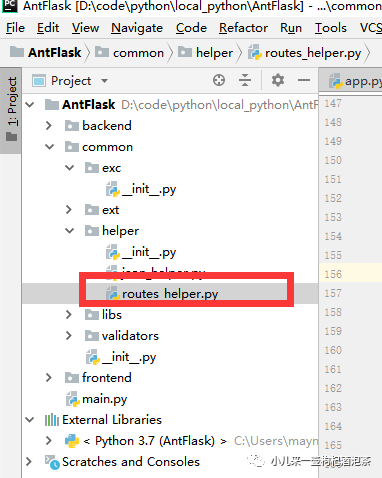
定义导入函数:
# 通过模块的属性值来导入---注意是模块 不是__init
def register_nestable_blueprint(app=None,project_name=None,api_name ='api',key_attribute = 'bp',hongtu='hongtu'):
    '''
    自动的导入的蓝图模块
    :param app:
    :return:
    '''
    if not app:
        import warnings
        warnings.warn('路由注册失败,需要传入Flask对象实例')
        return None
    if project_name:
        # include_packages 这个设置为True很关键,它包含了 检测 对于的_init__内的属性,这个对于外层的遍历的来说很关键
        modules = find_modules(f'{project_name}.{api_name}', include_packages=True,recursive=True)
        lantu  =None
        for name in modules:
            # print('藍色的合適的話', name)
            module = import_string(name)
            if hasattr(module, key_attribute):
                # print('符合藍圖', name)
                # app.register_blueprint(module.mmpbp)
                lantu = getattr(module,key_attribute)
                app.register_blueprint(getattr(module,key_attribute))
            if hasattr(module, hongtu): pass
                # print('符合紅土', name)
                # getattr(module, hongtu).register(lantu)

    else:
        import warnings
        warnings.warn('路由注册失败,外部项目名称还没定义')
ps:注意点 find_modules中的include_packages 这个设置为True很关键,它包含了 检测 对于的_init__内的属性,这个对于外层的遍历的来说很关键!
role模块代码,保持不变
from flask import Blueprint

bp = Blueprint("角色组模块", 'role', url_prefix='/role')


@bp.route('/role', methods=['GET'])
def index():

    return 'ok'
系统蓝图模块sys下的__init__.py下定义蓝图对象:
#!/usr/bin/evn python
# coding=utf-8
from flask import Blueprint
bp = Blueprint('sys', __name__, url_prefix='/sys')
系统蓝图模块sys下的get_sys_info.py
#!/usr/bin/evn python
# coding=utf-8
from backend.api.sys import bp
@bp.route('/get_sys_info', methods=['GET'])
def get_sys_info():

    return 'ok'
系统蓝图模块sys下的get_sys_list.py
#!/usr/bin/evn python
# coding=utf-8
from backend.api.sys import bp
@bp.route('/get_sys_list', methods=['GET'])
def get_sys_list():

    return 'ok'
用户组的上述。只是对应的接口名称不一样。
在app启动的时候进行自动模块查询
def __init_route(app):
    # 初始化该插件的下的蓝图路由
    from common.helper.routes_helper import register_nestable_blueprint
    register_nestable_blueprint(app=app, project_name='backend', api_name='api', key_attribute='bp')
启动服务查看自动导入效果
------上面还有很多的其他代码,省略而已

def __init_route(app):
    # 初始化该插件的下的蓝图路由
    from common.helper.routes_helper import register_nestable_blueprint
    register_nestable_blueprint(app=app, project_name='backend', api_name='api', key_attribute='bp')


def create_app():
    app = Flask(__name__)
    # 初始化默认有的路由
    __health_chcek_route(app)
    # 初始化配置信息----初始化优先级1
    __init_config(app)
    # # 初始化数据库的链接
    __init_db(app)
    __register_customize_log_loguru()
    # 全局错误处理初始化
    __init_error_handlers(app)
    # 初始化钩子异常
    __init_hooks(app)
    # 初始化相关的第三方的插件库
    __init_all_plugins(app)
    # WSGI代理支持
    # app.wsgi_app = ProxyFix(app.wsgi_app, num_proxies=1)
    # 自动导入模块
    __init_route(app)
    return app


# from apicore.ext.celery_flask import make_celery
from common.ext.xhttp import XHttp

if __name__ == '__main__':
    app = create_app()
    print(app.url_map)
    app.run(host='127.0.0.1', port='8808', debug=True)
查看我们的输出情况:
2021-02-25 16:39:32.483 | INFO     | __main__:__register_customize_log_loguru:140 - 日志对象初始化完成!
Map([<Rule '/user/get_user_info' (HEAD, OPTIONS, GET) -> user.get_user_info>,
 <Rule '/user/get_user_info' (HEAD, OPTIONS, GET) -> user.get_user_info>,
 <Rule '/user/get_user_list' (HEAD, OPTIONS, GET) -> user.get_user_list>,
 <Rule '/role/role' (HEAD, OPTIONS, GET) -> 角色组模块.index>,
 <Rule '/sys/get_sys_info' (HEAD, OPTIONS, GET) -> sys.get_sys_info>,
 <Rule '/sys/get_sys_info' (HEAD, OPTIONS, GET) -> sys.get_sys_info>,
 <Rule '/sys/get_sys_list' (HEAD, OPTIONS, GET) -> sys.get_sys_list>,
 <Rule '/backend_health' (HEAD, OPTIONS, GET) -> backend_health>,
 <Rule '/' (HEAD, OPTIONS, GET) -> route_map>,
 <Rule '/static/<filename>' (HEAD, OPTIONS, GET) -> static>])
 * Debugger is active!
 * Debugger PIN: 104-589-570
 * Running on http://127.0.0.1:8808/ (Press CTRL+C to quit)
看到有重复的导入接口了!!!
 <Rule '/sys/get_sys_info' (HEAD, OPTIONS, GET) -> sys.get_sys_info>,
 <Rule '/sys/get_sys_info' (HEAD, OPTIONS, GET) -> sys.get_sys_info>,
原因是因为我们找的都是关于叫做bp的蓝图对象的属性。但是每个模块里面都是这个属性了,所以会引发重复注册问题。 规避重复导入问题,可以使用重名的方式。
role模块代码,保持不变
from flask import Blueprint

bp = Blueprint("角色组模块", 'role', url_prefix='/role')


@bp.route('/role', methods=['GET'])
def index():

    return 'ok'
系统蓝图模块sys下的__init__.py下定义蓝图对象: 保持不变
#!/usr/bin/evn python
# coding=utf-8
from flask import Blueprint
bp = Blueprint('sys', __name__, url_prefix='/sys')
系统蓝图模块sys下的get_sys_info.py 修改为导入时候进行重名名bp 变为 lantu
#!/usr/bin/evn python
# coding=utf-8

from backend.api.sys import bp as lantu

@lantu.route('/get_sys_info', methods=['GET'])
def get_sys_info():
    return 'ok'
系统蓝图模块sys下的get_sys_list.py 修改为导入时候进行重名名bp 变为 lantu
#!/usr/bin/evn python
# coding=utf-8
from backend.api.sys import bp as lantu
@lantu.route('/get_sys_list', methods=['GET'])
def get_sys_list():

    return 'ok'
再重新的启动服务看输出的结果:
Map([<Rule '/role/role' (GET, HEAD, OPTIONS) -> 角色组模块.index>,
 <Rule '/sys/get_sys_info' (GET, HEAD, OPTIONS) -> sys.get_sys_info>,
 <Rule '/sys/get_sys_list' (GET, HEAD, OPTIONS) -> sys.get_sys_list>,
 <Rule '/backend_health' (GET, HEAD, OPTIONS) -> backend_health>,
 <Rule '/' (GET, HEAD, OPTIONS) -> route_map>,
 <Rule '/static/<filename>' (GET, HEAD, OPTIONS) -> static>])
关注点:
<Rule '/sys/get_sys_info' (GET, HEAD, OPTIONS) -> sys.get_sys_info>,
<Rule '/sys/get_sys_list' (GET, HEAD, OPTIONS) -> sys.get_sys_list>,、
这两个接口已经自动的导入了!我们在修改一下我们的用户组下的一样,充命名! 但是服务再观察,好像我们的用户组的没有自动导入了!!!
系统蓝图模块user下的__init__.py下定义蓝图对象: 保持不变
#!/usr/bin/evn python
# coding=utf-8
from flask import Blueprint
bp = Blueprint('user', __name__, url_prefix='/user')
系统蓝图模块user下的get_user_info.py 修改为导入时候进行重名名bp 变为 lantu
#!/usr/bin/evn python
# coding=utf-8

from backend.api.sys import bp as lantu

@lantu.route('/get_user_info', methods=['GET'])
def get_sys_info():
    return 'ok'
系统蓝图模块sys下的get_user_list.py 修改为导入时候进行重名名bp 变为 lantu
#!/usr/bin/evn python
# coding=utf-8
from backend.api.sys import bp as lantu
@lantu.route('/get_user_list', methods=['GET'])
def get_user_list):

    return 'ok'
分析了一下,应该导入模块循环的时候,加载到其他模块了的时候没自动的导入了!
修改-系统蓝图模块user下的__init__.py 和 sys下的__init__.py
新增如下的代码: sys:
#!/usr/bin/evn python
# coding=utf-8
from flask import Blueprint
bp = Blueprint('sys', __name__, url_prefix='/sys')

# 使用的是非模块内 属性的判断形势导入的时候没,可以使用下面的这个方案二,自动的进行导入
def auto():
    import os
    import sys
    pro_path = os.path.split(os.path.realpath(__file__))[0]
    sys.path.append(pro_path)
    for root, dirs, files in os.walk(pro_path):
        for file in files:
            name, ext = os.path.splitext(file)
            if ext == '.py' and name != '__init__' and pro_path == root:
                __import__(name)
        break

#自动化
auto()
user:
#!/usr/bin/evn python
# coding=utf-8
from flask import Blueprint
bp = Blueprint('user', __name__, url_prefix='/user')

# 使用的是非模块内 属性的判断形势导入的时候没,可以使用下面的这个方案二,自动的进行导入
def auto():
    import os
    import sys
    pro_path = os.path.split(os.path.realpath(__file__))[0]
    sys.path.append(pro_path)
    for root, dirs, files in os.walk(pro_path):
        for file in files:
            name, ext = os.path.splitext(file)
            if ext == '.py' and name != '__init__' and pro_path == root:
                __import__(name)
        break

#自动化
auto()
再启动观察我们的URL情况:
2021-02-25 17:06:58.926 | INFO     | __main__:__register_customize_log_loguru:140 - 日志对象初始化完成!
Map([<Rule '/user/get_user_info' (GET, HEAD, OPTIONS) -> user.get_user_info>,
 <Rule '/user/get_user_list' (GET, HEAD, OPTIONS) -> user.get_user_list>,
 <Rule '/sys/get_sys_info' (GET, HEAD, OPTIONS) -> sys.get_sys_info>,
 <Rule '/sys/get_sys_list' (GET, HEAD, OPTIONS) -> sys.get_sys_list>,
 <Rule '/backend_health' (GET, HEAD, OPTIONS) -> backend_health>,
 <Rule '/' (GET, HEAD, OPTIONS) -> route_map>,
 <Rule '/static/<filename>' (GET, HEAD, OPTIONS) -> static>])
 * Debugger is active!
 * Debugger PIN: 104-589-570
 * Running on http://127.0.0.1:8808/ (Press CTRL+C to quit)
已经正常的自动加载所有的URL了!
蓝图的方式自动导入Api
(意思就是蓝图下面还有蓝图,不是单纯的一个接口.py方式,而是一个包分类的形式)
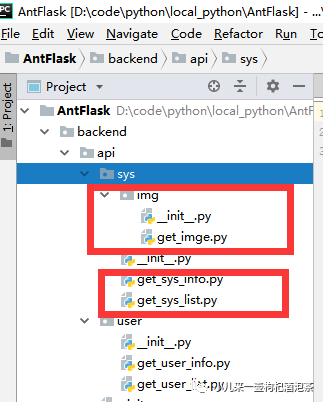
需要对自动导入的模块下包含的文件夹的包再进行导入。 新增关于自动导入下的包含文件夹的子包的分析导入。
修改-系统蓝图模块user下的__init__.py 和 sys下的__init__.py
新增如下的代码:
#!/usr/bin/evn python
# coding=utf-8
# + + + ++ + + ++ + + ++ + + ++ + + ++ + + ++ + + ++ + + ++ + + ++ + + ++ + + ++ + + ++ + + ++ + + ++ + + +
#        ┏┓   ┏┓+ +
#    ┏┛┻━━━┛┻┓ + +
#    ┃       ┃
#    ┃   ━   ┃ ++ + + +
#    ████━████ ┃+
#    ┃       ┃ +
#    ┃   ┻   ┃
#    ┃       ┃ + +
#    ┗━┓   ┏━┛
#      ┃   ┃
#      ┃   ┃ + + + +
#      ┃   ┃    Codes are far away from bugs with the animal protecting
#      ┃   ┃ +     神兽保佑,代码无bug
#      ┃   ┃
#      ┃   ┃  +
#      ┃    ┗━━━┓ + +
#      ┃        ┣┓
#      ┃        ┏┛
#      ┗┓┓┏━┳┓┏┛ + + + +
#       ┃┫┫ ┃┫┫
#       ┗┻┛ ┗┻┛+ + + +
# + + + ++ + + ++ + + ++ + + ++ + + ++ + + ++ + + ++ + + ++ + + ++ + + ++ + + ++ + + ++ + + ++ + + ++ + + +"""
"""
# 版权说明
# + + + ++ + + ++ + + ++ + + ++ + + ++ + + ++ + + ++ + + ++ + + ++ + + ++ + + ++ + + ++ + + ++ + + ++ + + +

Licensed under the Apache License, Version 2.0 (the "License");
you may not use this file except in compliance with the License.
You may obtain a copy of the License at

    http://www.apache.org/licenses/LICENSE-2.0

Unless required by applicable law or agreed to in writing, software
distributed under the License is distributed on an "AS IS" BASIS,
WITHOUT WARRANTIES OR CONDITIONS OF ANY KIND, either express or implied.
See the License for the specific language governing permissions and
limitations under the License.
# + + + ++ + + ++ + + ++ + + ++ + + ++ + + ++ + + ++ + + ++ + + ++ + + ++ + + ++ + + ++ + + ++ + + ++ + + +

# @Time  : 2020/3/26 16:32

# @Author : mayn

# @Project : ZFlask

# @FileName: __init__.py.py

# @Software: PyCharm

# 作者:小钟同学

# 著作权归作者所有

# 文件功能描述:
"""


from flask import Blueprint
bp = Blueprint('cekkskd', __name__, url_prefix='/cekkskd')


# 导入其他模块
# from backend.admin.api.sys.permission import permission
# permission.register(bp)
# import os
# import sys
#
# pro_path = os.path.split(os.path.realpath(__file__))[0]
# sys.path.append(pro_path)
import os
import sys

pro_path = os.path.split(os.path.realpath(__file__))[0]
sys.path.append(pro_path)

def auto_register_edprint(edprint_key_attribute ='bp_edprint'):
    # 如果存在红图,则自动的导入红图的模块并且进行注册
    for root, dirs, files in os.walk(pro_path):
        # 遍历所有的文件夹
        if len(dirs)<=0:
            continue
        for d in dirs:
            if '__pycache__' not in root and '__pycache__' not in str(d):
                pass
                # intas = intas+1
                # 安装红图对象的执行的次数,等加载到最后的时候再执行操作
                install_redprint_index = 0
                curr_redprint_dir = os.path.join(root, d)
                # 安装当前文件夹是红图的对象名称
                for curr_redprint_dir_doot, curr_redprint_dir_dirs, curr_redprint_dir_files in os.walk(curr_redprint_dir):
                    for curr_redprint_dir_file in curr_redprint_dir_files:
                        # 查询当前存在红图对象属性的文件
                        name, ext = os.path.splitext(curr_redprint_dir_file)
                        # 判断非__init__ 是否存在对应的红图对象模块
                        if name != '__init__' and ext == '.py':
                            curr_redprint_module = __import__(d + '.' + name, fromlist=[''])
                            # module = import_string(name)
                            # if hasattr(module___sad, 'auto'):
                            #     auto = getattr(module___sad, 'auto')
                            # 动态的导入模块下某个方法
                            #     auto()
                            if hasattr(curr_redprint_module, edprint_key_attribute):
                                # 判断某个属性对象是否存在
                                cls = getattr(curr_redprint_module, edprint_key_attribute)
                                # 调用属性的方法
                                # cls.register2(bp)
                                install_redprint_index = install_redprint_index + 1
                                # 避免多次的加载红图对象
                                if install_redprint_index == len(curr_redprint_dir_files) - 1:
                                    # 当挂载完成所有的红图的路径之后,再执行对应的注册
                                    cls.register(bp)

                        else:
                            # 如果__init__ 本身自己就带有了红图的对象属性的话,
                            if name == '__init__' and ext == '.py':
                                curr_redprint_module = __import__(d + '.' + name, fromlist=[''])
                                if hasattr(curr_redprint_module, edprint_key_attribute):
                                    # 判断某个属性对象是否存在
                                    cls = getattr(curr_redprint_module, edprint_key_attribute)
                                    # 当直接的执行注册
                                    cls.register(bp)
                            pass


def auto_register_lanytu():
    # 如果存在红图,则自动的导入红图的模块并且进行注册
    for root, dirs, files in os.walk(pro_path):
        # 遍历所有的文件夹
        if len(dirs)<=0:
            continue
        for d in dirs:
            if '__pycache__' not in root and '__pycache__' not in str(d):
                pass
                # intas = intas+1
                # 安装红图对象的执行的次数,等加载到最后的时候再执行操作
                install_redprint_index = 0
                curr_redprint_dir = os.path.join(root, d)
                # 安装当前文件夹是红图的对象名称
                for curr_redprint_dir_doot, curr_redprint_dir_dirs, curr_redprint_dir_files in os.walk(curr_redprint_dir):
                    for curr_redprint_dir_file in curr_redprint_dir_files:
                        # 查询当前存在红图对象属性的文件
                        name, ext = os.path.splitext(curr_redprint_dir_file)
                        # 判断非__init__ 是否存在对应的红图对象模块
                        # 如果__init__ 本身自己就带有了红图的对象属性的话,
                        if name == '__init__' and ext == '.py':
                            curr_redprint_module = __import__(d + '.' + name, fromlist=[''])
                        pass

def auto_py():
    for root, dirs, files in os.walk(pro_path):
        # 导入非文件夹模块的文件
        for file in files:
            name, ext = os.path.splitext(file)
            if ext == '.py' and name != '__init__' and pro_path == root:
                __import__(name)
        # 如果存在红图,则自动的导入红图的模块并且进行注册
        if len(dirs)>0:
            pass

        break
    # 自动注册红图
    # auto_register_edprint()

# 自动导入蓝图
auto_py()
# 自动导入蓝图下的红图模块
# auto_register_edprint()
auto_register_lanytu()
测试查看我们的新增的接口get_imge.py
#!/usr/bin/evn python
# coding=utf-8


from backend.api.sys import bp as lantu
@lantu.route('/getimgae/tuing', methods=['GET'])
def getimgae():

    return 'ok'
PS:注意我们的也需要再res下的__init__需要进行自动的导入
#!/usr/bin/evn python
# coding=utf-8


import os
import sys

pro_path = os.path.split(os.path.realpath(__file__))[0]
sys.path.append(pro_path)


def auto_py():
    for root, dirs, files in os.walk(pro_path):
        # 导入非文件夹模块的文件
        for file in files:
            name, ext = os.path.splitext(file)
            if ext == '.py' and name != '__init__' and pro_path == root:
                __import__(name)
        # 如果存在红图,则自动的导入红图的模块并且进行注册
        if len(dirs)>0:
            pass

        break

auto_py()
最终我们的启动服务查看对应的路由注册情况:
2021-02-25 17:20:23.397 | INFO     | __main__:__register_customize_log_loguru:140 - 日志对象初始化完成!
Map([<Rule '/sys/getimgae/tuing' (HEAD, OPTIONS, GET) -> sys.getimgae>,
 <Rule '/user/get_user_info' (HEAD, OPTIONS, GET) -> user.get_user_info>,
 <Rule '/user/get_user_list' (HEAD, OPTIONS, GET) -> user.get_user_list>,
 <Rule '/sys/get_sys_info' (HEAD, OPTIONS, GET) -> sys.get_sys_info>,
 <Rule '/sys/get_sys_list' (HEAD, OPTIONS, GET) -> sys.get_sys_list>,
 <Rule '/backend_health' (HEAD, OPTIONS, GET) -> backend_health>,
 <Rule '/' (HEAD, OPTIONS, GET) -> route_map>,
 <Rule '/static/<filename>' (HEAD, OPTIONS, GET) -> static>])
 * Debugger is active!
 * Debugger PIN: 104-589-570
 * Running on http://127.0.0.1:8808/ (Press CTRL+C to quit)
Map([<Rule '/sys/getimgae/tuing' (HEAD, OPTIONS, GET) -> sys.getimgae>,正常的导入
后续你新增任何接口的都都会自动的导入:
新增新的接口: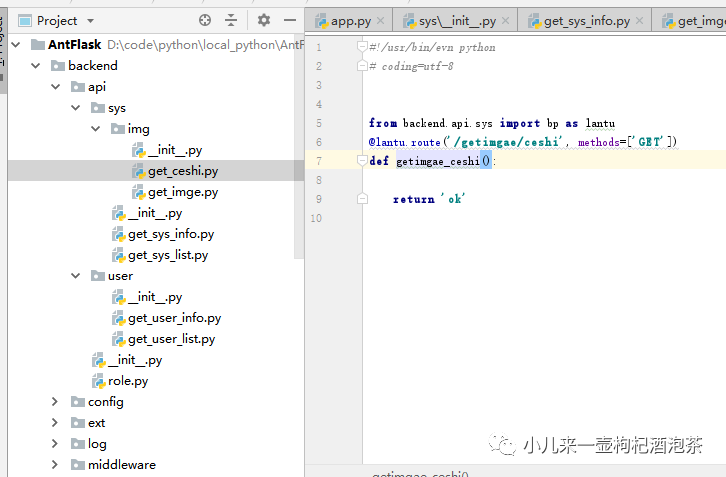 再看路由注册情况:
Map([<Rule '/sys/getimgae/ceshi' (OPTIONS, GET, HEAD) -> sys.getimgae_ceshi>,
 <Rule '/sys/getimgae/tuing' (OPTIONS, GET, HEAD) -> sys.getimgae>,
 <Rule '/user/get_user_info' (OPTIONS, GET, HEAD) -> user.get_user_info>,
 <Rule '/user/get_user_list' (OPTIONS, GET, HEAD) -> user.get_user_list>,
 <Rule '/sys/get_sys_info' (OPTIONS, GET, HEAD) -> sys.get_sys_info>,
 <Rule '/sys/get_sys_list' (OPTIONS, GET, HEAD) -> sys.get_sys_list>,
 <Rule '/backend_health' (OPTIONS, GET, HEAD) -> backend_health>,
 <Rule '/' (OPTIONS, GET, HEAD) -> route_map>,
 <Rule '/static/<filename>' (OPTIONS, GET, HEAD) -> static>])
 * Debugger is active!
 * Debugger PIN: 104-589-570
 * Running on http://127.0.0.1:8808/ (Press CTRL+C to quit)
END
以上关于蓝图的自动导入的情况,其实还可以做到红图,这个和蓝图的差不多!
小钟同学 | 文 【原创】【转载请联系本人】| QQ:308711822
