



上一节《Jenkins X--(6)虚拟机里搭建Minikube环境》,我们已经完成了基于minikube的K8s环境的搭建,如果只是学习K8s这个环境就够了。这一节,我们要在这个K8s集群上,搭建一套云原生时代CICD的开源框架:Jenkins X。
jenkins-x-versions:v1.0.118 https://github.com/jenkins-x/jenkins-x-versions
jx:2.0.844 https://github.com/jenkins-x/jx
jenkins-x-platform:2.0.1413 https://github.com/jenkins-x/jenkins-x-platform
jenkins-x-versions是一个包含与jenkins-x及其相关程序一起使用的packages和helm charts的一致的版本集合。jenkins-x-versions v1.0.118 对应的jx版本是2.0.844,jenkins-x-platform的版本是2.0.1413。
首先安装jx
首先在本机上安装一个命令行工具jx,用于安装和使用Jenkins X。
jx可以安装在MacOs,Linux和Window上。可以参考:https://github.com/jenkins-x/jx/releases
这里执行一下命令安装2.0.844版本的jx:
curl -L https://github.com/jenkins-x/jx/releases/download/v2.0.844/jx-linux-amd64.tar.gz | tar xzvsudo mv jx usr/local/bin
验证jx是否安装成功,输入:jx,显示jx的命令清单。
[root@learncloudnative ~]# jxjx is a command line tool for working with Jenkins XWARNING: Unable to load managed plugins because customresourcedefinitions.apiextensions.k8s.io "plugins.jenkins.io" not foundInstalling:profile Set your jx profileboot Boots up Jenkins X in a Kubernetes cluster using GitOps and a Jenkins X Pipelineinstall Install Jenkins X in the current Kubernetes clusteruninstall Uninstall the Jenkins X platformupgrade Upgrades a resourcecreate cluster Create a new Kubernetes clusterupdate cluster Updates an existing Kubernetes clustercreate jenkins token Adds a new username and API token for a Jenkins serverdelete jenkins token Deletes one or more Jenkins user API tokensinit Init Jenkins XAdding Projects to Jenkins X:import Imports a local project or Git repository into Jenkinscreate archetype Create a new app from a Maven Archetype and import the generated code into Git and Jenkins for CI/CDcreate spring Create a new Spring Boot application and import the generated code into Git and Jenkins for CI/CDcreate lile Create a new Lile based application and import the generated code into Git and Jenkins for CI/CDcreate micro Create a new micro based application and import the generated code into Git and Jenkins for CI/CDcreate quickstart Create a new app from a Quickstart and import the generated code into Git and Jenkins for CI/CDcreate quickstartlocation Create a location of quickstarts for your teamApps:create addon Creates an addoncreate token addon Adds a new token/login for a user for a given addondelete addon Deletes one or more addonsdelete token addon Deletes one or more API tokens for a user on an issue addon serverdelete app Deletes one or more apps from Jenkins Xdelete application Deletes one or more applications from Jenkinsadd app Adds an appGit:create git server Creates a new Git server from a URL and kinddelete git server Deletes one or more Git serverscreate git token Adds a new API token for a user on a Git serverdelete git token Deletes one or more API tokens for a user on a Git serverrepository Opens the web page for the current Git repository in a browserWorking with Kubernetes:compliance Run compliance tests against Kubernetes clustercompletion Output shell completion code for the given shell (bash or zsh)context View or change the current Kubernetes context (Kubernetes cluster)environment View or change the current environment in the current Kubernetes clusterteam View or change the current team in the current Kubernetes clusternamespace View or change the current namespace context in the current Kubernetes clusterprompt Generate the command line prompt for the current team and environmentscan Perform a scan actionshell Create a sub shell so that changes to the Kubernetes context, namespace or environment remain local to the shellstatus status of the Kubernetes cluster or named nodeWorking with Applications:console Opens the Jenkins consolelogs Tails the log of the latest pod for a deploymentopen Open a service in a browserrsh Opens a terminal in a pod or runs a command in the podsync Synchronises your local files to a DevPodWorking with CloudBees application:cloudbees Opens the CloudBees app for Kubernetes for visualising CI/CD and your environmentslogin Onboard an user into the CloudBees applicationWorking with Environments:preview Creates or updates a Preview Environment for the current version of an applicationpromote Promotes a version of an application to an Environmentcreate addon environment Create an Environment Controller to handle webhooks and promote changes from GitOpscreate environment Create a new Environment which is used to promote your Team's Applications via Continuous Deliverydelete addon environment Deletes the Environment Controllerdelete environment Deletes one or more Environmentsedit environment Edits an Environment which is used to promote your Team's Applications via Continuous Deliveryget environments Display one or more EnvironmentsWorking with Jenkins X resources:get Display one or more resourcesedit Edit a resourcecreate Create a new resourceupdate Updates an existing resourcedelete Deletes one or more resourcesadd Adds a new resourcestart Starts a process such as a pipelinestop Stops a process such as a pipelineJenkins X Pipeline Commands:step pipeline stepsJenkins X services:controller Runs a controllergc Garbage collects Jenkins X resourcesOther Commands:diagnose Print diagnostic information about the Jenkins X installationdocs Open the documentation in a browserhelp Help about any commandversion Print the version informationOptions:-b, --batch-mode=false: Runs in batch mode without prompting for user input--verbose=false: Enables verbose output--version=false: version for jxUsage:jx [flags] [options]Use "jx <command> --help" for more information about a given command.Use "jx options" for a list of global command-line options (applies to all commands).[root@learncloudnative ~]#
安装Jenkins-X到当前K8s集群
准备工作
jx在安装jenkinsX到K8s集群时,需要从github上clone相关的代码库,比如:预览环境和生产环境的模板代码库。也需要提供一个Git Server以及相关的账号、Token来上传相应的代码库。因此,验证git是否安装,并设置git config。
安装Git
centos里自带的git的版本有点低,可通过下面方法使用源码安装高版本git
# yum -y groupinstall Development tools# yum install gcc perl-ExtUtils-MakeMaker openssl-devel curl-devel expat-devel# yum -y remove git# wget https://www.kernel.org/pub/software/scm/git/git-2.16.5.tar.gz# tar -zxvf git-2.16.5.tar.gz# make prefix=/usr/local/git all# make prefix=/usr/local/git install# echo "export PATH=$PATH:/usr/local/git/bin" >> etc/bashrc# source etc/bashrc
设置Git Server Token
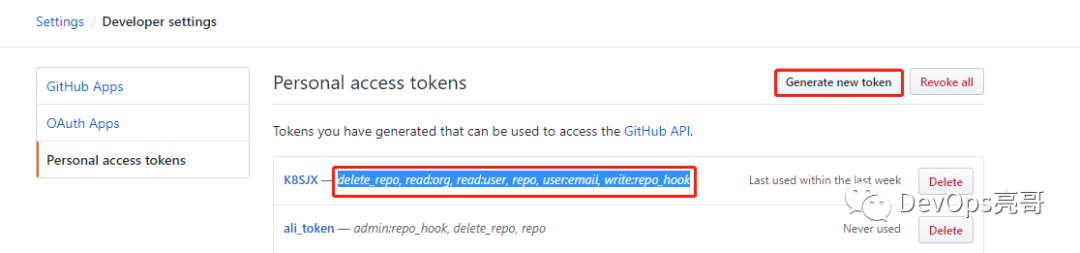
Git Server的token提前准备好,我这里是用的github,可以在个人设置Setting---Personal access tokens里添加新的token。权限包括:delete_repo, read:org, read:user, repo, user:email, write:repo_hook
下载JenkinsX的镜像
jenkinsX的镜像需要从国外网站上下载,jx并没有提供像minikube里指定镜像地址的参数,这里只能依靠之前写的《Jenkins X--(4)不用翻墙也能下载国外的镜像》,先提前把镜像准备好。各位幸运的是,这些镜像我都已经准备好了,可以在hub.docker.com里搜索,账号:xinglongjian下一般都有,如果没有,那就是在其他的账号里已经有了,我就没重复上传。如果都没有,可以安装文章里提供的方法,自行上传。
执行安装
jx install --versions-ref='v1.0.118'
执行过程如下:执行过程中会设置git config,以及连接github的账号和token,jx install根据指定的版本下载相应的代码库和镜像,同时会给自己的代码库中创建好环境代码库(test,stage,production)。
[root@learncloudnative ~]# jx install --versions-ref='v1.0.118'? Select Jenkins installation type: [Use arrows to move, space to select, type to filter]> Serverless Jenkins X Pipelines with TektonStatic Jenkins Server and Jenkinsfiles? Select Jenkins installation type: [Use arrows to move, space to select, type to filter]Serverless Jenkins X Pipelines with Tekton> Static Jenkins Server and Jenkinsfiles? Select Jenkins installation type: Static Jenkins Server and JenkinsfilesNamespace jx createdContext "minikube" modified.set exposeController Config Domain 192.168.117.129.nip.ioGit configured for user: xinglongjian and email xinglongjian@qq.comhelm installed and configurednginx ingress controller already enabledSet up a Git username and API token to be able to perform CI/CD? Do you wish to use xinglongjian as the local Git user for GitHub server: YesSelect the CI/CD pipelines Git server and user? Do you wish to use GitHub as the pipelines Git server: YesSetting the pipelines Git server https://github.com and user name xinglongjian.Deleting and cloning the Jenkins X versions repoCloning the Jenkins X versions repo https://github.com/jenkins-x/jenkins-x-versions.git with revision v1.0.118 to root/.jx/jenkins-x-versionsremote: Enumerating objects: 2, done.remote: Counting objects: 100% (2/2), done.remote: Compressing objects: 100% (2/2), done.remote: Total 2 (delta 0), reused 2 (delta 0), pack-reused 0展开对象中: 100% (2/2), 完成.来自 https://github.com/jenkins-x/jenkins-x-versions* tag v1.0.118 -> FETCH_HEADCloning the Jenkins X cloud environments repo to root/.jx/cloud-environments? A local Jenkins X cloud environments repository already exists, recreating with latest: YesCloning the Jenkins X cloud environments repo to root/.jx/cloud-environmentsEnumerating objects: 1440, done.Total 1440 (delta 0), reused 0 (delta 0), pack-reused 1440? Defaulting workload build pack: Kubernetes Workloads: Automated CI+CD with GitOps PromotionSetting the team build pack to kubernetes-workloads repo: https://github.com/jenkins-x-buildpacks/jenkins-x-kubernetes.git ref: masterInstalling jx into namespace jxInstalling jenkins-x-platform version: 2.0.1413Deleting and cloning the Jenkins X versions repoCloning the Jenkins X versions repo https://github.com/jenkins-x/jenkins-x-versions.git with revision v1.0.118 to root/.jx/jenkins-x-versionsremote: Enumerating objects: 2, done.remote: Counting objects: 100% (2/2), done.remote: Compressing objects: 100% (2/2), done.remote: Total 2 (delta 0), reused 2 (delta 0), pack-reused 0展开对象中: 100% (2/2), 完成.来自 https://github.com/jenkins-x/jenkins-x-versions* tag v1.0.118 -> FETCH_HEADWARNING: waiting for install to be ready, if this is the first time then it will take a while to download imagesJenkins X deployments ready in namespace jxConfiguring the TeamSettings for ImportMode JenkinsfileConfigure Jenkins API TokenGenerating the API token...Logged in admin to Jenkins server at http://jenkins.jx.192.168.117.129.nip.io via legacy security realmEnable CSRF protection at: http://jenkins.jx.192.168.117.129.nip.io/configureSecurity/Created user admin API Token for Jenkins server jenkins.jx.192.168.117.129.nip.io at http://jenkins.jx.192.168.117.129.nip.ioUpdating Jenkins with new external URL details http://jenkins.jx.192.168.117.129.nip.ioCreating default staging and production environments? Select the organization where you want to create the environment repository: [Use arrows to move, space to select, type to filter]> xinglongjian? Select the organization where you want to create the environment repository: xinglongjianUsing Git provider GitHub at https://github.com? Using Git user name: xinglongjian? Using organisation: xinglongjianCreating repository xinglongjian/environment-healerwheat-stagingCreating Git repository xinglongjian/environment-healerwheat-stagingPushed Git repository to https://github.com/xinglongjian/environment-healerwheat-stagingCreating staging Environment in namespace jxCreated environment stagingCreated Jenkins Project: http://jenkins.jx.192.168.117.129.nip.io/job/xinglongjian/job/environment-healerwheat-staging/Note that your first pipeline may take a few minutes to start while the necessary images get downloaded!Creating GitHub webhook for xinglongjian/environment-healerwheat-staging for url http://jenkins.jx.192.168.117.129.nip.io/github-webhook/Using Git provider GitHub at https://github.com? Using Git user name: xinglongjian? Using organisation: xinglongjianCreating repository xinglongjian/environment-healerwheat-productionCreating Git repository xinglongjian/environment-healerwheat-productionPushed Git repository to https://github.com/xinglongjian/environment-healerwheat-productionCreating production Environment in namespace jxCreated environment productionNamespace jx-production createdCreated Jenkins Project: http://jenkins.jx.192.168.117.129.nip.io/job/xinglongjian/job/environment-healerwheat-production/Note that your first pipeline may take a few minutes to start while the necessary images get downloaded!Creating GitHub webhook for xinglongjian/environment-healerwheat-production for url http://jenkins.jx.192.168.117.129.nip.io/github-webhook/Jenkins X installation completed successfully********************************************************NOTE: Your admin password is: wn4vA4abe+ncULd48g~s********************************************************Your Kubernetes context is now set to the namespace: jxTo switch back to your original namespace use: jx namespace jxOr to use this context/namespace in just one terminal use: jx shellFor help on switching contexts see: https://jenkins-x.io/developing/kube-context/To import existing projects into Jenkins: jx importTo create a new Spring Boot microservice: jx create spring -d web -d actuatorTo create a new microservice from a quickstart: jx create quickstart[root@learncloudnative ~]#
jenkins X安装时默认,在k8s集群中安装一个名为jx的命名空间。同时也会为每个环境创建一个命名空间,如下表:
[root@learncloudnative ~]# kubectl get nsNAME STATUS AGEdefault Active 4d18hjx Active 25mjx-production Active 20mjx-staging Active 14hkube-public Active 4d18hkube-system Active 4d18h[root@learncloudnative ~]# kubectl get pod -n jxNAME READY STATUS RESTARTS AGEjenkins-5c95d5bf9b-p94qh 1/1 Running 0 23mjenkins-x-chartmuseum-67f75c4884-kc9f8 1/1 Running 0 23mjenkins-x-controllerrole-7f7d94659c-8fnbx 1/1 Running 0 23mjenkins-x-controllerteam-9775fbf47-4cggm 1/1 Running 0 23mjenkins-x-controllerworkflow-578f9cbf9b-4bmt5 1/1 Running 0 23mjenkins-x-docker-registry-589d4d79c4-dx4jq 1/1 Running 0 23mjenkins-x-heapster-fbdccf687-vchkq 2/2 Running 0 23mjenkins-x-nexus-57c8447c4-7gnw8 1/1 Running 0 23mmaven-ns5xq 2/2 Running 0 20mmaven-x1293 2/2 Running 0 20m[root@learncloudnative ~]# kubectl get all -n jxNAME READY STATUS RESTARTS AGEpod/jenkins-5c95d5bf9b-p94qh 1/1 Running 0 23mpod/jenkins-x-chartmuseum-67f75c4884-kc9f8 1/1 Running 0 23mpod/jenkins-x-controllerrole-7f7d94659c-8fnbx 1/1 Running 0 23mpod/jenkins-x-controllerteam-9775fbf47-4cggm 1/1 Running 0 23mpod/jenkins-x-controllerworkflow-578f9cbf9b-4bmt5 1/1 Running 0 23mpod/jenkins-x-docker-registry-589d4d79c4-dx4jq 1/1 Running 0 23mpod/jenkins-x-heapster-fbdccf687-vchkq 2/2 Running 0 23mpod/jenkins-x-nexus-57c8447c4-7gnw8 1/1 Running 0 23mpod/maven-ns5xq 2/2 Running 0 20mpod/maven-x1293 2/2 Running 0 20mNAME TYPE CLUSTER-IP EXTERNAL-IP PORT(S) AGEservice/heapster ClusterIP 10.110.166.28 <none> 8082/TCP 23mservice/jenkins ClusterIP 10.99.2.200 <none> 8080/TCP 23mservice/jenkins-agent ClusterIP 10.104.2.199 <none> 50000/TCP 23mservice/jenkins-x-chartmuseum ClusterIP 10.111.135.247 <none> 8080/TCP 23mservice/jenkins-x-docker-registry ClusterIP 10.108.62.53 <none> 5000/TCP 23mservice/nexus ClusterIP 10.109.97.154 <none> 80/TCP 23mNAME READY UP-TO-DATE AVAILABLE AGEdeployment.apps/jenkins 1/1 1 1 23mdeployment.apps/jenkins-x-chartmuseum 1/1 1 1 23mdeployment.apps/jenkins-x-controllerrole 1/1 1 1 23mdeployment.apps/jenkins-x-controllerteam 1/1 1 1 23mdeployment.apps/jenkins-x-controllerworkflow 1/1 1 1 23mdeployment.apps/jenkins-x-docker-registry 1/1 1 1 23mdeployment.apps/jenkins-x-heapster 1/1 1 1 23mdeployment.apps/jenkins-x-nexus 1/1 1 1 23mNAME DESIRED CURRENT READY AGEreplicaset.apps/jenkins-5c95d5bf9b 1 1 1 23mreplicaset.apps/jenkins-x-chartmuseum-67f75c4884 1 1 1 23mreplicaset.apps/jenkins-x-controllerrole-7f7d94659c 1 1 1 23mreplicaset.apps/jenkins-x-controllerteam-9775fbf47 1 1 1 23mreplicaset.apps/jenkins-x-controllerworkflow-578f9cbf9b 1 1 1 23mreplicaset.apps/jenkins-x-docker-registry-589d4d79c4 1 1 1 23mreplicaset.apps/jenkins-x-heapster-7489b8d655 0 0 0 23mreplicaset.apps/jenkins-x-heapster-fbdccf687 1 1 1 23mreplicaset.apps/jenkins-x-nexus-57c8447c4 1 1 1 23mNAME SCHEDULE SUSPEND ACTIVE LAST SCHEDULE AGEcronjob.batch/jenkins-x-gcactivities 0/30 */3 * * * False 0 <none> 23mcronjob.batch/jenkins-x-gcpods 0/30 */3 * * * False 0 <none> 23mcronjob.batch/jenkins-x-gcpreviews 0 */3 * * * False 0 <none> 23mNAME GIT URL STATUSpipelineactivity.jenkins.io/xinglongjian-environment-healerwheat-production-master-1 Runningpipelineactivity.jenkins.io/xinglongjian-environment-healerwheat-staging-master-1 Running[root@learncloudnative ~]#
以界面启动,在终端输入:jx console,可以在浏览器中打开jenkins X的控制台。
[root@learncloudnative ~]# jx consoleJenkins Console: http://jenkins.jx.192.168.117.129.nip.io/blueThis tool has been deprecated, use 'gio open' instead.See 'gio help open' for more info.
在浏览器中打开这个地址,使用上面的管理员密码登录。
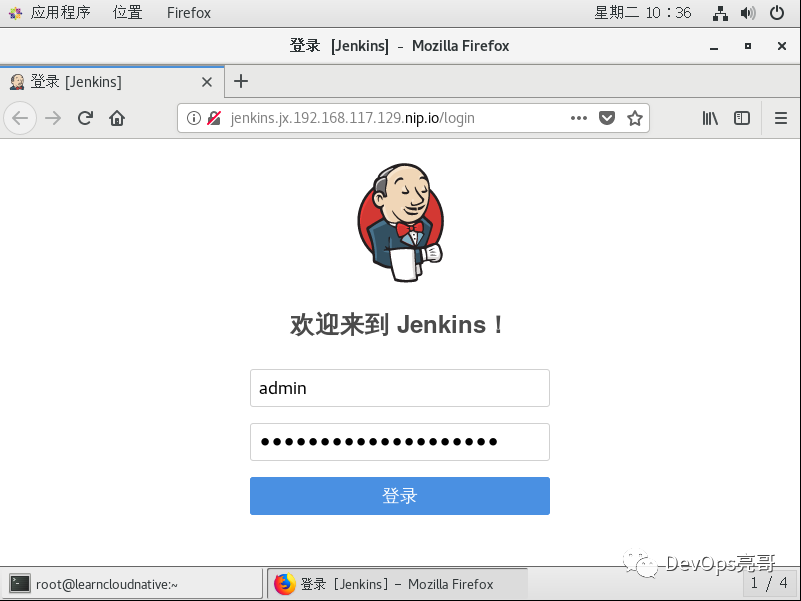
登录后,就进入到Jenkins的主界面了,同时有我们上面自动创建的两个环境(staging和production)流水线。

查看environment-healerwheat-production流水线的执行状态和执行日志。
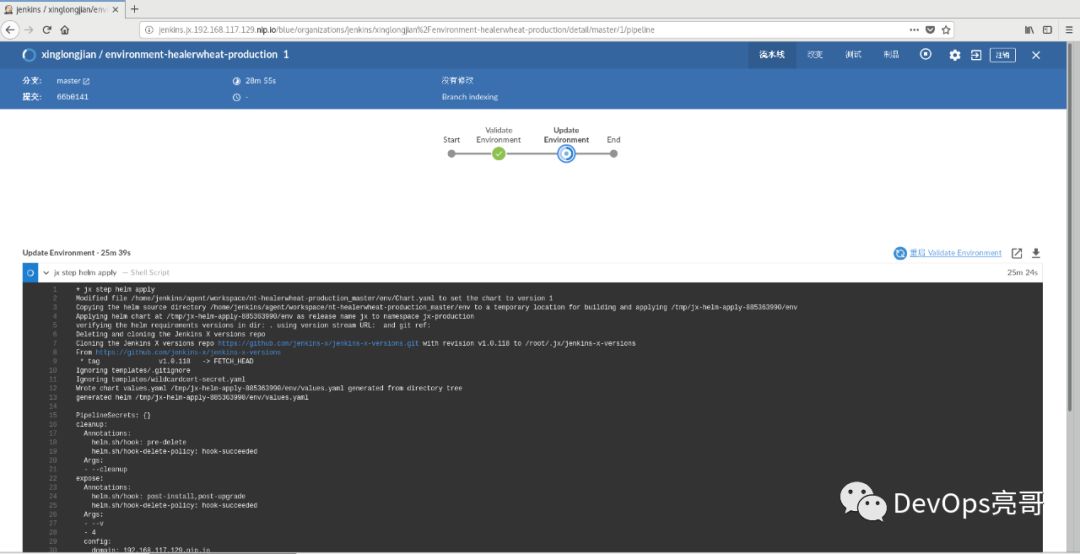
这样,Jenkins X的环境就搭建好了,Jenkins X是云原生时代的CICD实现,以DevOps最佳实践和原则为指导,真正能够做到自动化,高效。
