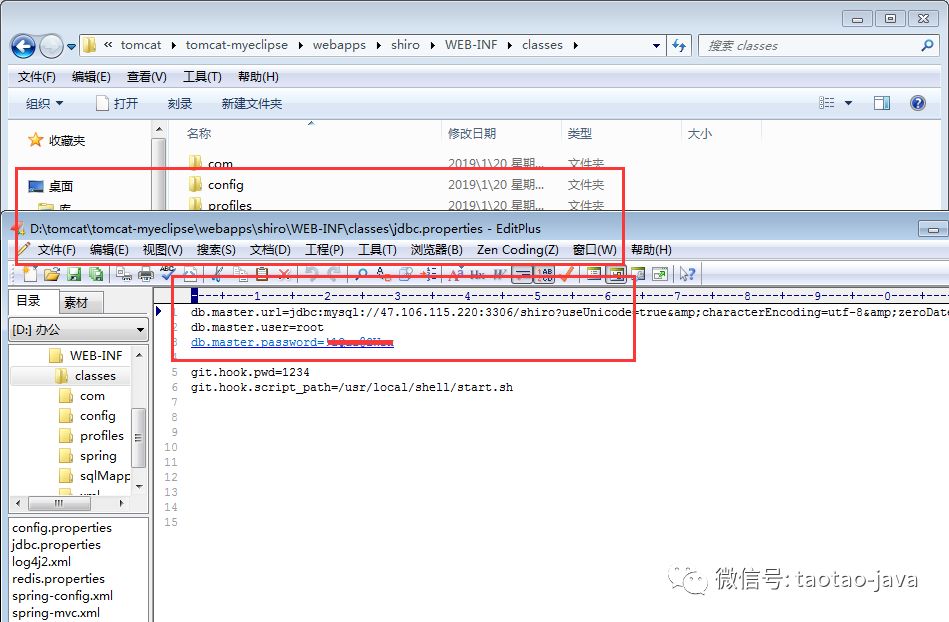
开发一个项目,主要有开发,测试和最终部署上线几个阶段,每个阶段对配置(数据库,日志)都有不同的设置。如何能实现在生成不同的发布包时对资源进行不同的替换?maven已经提供方案了,通过在build节点中添加maven的resources、filter和profile实现不同环境使用不同配置文件
一、介绍下resources、filter和profile
1、profiles定义了各个环境的变量id
2 、filters中定义了变量配置文件的地址,其中地址中的环境变量就是上面profile中定义的值
3、resources中是定义哪些目录下的文件会被配置文件中定义的变量替换,一般把项目的配置文件放在src/main/resources下,像db,bean等,里面用到的变量在打包时就会根据filter中的变量配置替换成固定值
二、原理:
1、利用filter实现对资源文件(resouces)过滤
maven filter可利用指定的xxx.properties中对应的key=value对资源文件中的{key}进行替换,最终把你的资源文件中的username={key}替换成username=value
2、利用profile来切换环境
maven profile可使用操作系统信息,jdk信息,文件是否存在,属性值等作为依据,来激活相应的profile,也可在编译阶段,通过mvn命令加参数 -PprofileId 来手工激活使用对应的profile,结合filter和profile,可以在不同环境下使用不同的配制
三、实战
项目资源目录如下:
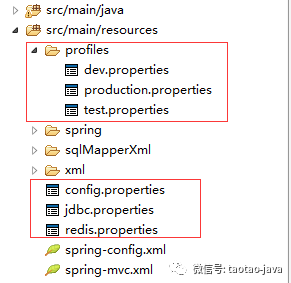
pom.xml文件
<build>
        <finalName>shiro</finalName>
        <filters>
            <filter>src/main/resources/profiles/${profiles.active}.properties</filter>
        </filters>
        <resources>
            <resource>
                <directory>src/main/resources</directory>
                <filtering>true</filtering>
            </resource>

        </resources>
        <plugins>
            <plugin>
                <groupId>org.apache.maven.plugins</groupId>
                <artifactId>maven-compiler-plugin</artifactId>
                <version>2.3.2</version>
                <configuration>
                    <source>${jdk.version}</source>
                    <target>${jdk.version}</target>
                    <encoding>${project.build.sourceEncoding}</encoding>
                </configuration>
            </plugin>
            <!-- tomcat7:run -->
            <plugin>
                <groupId>org.apache.tomcat.maven</groupId>
                <artifactId>tomcat7-maven-plugin</artifactId>
                <version>2.2</version>
                <configuration>
                    <path>/</path>
                    <uriEncoding>UTF-8</uriEncoding>
                    <server>tomcat7</server>
                </configuration>
            </plugin>
        </plugins>
    </build>

    <profiles>
        <!-- 默认激活 dev 开发环境 -->
        <!-- 线上使用 mvn 打包添加 -Pproduction 变量 -->
        <profile>
            <!-- 开发环境 -->
            <id>dev</id>
            <properties>
                <profiles.active>dev</profiles.active>
            </properties>
               <activation>
                <!-- 设置默认激活该配置 -->
                <activeByDefault>true</activeByDefault>
            </activation>
        </profile>

        <profile>
            <!-- 测试环境  -->
            <id>test</id>
            <properties>
                <profiles.active>test</profiles.active>
            </properties>
        </profile>

        <profile>
            <!-- 生产环境 production -->
            <id>production</id>
            <properties>
                <profiles.active>production</profiles.active>
            </properties>
        </profile>
    </profiles>
src/main/resources/profiles/dev.properties
app.name=shiro
profile.env=dev

#--------- database -----------
db.master.url=jdbc\:mysql\://127.0.0.1\:3306/shiro?useUnicode\=true&characterEncoding\=utf-8&zeroDateTimeBehavior\=convertToNull&transformedBitIsBoolean\=true&useSSL\=false
db.master.user=root
db.master.password=root
src/main/resources/jdbc.properties
db.master.url=${db.master.url}
db.master.user=${db.master.user}
db.master.password=${db.master.password}
maven命令:
mvn package -Pproduction
mvn package -Ptest
mvn package -Pdev
运行打包命令maven会将src/main/resources/profiles/${profiles.active}.properties对应文件里的key的值替换到src/main/resources下所有文件
四、结果