




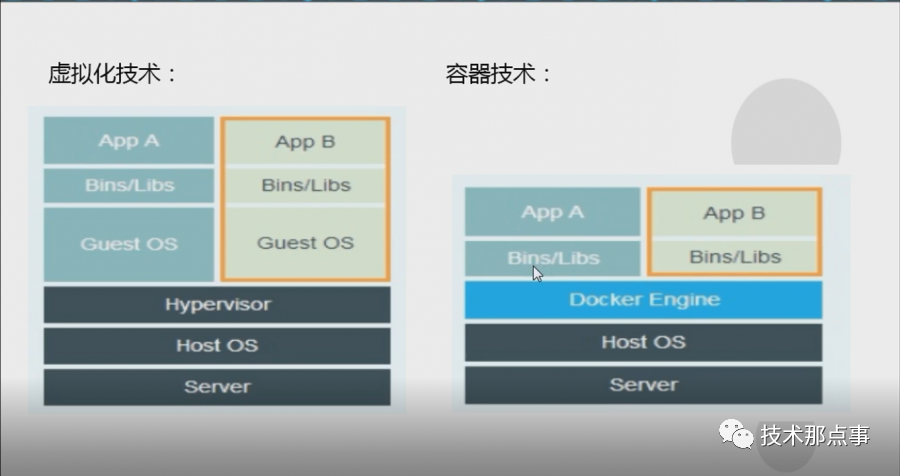
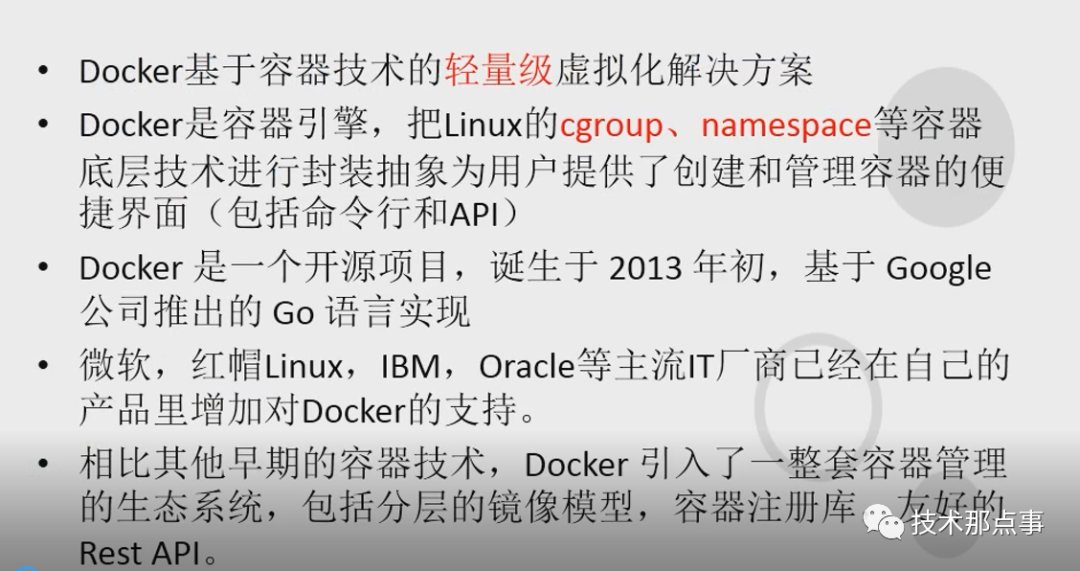
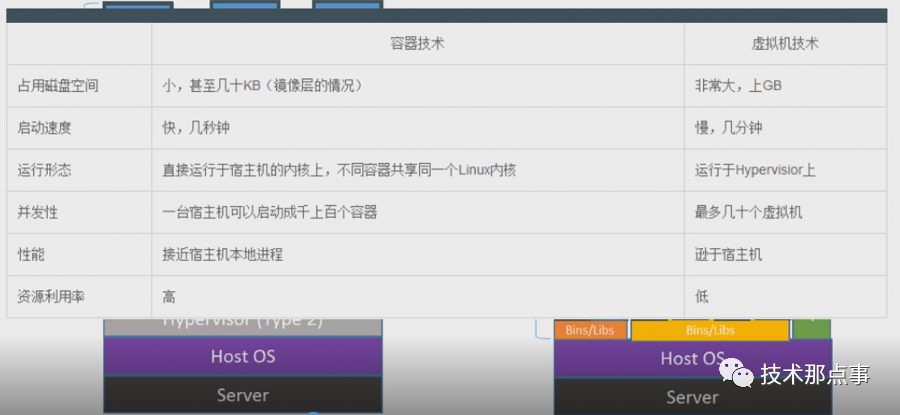
Docker是一个开源的应用容器引擎,基于 Go 语言 并遵从 Apache2.0 协议开源。Docker可以让开发者打包他们的应用以及依赖包到一个轻量级、可移植的容器中,然后发布到任何流行的 Linux 机器上,也可以实现虚拟化。容器是完全使用沙箱机制,相互之间不会有任何接口(类似iPhone 的 app),更重要的是容器性能开销极低。
Docker容器引擎安装部署配置:[root@localhost ~]# curl -o etc/yum.repos.d/epel.repo http://mirrors.aliyun.com/repo/epel-7.repo[root@localhost ~]# yum install epel-release -y #配置epel源
[root@localhost ~]# yum list docker --show-duplicates #查看epel是否有docker相关的包Loaded plugins: fastestmirror, langpacksLoading mirror speeds from cached hostfile* base: mirrors.163.com* extras: mirrors.163.com* updates: mirrors.aliyun.comAvailable Packagesdocker.x86_64 2:1.13.1-102.git7f2769b.el7.centos extrasdocker.x86_64 2:1.13.1-103.git7f2769b.el7.centos extrasdocker.x86_64 2:1.13.1-108.git4ef4b30.el7.centos extrasdocker.x86_64 2:1.13.1-109.gitcccb291.el7.centos extrasdocker.x86_64 2:1.13.1-161.git64e9980.el7_8 extrasdocker.x86_64 2:1.13.1-162.git64e9980.el7.centos
[root@localhost ~]# yum install -y yum-utils[root@localhost ~]# yum-config-manager --add-repo http://mirrors.aliyun.com/docker-ce/linux/centos/docker-ce.repo[root@localhost ~]# yum list docker-ce --show-duplicates #查看发行版Loaded plugins: fastestmirror, langpacksLoading mirror speeds from cached hostfile* base: mirrors.163.com* extras: mirrors.163.com* updates: mirrors.aliyun.comAvailable Packagesdocker-ce.x86_64 17.03.0.ce-1.el7.centos docker-ce-stabledocker-ce.x86_64 17.03.1.ce-1.el7.centos docker-ce-stabledocker-ce.x86_64 17.03.2.ce-1.el7.centos docker-ce-stabledocker-ce.x86_64 17.03.3.ce-1.el7 docker-ce-stabledocker-ce.x86_64 17.06.0.ce-1.el7.centos docker-ce-stabledocker-ce.x86_64 17.06.1.ce-1.el7.centos docker-ce-stabledocker-ce.x86_64 17.06.2.ce-1.el7.centos docker-ce-stabledocker-ce.x86_64 17.09.0.ce-1.el7.centos docker-ce-stabledocker-ce.x86_64 17.09.1.ce-1.el7.centos docker-ce-stabledocker-ce.x86_64 17.12.0.ce-1.el7.centos docker-ce-stabledocker-ce.x86_64 17.12.1.ce-1.el7.centos docker-ce-stabledocker-ce.x86_64 18.03.0.ce-1.el7.centos docker-ce-stabledocker-ce.x86_64 18.03.1.ce-1.el7.centos docker-ce-stabledocker-ce.x86_64 18.06.0.ce-3.el7 docker-ce-stabledocker-ce.x86_64 18.06.1.ce-3.el7 docker-ce-stabledocker-ce.x86_64 18.06.2.ce-3.el7 docker-ce-stabledocker-ce.x86_64 18.06.3.ce-3.el7 docker-ce-stabledocker-ce.x86_64 3:18.09.0-3.el7 docker-ce-stabledocker-ce.x86_64 3:18.09.1-3.el7 docker-ce-stabledocker-ce.x86_64 3:18.09.2-3.el7 docker-ce-stabledocker-ce.x86_64 3:18.09.3-3.el7 docker-ce-stabledocker-ce.x86_64 3:18.09.4-3.el7 docker-ce-stabledocker-ce.x86_64 3:18.09.5-3.el7 docker-ce-stabledocker-ce.x86_64 3:18.09.6-3.el7 docker-ce-stabledocker-ce.x86_64 3:18.09.7-3.el7 docker-ce-stabledocker-ce.x86_64 3:18.09.8-3.el7 docker-ce-stabledocker-ce.x86_64 3:18.09.9-3.el7 docker-ce-stabledocker-ce.x86_64 3:19.03.0-3.el7 docker-ce-stabledocker-ce.x86_64 3:19.03.1-3.el7 docker-ce-stabledocker-ce.x86_64 3:19.03.2-3.el7 docker-ce-stabledocker-ce.x86_64 3:19.03.3-3.el7 docker-ce-stabledocker-ce.x86_64 3:19.03.4-3.el7 docker-ce-stabledocker-ce.x86_64 3:19.03.5-3.el7 docker-ce-stabledocker-ce.x86_64 3:19.03.6-3.el7 docker-ce-stabledocker-ce.x86_64 3:19.03.7-3.el7 docker-ce-stabledocker-ce.x86_64 3:19.03.8-3.el7 docker-ce-stabledocker-ce.x86_64 3:19.03.9-3.el7 docker-ce-stabledocker-ce.x86_64 3:19.03.10-3.el7 docker-ce-stabledocker-ce.x86_64 3:19.03.11-3.el7 docker-ce-stabledocker-ce.x86_64 3:19.03.12-3.el7 docker-ce-stabledocker-ce.x86_64 3:19.03.13-3.el7 docker-ce-stable
[root@localhost ~]# yum install docker #安装docker
[root@localhost ~]# systemctl enable docker #设置开机自启动Created symlink from etc/systemd/system/multi-user.target.wants/docker.service to usr/lib/systemd/system/docker.service.[root@localhost ~]# systemctl start docker #启动docker
[root@localhost ~]# systemctl status docker #查看状态● docker.service - Docker Application Container EngineLoaded: loaded (/usr/lib/systemd/system/docker.service; enabled; vendor preset: disabled)Active: active (running) since Tue 2020-11-10 15:05:00 CST; 12min agoDocs: http://docs.docker.comMain PID: 58922 (dockerd-current)CGroup: system.slice/docker.service├─58922 usr/bin/dockerd-current --add-runtime docker-runc=/usr/libexec/docker/docker-runc-current --default-...└─58928 usr/bin/docker-containerd-current -l unix:///var/run/docker/libcontainerd/docker-containerd.sock --m...Nov 10 15:04:59 localhost.localdomain dockerd-current[58922]: time="2020-11-10T15:04:59.009387464+08:00" level=info ...928"Nov 10 15:05:00 localhost.localdomain dockerd-current[58922]: time="2020-11-10T15:05:00.165239958+08:00" level=info ...nds"Nov 10 15:05:00 localhost.localdomain dockerd-current[58922]: time="2020-11-10T15:05:00.167532463+08:00" level=info ...rt."Nov 10 15:05:00 localhost.localdomain dockerd-current[58922]: time="2020-11-10T15:05:00.224075983+08:00" level=info ...lse"Nov 10 15:05:00 localhost.localdomain dockerd-current[58922]: time="2020-11-10T15:05:00.332164074+08:00" level=info ...ess"Nov 10 15:05:00 localhost.localdomain dockerd-current[58922]: time="2020-11-10T15:05:00.482551917+08:00" level=info ...ne."Nov 10 15:05:00 localhost.localdomain dockerd-current[58922]: time="2020-11-10T15:05:00.578021581+08:00" level=info ...ion"Nov 10 15:05:00 localhost.localdomain dockerd-current[58922]: time="2020-11-10T15:05:00.578053862+08:00" level=info ...13.1Nov 10 15:05:00 localhost.localdomain dockerd-current[58922]: time="2020-11-10T15:05:00.592706186+08:00" level=info ...ock"Nov 10 15:05:00 localhost.localdomain systemd[1]: Started Docker Application Container Engine.Hint: Some lines were ellipsized, use -l to show in full.
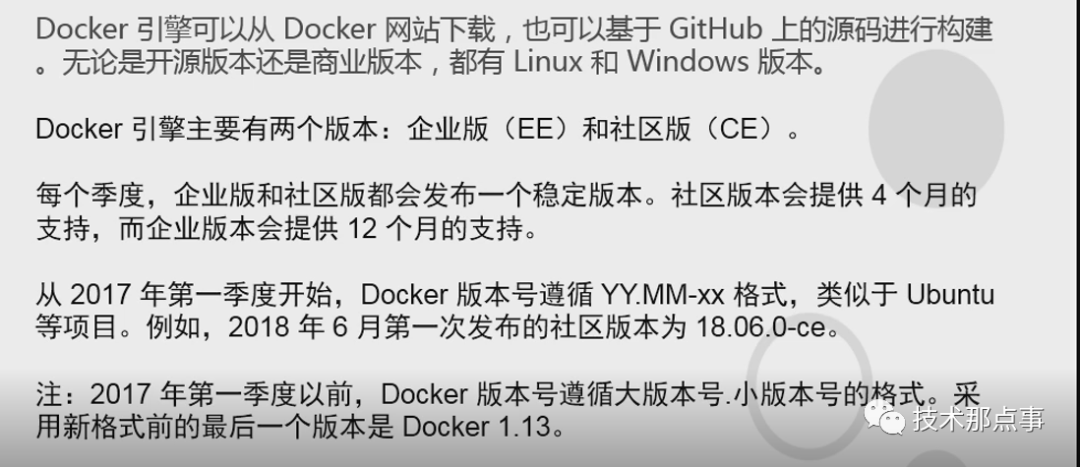
[root@localhost run]# docker version #查看docker版本Client:Version: 1.13.1API version: 1.26Package version: docker-1.13.1-162.git64e9980.el7.centos.x86_64Go version: go1.10.3Git commit: 64e9980/1.13.1Built: Wed Jul 1 14:56:42 2020OS/Arch: linux/amd64Server:Version: 1.13.1API version: 1.26 (minimum version 1.12)Package version: docker-1.13.1-162.git64e9980.el7.centos.x86_64Go version: go1.10.3Git commit: 64e9980/1.13.1Built: Wed Jul 1 14:56:42 2020OS/Arch: linux/amd64Experimental: false
9.启动第一个Docker容器并详解启动原理:[root@localhost run]# docker run hello-world #启动一个hello-world 容器Unable to find image 'hello-world:latest' locally #我不能在本地找到一个名为hello-world的镜像Trying to pull repository docker.io/library/hello-world ...latest: Pulling from docker.io/library/hello-world0e03bdcc26d7: Pull completeDigest: sha256:8c5aeeb6a5f3ba4883347d3747a7249f491766ca1caa47e5da5dfcf6b9b717c0Status: Downloaded newer image for docker.io/hello-world:latestHello from Docker!This message shows that your installation appears to be working correctly.()To generate this message, Docker took the following steps:1. The Docker client contacted the Docker daemon.2. The Docker daemon pulled the "hello-world" image from the Docker Hub.(amd64)3. The Docker daemon created a new container from that image which runs theexecutable that produces the output you are currently reading.(3.服务端创建了一个容器,这个容器帮你执行了一段可执行的程序)4. The Docker daemon streamed that output to the Docker client, which sent itto your terminal.To try something more ambitious, you can run an Ubuntu container with:$ docker run -it ubuntu bashShare images, automate workflows, and more with a free Docker ID:https://hub.docker.com/For more examples and ideas, visit:https://docs.docker.com/get-started/
继续关注,后续持续更新......
目前10000+人已关注加入我们



文章转载自技术那点事,如果涉嫌侵权,请发送邮件至:contact@modb.pro进行举报,并提供相关证据,一经查实,墨天轮将立刻删除相关内容。
