1.介绍
Gin
框架的路由功能是基于httprouter(https://github.com/julienschmidt/httprouter)设计的,httprouter
是一由golang
实现的路由组件。httprouter
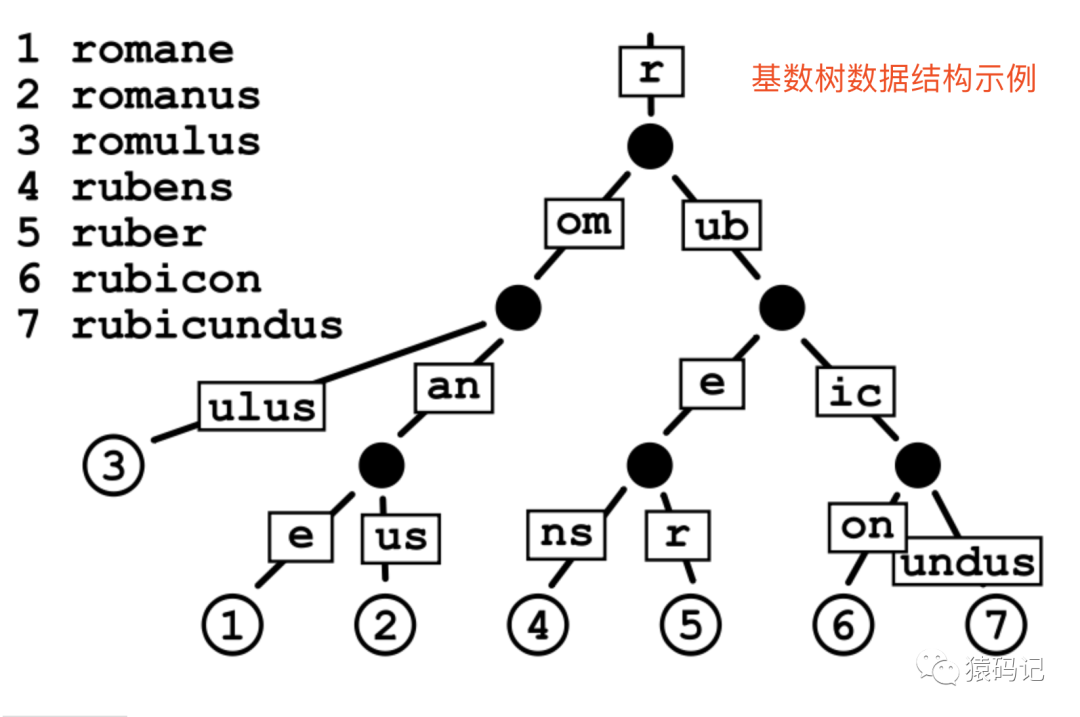
使用基数树(也叫基数特里树或压缩前缀树)这种数据结构来维护映射路由关系,通过前缀树快速路由。同时其里面的HttpRouter
结构体实现了golang
的net.http.server
的Handler
接口,可以作为httpHandle
发布。
基数树(
Radix Tree
)又称为PAT
位树(Patricia Trie or crit bit tree
),是一种更节省空间的前缀树(Trie Tree
)。对于基数树的每个节点,如果该节点是唯一的子树的话,就和父节点合并。
2.HTTP方法
在Gin
框架中对HTTP
常见相关方法(GET、POST、PUT、DELETE、HEAD等
)已经做了封装,直接调用就会快速注册相关路由,源码所在文件位置:github.com/gin-gonic/gin/routergroup.go
2.1 使用示例
main.go 源码(https://github.com/52lu/gin-use/blob/main/main.go)
routing_use.go 源码(https://github.com/52lu/gin-use/blob/main/practise/routing_use.go)
---------------------------     main.go 代码    -------------------------------
package main
import (
 "github.com/gin-gonic/gin" // 引入Gin框架
 "go-use/practise" //引入使用示例代码包
)
func main() {
 // 创建一个默认的路由引擎
 engine := gin.Default()
 // 调用HTTP方法路由
 practise.UseHttp(engine)
 _ = engine.Run()
}
----------------------- go-use/practise/routing_use.go代码 -----------------------
// 学习使用HTTP方法
func UseHttp(engine *gin.Engine)  {
 // 使用Get方法
 engine.GET("/get", func(context *gin.Context) {
  context.JSON(200,gin.H{"msg":"请求成功","method":"get"})
 })
 // 使用Post方法
 engine.POST("/post", func(context *gin.Context) {
  context.JSON(200,gin.H{"msg":"请求成功","method":"post"})
 })
 // 使用PUT方法
 engine.PUT("/put", func(context *gin.Context) {
  context.JSON(200,gin.H{"msg":"请求成功","method":"put"})
 })
 // 使用DELETE方法
 engine.DELETE("/del", func(context *gin.Context) {
  context.JSON(200,gin.H{"msg":"请求成功","method":"del"})
 })
 // 使用HEAD方法
 engine.HEAD("/head", func(context *gin.Context) {
  context.JSON(200,gin.H{"msg":"请求成功","method":"head"})
 })
}
启动日志输出:
[GIN-debug] [WARNING] Creating an Engine instance with the Logger and Recovery middleware already attached.

[GIN-debug] [WARNING] Running in "debug" mode. Switch to "release" mode in production.
 - using env:   export GIN_MODE=release
 - using code:  gin.SetMode(gin.ReleaseMode)

[GIN-debug] GET    /get                      --> go-use/practise.UseHttp.func1 (3 handlers)
[GIN-debug] POST   /post                     --> go-use/practise.UseHttp.func2 (3 handlers)
[GIN-debug] PUT    /put                      --> go-use/practise.UseHttp.func3 (3 handlers)
[GIN-debug] DELETE /del                      --> go-use/practise.UseHttp.func4 (3 handlers)
[GIN-debug] HEAD   /head                     --> go-use/practise.UseHttp.func5 (3 handlers)
[GIN-debug] Environment variable PORT is undefined. Using port :8080 by default
[GIN-debug] Listening and serving HTTP on :8080
调用示例:
# GET请求
➜  ~ curl -X GET http://127.0.0.1:8080/get
{"method":"get","msg":"请求成功"}%
# 使用GET请求接收post的路由会报错
➜  ~ curl -X GET http://127.0.0.1:8080/post
404 page not found%
# POST请求
➜  ~ curl -X POST http://127.0.0.1:8080/post
{"method":"post","msg":"请求成功"}%
# PUT 请求
➜  ~ curl -X PUT http://127.0.0.1:8080/put
{"method":"put","msg":"请求成功"}%
# DELETE请求
➜  ~ curl -X DELETE http://127.0.0.1:8080/del
{"method":"del","msg":"请求成功"}%
# HEAD请求
➜  ~ curl -i -X HEAD http://127.0.0.1:8080/head
Warning: Setting custom HTTP method to HEAD with -X/--request may not work the
Warning: way you want. Consider using -I/--head instead.
HTTP/1.1 200 OK
Content-Type: application/json; charset=utf-8
Date: Mon, 26 Apr 2021 08:55:19 GMT
Content-Length: 38
需要注意的是:当路由注册成指定HTTP方法时,必须以同样的方式请求,否则会返回:
404 page not found
2.2 匹配所有HTTP请求
使用Any
方法,可以匹配所有的HTTP
的方法(GET, POST, PUT, PATCH, HEAD, OPTIONS, DELETE, CONNECT, TRACE
)
使用示例如下:
func main() {
 // 创建一个默认的路由引擎
 engine := gin.Default()
 // 匹配HTTP方法方法
 engine.Any("/all", func(context *gin.Context) {
  context.JSON(200,gin.H{"msg":"success"})
 })
 _ = engine.Run()
}
3.注册规则
3.1 定义
根据上面示例,可以总结注册HTTP
方法路由时,规则如下:
// engine := gin.Default()
engine.MethodName(path string, ...HandlerFunc)
path
: 代表的是路径...HandlerFunc
: 一个或多个接收请求的处理函数。
3.2 传多个HandlerFunc
示例
package main
import (
 "github.com/gin-gonic/gin" // 引入Gin框架
)
func main() {
 // 创建一个默认的路由引擎
 engine := gin.Default()
 // 注册路由,接收两个HandlerFunc
 engine.GET("/handler",handFuncA,handFuncB)
 _ = engine.Run()
}
func handFuncA(ctx *gin.Context) {
 ctx.JSON(200, gin.H{"msg": "handFuncA"})
}
func handFuncB(ctx *gin.Context) {
 ctx.JSON(200, gin.H{"msg": "handFuncB"})
}
请求输出:
➜ curl -X GET http://127.0.0.1:8080/handler
{"msg":"handFuncA"}{"msg":"handFuncB"}
4.匹配规则
由于Gin
路由采用的是httprouter
,而httprouter
的路径匹配规则整理如下
4.1 /path
这类路径只会匹配/path
,@@注意:不会匹配/path/
。
a. 启动服务
func main() {
 // 创建一个默认的路由引擎
 engine := gin.Default()
 // 注册路由
 engine.GET("/test", func(context *gin.Context) {
  context.JSON(200, gin.H{
   "msg":  "success",
  })
  return
 })
 _ = engine.Run()
}
b. 发起请求
# 会匹配
➜ curl -X GET http://127.0.0.1:8080/test
{"msg":"success"}
# 命令行请求返回,用浏览器请求会正常返回
➜  ~ curl -X GET http://127.0.0.1:8080/test/
<a href="/test">Moved Permanently</a>
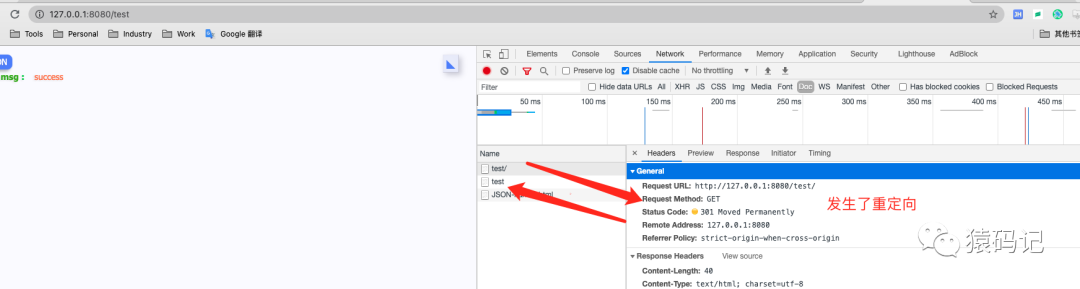
@注意:当注册路由路径是:/path
时,不会匹配/path/
,用命令请求则返回<a href="/test">Moved Permanently</a>
,但是用浏览器请求则会正常返回。原因: httprouter
默认开启自动重定向,/path/
会被重定向到/path
,如下图所示:
4.2 :param
:param
: 都是参数的名称
a. 匹配规则
| 路由规则 | 请求示例 | 参数值 |
|---|---|---|
/path/:a | /test/张三 | a=张三 |
/path/:a/:b | /test/张三/1 | a=张三,b=1 |
/path/:a/:b/:c | /test/张三/1/2 | a=张三,b=1,c=2 |
b. 启动服务
package main
import (
 "github.com/gin-gonic/gin" // 引入Gin框架
)
func main() {
 // 创建一个默认的路由引擎
 engine := gin.Default()
 // 注册路由
 engine.GET("/test/:name", func(context *gin.Context) {
  // 接收参数
  name := context.Param("name")
  context.JSON(200, gin.H{"msg": "success", "name": name})
 })
 engine.GET("/test/:name/:age", func(context *gin.Context) {
  // 接收参数
  name := context.Param("name")
  age := context.Param("age")
  context.JSON(200, gin.H{
   "msg": "success",
   "name": name,
   "phone":age,
  })
 })
 engine.GET("/test/:name/:age/:height", func(context *gin.Context) {
  // 接收参数
  name := context.Param("name")
  age := context.Param("age")
  height := context.Param("height")
  context.JSON(200, gin.H{
   "msg": "success",
   "name": name,
   "phone":age,
   "height":height,
  })
 })
 _ = engine.Run()
}
c. 发起请求
➜ curl -X GET http://127.0.0.1:8080/test/张三
{"msg":"success","name":"张三"}
➜ curl -X GET http://127.0.0.1:8080/test/张三/18
{"msg":"success","name":"张三","phone":"18"}
➜ curl -X GET http://127.0.0.1:8080/test/张三/18/170
{"height":"170","msg":"success","name":"张三","phone":"18"}
4.3 *param
从指定位置开始 (包含前缀
"/"
) 匹配到结尾。
a. 匹配规则
| 路由规则 | 请求示例 | 参数值 |
|---|---|---|
/path/*a | /test/张三 | a=/张三 |
/test/张三/1 | a=张三/1 | |
/test/张三/1/2 | a=张三/1/2 |
b.启动服务
package main
import (
 "github.com/gin-gonic/gin" // 引入Gin框架
)
func main() {
 // 创建一个默认的路由引擎
 engine := gin.Default()
 // 注册路由
 engine.GET("/test/*param", func(context *gin.Context) {
  // 接收参数
  param := context.Param("param")
  context.JSON(200, gin.H{"msg": "success", "name": param})
 })
 _ = engine.Run()
}
c. 发起请求
➜ curl -X GET http://127.0.0.1:8080/test/张三
{"msg":"success","name":"/张三"}
➜ curl -X GET http://127.0.0.1:8080/test/张三/1
{"msg":"success","name":"/张三/1"}
➜ curl -X GET http://127.0.0.1:8080/test/张三/1/2
{"msg":"success","name":"/张三/1/2"}