作者:laixintao
原文链接:https://www.kawabangga.com/posts/4411
* 本文着重展示创建 Redis Docker 镜像过程,镜像本身不推荐使用。
| 环境准备
首先,我们先对比一组数据:
官方的 Redis 镜像:105MB
官方的基于 Alpine 的 Redis 镜像:32.3MB
Ubuntu 中默认配置创建的 redis-server binary:13M
一个什么都没有的 alpine:latest docker 镜像:5.6MB
下图中的 Redis 镜像:1.69MB
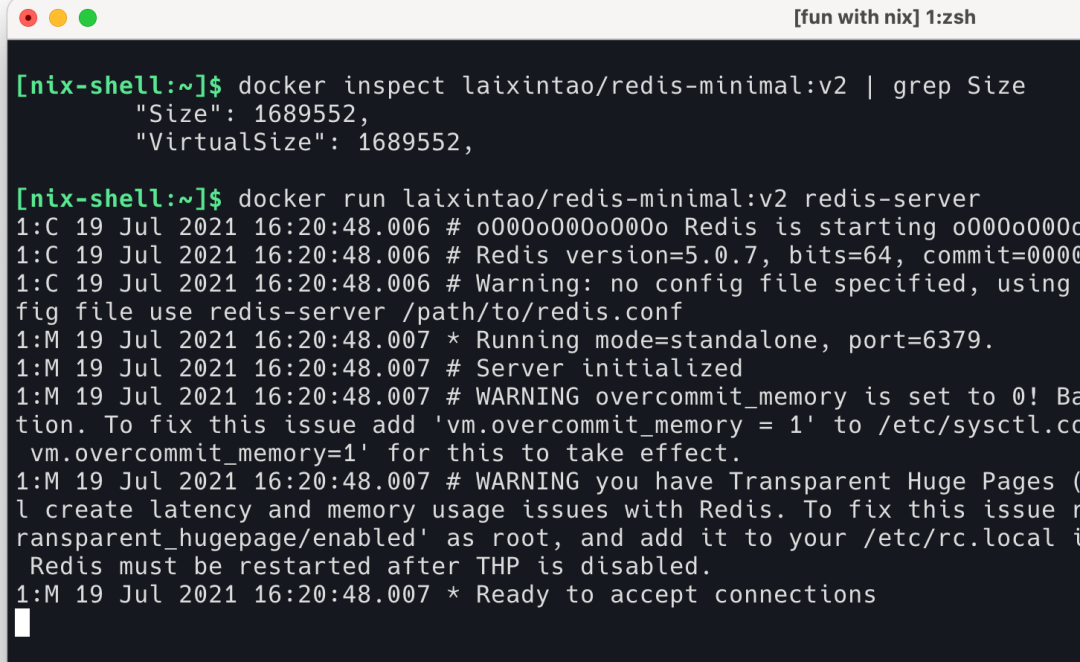
当然生产环境肯定不差 100M 这点空间,还是带上一些常用的工具在生产环境跑比较好。
这个镜像是用 Nix 创建 [1] 的,步骤如下:
使用 Nix 来创建镜像;
编译的时候关闭了 systemd 的支持,Docker 里面不需要这种东西;
使用 musl 静态链接编译;
把除了 redis-server 之外的东西删除掉;
编译完成使用
strip -s
对最终的 Binary 再次做删减。
| 具体的编译方法
首先在 Nix 创建一个文件,来编译 Redis,这里实际上使用的 Nix 打包好的 Redis,我只是对其通过 preBuild 和 postInstall 做了一些操作,替换 musl 和 strip 之类的。
[nix-shell:~]$ cat redis-minimal.nix{ pkgs ? import <nixpkgs> {}}:pkgs.redis.overrideAttrs (old: { # no need for systemd support in our docker image makeFlags = old.makeFlags ++ ["USE_SYSTEMD=no"]; # build static binary with musl preBuild = '' makeFlagsArray=(PREFIX="$out" CC="${pkgs.musl.dev}/bin/musl-gcc -static" CFLAGS="-I${pkgs.musl.dev}/include" LDFLAGS="-L${pkgs.musl.dev}/lib") ''; # Let's remove some binaries which we don't need postInstall = '' rm -f $out/bin/redis-{benchmark,check-*,cli,sentinel} strip -s $out/bin/redis-server '';})
然后再需要一个文件描述如何 build docker image:
[nix-shell:~]$ cat docker-redis-minimal.nix{ pkgs ? import <nixpkgs> { system = "x86_64-linux";}}: # nixpkgs package setlet redisMinimal = import ./redis-minimal.nix { inherit pkgs; };inpkgs.dockerTools.buildLayeredImage { # helper to build docker image name = "nix-redis-minimal"; # give docker image a name tag = "latest"; # provide a tag contents = [ redisMinimal ]; # use redisMinimal package}
然后运行下面这个命令,build 就可以了。因为我已经 build 好了,所以 Nix 不会再出现 build 的日志。
[nix-shell:~]$ nix-build docker-redis-minimal.nix -o ./result/nix/store/42frnm57499800z3mpwf05ab37mam1r0-docker-image-nix-redis-minimal.tar.gz
Docker image 本质上就是一个 tar 包。我们使用以下命令可以 load 这个 image。然后就可以运行了:
[nix-shell:~]$ docker load -i resultLoaded image: nix-redis-minimal:latest[nix-shell:~/export-docker-image]$ docker imagesREPOSITORY TAG IMAGE ID CREATED SIZEnix-redis-minimal latest 433cad4ad790 51 years ago 1.69MB[nix-shell:~]$ docker run nix-redis-minimal:latest redis-server1:C 19 Jul 2021 16:37:09.847 # oO0OoO0OoO0Oo Redis is starting oO0OoO0OoO0Oo1:C 19 Jul 2021 16:37:09.847 # Redis version=5.0.7, bits=64, commit=00000000, modified=0, pid=1, just started1:C 19 Jul 2021 16:37:09.847 # Warning: no config file specified, using the default config. In order to specify a config file use redis-server /path/to/redis.conf1:M 19 Jul 2021 16:37:09.848 * Running mode=standalone, port=6379.1:M 19 Jul 2021 16:37:09.848 # Server initialized1:M 19 Jul 2021 16:37:09.848 # WARNING overcommit_memory is set to 0! Background save may fail under low memory condition. To fix this issue add 'vm.overcommit_memory = 1' to /etc/sysctl.conf and then reboot or run the command 'sysctl vm.overcommit_memory=1' for this to take effect.1:M 19 Jul 2021 16:37:09.848 # WARNING you have Transparent Huge Pages (THP) support enabled in your kernel. This will create latency and memory usage issues with Redis. To fix this issue run the command 'echo never > /sys/kernel/mm/transparent_hugepage/enabled' as root, and add it to your /etc/rc.local in order to retain the setting after a reboot. Redis must be restarted after THP is disabled.1:M 19 Jul 2021 16:37:09.848 * Ready to accept connections
可能你发现了这个 image 的信息有一些奇怪:CREATED 为 51 years ago。其实这是对的。因为 Nix 号称是完全 reproducible 的,但是 image 如果有一个创建时间的话,那么每次 build 出来的产物都会因为这个创建时间,而导致每次的产物 hash 都不一样。所以 Nix 将 Docker image 产物的 CREATED 时间设置成 0 了。即 timestamp = 0.
| 镜像里面都有什么?
读者可以在 Docker hub 上下载这个镜像,然后使用 docker save
将它保存成 tar 再解压,看看里面都有什么。我这里直接去解压 Nix 创建好的 image,每一层 layer 下面的 layer.tar 也都解压到对应的 layer 下面了。
可以看到,里面一层只有一个 redis-server 的 binary,上面一层是一个 bianry 的符号链接。符号链接是 Nix 的逻辑,符号链接很小,就懒得去删除了。
[nix-shell:~/export-docker-image]$ tree.├── 42frnm57499800z3mpwf05ab37mam1r0-docker-image-nix-redis-minimal.tar.gz├── 433cad4ad790679879357e81194fa7502f7688edfe5b7ff64a4f59edfed3f84d.json├── 83d967dde8785f9b8efc694109992e72f3a9ab6a1b953519e4b892633fd01b1d│ ├── bin│ │ └── redis-server -> /nix/store/h25xxpbif767cwhiqxk9z3gp1rbbx6fr-redis-5.0.7/bin/redis-server│ ├── json│ ├── layer.tar│ └── VERSION├── 8f7098124197b3823e91dd99eb3cd89853d3ec03448689f2a3f283b261551734│ ├── json│ ├── layer.tar│ ├── nix│ │ └── store│ │ └── h25xxpbif767cwhiqxk9z3gp1rbbx6fr-redis-5.0.7│ │ └── bin│ │ └── redis-server│ └── VERSION├── manifest.json└── repositories7 directories, 12 files
| 体验一下
将该镜像放到 Docker hub [2]上。
直接运行 docker run laixintao/redis-minimal:v1 redis-server
来体验一下。
也可以尝试 Docker 在 NixOS 里面的安装 [3]。
[1]. Cover Demo: https://nixos.org/#asciinema-demo-cover
[2]. Docker hub: https://hub.docker.com/repository/docker/laixintao/redis-minimal
[3]. Docker 在 NixOS 里面的安装: https://nixos.wiki/wiki/Docker
关于 RadonDB
RadonDB开源社区 是一个面向云原生、容器化的数据库开源社区。为数据库技术爱好者提供围绕主流开源数据库(MySQL、PostgreSQL、Redis、MongoDB、ClickHouse 等)的技术分享平台,并提供企业级 RadonDB 开源产品及服务。
目前 RadonDB 开源数据库系列产品已被 光大银行、浦发硅谷银行、哈密银行、泰康保险、太平保险、安盛保险、阳光保险、百年人寿、安吉物流、安畅物流、蓝月亮、天财商龙、罗克佳华、升哲科技、无锡汇跑体育、北京电信、江苏交通控股、四川航空、昆明航空、国控生物 等上千家企业及社区用户采用。
RadonDB 可基于云平台与 Kubernetes 容器平台交付,不仅提供覆盖多场景的数据库产品解决方案,而且提供专业的集群管理和自动化运维能力,主要功能特性包括:高可用主从切换、数据强一致性、读写分离、一键安装部署、多维指标监控&告警、弹性扩容&缩容、横向自由扩展、自动备份&恢复、同城多活、异地灾备 等。RadonDB 仅需企业及社区用户专注于业务层逻辑开发,无需关注集群高可用选型、管理和运维等复杂问题,帮助企业及社区用户大幅度提升业务开发与价值创新的效率!
GitHub:
https://github.com/radondb

微信群: 请搜索添加群助手微信号 radondb