



本章内容:
简介、安装、使用
使用 API 操作 RabbitMQ
消息不丢失
发布订阅
关键字发送
模糊匹配
1、简介、安装、使用
RabbitMQ 是一个在 AMQP 基础上完成的,可复用的企业消息系统。他遵循 Mozilla Public License 开源协议。
MQ 全称为 Message Queue, 消息队列(MQ)是一种应用程序对应用程序的通信方式。应用程序通过读写出入队列的消息(针对应用程序的数据)来通信,而无需专用连接来链接它们。消息传递指的是程序之间通过在消息中发送数据进行通信,而不是通过直接调用彼此来通信,直接调用通常是用于诸如远程过程调用的技术。排队指的是应用程序通过 队列来通信。队列的使用除去了接收和发送应用程序同时执行的要求。
流程上生产者把消息放到队列中去, 然后消费者从队列中取出消息。
Producing , 生产者, 产生消息的角色.
Exchange , 交换器, 在得到生产者产生的消息后, 把消息放入队列的角色. Queue , 队列, 消息暂时保存的地方. Consuming , 消费者, 把消息从队列中取出的角色. 消息 Message
RabbitMQ安装
# 安装配置epel源$ rpm -ivh http://dl.fedoraproject.org/pub/epel/6/i386/epel-release-6-8.noarch.rpm# 安装erlang$ yum -y install erlang# 安装RabbitMQ$ yum -y install rabbitmq-server
# 启动service rabbitmq-server start/stop# 默认监听端口5672 (带上 SSL 默认 5671)
python 安装 API
pip install pikaoreasy_install pikaor源码https://pypi.python.org/pypi/pika
2、使用API操作RabbitMQ
基于队列 Queue 实现生产者消费者模型:
#!/usr/bin/env python# -*- coding:utf-8 -*-import Queueimport threadingmessage = Queue.Queue(10)def producer(i):while True:message.put(i)def consumer(i):while True:msg = message.get()for i in range(12):t = threading.Thread(target=producer, args=(i,))t.start()for i in range(10):t = threading.Thread(target=consumer, args=(i,))t.start()
RabbitMQ 实现:
#!/usr/bin/env pythonimport pika# ######################### 生产者 #########################connection = pika.BlockingConnection(pika.ConnectionParameters(host='localhost'))channel = connection.channel()channel.queue_declare(queue='hello')channel.basic_publish(exchange='',routing_key='hello',body='Hello World!')print(" [x] Sent 'Hello World!'")connection.close()#!/usr/bin/env pythonimport pika# ########################## 消费者 ##########################connection = pika.BlockingConnection(pika.ConnectionParameters(host='localhost'))channel = connection.channel()channel.queue_declare(queue='hello')def callback(ch, method, properties, body):print(" [x] Received %r" % body)channel.basic_consume(callback,queue='hello',no_ack=True)print(' [*] Waiting for messages. To exit press CTRL+C')channel.start_consuming()
1、acknowledgment 消息不丢失
no-ack = False,如果消费者由于某些情况宕了(its channel is closed, connection is closed, or TCP connection is lost),那 RabbitMQ 会重新将该任务放入队列中。
在实际应用中,可能会发生消费者收到Queue中的消息,但没有处理完成就宕机(或出现其他意外)的情况,这种情况下就可能会导致消息丢失。为了避免这种情况发生,我们可以要求消费者在消费完消息后发送一个回执给RabbitMQ,RabbitMQ收到消息回执(Message acknowledgment)后才将该消息从Queue中移除;如果RabbitMQ没有收到回执并检测到消费者的RabbitMQ连接断开,则RabbitMQ会将该消息发送给其他消费者(如果存在多个消费者)进行处理。这里不存在timeout概念,一个消费者处理消息时间再长也不会导致该消息被发送给其他消费者,除非它的RabbitMQ连接断开。
这里会产生另外一个问题,如果我们的开发人员在处理完业务逻辑后,忘记发送回执给RabbitMQ,这将会导致严重的bug——Queue中堆积的消息会越来越多;消费者重启后会重复消费这些消息并重复执行业务逻辑…
消费者
import pikaconnection = pika.BlockingConnection(pika.ConnectionParameters(host='10.211.55.4'))channel = connection.channel()channel.queue_declare(queue='hello')def callback(ch, method, properties, body):print(" [x] Received %r" % body)import timetime.sleep(10)print 'ok'ch.basic_ack(delivery_tag = method.delivery_tag)channel.basic_consume(callback,queue='hello',no_ack=False)print(' [*] Waiting for messages. To exit press CTRL+C')channel.start_consuming()
2、durable 消息不丢失
如果我们希望即使在RabbitMQ服务重启的情况下,也不会丢失消息,我们可以将Queue与Message都设置为可持久化的(durable),这样可以保证绝大部分情况下我们的RabbitMQ消息不会丢失。但依然解决不了小概率丢失事件的发生(比如RabbitMQ服务器已经接收到生产者的消息,但还没来得及持久化该消息时RabbitMQ服务器就断电了),如果我们需要对这种小概率事件也要管理起来,那么我们要用到事务。由于这里仅为RabbitMQ的简单介绍,所以这里将不讲解RabbitMQ相关的事务。
需要改两处地方
生产者
#!/usr/bin/env pythonimport pikaconnection = pika.BlockingConnection(pika.ConnectionParameters(host='10.211.55.4'))channel = connection.channel()# make message persistentchannel.queue_declare(queue='hello', durable=True)channel.basic_publish(exchange='',routing_key='hello',body='Hello World!',properties=pika.BasicProperties(delivery_mode=2, # make message persistent))print(" [x] Sent 'Hello World!'")connection.close()
消费者
#!/usr/bin/env python# -*- coding:utf-8 -*-import pikaconnection = pika.BlockingConnection(pika.ConnectionParameters(host='10.211.55.4'))channel = connection.channel()# make message persistentchannel.queue_declare(queue='hello', durable=True)def callback(ch, method, properties, body):print(" [x] Received %r" % body)import timetime.sleep(10)print 'ok'ch.basic_ack(delivery_tag = method.delivery_tag)channel.basic_consume(callback,queue='hello',no_ack=False)print(' [*] Waiting for messages. To exit press CTRL+C')channel.start_consuming()
3、消息获取顺序
默认情况下,消费者拿消息队列里的数据是按平均分配,例如:消费者1 拿队列中 奇数 序列的任务,消费者2 拿队列中 偶数 序列的任务。
channel.basic_qos(prefetch_count=1) 表示谁来谁取,不再按照奇偶数排列,这个性能较高的机器拿的任务就多
消费者
#!/usr/bin/env python# -*- coding:utf-8 -*-import pikaconnection = pika.BlockingConnection(pika.ConnectionParameters(host='10.211.55.4'))channel = connection.channel()# make message persistentchannel.queue_declare(queue='hello')def callback(ch, method, properties, body):print(" [x] Received %r" % body)import timetime.sleep(10)print 'ok'ch.basic_ack(delivery_tag = method.delivery_tag)channel.basic_qos(prefetch_count=1)channel.basic_consume(callback,queue='hello',no_ack=False)print(' [*] Waiting for messages. To exit press CTRL+C')channel.start_consuming()
4、发布订阅
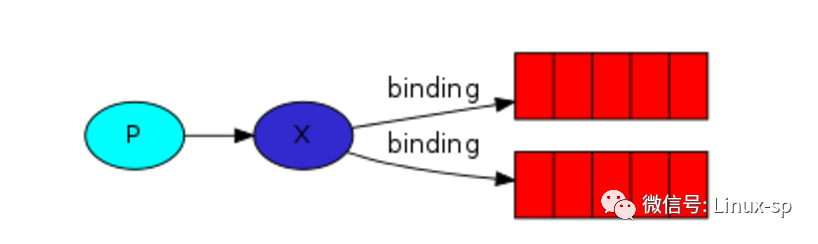
发布订阅和简单的消息队列区别在于,发布订阅者会将消息发送给所有的订阅者,而消息队列中的数据被消费一次便消失。所以,RabbitMQ 实现发布订阅时,会为每一个订阅者创建一个队列,而发布者发布消息的时候,会将消息放置在所有相关的队列中。
exchange type = fanout
发布者
#!/usr/bin/env pythonimport pikaimport sysconnection = pika.BlockingConnection(pika.ConnectionParameters(host='localhost'))channel = connection.channel()channel.exchange_declare(exchange='logs',type='fanout')message = ' '.join(sys.argv[1:]) or "info: Hello World!"channel.basic_publish(exchange='logs',routing_key='',body=message)print(" [x] Sent %r" % message)connection.close()
订阅者
#!/usr/bin/env pythonimport pikaconnection = pika.BlockingConnection(pika.ConnectionParameters(host='localhost'))channel = connection.channel()channel.exchange_declare(exchange='logs',type='fanout')result = channel.queue_declare(exclusive=True)queue_name = result.method.queuechannel.queue_bind(exchange='logs',queue=queue_name)print(' [*] Waiting for logs. To exit press CTRL+C')def callback(ch, method, properties, body):print(" [x] %r" % body)channel.basic_consume(callback,queue=queue_name,no_ack=True)channel.start_consuming()
5、关键字发送
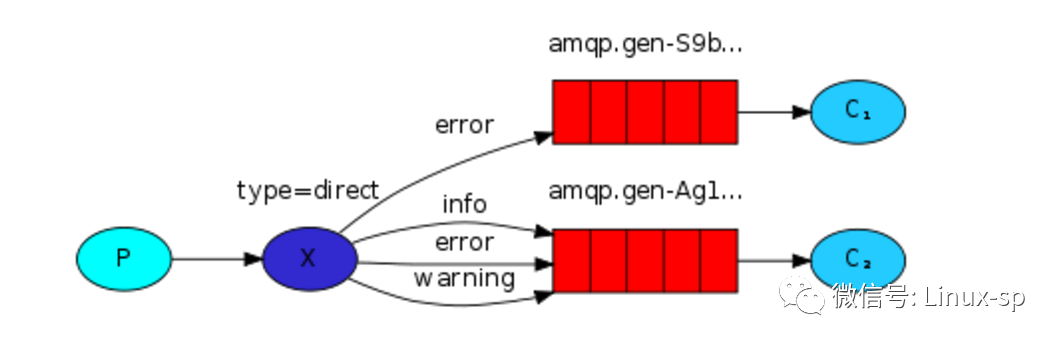
第4步实例中,发送消息必须明确指定某个队列并向其中发送消息,当然,RabbitMQ 还支持根据关键字发送(队列绑定关键字),发送者将消息发送到 exchange,exchange 根据关键字 判定应该将数据发送至指定队列。
exchange type = direct
消费者
#!/usr/bin/env pythonimport pikaimport sysconnection = pika.BlockingConnection(pika.ConnectionParameters(host='localhost'))channel = connection.channel()channel.exchange_declare(exchange='direct_logs',type='direct')result = channel.queue_declare(exclusive=True)queue_name = result.method.queueseverities = sys.argv[1:]if not severities:sys.stderr.write("Usage: %s [info] [warning] [error]\n" % sys.argv[0])sys.exit(1)for severity in severities:channel.queue_bind(exchange='direct_logs',queue=queue_name,routing_key=severity)print(' [*] Waiting for logs. To exit press CTRL+C')def callback(ch, method, properties, body):print(" [x] %r:%r" % (method.routing_key, body))channel.basic_consume(callback,queue=queue_name,no_ack=True)channel.start_consuming()
生产者
#!/usr/bin/env pythonimport pikaimport sysconnection = pika.BlockingConnection(pika.ConnectionParameters(host='localhost'))channel = connection.channel()channel.exchange_declare(exchange='direct_logs',type='direct')severity = sys.argv[1] if len(sys.argv) > 1 else 'info'message = ' '.join(sys.argv[2:]) or 'Hello World!'channel.basic_publish(exchange='direct_logs',routing_key=severity,body=message)print(" [x] Sent %r:%r" % (severity, message))connection.close()
6、模糊匹配
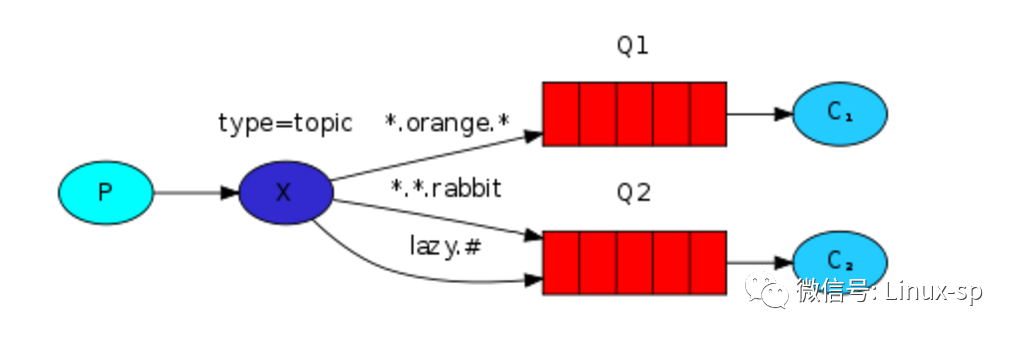
exchange type = topic
在 topic 类型下,可以让队列绑定几个模糊的关键字,之后发送者将数据发送到 exchange,exchange 将传入”路由值“和 ”关键字“进行匹配,匹配成功,则将数据发送到指定队列。
匹配基本规则及示例:
# 表示可以匹配 0 个 或 多个 单词
* 表示只能匹配 一个 单词
发送者路由值 队列中www.suoning.python www.* -- 不匹配www.suoning.python www.# -- 匹配
消费者
#!/usr/bin/env pythonimport pikaimport sysconnection = pika.BlockingConnection(pika.ConnectionParameters(host='localhost'))channel = connection.channel()channel.exchange_declare(exchange='topic_logs',type='topic')result = channel.queue_declare(exclusive=True)queue_name = result.method.queuebinding_keys = sys.argv[1:]if not binding_keys:sys.stderr.write("Usage: %s [binding_key]...\n" % sys.argv[0])sys.exit(1)for binding_key in binding_keys:channel.queue_bind(exchange='topic_logs',queue=queue_name,routing_key=binding_key)print(' [*] Waiting for logs. To exit press CTRL+C')def callback(ch, method, properties, body):print(" [x] %r:%r" % (method.routing_key, body))channel.basic_consume(callback,queue=queue_name,no_ack=True)channel.start_consuming()
生产者
#!/usr/bin/env pythonimport pikaimport sysconnection = pika.BlockingConnection(pika.ConnectionParameters(host='localhost'))channel = connection.channel()channel.exchange_declare(exchange='topic_logs',type='topic')routing_key = sys.argv[1] if len(sys.argv) > 1 else 'anonymous.info'message = ' '.join(sys.argv[2:]) or 'Hello World!'channel.basic_publish(exchange='topic_logs',routing_key=routing_key,body=message)print(" [x] Sent %r:%r" % (routing_key, message))connection.close()
