Spring Cloud Config为微服务提供了集中化的配置管理,可以通过git仓库的形式来对各个服务的配置属性进行管理维护,在配置更新时,可通过消息总线的方式实现动态更新,而不需要重启服务。
架构
Spring Cloud Config属于CS架构,包括Config Server与Config Client, Config Server从配置存储库(可以是git,svn,jdbc数据库,或本地文件系统)获取配置属性,Config Client通过http请求对应的配置属性。如图
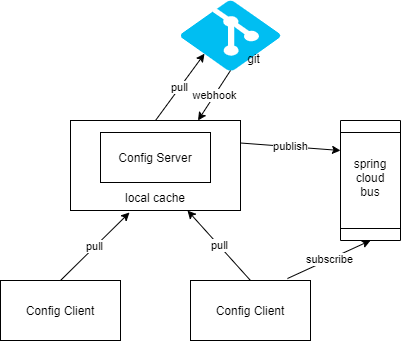
Config Server在客户端请求配置信息时,从git获取配置信息(可以配置为启动时即从git获取)返回给客户端,当配置发生更新时,可通过webhook的方式通知到Config Server,Config Server发出RefreshRemoteApplicationEvent 事件,通知客户端更新配置信息。
Config Server
搭建一个Config Server很简单。
1. 首先pom.xml中引入依赖
<dependency> |
加入Eureka Client是使配置服务作为一个微服务注册到Eureka被其它微服务(作为Config Client)发现。
2. 然后application.yml中添加配置
spring: |
上述配置使Config Server从github仓库获取配置信息,searchPaths: ‘{application}’ 可以将每个服务的配置属性文件放入仓库的同名文件夹下。注意这里的引号是必须的,否则因为不符合yaml文件语法导致不生效。
定期刷新:spring.cloud.config.server.git.refreshRate 单位秒, 默认为0, 表示每次请求时,config server都会从git 仓库获取更新的配置。
本地缓存:默认本地副本存在临时目录中,有些操作系统可能会定时清理临时目录,导致问题,设置配置的本地目录:spring.cloud.config.server.git.basedir
3. 最后启动类上添加注解
@SpringBootApplication |
完成以上三步一个简单的Config Server就搭建完成了,启动项目,访问 http://localhost:8888/hello-service/dev 可获取到仓库 hello-service 目录下对应profile为dev的配置属性文件hello-service-dev.yml与默认配置文件(包括同目录下application.yml与仓库根目录下的application.yml, application-dev.yml配置文件)
通过url获取配置的访问方式:
/{application}/{profile}[/{label}]
/{application}-{profile}.yml
/{label}/{application}-{profile}.yml
/{application}-{profile}.properties
/{label}/{application}-{profile}.properties
其中 application是spring.config.name的值,profile可以是以逗号分隔的列表,label是git的分支,默认是master。
Config Server的高可用:
起多个实例,客户端配置spring.cloud.config.uri 以逗号隔开配多个uri
或将实例注册到服务注册中心
对于500,401等异常,客户端不会重试其它实例, 只在实例挂掉或连接超时时,才会重试其它实例
Config Client
客户端以springcloud-eureka-client项目为基础进行改造
1. 在pom.xml中添加config相关依赖
<dependency> |
添加actuator可以暴露相关接口,如/env 来查看配置属性加载情况,springboot2中actuator默认只开放/info health 两个接口,可通过如下配置放开(生产环境根据需要调整)
management: |
2. 添加bootstrap.yml配置文件
spring: |
依次启动服务注册中心 springcloud-eureka, 配置管理服务 springcloud-config, 配置客户端 springcloud-eureka-client, 访问 http://localhost:8080/actuator/env 可看到配置客户端加载的配置信息。在配置客户端启动时,控制台也会打印从配置服务获取配置的相关信息,如
Located property source: OriginTrackedCompositePropertySource {name='configService', propertySources=[MapPropertySource {name='configClient'}, OriginTrackedMapPropertySource {name='https://github.com/ronwxy/jboost-config/hello-service/hello-service-dev.yml'}, OriginTrackedMapPropertySource {name='https://github.com/ronwxy/jboost-config/application-dev.yml'}, OriginTrackedMapPropertySource {name='https://github.com/ronwxy/jboost-config/hello-service/application.yml'}, OriginTrackedMapPropertySource {name='https://github.com/ronwxy/jboost-config/application.yml'}]} |
这样,在客户端就可以通过 @ConfigurationProperties注解的属性类, @Value 注解,或Environment对象来访问相关属性,如
@Autowired |
客户端重试机制:
首先设置 spring.cloud.config.failfast=true
然后添加 spring-retry, spring-boot-starter-aop 依赖
默认进行6次重试,每次间隔一开始1s,然后每次1.1倍递增。如果要自定义,则通过spring.cloud.config.retry.* 配置参数, 或通过定义一个ID为configServerRetryInterceptor 的RetryOperationsInterceptor 类型的@Bean,可通过RetryInterceptorBuilder 来创建。
本文示例源码地址: https://github.com/ronwxy/springcloud-demos
认真生活,快乐分享
欢迎关注微信公众号:空山新雨的技术空间