主机规划
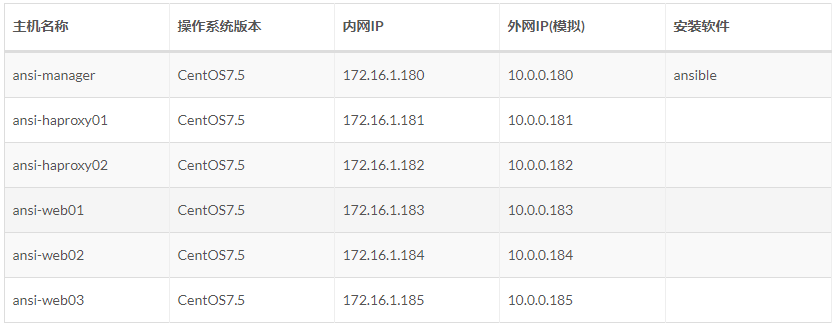
在实际使用中并不需要对ansible配置进行修改,或者说只有需要的时候才修改ansible配置。
添加用户账号
说明:
1、 运维人员使用的登录账号;
2、 所有的业务都放在 app/ 下「yun用户的家目录」,避免业务数据乱放;
3、 该用户也被 ansible 使用,因为几乎所有的生产环境都是禁止 root 远程登录的(因此该 yun 用户也进行了 sudo 提权)。
# 使用一个专门的用户,避免直接使用root用户# 添加用户、指定家目录并指定用户密码# sudo提权# 让其它普通用户可以进入该目录查看信息useradd -u 1050 -d app yun && echo '123456' | usr/bin/passwd --stdin yunecho "yun ALL=(ALL) NOPASSWD: ALL" >> etc/sudoerschmod 755 app/
基于密码连接「了解」
在实际生产环境中,建议使用基于秘钥连接而不是密码连接。
原因如下:
1、将密码直接写入文件中,有安全隐患;
2、生产环境的密码可能会定期更换,如果基于密码连接,那么我们也会频繁的维护,造成维护成本高;
3、基于秘钥连接,我们只需要做一次秘钥分发,后期连接无需任何修改。
清单配置
[yun@ansi-manager ansible_info]$ pwd/app/ansible_info[yun@ansi-manager ansible_info]$ cat hosts_pwd# 未分组机器,放在所有组前面# 默认端口22,可省略# 方式1:主机 + 端口 + 密码172.16.1.180 ansible_ssh_port=22 ansible_ssh_user=yun ansible_ssh_pass='123456'# 方式2:主机 + 端口 + 密码[proxyservers]172.16.1.18[1:2] ansible_ssh_port=22 ansible_ssh_user=yun ansible_ssh_pass='123456'# 方式3:主机 + 端口 + 密码[webservers]172.16.1.18[3:5] ansible_ssh_port=22 ansible_ssh_user=yun[webservers:vars]ansible_ssh_pass='123456'
测验连接
[yun@ansi-manager ansible_info]$ ansible 172.16.1.180 -m ping -i ./hosts_pwd # 普通用户执行172.16.1.180 | FAILED! => {"msg": "Using a SSH password instead of a key is not possible because Host Key checking is enabled and sshpass does not support this. Please add this host's fingerprint to your known_hosts file to manage this host."}[yun@ansi-manager ansible_info]$ sudo ansible 172.16.1.180 -m ping -i ./hosts_pwd # 提权使用 root 用户执行172.16.1.180 | FAILED! => {"msg": "Using a SSH password instead of a key is not possible because Host Key checking is enabled and sshpass does not support this. Please add this host's fingerprint to your known_hosts file to manage this host."}
大概提示信息:因为启用了主机密钥检查,而 sshpass 不支持这一点。请将此主机「172.16.1.180」的指纹添加到你本机的known_hosts文件中以管理此主机。
跳过主机密钥检查,有两种方式:
方式1:修改 Linux 系统配置
[root@ansi-manager ssh]# vim etc/ssh/ssh_config# AddressFamily any# ConnectTimeout 0# StrictHostKeyChecking ask # 将该配置的注释打开,并改为 StrictHostKeyChecking no 这样针对所有用户都不会在进行 「主机密钥检查」了# IdentityFile ~/.ssh/identity
但是这个是 Linux 自带的配置,我们不能随意去更改。因此不建议如此操作。
方式2:修改 ansible 配置
[root@ansi-manager ansible]# pwd/etc/ansible[root@ansi-manager ansible]# vim ansible.cfg# uncomment this to disable SSH key host checkinghost_key_checking = False # 将该配置的注释去掉
改配置仅对 root 用户生效,其他普通用户是不生效的。这里使用该方法。
再次连接测试
[yun@ansi-manager ansible_info]$ ansible 172.16.1.180 -m ping -i ./hosts_pwd # 普通用户还是不行172.16.1.180 | FAILED! => {"msg": "Using a SSH password instead of a key is not possible because Host Key checking is enabled and sshpass does not support this. Please add this host's fingerprint to your known_hosts file to manage this host."}[yun@ansi-manager ansible_info]$ sudo ansible 172.16.1.180 -m ping -i ./hosts_pwd # 提权使用 root 用户执行172.16.1.180 | SUCCESS => {"ansible_facts": {"discovered_interpreter_python": "/usr/bin/python"},"changed": false,"ping": "pong"}[yun@ansi-manager ansible_info]$ sudo ansible proxyservers -m ping -i ./hosts_pwd # 正常[yun@ansi-manager ansible_info]$ sudo ansible webservers -m ping -i ./hosts_pwd # 正常
基于秘钥连接「推荐」
在实际生产环境中,建议使用基于秘钥连接而不是密码连接。
原因如下:
1、将密码直接写入文件中,有安全隐患;
2、生产环境的密码可能会定期更换,如果基于密码连接,那么我们也会频繁的维护,造成维护成本高;
3、基于秘钥连接,我们只需要做一次秘钥分发,后期连接无需任何修改。
实现yun用户免秘钥登录
要求:根据规划实现 172.16.1.180 到 172.16.1.180、172.16.1.181、172.16.1.182、172.16.1.183、172.16.1.184、172.16.1.185 免秘钥登录
因此需要在 172.16.1.180 机器创建秘钥,然后分发到受控机器。
创建秘钥
[yun@ansi-manager ~]$ ssh-keygen -t rsa # 一路回车即可 注意使用的是 yun 用户# 生成之后会在用户的根目录生成一个 “.ssh”的文件夹[yun@ansi-manager ~]$ ll -d .ssh/drwx------ 2 yun yun 38 Jul 25 10:51 .ssh/[yun@ansi-manager ~]$ ll .ssh/total 8-rw------- 1 yun yun 1675 Jul 25 10:51 id_rsa-rw-r--r-- 1 yun yun 398 Jul 25 10:51 id_rsa.pub
分发密钥
[yun@ansi-manager ~]$ ssh-copy-id -i ~/.ssh/id_rsa.pub 172.16.1.180[yun@ansi-manager ~]$ ssh-copy-id -i ~/.ssh/id_rsa.pub 172.16.1.181[yun@ansi-manager ~]$ ssh-copy-id -i ~/.ssh/id_rsa.pub 172.16.1.182[yun@ansi-manager ~]$ ssh-copy-id -i ~/.ssh/id_rsa.pub 172.16.1.183[yun@ansi-manager ~]$ ssh-copy-id -i ~/.ssh/id_rsa.pub 172.16.1.184[yun@ansi-manager ~]$ ssh-copy-id -i ~/.ssh/id_rsa.pub 172.16.1.185
测验免密登录是否成功
[yun@ansi-manager ~]$ ssh 172.16.1.180 # 等价于 ssh yun@172.16.1.180[yun@ansi-manager ~]$ ssh 172.16.1.181[yun@ansi-manager ~]$ ssh 172.16.1.182[yun@ansi-manager ~]$ ssh 172.16.1.183[yun@ansi-manager ~]$ ssh 172.16.1.184[yun@ansi-manager ~]$ ssh 172.16.1.185
注意:必须保证每台机器都免密登录成功,因此需要每台机器都验证。
.ssh目录中的文件说明
[yun@ansi-manager .ssh]$ pwd/app/.ssh[yun@ansi-manager .ssh]$ lltotal 16-rw------- 1 yun yun 398 Jul 25 11:01 authorized_keys-rw------- 1 yun yun 1675 Jul 25 10:51 id_rsa-rw-r--r-- 1 yun yun 398 Jul 25 10:51 id_rsa.pub-rw-r--r-- 1 yun yun 1120 Jul 25 11:04 known_hosts########################################################################################authorized_keys :存放要远程免密登录机器的公钥,主要通过这个文件记录多台要远程登录机器的公钥id_rsa : 生成的私钥文件id_rsa.pub :生成的公钥文件know_hosts : 已知的主机公钥清单
清单配置
[yun@ansi-manager ansible_info]$ pwd/app/ansible_info[yun@ansi-manager ansible_info]$ cat hosts_key# 未分组机器,放在所有组前面# 默认端口22,可省略# 方式1、主机 + 端口 + 密钥172.16.1.180:22# 方式2:主机 + 端口 + 密钥[proxyservers]172.16.1.18[1:2]:22# 方式3:别名 + 主机 + 端口 + 密码[webservers]web01 ansible_ssh_host=172.16.1.183 ansible_ssh_port=22web02 ansible_ssh_host=172.16.1.184 ansible_ssh_port=22web03 ansible_ssh_host=172.16.1.185 ansible_ssh_port=22
测验连接
测验一
[yun@ansi-manager ansible_info]$ ansible 172.16.1.180 -m ping -i ./hosts_key172.16.1.180 | SUCCESS => {"ansible_facts": {"discovered_interpreter_python": "/usr/bin/python"},"changed": false,"ping": "pong"}
测验二
[yun@ansi-manager ansible_info]$ ansible proxyservers -m ping -i ./hosts_key172.16.1.181 | SUCCESS => {"ansible_facts": {"discovered_interpreter_python": "/usr/bin/python"},"changed": false,"ping": "pong"}172.16.1.182 | SUCCESS => {"ansible_facts": {"discovered_interpreter_python": "/usr/bin/python"},"changed": false,"ping": "pong"}
测验三
[yun@ansi-manager ansible_info]$ ansible webservers -m ping -i ./hosts_keyweb03 | SUCCESS => {"ansible_facts": {"discovered_interpreter_python": "/usr/bin/python"},"changed": false,"ping": "pong"}web01 | SUCCESS => {"ansible_facts": {"discovered_interpreter_python": "/usr/bin/python"},"changed": false,"ping": "pong"}web02 | SUCCESS => {"ansible_facts": {"discovered_interpreter_python": "/usr/bin/python"},"changed": false,"ping": "pong"}
混合方式和主机组方式
清单配置
[yun@ansi-manager ansible_info]$ pwd/app/ansible_info[yun@ansi-manager ansible_info]$ cat hosts_group# 未分组机器,放在所有组前面# 默认端口22,可省略# 方式1、主机 + 端口 + 密钥172.16.1.180# 方式一、主机组变量 + 主机 + 密码[proxyservers]172.16.1.18[1:2] ansible_ssh_port=22 ansible_ssh_user=yun ansible_ssh_pass='123456'# 方式二、主机组变量 + 主机 + 密钥[webservers]172.16.1.18[3:5]:22# 定义多组,多组汇总整合# website 组包括两个子组[proxyservers, webservers][website:children]proxyserverswebservers
说明:定义多组使用没有问题。但是不能像上面一样既有密码配置,又有秘钥配置,这样会增加维护成本。这里为了演示因此用了密码和秘钥配置。
测验连接
测验一
# 如果 ~/.ssh/known_hosts 文件中没有添加受控机指纹,那么必须提权操作[yun@ansi-manager ansible_info]$ sudo ansible proxyservers -m ping -i ./hosts_group --list-hostshosts (2):172.16.1.181172.16.1.182[yun@ansi-manager ansible_info]$ sudo ansible proxyservers -m ping -i ./hosts_group172.16.1.182 | SUCCESS => {"ansible_facts": {"discovered_interpreter_python": "/usr/bin/python"},"changed": false,"ping": "pong"}172.16.1.181 | SUCCESS => {"ansible_facts": {"discovered_interpreter_python": "/usr/bin/python"},"changed": false,"ping": "pong"}
测验二
[yun@ansi-manager ansible_info]$ ansible webservers -m ping -i ./hosts_group --list-hostshosts (3):172.16.1.183172.16.1.184172.16.1.185[yun@ansi-manager ansible_info]$ ansible webservers -m ping -i ./hosts_group………………
测验三
[yun@ansi-manager ansible_info]$ ansible website -m ping -i ./hosts_group --list-hostshosts (5):172.16.1.181172.16.1.182172.16.1.183172.16.1.184172.16.1.185[yun@ansi-manager ansible_info]$ ansible website -m ping -i ./hosts_group
测验四
特殊组:all
[yun@ansi-manager ansible_info]$ ansible all -m ping -i ./hosts_group --list-hostshosts (6):172.16.1.180172.16.1.181172.16.1.182172.16.1.183172.16.1.184172.16.1.185[yun@ansi-manager ansible_info]$ ansible all -m ping -i ./hosts_group
———END———
如果觉得不错就关注下呗 (-^O^-) !