



主机规划
| 主机名称 | 操作系统版本 | 内网IP | 外网IP(模拟) | 安装软件 |
| ansi-manager | CentOS7.5 | 172.16.1.180 | 10.0.0.180 | ansible |
| ansi-haproxy01 | CentOS7.5 | 172.16.1.181 | 10.0.0.181 | |
| ansi-haproxy02 | CentOS7.5 | 172.16.1.182 | 10.0.0.182 | |
| ansi-web01 | CentOS7.5 | 172.16.1.183 | 10.0.0.183 | |
| ansi-web02 | CentOS7.5 | 172.16.1.184 | 10.0.0.184 | |
| ansi-web03 | CentOS7.5 | 172.16.1.185 | 10.0.0.185 |
在实际使用中并不需要对ansible配置进行修改,或者说只有需要的时候才修改ansible配置。
添加用户账号
说明:
1、 运维人员使用的登录账号;
2、 所有的业务都放在 app/ 下「yun用户的家目录」,避免业务数据乱放;
3、 该用户也被 ansible 使用,因为几乎所有的生产环境都是禁止 root 远程登录的(因此该 yun 用户也进行了 sudo 提权)。
# 使用一个专门的用户,避免直接使用root用户
# 添加用户、指定家目录并指定用户密码
# sudo提权
# 让其它普通用户可以进入该目录查看信息
useradd -u 1050 -d /app yun && echo '123456' | /usr/bin/passwd --stdin yun
echo "yun  ALL=(ALL)       NOPASSWD: ALL" >>  /etc/sudoers
chmod 755 /app/
Ansible 部署流程
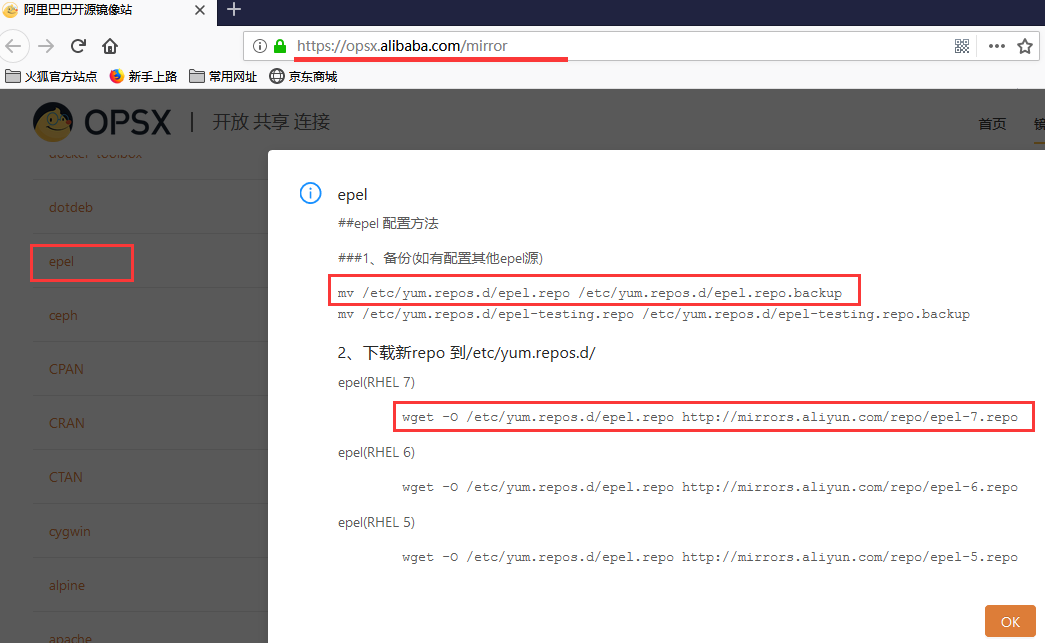
添加 epel 源「如果没有的话」
添加阿里云 epel 源
https://opsx.alibaba.com/mirror
Ansible 安装与版本信息查看
[root@ansi-manager ~]# yum install -y ansible
[root@ansi-manager ~]# whereis ansible  # ansible 位置信息
ansible: usr/bin/ansible etc/ansible usr/share/ansible usr/share/man/man1/ansible.1.gz
[root@ansi-manager ~]# ansible --version  # 版本信息查看
ansible 2.8.1  # ansible 版本
  config file = etc/ansible/ansible.cfg  # 使用的配置文件
  configured module search path = [u'/root/.ansible/plugins/modules', u'/usr/share/ansible/plugins/modules']  # 模块查找路径
  ansible python module location = usr/lib/python2.7/site-packages/ansible  # ansible Python 模块位置,使用 Python 2.7
  executable location = bin/ansible  # ansible 执行文件的位置
  python version = 2.7.5 (default, Apr 11 2018, 07:36:10) [GCC 4.8.5 20150623 (Red Hat 4.8.5-28)]  # Python 版本信息
[yun@ansi-manager ~]$ ll usr/bin/ansible  bin/ansible  # ansible 命令位置
lrwxrwxrwx 1 root root 20 Jun 24 14:14 bin/ansible -> usr/bin/ansible-2.7
lrwxrwxrwx 1 root root 20 Jun 24 14:14 usr/bin/ansible -> usr/bin/ansible-2.7
Ansible 配置文件讲解
Ansible配置文件查找顺序
ansible 将从多个地方查找配置文件,顺序如下:
1、从环境变量 ANSIBLE_CONFIG 中查找,如果该环境变量有值的话;
2、当前目录的 ansible.cfg 文件;「每个项目都可以有一个该配置文件,这样可以更好的管理项目,移植时也更方便。」
3、当前用户家目录的 .ansible.cfg 文件;
4、/etc/ansible/ansible.cfg 文件。
可以使用 ansible --version 命令查看使用的配置文件。
在 etc/ansible/ansible.cfg 配置文件中有该说明
Ansible 部分配置文件讲解
实际生产中可以无需做任何修改。
[yun@ansi-manager ansible]$ pwd
/etc/ansible
[yun@ansi-manager ansible]$ vim ansible.cfg
#inventory      = etc/ansible/hosts      # 受控端主机资源清单
#library        = usr/share/my_modules/  # 所需依赖库路径
#remote_tmp     = ~/.ansible/tmp          # 远端机器,临时文件存放位置
#local_tmp      = ~/.ansible/tmp          # 本机临时文件存放位置
#forks          = 5                       # 默认并发数
#poll_interval  = 15                      # 默认轮询时间间隔(单位秒)
#sudo_user      = root                    # 默认sudo后的用户
#ask_sudo_pass = True                     # 使用sudo,是否需要输入密码
#ask_pass      = True                     # 是否需要输入密码
#transport      = smart                   # 传输方式
#remote_port    = 22                      # 默认远程主机的端口号
#module_lang    = C                       # 模块和系统之间通信的语言
#module_set_locale = False
………………
# uncomment this to disable SSH key host checking  取消注释以禁用SSH key主机检查 【默认是注释掉的,要检查主机指纹】
host_key_checking = False                # 解开注释,即跳过检查主机指纹 【只有 root 用户执行时才有该取消指纹检测的权限】
………………
# logging is off by default unless this path is defined
# if so defined, consider logrotate
#log_path = var/log/ansible.log          # 开启ansible日志
………………
[privilege_escalation]                    # 普通用户提权配置「使用地方:普通用户远程提权使用」
#become=True
#become_method=sudo
#become_user=root
#become_ask_pass=False
上述的 [privilege_escalation] 配置,可在 ansible -h 中查看如何使用。如下:
[yun@ansi-manager ~]$ ansible -h
………………
  Privilege Escalation Options:  # 权限提升选项
    control how and which user you become as on target hosts

    -b, --become        run operations with become (does not imply password
                        prompting)
    --become-method=BECOME_METHOD
                        privilege escalation method to use (default=sudo), use
                        `ansible-doc -t become -l` to list valid choices.
    --become-user=BECOME_USER
                        run operations as this user (default=root)
    -K, --ask-become-pass
                        ask for privilege escalation password
………………
———END———
如果觉得不错就关注下呗(-^O^-) !

文章转载自OpenInfo,如果涉嫌侵权,请发送邮件至:contact@modb.pro进行举报,并提供相关证据,一经查实,墨天轮将立刻删除相关内容。
