



点击上方“icloud布道师”,“星标或置顶公众号”
逆境前行,能帮你的只有自己


************************************
HeartBeat概述
heartbeat
的工作原理:heartbeat最核心的包括两个部分,心跳监测部分和资源接管部分,心跳监测可以通过网络链路和串口进行,而且支持冗余链路,它们之间相互发送报文来告诉对方自己当前的状态,如果在指定的时间内未收到对方发送的报文,那么就认为对方失效,这时需启动资源接管模块来接管运行在对方主机上的资源或者服务
Heartbeat是一个守护程序,为其客户端提供集群基础结构(通信和成员资格)服务。这允许客户端了解其他计算机上对等进程的存在(或消失!),并轻松地与它们交换消息。
为了对用户有用,Heartbeat守护程序需要与群集资源管理器(CRM)结合使用,该群集资源管理器的任务是启动和停止群集将高度可用的服务(IP地址,Web服务器等)。通常与Heartbeat相关联的规范集群资源管理器是Pacemaker,这是 一种高度可扩展且功能丰富的实现,支持Heartbeat和Corosync集群消息传递层。
HeartBeat模块
通讯模块
Heartbeat通信模块在基本上任何基于IP的媒体上提供强认证的,本地有序的多播消息。Heartbeat支持通过以下网络链接类型进行群集通信:
单播UDP over IPv4;
广播UDP over IPv4;
多播UDP over IPv4;
串行链路通信。
集群共识成员资格
CCM提供强关联的共识集群成员资格服务。它确保计算成员资格中的每个节点都可以与此相同成员资格中的每个其他节点进行通信。CCM实现OCF草案成员资格API和SAF AIS成员资格API。通常,它会在亚秒级时间内计算成员资格。
集群管道库
Cluster管道库是一组非常有用的函数,它们提供了许多主要组件使用的各种服务。该库提供的一些主要对象包括:
压缩API(带底层压缩插件)
非阻塞日志记录API
内存管理面向持续运行的服务
分层名称 - 值对消息传递工具,提升可移植性和版本升级兼容性(还提供可选的消息压缩功能)
信号统一 - 允许信号显示为主循环事件
核心转储管理实用程序 - 在所有情况下以统一的方式促进核心转储的捕获
定时器(就像glib mainloop定时器 - 但它们即使在时钟跳时也可以工作)
子进程管理 - 子进程的死亡导致进程对象的调用,具有可配置的死亡儿童消息
触发器(由软件触发的任意事件)
实时管理 - 设置和取消设置高优先级,并锁定到进程的内存属性。
64位HZ粒度时间操作(longclock_t)
用于安全目的的用户标识管理,用于需要某些root特权的进程。
IPC,普通文件描述符,信号等的Mainloop集成。这意味着所有这些不同的事件源都被一致地管理和分派。
IPC图书馆
所有进程间通信都使用非常通用的IPC库执行,该库使用灵活的排队策略提供对IPC的非阻塞访问,并包括集成流控制。此IPC API不需要套接字,但当前可用的实现使用UNIX(本地)域套接字。
此API还包括对等进程的内置身份验证和授权,并且可以移植到大多数类似POSIX的操作系统。虽然不需要在这些API中使用Glib主循环,但Heartbeat提供了与mainloop的简单方便的集成。
非阻塞日志记录守护程序
logd是Heartbeat的日志记录守护程序,能够记录到syslog守护程序,文件或两者。logd永远不会阻塞,相反,它会丢弃落后太多的消息。
一旦它能够再次输出消息,就会logd打印丢失的消息计数。队列大小可以在整体上控制,也可以在每个应用程序的基础上控制。
HeartBeat官方地址
官方网址:http://www.linux-ha.org/wiki/Main_Page
拓展
Heartbeat-3.X版本以后被分为了4个模块,这些安装包都可以从官网:
http://www.linux-ha.org/wiki/Downloads下载得到:
目前的这些版本是:
ClusterLabs-resource-agents-v3.9.2-0-ge261943.tar.gz #集群实验资源代理
Heartbeat-3-0-7e3a82377fa8.tar.bz2 # 心跳主程序包
pacemaker-1.1.9-1512.el6.src.rpm # 起搏器
ˈpāsˌmākər 起搏器
Reusable-Cluster-Components-glue--glue-1.0.9.tar.bz2 #可重复使用的群集组件
端口号
:694
扩展
: 谁管理着TCP/UDP公共服务的端口定义
IANA 就是指(Internet Assigned Numbers Authority) ,Internet号分配的机构。负责对IP地址分配规划以及对TCP/UDP公共服务的端口定义。
IANA的所有任务可以大致分为三个类型:
一、域名。IANA管理DNS域名根和.int,.arpa域名以及IDN(国际化域名)资源。
二、数字资源。IANA协调全球IP和AS(自治系统)号并将它们提供给各区域Internet注册机构。
注: AS自治系统号,是BGP路由协议中的号。
三、协议分配。IANA与各标准化组织一同管理协议编号系统。
官网:http://www.iana.org/
HeartBeat实现Web服务器高可用
Layer3:
Keepalived 使用 Layer3 的方式工作式时, Keepalived 会定期向服务器群中的服务器发送一个 ICMP 的数据包(既我们平时用的 Ping 程序) , 如果发现某台服务的 IP 地址没有激活,Keepalived 便报告这台服务器失效,并将它从服务器群中剔除,这种情况的典型例子是某台服务器被非法关机。 Layer3 的方式是以服务器的 IP 地址是否有效作为服务器工作正常与否的标准
Layer4:
主要以 TCP 端口的状态来决定服务器工作正常与否。如 web server 的服务端口一般是80,如果 Keepalived 检测到 80 端口没有启动,则 Keepalived 将把这台服务器从服务器群中删除
Layer5:
Layer5 就是工作在具体的应用层了,比 Layer3,Layer4 要复杂一点,在网络上占用的带宽也要大一些。 Keepalived 将根据用户的设定检查服务器程序的运行是否正常,如果与用户的设定不相符,则 Keepalived 将把服务器从服务器群中剔除
HeartBeat构建
实验环境
&& `实验环境`
| 机器名称 | 机器 IP | 公网IP | 作用 || nfs | 192.168.231.129 | 192.168.231.111 | NFS服务器 || Rserver 1| 192.168.231.130 | 192.168.231.111 | 主Web服务 || Rserver 2 | 192.168.231.132 | 192.168.231.111 | 备Web服务 |
&& `前期准备`
~]# setenforce 0 //关闭selinux~]# systemctl stop firewalld //关闭防火墙~]# yum install -y epel-release //安装扩展yum源&& `修改hosts`~]# vim etc/hosts***********************************192.168.231.129 nfs.cn192.168.231.130 Rserver1.cn192.168.231.132 Rserver2.cn***********************************
配置NFS服务器
安装NFS
[root@NFS ~]# yum install nfs-utils 三台机器都要安装[root@NFS ~]# mkdir /webroot //创建共享文件[root@NFS ~]# echo 'HesrtBeat test web!'> /webroot/index.html[root@NFS ~]# chmod 777 webroot/ -R 修改权限[root@NFS ~]# vim etc/exports 修改nfs配置**************************/webroot 192.168.231.0/24(rw)**************************[root@NFS ~]# ll -d webroot/drwxrwxrwx. 2 root root 24 6月 9 17:41 webroot/[root@NFS ~]# systemctl start nfs 开启nfs[root@NFS ~]# systemctl enable nfs //开机自启
配置Rservver1服务器
安装NFS
[root@Rserver1 ~]# yum install nfs-utils[root@Rserver1 ~]# systemctl start nfs 开启nfs[root@Rserver1 ~]# systemctl enable nfs 开机自启[root@Rserver1 ~]# showmount -e 192.168.231.129 //查看挂载Export list for 192.168.231.129:/webroot 192.168.231.0/24[root@Rserver1 ~]# mount -t nfs 192.168.231.129:/webroot var/www/html/ 挂载
安装Apache
[root@Rserver1 ~]# yum install httpd[root@Rserver1 ~]# systemctl restart httpd //启动httpd
测试

卸载资源
//后期这些服务会通过heartbeat来实现[root@Rserver1 ~]# umount var/www/html[root@Rserver1 ~]# systemctl stop httpd[root@Rserver1 ~]# systemctl disable httpd
配置Rservver2服务器
安装NFS
[root@Rserver2 ~]# yum install nfs-utils -y //安装nfs[root@Rserver2 ~]# systemctl start nfs 开启nfs[root@Rserver2 ~]# systemctl enable nfs 开机自启[root@Rserver2 ~]# showmount -e 192.168.231.129 查看挂载Export list for 192.168.231.129:/webroot 192.168.231.0/24[root@Rserver2 ~]# mount -t nfs 192.168.231.129:/webroot var/www/html/
安装Apache
[root@Rserver2 ~]# yum install httpd[root@Rserver2 ~]# systemctl restart httpd 启动httpd
测试
[root@Rserver2 ~]# yum install elinks -y //安装elinks[root@Rserver2 ~]# elinks 192.168.231.132 -dump //测试HesrtBeat test web!
卸载资源
[root@Rserver2 ~]# umount var/www/html/[root@Rserver2 ~]# systemctl stop httpd
Rservver1安装HeartBeat
安装依赖
[root@Rserver1 ~]# yum install -y bzip2 bzip2-devel gcc gcc-c++ autoconf automake libtool e2fsprogs-devel glib2-devel libxml2 libxml2-devel libtool-ltdl-devel asciidoc libuuid-devel docbook[root@Rserver1 resource.d]# yum install perl-IO-Socket-INET6
下载安装包
&& `必要`[root@Rserver1 ~]# wget http://hg.linux-ha.org/heartbeat-STABLE_3_0/archive/958e11be8686.tar.bz2[root@Rserver1 ~]# wget http://hg.linux-ha.org/glue/archive/0a7add1d9996.tar.bz2[root@Rserver1 ~]# wget https://github.com/ClusterLabs/resource-agents/archive/v3.9.6.tar.gz&& `非必要`[root@Rserver1 ~]# wget https://github.com/crmsh/crmsh/archive/2.1.2.tar.gz //非必须[root@Rserver1 ~]# wget http://download.opensuse.org/repositories/network:/ha-clustering:/Stable/ 非必须

编译安装Cluster Glue
&& `解压`[root@Rserver1 ~]# tar -jxvf 0a7add1d9996.tar.bz2 -C usr/local/src&& `预编译`[root@Rserver1 ~]# cd usr/local/src/Reusable-Cluster-Components-glue--0a7add1d9996/[root@Rserver1 Reusable-Cluster-Components-glue--0a7add1d9996]# groupadd haclient //创建用户组[root@Rserver1 Reusable-Cluster-Components-glue--0a7add1d9996]# useradd -g haclient hacluster //创建用户[root@Rserver1 Reusable-Cluster-Components-glue--0a7add1d9996]# ./autogen.sh[root@Rserver1 Reusable-Cluster-Components-glue--0a7add1d9996]# ./configure --prefix=/usr/local/heartbeat/**************************************************cluster-glue configuration:Version = 1.0.12 (Build: 0a7add1d9996b6d869d441da6c82fb7b8abcef4f)Features =Prefix = usr/local/heartbeatExecutables = usr/local/heartbeat/sbinMan pages = usr/local/heartbeat/share/manLibraries = usr/local/heartbeat/libHeader files = usr/local/heartbeat/includeArch-independent files = usr/local/heartbeat/shareDocumentation = usr/local/heartbeat/share/doc/cluster-glueState information = usr/local/heartbeat/varSystem configuration = usr/local/heartbeat/etcUse system LTDL = yesHA group name = haclientHA user name = haclusterCFLAGS = -I usr/local/heartbeat/include -L usr/local/heartbeat/lib -ggdb -fgnu89-inline -fstack-protector-all -Wall -Waggregate-return -Wbad-function-cast -Wcast-qual -Wcast-align -Wdeclaration-after-statement -Wendif-labels -Wfloat-equal -Wformat=2 -Wformat-security -Wformat-nonliteral -Winline -Wmissing-prototypes -Wmissing-declarations -Wmissing-format-attribute -Wnested-externs -Wno-long-long -Wno-strict-aliasing -Wpointer-arith -Wstrict-prototypes -Wwrite-strings -ansi -D_GNU_SOURCE -DANSI_ONLY -WerrorLibraries = -lbz2 -lz -lxml2 -lc -luuid -lrt -ldl -lglib-2.0 -lltdlStack Libraries =***********************************************************&& `编译`[root@Rserver1 Reusable-Cluster-Components-glue--0a7add1d9996]# make && make install
编译安装Resource agents
[root@Rserver1 ~]# tar -zxvf v3.9.6.tar.gz -C usr/local/src[root@Rserver1 ~]# cd usr/local/src/resource-agents-3.9.6/[root@Rserver1 resource-agents-3.9.6]# ./autogen.sh[root@Rserver1 resource-agents-3.9.6]# ./configure --prefix=/usr/local/heartbeat --with-daemon-user=hacluster --with-daemon-group=haclient --enable-fatal-warnings=no LIBS='/lib64/libuuid.so.1'[root@Rserver1 resource-agents-3.9.6]# make && make install
编译安装HeartBeat
&& `解压`[root@Rserver1 ~]# tar -jxvf 958e11be8686.tar.bz2 -C usr/local/src/&& `预编译`[root@Rserver1 ~]# cd usr/local/src/Heartbeat-3-0-958e11be8686/[root@Rserver1 Heartbeat-3-0-958e11be8686]# ./bootstrap[root@Rserver1 Heartbeat-3-0-958e11be8686]# export CFLAGS="$CFLAGS -I/usr/local/heartbeat/include -L/usr/local/heartbeat/lib"&& `编译安装`[root@Rserver1 Heartbeat-3-0-958e11be8686]# ./configure --prefix=/usr/local/heartbeat --with-daemon-user=hacluster --with-daemon-group=haclient --enable-fatal-warnings=no LIBS='/lib64/libuuid.so.1'[root@Rserver1 Heartbeat-3-0-958e11be8686]# make && make install
生成配置文件
[root@Rserver1 ha.d]# cd usr/local/heartbeat/etc/ha.d/[root@Rserver1 ha.d]# cp usr/local/src/Heartbeat-3-0-958e11be8686/doc/{authkeys,ha.cf,haresources} .[root@Rserver1 ha.d]# chkconfig --add heartbeat[root@Rserver1 ha.d]# chmod 600 authkeys[root@Rserver1 ha.d]# mkdir -pv usr/local/heartbeat/usr/lib/ocf/lib/heartbeat[root@Rserver1 ha.d]# cp usr/lib/ocf/lib/heartbeat/ocf-* usr/local/heartbeat/usr/lib/ocf/lib/heartbeat/[root@Rserver1 ha.d]# ln -sv usr/local/heartbeat/lib64/heartbeat/plugins//* usr/local/heartbeat/lib/heartbeat/plugins/
配置heartbeat
heartbeat主要配置文件为authkeys,ha.cf,haresources这三个;
ha.cf:主配置文件
authkeys:用来指定heartbeat认证方式
haresources: 用来指定heartbeat托管的服务
&& `配置ha.cf`[root@Rserver1 ha.d]# vim usr/local/heartbeat/etc/ha.d/ha.cf****************************************************// 数字为行号24 debugfile var/log/ha-debug ##用于记录heartbeat的调试信息29 logfile var/log/ha-log ##用于记录heartbeat的日志信息34 logfacility local0 ##设置heartbeat的日志,这里用的是系统日志48 keepalive 2 ##设定心跳(监测)时间时间为2秒56 deadtime 30 ##指定若备用节点在30秒内未收到主节点心跳信号,则接管主服务器资源61 warntime 10 ##指定心跳延迟的时间为10秒,10秒内备节点不能接收主节点心跳信号,即往日志写入警告日志,但不会切换服务71 initdead 60 ##系统启动或重启后预留的忽略时间段,取值至少为deadtime的两倍76 udpport 694 ##广播/单播通讯使用的Udp端口91 #bcast ens32 # Linux ##使用网卡eno32发送心跳检测113 #mcast eth0 225.0.0.1 694 1 0 ##采用网卡eth0的Udp多播来组织心跳,一般在备用节点Bcast、ucast和mcast分别代表广播、单播和多播,是组织心跳的的方式,任选其一121 ucast ens33 192.168.231.132 ##采用网卡eth32的udp单播来组织心跳,后面跟的IP地址为双机对方IP地址157 auto_failback on ##定义当主节点恢复后,是否将服务自动切回211 node Rserver1 ##主节点名称212 node Rserver2 ##备用节点名称220 ping 192.168.231.132 ##通过ping网关检测心跳是否正常,仅用来测试网络253 respawn hacluster /usr/local/heartbeat/libexec/heartbeat/ipfail ##指定和heartbeat一起启动、关闭的进程259 apiauth ipfail gid=haclient uid=hacluster ##设置启动IPfail的用户和组****************************************************
配置haresources
Haresources文件用于指定双机系统的主节点、集群IP、子网掩码、广播地址及启动服务集群资源,文件每一行可包含一个或多个资源脚本名,资源间使用空格隔开,参数间使用两个冒号隔开,主节点和备份节点中资源文件haresources要完全一样
一般格式为:
node-name network <resource-group>
node-name表示主节点的主机名,必须和ha.cf文件中指定的节点名一致。network用于设定集群的
IP地址、子网掩码和网络设备标识等。resource-group用于指定需Heartbeat托管的服务(即这些
服务可由Heartbeat来启动和关闭)。
注意:这里指定的IP地址就是集群对外服务的IP地址
如要托管这些服务,必须将服务写成可通过start/stop来启动或关闭的脚本,放到/etc/init.d/
或/etc/ha.d/resource.d/目录下,Heartbeat会根据脚本名称自动去/etc/init.d或者
/etc/ha.d/resource.d目录下找到相应脚本进行启动或关闭操作。
[root@Rserver1 ha.d]# vim haresources//在44行添加********************************************************************Rserver1 IPaddr::192.168.231.111/24/ens33 Filesystem::192.168.231.129:/webroot::/var/www/html::nfs httpd********************************************************************//注:Rserver.cn是主服务器的主机名, Rserver2上不需要修改。这样资源默认会加一这个主机上。当Rserver1坏了,Rserver2会再接管。IPaddr::192.168.231.111/24/eth33 #指定VIP及绑定到哪个网卡上Filesystem::192.168.231.129:webroot::/var/www/html::nfs #指定要挂载的存储httpd #指定要启动的服务。这个服务必须是在/etc/init.d下或者/usr/local/heartbeat/etc/ha.d/resource.d目录下
配置authkeys
[root@Rserver1 ha.d]# vim usr/local/heartbeat/etc/ha.d/authkeys**********************************auth 3#1 crc#2 sha1 HI!3 md5 Hello!************************************chmod 600 usr/local/heartbeat/etc/ha.d/authkeys
注:auth后填序号,可任意填写,但第二行开头必须为序号名,然后为验证方式,支持三种( crc md5 sha1 )方式验证,最后面是自定义密钥。我应该选哪种验证?
如果Heartbeat运行于安全网络之上,如本例中的交叉线,可以使用crc,从资源的角度来看,这是代价最低的方法。如果网络并不安全,但也希望降低CPU使用,则使用md5。最后,如果想得到最好的认证,而不考虑CPU使用情况,则使用sha1,它在三者之中最难破解。
配置httpd启动脚本
[root@Rserver1 ha.d]# vim /usr/local/heartbeat/etc/ha.d/resource.d/httpd#!/bin/bash/bin/systemctl $1 httpd[root@Rserver1 ha.d]# chmod 755 resource.d/httpd
Rservver2安装HeartBeat
安装依赖
[root@Rserver2 ~]# yum install -y bzip2 bzip2-devel gcc gcc-c++ autoconf automake libtool e2fsprogs-devel glib2-devel libxml2 libxml2-devel libtool-ltdl-devel asciidoc libuuid-devel docbook[root@Rserver2 resource.d]# yum install perl-IO-Socket-INET6[root@Rserver2 resource.d]# yum install psmisc
下载安装包
[root@Rserver1 ha.d]# scp ~/{0a7add1d9996.tar.bz2,958e11be8686.tar.bz2,v3.9.6.tar.gz} 192.168.231.132:~
编译安装Cluster Glue
[root@Rserver2 ~]# tar -jxvf 0a7add1d9996.tar.bz2 -C usr/local/src[root@Rserver2 ~]# cd usr/local/src/Reusable-Cluster-Components-glue--0a7add1d9996/[root@Rserver2 Reusable-Cluster-Components-glue--0a7add1d9996]# groupadd haclient[root@Rserver2 Reusable-Cluster-Components-glue--0a7add1d9996]# useradd -g haclient hacluster[root@Rserver2 Reusable-Cluster-Components-glue--0a7add1d9996]# ./autogen.sh[root@Rserver2 resource-agents-3.9.6]# ./configure --prefix=/usr/local/heartbeat[root@Rserver2 resource-agents-3.9.6]# make && make install
编译安装Resource agents
[root@Rserver2 ~]# tar -zxvf v3.9.6.tar.gz -C usr/local/src[root@Rserver2 ~]# cd usr/local/src/resource-agents-3.9.6/[root@Rserver2 resource-agents-3.9.6]# ./autogen.sh[root@Rserver2 resource-agents-3.9.6]# ./configure --prefix=/usr/local/heartbeat --with-daemon-user=hacluster --with-daemon-group=haclient --enable-fatal-warnings=no LIBS='/lib64/libuuid.so.1'[root@Rserver2 resource-agents-3.9.6]# make && make install
编译安装HeartBeat
&& `解压`[root@Rserver2 ~]# tar -jxvf 958e11be8686.tar.bz2 -C usr/local/src/&& `预编译`[root@Rserver2 ~]# cd usr/local/src/Heartbeat-3-0-958e11be8686/[root@Rserver2 Heartbeat-3-0-958e11be8686]# ./bootstrap[root@Rserver2 Heartbeat-3-0-958e11be8686]# export CFLAGS="$CFLAGS -I/usr/local/heartbeat/include -L/usr/local/heartbeat/lib"&& `编译安装`[root@Rserver2 Heartbeat-3-0-958e11be8686]# ./configure --prefix=/usr/local/heartbeat --with-daemon-user=hacluster --with-daemon-group=haclient --enable-fatal-warnings=no LIBS='/lib64/libuuid.so.1'[root@Rserver2 Heartbeat-3-0-958e11be8686]# make && make install
生成配置文件
[root@Rserver2 ha.d]# cd usr/local/heartbeat/etc/ha.d/[root@Rserver2 ha.d]# cp usr/local/src/Heartbeat-3-0-958e11be8686/doc/{authkeys,ha.cf,haresources} .[root@Rserver2 ha.d]# chkconfig --add heartbeat[root@Rserver2 ha.d]# chmod 600 authkeys[root@Rserver2 ha.d]# mkdir -pv usr/local/heartbeat/usr/lib/ocf/lib/heartbeat[root@Rserver2 ha.d]# cp usr/lib/ocf/lib/heartbeat/ocf-* usr/local/heartbeat/usr/lib/ocf/lib/heartbeat/[root@Rserver2 ha.d]# ln -sv usr/local/heartbeat/lib64/heartbeat/plugins//* usr/local/heartbeat/lib/heartbeat/plugins/
配置heartbeat
&& `配置ha.cf`[root@Rserver2 ha.d]# vim /usr/local/heartbeat/etc/ha.d/ha.cf****************************************************// 数字为行号24 debugfile /var/log/ha-debug ##用于记录heartbeat的调试信息29 logfile /var/log/ha-log ##用于记录heartbeat的日志信息34 logfacility local0 ##设置heartbeat的日志,这里用的是系统日志48 keepalive 2 ##设定心跳(监测)时间时间为2秒56 deadtime 30 ##指定若备用节点在30秒内未收到主节点心跳信号,则接管主服务器资源61 warntime 10 ##指定心跳延迟的时间为10秒,10秒内备节点不能接收主节点心跳信号,即往日志写入警告日志,但不会切换服务71 initdead 60 ##系统启动或重启后预留的忽略时间段,取值至少为deadtime的两倍76 udpport 694 ##广播/单播通讯使用的Udp端口91 #bcast ens32 # Linux ##使用网卡eno32发送心跳检测113 #mcast eth0 225.0.0.1 694 1 0 ##采用网卡eth0的Udp多播来组织心跳,一般在备用节点Bcast、ucast和mcast分别代表广播、单播和多播,是组织心跳的的方式,任选其一121 ucast ens33 192.168.231.130 ##采用网卡eth32的udp单播来组织心跳,后面跟的IP地址为双机对方IP地址157 auto_failback on ##定义当主节点恢复后,是否将服务自动切回211 node Rserver1 ##主节点名称212 node Rserver2 ##备用节点名称220 ping 192.168.231.130 ##通过ping网关检测心跳是否正常,仅用来测试网络253 respawn hacluster /usr/local/heartbeat/libexec/heartbeat/ipfail ##指定和heartbeat一起启动、关闭的进程259 apiauth ipfail gid=haclient uid=hacluster ##设置启动IPfail的用户和组****************************************************
配置haresources
[root@Rserver2 ha.d]# vim haresources//在44行添加********************************************************************Rserver1 IPaddr::192.168.231.111/24/ens33 Filesystem::192.168.231.129:/webroot::/var/www/html::nfs httpd********************************************************************
配置authkeys
[root@Rserver2 ha.d]# vim /usr/local/heartbeat/etc/ha.d/authkeys**********************************auth 3#1 crc#2 sha1 HI!3 md5 Hello!************************************chmod 600 /usr/local/heartbeat/etc/ha.d/authkeys
配置httpd启动脚本
[root@Rserver2 ha.d]# vim /usr/local/heartbeat/etc/ha.d/resource.d/httpd#!/bin/bash/bin/systemctl $1 httpd[root@Rserver2 ha.d]# chmod 755 resource.d/httpd
HeartBeat测试
手动加载vip
手动加载VIP 192.168.231.111到ens33上
[root@Rserver1 ha.d]# cd /usr/local/heartbeat/etc/ha.d/resource.d[root@Rserver1 resource.d]# ./IPaddr 192.168.231.111/24/ens33 startINFO: Using calculated netmask for 192.168.231.111: 255.255.255.0DEBUG: Using calculated broadcast for 192.168.231.111: 192.168.231.255INFO: eval ifconfig ens33:0 192.168.231.111 netmask 255.255.255.0 broadcast 192.168.231.255DEBUG: Sending Gratuitous Arp for 192.168.231.111 on ens33:0 [ens33]ARPING 192.168.231.111 from 192.168.231.111 ens33INFO: SuccessINFO: Success
查看vip
[root@Rserver1 resource.d]# ifconfigens33: flags=4163<UP,BROADCAST,RUNNING,MULTICAST> mtu 1500inet 192.168.231.130 netmask 255.255.255.0 broadcast 192.168.231.255inet6 fe80::19f4:46f4:5480:a6a8 prefixlen 64 scopeid 0x20<link>ether 00:0c:29:ef:39:a4 txqueuelen 1000 (Ethernet)RX packets 158177 bytes 204326501 (194.8 MiB)RX errors 0 dropped 0 overruns 0 frame 0TX packets 48457 bytes 22659488 (21.6 MiB)TX errors 0 dropped 0 overruns 0 carrier 0 collisions 0ens33:0: flags=4163<UP,BROADCAST,RUNNING,MULTICAST> mtu 1500inet 192.168.231.111 netmask 255.255.255.0 broadcast 192.168.231.255ether 00:0c:29:ef:39:a4 txqueuelen 1000 (Ethernet)
手动加载nfs
手动加载NFS存储资源到/var/www/html (加载需要fuser支持,yum install psmisc -y)
[root@Rserver1 resource.d]# ./Filesystem 192.168.231.129:/webroot /var/www/html/ nfs startINFO: Running start for 192.168.231.129:/webroot on /var/www/htmlINFO: SuccessINFO: Success
查看挂载
[root@Rserver1 resource.d]# df -h文件系统 容量 已用 可用 已用% 挂载点/dev/mapper/centos-root 8.0G 4.6G 3.5G 58% /devtmpfs 373M 0 373M 0% /devtmpfs 390M 0 390M 0% /dev/shmtmpfs 390M 18M 373M 5% /runtmpfs 390M 0 390M 0% /sys/fs/cgroup/dev/sda1 1014M 166M 849M 17% /boottmpfs 78M 4.0K 78M 1% /run/user/42tmpfs 78M 52K 78M 1% /run/user/1000/dev/sr0 4.3G 4.3G 0 100% /mediatmpfs 78M 0 78M 0% /run/user/0192.168.231.129:/webroot 13G 5.7G 6.9G 46% /var/www/html
手动启动httpd
[root@Rserver1 resource.d]# systemctl start httpd
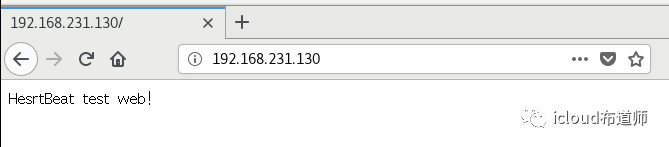
测试打开主服务页面http://192.168.231.130
启动HeartBeat
启动heartbeat
[root@Rserver1 resource.d]# /etc/init.d/heartbeat restartRestarting heartbeat (via systemctl): [ OK ][root@Rserver2 resource.d]# /etc/init.d/heartbeat restartRestarting heartbeat (via systemctl): [ OK ]
查看端口
[root@Rserver1 ha.d]# netstat -tlunp | grep 694udp 0 0 0.0.0.0:694 0.0.0.0:* 55543/heartbeat: wr
报错
[root@Rserver2 ha.d]# tail -f /var/log/messages

原因是没有做软连接!!!
[root@Rserver2 ha.d]# ln -svf /usr/local/heartbeat/lib64/heartbeat/plugins/* /usr/local/heartbeat/lib/heartbeat/plugins/
报错
Could not reliably determine the server's fully qualified domain name, using 218.68.250.118. Set the 'ServerName' directive globally to suppress this message
&& `解决`[root@Rserver1 resource.d]# vim /etc/httpd/conf/httpd.confServerName localhost:80
查看端口
[root@Rserver2 ha.d]# netstat -tlunp | grep 694udp 0 0 0.0.0.0:694 0.0.0.0:* 68335/heartbeat: wr[root@Rserver1 resource.d]# netstat -tlunp | grep 694udp 0 0 0.0.0.0:694 0.0.0.0:* 75163/heartbeat: wr
查看VIP地址

模拟故障测试
关闭Rsever1
[root@Rserver1 resource.d]# systemctl stop heartbeat
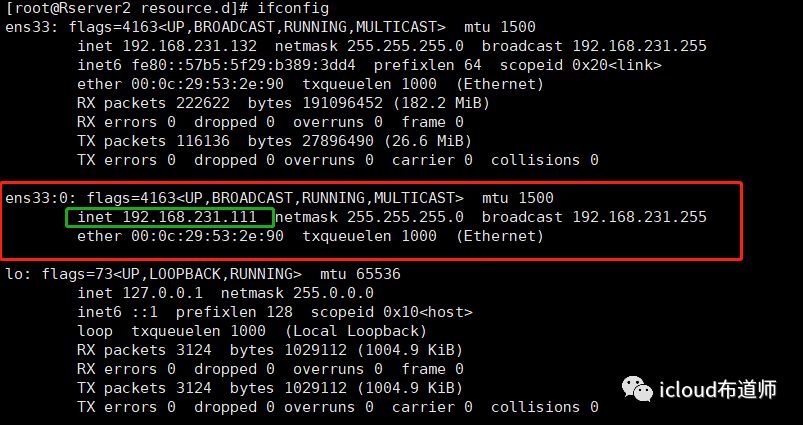
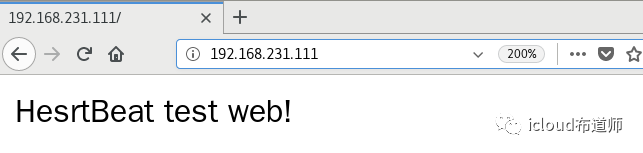
在Rserver2查看
[root@Rserver2 resource.d]# ifconfig
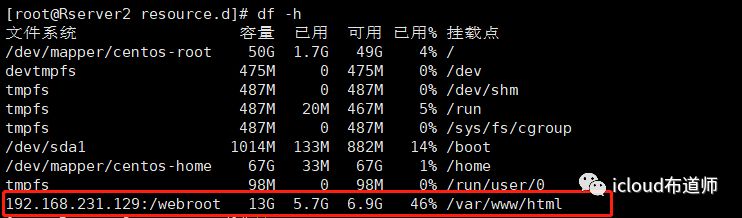
[root@Rserver2 resource.d]# df -h
查看切换日志
Mar 28 13:30:34 localhost heartbeat: [95855]: info: Received shutdown notice from 'rserver1'.Mar 28 13:30:34 localhost heartbeat: [95855]: info: Resources being acquired from rserver1.Mar 28 13:30:34 localhost heartbeat: [96680]: info: acquire local HA resources (standby).Mar 28 13:30:34 localhost heartbeat: [96680]: info: local HA resource acquisition completed (standby).Mar 28 13:30:34 localhost heartbeat: [95855]: info: Standby resource acquisition done [foreign].Mar 28 13:30:34 localhost heartbeat: [96681]: info: No local resources [/usr/local/heartbeat/share/heartbeat/ResourceManager listkeys rserver2] to acquire.Mar 28 13:30:34 localhost harc(default)[96706]: info: Running /usr/local/heartbeat/etc/ha.d//rc.d/status statusMar 28 13:30:34 localhost mach_down(default)[96723]: info: Taking over resource group IPaddr::192.168.231.111/24/ens33Mar 28 13:30:34 localhost ResourceManager(default)[96750]: info: Acquiring resource group: rserver1 IPaddr::192.168.231.111/24/ens33 Filesystem::192.168.231.129:/webroot::/var/www/html::nfs httpdMar 28 13:30:34 localhost /usr/lib/ocf/resource.d//heartbeat/IPaddr(IPaddr_192.168.231.111)[96778]: INFO: Resource is stoppedMar 28 13:30:34 localhost ResourceManager(default)[96750]: info: Running /usr/local/heartbeat/etc/ha.d//resource.d/IPaddr 192.168.231.111/24/ens33 startMar 28 13:30:34 localhost IPaddr(IPaddr_192.168.231.111)[96869]: INFO: Using calculated netmask for 192.168.231.111: 255.255.255.0Mar 28 13:30:34 localhost IPaddr(IPaddr_192.168.231.111)[96869]: INFO: eval ifconfig ens33:0 192.168.231.111 netmask 255.255.255.0 broadcast 192.168.231.255Mar 28 13:30:34 localhost NetworkManager[6441]: <info> [1553751034.6428] policy: set-hostname: current hostname was changed outside NetworkManager: 'Rserver2'Mar 28 13:30:34 localhost /usr/lib/ocf/resource.d//heartbeat/IPaddr(IPaddr_192.168.231.111)[96843]: INFO: SuccessMar 28 13:30:34 localhost /usr/lib/ocf/resource.d//heartbeat/Filesystem(Filesystem_192.168.231.129:/webroot)[96979]: INFO: Resource is stoppedMar 28 13:30:34 localhost ResourceManager(default)[96750]: info: Running /usr/local/heartbeat/etc/ha.d//resource.d/Filesystem 192.168.231.129:/webroot /var/www/html nfs startMar 28 13:30:34 localhost Filesystem(Filesystem_192.168.231.129:/webroot)[97058]: INFO: Running start for 192.168.231.129:/webroot on /var/www/htmlMar 28 13:30:34 localhost /usr/lib/ocf/resource.d//heartbeat/Filesystem(Filesystem_192.168.231.129:/webroot)[97050]: INFO: SuccessMar 28 13:30:34 localhost ResourceManager(default)[96750]: info: Running /usr/local/heartbeat/etc/ha.d//resource.d/httpd startMar 28 13:30:34 localhost systemd: Starting The Apache HTTP Server...Mar 28 13:30:34 localhost systemd: Started The Apache HTTP Server.Mar 28 13:30:34 localhost mach_down(default)[96723]: info: /usr/local/heartbeat/share/heartbeat/mach_down: nice_failback: foreign resources acquiredMar 28 13:30:35 localhost mach_down(default)[96723]: info: mach_down takeover complete for node rserver1.Mar 28 13:30:35 localhost heartbeat: [95855]: info: mach_down takeover complete.Mar 28 13:30:36 localhost heartbeat: [95855]: info: rserver1 wants to go standby [foreign]Mar 28 13:31:06 localhost heartbeat: [95855]: WARN: node rserver1: is deadMar 28 13:31:06 localhost heartbeat: [95855]: info: Cancelling pending standby operationMar 28 13:31:06 localhost heartbeat: [95855]: info: Dead node rserver1 gave up resources.Mar 28 13:31:06 localhost ipfail: [95881]: info: Status update: Node rserver1 now has status deadMar 28 13:31:06 localhost ipfail: [95881]: info: NS: We are still alive!Mar 28 13:31:06 localhost heartbeat: [95855]: info: Link rserver1:ens33 dead.Mar 28 13:31:06 localhost ipfail: [95881]: info: Link Status update: Link rserver1/ens33 now has status deadMar 28 13:31:07 localhost ipfail: [95881]: info: Asking other side for ping node count.Mar 28 13:31:07 localhost ipfail: [95881]: info: Checking remote count of ping nodes.
重新启动Rserver1,查看是否自动切换
[root@Rserver1 log]# systemctl start heartbeat
查看Rserver2日志
Mar 28 13:41:34 localhost heartbeat: [95855]: info: Heartbeat restart on node rserver1Mar 28 13:41:34 localhost heartbeat: [95855]: info: Link rserver1:ens33 up.Mar 28 13:41:34 localhost heartbeat: [95855]: info: Status update for node rserver1: status initMar 28 13:41:34 localhost heartbeat: [95855]: info: Status update for node rserver1: status upMar 28 13:41:34 localhost ipfail: [95881]: info: Link Status update: Link rserver1/ens33 now has status upMar 28 13:41:34 localhost ipfail: [95881]: info: Status update: Node rserver1 now has status initMar 28 13:41:34 localhost ipfail: [95881]: info: Status update: Node rserver1 now has status upMar 28 13:41:34 localhost harc(default)[97213]: info: Running /usr/local/heartbeat/etc/ha.d//rc.d/status statusMar 28 13:41:34 localhost harc(default)[97230]: info: Running /usr/local/heartbeat/etc/ha.d//rc.d/status statusMar 28 13:41:35 localhost heartbeat: [95855]: info: all clients are now pausedMar 28 13:41:36 localhost heartbeat: [95855]: info: Status update for node rserver1: status activeMar 28 13:41:36 localhost ipfail: [95881]: info: Status update: Node rserver1 now has status activeMar 28 13:41:36 localhost harc(default)[97247]: info: Running /usr/local/heartbeat/etc/ha.d//rc.d/status statusMar 28 13:41:36 localhost heartbeat: [95855]: info: remote resource transition completed.Mar 28 13:41:36 localhost heartbeat: [95855]: info: rserver2 wants to go standby [foreign]Mar 28 13:41:37 localhost heartbeat: [95855]: info: standby: rserver1 can take our foreign resourcesMar 28 13:41:37 localhost heartbeat: [97264]: info: give up foreign HA resources (standby).Mar 28 13:41:37 localhost ResourceManager(default)[97277]: info: Releasing resource group: rserver1 IPaddr::192.168.231.111/24/ens33 Filesystem::192.168.231.129:/webroot::/var/www/html::nfs httpdMar 28 13:41:37 localhost ResourceManager(default)[97277]: info: Running /usr/local/heartbeat/etc/ha.d/resource.d/httpd stopMar 28 13:41:37 localhost systemd: Stopping The Apache HTTP Server...Mar 28 13:41:38 localhost systemd: Stopped The Apache HTTP Server.Mar 28 13:41:38 localhost ResourceManager(default)[97277]: info: Running /usr/local/heartbeat/etc/ha.d/resource.d/Filesystem 192.168.231.129:/webroot /var/www/html nfs stopMar 28 13:41:38 localhost Filesystem(Filesystem_192.168.231.129:/webroot)[97343]: INFO: Running stop for 192.168.231.129:/webroot on /var/www/htmlMar 28 13:41:38 localhost Filesystem(Filesystem_192.168.231.129:/webroot)[97343]: INFO: Trying to unmount /var/www/htmlMar 28 13:41:38 localhost Filesystem(Filesystem_192.168.231.129:/webroot)[97343]: INFO: unmounted /var/www/html successfullyMar 28 13:41:38 localhost /usr/lib/ocf/resource.d//heartbeat/Filesystem(Filesystem_192.168.231.129:/webroot)[97335]: INFO: SuccessMar 28 13:41:38 localhost ResourceManager(default)[97277]: info: Running /usr/local/heartbeat/etc/ha.d/resource.d/IPaddr 192.168.231.111/24/ens33 stopMar 28 13:41:38 localhost IPaddr(IPaddr_192.168.231.111)[97472]: INFO: ifconfig ens33:0 downMar 28 13:41:38 localhost NetworkManager[6441]: <info> [1553751698.7782] policy: set-hostname: current hostname was changed outside NetworkManager: 'Rserver2'Mar 28 13:41:38 localhost /usr/lib/ocf/resource.d//heartbeat/IPaddr(IPaddr_192.168.231.111)[97446]: INFO: SuccessMar 28 13:41:38 localhost heartbeat: [97264]: info: foreign HA resource release completed (standby).Mar 28 13:41:38 localhost heartbeat: [95855]: info: Local standby process completed [foreign].Mar 28 13:41:38 localhost heartbeat: [95855]: info: all clients are now resumedMar 28 13:41:38 localhost ipfail: [95881]: info: Asking other side for ping node count.Mar 28 13:41:40 localhost ipfail: [95881]: info: No giveup timer to abort.Mar 28 13:41:52 localhost heartbeat: [95855]: WARN: 1 lost packet(s) for [rserver1] [20:22]Mar 28 13:41:52 localhost heartbeat: [95855]: info: remote resource transition completed.Mar 28 13:41:52 localhost heartbeat: [95855]: info: No pkts missing from rserver1!Mar 28 13:41:52 localhost heartbeat: [95855]: info: Other node completed standby takeover of foreign resources.
可以看到其他主机已经代替了本主机,因为在ha.cf里面设置了权限,当rserver1恢复时,自动将数据切换回rserver1。
拓展:ipfail模块
heartbeat自带的断网切换的工具-ipfailipfail断网切换的原理:关于ipfail这个断网切换的原理很简单,首先heartbeat要判断自己的网络是否正常其实就是通过ping某个ip,如果可以ping的通,说明网络是通的,如果ping不通了,说明是网络断了,或者是主服务器的网卡坏了,然后执行切换的动作。ping一个group的ipfail配置:ping_group group1 172.16.103.254 172.16.103.212
----------------------------------------------
----------------------------------------------
???!
HesrtBeat?
单词敲错了
就这样吧 = =
实验证明:
懒能攻克强迫症
----------------------
到此结束
