



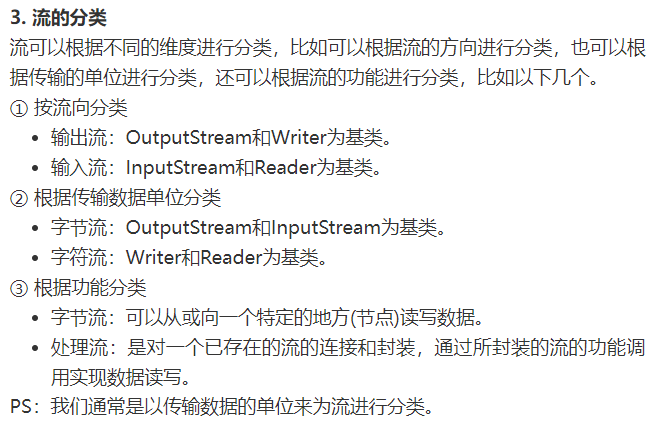
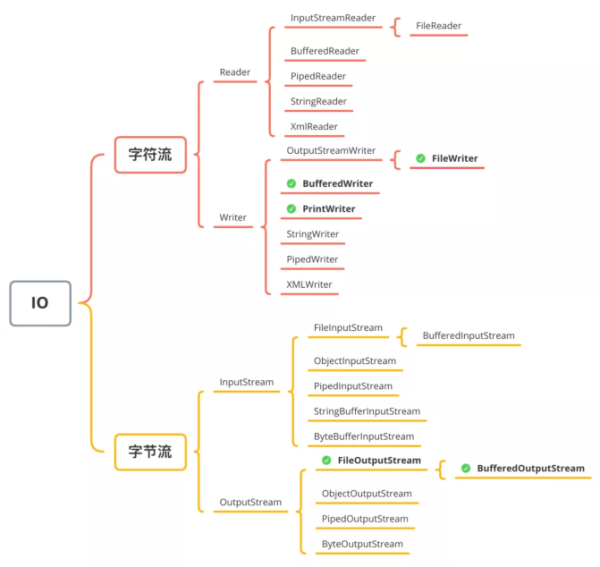
写程序时经常会碰到读写文件的场景,在Java中操作文件的方法本质上只有两种:字符流和字节流,而他们的实现类又有很多,因此,有时候用起来,就会比较乱。
这篇文章系统介绍了Java操作文件的几种方式,学习一下,
https://www.cnblogs.com/rinack/p/14173936.html

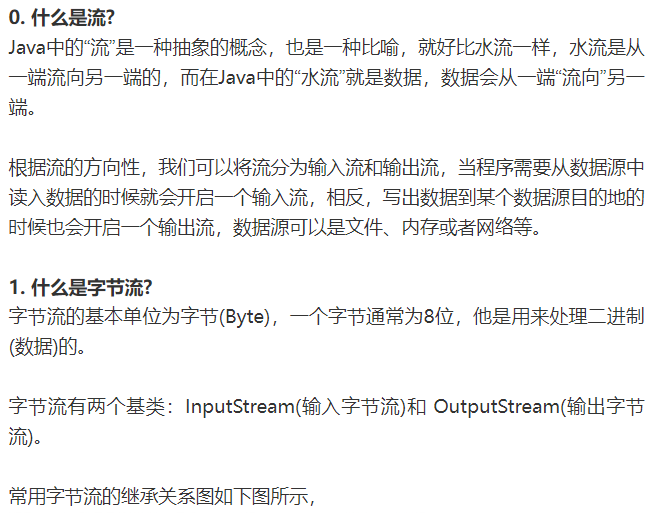
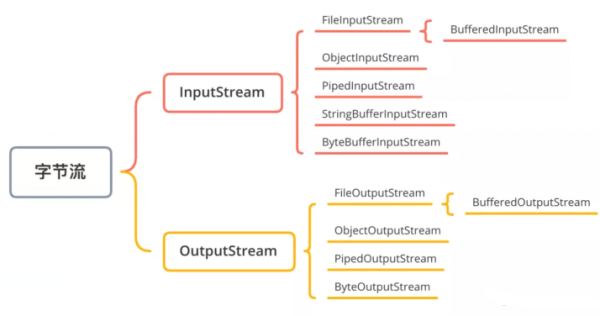
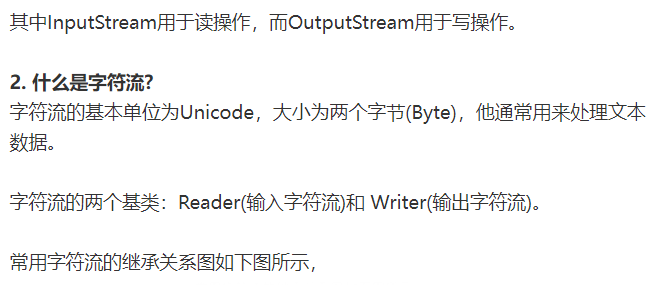
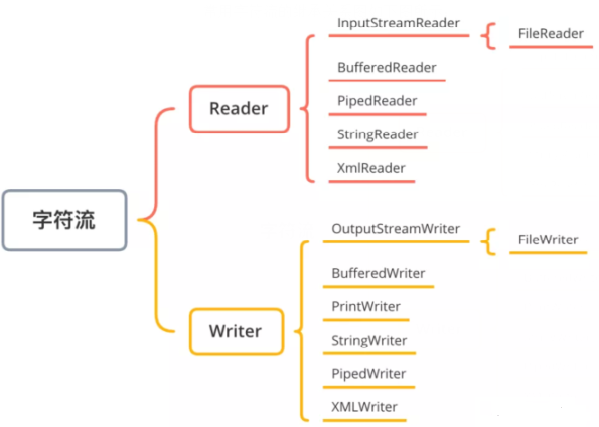

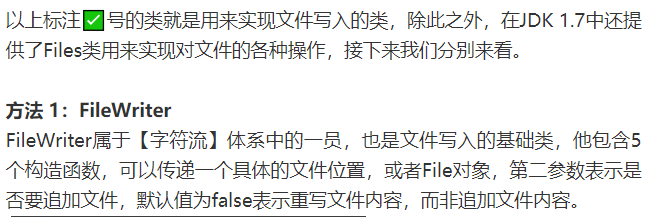
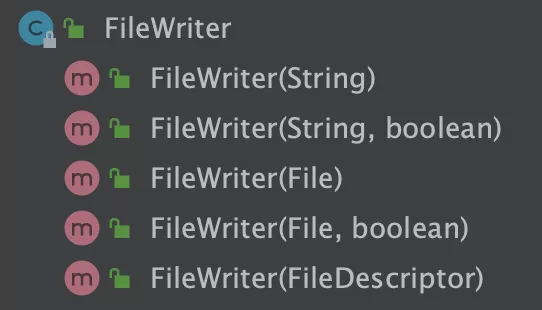
FileWriter类的实现如下,
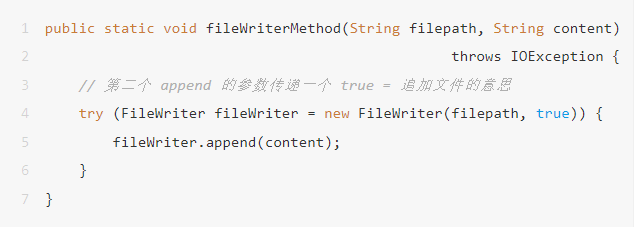
/*** 方法 1:使用 FileWriter 写文件* @param filepath 文件目录* @param content 待写入内容* @throws IOException*/public static void fileWriterMethod(String filepath, String content) throws IOException {try (FileWriter fileWriter = new FileWriter(filepath)) {fileWriter.append(content);}}
只需要传入具体的文件路径和待写入的内容即可,调用代码如下,
public static void main(String[] args) {fileWriterMethod("/Users/mac/Downloads/io_test/write1.txt", "Hello, Java.");}
了解了缓存区的优点之后,咱们回到本文的主题,接下来我们用BufferedWriter来文件的写入,实现代码如下,
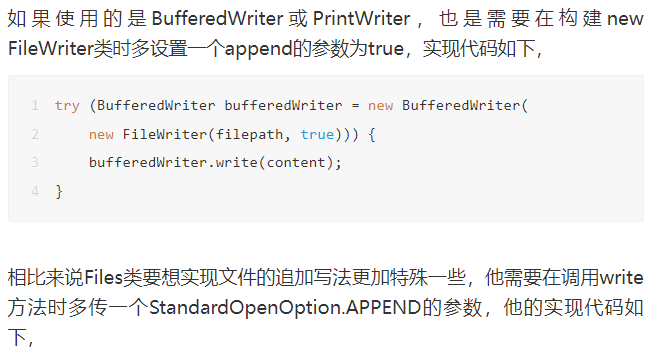
/*** 方法 2:使用 BufferedWriter 写文件* @param filepath 文件目录* @param content 待写入内容* @throws IOException*/public static void bufferedWriterMethod(String filepath, String content) throws IOException {try (BufferedWriter bufferedWriter = new BufferedWriter(new FileWriter(filepath))) {bufferedWriter.write(content);}}

/*** 方法 3:使用 PrintWriter 写文件* @param filepath 文件目录* @param content 待写入内容* @throws IOException*/public static void printWriterMethod(String filepath, String content) throws IOException {try (PrintWriter printWriter = new PrintWriter(new FileWriter(filepath))) {printWriter.print(content);}}

/*** 方法 4:使用 FileOutputStream 写文件* @param filepath 文件目录* @param content 待写入内容* @throws IOException*/public static void fileOutputStreamMethod(String filepath, String content) throws IOException {try (FileOutputStream fileOutputStream = new FileOutputStream(filepath)) {byte[] bytes = content.getBytes();fileOutputStream.write(bytes);}}

/*** 方法 5:使用 BufferedOutputStream 写文件* @param filepath 文件目录* @param content 待写入内容* @throws IOException*/public static void bufferedOutputStreamMethod(String filepath, String content) throws IOException {try (BufferedOutputStream bufferedOutputStream = new BufferedOutputStream(new FileOutputStream(filepath))) {bufferedOutputStream.write(content.getBytes());}}
/*** 方法 6:使用 Files 写文件* @param filepath 文件目录* @param content 待写入内容* @throws IOException*/public static void filesTest(String filepath, String content) throws IOException {Files.write(Paths.get(filepath), content.getBytes());}
import java.io.*;import java.nio.file.Files;import java.nio.file.Paths;public class WriteExample {public static void main(String[] args) throws IOException {// 构建写入内容StringBuilder stringBuilder = new StringBuilder();for (int i = 0; i < 1000000; i++) {stringBuilder.append("ABCDEFGHIGKLMNOPQRSEUVWXYZ");}// 写入内容final String content = stringBuilder.toString();// 存放文件的目录final String filepath1 = "/Users/mac/Downloads/io_test/write1.txt";final String filepath2 = "/Users/mac/Downloads/io_test/write2.txt";final String filepath3 = "/Users/mac/Downloads/io_test/write3.txt";final String filepath4 = "/Users/mac/Downloads/io_test/write4.txt";final String filepath5 = "/Users/mac/Downloads/io_test/write5.txt";final String filepath6 = "/Users/mac/Downloads/io_test/write6.txt";// 方法一:使用 FileWriter 写文件long stime1 = System.currentTimeMillis();fileWriterTest(filepath1, content);long etime1 = System.currentTimeMillis();System.out.println("FileWriter 写入用时:" + (etime1 - stime1));// 方法二:使用 BufferedWriter 写文件long stime2 = System.currentTimeMillis();bufferedWriterTest(filepath2, content);long etime2 = System.currentTimeMillis();System.out.println("BufferedWriter 写入用时:" + (etime2 - stime2));// 方法三:使用 PrintWriter 写文件long stime3 = System.currentTimeMillis();printWriterTest(filepath3, content);long etime3 = System.currentTimeMillis();System.out.println("PrintWriterTest 写入用时:" + (etime3 - stime3));// 方法四:使用 FileOutputStream 写文件long stime4 = System.currentTimeMillis();fileOutputStreamTest(filepath4, content);long etime4 = System.currentTimeMillis();System.out.println("FileOutputStream 写入用时:" + (etime4 - stime4));// 方法五:使用 BufferedOutputStream 写文件long stime5 = System.currentTimeMillis();bufferedOutputStreamTest(filepath5, content);long etime5 = System.currentTimeMillis();System.out.println("BufferedOutputStream 写入用时:" + (etime5 - stime5));// 方法六:使用 Files 写文件long stime6 = System.currentTimeMillis();filesTest(filepath6, content);long etime6 = System.currentTimeMillis();System.out.println("Files 写入用时:" + (etime6 - stime6));}/*** 方法六:使用 Files 写文件* @param filepath 文件目录* @param content 待写入内容* @throws IOException*/private static void filesTest(String filepath, String content) throws IOException {Files.write(Paths.get(filepath), content.getBytes());}/*** 方法五:使用 BufferedOutputStream 写文件* @param filepath 文件目录* @param content 待写入内容* @throws IOException*/private static void bufferedOutputStreamTest(String filepath, String content) throws IOException {try (BufferedOutputStream bufferedOutputStream = new BufferedOutputStream(new FileOutputStream(filepath))) {bufferedOutputStream.write(content.getBytes());}}/*** 方法四:使用 FileOutputStream 写文件* @param filepath 文件目录* @param content 待写入内容* @throws IOException*/private static void fileOutputStreamTest(String filepath, String content) throws IOException {try (FileOutputStream fileOutputStream = new FileOutputStream(filepath)) {byte[] bytes = content.getBytes();fileOutputStream.write(bytes);}}/*** 方法三:使用 PrintWriter 写文件* @param filepath 文件目录* @param content 待写入内容* @throws IOException*/private static void printWriterTest(String filepath, String content) throws IOException {try (PrintWriter printWriter = new PrintWriter(new FileWriter(filepath))) {printWriter.print(content);}}/*** 方法二:使用 BufferedWriter 写文件* @param filepath 文件目录* @param content 待写入内容* @throws IOException*/private static void bufferedWriterTest(String filepath, String content) throws IOException {try (BufferedWriter bufferedWriter = new BufferedWriter(new FileWriter(filepath))) {bufferedWriter.write(content);}}/*** 方法一:使用 FileWriter 写文件* @param filepath 文件目录* @param content 待写入内容* @throws IOException*/private static void fileWriterTest(String filepath, String content) throws IOException {try (FileWriter fileWriter = new FileWriter(filepath)) {fileWriter.append(content);}}}
在查看结果之前,我们先去对应的文件夹看看写入的文件是否正常,如下图所示,
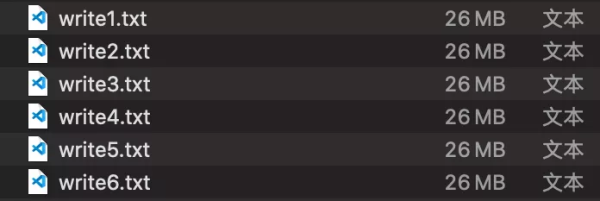
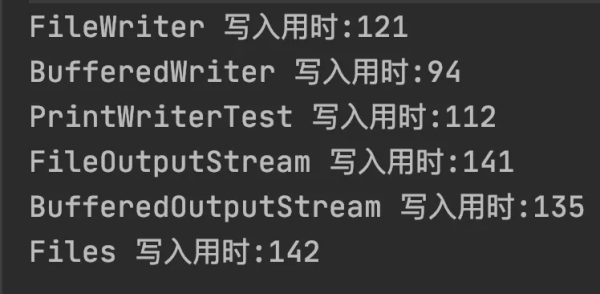
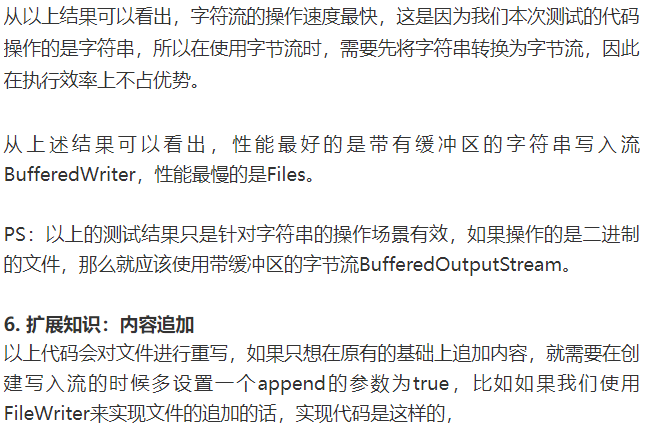
从上述结果可以看出,每种方法都正常写入了26 MB的数据,他们最终执行的结果如下图所示,

近期更新的文章:
《第七届DAMS中国数据智能管理峰会(上海站) - 文末俩惊喜》
文章分类和索引:
文章转载自bisal的个人杂货铺,如果涉嫌侵权,请发送邮件至:contact@modb.pro进行举报,并提供相关证据,一经查实,墨天轮将立刻删除相关内容。
