一、整体架构采用nginx + kafka
整体基于openresty + lua-resty-kafka+centos
首先添加openresty依赖
apt-get install libreadline-dev libncurses5-dev libpcre3-dev libssl-dev perl make build-essential
yum install readline-devel pcre-devel openssl-devel gcc
安装编译openresty:
安装文件所在目录: cd /opt/nginx/
下载openresty: wget https://openresty.org/download/openresty-1.9.7.4.tar.gz
解压:tar -xzf openresty-1.9.7.4.tar.gz /opt/nginx/
配置:
# 指定目录为/opt/openresty,默认在/usr/local。
./configure --prefix=/opt/openresty --with-luajit --without-http_redis2_module --with-http_iconv_module
5. 安装 make & make install
安装lua-resty-kafka
#下载lua-resty-kafka:
wget https://github.com/doujiang24/lua-resty-kafka/archive/master.zip
unzip lua-resty-kafka-master.zip -d /opt/nginx/
#拷贝lua-resty-kafka到openresty
mkdir /opt/openresty/lualib/kafka
cp -rf /opt/nginx/lua-resty-kafka-master/lib/resty /opt/openresty/lualib/kafka/
安装单机kafka:【需要注意的如果不能保证nginx和kafka在同一台机器需要调整/opt/openresty/lualib/kafka里面的client.lua源码 具体见本文最后】
cd /opt/nginx/
wget http://apache.fayea.com/kafka/0.9.0.1/kafka_2.10-0.9.0.1.tgz
tar xvf kafka_2.10-0.9.0.1.tgz
# 开启单机zookeeper
nohup sh bin/zookeeper-server-start.sh config/zookeeper.properties > ./zk.log 2>&1 &
# 绑定broker ip,必须绑定
#在config/servier.properties下修改host.name
#host.name={your_server_ip}
# 启动kafka服务
nohup sh bin/kafka-server-start.sh config/server.properties > ./server.log 2>&1 &
# 创建测试topic【无论nginx和kafka是否在一台 必须保证topi存在 并且 nginx.conf使用名称相同】
sh bin/kafka-topics.sh --zookeeper localhost:2181 --create --topic test1 --partitions 1 -- replication-factor 1
二、配置【nginx.conf + /etc/sysctl.conf】
nginx.conf配置
#user nobody;
worker_processes auto; #nginx总进程 CPU核数
worker_rlimit_nofile 100000; #一个nginx进程打开的最多文件描述符数目;(系统的值ulimit -n)与nginx进程数相除;建议一般是 ulimit -n的值保持一致
error_log logs/error.log; #全局错误日志存放
#error_log logs/error.log notice;
#error_log logs/error.log info;
#pid logs/nginx.pid;
events {
use epoll;
multi_accept on;
worker_connections 65535;
}
http {
gzip on;
gzip_disable "msie6";
gzip_proxied any;
gzip_min_length 1000;
gzip_buffers 16 64k;
gzip_comp_level 4;
gzip_types text/plain application/json application/x-javascript text/css application/xml;
gzip_vary on;
server_tokens off;
sendfile on;
tcp_nopush on;
tcp_nodelay on;
keepalive_timeout 30;
client_header_timeout 30;
client_body_timeout 30;
reset_timedout_connection on;
send_timeout 10;
limit_conn_zone $binary_remote_addr zone=addr:5m;
limit_conn addr 100;
open_file_cache max=200000 inactive=20s;
open_file_cache_valid 30s;
open_file_cache_min_uses 2;
open_file_cache_errors on;
access_log off;
lua_package_path "/opt/openresty/lualib/kafka/?.lua;;"; #引入lua-resty-kafka
server {
listen 80;
server_name localhost;
location favicon.ico {
root html;
index index.html index.htm;
}
location logs {
# 使用log_by_lua 包含lua代码,因为log_by_lua指令运行在请求最后且不影响proxy_pass机制
log_by_lua '
-- 引入lua所有api
local cjson = require "cjson"
local producer = require "resty.kafka.producer"
-- 定义kafka broker地址,ip需要和kafka的host.name配置一致
local broker_list = {
{ host = "10.33.97.92", port = 9092 },
}
local broker_list_host_ip = { #该块代码见client.lua修改
{ host = "datagroup-97-92", ip = "10.33.97.92" },
}
-- 定义json便于日志数据整理收集
local log_json = {}
log_json["uri"]=ngx.var.uri
log_json["args"]=ngx.var.args
log_json["host"]=ngx.var.host
log_json["request_body"]=ngx.var.request_body
log_json["remote_addr"] = ngx.var.remote_addr
log_json["remote_user"] = ngx.var.remote_user
log_json["time_local"] = ngx.var.time_local
log_json["status"] = ngx.var.status
log_json["body_bytes_sent"] = ngx.var.body_bytes_sent
log_json["http_referer"] = ngx.var.http_referer
log_json["http_user_agent"] = ngx.var.http_user_agent
log_json["http_x_forwarded_for"] = ngx.var.http_x_forwarded_for
log_json["upstream_response_time"] = ngx.var.upstream_response_time
log_json["request_time"] = ngx.var.request_time
-- 转换json为字符串
local message = cjson.encode(log_json);
-- 定义kafka异步生产者
local bp = producer:new(broker_list, { producer_type = "async", broker_list_host_ip = broker_list_host_ip,refresh_interval = 3000 })
-- 发送日志消息,send第二个参数key,用于kafka路由控制:
-- key为nill(空)时,一段时间向同一partition写入数据
-- 指定key,按照key的hash写入到对应的partition
local ok, err = bp:send("test1", nil, message)
if not ok then
ngx.log(ngx.ERR, "kafka send err:", err)
return
end
';
}
error_page 500 502 503 504 /50x.html;
location = 50x.html {
root html;
}
}
}
/etc/sysctl.conf优化【根据自身服务器情况调整】
# Kernel sysctl configuration file for Red Hat Linux
#
# For binary values, 0 is disabled, 1 is enabled. See sysctl(8) and
# sysctl.conf(5) for more details.
# Controls IP packet forwarding
net.ipv4.ip_forward = 0
# Controls source route verification
net.ipv4.conf.default.rp_filter = 1
# Do not accept source routing
net.ipv4.conf.default.accept_source_route = 0
# Controls the System Request debugging functionality of the kernel
kernel.sysrq = 0
# Controls whether core dumps will append the PID to the core filename.
# Useful for debugging multi-threaded applications.
kernel.core_uses_pid = 1
# Controls the use of TCP syncookies
net.ipv4.tcp_syncookies = 1
# Disable netfilter on bridges.
#net.bridge.bridge-nf-call-ip6tables = 0
#net.bridge.bridge-nf-call-iptables = 0
#net.bridge.bridge-nf-call-arptables = 0
# Controls the default maxmimum size of a mesage queue
kernel.msgmnb = 65536
# Controls the maximum size of a message, in bytes
kernel.msgmax = 65536
# Controls the maximum shared segment size, in bytes
kernel.shmmax = 68719476736
# Controls the maximum number of shared memory segments, in pages
kernel.shmall = 4294967296
# add 2016-11-16
# 调高系统的 IP 以及端口数据限制,从可以接受更多的连接
net.ipv4.ip_local_port_range = 2000 65000
net.ipv4.tcp_window_scaling = 1
# number of packets to keep in backlog before the kernel starts dropping them
# 设置协议栈可以缓存的报文数阀值,超过阀值的报文将被内核丢弃
net.ipv4.tcp_max_syn_backlog = 3240000
# increase socket listen backlog
# 调高 socket 侦听数阀值
net.core.somaxconn = 3240000
net.ipv4.tcp_max_tw_buckets = 1440000
# Increase TCP buffer sizes
# 调大 TCP 存储大小
net.core.rmem_default = 8388608
net.core.rmem_max = 16777216
net.core.wmem_max = 16777216
net.ipv4.tcp_rmem = 4096 87380 16777216
net.ipv4.tcp_wmem = 4096 65536 16777216
net.ipv4.tcp_congestion_control = cubic
/opt/openresty/lualib/kafka/resty/kafka的client.lua 调整内容红色部分
function _M.new(self, broker_list, client_config)
local opts = client_config or {}
local socket_config = {
socket_timeout = opts.socket_timeout or 3000,
keepalive_timeout = opts.keepalive_timeout or 600 * 1000, -- 10 min
keepalive_size = opts.keepalive_size or 2,
}
--start 0 == 2016-11-18
local broker_list_host_ip = opts.broker_list_host_ip or {}
local cli = setmetatable({
broker_list = broker_list,
broker_list_host_ip = broker_list_host_ip,
topic_partitions = {},
brokers = {},
client_id = "worker" .. pid(),
socket_config = socket_config,
}, mt)
--end 0 == 2016-11-18
if opts.refresh_interval then
meta_refresh(nil, cli, opts.refresh_interval 1000) -- in ms
end
return cli
end
function _M.fetch_metadata(self, topic)
local brokers, partitions = _metadata_cache(self, topic)
if brokers then
return brokers, partitions
end
_fetch_metadata(self, topic)
return _metadata_cache(self, topic)
end
function _M.choose_broker(self, topic, partition_id)
local brokers, partitions = self:fetch_metadata(topic)
if not brokers then
return nil, partitions
end
local partition = partitions[partition_id]
if not partition then
return nil, "not found partition"
end
local config = brokers[partition.leader]
if not config then
return nil, "not found broker"
end
--start 1 == 2016-11-18
local broker_list_host_ip = self.broker_list_host_ip
for k = 1, #broker_list_host_ip do
local hostip = broker_list_host_ip[k]
if config ~= nil and hostip ~= nil and config.host == hostip.host then
config.host = broker_list_host_ip[k].ip
end
end
--end 1 == 2016-11-18
return config
end
return _M
三、启动nginx
# 启动
./nginx -c /opt/openresty/nginx/conf/nginx.conf
# 重启
./nginx -s reload
四、测试
http://localhost/logs?passport=83FBC7337D681E679FFBA1B913E22A0D@qq.sohu.com&page=2&size=10
开启kafka consumer消费数据
kafka-console-consumer.sh --zookeeper 10.33.97.52:2181 --topic test1 --from-beginning
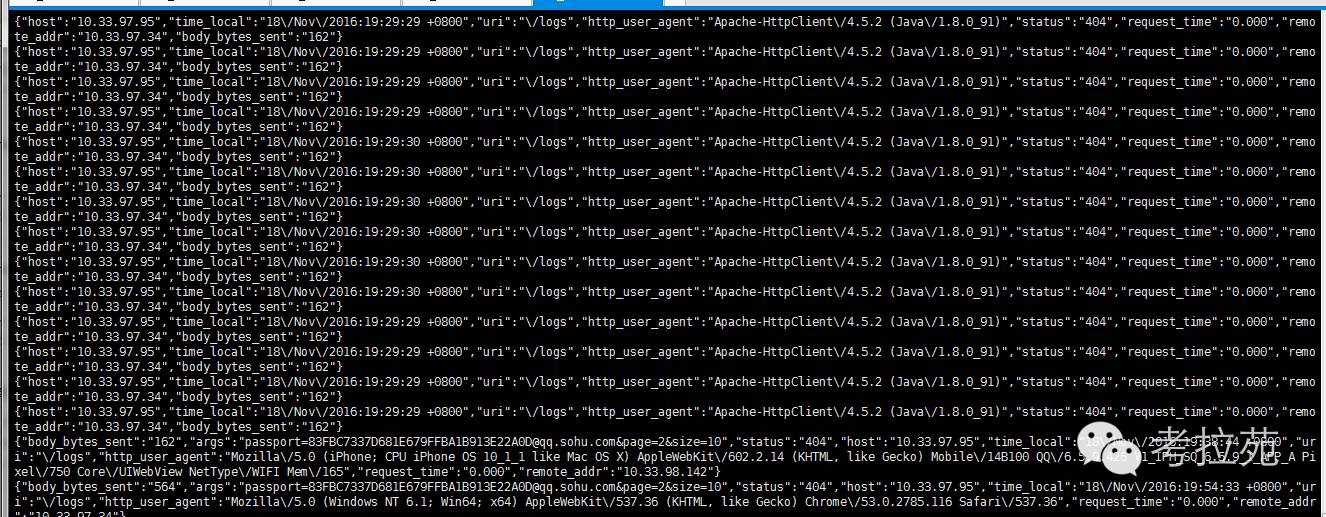
截图如下
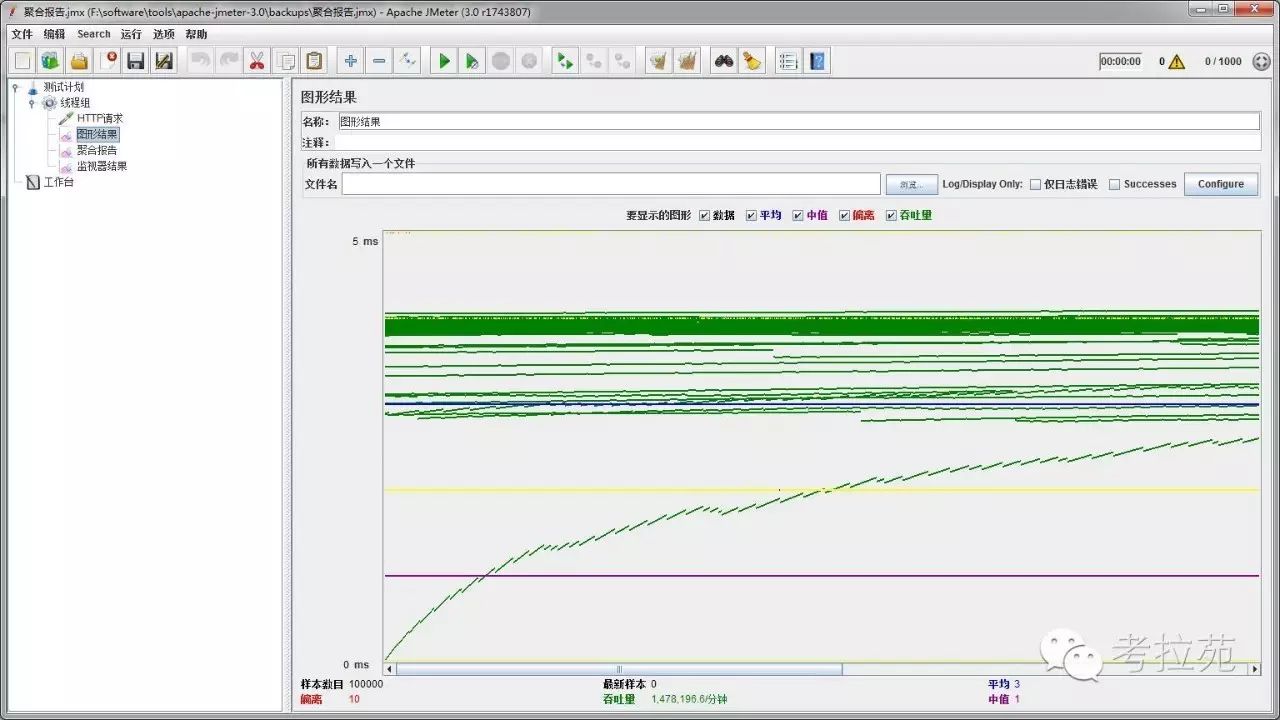
压测结果【使用jmeter】
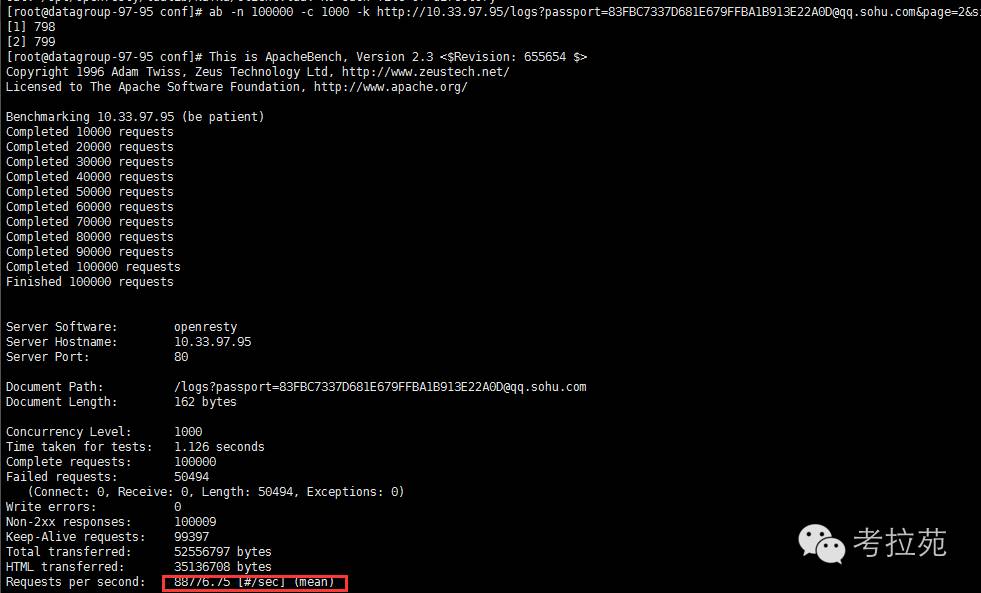
apache ab压测