



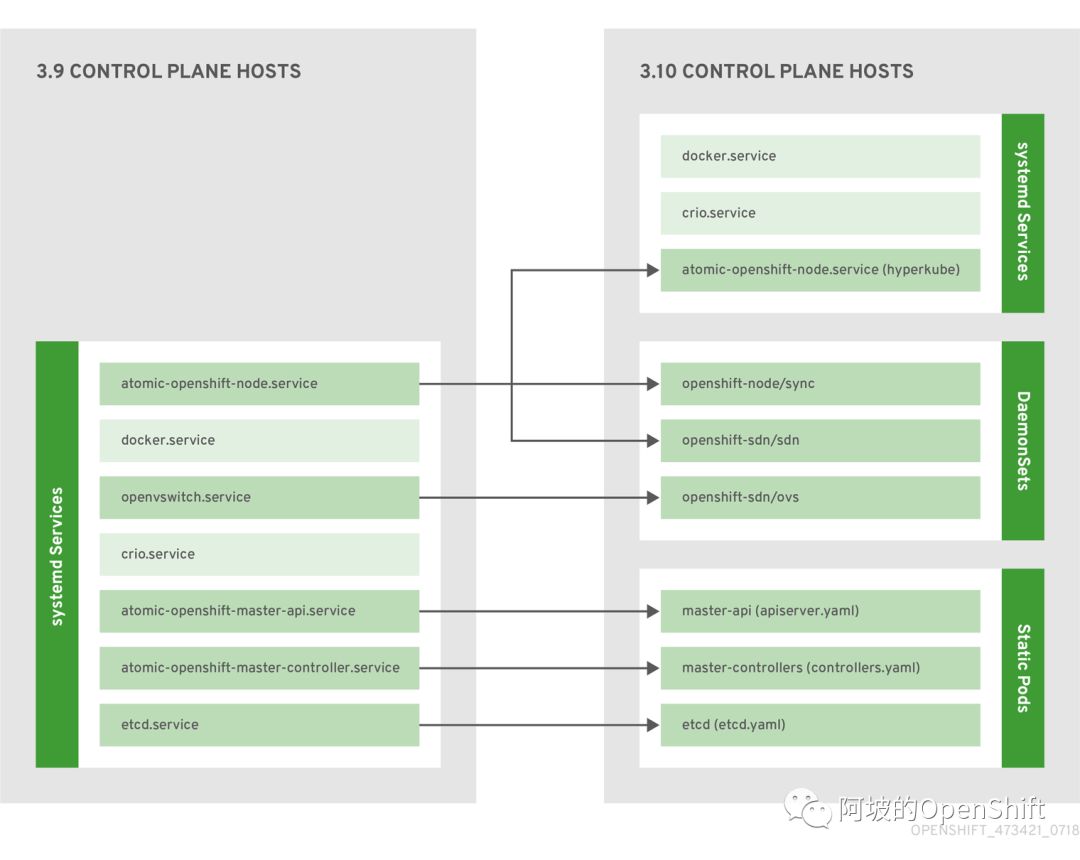
3.9 与 3.10 对比架构图
简述
从对比架构图可以看到 3.9 时的 ocp 服务都是采用systemd来进行管理的,常用的主要分为docker、node、ovs、master-api、master-controller、etcd这6个服务,在3.10时,docker服务不变,node服务划分为node(hyperkube)、sync、sdn三个服务,node(hyperkube)服务还是由systemd来管理,sync与sdn以daemonset容器化的方式运行在每个节点上,ovs也以daemonset容器化的方式运行在每个节点上,控制平面的三个服务master-api、master-controller、etcd 以 static pod 的方式运行。
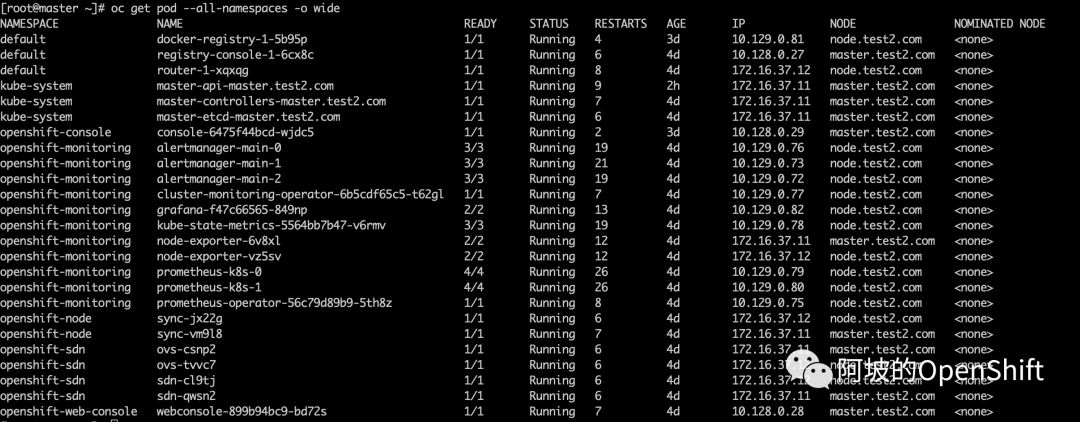
pod运行状态及所属项目
openshift-node服务与ovs服务
openshift-node服务分为node(hyperkube)、sync、sdn进行运行,其中node(hyperkube)还是以systemd的方式进行运行,sync与sdn以daemonset的方式运行,不过sync、sdn、ovs这三个pod使用的镜像是一样的,都为openshift3/ose-node,只是根据各自的作用不同所选择的启动命令相关参数不同。
sync
volume 配置:可以看到sync pod会读取主机的相关配置信息,这意味着在宿主机上修改配置,重启sync的pod即可。
      volumes:
      - hostPath:
          path: etc/origin/node
          type: ""
        name: host-config
      - hostPath:
          path: etc/sysconfig
          type: ""
        name: host-sysconfig-node
        volumeMounts:
        - mountPath: etc/origin/node/
          name: host-config
        - mountPath: etc/sysconfig
          name: host-sysconfig-node
          readOnly: true
网络配置:使用的是宿主机的网络,加上上面的宿主机配置文件,这意味着该服务跟运行在systemd上是没什么很大的区别。
hostNetwork: true权限相关:pod已root进行启动,并且有权限访问宿主机文件系统的权限;给pod使用的sa为sync,sync已经分配了privileged级别的scc。
        securityContext:
          privileged: true
          runAsUser: 0
      serviceAccount: sync
      serviceAccountName: sync
sdn
volume 配置:可以看到sdn pod会读取主机的相关配置信息,与sync类似。
      volumes:
      - hostPath:
          path: etc/origin/node
          type: ""
        name: host-config
      - hostPath:
          path: etc/sysconfig/origin-node
          type: ""
        name: host-sysconfig-node
      - hostPath:
          path: lib/modules
          type: ""
        name: host-modules
      - hostPath:
          path: var/run
          type: ""
        name: host-var-run
      - hostPath:
          path: var/run/dbus
          type: ""
        name: host-var-run-dbus
      - hostPath:
          path: var/run/openvswitch
          type: ""
        name: host-var-run-ovs
      - hostPath:
          path: var/run/kubernetes
          type: ""
        name: host-var-run-kubernetes
      - hostPath:
          path: var/run/openshift-sdn
          type: ""
        name: host-var-run-openshift-sdn
      - hostPath:
          path: opt/cni/bin
          type: ""
        name: host-opt-cni-bin
      - hostPath:
          path: etc/cni/net.d
          type: ""
        name: host-etc-cni-netd
      - hostPath:
          path: var/lib/cni/networks/openshift-sdn
          type: ""
        name: host-var-lib-cni-networks-openshift-sdn
        volumeMounts:
        - mountPath: etc/origin/node/
          name: host-config
          readOnly: true
        - mountPath: etc/sysconfig/origin-node
          name: host-sysconfig-node
          readOnly: true
        - mountPath: var/run
          name: host-var-run
        - mountPath: var/run/dbus/
          name: host-var-run-dbus
          readOnly: true
        - mountPath: var/run/openvswitch/
          name: host-var-run-ovs
          readOnly: true
        - mountPath: var/run/kubernetes/
          name: host-var-run-kubernetes
          readOnly: true
        - mountPath: var/run/openshift-sdn
          name: host-var-run-openshift-sdn
        - mountPath: host/opt/cni/bin
          name: host-opt-cni-bin
        - mountPath: etc/cni/net.d
          name: host-etc-cni-netd
        - mountPath: var/lib/cni/networks/openshift-sdn
          name: host-var-lib-cni-networks-openshift-sdn
网络配置:使用的也是宿主机的网络
权限相关:pod已root进行启动,并且有权限访问宿主机文件系统的权限;给pod使用的sa为sdn,sdn已经分配了privileged级别的scc。
        securityContext:
          privileged: true
          runAsUser: 0
      serviceAccount: sdn
      serviceAccountName: sdn
ovs
volume:
      volumes:
      - hostPath:
          path: lib/modules
          type: ""
        name: host-modules
      - hostPath:
          path: run/openvswitch
          type: ""
        name: host-run-ovs
      - hostPath:
          path: sys
          type: ""
        name: host-sys
      - hostPath:
          path: etc/origin/openvswitch
          type: ""
        name: host-config-openvswitch
       volumeMounts:
        - mountPath: lib/modules
          name: host-modules
          readOnly: true
        - mountPath: run/openvswitch
          name: host-run-ovs
        - mountPath: var/run/openvswitch
          name: host-run-ovs
        - mountPath: sys
          name: host-sys
          readOnly: true
        - mountPath: etc/openvswitch
          name: host-config-openvswitch
网络配置:使用的也是宿主机的网络
权限:与sdn一样
node-service(hyperkube)
node-service(hyperkube)这个服务其实就是以/usr/bin/hyperkube kubelet进行加载的。
[root@master ~]# systemctl status atomic-openshift-node.service
● atomic-openshift-node.service - OpenShift Node
   Loaded: loaded (/etc/systemd/system/atomic-openshift-node.service; enabled; vendor preset: disabled)
   Active: active (running) since Thu 2018-10-25 02:01:12 EDT; 2h 30min ago
     Docs: https://github.com/openshift/origin
 Main PID: 1843 (hyperkube)
   Memory: 122.2M
   CGroup: system.slice/atomic-openshift-node.service
           └─1843 usr/bin/hyperkube kubelet --v=2 --address=0.0.0.0 --allow-privileged=true --anonymous-auth=true --authentication-token-webhook=true --authentication-token-webhook-cache-ttl=5m --author...
控制平面服务
控制平面服务即master服务:master-contoller、master-api、etcd,三个以static pod方式运行。
static pod
static pod是指有kubelet直接进行管理的pod,没有RC、RS、DC等对象对pod进行管理,kubelet会去指定路径下加载pod的yaml或json文件进行启动,kubelet是systemd服务启动的,即:node-service(hyperkube)。
查看kubelet加载pod yaml文件的路径参数:
/usr/bin/hyperkube kubelet --pod-manifest-path=/etc/origin/node/pods前往该路径目录查看文件,可以看到控制平面三个服务的pod yaml文件
[root@master ~]# ll etc/origin/node/pods
total 12
-rw-------. 1 root root 1555 Oct 20 23:02 apiserver.yaml
-rw-------. 1 root root 1656 Oct 20 23:02 controller.yaml
-rw-------. 1 root root 1218 Oct 20 23:01 etcd.yaml
参考链接:https://kubernetes.io/docs/tasks/administer-cluster/static-pod/
master-contoller
volume:可以看到master-controller也是读取宿主机的配置,路径同3.9
  volumes:
  - hostPath:
      path: etc/origin/master/
      type: ""
    name: master-config
  - hostPath:
      path: etc/origin/cloudprovider
      type: ""
    name: master-cloud-provider
  - hostPath:
      path: etc/containers/registries.d
      type: ""
    name: signature-import
  - hostPath:
      path: usr/libexec/kubernetes/kubelet-plugins
      type: ""
    name: kubelet-plugins
    volumeMounts:
    - mountPath: etc/origin/master/
      name: master-config
    - mountPath: /etc/origin/cloudprovider/
      name: master-cloud-provider
    - mountPath: /etc/containers/registries.d/
      name: signature-import
    - mountPath: /usr/libexec/kubernetes/kubelet-plugins
      mountPropagation: HostToContainer
      name: kubelet-plugins
网络配置:使用的也是宿主机的网络
权限相关:pod已root进行启动,并且有权限访问宿主机文件系统的权限,并没有使用sa进行启动
master-api
volume:可以看到master-api也是读取宿主机的配置,路径同3.9
 volumes:
  - hostPath:
      path: /etc/origin/master/
      type: ""
    name: master-config
  - hostPath:
      path: /etc/origin/cloudprovider
      type: ""
    name: master-cloud-provider
  - hostPath:
      path: /var/lib/origin
      type: ""
    name: master-data
   volumeMounts:
    - mountPath: /etc/origin/master/
      name: master-config
    - mountPath: /etc/origin/cloudprovider/
      name: master-cloud-provider
    - mountPath: /var/lib/origin/
      name: master-data
网络配置:使用的也是宿主机的网络
权限相关:pod已root进行启动,并且有权限访问宿主机文件系统的权限,并没有使用sa进行启动
etcd
volume: 不解释
  volumes:
  - hostPath:
      path: /etc/etcd/
      type: ""
    name: master-config
  - hostPath:
      path: /var/lib/etcd
      type: ""
    name: master-data
    volumeMounts:
    - mountPath: /etc/etcd/
      name: master-config
      readOnly: true
    - mountPath: /var/lib/etcd/
      name: master-data
网络配置:使用的也是宿主机的网络
权限相关:pod已root进行启动,并且有权限访问宿主机文件系统的权限,并没有使用sa进行启动
服务操作
查看服务日志
master-logs api api
master-logs controllers controllers
master-logs etcd etcd
重启服务
master-restart controllers
master-restart api
master-restart etcd
新增功能
promethues监控相关的。
cluster-console的管理员入口。
