



Kubernetes Catalog是Kubernetes的一个扩展API,使运行在K8S cluster中的应用程序可以很容易的集成外部的服务。OSB API是Open Service Broker API的缩写,是Service Broker对外提供的API。
应用场景简析
在cloud环境中,一般都是通过micro-service对外提供服务。但是别人如何集成你的micro-service呢?假设你是一个MySQL专家,你开发了一个支持multi-tenant的MySQL cloud service,对外提供MySQL服务。可以为每个用户创建一个独立的MySQL instance。那么别人如何创建MySQL instance,并集成到自己的应用中呢?你可以自己开发一套自定义的用于管理的API,来解决这个问题。但这不是标准的做法,标准的做法就是实现OSB(Open Service Broker) API。OSB API定义了创建实例,并如何绑定到本地应用的接口。
Kubernetes Catalog是与Service Broker通信的客户端;Service Broker则是通信的服务端。
Kubernetes官网对Catalog的介绍如下,
https://kubernetes.io/docs/concepts/extend-kubernetes/service-catalog/
虽然Kubernetes官网对Catalog的介绍过于简单,但上面提供的图片还是值得参考,
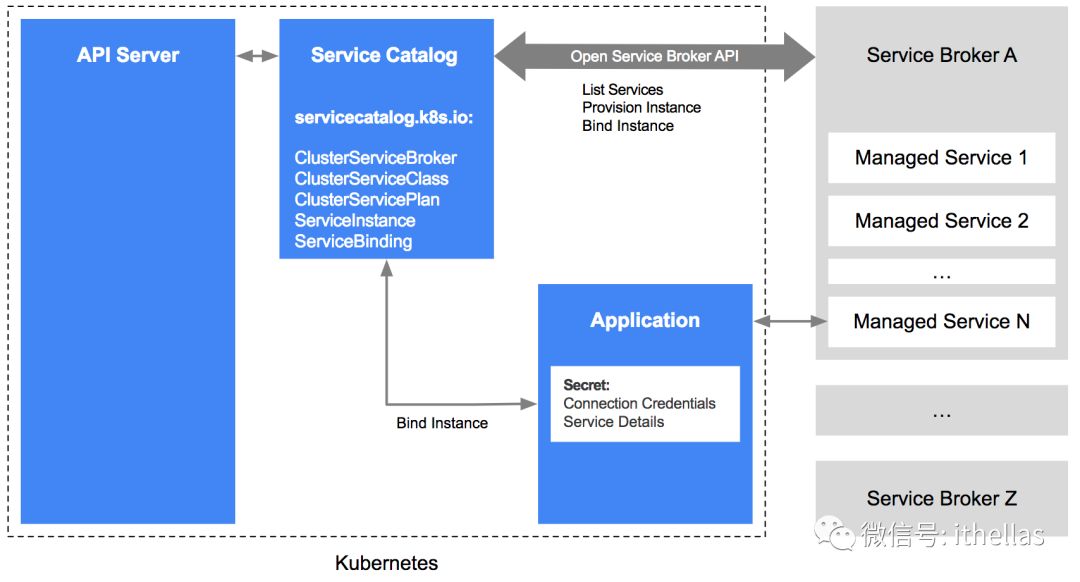
OSB(Open Service Broker) API
OSB API定义了Catalog与Service Broker之间的RESTful API。具体规范定义如下:
https://github.com/openservicebrokerapi/servicebroker/blob/v2.13/spec.md
该规范主要定义了以下7个接口:
GET v2/catalog
GET v2/service_instances/:instance_id/last_operation
PUT v2/service_instances/:instance_id
PATCH v2/service_instances/:instance_id
PUT v2/service_instances/:instance_id/service_bindings/:binding_id
DELETE v2/service_instances/:instance_id/service_bindings/:binding_id
DELETE v2/service_instances/:instance_id
当你希望将你的micro-service以标准的方式对外提供服务时,那么你就应该为你的micro-service实现一个或多个对应的service broker。而service broker主要就是要实现以上7个接口。
注意:从Catalog到service broker的HTTP请求头中必须包含版本信息(格式为MAJOR.MINOR):
X-Broker-API-Version: 2.13
下面对这7个API分别做一个简要的介绍。
1、GET v2/catalog
当service broker接收到该请求时,会将该broker支持的服务列表返回给客户端。用curl请求的示例如下:
$curl -H "X-Broker-API-Version: 2.13" http://username:password@broker-url/v2/catalog
2、GET v2/service_instances/:instance_id/last_operation
Service broker支持同步或异步两种调用方式。当采用异步方式时,就可以使用该接口查询最近一次操作的状态。用curl请求的示例如下:
$curl -H "X-Broker-API-Version: 2.13” http://username:password@broker-url/v2/service_instances/:instance_id/last_operation
返回的状态是以下三种之一:in progress, succeeded, 或failed。
3、PUT v2/service_instances/:instance_id
该接口是用来创建新的服务实例。用上面MySQL cloud servcie那个例子来说,该接口主要是为请求的用户创建一个单独的MySQL实例,或者创建一个Schema。用curl请求的示例如下:
$ curl http://username:password@broker-url/v2/service_instances/:instance_id?accepts_incomplete=true -d '{
"service_id": "service-id-here",
"plan_id": "plan-id-here",
"context": {
"platform": "cloudfoundry",
"some_field": "some-contextual-data"
},
"organization_guid": "org-guid-here",
"space_guid": "space-guid-here",
"parameters": {
"parameter1": 1,
"parameter2": "foo"
}
}' -X PUT -H "X-Broker-API-Version: 2.13" -H "Content-Type: application/json”
4、PATCH v2/service_instances/:instance_id
该接口主要用于修改已经创建的service instance的属性。用curl请求的示例如下:
$ curl http://username:password@broker-url/v2/service_instances/:instance_id?accepts_incomplete=true -d '{
"context": {
"platform": "cloudfoundry",
"some_field": "some-contextual-data"
},
"service_id": "service-id-here",
"plan_id": "plan-id-here",
"parameters": {
"parameter1": 1,
"parameter2": "foo"
},
"previous_values": {
"plan_id": "old-plan-id-here",
"service_id": "service-id-here",
"organization_id": "org-guid-here",
"space_id": "space-guid-here"
}
}' -X PATCH -H "X-Broker-API-Version: 2.13" -H "Content-Type: application/json”
5、PUT v2/service_instances/:instance_id/service_bindings/:binding_id
该接口主要用于将已经创建的service instance绑定到用户的应用中。用curl请求的示例如下:
$ curl http://username:password@broker-url/v2/service_instances/:instance_id/service_bindings/:binding_id -d '{
"context": {
"platform": "cloudfoundry",
"some_field": "some-contextual-data"
},
"service_id": "service-id-here",
"plan_id": "plan-id-here",
"bind_resource": {
"app_guid": "app-guid-here"
},
"parameters": {
"parameter1-name-here": 1,
"parameter2-name-here": "parameter2-value-here"
}
}' -X PUT -H "X-Broker-API-Version: 2.13" -H "Content-Type: application/json”
一个典型的场景就是将service instance的credentials信息返回给客户端。还是用上面MySQL cloud service的例子,返回给客户端的信息如下:
{
"credentials": {
"uri": "mysql://mysqluser:pass@mysqlhost:3306/dbname",
"username": "mysqluser",
"password": "pass",
"host": "mysqlhost",
"port": 3306,
"database": "dbname"
}
}
注:并不是所有的service都需要bind。对于不需要bind的service,那么service broker不需要实现该接口。
6、DELETE v2/service_instances/:instance_id/service_bindings/:binding_id
该接口与上面的bind接口相对应,用于解除绑定。用curl请求的示例如下:
$ curl 'http://username:password@broker-url/v2/service_instances/:instance_id/
service_bindings/:binding_id?service_id=service-id-here&plan_id=plan-id-here' -X DELETE -H "X-Broker-API-Version: 2.13”
7、DELETE /v2/service_instances/:instance_id
该接口用于删除已经创建的实例。用curl请求的示例如下:
$ curl 'http://username:password@broker-url/v2/service_instances/:instance_id?accepts_incomplete=true
&service_id=service-id-here&plan_id=plan-id-here' -X DELETE -H "X-Broker-API-Version: 2.13”
Kubernetes Service Catalog
当我们的应用部署在K8S cluster中时,那么Kubernetes Catalog就是集成外部的实现了OSB API的service的标准方式。
Kubernetes Catalog定义的API是servicecatalog.k8s.io。主要定义了如下CRD(Custom Resource Definition),
ClusterServiceBroker
ClusterServiceClass
ClusterServicePlan
ServiceInstance
ServiceBinding
上面的几个CRD中,以“Cluster"开头的都是cluster的全局资源,并不在某一个namespace中。ServiceInstance和ServiceBinding则是在某一个namespace中。
ClusterServiceBroker是service Broker在K8S cluster内的代表。它包含service broker的连接信息。例如:
apiVersion: servicecatalog.k8s.io/v1beta1
kind: ClusterServiceBroker
metadata:
name: ups-broker
spec:
url: http://ups-broker-ups-broker.ups-broker.svc.cluster.local
一个ClusterServiceClass对应于Service Broker提供一个managed service。一个Service Broker可以提供多个managed service。而一个CluterServicePlan则对应于一个ClusterServiceClass的特定版本,例如免费版、收费版。
一般创建ClusterServiceBroker之后,就会自动创建ClusterServiceClass和ClusterServicePlan。
ServiceInstance则是创建的ClusterServiceClass的一个实例。例如通过下面的yaml文件可以创建一个ServiceInstance。其中指定了要实例化的ClusterServiceClass和ClusterServicePlan的名称。
apiVersion: servicecatalog.k8s.io/v1beta1
kind: ServiceInstance
metadata:
name: ups-instance
namespace: test-ns
spec:
clusterServiceClassExternalName: user-provided-service
clusterServicePlanExternalName: default
parameters:
param-1: value-1
param-2: value-2
ServiceBinding则是用于访问ServiceInstance的Credentials信息。例如,通过下面的yaml文件可以创建了一个ServiceBinding,而其对应的ServiceIntance就是ups-instance。
apiVersion: servicecatalog.k8s.io/v1beta1
kind: ServiceBinding
metadata:
name: ups-binding
namespace: test-ns
spec:
instanceRef:
name: ups-instance
创建ServiceBinding之后,会发现在test-ns namespace里面会自动生成一个secret,
$ kubectl get secrets -n test-ns
NAME TYPE DATA AGE
default-token-v24x9 kubernetes.io/service-account-token 3 2m
ups-binding Opaque 2 54s
建议动手实践以下文档中的步骤,以便加深理解:
https://github.com/kubernetes-incubator/service-catalog/blob/master/docs/walkthrough.md
总结
虽然Service Catalog推出才1年多的时间,但它是provision & binding第三方的支持了OSB API的Service的标准。同样,OSB API也是将micro-service对外提供服务的标准。任何时候,我们都应该尽量遵循标准,而不是闭门造车!
--END--
