暂无图片
暂无图片
暂无图片
暂无图片
暂无图片

Spring Boot Web页面访问及模板引擎thymeleaf引入(七)

程序员溪言 2019-12-12
253


写在前面:
根据之前介绍的,Spring Boot Web项目创建步骤:
  • 创建Spring Boot应用,选中我们项目中需要的模块

  • 项目创建完后,其基础配置就已经完成,我们只需要在配置文件(application.yml)中指定少量的配置就可以运行

  • 业务代码编写


一、SpringBoot对静态资源的映射

1)在Spring Boot中我们将所有的前端使用的类库,如:jQuery等 webjars,以jar包的方式放在pom.xml文件中,自动引入依赖,如:
    <dependency>
    <groupId>org.webjars</groupId>
    <artifactId>jquery</artifactId>
    <version>3.4.1</version>
    </dependency>
    webjars地址:https://www.webjars.org/
    Spring Boot源码会依据类文件下的目录访问对应的文件
      classpath:/META-INF/resources/webjars/
      这里想要详细了解可以看源码中 WebMvcAutoConfiguration类
      访问方式:
      启动Spring Boot, 访问url:http://localhost:8080/webjars/jquery/3.4.1/jquery.js

      2)如何访问自定义页面
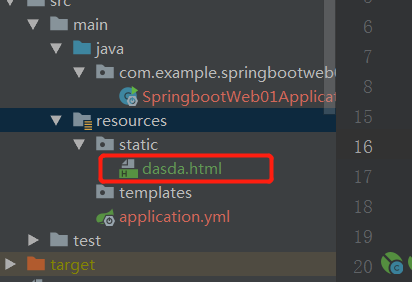
      通过查看Spring Boot的底层代码WebMvcAutoConfiguration类,得知自定义页面,可以存放在,以下文件夹下,即类路径下的文件夹,通过访问http://localhost:8080/dasda.html 即可,不需要我们关心,Springboot会自动去查找dasda.html页面。
        private static final String[] CLASSPATH_RESOURCE_LOCATIONS =
        new String[]{
        "classpath:/META-INF/resources/",
        "classpath:/resources/",
        "classpath:/static/",
        "classpath:/public/"};


        3)Spring Boot自定义首页 
        欢迎页;静态资源文件夹下的所有index.html页面;被"/**"映射;
        源码:
          private Resource getIndexHtml(String location) {
          return this.resourceLoader.getResource(location + "index.html");
          }
          在不要求访问哪个页面时,自定扫描是否含有index.html, 有就会直接访问index页面。

          二、模板引擎

          SpringBoot推荐的Thymeleaf;

          语法简单,功能强大;

          我们也可以在创建项目的时候选择Thymeleaf模块

          1、引入thymeleaf;

          1)引入thymeleaf


             <dependency>
            <groupId>org.springframework.boot</groupId>
            <artifactId>spring-boot-starter-thymeleaf</artifactId>
            <version>3.0.9.RELEASE</version>
            </dependency>


            2、Thymeleaf使用

              @ConfigurationProperties(
              prefix = "spring.thymeleaf"
              )
              public class ThymeleafProperties {
              private static final Charset DEFAULT_ENCODING;
              public static final String DEFAULT_PREFIX = "classpath:/templates/";
              public static final String DEFAULT_SUFFIX = ".html";
              private boolean checkTemplate = true;
              private boolean checkTemplateLocation = true;
              private String prefix = "classpath:/templates/";
              private String suffix = ".html";
              private String mode = "HTML";
              private Charset encoding;
              只要我们把HTML页面放在classpath:/templates/,thymeleaf就能自动渲染;
              使用:
              1)导入thymeleaf的名称空间
                <html lang="en" xmlns:th="http://www.thymeleaf.org">
                2)使用thymeleaf语法;
                  <!DOCTYPE html>
                  <html lang="en" xmlns:th="http://www.thymeleaf.org">
                  <head>
                  <meta charset="UTF-8">
                  <title>Title</title>
                  </head>
                  <body>
                   <h1>展示</h1>
                  姓名:<span th:text="${name}"></span>
                  口头语:<span th:text="${say}"></span>
                  </body>
                  </html>

                  3)controller层

                    @Controller
                    public class UserController {
                    @RequestMapping(value = "user")
                    public String UserContext(Map<String,String> user){
                    user.put("name","黄晓明");
                    user.put("say","我不要你觉得,我要我觉得");
                    return "user";
                    }
                    }


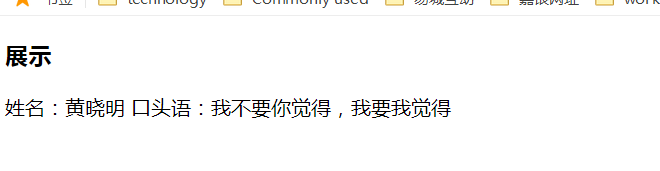
                    结果展示:

                    url: http://localhost:8080/user

                    3、语法规则
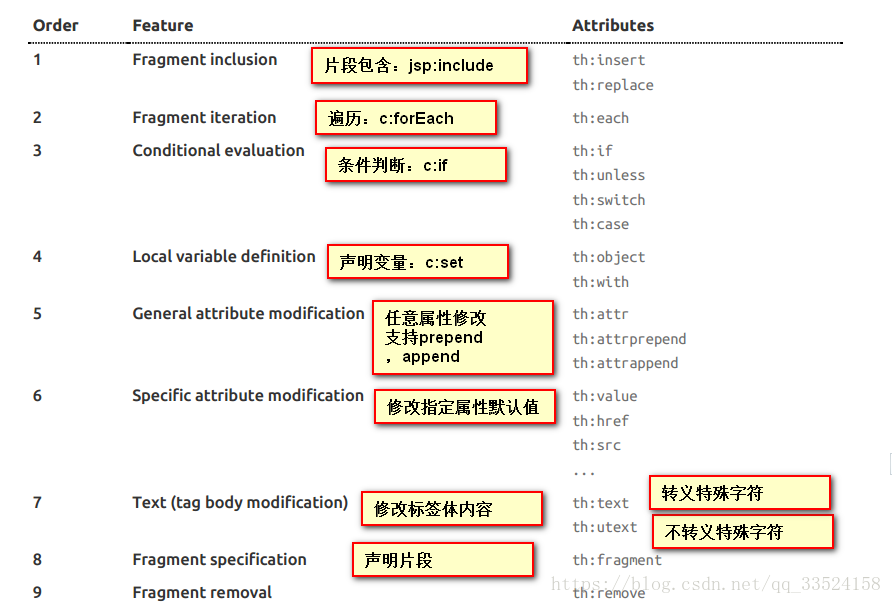
                    th:text;改变当前元素里面的文本内容;
                    th:任意html属性;来替换原生属性的值
                    下图显示其他对应jsp标签

                    ☆ END ☆

                    如果读完觉得有收获的话,欢迎点【在看】,关注【程序员溪言】,及时获得精彩推送!!!回复口令”java”,获得大量学习视频资料!

                    扫描二维码

                    获取更多精彩

                    关注【程序员溪言】


                    点这里在看

                     
                    文章转载自程序员溪言,如果涉嫌侵权,请发送邮件至:contact@modb.pro进行举报,并提供相关证据,一经查实,墨天轮将立刻删除相关内容。

                    评论