



记录一下创新项目的学习进程。本项目基于Kinect2.0采集室内场景深度信息,在Pointnet框架中进行学习,实现识别的效果。
先放下配置的环境,具体教程后续更新。
配置环境:win10+vs2019+opencv+PCL1.10.1+Kinect v2
1.1包含目录:
C:\Program Files\Microsoft SDKs\Kinect\v2.0_1409\inc
D:\PCL 1.10.1\3rdParty\VTK\include\vtk-8.2
D:\PCL 1.10.1\3rdParty\Qhull\include
C:\Program Files\OpenNI2\Include
D:\PCL 1.10.1\3rdParty\FLANN\include
D:\PCL 1.10.1\3rdParty\Eigen\eigen3
D:\PCL 1.10.1\3rdParty\Boost\include\boost-1_72
D:\PCL 1.10.1\include\pcl-1.10
1.2库目录:
我直接把opencv+Kinect+PCL都贴上来了,读者请按照自己的地址。
C:\Program Files\Microsoft SDKs\Kinect\v2.0_1409\Lib\x64
D:\PCL 1.10.1\lib
D:\PCL 1.10.1\3rdParty\VTK\lib
D:\PCL 1.10.1\3rdParty\Qhull\lib
C:\Program Files\OpenNI2\Lib
D:\PCL 1.10.1\3rdParty\FLANN\lib
D:\PCL 1.10.1\3rdParty\Boost\lib
1.3附加依赖项:
kinect20.lib
opencv_world412d.lib
2.1点云
点云数据是指在一个三维坐标系中的一组向量的集合。这些向量通常以X,Y,Z三维坐标的形式表示,一般主要代表一个物体的外表面几何形状,除此之外点云数据还可以附带RGB信息,即每个坐标点的颜色信息,或者是其他的信息。
PCL这个开源库专门处理pcd格式的文件,它实现了点云获取、滤波、分割、配准、检索、特征提取、识别、追踪、曲面重建、可视化等。
2.1代码
我们通过kinect v2自带的SDK进行修改,调动kinect相机获取点云图像并保存为pcd格式
#include <Kinect.h>
#include <opencv2\opencv.hpp>
#include <pcl/visualization/cloud_viewer.h>
#include <pcl/visualization/pcl_visualizer.h>
#include <opencv2/highgui/highgui.hpp>
#include <pcl/point_cloud.h>
#include <pcl/io/pcd_io.h>
using namespace cv;
using namespace std;
IKinectSensor* pSensor;
ICoordinateMapper* pMapper;
const int iDWidth = 512, iDHeight = 424;//深度图尺寸
const int iCWidth = 1920, iCHeight = 1080;//彩色图尺寸
CameraSpacePoint depth2xyz[iDWidth * iDHeight];
ColorSpacePoint depth2rgb[iCWidth * iCHeight];
void viewerOneOff(pcl::visualization::PCLVisualizer& viewer)
{
viewer.setBackgroundColor(1.0, 1.0, 1.0);//设置背景颜色
}
//启动Kinect
bool initKinect()
{
if (FAILED(GetDefaultKinectSensor(&pSensor))) return false;
if (pSensor)
{
pSensor->get_CoordinateMapper(&pMapper);
pSensor->Open();
cout << "已打开相机" << endl;
return true;
}
else return false;
}
//获取深度帧
Mat DepthData()
{
IDepthFrameSource* pFrameSource = nullptr;
pSensor->get_DepthFrameSource(&pFrameSource);
IDepthFrameReader* pFrameReader = nullptr;
pFrameSource->OpenReader(&pFrameReader);
IDepthFrame* pFrame = nullptr;
Mat mDepthImg(iDHeight, iDWidth, CV_16UC1);
while (true)
{
if (pFrameReader->AcquireLatestFrame(&pFrame) == S_OK)
{
pFrame->CopyFrameDataToArray(iDWidth * iDHeight, reinterpret_cast<UINT16*>(mDepthImg.data));
cout << "已获取深度帧" << endl;
pFrame->Release();
return mDepthImg;
break;
}
}
}
//获取彩色帧
Mat RGBData()
{
IColorFrameSource* pFrameSource = nullptr;
pSensor->get_ColorFrameSource(&pFrameSource);
IColorFrameReader* pFrameReader = nullptr;
pFrameSource->OpenReader(&pFrameReader);
IColorFrame* pFrame = nullptr;
Mat mColorImg(iCHeight, iCWidth, CV_8UC4);
while (true)
{
if (pFrameReader->AcquireLatestFrame(&pFrame) == S_OK)
{
pFrame->CopyConvertedFrameDataToArray(iCWidth * iCHeight * 4, mColorImg.data, ColorImageFormat_Bgra);
cout << "已获取彩色帧" << endl;
pFrame->Release();
return mColorImg;
break;
}
}
}
int main()
{
initKinect();
pcl::visualization::CloudViewer viewer("Cloud Viewer");//简单显示点云的可视化工具类
viewer.runOnVisualizationThreadOnce(viewerOneOff);//点云显示线程,渲染输出时每次都调用
pcl::PointCloud<pcl::PointXYZRGBA>::Ptr cloud(new pcl::PointCloud<pcl::PointXYZRGBA>);
Mat mColorImg;
Mat mDepthImg;
int count = 0;
while (count <= 0)
{
Sleep(5000);
mColorImg = RGBData();
mDepthImg = DepthData();
imshow("RGB", mColorImg);
pMapper->MapDepthFrameToColorSpace(iDHeight * iDWidth, reinterpret_cast<UINT16*>(mDepthImg.data), iDHeight* iDWidth, depth2rgb);//深度图到颜色的映射
pMapper->MapDepthFrameToCameraSpace(iDHeight * iDWidth, reinterpret_cast<UINT16*>(mDepthImg.data), iDHeight* iDWidth, depth2xyz);//深度图到相机三维空间的映射
float maxX = depth2xyz[0].X, maxY = depth2xyz[0].Y, maxZ = depth2xyz[0].Z;
float minX = depth2xyz[0].X, minY = depth2xyz[0].Y, minZ = depth2xyz[0].Z;
for (size_t i = 0; i < iDWidth; i++)
{
for (size_t j = 0; j < iDHeight; j++)
{
pcl::PointXYZRGBA pointTemp;
if (depth2xyz[i + j * iDWidth].Z > 0.5 && depth2rgb[i + j * iDWidth].X < 1920 && depth2rgb[i + j * iDWidth].X>0 && depth2rgb[i + j * iDWidth].Y < 1080 && depth2rgb[i + j * iDWidth].Y>0)
{
pointTemp.x = -depth2xyz[i + j * iDWidth].X;
if (depth2xyz[i + j * iDWidth].X > maxX) maxX = -depth2xyz[i + j * iDWidth].X;
if (depth2xyz[i + j * iDWidth].X < minX) minX = -depth2xyz[i + j * iDWidth].X;
pointTemp.y = depth2xyz[i + j * iDWidth].Y;
if (depth2xyz[i + j * iDWidth].Y > maxY) maxY = depth2xyz[i + j * iDWidth].Y;
if (depth2xyz[i + j * iDWidth].Y < minY) minY = depth2xyz[i + j * iDWidth].Y;
pointTemp.z = depth2xyz[i + j * iDWidth].Z;
if (depth2xyz[i + j * iDWidth].Z != 0.0)
{
if (depth2xyz[i + j * iDWidth].Z > maxZ) maxZ = depth2xyz[i + j * iDWidth].Z;
if (depth2xyz[i + j * iDWidth].Z < minZ) minZ = depth2xyz[i + j * iDWidth].Z;
}
pointTemp.b = mColorImg.at<cv::Vec4b>(depth2rgb[i + j * iDWidth].Y, depth2rgb[i + j * iDWidth].X)[0];
pointTemp.g = mColorImg.at<cv::Vec4b>(depth2rgb[i + j * iDWidth].Y, depth2rgb[i + j * iDWidth].X)[1];
pointTemp.r = mColorImg.at<cv::Vec4b>(depth2rgb[i + j * iDWidth].Y, depth2rgb[i + j * iDWidth].X)[2];
pointTemp.a = mColorImg.at<cv::Vec4b>(depth2rgb[i + j * iDWidth].Y, depth2rgb[i + j * iDWidth].X)[3];
cloud->push_back(pointTemp);
}
}
}
//pcl::io::savePCDFileASCII("deng.pcd", *cloud);
/*char image_name[13];
sprintf(image_name, "%s%d%s", "C:/Users/Xu_Ruijie/Desktop", count, ".pcd");
imwrite(image_name, im);*/
string s = "我来了";
s += ".pcd";
pcl::io::savePCDFile(s, *cloud, false);
std::cerr << "Saved " << cloud->points.size() << " data points." << std::endl;
viewer.showCloud(cloud);
count++;
mColorImg.release();
mDepthImg.release();
cloud->clear();
waitKey(10);
}
return 0;
}
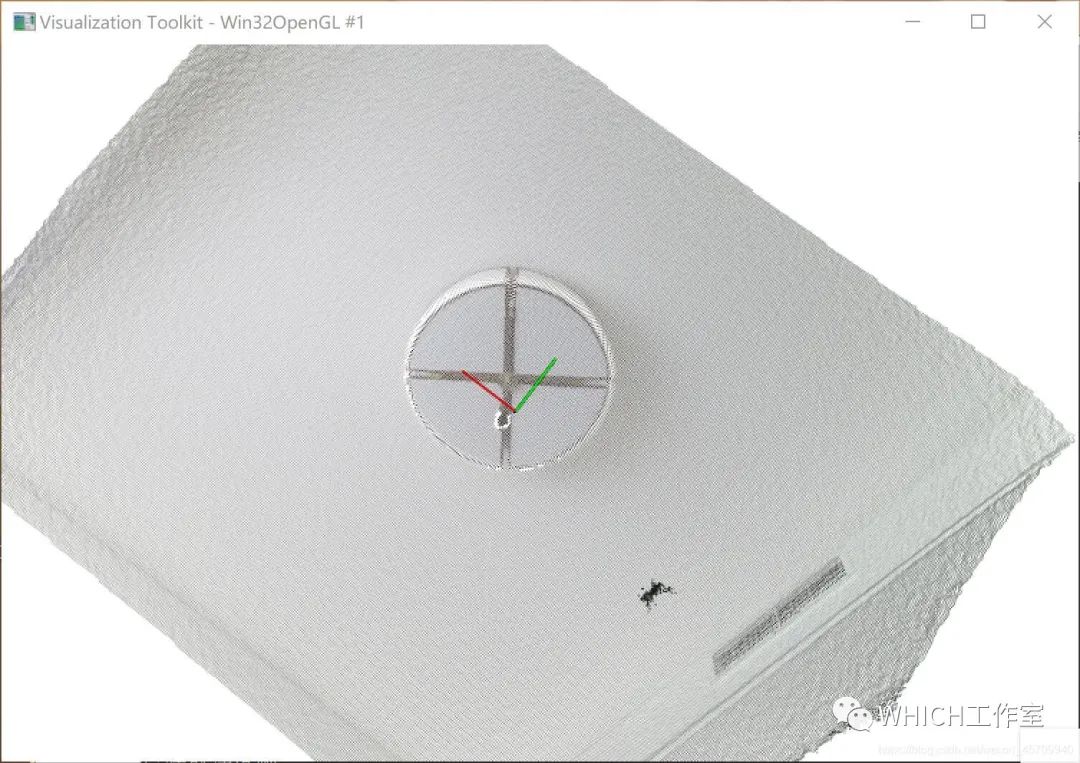
如图所示的灯即为得到的点云图像。
