学习Excel技术,关注微信公众号:
excelperfect
引言:本文的代码与昨天发表的《VBA实战技巧34:使用VBA组织图形1》一样,都整理自mrexcel.com,一个很好的令人兴奋的示例,有兴趣的朋友可以仔细研究。
代码所使用的工作表数据与《VBA实战技巧34:使用VBA组织图形1》相同,如下图1所示,包含所需信息的源数据表,其中:
列A和列B – 两个元素之间的关系。形状填充颜色将来自列A。
列C – 要显示的描述性文本。
列D – 放置在形状旁边的辅助数据。
列E – 形状是否有轮廓。
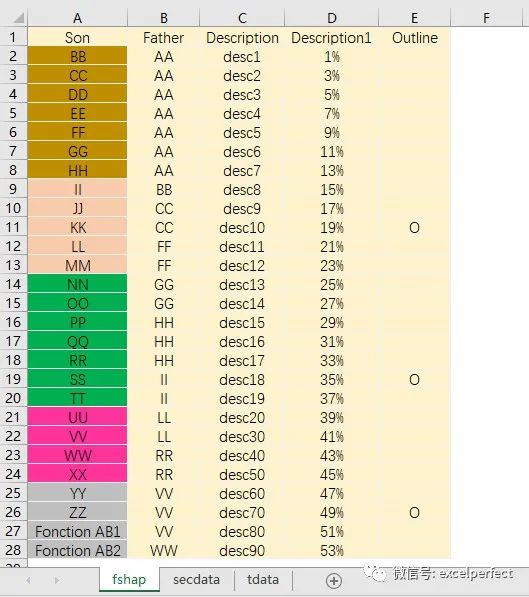
图1
与《VBA实战技巧34:使用VBA组织图形1》不同,本文的代码自顶向下组织图形,代码运行后的效果,如下图2所示。
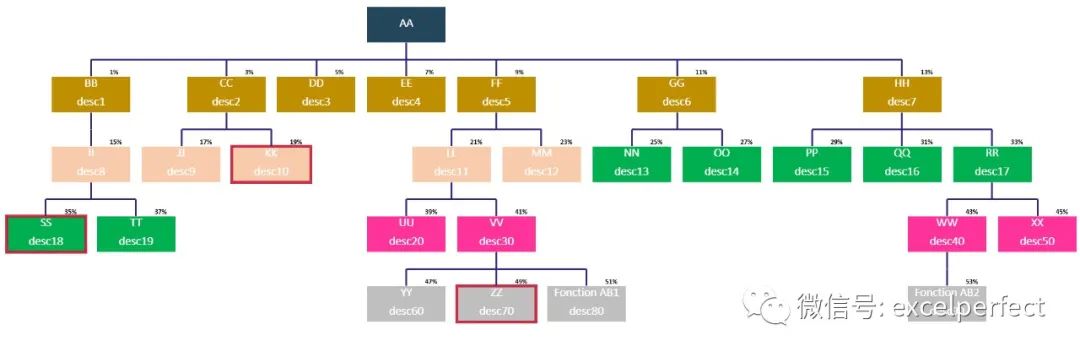
图2
注意,SmartArt可以创建组织结构图,但会有格式限制,本文给出的代码克服了这一点。
VBA代码如下:
Dim h%, w%
'主程序
Sub main()
Dim i%, ob As Worksheet, dt As Worksheet, r As Range, tb As Shape
Set dt = Sheets("tdata")
Set ob = Sheets("fshap")
h = 1
w = 1
Set tb =dt.Shapes.AddTextbox(msoTextOrientationHorizontal, 500, 70, 50, 50)
tb.TextFrame2.TextRange.Text = "Milou"
tb.TextFrame2.AutoSize = msoAutoSizeShapeToFitText
tb.TextFrame2.WordWrap = msoFalse
tb.TextFrame2.TextRange.Font.Size = 16
'确定大形状的大小
For i = 1 To ob.Range("a" &Rows.Count).End(xlUp).Row
tb.TextFrame2.TextRange.Text = Cells(i, 1) & vbLf & Cells(i, 3)
If tb.Height > h Then h = tb.Height
If tb.Width > w Then w = tb.Width
Next
Application.CutCopyMode = 0
dt.Cells.ClearContents
'原始表格
ob.[a1].CurrentRegion.Copy
Sheets("secdata").[bb1].PasteSpecialPaste:=xlPasteAll, Operation:=xlNone, _
SkipBlanks:=False, Transpose:=False
For i = ob.Shapes.Count To 1 Step -1
ob.Shapes(i).Delete
Next
ob.Activate
Phase1
'移动形状
Phase2 True, False
'更新表格
Phase2 False, False
Phase3
Sheets("secdata").[bb1].CurrentRegion.Copy
ob.Range("a1").PasteSpecial xlPasteAll,xlPasteSpecialOperationNone, False, False
Set r =dt.Range("b:b").Find(WorksheetFunction.Min(dt.[b:b]), dt.[b1],xlValues, xlWhole)
ob.Rows(CStr(Split(ob.[a1].CurrentRegion.Address,"$")(4) + 2) & ":" & _
CStr(Split(ob.Shapes(r.Offset(,-1)).TopLeftCell.Address, "$")(2) - 2)).Delete
'由顶到底
GroupShapes True
End Sub
'绘制连接线
Sub Phase3()
Dim v, r As Range, lasto%, i%, y1, y2, yf, x1, x2,ws As Worksheet, _
dt As Worksheet, j%, boss$, nr%
Set ws = Sheets("fshap")
Set dt = Sheets("tdata")
dt.[a1:ab70].ClearContents
ws.[a1].CurrentRegion.Copy dt.[a1]
dt.Activate
[g1] = [b1]
v = Split([a1].CurrentRegion.Address,"$")(4)
Range("b1:b" & v).AdvancedFilterxlFilterCopy, [g1:g2], [k1], True
For j = 2 To Range("k" &Rows.Count).End(xlUp).Row
[m1:z70].ClearContents
[m1] =[g1]
[m2] =Cells(j, "k")
Range("a1:b" & v).AdvancedFilter xlFilterCopy, [m1:m2],[n1], False
Set r =[d:d].Find([m2], [d1], xlValues, xlPart)
[q1] =[d74]
[q2] ="*" & [m2] & "*"
nr =Range("n" & Rows.Count).End(xlUp).Row
For i = 2 To nr
Cells(i + 1, "q") = "*" & Cells(i,"n") & "*"
Next
lasto =Split(Range("q1").CurrentRegion.Address, "$")(4)
Range("a74:g" & Range("a" &Rows.Count).End(xlUp).Row).AdvancedFilter _
xlFilterCopy, Range("q1:q" & lasto), [s1], False
y1 =WorksheetFunction.Min([t:t]) + WorksheetFunction.Max([w:w])
yf = y1 +(WorksheetFunction.Max([t:t]) - y1) 2
x1 =WorksheetFunction.Min([u:u]) + WorksheetFunction.Max([y:y]) / 2
x2 =WorksheetFunction.Max([u:u]) + WorksheetFunction.Max([y:y]) / 2
'水平
With ws.Shapes.AddLine(x1, yf, x2, yf).Line
.DashStyle = msoLineSolid
.ForeColor.RGB = RGB(50, 40, 130)
.Weight = 2
End With
Set r =Range("v:v").Find([m2], [v1], xlValues, xlPart)
x1 =r.Offset(, -1) + r.Offset(, 3) / 2
'层级一
Set r =dt.[f:f].Find(1, dt.[f1], xlValues, xlWhole)
boss =r.Offset(, -5)
If [m2] =r.Offset(, -2) And nr Mod 2 = 0 Then
dt.[u:u].Copy dt.[aa1]
Set r= dt.Range("aa:aa").Find(r.Offset(, -3), dt.[aa1], xlValues, xlWhole)
r =10000
Sorter "aa", 2, dt
ws.Shapes(boss).Left = dt.Cells(4 + (Range("aa" &Rows.Count).End(xlUp).Row - 5) / 2, "aa")
x1 =ws.Shapes(boss).Left + ws.Shapes(boss).Width / 2
End If
'父节点到水平线
With ws.Shapes.AddLine(x1, yf, x1, WorksheetFunction.Max([t:t])).Line
.DashStyle = msoLineSolid
.ForeColor.RGB = RGB(50, 40, 130): .Weight = 2
End With
'子节点到水平线
For i = 2 To Range("n" & Rows.Count).End(xlUp).Row
Set r= Range("v:v").Find(Cells(i, "n").Value, [v1], xlValues,xlPart)
x1 =r.Offset(, -1) + r.Offset(, 3) / 2
With ws.Shapes.AddLine(x1, r.Offset(, -2) + r.Offset(, 1), x1, yf).Line
.DashStyle = msoLineSolid
.ForeColor.RGB = RGB(50, 40, 130)
.Weight = 2
End With
Next
Next
On Error Resume Next
For i = 1 To ws.Shapes.Count
If Notws.Shapes(i).TextFrame2.TextRange.Text Like "*%*" Then _
ws.Shapes(i).TextFrame2.TextRange.Font.Size = 16
Next
On Error GoTo 0
End Sub
'绘制原始图
Sub Phase1()
Dim arr(), i%, t
'保存原始表
arr = Range([a1].CurrentRegion.Address)
[ca:ce].ClearContents
Adjust
CreateDiagram ActiveSheet, 1.4
[a:p].ClearContents
'原始表
[a1].Resize(UBound(arr, 1), UBound(arr, 2)).Value =arr
On Error Resume Next
For i = 1 To ActiveSheet.Shapes.Count
If ActiveSheet.Shapes(i).TopLeftCell = [a1] Then ActiveSheet.Shapes(i).Delete
t =ActiveSheet.Shapes(i).TextFrame2.TextRange.Text
If Len(t)And Not t Like "*%*" Then ActiveSheet.Shapes(i).IncrementRotation 180
Next
On Error GoTo 0
End Sub
'增加垂直间距
Sub Phase2(move As Boolean, geo As Boolean)
Dim ws As Worksheet, i%, s As Shape, r As Range,lr%, delta, v%, sn As Shape, dt As Worksheet, x, boss$
Set dt = Sheets("tdata"): Set ws =Sheets("fshap")
dt.Activate: dt.Cells.ClearContents
Set r = [a75]
On Error Resume Next
'连接线
For Each s In ws.Shapes
If Len(s.TextFrame2.TextRange.Text) = 0 Then s.Delete
Next
On Error GoTo 0
[a74] = "name": [b74] = "top":[c74] = "left": [d74] = "text": [e74] = "height"
[h74] = "top": [f74] = "level":[g74] = "width"
For i = 1 To ws.Shapes.Count
If Not ws.Shapes(i).Name Like "*aux*" Then
r =ws.Shapes(i).Name
r.Offset(, 1) = Round(ws.Shapes(i).Top, 0)
r.Offset(, 2) = Round(ws.Shapes(i).Left, 0)
r.Offset(, 3) = ws.Shapes(i).TextFrame2.TextRange.Text
r.Offset(, 4) = Round(ws.Shapes(i).Height, 0)
r.Offset(, 6) = Round(ws.Shapes(i).Width, 0)
Set r= r.Offset(1)
End If
Next
lr = Range("b" &Rows.Count).End(xlUp).Row
Range("B74:B" & lr).AdvancedFilterAction:=xlFilterCopy, CriteriaRange:=[h74:h75], _
CopyToRange:=[i74], Unique:=True
Sorter "i", 75, dt
Range("j75:j" & lr).Formula ="=row()-74"
lr = Range("b" &Rows.Count).End(xlUp).Row
Range("f75:f" & lr).Formula ="=match(b75,$i$75:$i$" & lr & ",0)"
If move Then
delta =WorksheetFunction.Max([e:e])
For i =75 To lr
Set sn = ws.Shapes(Range("a" & i))
sn.Height = h
sn.Width = w
'新的垂直位置
sn.Top = 2000 - delta * Range("f" & i) * 2
ws.Shapes(Range("a" & i) & "aux").Top =sn.Top + sn.Height
Next
End If
Set r = Range("f1:f" & lr).Find(1,[f1], xlValues, xlWhole)
boss = r.Offset(, -5)
On Error Resume Next
ws.Shapes(boss & "aux").Delete
On Error GoTo 0
'层级二
[h75] = 2
[h74] = [f74]
Range("a74:g" & lr).AdvancedFilterxlFilterCopy, [h74:h75], [L74], False
'几何中间
If geo And move Then
x =WorksheetFunction.Max([n:n]) - WorksheetFunction.Min([n:n]) +WorksheetFunction.Max([r:r])
ws.Shapes(boss).Left = WorksheetFunction.Min([n:n]) + x / 2 -WorksheetFunction.Max([r:r]) / 2
'对齐到最近的形状
ElseIf move And Not geo Then
lr =Range("L" & Rows.Count).End(xlUp).Row
Range("s75:s" & lr).Formula = "=abs(n75-" &CInt(ws.Shapes(boss).Left) & ")"
Range("t75:t" & lr).Formula = "=$n75"
Set r =Range("s:s").Find(WorksheetFunction.Min([s:s]), [s1], xlValues,xlWhole)
ws.Shapes(boss).Left = r.Offset(, 1)
End If
End Sub
Sub Sorter(col$, rn%, dt As Worksheet)
Dim lr%
lr = Range(col & Rows.Count).End(xlUp).Row
dt.Sort.SortFields.Clear
dt.Sort.SortFields.Add Key:=dt.Cells(rn, col),SortOn:=xlSortOnValues, _
Order:=2, DataOption:=0
With dt.Sort
.SetRangedt.Range(Cells(rn, col), Cells(lr, col))
.Header =xlNo
.MatchCase = False
.Orientation = xlTopToBottom
.SortMethod = xlPinYin
.Apply
End With
End Sub
Sub Adjust()
Dim lr%, i%
For i = 1 To ActiveSheet.Shapes.Count
ActiveSheet.Shapes(1).Delete
Next
[k:ae].ClearContents
lr = Range("a" &Rows.Count).End(xlUp).Row
[k1] = "Seq": [L1] = "code1":[m1] = "code2"
[L2] = [b2]: [n1] = "info": [o1] ="info2": [p1] = "outline"
[m2] = [b2]: [k2] = 2: [n2] = 0.01: [o2] ="desc0"
Range("a2:a" & lr).Copy
[L3].PasteSpecial xlPasteAll
Range("b2:b" & lr).Copy
Range("m3").PasteSpecial xlPasteAll
Range("c2:c" & lr).Copy
Range("o3").PasteSpecial xlPasteAll
Range("d2:d" & lr).Copy
Range("n3").PasteSpecial xlPasteAll
Range("e2:e" & lr).Copy
Range("p3").PasteSpecial xlPasteAll
Range("k3:k" & lr + 1).Formula ="=row()"
[a:e].ClearContents
'调整的表
[k1].CurrentRegion.Copy [a1]
[L2].Interior.Color = RGB(35, 70, 90)
[k1].CurrentRegion.Copy [z100]
End Sub
Sub CreateDiagram(Src As Worksheet, factor#)
Dim sal As SmartArtLayout, QNode As SmartArtNode,QNodes As SmartArtNodes, oshp As Shape, L%, _
i%, r As Range, PID$, mn, mx, ws As Worksheet,crar(), c%, ad, v, t, s As ShapeRange, boss
c = 1
ReDim crar(1 To c)
Set ws = ActiveSheet
For i = 1 To ws.Shapes.Count
ws.Shapes(1).Delete
Next
Select Case Val(Application.Version)
' Excel 2013
Case 15
Setsal = Application.SmartArtLayouts(89)
Setoshp = ws.Shapes.AddSmartArt(sal)
' Excel 2016
Case 16
Setoshp = ActiveSheet.Shapes.AddSmartArt(Application.SmartArtLayouts _
("urn:microsoft.com/office/officeart/2008/layout/NameandTitleOrganizationalChart"))
End Select
oshp.Top = [a50].Top
Set QNodes = oshp.SmartArt.AllNodes
For i = 1 To 5
'初始节点
oshp.SmartArt.AllNodes(1).Delete
Next
'查找根节点
L = 2
boss = [b2]
Do While Src.Cells(L, 1) <> ""
IfSrc.Cells(L, 2) = Src.Cells(L, 3) Then
SetQNode = oshp.SmartArt.AllNodes.Add
QNode.TextFrame2.TextRange.Text = Src.Cells(L, 2)
'父节点
PID =Src.Cells(L, 2)
Src.Rows(L).Delete
AddChildNodesQNode, Src, PID
Else
L = L+ 1
End If
Loop
oshp.SmartArt.AllNodes(1).TextFrame2.TextRange.Text= boss
oshp.Width = 1000
oshp.Height = 700
oshp.Select
CommandBars.ExecuteMso("SmartArtConvertToShapes")
With Selection
.ShapeRange.IncrementRotation180
'整体大小
.ShapeRange.ScaleWidth factor, msoFalse, msoScaleFromBottomRight
.ShapeRange.ScaleHeight factor, msoFalse, msoScaleFromBottomRight
.Ungroup
End With
Set r = ws.[a2]
On Error Resume Next
For i = 1 To ws.Shapes.Count
r =ws.Shapes(i).Height
Set r =r.Offset(1)
Next
mn = WorksheetFunction.Min([a:a])
mx = WorksheetFunction.Max([a:a])
For i = ws.Shapes.Count To 1 Step -1
Ifws.Shapes(i).Height = mn Then ws.Shapes(i).Delete
Ifws.Shapes(i).Height = mx Then
crar(c) = ws.Shapes(i).Name
c = c+ 1
ReDimPreserve crar(1 To c)
End If
Next
On Error GoTo 0
For i = LBound(crar) To UBound(crar)
If Len(crar(i)) Then
v =Split(ws.Shapes(crar(i)).TextFrame2.TextRange.Text, vbLf)(0)
Set r= Range("aa:aa").Find(v, [aa1], xlValues, 1)
ad =r.Offset(, 2)
ws.Shapes(crar(i)).Fill.ForeColor.RGB = r.Interior.Color
Set s= ws.Shapes.Range(Array(crar(i)))
s.TextFrame2.TextRange.Font.Bold = msoTrue
s.TextFrame2.TextRange.Font.Name = "+mj-lt"
'轮廓线
If r.Offset(, 4) = "O" Then
With s.Line
.Weight = 4
.Visible = msoTrue
.ForeColor.RGB = RGB(200, 25, 55)
.Transparency = 0.1
End With
End If
ws.Shapes.AddShape(62, 10, 10, ws.Shapes(crar(i)).Width / 2.5,ws.Shapes(crar(i)).Height / 3).Name = _
ws.Shapes(crar(i)).Name & "aux"
With ws.Shapes(ws.Shapes(crar(i)).Name & "aux")
.Left = ws.Shapes(crar(i)).Left
.Top = ws.Shapes(crar(i)).Top + ws.Shapes(crar(i)).Height
.Line.ForeColor.SchemeColor = 1
.Line.Transparency = 1
.Fill.Visible = msoFalse
.TextFrame.Characters.Text = FormatPercent(ad, 0, vbTrue, vbFalse, -2)
.TextFrame.Characters(1, Len(ad)).Font.Size = 9
.TextFrame.Characters(1, Len(ad)).Font.ColorIndex = 0
.TextFrame.Characters(1, Len(ad)).Font.Bold = 1
If ad = 0 Then .TextFrame.Characters.Text = "0%"
End With
End If
Next
End Sub
Sub AddChildNodes(QNode As SmartArtNode, Source AsWorksheet, PID$)
Dim L%, Found As Boolean, ParNode As SmartArtNode,CurPid$, ad
L = 2
'仍没有找到
Found = False
Do While Source.Cells(L, 1) <> ""
If Source.Cells(L, 3) = PID Then
Set ParNode = QNode
Set QNode = QNode.AddNode(msoSmartArtNodeBelow)
QNode.TextFrame2.TextRange.Text = Cells(L, 2) & vbLf & Cells(L,5)
'当前父节点
CurPid = Source.Cells(L, 2)
'找到一些
If Not Found Then Found = True
Source.Rows(L).Delete
AddChildNodes QNode, Source, CurPid
Set QNode = ParNode
'已排序,找不到其他任何东西
ElseIf Found Then
Exit Do
Else
L = L+ 1
End If
Loop
End Sub
Sub GroupShapes(tp As Boolean)
Dim ws As Worksheet
If tp Then
Set ws =Sheets("fshap")
ws.Activate
ws.Shapes.SelectAll
Selection.Group
Selection.ShapeRange.IncrementRotation 180
DoEvents
ws.Shapes(1).IncrementRotation 180
End If
End Sub
【福利】加入了知识星球:完美Excel社群的朋友,可以到知识星球或者我们的微信交流群中下载示例工作簿,以方便理解和运用代码。
欢迎在下面留言,完善本文内容,让更多的人学到更完美的知识。
欢迎到知识星球:完美Excel社群,进行技术交流和提问,获取更多电子资料,并通过社群加入专门的微信讨论群,更方便交流。