学习Excel技术,关注微信公众号:
excelperfect
引言:本文学习整理自chandoo.org的文章《Compare 2 sets of databy letter or word & highlight mismatches [vba]》,供有兴趣的朋友学习参考。
假设你正在查看下图1所示的2列表,并且想知道每行中的两组数据哪里不同。
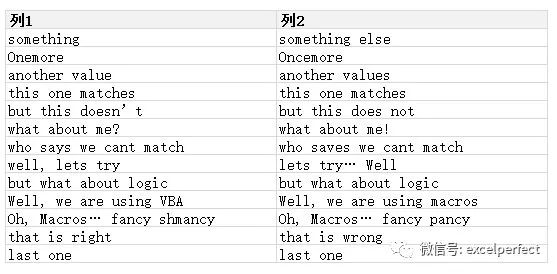
图1
可以使用一个简单的VBA程序来比较这2个列表并突出显示不匹配的字母或单词。演示如下图2所示。
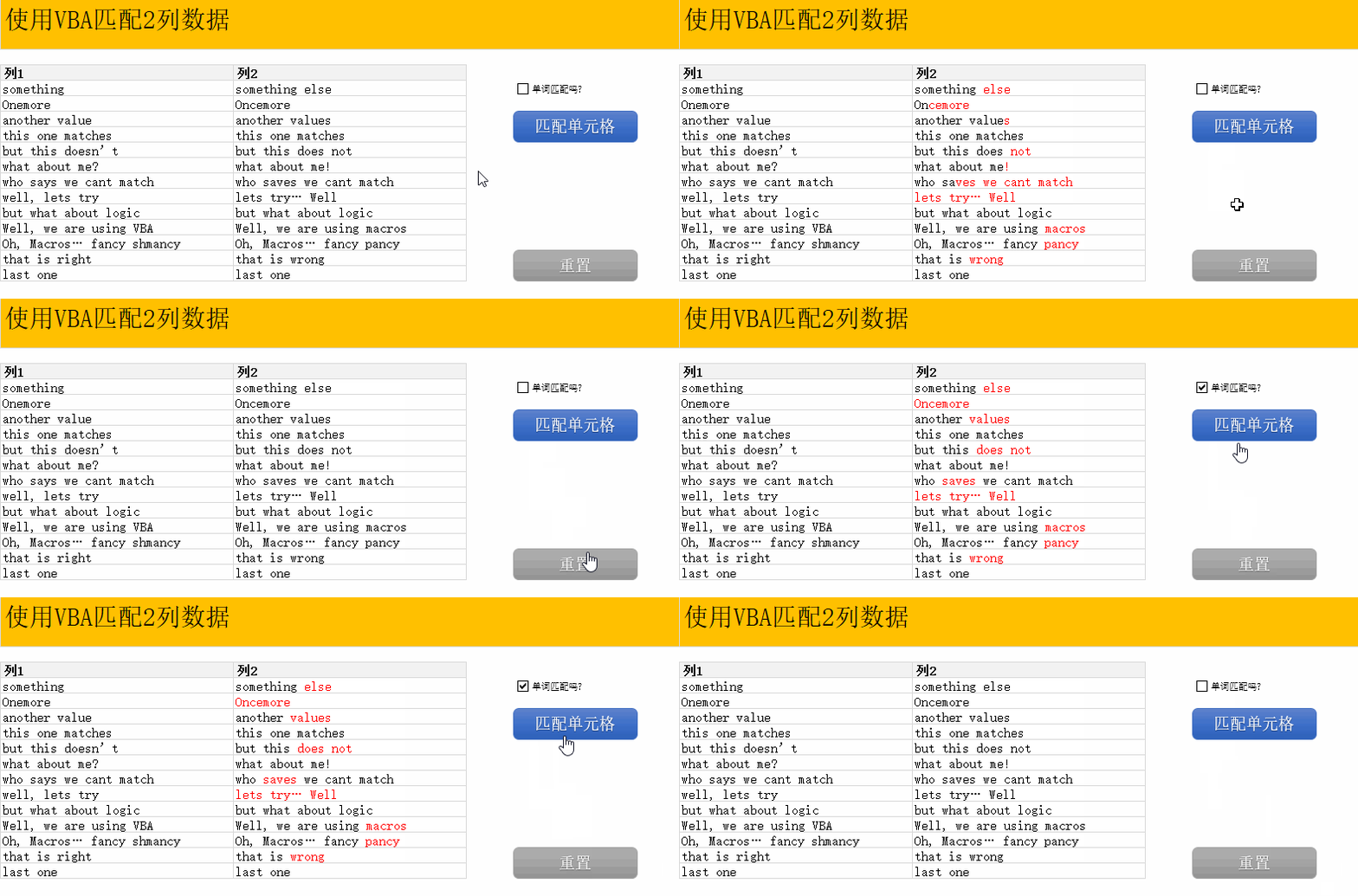
图2
当开始创建这样的宏时,第一步是定义基本算法(简单的逻辑步骤)。要比较两组数据,需要执行以下操作:
1.对于列1中的每个项目
2.获取列2中的对应项
3.如果它们不匹配
4.对于单词匹配
(1)对于第一个文本中的每个单词
(2)在第二个文本中获取相应的单词
(3)相比较
(4)如果不匹配,以红色突出显示
(5)重复其他词
5.对于字母匹配
(1)找到第一个不匹配的字母
(2)在第二个文本中突出显示自该点的所有字母
6.重复列1 中的下一项
7.完毕
一旦你写下了这个逻辑,就只需继续并在VBA代码中实现它。完整的代码如下:
Sub highlightDiffs()
Dim cell1 As Range, cell2 As Range, i As Long
Dim j As Long, k As Long, length As Long, word1 As String, word2 As String
resetColors
i = 1
For Each cell1 In Range("list1")
Set cell2 = Range("list2").Cells(i)
If Not cell1.Value2 = cell2.Value2 Then
'两个单元格都不匹配.找到第一个不匹配的单词/字符
length = Len(cell1.Value2)
If Range("wordMatch") Then
'匹配单词
j = 1
k = 1
Do
word1 = nextWord(cell1.Value2, j)
word2 = nextWord(cell2.Value2, k)
If Not word1 = word2 Then
With cell2.Characters(k, Len(word2)).Font
.Color = -16776961
End With
End If
j = j + Len(word1) + 1
k = k + Len(word2) + 1
Loop While j <= length
If k <= Len(cell2.Value2) Then
With cell2.Characters(k, Len(cell2.Value2) - k + 1).Font
.Color = -16776961
End With
End If
Else
'匹配字母
For j = 1 To length
If Not cell1.Characters(j,1).Text = cell2.Characters(j, 1).Text _
Then Exit For
Next j
If j <= Len(cell2.Value2) Then
With cell2.Characters(j, Len(cell2.Value2) - j + 1).Font
.Color = -16776961
End With
End If
End If
End If
i = i+ 1
Next cell1
End Sub
Sub resetColors()
'重置颜色
With Range("list2").Font
.ColorIndex = xlAutomatic
.TintAndShade = 0
End With
End Sub
Function nextWord(fromThis As String, startHere As Long) As String
'返回从start Here开始以分隔符 ., ?!"';结束的下一个单词
Dim i As Long
Dim delim As String
delim =" .,?!"""
startHere= IIf(delim Like "*" & Mid(fromThis, startHere, 1) &"*", startHere + 1, startHere)
For i =startHere To Len(fromThis)
If delim Like "*" & Mid(fromThis, i, 1) & "*" Then Exit For
Next i
nextWord= Trim(Mid(fromThis, startHere, i - startHere))
End Function
欢迎在下面留言,完善本文内容,让更多的人学到更完美的知识。
欢迎到知识星球:完美Excel社群,进行技术交流和提问,获取更多电子资料,并通过社群加入专门的微信讨论群,更方便交流。