环境规划
环境是这样的,只有一台虚拟机,配置16c80G,准备使用docker来模拟出4台CentOS主机,搭建OceanBase 3.1.1社区版的集群。OBServer每台至少需要8G内存,否则不能启动。
具体配置如下所示:
| 主机名 | IP | 端口 | 主机映射端口 | Zone | 作用 |
|---|---|---|---|---|---|
| lhrob1 | 172.72.8.11 | 2881 | 28811 | zone1 | OB Server1 |
| lhrob2 | 172.72.8.12 | 2881 | 28812 | zone2 | OB Server2 |
| lhrob3 | 172.72.8.13 | 2881 | 28813 | zone3 | OB Server3 |
| lhrobproxy | 172.72.8.14 | 2883 | 28814 | 用于OBD、OBProxy、OBClient、mysql客户端、时间服务器等 |
初始化准备
申请环境
1docker network create --subnet=172.72.8.0/16 lhrob-network 2docker network inspect lhrob-network 3 4 5docker rm -f lhrob1 lhrob2 lhrob3 lhrobproxy 6 7docker run -d --name lhrob1 -h lhrob1 \ 8 --net=lhrob-network --ip 172.72.8.11 \ 9 -p 28811:2881 \10 -v /sys/fs/cgroup:/sys/fs/cgroup \11 --privileged=true lhrbest/lhrcentos76:8.5 \12 /usr/sbin/init1314docker run -d --name lhrob2 -h lhrob2 \15 --net=lhrob-network --ip 172.72.8.12 \16 -p 28812:2881 \17 -v /sys/fs/cgroup:/sys/fs/cgroup \18 --privileged=true lhrbest/lhrcentos76:8.5 \19 /usr/sbin/init 202122docker run -d --name lhrob3 -h lhrob3 \23 --net=lhrob-network --ip 172.72.8.13 \24 -p 28813:2881 \25 -v /sys/fs/cgroup:/sys/fs/cgroup \26 --privileged=true lhrbest/lhrcentos76:8.5 \27 /usr/sbin/init 282930docker run -d --name lhrobproxy -h lhrobproxy \31 --net=lhrob-network --ip 172.72.8.14 \32 -p 28814:2883 \33 -v /sys/fs/cgroup:/sys/fs/cgroup \34 --privileged=true lhrbest/lhrcentos76:8.5 \35 /usr/sbin/init 36373839docker exec -it lhrobproxy bash
配置时钟源
参考:https://open.oceanbase.com/docs/community/oceanbase-database/V3.1.1/optional-configuring-clock-sources
如果您使用集群安装 OceanBase,则需要保证集群内各机器的时间同步。否则集群无法启动,服务在运行时也会出现异常。如果您已配置 NTP 时钟同步,则无需重新配置。
OceanBase 集群中的服务器时间必须保持一致,否则会导致 OceanBase 集群无法启动,运行时也会出现故障。物理机与时钟服务器的误差在 50ms 以下可认为时钟是同步状态,OceanBase 集群最大容忍误差不能超过 100ms。当超过 100ms 时,会出现无主情况。恢复时钟同步后。重启 OceanBase 集群, 可以恢复正常。
部署 OceanBase 集群时,各个 OBServer 的 RPC 允许的时钟偏差最大是100ms。
这里以“172.72.8.14”为时间服务器,其它3台OBServer同步该机器的时间:
1yum install ntp ntpdate -y2ntpq -4p3ntpstat4timedatectl
1、修改“172.72.8.14”为时间服务器/etc/ntp.conf
1# For more information about this file, see the man pages 2# ntp.conf(5), ntp_acc(5), ntp_auth(5), ntp_clock(5), ntp_misc(5), ntp_mon(5). 3 4driftfile /var/lib/ntp/drift 5 6#新增:日志目录 7logfile /var/log/ntpd.log 8 9# Permit time synchronization with our time source, but do not10# permit the source to query or modify the service on this system.11restrict default nomodify notrap nopeer noquery1213# Permit all access over the loopback interface. This could14# be tightened as well, but to do so would effect some of15# the administrative functions.16restrict 127.0.0.1 17restrict ::11819#新增:这一行的含义是授权172.72.8.0网段上的所有机器可以从这台机器上查询和同步时间.20restrict 172.72.8.0 mask 255.255.255.0 nomodify notrap2122# Hosts on local network are less restricted.23#restrict 192.168.1.0 mask 255.255.255.0 nomodify notrap2425# Use public servers from the pool.ntp.org project.26# Please consider joining the pool (http://www.pool.ntp.org/join.html).27#server 0.centos.pool.ntp.org iburst28#server 1.centos.pool.ntp.org iburst29#server 2.centos.pool.ntp.org iburst30#server 3.centos.pool.ntp.org iburst3132#新增:时间服务器列表.33server 0.cn.pool.ntp.org iburst34server 1.cn.pool.ntp.org iburst35server 2.cn.pool.ntp.org iburst36server 3.cn.pool.ntp.org iburst3738#新增:当外部时间不可用时,使用本地时间39server 127.0.0.1 iburst40fudge 127.0.0.1 stratum 10414243#broadcast 192.168.1.255 autokey # broadcast server44#broadcastclient # broadcast client45#broadcast 224.0.1.1 autokey # multicast server46#multicastclient 224.0.1.1 # multicast client47#manycastserver 239.255.254.254 # manycast server48#manycastclient 239.255.254.254 autokey # manycast client4950# Enable public key cryptography.51#crypto5253includefile /etc/ntp/crypto/pw5455# Key file containing the keys and key identifiers used when operating56# with symmetric key cryptography. 57keys /etc/ntp/keys5859# Specify the key identifiers which are trusted.60#trustedkey 4 8 426162# Specify the key identifier to use with the ntpdc utility.63#requestkey 86465# Specify the key identifier to use with the ntpq utility.66#controlkey 86768# Enable writing of statistics records.69#statistics clockstats cryptostats loopstats peerstats7071# Disable the monitoring facility to prevent amplification attacks using ntpdc72# monlist command when default restrict does not include the noquery flag. See73# CVE-2013-5211 for more details.74# Note: Monitoring will not be disabled with the limited restriction flag.75disable monitor
配置开机启动:
1systemctl enable ntpd 2systemctl is-enabled ntpd 3 4ntpdate -u 1.cn.pool.ntp.org 5systemctl restart ntpd 6 7 8[root@lhrobproxy /]# ntpstat 9synchronised to NTP server (84.16.73.33) at stratum 210 time correct to within 98 ms11 polling server every 64 s
其它客户端,修改“/etc/ntp.conf”,注释server开头的行,并添加如下行:
1server 172.72.8.1423restrict 172.72.8.14 nomodify notrap noquery45server 127.0.0.16fudge 127.0.0.1 stratum 10
配置开机启动:
1systemctl enable ntpd2systemctl restart ntpd
客户端配置自动同步:
1crontab -e2* * * * * /usr/sbin/ntpdate -u 172.72.8.14 & > /dev/null
配置内核参数
4个节点都运行:
1cat >> /etc/security/limits.conf <<"EOF" 2root soft nofile 655350 3root hard nofile 655350 4* soft nofile 655350 5* hard nofile 655350 6* soft stack 20480 7* hard stack 20480 8* soft nproc 655360 9* hard nproc 65536010* soft core unlimited11* hard core unlimited12EOF131415echo "fs.aio-max-nr=1048576" >> /etc/sysctl.conf1617sysctl -p
如果只是测试,您可以只设置 fs.aio-max-nr=1048576
。
创建用户
1useradd -U admin -d /home/admin -s /bin/bash2echo "admin:lhr" | chpasswd34chown -R admin:admin /home/admin567echo "admin ALL=(ALL) NOPASSWD: ALL" >> /etc/sudoers
设置无密码SSH登陆
可以使用rac上的sshUserSetup.sh快速配置,只在lhrobproxy上运行:
1sh sshUserSetup.sh -user admin -hosts "lhrob1 lhrob2 lhrob3 lhrobproxy" -advanced exverify -confirm
安装集群
在lhrobproxy操作:
安装OBD
1yum install -y yum-utils2yum-config-manager --add-repo https://mirrors.aliyun.com/oceanbase/OceanBase.repo3yum install -y ob-deploy
设置yaml的配置文件
OBD根据这个yaml文件即可自动创建集群
1cat > /tmp/obd_observer_obproxy.yaml <<"EOF" 2## Only need to configure when remote login is required 3user: 4 username: admin #用户名,前提三个节点保持一致 5 password: lhr #密码 ,前提三个节点保持一致 6 key_file: #密钥,可省略 7 8#################### 下面是 observer搭建参数 ############################## 9oceanbase-ce: 10 servers:11 - name: z1 # zone名12 # Please don't use hostname, only IP can be supported13 ip: 172.72.8.11 # OB1 地址14 - name: z215 ip: 172.72.8.12 # OB2 地址16 - name: z317 ip: 172.72.8.13 # OB3 地址18 global:19 mysql_port: 2881 # 数据库端口20 rpc_port: 2882 # 远程访问的协议端口号21 home_path: /home/admin/oceanbase # 软件目录22 #data_dir: /data # 数据目录23 #redo_dir: /redo # redo目录24 devname: eth0 # 设置要部署节点的网卡25 memory_limit: 8G 26 system_memory: 2G # 系统剩余保留内存2G27 lower_case_table_names: 1 # 数据库不区分大小写28 foreign_key_checks: 0 # DML 语句不检查外建约束,DDL 操作不受影响29 sys_bkgd_migration_retry_num: 5 # 副本迁移失败时最多重试次数。30 stack_size: 512K # 设置程序函数调用栈的大小。 磁盘要512k 对齐,如果不是可能会启动失败31 cpu_count: 16 # cpu 16核32 cache_wash_threshold: 1G # 设置触发缓存清理的容量阈值。如果内存空间小于指定值时,内存空间将被清理。33 __min_full_resource_pool_memory: 1073741824 # 默认普通租户的内存最小规格必须大于等于 5 GB,这里设置成1G,就说明我可以最低设置租户内存为1G 34 workers_per_cpu_quota: 10 # 用于设置分配给每个 CPU 配额的工作线程数量。35 schema_history_expire_time: 1d # 元数据历史数据过期时间。36 net_thread_count: 4 # 设置网络 I/O 线程数,The value of net_thread_count had better be same as cpu's core number.37 major_freeze_duty_time: Disable38 minor_freeze_times: 10 # 多少次小合并触发一次全局合并。39 enable_separate_sys_clog: True # 是否把系统事务日志与用户事务日志分开存储。40 enable_merge_by_turn: FALSE41 datafile_size: 5G42 # datafile_disk_percentage: 0.1 # 数据库系统初始化用于存储数据,例如这里设置了40,表示百分之四十,如果我单节点是1TB的,约400多G空间将会被立即占用43 syslog_level: INFO # 日志警报级别44 enable_syslog_recycle: True # 开启回收系统日志的功能45 max_syslog_file_count: 4 # 日志文件数量46 log_dir_size_threshold: 1G47 cluster_id: 1 # 集群ID48 # observer cluster name, consistent with obproxy's cluster_name49 appname: lhrob311cluster # 集群名,要与下面obproxy的对应一致50 root_password: lhr51 proxyro_password: lhr52 ###下面设置节点信息53 z1:54 zone: zone1 # 设置节点所在的 Zone 的名字55 z2:56 zone: zone257 z3:58 zone: zone359########################## 以下是obrpoxy的 搭建参数 ######################360obproxy: 61 servers:62 - 127.0.0.163 global:64 listen_port: 288365 prometheus_listen_port: 288466 home_path: /home/admin/obproxy67 # oceanbase root server list68 # format: ip:mysql_port,ip:mysql_port69 rs_list: 172.72.8.11:2881;172.72.8.12:2881;172.72.8.13:288170 enable_cluster_checkout: false71EOF
使用OBD初始化集群
1sh /etc/profile.d/obd.sh 2 3obd cluster deploy lhrob311cluster -c /tmp/obd_observer_obproxy.yaml -f 4 5obd cluster list 6obd cluster display lhrob311cluster 7 8obd cluster start lhrob311cluster 910-- 修改参数11obd cluster edit-config lhrob311cluster
执行过程:
1[root@lhrobproxy soft]# obd cluster deploy lhrob311cluster -c /tmp/obd_observer_obproxy.yaml -f 2Update OceanBase-community-stable-el7 ok 3Update OceanBase-development-kit-el7 ok 4Download oceanbase-ce-3.1.1-4.el7.x86_64.rpm (46.21 M): 100% [###############################################################################################################################################################################################################################################################################################################################################################################################################################################################################################################################################################################################################################################################################################################################################################################################################################################################################################################################################] Time: 0:00:18 2.58 MB/s 5Package oceanbase-ce-3.1.1 is available. 6Download obproxy-3.1.0-1.el7.x86_64.rpm (7.70 M): 100% [#####################################################################################################################################################################################################################################################################################################################################################################################################################################################################################################################################################################################################################################################################################################################################################################################################################################################################################################################################################] Time: 0:00:01 4.62 MB/s 7Package obproxy-3.1.0 is available. 8install oceanbase-ce-3.1.1 for local ok 9install obproxy-3.1.0 for local ok 10+-----------------------------------------------------------------------------+ 11| Packages | 12+--------------+---------+---------+------------------------------------------+ 13| Repository | Version | Release | Md5 | 14+--------------+---------+---------+------------------------------------------+ 15| oceanbase-ce | 3.1.1 | 4.el7 | f19f8bfb67723712175fb0dfd60579196b3168f1 | 16| obproxy | 3.1.0 | 1.el7 | 0b17cf0459a3b53c5a2febb6572894d183154c64 | 17+--------------+---------+---------+------------------------------------------+ 18Repository integrity check ok 19Parameter check ok 20Open ssh connection ok 21Remote oceanbase-ce-3.1.1-f19f8bfb67723712175fb0dfd60579196b3168f1 repository install ok 22Remote oceanbase-ce-3.1.1-f19f8bfb67723712175fb0dfd60579196b3168f1 repository lib check !! 23[WARN] z1(172.72.8.11) oceanbase-ce-3.1.1-f19f8bfb67723712175fb0dfd60579196b3168f1 require: libmariadb.so.3 24[WARN] z2(172.72.8.12) oceanbase-ce-3.1.1-f19f8bfb67723712175fb0dfd60579196b3168f1 require: libmariadb.so.3 25[WARN] z3(172.72.8.13) oceanbase-ce-3.1.1-f19f8bfb67723712175fb0dfd60579196b3168f1 require: libmariadb.so.3 26 27Remote obproxy-3.1.0-0b17cf0459a3b53c5a2febb6572894d183154c64 repository install ok 28Remote obproxy-3.1.0-0b17cf0459a3b53c5a2febb6572894d183154c64 repository lib check ok 29Try to get lib-repository 30Download oceanbase-ce-libs-3.1.1-4.el7.x86_64.rpm (155.15 K): 100% [#########################################################################################################################################################################################################################################################################################################################################################################################################################################################################################################################################################################################################################################################################################################################################################################################################################################################################################################################################] Time: 0:00:00 1.87 MB/s 31Package oceanbase-ce-libs-3.1.1 is available. 32install oceanbase-ce-libs-3.1.1 for local ok 33Use oceanbase-ce-libs-3.1.1-58384f7ab4ee736e9d530f4bdd63c20ced0e7aba for oceanbase-ce-3.1.1-f19f8bfb67723712175fb0dfd60579196b3168f1 34Remote oceanbase-ce-libs-3.1.1-58384f7ab4ee736e9d530f4bdd63c20ced0e7aba repository install ok 35Remote oceanbase-ce-3.1.1-f19f8bfb67723712175fb0dfd60579196b3168f1 repository lib check ok 36Cluster status check ok 37Initializes observer work home ok 38Initializes obproxy work home ok 39lhrob311cluster deployed 40 41[root@lhrobproxy soft]# obd cluster list 42+------------------------------------------------------------------------+ 43| Cluster List | 44+-----------------+------------------------------------+-----------------+ 45| Name | Configuration Path | Status (Cached) | 46+-----------------+------------------------------------+-----------------+ 47| lhrob311cluster | /root/.obd/cluster/lhrob311cluster | deployed | 48+-----------------+------------------------------------+-----------------+ 49 50[root@lhrobproxy soft]# obd cluster start lhrob311cluster 51Get local repositories and plugins ok 52Open ssh connection ok 53Cluster param config check ok 54Check before start observer ok 55[WARN] (172.72.8.11) clog and data use the same disk (/) 56[WARN] (172.72.8.12) clog and data use the same disk (/) 57[WARN] (172.72.8.13) clog and data use the same disk (/) 58 59Check before start obproxy ok 60Start observer ok 61observer program health check ok 62Connect to observer ok 63Initialize cluster 64Cluster bootstrap ok 65Wait for observer init ok 66+-----------------------------------------------+ 67| observer | 68+-------------+---------+------+-------+--------+ 69| ip | version | port | zone | status | 70+-------------+---------+------+-------+--------+ 71| 172.72.8.11 | 3.1.1 | 2881 | zone1 | active | 72| 172.72.8.12 | 3.1.1 | 2881 | zone2 | active | 73| 172.72.8.13 | 3.1.1 | 2881 | zone3 | active | 74+-------------+---------+------+-------+--------+ 75 76Start obproxy ok 77obproxy program health check ok 78Connect to obproxy ok 79Initialize cluster 80+---------------------------------------------+ 81| obproxy | 82+-----------+------+-----------------+--------+ 83| ip | port | prometheus_port | status | 84+-----------+------+-----------------+--------+ 85| 127.0.0.1 | 2883 | 2884 | active | 86+-----------+------+-----------------+--------+ 87lhrob311cluster running 88[root@lhrobproxy soft]# obd cluster list 89+------------------------------------------------------------------------+ 90| Cluster List | 91+-----------------+------------------------------------+-----------------+ 92| Name | Configuration Path | Status (Cached) | 93+-----------------+------------------------------------+-----------------+ 94| lhrob311cluster | /root/.obd/cluster/lhrob311cluster | running | 95+-----------------+------------------------------------+-----------------+ 96[root@lhrobproxy soft]# 97 98[root@lhrobproxy soft]# netstat -tulnp| grep 288 99tcp 0 0 0.0.0.0:2883 0.0.0.0:* LISTEN 8048/obproxy 100tcp 0 0 0.0.0.0:2884 0.0.0.0:* LISTEN 8048/obproxy 101102-- 剩余节点类似 103[root@lhrob1 log]# netstat -tulnp| grep 288104tcp 0 0 0.0.0.0:2881 0.0.0.0:* LISTEN 8244/observer 105tcp 0 0 0.0.0.0:2882 0.0.0.0:* LISTEN 8244/observer
配置obproxy
https://open.oceanbase.com/articles/1100243
obproxy跟OB集群通信是使用sys租户内的一个内部账户proxyro。这个账户需要创建。
obproxy启动后,默认用 root@proxysys 登录,密码为空。需要改密码(通过proxy参数obproxy_sys_password指定)。
obproxy启动后,还需要修改proxyro的密码(通过proxy参数observer_sys_password指定),设置为跟OB集群里创建的proxyro密码一致才能链接那个OB集群。
1mysql -h127.1 -uroot@sys -P2881 -plhr -c -A oceanbase 2 3create user proxyro identified by 'lhr'; 4alter user proxyro identified by 'lhr'; 5grant select on *.* to proxyro; 6 7 8 9mysql -h127.1 -uroot@proxysys -P2883 -p10alter proxyconfig set obproxy_sys_password='lhr';11alter proxyconfig set observer_sys_password='lhr';12show proxyconfig like '%sys_password%';131415mysql -h127.1 -uroot@sys -P2883 -plhr -c -A oceanbase16mysql -uroot@sys -plhr -h192.168.66.35 -P288141718select * from oceanbase.__all_server;19show full processlist;
安装客户端
1yum install -y obclient mariadb mariadb-libs mariadb-devel
可以查询:
1mysql -uroot@proxysys#lhrob311cluster -p -h192.168.66.35 -P288142obclient -h 127.0.0.1 -uroot@proxysys -P28833obclient -h 127.0.0.1 -uroot@proxysys#lhrob311cluster -P2883456mysql -uroot@sys -plhr -h192.168.66.35 -P288117mysql -uroot@sys -plhr -h192.168.66.35 -P28814
如下:
1C:\Users\lhrxxt>mysql -uroot@sys -plhr -h192.168.66.35 -P28814 2mysql: [Warning] Using a password on the command line interface can be insecure. 3Welcome to the MySQL monitor. Commands end with ; or \g. 4Your MySQL connection id is 92 5Server version: 5.6.25 OceanBase 3.1.1 (r4-8c615943cbd25a6f7b8bdfd8677a13a21709a05e) (Built Oct 21 2021 10:33:14) 6 7Copyright (c) 2000, 2020, Oracle and/or its affiliates. All rights reserved. 8 9Oracle is a registered trademark of Oracle Corporation and/or its10affiliates. Other names may be trademarks of their respective11owners.1213Type 'help;' or '\h' for help. Type '\c' to clear the current input statement.1415MySQL [(none)]> show databases;16+--------------------+17| Database |18+--------------------+19| oceanbase |20| information_schema |21| mysql |22| SYS |23| LBACSYS |24| ORAAUDITOR |25| test |26+--------------------+277 rows in set (0.64 sec)2829MySQL [(none)]> create database lhrdb;30Query OK, 1 row affected (0.62 sec)3132MySQL [(none)]> select * from oceanbase.__all_server;33+----------------------------+----------------------------+-------------+----------+----+-------+------------+-----------------+--------+-----------------------+------------------------------------------------------------------------+-----------+--------------------+--------------+----------------+-------------------+34| gmt_create | gmt_modified | svr_ip | svr_port | id | zone | inner_port | with_rootserver | status | block_migrate_in_time | build_version | stop_time | start_service_time | first_sessid | with_partition | last_offline_time |35+----------------------------+----------------------------+-------------+----------+----+-------+------------+-----------------+--------+-----------------------+------------------------------------------------------------------------+-----------+--------------------+--------------+----------------+-------------------+36| 2021-11-03 10:07:29.148223 | 2021-11-03 15:36:29.125523 | 172.72.8.11 | 2882 | 1 | zone1 | 2881 | 0 | active | 0 | 3.1.1_4-8c615943cbd25a6f7b8bdfd8677a13a21709a05e(Oct 21 2021 10:33:14) | 0 | 1635907362335045 | 0 | 1 | 0 |37| 2021-11-03 10:07:28.665950 | 2021-11-03 15:36:29.126133 | 172.72.8.12 | 2882 | 2 | zone2 | 2881 | 0 | active | 0 | 3.1.1_4-8c615943cbd25a6f7b8bdfd8677a13a21709a05e(Oct 21 2021 10:33:14) | 0 | 1635907363335302 | 0 | 1 | 0 |38| 2021-11-03 10:07:28.675445 | 2021-11-03 15:36:29.126735 | 172.72.8.13 | 2882 | 3 | zone3 | 2881 | 1 | active | 0 | 3.1.1_4-8c615943cbd25a6f7b8bdfd8677a13a21709a05e(Oct 21 2021 10:33:14) | 0 | 1635907362334795 | 0 | 1 | 0 |39+----------------------------+----------------------------+-------------+----------+----+-------+------------+-----------------+--------+-----------------------+------------------------------------------------------------------------+-----------+--------------------+--------------+----------------+-------------------+403 rows in set (0.12 sec)4142MySQL [(none)]> select43 -> zone,44 -> concat(svr_ip, ':', svr_port) as observer,45 -> concat(cpu_assigned, ' : ', cpu_total) as cpu_summary,46 -> concat(mem_assigned/(1024*1024*1024),' : ', mem_total/(1024*1024*1024)) as mem_summary_gb,47 -> concat(disk_assigned/(1024*1024*1024),' : ', disk_total/(1024*1024*1024)) as disk_summary_gb,48 -> cast(cpu_weight as decimal(5,2)) as c_weight,49 -> cast(memory_weight as decimal(5,2)) as m_weight,50 -> cast(disk_weight as decimal(5,2)) as d_weight,51 -> unit_num52 -> from oceanbase.__all_virtual_server_stat53 -> order by zone,observer;54+-------+------------------+-------------+-----------------+-----------------+----------+----------+----------+----------+55| zone | observer | cpu_summary | mem_summary_gb | disk_summary_gb | c_weight | m_weight | d_weight | unit_num |56+-------+------------------+-------------+-----------------+-----------------+----------+----------+----------+----------+57| zone1 | 172.72.8.11:2882 | 2.5 : 10 | 1.5000 : 6.0000 | 2.0000 : 2.0000 | 0.50 | 0.50 | 0.00 | 1 |58| zone2 | 172.72.8.12:2882 | 2.5 : 10 | 1.5000 : 6.0000 | 2.0000 : 2.0000 | 0.50 | 0.50 | 0.00 | 1 |59| zone3 | 172.72.8.13:2882 | 2.5 : 10 | 1.5000 : 6.0000 | 2.0000 : 2.0000 | 0.50 | 0.50 | 0.00 | 1 |60+-------+------------------+-------------+-----------------+-----------------+----------+----------+----------+----------+613 rows in set (0.40 sec)
接下来就是创建租户啥的操作,这里不再详细演示。
巡检脚本
可以使用麦老师的OceanBase的巡检脚本(https://www.xmmup.com/shujukuxunjianjiaoben.html),脚本目前不是很详细,当然一直在完善中,如下:
1C:\Users\lhrxxt>mysql -uroot@sys -plhr -h192.168.66.35 -P28814 -f --silent < D:\DB_OceanBase_HC_lhr_v7.0.0.sql > D:\lhr_OceanBase_check.html2mysql: [Warning] Using a password on the command line interface can be insecure.
运行结果:
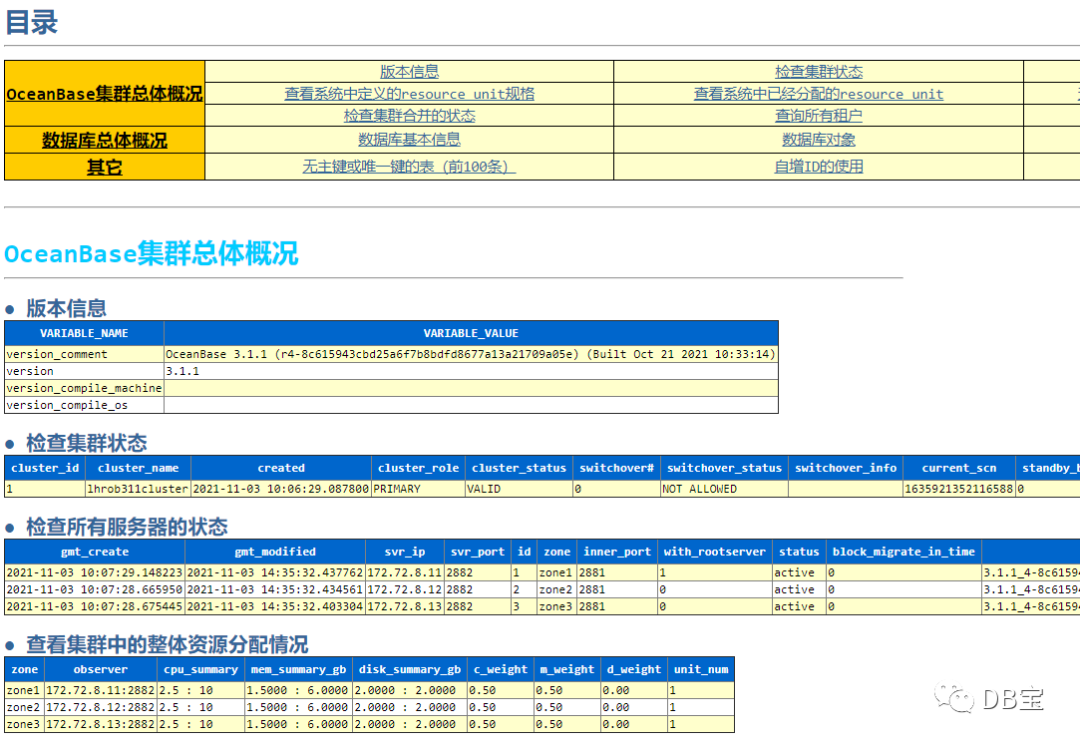
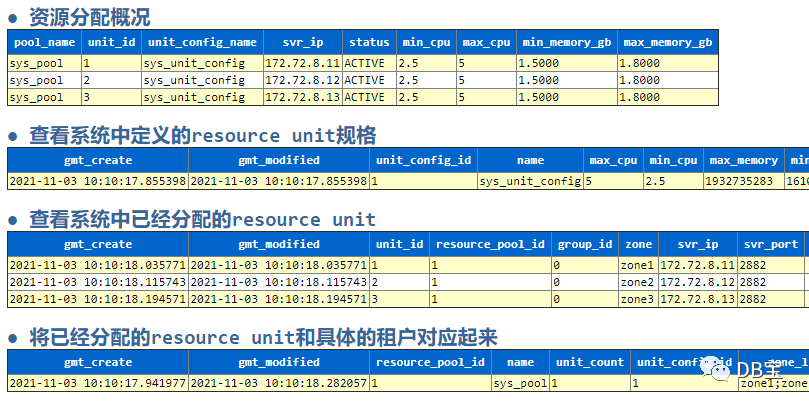
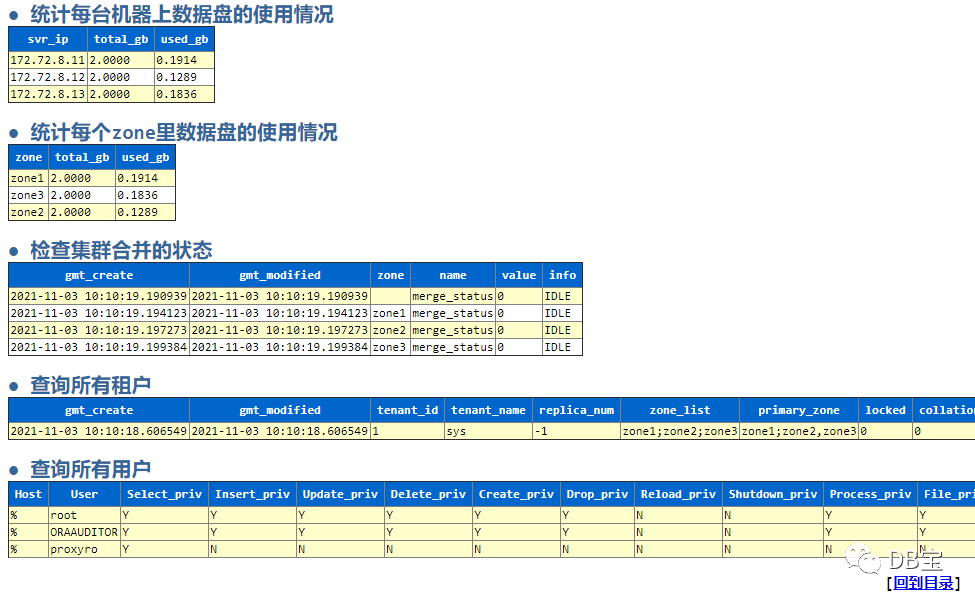
其它不再列举。
这里只列出部分结果,其它的详细内容可以参考:https://share.weiyun.com/5lb2U2M
本文结束。

• 个人博客地址:www.xmmup.com
• 微信公众号:DB宝,作者:小麦苗,作者微信:db_bao
• 作者QQ:646634621,QQ群:230161599、618766405
• 提供Oracle OCP、OCM、高可用(rac+dg+ogg)、MySQL DBA和PostgreSQL DBA培训及其考证事宜
• 版权所有,欢迎分享本文,转载请保留出处• 若有侵权请联系小麦苗删除
长按下图识别二维码,关注小麦苗的微信公众号:DB宝,学习最实用的数据库技术。