1、概述
Guacamole大致流程如下图所示,本文目的是快速完成安装部署,如需深入了解参阅官方文档或其他博客。
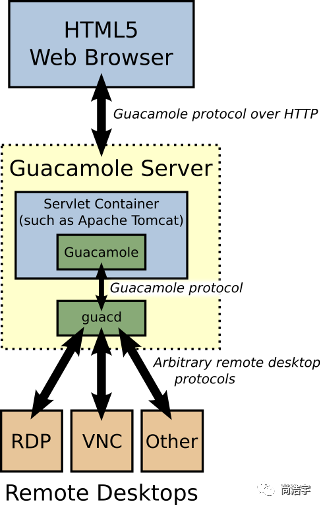
准备两台机器,一个是代理机一个是目标机器。
2、安装依赖
基础依赖:
jdk1.8+
tomcat8+
系统依赖:
yum install -y cairo-devel libjpeg-turbo-devel libpng-devel uuid-develyum install -y freerdp-devel pango-devel libssh2-devel libvncserver-devel pulseaudio-libs-devel openssl-devel libvorbis-devel libwebp-devel
3、部署
3.1、guacamole
访问http://guacamole.apache.org/releases/1.0.0/下载server包,然后上传到代理机目录下,如/opt/guacamole。接着解压,cd到目录执行
./configure --with-init-dir=/etc/init.dmake && make installldconfig
执行完成后,编译或下载war包,这里是war包下载地址http://mirror.bit.edu.cn/apache/guacamole/1.0.0/binary/,放入到tomcat的webapp下,然后在/opt/guacamole目录下创建三个文件:
guacamole.properties
guacd-hostname: 192.168.1.96guacd-port: 4822
user-mapping.xml
<user-mapping><!-- 登陆账号密码 --><authorize username="admin" password="1"><connection name="win"><protocol>rdp</protocol><param name="hostname">192.168.4.181</param><param name="port">3389</param><!-- 需要链接的服务器的账号密码 --><param name="username">shy</param><param name="password">1</param><!-- 大小自动变化 --><param name="resize-method">display-update</param><!-- 分辨率 --><param name="dpi">100</param></connection><connection name="linux_cmd"><protocol>ssh</protocol><param name="hostname">192.168.4.181</param><param name="port">22</param><!-- 需要链接的服务器的账号密码 --><param name="username">shy</param><param name="password">cmgplex!@#</param></connection><connection name="linux_win"><protocol>rdp</protocol><param name="hostname">192.168.4.181</param><param name="port">1</param><!-- 需要链接的服务器的账号密码 --><param name="username">shy</param><param name="password">1</param></connection></authorize></user-mapping>
logback.xml
<configuration><appender name="FILE" class="ch.qos.logback.core.FileAppender"><file>/opt/guacamole/guacamole.log</file><encoder><pattern>%msg%n</pattern></encoder></appender><root level="info"><appender-ref ref="FILE" ></root></configuration>
需要注意的是,如果guacamole.properties配置不起作用,代理会始终绑定在127.0.0.1上,导致其他服务器无法连接,这时可以手动启动加参数绑定IP即可
guacd -b 192.168.43.1
准备完成后配置环境变量
export CATALINA_HOME=/opt/guacamole/apache-tomcat-8.5.43export CATALINA_BASE=/opt/guacamole/apache-tomcat-8.5.43export GUACAMOLE_HOME=/opt/guacamole
最后启动服务
service guacd start #启动guacamole./startup.sh #启动tomcat
3.2目标机器
如果目标是windows,或者命令行linux直接配置用户名密码等即可,如果目标是linux桌面,那么需要在目标机器上安装vnc或者rdp服务,以rdp为例,部署过程如下:
vi etc/yum.repos.d/xrdp.repo
[xrdp]name=xrdpbaseurl=http://li.nux.ro/download/nux/dextop/el7/x86_64/enabled=1gpgcheck=0
yum -y install xrdp tigervnc-server
#启动服务:
systemctl start xrdp.servicesystemctl enable xrdp.service
最后打开http://localhost:8080/guacamole,即可看到页面
三、自定义客户端
有时候需要集成到自己的系统,而不是使用自带的client,Guacamole支持多种客户端API,以java为例,基于springboot流程如下:
添加依赖
<!-- guacamole --><dependency><groupId>org.apache.guacamole</groupId><artifactId>guacamole-common</artifactId><version>1.0.0</version></dependency>
Application增加注解@ServletComponentScan,复制官方demo的servlet并稍作修改如下:
DummyGuacamoleTunnelServlet.java
/** Licensed to the Apache Software Foundation (ASF) under one* or more contributor license agreements. See the NOTICE file* distributed with this work for additional information* regarding copyright ownership. The ASF licenses this file* to you under the Apache License, Version 2.0 (the* "License"); you may not use this file except in compliance* with the License. You may obtain a copy of the License at** http://www.apache.org/licenses/LICENSE-2.0** Unless required by applicable law or agreed to in writing,* software distributed under the License is distributed on an* "AS IS" BASIS, WITHOUT WARRANTIES OR CONDITIONS OF ANY* KIND, either express or implied. See the License for the* specific language governing permissions and limitations* under the License.*/import javax.servlet.annotation.WebServlet;import javax.servlet.http.HttpServletRequest;import org.apache.guacamole.GuacamoleException;import org.apache.guacamole.net.GuacamoleTunnel;import org.apache.guacamole.net.InetGuacamoleSocket;import org.apache.guacamole.net.SimpleGuacamoleTunnel;import org.apache.guacamole.protocol.ConfiguredGuacamoleSocket;import org.apache.guacamole.protocol.GuacamoleConfiguration;import org.apache.guacamole.servlet.GuacamoleHTTPTunnelServlet;import org.springframework.beans.factory.annotation.Value;/*** Simple tunnel example with hard-coded configuration parameters.*/@WebServlet(urlPatterns = "/tunnel")public class DummyGuacamoleTunnelServlet extends GuacamoleHTTPTunnelServlet {@Value("${guacamole.guacd.host}")private String guacdHost;@Value("${guacamole.guacd.port}")private Integer guacdPort;@Value("${guacamole.target.protocol}")private String targetProtocol;@Value("${guacamole.target.host}")private String targetHost;@Value("${guacamole.target.port}")private String targetPort;@Value("${guacamole.target.username}")private String targetUsername;@Value("${guacamole.target.password}")private String targetPassword;private static final long serialVersionUID = 1126569778799758654L;@Overrideprotected GuacamoleTunnel doConnect(HttpServletRequest request) throws GuacamoleException {GuacamoleConfiguration config = new GuacamoleConfiguration();config.setProtocol(this.targetProtocol);config.setParameter("hostname", this.targetHost);config.setParameter("port", this.targetPort);config.setParameter("username", this.targetUsername);config.setParameter("password", this.targetPassword);return new SimpleGuacamoleTunnel(new ConfiguredGuacamoleSocket(new InetGuacamoleSocket(this.guacdHost, this.guacdPort), config));}}
application.properties增加如下配置
guacamole.guacd.host=xxxxguacamole.guacd.port=4822guacamole.target.protocol=rdpguacamole.target.host=192.168.1.1guacamole.target.port=3389guacamole.target.username=adguacamole.target.password=1
最后增加页面,页面很简单注意引用js即可
<%@ page language="java" contentType="text/html; charset=UTF-8" pageEncoding="UTF-8"%><!DOCTYPE html PUBLIC "-//W3C//DTD HTML 4.01 Transitional//EN" "http://www.w3.org/TR/html4/loose.dtd"><!--Licensed to the Apache Software Foundation (ASF) under oneor more contributor license agreements. See the NOTICE filedistributed with this work for additional informationregarding copyright ownership. The ASF licenses this fileto you under the Apache License, Version 2.0 (the"License"); you may not use this file except in compliancewith the License. You may obtain a copy of the License athttp://www.apache.org/licenses/LICENSE-2.0Unless required by applicable law or agreed to in writing,software distributed under the License is distributed on an"AS IS" BASIS, WITHOUT WARRANTIES OR CONDITIONS OF ANYKIND, either express or implied. See the License for thespecific language governing permissions and limitationsunder the License.--><html><head><link rel="stylesheet" type="text/css" href="/media/css/guacamole.css"/><!-- Guacamole JavaScript API --><script type="text/javascript" src="/media/js/all.min.js"></script><link rel="shortcut icon" href="/media/image/favicon.ico" ></head><body><!-- Display --><div id="display"></div><!-- Init --><script type="text/javascript"> /* <![CDATA[ */// Get display div from documentvar display = document.getElementById("display");// Instantiate client, using an HTTP tunnel for communications.var guac = new Guacamole.Client(new Guacamole.HTTPTunnel("/tunnel"));// Add client to display divdisplay.appendChild(guac.getDisplay().getElement());// Error handlerguac.onerror = function(error) {alert(error);};// Connectguac.connect();// Disconnect on closewindow.onunload = function() {guac.disconnect();}// Mousevar mouse = new Guacamole.Mouse(guac.getDisplay().getElement());mouse.onmousedown =mouse.onmouseup =mouse.onmousemove = function(mouseState) {guac.sendMouseState(mouseState);};// Keyboardvar keyboard = new Guacamole.Keyboard(document);keyboard.onkeydown = function (keysym) {guac.sendKeyEvent(1, keysym);};keyboard.onkeyup = function (keysym) {guac.sendKeyEvent(0, keysym);};/* ]]> */ </script></body></html>
js可以在官方demo里找到。
这里展示的是比较简单的自定义客户端,根据自身业务可以做到更强大的功能。
有兴趣的大佬大神可以关注下小弟的微信公共号,一起学习交流,扫描以下二维码关注即可。