

1 演示环境介绍
CDH集群运行正常,Apache服务正常运行
操作系统版本:CentOS6.5
CM和CDH版本:5.12.1
root用户操作
2 操作演示
CDH集群安装Anaconda
使用Parcel包的方式在CDH集群安装Anaconda,下载地址:
https://repo.continuum.io/pkgs/misc/parcels/
部署Anaconda的Parcel包http访问
下载Anaconda的Parcel包,下载地址如下
https://repo.continuum.io/pkgs/misc/parcels/Anaconda-4.2.0-el6.parcel
https://repo.continuum.io/pkgs/misc/parcels/Anaconda-4.2.0-el6.parcel.sha
https://repo.continuum.io/pkgs/misc/parcels/manifest.json
将上面3个文件下载至HTTP所在服务器的/var/www/html/anaconda4.2.0目录下
[root@ip-186-33-8-166 html]# mkdir -p anaconda4.2.0/
[root@ip-186-33-8-166 html]# cd anaconda4.2.0/
[root@ip-186-33-8-166 anaconda4.2.0]# ll
total 541416
-rw-r--r-- 1 root root 554396033 Jun 19 17:47 Anaconda-4.2.0-el6.parcel
-rw-r--r-- 1 root root        41 Jul  7 19:43 Anaconda-4.2.0-el6.parcel.sha
-rw-r--r-- 1 root root      3890 Jul  7 19:43 manifest.json
[root@ip-186-33-8-166 anaconda4.2.0]#
验证http是否正常访问
安装Anaconda
配置Anaconda的parcels包访问地址,点击下载、分配并激活
配置Anaconda环境变量
Anaconda默认安装在/opt/cloudera/parcels/Anaconda目录,在集群所有节点配置Anaconda的环境变量,操作如下:
使用root用户或有sudo权限用户编辑/etc/profile文件,在文件末尾增加如下配置
export ANACONDA_HOME=/opt/cloudera/parcels/Anaconda
export PATH=$ANACONDA_HOME/bin:$PATH
执行source命令,使环境变量立即生效
[root@ip-186-33-8-166 anaconda4.2.0]# source etc/profile
验证环境变量是否配置成功
[root@ip-186-33-8-166 anaconda4.2.0]# python
Python 2.7.12 |Anaconda 4.2.0 (64-bit)| (default, Jul  2 2016, 17:42:40)
[GCC 4.4.7 20120313 (Red Hat 4.4.7-1)] on linux2
Type "help", "copyright", "credits" or "license" for more information.
Anaconda is brought to you by Continuum Analytics.
Please check out: http://continuum.io/thanks and https://anaconda.org
>>>
搭建Pyton私有源
下载pip2pi安装包,下载地址:
https://codeload.github.com/wolever/pip2pi/zip/master
下载Python源码依赖包(tar.gz/zip/whl等格式安装包)
安装pip2pi工具
将下载的pip2pi源码包上传至服务器,并解压
[root@ip-186-33-8-166 ~]# unzip master
使用Python命令安装pip2pi
[root@ip-186-33-8-166 python]# cd pip2pi-master/
[root@ip-186-33-8-166 pip2pi-master]# ll
total 44
-rw-r--r-- 1 root root 2797 Mar 19 15:51 CHANGELOG.txt
drwxr-xr-x 2 root root 4096 Mar 19 15:51 libpip2pi
-rw-r--r-- 1 root root 1649 Mar 19 15:51 LICENSE.txt
-rw-r--r-- 1 root root   19 Mar 19 15:51 MANIFEST.in
-rw-r--r-- 1 root root 5080 Mar 19 15:51 README.rst
-rwxr-xr-x 1 root root   84 Mar 19 15:51 run-tests
-rw-r--r-- 1 root root   20 Mar 19 15:51 setup.cfg
-rw-r--r-- 1 root root 1422 Mar 19 15:51 setup.py
drwxr-xr-x 5 root root 4096 Mar 19 15:51 tests
-rw-r--r-- 1 root root  194 Mar 19 15:51 tox.ini
[root@ip-186-33-8-166 pip2pi-master]# python setup.py install
部署依赖包
在http服务器的/var/www/html目录下新建python-packages目录
[root@ip-186-33-8-166 html]# mkdir python-packages
[root@ip-186-33-8-166 html]# pwd
/var/www/html
[root@ip-186-33-8-166 html]# ll
total 32
drwxr-xr-x 2 root root 4096 Sep 11 15:52 python-packages
[root@ip-186-33-8-166 html]#
将本地下载的Python依赖包上传至服务器的/var/www/html/python-packages目录
[root@ip-186-33-8-166 python-packages]# ll
total 1780
-rw-r--r-- 1 root root   2421 Sep 24  2016 bit_array-0.1.0.tar.gz
-rw-r--r-- 1 root root   1254 Sep 12 07:18 enum-compat-0.0.2.tar.gz
-rw-r--r-- 1 root root 339017 Sep 12 07:27 pymongo-3.3.0-cp27-cp27mu-manylinux1_x86_64.whl
-rw-r--r-- 1 root root 368294 Sep 12 07:25 pymongo-3.5.1-cp27-cp27mu-manylinux1_x86_64.whl
-rw-r--r-- 1 root root 799601 Sep 12 07:04 Routes-1.12.3.tar.gz
-rw-r--r-- 1 root root  30409 Apr 23  2016 sasl-0.2.1.tar.gz
-rw-r--r-- 1 root root  29630 Apr 21  2016 six-1.10.0.tar.gz
-rw-r--r-- 1 root root  87832 Jan 14  2017 thrift-0.10.0.zip
-rw-r--r-- 1 root root   3885 Jun  9  2016 thrift_sasl-0.2.1.tar.gz
-rw-r--r-- 1 root root 140861 Dec  3  2016 ym-impyla-0.14.0.tar.gz
使用dir2pi命令建立包索引
[root@ip-186-33-8-166 python-packages]# dir2pi var/www/html/python-packages/
[root@ip-186-33-8-166 python-packages]# ll
total 1784
-rw-r--r--  1 root root   2421 Sep 24  2016 bit_array-0.1.0.tar.gz
-rw-r--r--  1 root root   1254 Sep 12 07:18 enum-compat-0.0.2.tar.gz
-rw-r--r--  1 root root 339017 Sep 12 07:27 pymongo-3.3.0-cp27-cp27mu-manylinux1_x86_64.whl
-rw-r--r--  1 root root 368294 Sep 12 07:25 pymongo-3.5.1-cp27-cp27mu-manylinux1_x86_64.whl
-rw-r--r--  1 root root 799601 Sep 12 07:04 Routes-1.12.3.tar.gz
-rw-r--r--  1 root root  30409 Apr 23  2016 sasl-0.2.1.tar.gz
drwxr-xr-x 11 root root   4096 Sep 12 08:06 simple
-rw-r--r--  1 root root  29630 Apr 21  2016 six-1.10.0.tar.gz
-rw-r--r--  1 root root  87832 Jan 14  2017 thrift-0.10.0.zip
-rw-r--r--  1 root root   3885 Jun  9  2016 thrift_sasl-0.2.1.tar.gz
-rw-r--r--  1 root root 140861 Dec  3  2016 ym-impyla-0.14.0.tar.gz
[root@ip-186-33-8-166 python-packages]#
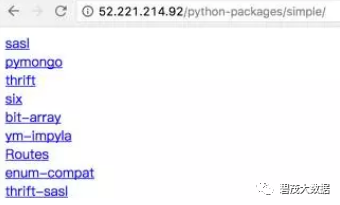
验证Http是否正常访问,访问地址
http://ip-186-33-8-166.fayson.com/python-packages/simple/
配置pip命令使用私有源
在当前用户的home目录(即“~”)目录,创建.pip目录
[root@ip-186-33-8-166 ~]# mkdir -p .pip
[root@ip-186-33-8-166 ~]# pwd
/root
[root@ip-186-33-8-166 ~]#
在~/.pip目录下新建pip.conf文件,文件内容如下
[root@ip-186-33-8-166 ~]# cd .pip/
[root@ip-186-33-8-166 .pip]# pwd
/root/.pip
[root@ip-186-33-8-166 .pip]# vim pip.conf
[global]
index-url = http://ip-186-33-8-166.fayson.com/python-packages/simple
[install]
trusted-host = ip-186-33-8-166.fayson.com
测试pip命令是否从私有源下载依赖包
[root@ip-186-33-8-166 .pip]# pip install bit-array
Collecting bit-array
  Downloading http://ip-186-33-8-166.fayson.com/python-packages/simple/bit-array/bit-array-0.1.0.tar.gz
Building wheels for collected packages: bit-array
  Running setup.py bdist_wheel for bit-array ... done
  Stored in directory: root/.cache/pip/wheels/7a/7f/04/3bdc776730b06ce5bedd46f9023d263a32f82941e1365a054f
Successfully built bit-array
Installing collected packages: bit-array
Successfully installed bit-array-0.1.0
[root@ip-186-33-8-166 .pip]#
pip使用
指定版本安装package
[root@ip-186-33-8-166 ~] pip install SomePackage            # 最新版本
[root@ip-186-33-8-166 ~] pip install SomePackage==1.0.4     # 具体的版本
[root@ip-186-33-8-166 ~] pip install 'SomePackage>=1.0.4'     # 最低版本
批量安装packages
创建文本文件requirements.txt,内容如下
[root@ip-186-33-8-166 ~]# vim requirements.txt
six
bit_array
thrift==0.10.0
使用pip批量安装
[root@ip-186-33-8-166 ~]# pip install -r requirements.txt
Collecting six (from -r requirements.txt (line 1))
Collecting bit_array (from -r requirements.txt (line 2))
Collecting thrift==0.10.0 (from -r requirements.txt (line 3))
  Downloading http://ip-186-33-8-166.fayson.com/python-packages/simple/thrift/thrift-0.10.0.zip (87kB)
    100% |████████████████████████████████| 92kB 58.1MB/s
Building wheels for collected packages: thrift
  Running setup.py bdist_wheel for thrift ... done
  Stored in directory: root/.cache/pip/wheels/21/53/2d/121a953df877103ba4f2fe9041be0d28d6979438c6dd7b2b15
Successfully built thrift
Installing collected packages: six, bit-array, thrift
Successfully installed bit-array-0.1.0 six-1.10.0 thrift-0.10.0
[root@ip-186-33-8-166 ~]#
输出当前python环境安装的所有package及版本到指定文件
[root@ip-186-33-8-166 ~]# pip freeze > requirements.txt
卸载package
[root@ip-186-33-8-166 ~]# pip uninstall six
列出当前Python环境安装的所有package
[root@ip-186-33-8-166 ~]# pip list --format=columns
Package                            Version
---------------------------------- -----------------------
alabaster                          0.7.9
anaconda-clean                     1.0
anaconda-client                    1.5.1
anaconda-navigator                 1.3.1
argcomplete                        1.0.0
astroid                            1.4.7
astropy                            1.2.1
Babel                              2.3.4
backports-abc                      0.4
查看安装的package详细信息
[root@ip-186-33-8-166 ~]# pip show six
Name: six
Version: 1.10.0
Summary: Python 2 and 3 compatibility utilities
Home-page: http://pypi.python.org/pypi/six/
Author: Benjamin Peterson
Author-email: benjamin@python.org
License: MIT
Location: opt/cloudera/parcels/Anaconda-4.2.0/lib/python2.7/site-packages
Requires:
[root@ip-186-33-8-166 ~]#
package下载方式
使用pip2pi工具进行批量下载
通过官网手动下载,官网下载地址:https://pypi.python.org/pypi
在本地安装pip2pi工具,可以通过pip2tgz命令批量下载package
pip2tgz是通过将参数传递给pip调用来完成包的下载,所以可以指定任何pip可以识别的参数格式。
在本地创建requirements.txt文件,内容如下
six
bit_array
thrift==0.10.0
使用pip2tgz命令进行批量下载
[root@ip-186-33-8-166 .pip]# pip2tgz root/python/ -r root/requirements.txt
搭建完Python私有源,pip安装package时报错
[root@ip-186-33-8-166 .pip]# pip install six
Collecting six
  The repository located at ip-186-33-8-166.fayson.com is not a trusted or secure host and is being ignored. If this repository is available via HTTPS it is recommended to use HTTPS instead, otherwise you may silence this warning and allow it anyways with '--trusted-host ip-186-33-8-166.fayson.com'.
  Could not find a version that satisfies the requirement six (from versions: )
No matching distribution found for six
[root@ip-186-33-8-166 .pip]#
解决方法:在pip.conf文件中增加如下配置:
trusted-host = ip-186-33-8-166.fayson.com
关注公众号:领取精彩视频课程&海量免费语音课程