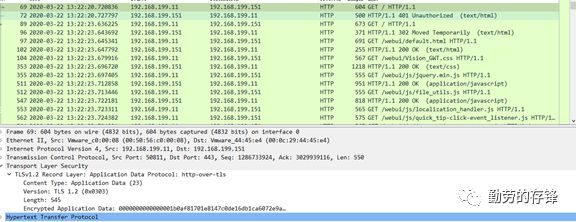
通过WIRESHARK
解密SSL/TLS流量
方法一、利用服务器证书和密钥来进行加解密
1、在服务器上导出服务器证书和密钥,格式为PersonalInformation Exchange - PKCS # 12 (.PFX)
2、配置Wireshark利用服务器证书和密钥解密SSL/TLS流量
a. In Wireshark menu, go to: Edit -> Preferences....
b. Expand Protocols -> TLS/SSL,click the Edit button after RSA key lists.
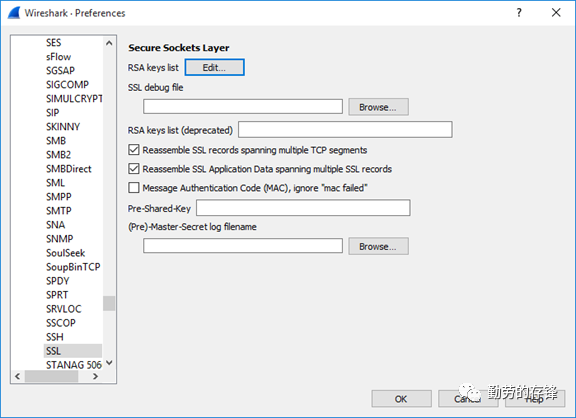
c. Configure as below:
IP address: Target server IP address, you can input"any" as well.
Port: The general port number of HTTPS is: 443.
Protocol: http
Key File: Select the PFX file you just exported.
Password: The password of the PFX file.

3、Disable Diffie-Hellman cipher
a. Run gpedit.msc toopen Local Group Policy Editor.
b. Edit setting: ComputerConfiguration -> Administrative Templates -> Network -> SSLConfiguration Settings -> SSL Cipher Suite Order.
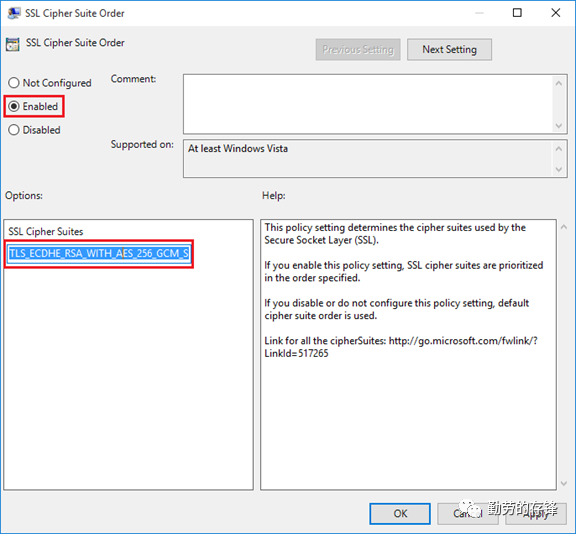
c. Remove all the ciphersthat contain "ECDHE" or "DHE",please keep all the ciphers in one line.d. Replace the default value with the new value, click OK to save the setting, then reboot the PC
e. After reboot, we can seethat the Cipher Suites value in IE Client Hello message does not contain any Diffie-Hellman ciphers and Wireshark is able to decrypt the SSL/TLS packets.
f. Remember only IE willchange the cipher suite not Chrome
g. Disable Chrome tosupport DH/ECDHE
c:\Program Files (x86)\Google\chrome\Application\chrome.exe--cipher-suite-blacklist=0xc02b,0xc02f,0x009e,0xcc14,0xcc13,0xc00a,0xc014,0x0039,0xc009,0xc013,0x0033
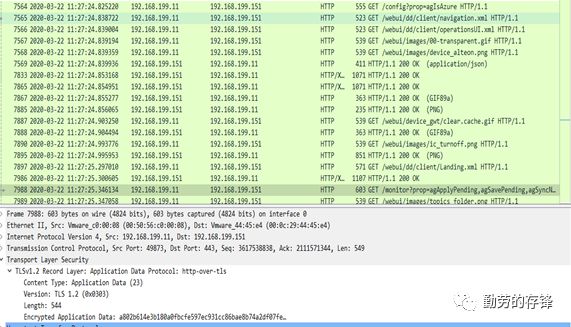
方法二:通过SSLKEYLOGFILE来实现解密SSL/TLS流量
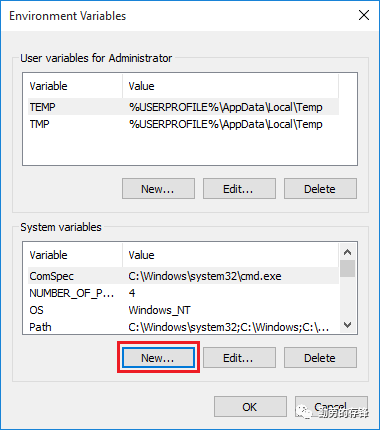
1、设置SSLKEKYLOGFILE环境变量
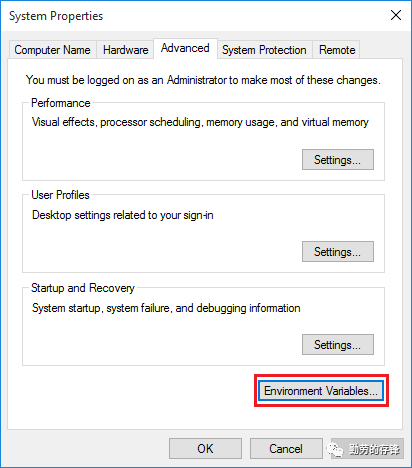
2、Rightclick Computer/This PC,view Properties,open Advanced system settings,view Advanced tab,click Environment Variables....
设置新的系统环境变量
3、打开ie浏览器,访问应用,查看ssl-log.txt
CLIENT_HANDSHAKE_TRAFFIC_SECRET5d019d9c96e2edf72e934b8f68a67efc85f7f8e7fe6db4ce81fd4310b980c2a6 0514b24840476ad1d3fcdfb58721ecd27aa0fd3a80813ca91ad8216832f1c93d
SERVER_HANDSHAKE_TRAFFIC_SECRET5d019d9c96e2edf72e934b8f68a67efc85f7f8e7fe6db4ce81fd4310b980c2a6b1a8941fb6a3f99c8afb24ec945f5b5a8917a0f30b7662fd360ae34613a0db4f
CLIENT_TRAFFIC_SECRET_05d019d9c96e2edf72e934b8f68a67efc85f7f8e7fe6db4ce81fd4310b980c2a69f1ae2357944442b3db07d0816afaa80b03d7683033e8f7c1a79070d73e34fa7
SERVER_TRAFFIC_SECRET_05d019d9c96e2edf72e934b8f68a67efc85f7f8e7fe6db4ce81fd4310b980c2a6217ceb00b62b8b6bf9cf81a0e899a71a95173835b434046cac921106a2e58a64
EXPORTER_SECRET5d019d9c96e2edf72e934b8f68a67efc85f7f8e7fe6db4ce81fd4310b980c2a6c0a6960343823a182a3ec49dbf19d67b29a3fc64357f992433c618b2cdbdc862
CLIENT_HANDSHAKE_TRAFFIC_SECRET4af34c715d45381cdb1e5faaca199c55759af6f1eb8c0f00cfca0e7c65ba8bc9f52981ec2be9ced05091d4b94d9985cad948485d0a80a31104224008bbe0b0dc
SERVER_HANDSHAKE_TRAFFIC_SECRET4af34c715d45381cdb1e5faaca199c55759af6f1eb8c0f00cfca0e7c65ba8bc926f47f9b417d4d92ba99add972ed8a70a8154d316efa81509f3f64fab1fe9537
CLIENT_TRAFFIC_SECRET_04af34c715d45381cdb1e5faaca199c55759af6f1eb8c0f00cfca0e7c65ba8bc9181cac6704d60f3e611776158f65770bcbf655e5540a1a30a5d3cc3a6a8a2201
SERVER_TRAFFIC_SECRET_04af34c715d45381cdb1e5faaca199c55759af6f1eb8c0f00cfca0e7c65ba8bc979c74582c33a8b7b45004c38af4f3033a6d291fda1ae9df85e3354d8c39b2e90
EXPORTER_SECRET4af34c715d45381cdb1e5faaca199c55759af6f1eb8c0f00cfca0e7c65ba8bc9c86b634c5003ad88daa67f307c92ce9c724cf96efd821d0d95a947008c0557ab
CLIENT_HANDSHAKE_TRAFFIC_SECRET97945337a444df66d995bf016774b81076ae64cfb9044f9ca56db849df73578144a88726db21b926c071c04184bdcf5b1ec9d3441fd25b295b4f3bafb4ad7b2b
SERVER_HANDSHAKE_TRAFFIC_SECRET97945337a444df66d995bf016774b81076ae64cfb9044f9ca56db849df735781f301dc737a3eee5bb025610229c4485fef1c182cd1ce1bef6a48156e4d711b19
CLIENT_TRAFFIC_SECRET_097945337a444df66d995bf016774b81076ae64cfb9044f9ca56db849df7357816e198b37dccae160a155b048004a9019eab080819630b3d581e6d534cc4c4b8b
SERVER_TRAFFIC_SECRET_097945337a444df66d995bf016774b81076ae64cfb9044f9ca56db849df735781b314d24d5b0543394c26c81f5cf033fd79d678557062f3bc8057ed818b3bed16
EXPORTER_SECRET97945337a444df66d995bf016774b81076ae64cfb9044f9ca56db849df735781fc4a184edf447ab3b9db91dc250d9c49558670ae9c0701ef7fce77a0bb52de34
CLIENT_HANDSHAKE_TRAFFIC_SECRET22d98255260ccf09bab442cd4168b576c04d18b61fe31b333fccc48b4942ba6f17e67c6d9a66b10ddc6e19fe64274f0ce7f7a360beba8f9a7c3647fc0b2c966e
SERVER_HANDSHAKE_TRAFFIC_SECRET22d98255260ccf09bab442cd4168b576c04d18b61fe31b333fccc48b4942ba6fc709a84ae67b417193d39847588a1cebe6cd5bf59a7287f1606dc4de31239eb5
CLIENT_TRAFFIC_SECRET_022d98255260ccf09bab442cd4168b576c04d18b61fe31b333fccc48b4942ba6f1093f1ed5fb49dd6eae3faaed0e39603ba95c185659f82db13212bdee477346a
SERVER_TRAFFIC_SECRET_022d98255260ccf09bab442cd4168b576c04d18b61fe31b333fccc48b4942ba6f18b49fcc6f5118700b9d31cd034ddc940e72673d610cb0dc2515c0d55288c3ae
EXPORTER_SECRET22d98255260ccf09bab442cd4168b576c04d18b61fe31b333fccc48b4942ba6fe873801f3bee6ab25558b230792ca89070ffda65a61a7323941200fd99497b34
CLIENT_RANDOM216e7e649a7c59d4f3719e26aab8543df85859adeac3786fc91dce8415ea9e053ab506588c7b3604023482ea91186a9ebb7e37fded351b9bf5757f066e66e1f212ae5f83976dab76abdd55a5e978e8b1
4、或者执行
"C:\Users\Admin\AppData\Local\Google\Chrome\Application\chrome.exe"--ssl-key-log-file=c:\users\admin\documents\ssl-key.log
5、编辑Wireshark通过SSLKEYLOGFILE环境变量进行解密
a. In Wireshark, goto:Edit -> Preferences....
b. Expand Protocols -> SSL/TLS,set (Pre)-Master-Secret log filename to the same text file.
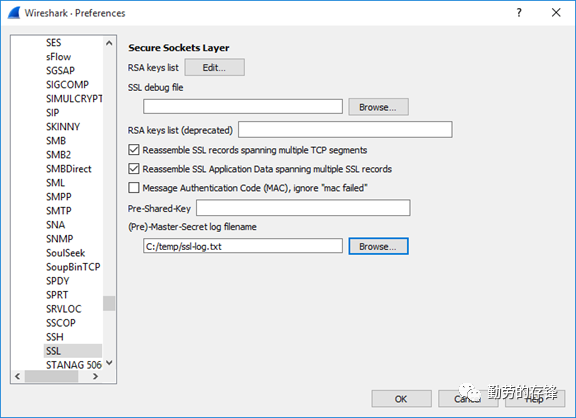
c. 这种方法的优点是能解密DH算法流量,缺点是只能解密客户端本地流量,无法解密第三方抓取的流量,因为无法看到实时的SSL SESSION KEY.
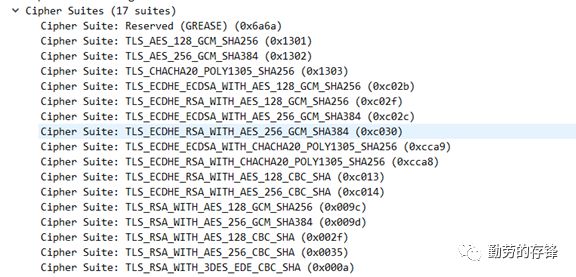
6、通过查看CLIENT HELLO/SERVER HELLO找出加密算法

7、查看加密内容