



通过SQL*PLUS我们可以构建友好的输出,满足多样化用户需求。
本例通过简单示例,介绍通过sql*plus输出xls,html两种格式文件.
首先创建两个脚本:
1.main.sql
用以设置环境,调用具体功能脚本
2.功能脚本-get_tables.sql
为实现具体功能之脚本
通过这样两个脚本可以避免spool中的冗余信息,参考:
如何去除SQLPLUS中SPOOL的冗余信息
示例如下:
1.main.sql脚本:
2.get_tables.sql脚本:
3.执行并获得输出:
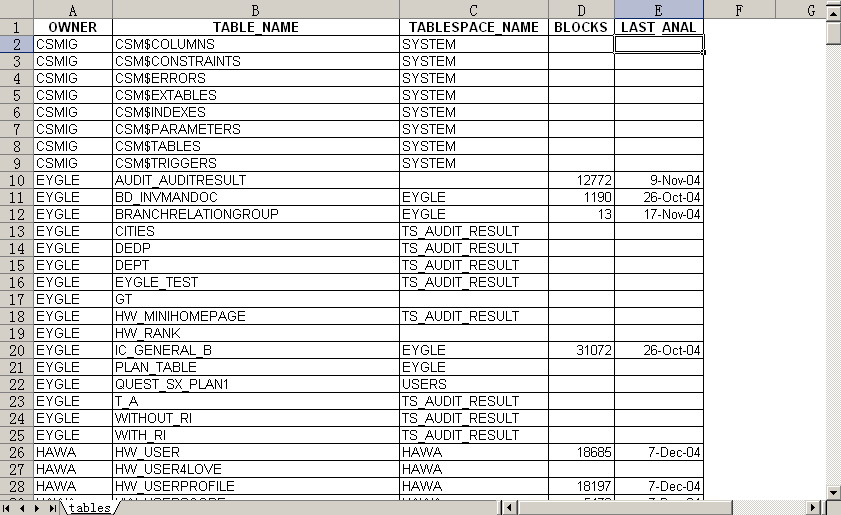
此处输出为xls文件,通过下图我们可以看到输出效果:
本例通过简单示例,介绍通过sql*plus输出xls,html两种格式文件.
首先创建两个脚本:
1.main.sql
用以设置环境,调用具体功能脚本
2.功能脚本-get_tables.sql
为实现具体功能之脚本
通过这样两个脚本可以避免spool中的冗余信息,参考:
如何去除SQLPLUS中SPOOL的冗余信息
示例如下:
1.main.sql脚本:
[oracle@jumper utl_file]$ more main.sql
set linesize 200
set term off verify off feedback off pagesize 999
set markup html on entmap ON spool on preformat off
spool tables.xls
@get_tables.sql
spool off
exit
2.get_tables.sql脚本:
[oracle@jumper utl_file]$ more get_tables.sql
select owner,table_name,tablespace_name,blocks,last_analyzed
from all_tables order by 1,2;
3.执行并获得输出:
[oracle@jumper utl_file]$ sqlplus "/ as sysdba" @main
SQL*Plus: Release 9.2.0.4.0 - Production on Mon Apr 25 10:30:11 2005
Copyright (c) 1982, 2002, Oracle Corporation.  All rights reserved.
Connected to:
Oracle9i Enterprise Edition Release 9.2.0.4.0 - Production
With the Partitioning option
JServer Release 9.2.0.4.0 - Production
Disconnected from Oracle9i Enterprise Edition Release 9.2.0.4.0 - Production
With the Partitioning option
JServer Release 9.2.0.4.0 - Production
[oracle@jumper utl_file]$ ls -l tables.xls
-rw-r--r--    1 oracle   dba         69539 Apr 25 10:30 tables.xls
[oracle@jumper utl_file]$
此处输出为xls文件,通过下图我们可以看到输出效果:
「喜欢这篇文章,您的关注和赞赏是给作者最好的鼓励」
关注作者
【版权声明】本文为墨天轮用户原创内容,转载时必须标注文章的来源(墨天轮),文章链接,文章作者等基本信息,否则作者和墨天轮有权追究责任。如果您发现墨天轮中有涉嫌抄袭或者侵权的内容,欢迎发送邮件至:contact@modb.pro进行举报,并提供相关证据,一经查实,墨天轮将立刻删除相关内容。
