



点击上方“IT微联盟”,选择“置顶或者星标”

1、Apollo
Apollo(阿波罗)是携程框架部门研发的分布式配置中心,能够集中化管理应用不同环境、不同集群的配置,配置修改后能够实时推送到应用端,并且具备规范的权限、流程治理等特性,适用于微服务配置管理场景。
apollo的文档在官方github上十分全面,在这里就不再重复介绍了,大家可以去官网阅读和使用。
2、核心原理
apollo使用长轮训的方式实现实时通知变化。DeferredResult——springmvc异步请求处理;
Callable和DeferredResult可以用来进行异步请求处理。利用它们,我们可以异步生成返回值,在具体处理的过程中,我们直接在controller中返回相应的Callable或者DeferredResult,在这之后,servlet线程将被释放,可用于其他连接;DeferredResult另外会有线程来进行结果处理,并setResult。
3、实现简化版的apollo配置中
package com.lsq.einterview.controller;import com.google.common.collect.HashMultimap;import com.google.common.collect.Multimap;import com.google.common.collect.Multimaps;import org.springframework.web.bind.annotation.PathVariable;import org.springframework.web.bind.annotation.RequestMapping;import org.springframework.web.bind.annotation.RequestMethod;import org.springframework.web.bind.annotation.RestController;import org.springframework.web.context.request.async.DeferredResult;import java.util.Collection;@RestControllerpublic class LongPullTestController {//创建一个线程安全的Map,存储DeferredResult,用来观察对应变更的消息private Multimap<String, DeferredResult<String>> watchRequests = Multimaps.synchronizedSetMultimap(HashMultimap.create());/*** 客户端请求该方法进行监控是否有配置变化* 如果无消息变化,客户端默认阻塞等待,该服务端释放servlet线程,使用DeferredResult异步处理* 当客户端关注的配置有变化时,服务端会返回对应的配置变化* 如配置一直为变化,等到超时时间会超时** @param key 关注的配置key* @return*/@RequestMapping(value = "/watch/{key}", method = RequestMethod.GET, produces = "text/html")public DeferredResult<String> watch(@PathVariable String key) {System.out.println("关注的key:" + key);DeferredResult<String> stringDeferredResult = new DeferredResult<>();stringDeferredResult.onTimeout(() -> {System.out.println("关注的key:" + key + "到期返回");});stringDeferredResult.onCompletion(new Runnable() {@Overridepublic void run() {System.out.println("关注的key:" + key + "监听到事件有变化");//从Map中删除该key,监听过程完成watchRequests.remove(key, stringDeferredResult);}});System.out.println("关注的key:" + key + "放入监听队列");watchRequests.put(key, stringDeferredResult);return stringDeferredResult;}/*** 模拟修改配置** @param key* @return*/@RequestMapping(value = "/config/{key}/{changeValue}", method = RequestMethod.GET, produces = "text/html")public Object publishConfig(@PathVariable("key") String key, @PathVariable("changeValue") String changeValue) {System.out.println(key + "配置发生变化,value:" + changeValue);if (watchRequests.containsKey(key)) {Collection<DeferredResult<String>> deferredResults = watchRequests.get(key);//通知所有watch这个namespace变更的长轮训配置变更结果for (DeferredResult<String> deferredResult : deferredResults) {deferredResult.setResult(changeValue);}}return "success";}}
4、演示
请求http://localhost:8080/watch/name;监控key:name的变化信息;

2.请求localhost:8080/config/name/it;修改name的配置为it;

3.显示监控的变化;

4.客户端监听超时;可以自己定义返回值和响应码;
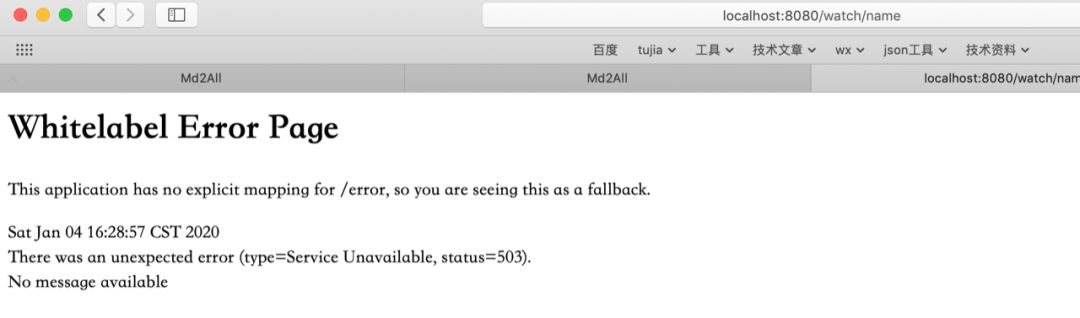
5.控制台显示;
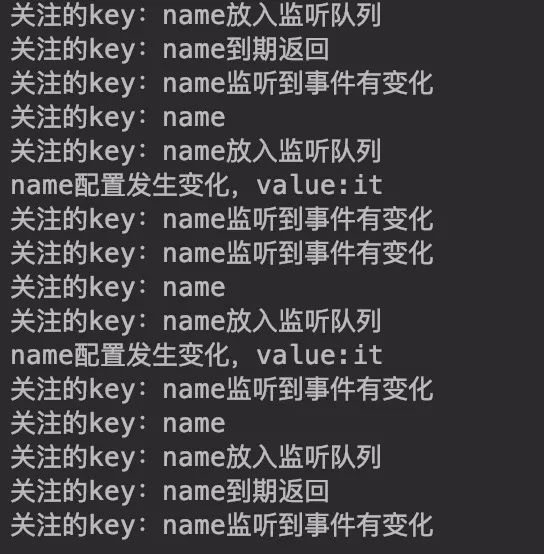
以上为简化版apollo配置中心,欢迎留言讨论。
- end -
点小程序,免费练习BATJ最新、最全面试题目。


每一个“在看”,都是对我们最大的肯定!
文章转载自IT微联盟,如果涉嫌侵权,请发送邮件至:contact@modb.pro进行举报,并提供相关证据,一经查实,墨天轮将立刻删除相关内容。
