



Machete.Rpc
Machete.Rpc 是一个轻量级的Rpc(远程过程调用的)框架。底层代理使用了Emit提高了效率,底层通信采用DotNetty框架以提升通信的效率。目前正在逐步完善中。
简单使用
目前还没有放到Nuget上,稍后放上去
1.新建一个类库Machete.Rpc.Sample.Service,新建一个接口IChatService
 [RpcService]
    public interface IChatService
    {
        string Hi(string name);
        string Hi(string name, string content);
        string Hello(int age);
        string Hello(double age);
    }
2.在新建一个类库Machete.Rpc.Sample.Implement,在类库里面新建一个实现IChatService的类
 [RpcService]
    public class ChatService : IChatService
    {
        public string Hi(string name)
        {
            return name + ":你好 世界";
        }
        public string Hi(string name, string content)
        {
            return name + ":" + content;
        }
        public string Hello(int age)
        {
            return "int:" + age;
        }
        public string Hello(double age)
        {
            return "double:" + age;
        }
    }
3.新建一个控制台程序 Machete.Rpc.Sample.Server(或者其他的程序),添加对Machete.Rpc.Sample.Service,Machete.Rpc.Sample.Implement的引用,在app.config 中增加如下配置,
 <appSettings>
    <add key="rpc.service" value="Machete.Rpc.Sample.Implement.dll"/>
    <add key="rpc.server.port" value="12900"/>
  </appSettings>
在Main方法中开启一个rpc服务
  int port = Convert.ToInt32(ConfigurationManager.AppSettings["rpc.server.port"].ToString());
            RpcHub hub = new RpcHub();
            hub.Start(port);
4.新建一个wpf(或其他的客户端程序)Machete.Rpc.Sample.Client,添加对Machete.Rpc.Sample.Service的引用,在app.config 文件中增加如下配置,
  <appSettings>
    <add key="rpc.server.host" value="127.0.0.1"/>
    <add key="rpc.server.port" value="12900"/>
  </appSettings>
进行rpc调用代码很简单,如下:
  private void Button_Click(object sender, RoutedEventArgs e)
        {
            IChatService chatService = InterfaceProxy.Resolve<IChatService>();
            string result = chatService.Hi("张三");
            MessageBox.Show(result);
        }
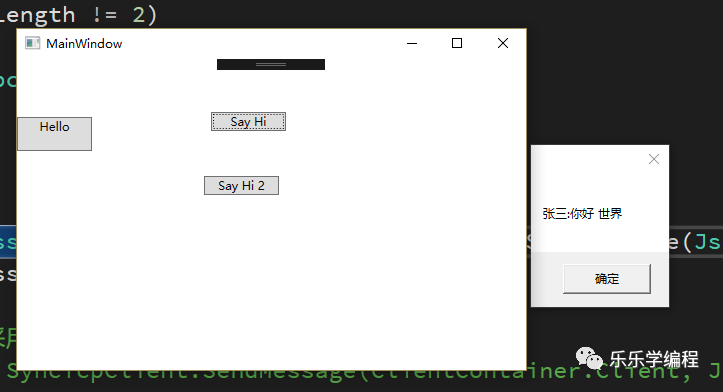
5.先启动Machete.Rpc.Sample.Server,在启动Machete.Rpc.Sample.Client。点击按钮(Say Hi),会进行rpc调用得到结果。
文章转载自乐乐学编程,如果涉嫌侵权,请发送邮件至:contact@modb.pro进行举报,并提供相关证据,一经查实,墨天轮将立刻删除相关内容。
