

暂无图片
暂无图片
暂无图片
暂无图片
暂无图片

Oracle HowTo:如何在Oracle10g中启动和关闭OEM

原创 eygle 2005-10-28
709
从Oracle10g开始,Oracle极大的增强了OEM工具,并通过服务器端进行EM工具全面展现。

在10g中,客户端可以不必安装任何Oracle客户端工具,仅凭浏览器就可以调用强大的EM工具。


在Server端,可以通过如下命令启动EM工具控制台:


emctl start dbconsole


以下是启动过程:


[oracle@danaly ~]$ emctl start dbconsole
TZ set to PRC
Oracle Enterprise Manager 10g Database Control Release 10.2.0.1.0
Copyright (c) 1996, 2005 Oracle Corporation. All rights reserved.
http://danaly.hurrray.com.cn:1158/em/console/aboutApplication
Starting Oracle Enterprise Manager 10g Database Control .......................... started.
------------------------------------------------------------------
Logs are generated in directory /opt/oracle/product/10.2.0/danaly.hurrray.com.cn_danaly/sysman/log


启动之后我们就可以通过在浏览器端输入以下url访问:

http://danaly.hurrray.com.cn:1158/em/
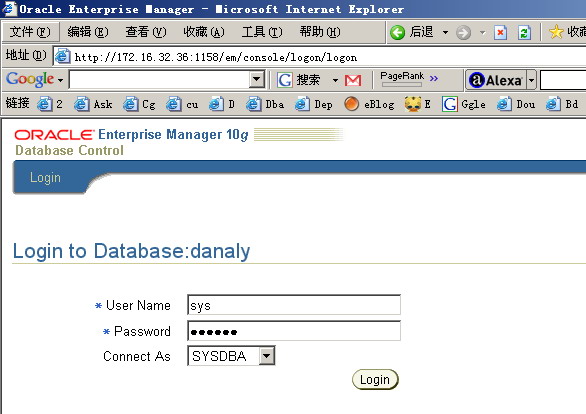
Oracle10g OEM

同样停止OEM可以输入如下命令:


emctl stop dbconsole


以下是停止过程:


[oracle@danaly ~]$ emctl stop dbconsole
TZ set to PRC
Oracle Enterprise Manager 10g Database Control Release 10.2.0.1.0
Copyright (c) 1996, 2005 Oracle Corporation. All rights reserved.
http://danaly.hurrray.com.cn:1158/em/console/aboutApplication
Stopping Oracle Enterprise Manager 10g Database Control ...... Stopped.


也可以直接键入emctl查看emctl支持的选项:


[oracle@danaly ~]$ emctl
TZ set to PRC
Oracle Enterprise Manager 10g Database Control Release 10.2.0.1.0
Copyright (c) 1996, 2005 Oracle Corporation. All rights reserved.
Invalid arguments
Unknown command option
Usage::
Oracle Enterprise Manager 10g Database Control commands:
emctl start| stop| status| setpasswd dbconsole
emctl secure
emctl set ssl test|off|on em
emctl set ldap
emctl blackout options can be listed by typing "emctl blackout"
emctl config options can be listed by typing "emctl config"
emctl secure options can be listed by typing "emctl secure"
emctl ilint options can be listed by typing "emctl ilint"
emctl deploy options can be listed by typing "emctl deploy"

「喜欢这篇文章,您的关注和赞赏是给作者最好的鼓励」
关注作者
【版权声明】本文为墨天轮用户原创内容,转载时必须标注文章的来源(墨天轮),文章链接,文章作者等基本信息,否则作者和墨天轮有权追究责任。如果您发现墨天轮中有涉嫌抄袭或者侵权的内容,欢迎发送邮件至:contact@modb.pro进行举报,并提供相关证据,一经查实,墨天轮将立刻删除相关内容。

评论