暂无图片
暂无图片
暂无图片
暂无图片
暂无图片

NetAPP + Linux iSCSI配置step-by-step

原创 eygle 2005-11-14
552
Redhat Linux从AS3 update 4开始集成iscsi-initiator。


[root@dell2650 etc]# cat /etc/redhat-release
Red Hat Enterprise Linux AS release 3 (Taroon Update 4)
[root@dell2650 etc]# rpm -qa|grep iscsi
iscsi-initiator-utils-3.6.2-4


在NETAPP上可以通过如下步骤分配iSCSI LUN

在菜单Luns部分,选择Add:
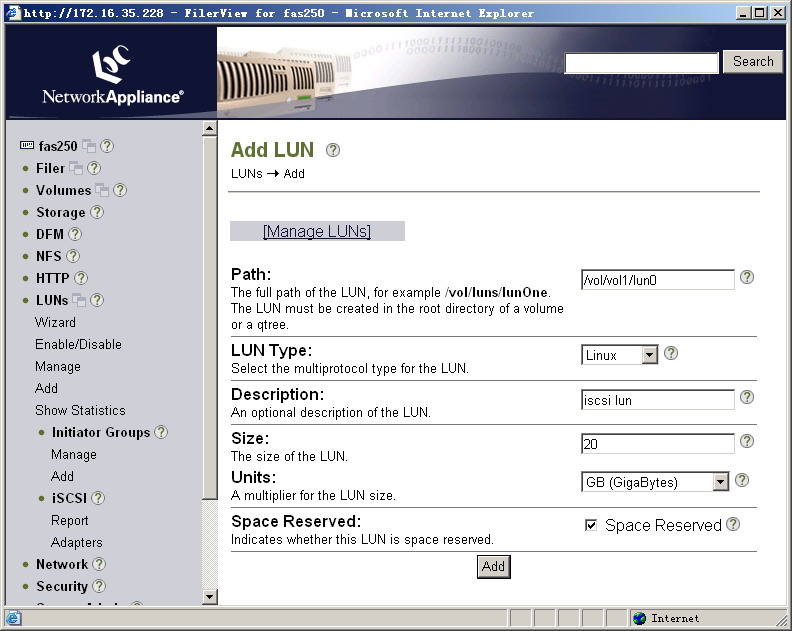
创建LUN
设置好相应的参数增加即可。


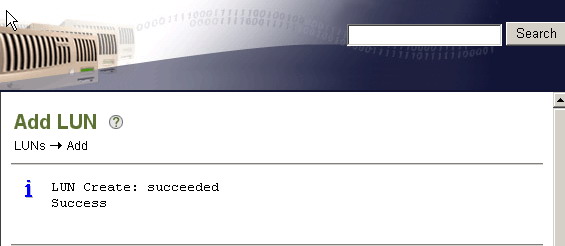
如果一切正常,即可显示成功:

成功...


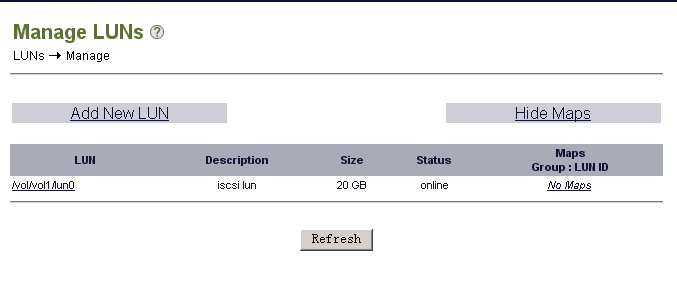
添加成功后可以在如下界面查看:

查看


此时可以在管理主机上启动/重新启动iscsi进程以识别增加的设备:


[root@dell2650 dev]# /etc/init.d/iscsi stop
Stopping iSCSI: iscsid[ OK ]
[root@dell2650 dev]# /etc/init.d/iscsi start
Starting iSCSI: iscsi iscsid[ OK ]


我们可以通过dmesg获得硬件信息:


iSCSI: 3.6.1 (22-Sep-2004) built for Linux 2.4.21-27.ELsmp
iSCSI: will translate deferred sense to current sense on disk command responses
iSCSI: control device major number 254
iSCSI: allocating task cache iscsi_0000729382 with reaping disabled
iSCSI: detected HBA f6aed100, host #2
scsi2 : iSCSI 3.6.1 (22-Sep-2004)
iSCSI: bus 0 target 0 = iqn.1992-08.com.netapp:sn.84192734
iSCSI: bus 0 target 0 portal 0 = address 172.16.35.228 port 3260 group 1
iSCSI: bus 0 target 0 trying to establish session c3ae8000 to portal 0, address 172.16.35.228 port 3260 group 1
iSCSI: bus 0 target 0 established session c3ae8000 #1, portal 0, address 172.16.35.228 port 3260 group 1
scsi singledevice 2 0 0 1
Vendor: NETAPP Model: LUN Rev: 0.2
Type: Direct-Access ANSI SCSI revision: 04
Attached scsi disk sdb at scsi2, channel 0, id 0, lun 1
iSCSI: session c3ae8000 recv_cmd f693aa00, cdb 0x0, status 0x2, response 0x0, senselen 18, key 06, ASC/ASCQ 29/00,
itt 3 task f6906f74 to (2 0 0 1), iqn.1992-08.com.netapp:sn.84192734
iSCSI: Sense f0000600 0000000a 00000000 29000000 0000
SCSI device sdb: 20971520 512-byte hdwr sectors (10737 MB)
sdb: unknown partition table


从这里可以看到其设备符为:sdb,我们此时就可以向操作普通硬盘一样操作iSCISI硬盘了.

以下是简单的分区过程:
「喜欢这篇文章,您的关注和赞赏是给作者最好的鼓励」
关注作者
【版权声明】本文为墨天轮用户原创内容,转载时必须标注文章的来源(墨天轮),文章链接,文章作者等基本信息,否则作者和墨天轮有权追究责任。如果您发现墨天轮中有涉嫌抄袭或者侵权的内容,欢迎发送邮件至:contact@modb.pro进行举报,并提供相关证据,一经查实,墨天轮将立刻删除相关内容。

评论