 点击上面“天码营”,加入我们,快速成长~
「内容简介」web.xml是描述Java Web应用的XML文件,它定义了Web应用中的各个组件(Servlet, Filter等)以及部署信息,虽然Servlet3.0提供了一些标注来简化该文件,但是我们也还是应该了解一下如何配置web.xml。
Servlet本身只是HttpServlet
抽象类的子类,通过重写doGet()
,doPost()
等方法来确定它响应HTTP请求的处理逻辑。在Servlet 3.0版本以后,在Servlet类上表明@WebServlet
注解可以定义它处理的URL模式——Servlet容器在加载Servlet时会扫描到注解中的信息,并将URL模式与该Servlet的映射关系记录下来,在接收HTTP请求以后根据这张映射关系表进行请求分发处理。这样做的好处是:
单一职责——明确Servlet本身的职责,而将URL的映射关系交给容器管理
复用——Servlet本身和URL映射关系解耦,它可以被引入任意Web应用中匹配不同的URL模式(注解不会影响Servlet本身的功能)
Web.xml文件
在Servlet 3.0之前,Servlet和URL的映射关系必须在WEB-INF/web.xml
文件中定义:
<?xml version="1.0" encoding="UTF-8"?><web-app xmlns:xsi="http://www.w3.org/2001/XMLSchema-instance"
         xmlns="http://java.sun.com/xml/ns/j2ee"
         xmlns:web="http://java.sun.com/xml/ns/javaee"
         xsi:schemaLocation="http://java.sun.com/xml/ns/javaee http://xmlns.jcp.org/xml/ns/javaee" version="2.5">
  <servlet>
    <servlet-name>registerServlet</servlet-name>
    <servlet-class>com.tianmaying.RegisterServlet</servlet-class>
  </servlet>
  <servlet-mapping>
    <servlet-name>registerServlet</servlet-name>
    <url-pattern>/register</url-pattern>
  </servlet-mapping></web-app>
<servlet>
标签定义了一个Servlet——它的名字(必须唯一)以及对应的Servlet类,Servlet容器在初始化时会直接加载这个Servlet;而<servlet-mapping>
标签则定义的Servlet处理的URL匹配模式。
同样,Filter也可以在web.xml
文件中定义:
<?xml version="1.0" encoding="UTF-8"?><web-app xmlns:xsi="http://www.w3.org/2001/XMLSchema-instance"
         xmlns="http://java.sun.com/xml/ns/j2ee"
         xmlns:web="http://java.sun.com/xml/ns/javaee"
         xsi:schemaLocation="http://java.sun.com/xml/ns/javaee http://xmlns.jcp.org/xml/ns/javaee" version="2.5">
  <filter>
    <filter-name>createPostFilter</filter-name>
    <servlet-class>com.tianmaying.filter.CreatePostFilter</servlet-class>
  </filter>
  <filter-mapping>
    <filter-name>createPostFilter</filter-name>
    <url-pattern>/createPost</url-pattern>
  </filter-mapping></web-app>
web.xml
是描述Java Web应用的XML文件,它定义了Web应用中的各个组件(Servlet, Filter等)以及部署信息。但是随着Web应用的规模逐渐庞大,web.xml
可能会过于臃肿(几百个Servlet以及Filter)以至于不容易维护,所以我们推荐在定义Servlet与Filter时使用@WebServlet
和@WebFilter
注解。
HTTP错误处理
程序运行过程中,总是难免会遇到各类错误:
用户访问了一个不存在的URL
Servlet/JSP代码中抛出了异常
对于这些错误,Servlet容器提供了默认的处理方式,例如当用户访问了一个不存在的URL,会出现如下提示:
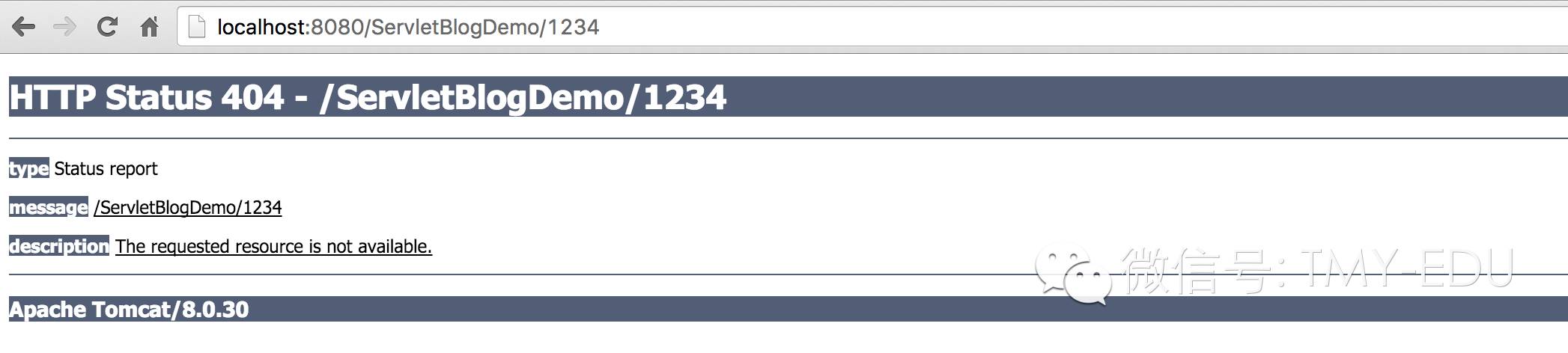
对于各类HTTP的错误返回码(4xx和5xx),Tomcat都提供了默认的错误页面,但是这个页面比较简单同时还包含了一些程序调试信息(异常Stacktrace),很多时候网站的这些错误提示页面都需要自己设计并配置。
这里用一个JSP页面WEB-INF/templates/error/404.jsp
作为404错误返回:
<div class="container">
  <div class="row">
    <div class="col-md-12">
      <div class="error-template">
        <h1>啊哦!</h1>
        <h2>404 Not Found</h2>
        <div class="error-details">错误404: 你访问的页面不存在</div>
        <div class="error-actions">
          <a href="" class="btn btn-primary btn-lg">
            <span class="glyphicon glyphicon-home"></span>
            返回主页
          </a>
          <a href="" class="btn btn-default btn-lg"><span class="glyphicon glyphicon-envelope"></span> </a>
        </div>
      </div>
    </div>
  </div>
</div>
在web.xml
中的<error-page>
标签中配置JSP:
<error-page>
  <error-code>404</error-code>
  <location>/WEB-INF/templates/error/404.jsp</location></error-page>
这样如果访问网站出现404错误,页面就会显示:
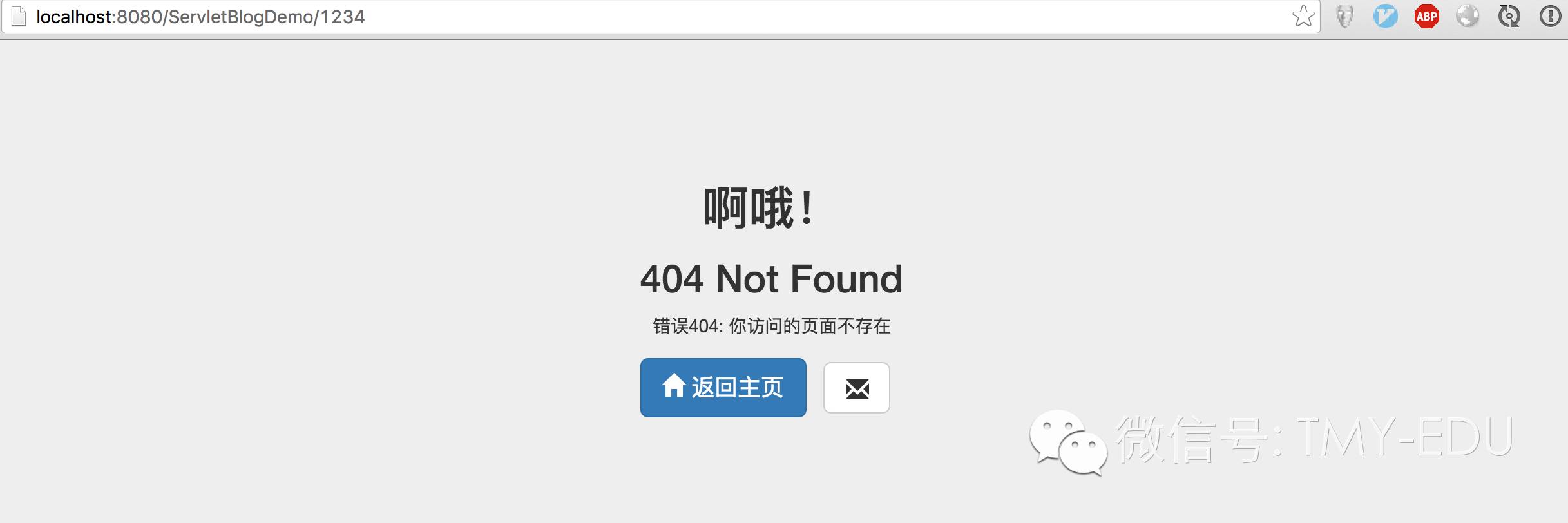
同理,<error-page>
标签能够指定任意HTTP状态码对应的错误页面——常用的包括403,500等等。
异常处理
除了错误的HTTP状态码,很多时候我们还希望能够对特定类型的异常(Exception)进行处理。例如我们自定义了一个异常:
package com.tianmaying;public class PostNotFoundException extends Exception {    public PostNotFoundException(long id) {        super("Post " + id + " not found!");
    }
}
当程序中抛出这个异常时,我们希望能够显示一个特定的错误页面,那么在web.xml
可以这样配置:
<error-page>
  <exception-type>com.tianmaying.PostNotFoundException</exception-type>
  <location>/WEB-INF/templates/error/post.jsp</location></error-page>
<error-page>
标签中,<error-code>
和<exception-type>
二者必选其一,代表处理不同类型的错误。<location>
标签可以是任意Web应用中的URL(只要他们对应的JSP/Servlet输出的HTML即可)。
天码营|让技术学习更加高效便捷