




新建两个项目。一个项目做 ES 的查询和添加。一个中转项目连接 ES 项目,查询 ES 和 添加数据库的同时向 ES 中添加。
ES 项目。
项目目录。
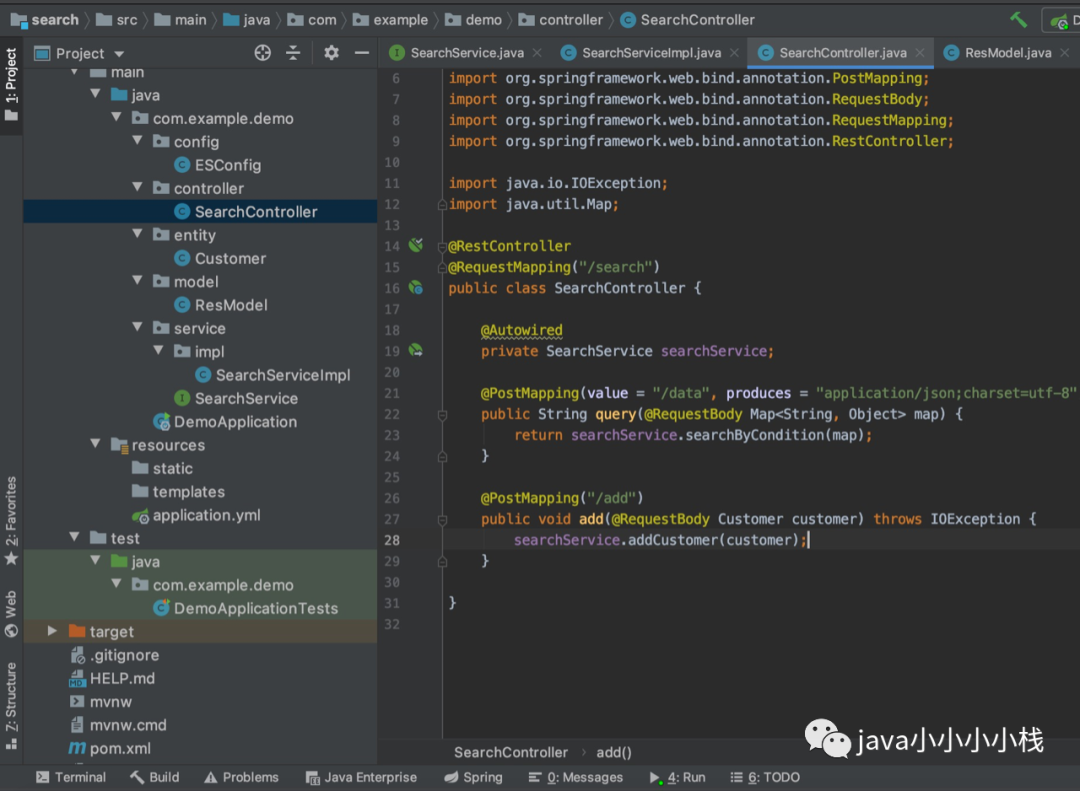
打开 ES 服务器。
// pom.xml<?xml version="1.0" encoding="UTF-8"?><project xmlns="http://maven.apache.org/POM/4.0.0" xmlns:xsi="http://www.w3.org/2001/XMLSchema-instance"xsi:schemaLocation="http://maven.apache.org/POM/4.0.0 https://maven.apache.org/xsd/maven-4.0.0.xsd"><modelVersion>4.0.0</modelVersion><parent><groupId>org.springframework.boot</groupId><artifactId>spring-boot-starter-parent</artifactId><version>2.1.6.RELEASE</version><relativePath/> <!-- lookup parent from repository --></parent><groupId>com.example</groupId><artifactId>demo</artifactId><version>1.0.0</version><name>demo</name><description>Demo project for Spring Boot</description><properties><java.version>1.8</java.version></properties><dependencies><dependency><groupId>org.springframework.boot</groupId><artifactId>spring-boot-starter-web</artifactId></dependency><dependency><groupId>org.springframework.boot</groupId><artifactId>spring-boot-devtools</artifactId><scope>runtime</scope><optional>true</optional></dependency><dependency><groupId>org.projectlombok</groupId><artifactId>lombok</artifactId><optional>true</optional></dependency><dependency><groupId>org.springframework.boot</groupId><artifactId>spring-boot-starter-test</artifactId><scope>test</scope></dependency><dependency><groupId>org.elasticsearch</groupId><artifactId>elasticsearch</artifactId><version>6.5.4</version></dependency><dependency><groupId>org.elasticsearch.client</groupId><artifactId>elasticsearch-rest-high-level-client</artifactId><version>6.5.4</version></dependency><dependency><groupId>com.fasterxml.jackson.core</groupId><artifactId>jackson-databind</artifactId><version>2.9.8</version></dependency><dependency><groupId>commons-beanutils</groupId><artifactId>commons-beanutils</artifactId><version>1.9.3</version></dependency></dependencies><build><plugins><plugin><groupId>org.springframework.boot</groupId><artifactId>spring-boot-maven-plugin</artifactId><configuration><excludes><exclude><groupId>org.projectlombok</groupId><artifactId>lombok</artifactId></exclude></excludes></configuration></plugin></plugins></build></project>
// Customer.java@Datapublic class Customer implements Serializable {private static final long serialVersionUID = 1586034423739L;/*** 主键** isNullAble:0*/private Integer id;/*** 公司名* isNullAble:1*/private String username;/**** isNullAble:1*/private String password;/**** isNullAble:1*/private String nickname;/*** 金钱* isNullAble:1*/private Long money;/*** 地址* isNullAble:1*/private String address;/*** 状态* isNullAble:1*/private Integer state;}
// application.ymlelasticsearch:host: 10.36.144.157port: 9200
// ESConfig.java@Configurationpublic class ESConfig {@Value("${elasticsearch.host}")private String host;@Value("${elasticsearch.port}")private int port;@Beanpublic RestHighLevelClient getClient() {HttpHost httpHost = new HttpHost(host, port);RestClientBuilder builder = RestClient.builder(httpHost);RestHighLevelClient client = new RestHighLevelClient(builder);return client;}}
先运行测试文件,建立 ES 表和添加一些数据,以做查询功能。
// DemoApplicationTests.java@SpringBootTest@RunWith(SpringRunner.class)public class DemoApplicationTests {@Autowiredprivate ESConfig config;String index = "openapi_customer";String type = "customer";@Testpublic void contextLoads() throws IOException {Settings.Builder settings = Settings.builder().put("number_of_shards", 5).put("number_of_replicas", 1);//2. 准备关于索引的结构mappingsXContentBuilder mappings = JsonXContent.contentBuilder().startObject().startObject("properties").startObject("id").field("type", "integer").endObject().startObject("username").field("type", "keyword").endObject().startObject("password").field("type", "keyword").endObject().startObject("nickname").field("type", "text").endObject().startObject("money").field("type", "long").endObject().startObject("address").field("type", "text").endObject().startObject("state").field("type", "integer").endObject().endObject().endObject();//3. 将settings和mappings封装到一个Request对象CreateIndexRequest request = new CreateIndexRequest(index).settings(settings).mapping(type, mappings);//4. 通过client对象去连接ES并执行创建索引CreateIndexResponse resp = config.getClient().indices().create(request, RequestOptions.DEFAULT);//5. 输出System.out.println("resp:" + resp.toString());}@Testpublic void testAddData() throws IOException {Customer c1 = new Customer();c1.setId(1);c1.setUsername("haier");c1.setPassword("111111");c1.setNickname("海尔集团");c1.setMoney(2000000L);c1.setAddress("青岛");c1.setState(1);Customer c2 = new Customer();c2.setId(2);c2.setUsername("lianxiang");c2.setPassword("111111");c2.setNickname("联想");c2.setMoney(1000000L);c2.setAddress("联想");c2.setState(1);Customer c3 = new Customer();c3.setId(3);c3.setUsername("google");c3.setPassword("111111");c3.setNickname("谷歌");c3.setMoney(1092L);c3.setAddress("霉果");c3.setState(1);ObjectMapper mapper = new ObjectMapper();String json1 = mapper.writeValueAsString(c1);String json2 = mapper.writeValueAsString(c2);String json3 = mapper.writeValueAsString(c3);//2. 创建Request,将准备好的数据封装进去BulkRequest request = new BulkRequest();request.add(new IndexRequest(index, type, c1.getId().toString()).source(json1, XContentType.JSON));request.add(new IndexRequest(index, type, c2.getId().toString()).source(json2, XContentType.JSON));request.add(new IndexRequest(index, type, c3.getId().toString()).source(json3, XContentType.JSON));//3. 用client执行BulkResponse resp = config.getClient().bulk(request, RequestOptions.DEFAULT);//4. 输出结果System.out.println(resp.toString());}}
// ResModel.java@Datapublic class ResModel<T> implements Serializable {private Integer code= 0 ;private String msg="";private long count;private List<T> data;}
// SearchService.javapublic interface SearchService {// es 查询String searchByCondition(Map<String, Object> map);// es 添加void addCustomer(Customer customer) throws IOException;}
// SearchServiceImpl.java@Service@Slf4jpublic class SearchServiceImpl implements SearchService {@Autowiredprivate ESConfig config;String index = "openapi_customer";String type = "customer";@Overridepublic String searchByCondition(Map<String, Object> map) {SearchSourceBuilder builder = new SearchSourceBuilder();builder.sort("id", SortOrder.DESC);Object name = map.get("name");Object state = map.get("state");if (name != null) {builder.query(QueryBuilders.termsQuery("username", name));}if (state != null) {builder.query(QueryBuilders.termsQuery("state", state));}int page = Integer.parseInt(map.get("page").toString());int limit = Integer.parseInt(map.get("limit").toString());builder.from((page - 1) * limit);builder.size(limit);SearchRequest request = new SearchRequest(index);request.types(type);request.source(builder);ResModel model = new ResModel();List<Customer> customerList = new ArrayList<>();try {SearchResponse search = config.getClient().search(request, RequestOptions.DEFAULT);for (SearchHit hit : search.getHits().getHits()) {Customer customer = new Customer();Map<String, Object> sourceAsMap = hit.getSourceAsMap();// map 转 对象BeanUtils.populate(customer, sourceAsMap);customerList.add(customer);}model.setCount(search.getHits().getTotalHits());model.setData(customerList);} catch (IOException e) {e.printStackTrace();} catch (IllegalAccessException e) {e.printStackTrace();} catch (InvocationTargetException e) {e.printStackTrace();}ObjectMapper objectMapper = new ObjectMapper();String string = "";try {string = objectMapper.writeValueAsString(model);} catch (JsonProcessingException e) {e.printStackTrace();}return string;}@Overridepublic void addCustomer(Customer customer) throws IOException {IndexRequest request = new IndexRequest(index, type, customer.getId() + "");ObjectMapper objectMapper = new ObjectMapper();String string = objectMapper.writeValueAsString(customer);request.source(string, XContentType.JSON);IndexResponse indexResponse = config.getClient().index(request, RequestOptions.DEFAULT);// 添加失败记录if(!"CREATED".equalsIgnoreCase(indexResponse.getResult().toString())){log.error("【添加文档失败!!】index={},type={},customerid={}"+index,type,customer.getId());}}}
@RestController@RequestMapping("/search")public class SearchController {@Autowiredprivate SearchService searchService;@PostMapping(value = "/data", produces = "application/json;charset=utf-8")public String query(@RequestBody Map<String, Object> map) {return searchService.searchByCondition(map);}@PostMapping("/add")public void add(@RequestBody Customer customer) throws IOException {searchService.addCustomer(customer);}}
使用 postman 测试。
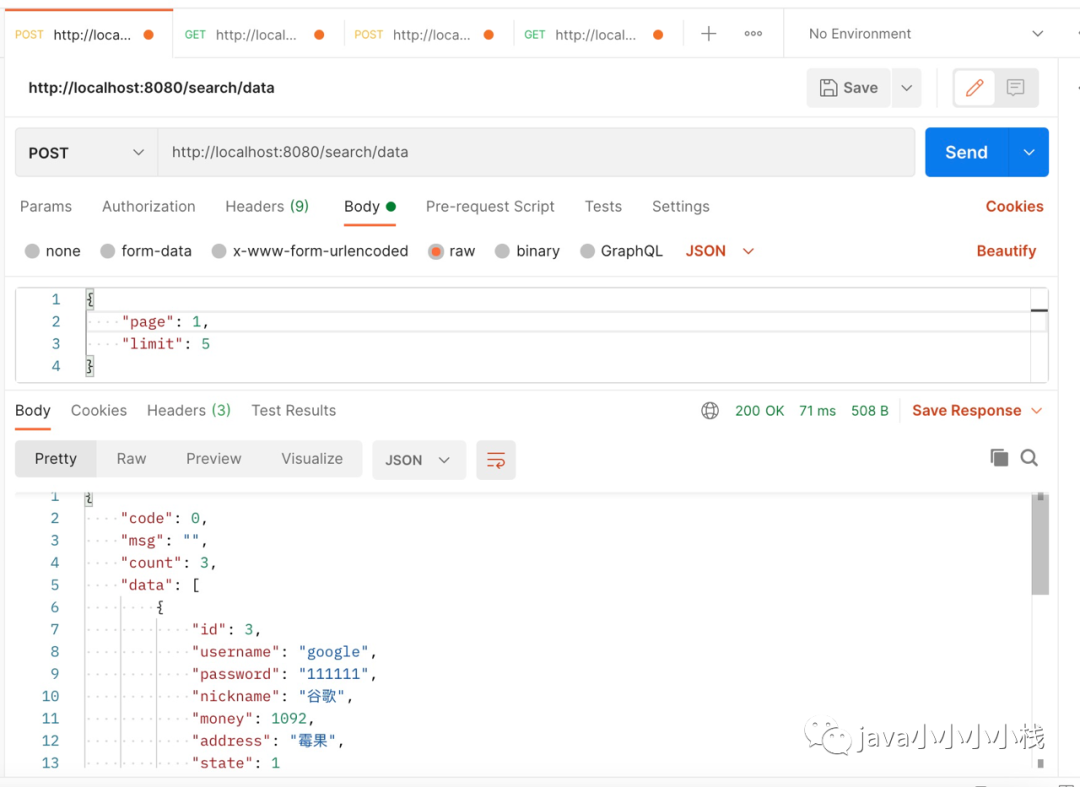
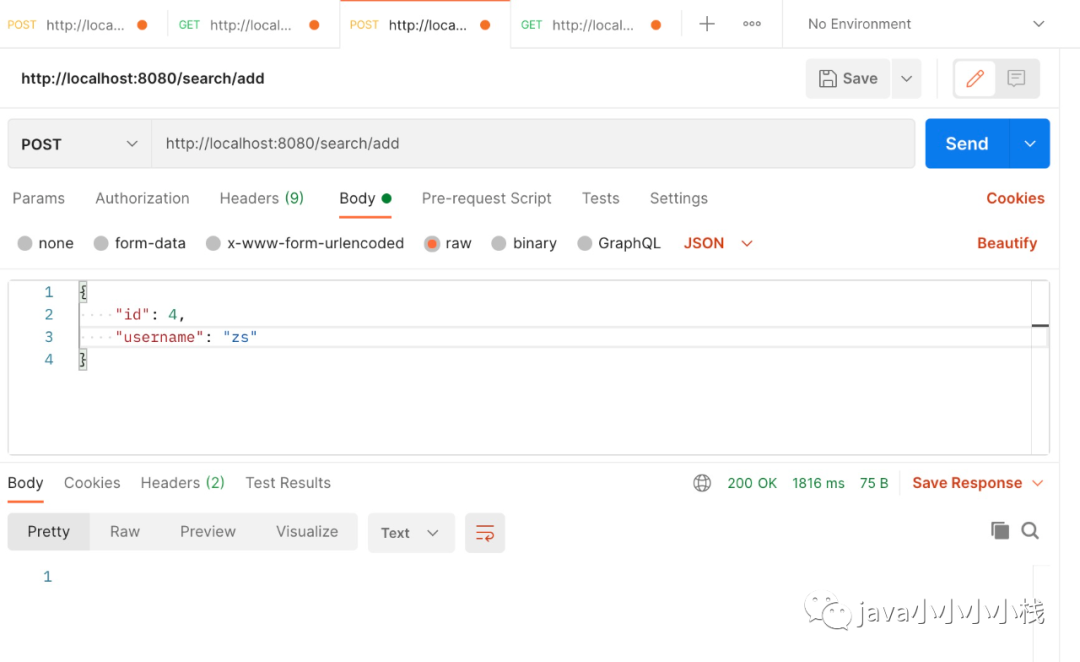
中转项目。本地连接需要改端口。
项目目录。
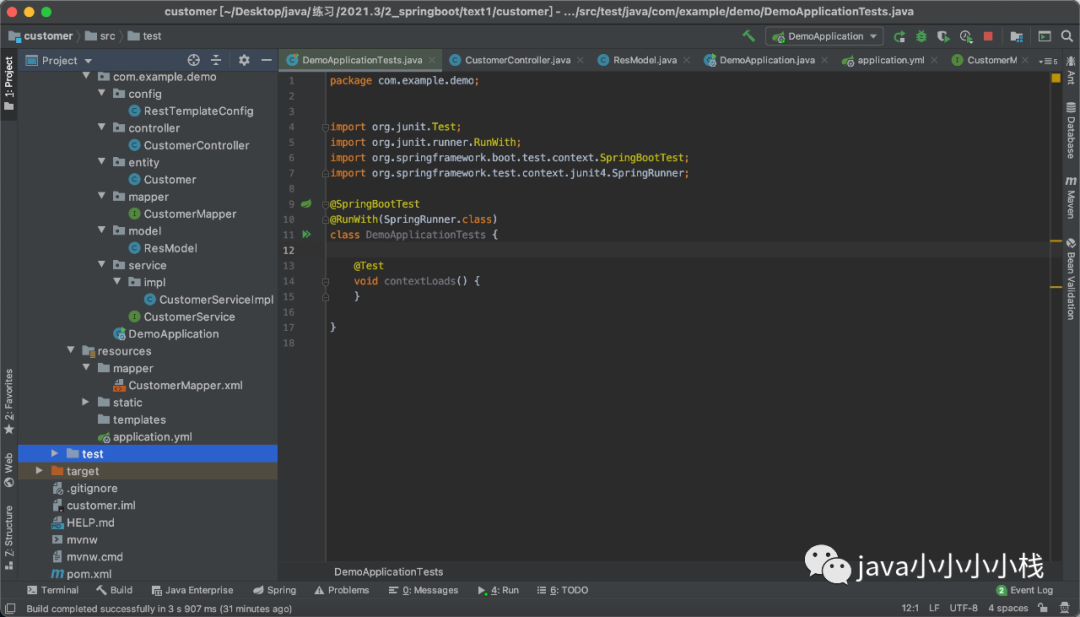
// pom.xml<?xml version="1.0" encoding="UTF-8"?><project xmlns="http://maven.apache.org/POM/4.0.0" xmlns:xsi="http://www.w3.org/2001/XMLSchema-instance"xsi:schemaLocation="http://maven.apache.org/POM/4.0.0 https://maven.apache.org/xsd/maven-4.0.0.xsd"><modelVersion>4.0.0</modelVersion><parent><groupId>org.springframework.boot</groupId><artifactId>spring-boot-starter-parent</artifactId><version>2.1.6.RELEASE</version><relativePath/> <!-- lookup parent from repository --></parent><groupId>com.example</groupId><artifactId>demo</artifactId><version>0.0.1-SNAPSHOT</version><name>demo</name><description>Demo project for Spring Boot</description><properties><java.version>1.8</java.version></properties><dependencies><dependency><groupId>org.springframework.boot</groupId><artifactId>spring-boot-starter-web</artifactId></dependency><dependency><groupId>org.projectlombok</groupId><artifactId>lombok</artifactId><optional>true</optional></dependency><dependency><groupId>org.springframework.boot</groupId><artifactId>spring-boot-starter-test</artifactId><scope>test</scope></dependency><dependency><groupId>mysql</groupId><artifactId>mysql-connector-java</artifactId><version>8.0.16</version></dependency><dependency><groupId>com.alibaba</groupId><artifactId>druid-spring-boot-starter</artifactId><version>1.1.21</version></dependency><dependency><groupId>org.mybatis.spring.boot</groupId><artifactId>mybatis-spring-boot-starter</artifactId><version>1.3.2</version></dependency></dependencies><build><plugins><plugin><groupId>org.springframework.boot</groupId><artifactId>spring-boot-maven-plugin</artifactId><configuration><excludes><exclude><groupId>org.projectlombok</groupId><artifactId>lombok</artifactId></exclude></excludes></configuration></plugin></plugins></build></project>
// application.ymlserver:port: 8089spring:datasource:driver-class-name: com.mysql.cj.jdbc.Driverurl: jdbc:mysql:///dbTest1?serverTimezone=UTCusername: rootpassword: 11111111type: com.alibaba.druid.pool.DruidDataSourcemybatis:mapper-locations: classpath:mapper/*.xml
RestTemplate,建立网络请求。
// RestTemplateConfig.java@Configurationpublic class RestTemplateConfig {@Beanpublic RestTemplate getTemplate() {return new RestTemplate();}}
// ResModel.java@Data@AllArgsConstructor@NoArgsConstructorpublic class ResModel {private boolean status;private String message;}
// CustomerMapper.javapublic interface CustomerMapper {int addCustomer(Customer customer);}
// CustomerMapper.xml<?xml version="1.0" encoding="UTF-8"?><!DOCTYPE mapper PUBLIC "-//mybatis.org//DTD Mapper 3.0//EN" "http://mybatis.org/dtd/mybatis-3-mapper.dtd"><mapper namespace="com.example.demo.mapper.CustomerMapper"><insert id="addCustomer" keyProperty="id" useGeneratedKeys="true">insert into customer VALUES (null,#{username},#{password},#{nickname},#{money},#{address},#{state})</insert></mapper>
程序入口扫描 mapper。
@SpringBootApplication@MapperScan("com.example.demo.mapper")public class DemoApplication {public static void main(String[] args) {SpringApplication.run(DemoApplication.class, args);}}
// CustomerService.javapublic interface CustomerService {String searchByCondition(Map<String, Object> map);void addCustomer(Customer customer);}
// CustomerServiceImpl.java@Service@Slf4jpublic class CustomerServiceImpl implements CustomerService {@Autowiredprivate RestTemplate restTemplate;@Autowiredprivate CustomerMapper customerMapper;@Overridepublic String searchByCondition(Map<String, Object> map) {String json = "";ObjectMapper objectMapper = new ObjectMapper();try {json = objectMapper.writeValueAsString(map);} catch (JsonProcessingException e) {e.printStackTrace();}HttpHeaders httpHeaders = new HttpHeaders();httpHeaders.setContentType(MediaType.parseMediaType("application/json;charset=utf-8"));HttpEntity httpEntity = new HttpEntity(json, httpHeaders);// 调用 ES 搜索请求String s = restTemplate.postForObject("http://localhost:8080/search/data", httpEntity, String.class);return s;}@Overridepublic void addCustomer(Customer customer) {// 添加到数据库中并回填 idint result = customerMapper.addCustomer(customer);if (result != 1) {log.error("【添加客户信息到数据库失败!】customer={}",customer);throw new RuntimeException("【添加客户信息到数据库失败!】");}String json = "";ObjectMapper objectMapper = new ObjectMapper();try {json = objectMapper.writeValueAsString(customer);} catch (JsonProcessingException e) {e.printStackTrace();}HttpHeaders httpHeaders = new HttpHeaders();httpHeaders.setContentType(MediaType.parseMediaType("application/json;charset=utf-8"));HttpEntity httpEntity = new HttpEntity(json, httpHeaders);// 调用 ES 添加请求restTemplate.postForObject("http://localhost:8080/search/add", httpEntity, String.class);}}
// CustomerController.java@RestController@RequestMapping("/sys/customer")public class CustomerController {@Autowiredprivate CustomerService customerService;@RequestMapping("/table")public String query(Integer page, Integer limit) {Map<String, Object> paramMap = new HashMap<>();paramMap.put("page", page);paramMap.put("limit", limit);// ObjectMapper objectMapper = new ObjectMapper();// try {// String string = objectMapper.writeValueAsString(paramMap);// return string;// } catch (JsonProcessingException e) {// e.printStackTrace();// }return customerService.searchByCondition(paramMap);// return "error";}@RequestMapping("/add")public ResModel add(Customer customer) {try {customerService.addCustomer(customer);return new ResModel(true, "添加成功");} catch (Exception e) {e.printStackTrace();return new ResModel(false, "添加失败");}}}
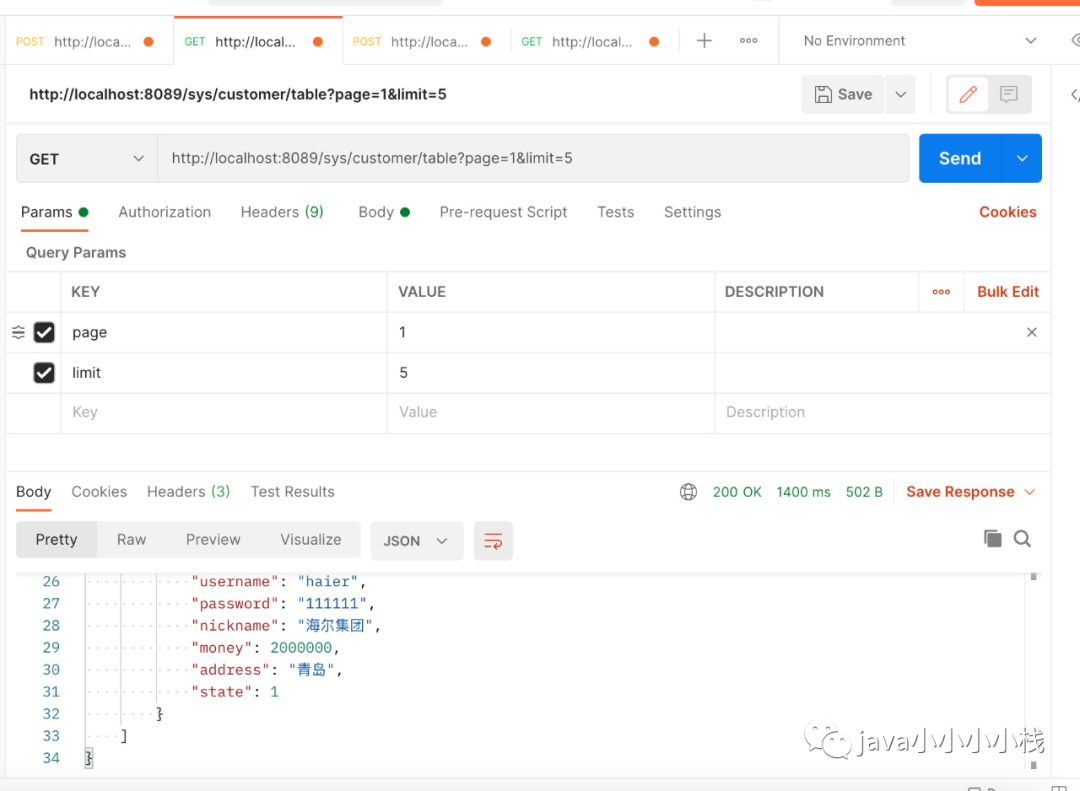
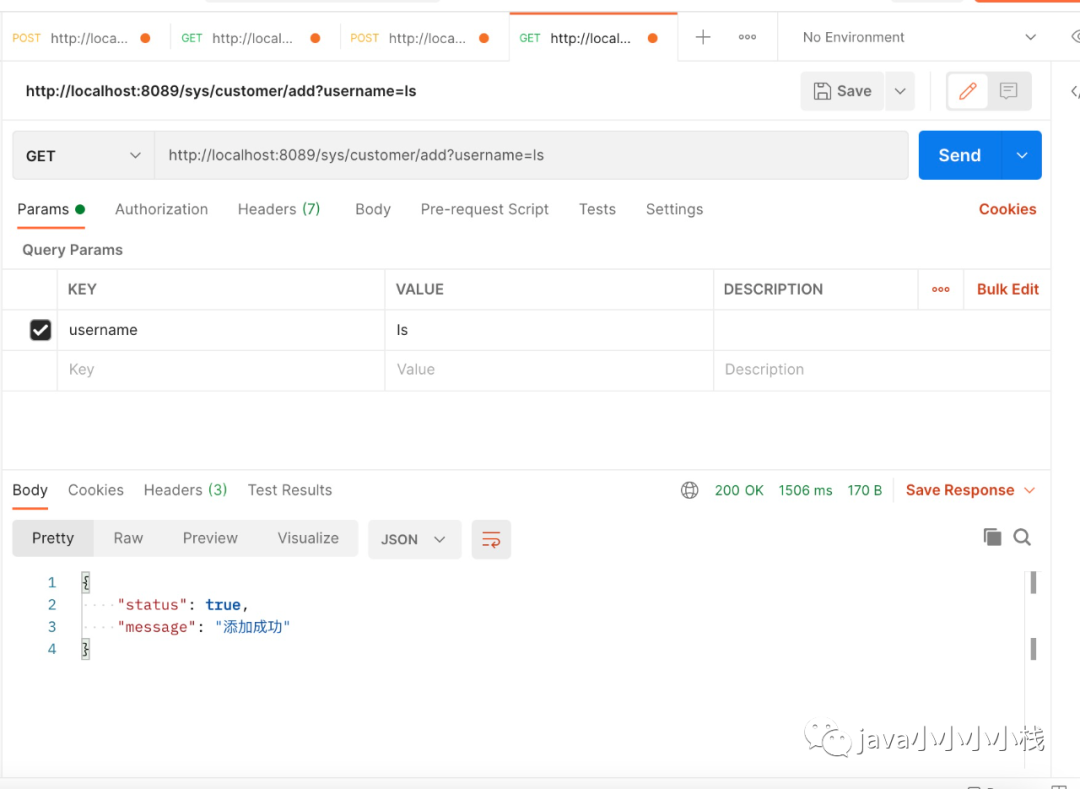
测试。
文章转载自java小小小小栈,如果涉嫌侵权,请发送邮件至:contact@modb.pro进行举报,并提供相关证据,一经查实,墨天轮将立刻删除相关内容。
