每天傍晚伴你一起成长!

我们将学习在我们的API Rest Assured自动化框架中的步骤定义之间共享测试上下文。
步骤定义之间共享测试上下文
在现实生活中的项目中,期望我们建立一个可扩展的自动化框架。此外,随着我们添加多个方案,自动化范围也会增加。如果单个步骤定义文件包含所有步骤定义,则会使步骤定义文件混乱。此外,它变得不可维护。因此,必须重构在不同类别下分离的步骤定义。
在Cucumber中功能文件的任何情况下,都会一步一步执行一系列步骤。场景的每个步骤都可能具有一个状态,该状态可能对同一场景中的另一个步骤有用。因此,这些步骤取决于先前执行的步骤。此外,由于这个原因,需要在步骤之间共享状态。
在我们的框架中,出于说明目的,我们只有一种情况。但是,随着我们添加许多方案,它会持续一段时间。此外,为了使步骤定义文件保持整洁并与所有 步骤定义文件共享测试上下文,我们将采用依赖项注入Container PicoContainer。
开始学习在 API Rest Assured Automation框架中的步骤定义之间实现测试上下文共享的方法。
如何使用PicoContainer在Cucumber步骤之间共享测试上下文
相同的步骤来跨步骤共享数据状态:
1. 首先,将PicoContainer添加到项目中。2. 其次,创建一个Test Context类来保存所有对象的状态。3. 第三,将“Steps”类分为多个步骤类。4.第四,编写构造函数以共享测试上下文。5.最后,运行测试。
将PicoContainer库添加到Maven项目
将依赖项注入的Maven依赖项PicoContainer添加到我们的项目pom.xml中。此外,您可以在Maven存储库– Cucumber PicoContainer中[1]找到有关版本等的更多详细信息。
<!-- https://mvnrepository.com/artifact/io.cucumber/cucumber-picocontainer -->
<dependency>
    <groupId>io.cucumber</groupId>
    <artifactId>cucumber-picocontainer</artifactId>
    <version>5.5.0</version>
    <scope>test</scope>
</dependency>
创建一个Test Context类,它将保存所有对象的状态
Text Context类应包含您的Steps文件正在使用的所有信息。在我们的框架中,我们同样使用来自Steps文件中Endpoints类的信息。简而言之,我们需要将Endpoints类的对象添加到此Test Context类中。
要创建一个测试上下文类,
1.首先,右键单击 上 的src/test/java下 ,选择 新建>>软件包。 此外,将其命名为Cucumber。所有Cucumber Helper类都将放在同一包中。
2.其次,右键单击上面创建的包,然后选择 New >> Class。将其命名为 TestContext。
TestContext.java
package cucumber;

import apiEngine.EndPoints;

public class TestContext {

 private String BASE_URL = "https://bookstore.toolsqa.com";
 private EndPoints endPoints;

 public TestContext() {
 endPoints = new EndPoints(BASE_URL);
 }

 public EndPoints getEndPoints() {
        return endPoints;
    }
}
因此,我们将端点的初始化保留在构造函数中,并为该对象创建了getEndPoints ()。将“Steps”类分为多个步骤类
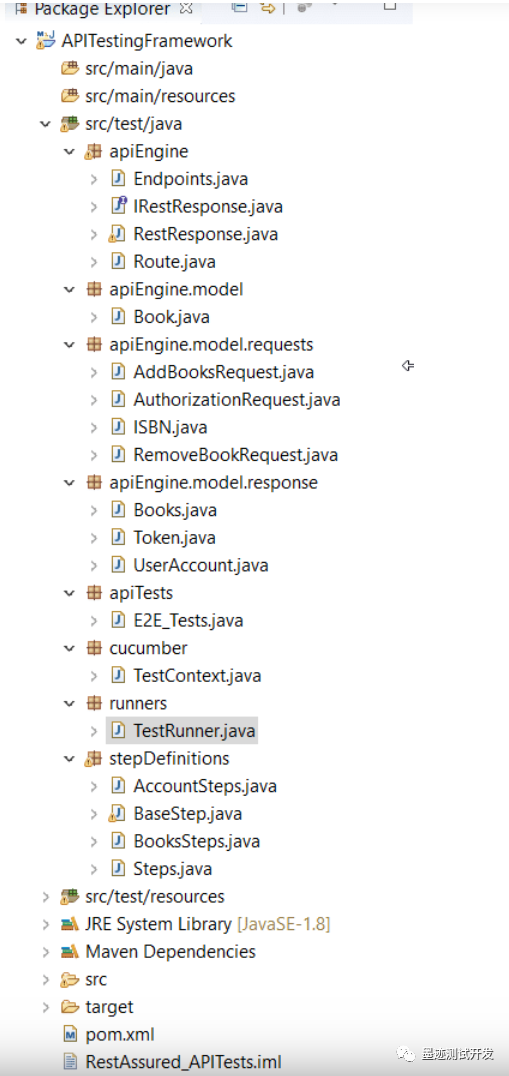
我们可以在逻辑上将端点划分为“帐户步骤”和“预订步骤”。一些必要的步骤将包括在BaseStep中。
在 stepDefinitions 包中使用以下名称创建三个新类:
AccountSteps
BooksSteps
BaseStep
注意:在清理过程中,可以通过将所需的步骤定义移至关联的类来用BaseSteps替换Steps文件。
编写构造函数以共享测试上下文
我们将步骤定义划分为不同的步骤类。这些类通常在它们之间共享Endpoints类。此外,在现实生活中的项目中,我们可能会有如此多个类,这些类对每个Step类都有广泛的要求。此外,不建议一次使用新的运算符为所有标准类创建对象。
如果将构造函数添加到Steps类文件中,然后将TestContext*作为参数传递给构造函数,它将解决所有问题。在TestContext对象中,我们获得了测试所需的一切。
因此,AccountsSteps.java类将如下所示:
package stepDefinitions;

import apiEngine.model.requests.*;
import cucumber.TestContext;
import cucumber.api.java.en.Given;

public class AccountSteps extends BaseStep {

    public AccountSteps(TestContext testContext){
        super(testContext);
    }

    @Given("^I am an authorized user$")
    public void iAmAnAuthorizedUser() {
        AuthorizationRequest authRequest = new AuthorizationRequest("TOOLSQA-Test", "Test@@123");
        getEndPoints().authenticateUser(authRequest);
    }

}
同样,BooksSteps.java类的更改是:
package stepDefinitions;

import apiEngine.IRestResponse;
import apiEngine.model.Book;
import apiEngine.model.requests.AddBooksRequest;
import apiEngine.model.requests.ISBN;
import apiEngine.model.requests.RemoveBookRequest;
import apiEngine.model.responses.Books;
import apiEngine.model.responses.UserAccount;
import cucumber.TestContext;
import cucumber.api.java.en.Given;
import cucumber.api.java.en.Then;
import cucumber.api.java.en.When;
import io.restassured.response.Response;
import org.junit.Assert;

public class BooksSteps extends BaseStep {

    public BooksSteps(TestContext testContext){
        super(testContext);
    }

    private final String USER_ID = "9b5f49ab-eea9-45f4-9d66-bcf56a531b85";
    private Response response;
    private IRestResponse<UserAccount> userAccountResponse;
    private Book book;

    @Given("^A list of books are available$")
    public void listOfBooksAreAvailable() {
        IRestResponse<Books> booksResponse = getEndPoints().getBooks();
        book = booksResponse.getBody().books.get(0);
    }

    @When("^I add a book to my reading list$")
    public void addBookInList() {
        ISBN isbn = new ISBN(book.isbn);
        AddBooksRequest addBooksRequest = new AddBooksRequest(USER_ID, isbn);
        userAccountResponse = getEndPoints().addBook(addBooksRequest);
    }

    @Then("^The book is added$")
    public void bookIsAdded() {
        Assert.assertTrue(userAccountResponse.isSuccessful());
        Assert.assertEquals(201, userAccountResponse.getStatusCode());

        Assert.assertEquals(USER_ID, userAccountResponse.getBody().userID);
        Assert.assertEquals(book.isbn, userAccountResponse.getBody().books.get(0).isbn);
    }

    @When("^I remove a book from my reading list$")
    public void removeBookFromList() {
        RemoveBookRequest removeBookRequest = new RemoveBookRequest(USER_ID, book.isbn);
        response = getEndPoints().removeBook(removeBookRequest);
    }

    @Then("^The book is removed$")
    public void bookIsRemoved() {
        Assert.assertEquals(204, response.getStatusCode());

        userAccountResponse = getEndPoints().getUserAccount(USER_ID);
        Assert.assertEquals(200, userAccountResponse.getStatusCode());

        Assert.assertEquals(0, userAccountResponse.getBody().books.size());
    }
}
最后,BaseSteps.java类更新为:
package stepDefinitions;

import apiEngine.EndPoints;
import cucumber.TestContext;

public class BaseStep {
    private static final String BASE_URL = "https://bookstore.toolsqa.com";
    private EndPoints endPoints;

    public BaseStep(TestContext testContext) {
        endPoints = testContext.getEndPoints();
    }

    public EndPoints getEndPoints() {
        return endPoints;
    }
}
运行Cucumber测试
以JUnit运行测试
现在,我们已经准备好运行更新的Cucumber测试。首先,右键-Click 上 的TestRunner 类,然后单击 运行方式>> JUnit测试。 Cucumber以与Selenium WebDriver相同的方式运行脚本。 因此,结果将显示在控制台的“ JUnit”选项卡中。
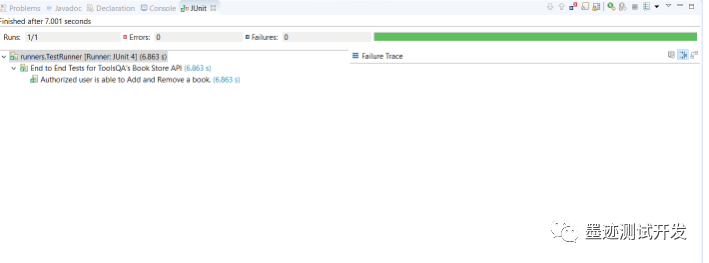
从Cucumber功能运行测试
要将测试作为Cucumber功能运行,请右键单击End2End_Test.feature文件。之后,选择“运行方式>>Cucumber功能”。
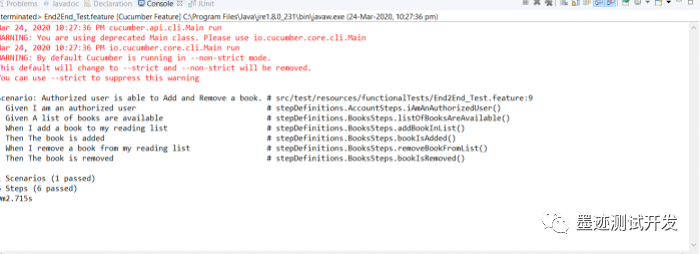
测试成功通过了我们所做的更改,以使我们在框架中与“Cucumber步骤定义”共享“测试上下文”。如上所述,请尝试在您的框架中实施上述更改。
我们更新后的框架项目文件夹结构将如下所示:
END
时光,在物转星移中渐行渐远,春花一梦,流水无痕,没有在最想做的时候去做的事情,都是人生的遗憾。人生需要深思熟虑,也需要一时的冲动。