当需要向数据库中执行多条语句的时候,如果一条一条的发送显然会使效率很低,这时就要使用批处理了,使用
addBatch()方法将要执行的sql语句添加到批处理中,然后使用executeBatch()方法执行批处理,最后调用
clearBatch()方法清除,以防止数据太多时内存溢出。
实现批处理的时候当然也有两种方式,一种是使用
Statement类,另一种方法时使用PreparedStatement,使用Statement类要首先编译好sql语句,如果批处理的
sql语句规律性很强,则还是使用PreparedStatement比较好。
package com.demo.test;

import java.sql.*;

public class BatchTest1 {
    private static final String USER = "root";
    private static final String PASS = "ForMe=520";
    private static final String URL = "jdbc:mysql://localhost:3306/test01";
    private static final String DRIVER = "com.mysql.jdbc.Driver";


    public static void main(String[] args) throws ClassNotFoundException {

//            batchTest();
            batchTest1();
    }

    public static Connection getConn() throws SQLException {
        Connection connection = DriverManager.getConnection(URL,USER,PASS);
        return connection;
    }

    public static void batchTest() throws ClassNotFoundException, SQLException {
        Class.forName(DRIVER);
        Connection connection = getConn();
        String sql = "INSERT INTO THINGS(id,name) VALUES (?,?)";
        PreparedStatement preparedStatement = connection.prepareStatement(sql);
        for(int i = 0; i < 50; i++){
            preparedStatement.setInt(1,i);
            preparedStatement.setString(2,"username" + i);

            preparedStatement.addBatch();
            if(i%2 == 0) {
                preparedStatement.executeBatch();//执行批处理
                preparedStatement.clearBatch();  //清除处理,防止数量过多时内存溢出
            }
        }
        preparedStatement.executeBatch();
        preparedStatement.clearBatch();
        preparedStatement.close();
        connection.close();
    }

    public static void batchTest1(){
        try {
            Class.forName(DRIVER);
            Connection connection = getConn();
            String sql1 = "UPDATE THINGS SET name='UPDATED1' WHERE id=10 ";
            String sql2 = "UPDATE THINGS SET name='UPDATED2' WHERE id=20";
            String sql3 = "UPDATE THINGS SET name='UPDATED3' WHERE id=30";
            String sql4 = "UPDATE THINGS SET name='UPDATED4' WHERE id=40";

            Statement statement = connection.createStatement();
            statement.addBatch(sql1);
            statement.addBatch(sql2);
            statement.addBatch(sql3);
            statement.addBatch(sql4);

            statement.executeBatch();
            statement.clearBatch();
            statement.close();
            connection.close();
        } catch (ClassNotFoundException e) {
            e.printStackTrace();
        } catch (SQLException e) {
            e.printStackTrace();
        }

    }
}
由上述例子可以看出,如果使用 Statement插入50条规律性很强的语句会有多么的麻烦。
使用PreparedStatement的缺点:只能应用在SQL语句相同,但参数不同的批处理中。因此此种形式的批处理经常用于在同一个表中批量插入数据,或批量更新表的数据。
首先先来了解一下主键是什么?
在数据表中每一行都应该有可以为以标识自己的一列(或一组列),例如订单有订单编号,学生有学生的学号等。如果没有主键,更新或者删除特定的行就会很困难,因为没有安全的保证只涉及相关的行。
定义主键的条件:
1、任意的两行都不具备相同的主键值
2、主键值不允许为空
何为自动主键?
也即是有自动增加约束(AUTO_INCREMENT)的主键,这样对行进行插入时会自动的增加主键,而无需在手动操作主键。
public static void auoPK(){
        try {
            Class.forName(DRIVER);
            Connection connection = getConn();
            ResultSet resultSet = null;
            String sql = "INSERT INTO THINGS (name) VALUES (?)";
            PreparedStatement preparedStatement = connection.prepareStatement(sql,Statement.RETURN_GENERATED_KEYS);
            preparedStatement.setString(1,"username");
            int num = preparedStatement.executeUpdate();

            if(num > 0) {
                 resultSet = preparedStatement.getGeneratedKeys();  //获取到自动主键的值
                if (resultSet.next()) {
                    System.out.println(resultSet.getInt(1));
                }
            }
            preparedStatement.close();
            connection.close();
        } catch (SQLException e) {
            e.printStackTrace();
        } catch (ClassNotFoundException e) {
            e.printStackTrace();
        }

    }
大数据分为文本类型的和二进制类型的,文本类型的大数据mysql用Text代替,二进制类型的使用blob,其中的类型又可分为:
TINYTEXT、TEXT、MEDIUMTEXT和LONGTEXT
TINYBLOB、BLOB、MEDIUMBLOB和LONGBLOB
先来看文本类型存进数据库和从数据库中读取
存入数据库
public static void addBigText(){
        try {
            Connection connection = getConn();
            Class.forName(DRIVER);
            String sql = "INSERT INTO bigtest (bigdata) VALUES (?)";
            PreparedStatement preparedStatement = connection.prepareStatement(sql);
            String path = BatchTest1.class.getClassLoader().getResource("data.txt").getPath();//获取文件路径
            File file = new File(path);
            FileReader fileReader = new FileReader(file);

            preparedStatement.setCharacterStream(1,fileReader,file.length()); //MySQL中存入Text类型

            int num = preparedStatement.executeUpdate();

            if(num > 0)
                System.out.println("插入大文本成功");
            preparedStatement.close();
            connection.close();
        } catch (SQLException e) {
            e.printStackTrace();
        } catch (ClassNotFoundException e) {
            e.printStackTrace();
        } catch (FileNotFoundException e) {
            e.printStackTrace();
        }

    }
结果
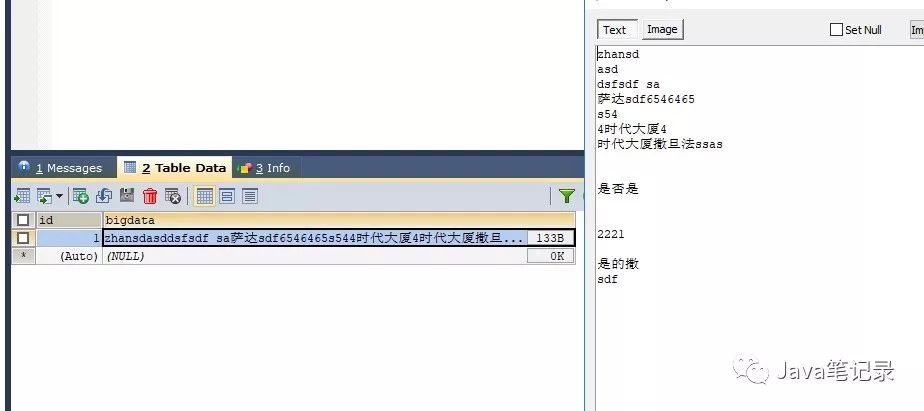
可以看到确实是存进了数据库
下面就把它读出来
public static void readBigText(){
        try {
            Connection connection = getConn();
            String sql = "SELECT * FROM bigtest";
            PreparedStatement preparedStatement = connection.prepareStatement(sql);
            ResultSet resultSet = preparedStatement.executeQuery();
            if(resultSet.next()){
                Reader reader = resultSet.getCharacterStream("bigdata");  //读取到数据库中的内容
                FileWriter fileWriter = new FileWriter("F://big.txt");//下面的内容就相当于对文件的操作
                char[] chars = new char[1024];
                int len = 0;
                while((len = reader.read(chars)) != -1){
                    fileWriter.write(chars,0,len);
                    fileWriter.flush();
                }
                fileWriter.close();
                reader.close();
            }
            preparedStatement.close();
            connection.close();
        } catch (SQLException e) {
            e.printStackTrace();
        } catch (IOException e) {
            e.printStackTrace();
        }
    }
把它存在F盘下的big.txt中,打开F盘发现确实读了出来,并且与原文本一致。
二进制类型的存取
二进制类型的存取和文本类型存取的原理是一样的,只不过是把字符流改成字节流,把读取文件改成setBinaryStream和getBinaryStream,其余的操作完全一致
存进数据库
public static void addBigBlob(){
        try {
            Connection connection = getConn();
            Class.forName(DRIVER);
            String sql = "INSERT INTO bigblob (bigblob) VALUES (?)";
            PreparedStatement preparedStatement = connection.prepareStatement(sql);
            String path = BatchTest1.class.getClassLoader().getResource("jdbc.jpg").getPath();//获取文件路径
            File file = new File(path);
            FileInputStream fileInputStream = new FileInputStream(file);

            preparedStatement.setBinaryStream(1,fileInputStream,file.length()); //MySQL中存入Text类型

            int num = preparedStatement.executeUpdate();

            if(num > 0)
                System.out.println("插入二进制类型成功");
            preparedStatement.close();
            connection.close();
        } catch (SQLException e) {
            e.printStackTrace();
        } catch (ClassNotFoundException e) {
            e.printStackTrace();
        } catch (FileNotFoundException e) {
            e.printStackTrace();
        }

    }
从数据库中读取
public static void readBigBlob(){
        try {
            Connection connection = getConn();
            String sql = "SELECT * FROM bigblob";
            PreparedStatement preparedStatement = connection.prepareStatement(sql);
            ResultSet resultSet = preparedStatement.executeQuery();
            if(resultSet.next()){
                InputStream inputStream = resultSet.getBinaryStream("bigblob");  //读取到数据库中的内容
                FileOutputStream fileWriter = new FileOutputStream("F://bigbolb.jpg");//下面的内容就相当于对文件的操作
                byte[] bytes = new byte[1024];
                int len = 0;
                while((len = inputStream.read(bytes)) != -1){
                    fileWriter.write(bytes,0,len);
                    fileWriter.flush();
                }
                fileWriter.close();
                inputStream.close();
            }
            preparedStatement.close();
            connection.close();
        } catch (SQLException e) {
            e.printStackTrace();
        } catch (IOException e) {
            e.printStackTrace();
        }
    }
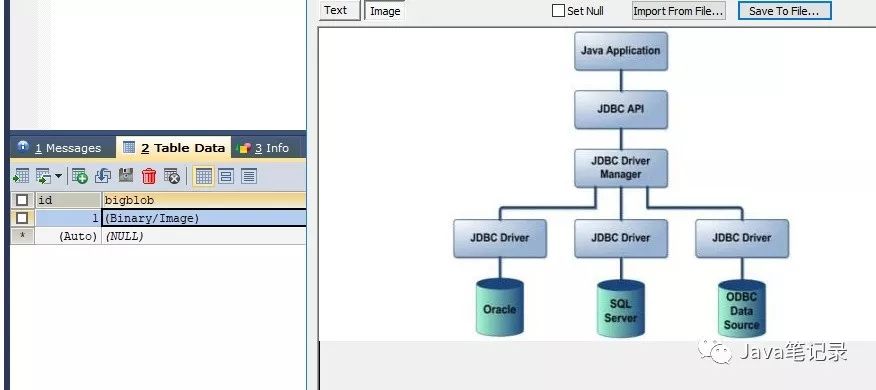
结果