



修改oracle可执行文件跳过异常的sql,达到启动数据库的目的。(仅供测试参考,生产上慎用)
以下模拟操作思路:
记录对比修改前的信息:
[oracle@ora02 bin]$ cd $ORACLE_HOME/bin
[oracle@ora02 bin]$ pwd
/u01/app/oracle/product/19.3.0/db_1/bin
[oracle@ora02 bin]$ strings -t d oracle | grep 'select count(\*) from XDB.XDB$SCHEMA s where s.xmldata.schema_url ='
[oracle@ora02 bin]$ strings -t d oracle.ok | grep 'select count(\*) from XDB.XDB$SCHEMA s where s.xmldata.schema_url ='
338216704 select count(*) from XDB.XDB$SCHEMA s where s.xmldata.schema_url = 'http://xmlns.oracle.com/xdb/XDBSchema.xsd'
[oracle@ora02 bin]$ strings oracle.ok | grep 'select count(\*) from XDB.XDB$SCHEMA s where s.xmldata.schema_url =' |wc -c
111
[oracle@ora02 bin]$
strings -t d oracle | grep 'select count(\*) from XDB.XDB$SCHEMA s where s.xmldata.schema_url =' | tee >(cut -d" " -f2-|wc -c)
338216704 select count(*) from XDB.XDB$SCHEMA s where s.xmldata.schema_url =
111

修改前停止数据库:
进入相应目录cd $ORACLE_HOME/bin,做好文件备份
cp oracle oracle.ok
1. xxd oracle.ok oracle.dump
转换二进制文件为可编辑模式xxd oracle.ok oracle.dump
2. vi oracle.dump
修改文件vi oracle.dump
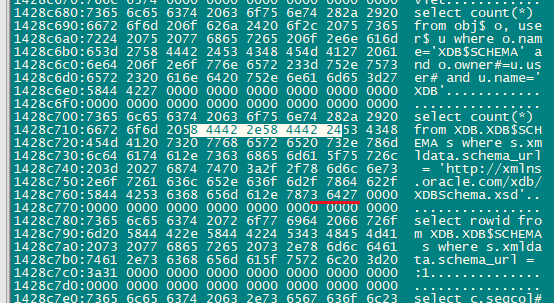
将上图中16进制内容
58 44 42 2e 58 44 42 24
修改为
73 79 73 2E 64 75 61 6C ,其它位置用20填充完整
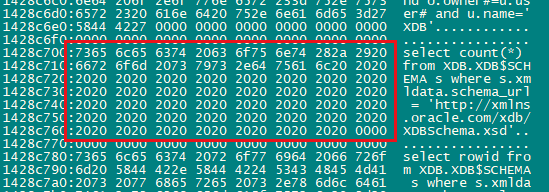
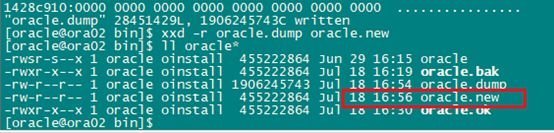
3. xxd -r oracle.dump oracle.new
将可修改文件还原为二进制文件xxd -r oracle.dump oracle.new
4. 还原oracle权限
chmod 6751 oracle

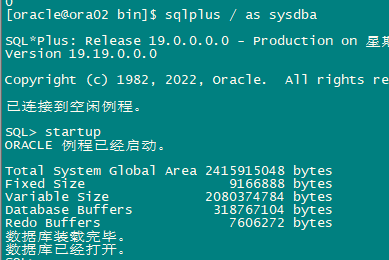
5. 启动数据库
[oracle@ora02 bin]$ sqlplus sys/oracle@mid as sysdba

SQL*Plus: Release 19.0.0.0.0 - Production on 星期三 7月 19 09:58:13 2023
Version 19.19.0.0.0

Copyright (c) 1982, 2022, Oracle.  All rights reserved.

ERROR:
ORA-12537: TNS: 连接关闭


请输入用户名:  ^C
[oracle@ora02 bin]$ sqlplus / as sysdba

SQL*Plus: Release 19.0.0.0.0 - Production on 星期三 7月 19 09:58:19 2023
Version 19.19.0.0.0

Copyright (c) 1982, 2022, Oracle.  All rights reserved.

ERROR:
ORA-12546: TNS: 权限被拒绝


请输入用户名:  ^C

--以上报错是因为oracle的权限没有做修改,需赋予chmod 6751 oracle权限

[oracle@ora02 bin]$ ll oracle*
-rw-r--r-- 1 oracle oinstall  455222864 Jul 19 09:58 oracle
-rwsr-s--x 1 oracle oinstall  455222864 Jun 29 16:15 oracle.20230719
-rwxr-x--x 1 oracle oinstall  455222864 Jul 18 16:19 oracle.bak
-rw-r--r-- 1 oracle oinstall 1906245743 Jul 18 16:54 oracle.dump
-rw-r--r-- 1 oracle oinstall  455222864 Jul 18 16:56 oracle.new
-rwxr-x--x 1 oracle oinstall  455222864 Jul 18 16:30 oracle.ok
[oracle@ora02 bin]$ rm oracle
[oracle@ora02 bin]$ cp oracle.new oracle
[oracle@ora02 bin]$ ll oracle*
-rw-r--r-- 1 oracle oinstall  455222864 Jul 19 09:58 oracle
-rwsr-s--x 1 oracle oinstall  455222864 Jun 29 16:15 oracle.20230719
-rwxr-x--x 1 oracle oinstall  455222864 Jul 18 16:19 oracle.bak
-rw-r--r-- 1 oracle oinstall 1906245743 Jul 18 16:54 oracle.dump
-rw-r--r-- 1 oracle oinstall  455222864 Jul 18 16:56 oracle.new
-rwxr-x--x 1 oracle oinstall  455222864 Jul 18 16:30 oracle.ok
[oracle@ora02 bin]$ chmod 6751 oracle
[oracle@ora02 bin]$ ll oracle*
-rwsr-s--x 1 oracle oinstall  455222864 Jul 19 09:58 oracle
-rwsr-s--x 1 oracle oinstall  455222864 Jun 29 16:15 oracle.20230719
-rwxr-x--x 1 oracle oinstall  455222864 Jul 18 16:19 oracle.bak
-rw-r--r-- 1 oracle oinstall 1906245743 Jul 18 16:54 oracle.dump
-rw-r--r-- 1 oracle oinstall  455222864 Jul 18 16:56 oracle.new
-rwxr-x--x 1 oracle oinstall  455222864 Jul 18 16:30 oracle.ok
[oracle@ora02 bin]$ sqlplus / as sysdba

SQL*Plus: Release 19.0.0.0.0 - Production on 星期三 7月 19 09:59:36 2023
Version 19.19.0.0.0

Copyright (c) 1982, 2022, Oracle.  All rights reserved.

已连接到空闲例程。

SQL> exit
已断开连接
[oracle@ora02 bin]$ strings -t d oracle | grep 'select count(\*) from sys.dual'
336885440 select count(*) from sys.dual where 2 = (select count(*) from system.logstdby$parameters      where name = 'FUTURE_SESSION'      or (name = 'COMPLETED_SESSION' and value = 'SWITCHOVER')) or 2 = (select count(*) from system.logstdby$parameters      where name = 'FUTURE_SESSION' or name = 'END_PRIMARY')
338216704 select count(*) from sys.dual
[oracle@ora02 bin]$ strings oracle | grep 'select count(\*) from sys.dual' |wc -c
414
[oracle@ora02 bin]$ strings oracle | grep 'select count(\*) from XDB.XDB$SCHEMA s where s.xmldata.schema_url =' |wc -c
0
[oracle@ora02 bin]$ sqlplus / as sysdba

SQL*Plus: Release 19.0.0.0.0 - Production on 星期三 7月 19 10:00:31 2023
Version 19.19.0.0.0

Copyright (c) 1982, 2022, Oracle.  All rights reserved.

已连接到空闲例程。

SQL> startup
ORACLE 例程已经启动。

Total System Global Area 2415915048 bytes
Fixed Size                  9166888 bytes
Variable Size            2080374784 bytes
Database Buffers          318767104 bytes
Redo Buffers                7606272 bytes
数据库装载完毕。
数据库已经打开。
SQL>
相关参考:https://www.cnblogs.com/lfree/p/17380748.html
https://www.xifenfei.com/2023/04/ora-07445-kglsget.html
http://blog.itpub.net/267265/viewspace-2950574/
最后修改时间:2023-07-25 13:02:43
「喜欢这篇文章,您的关注和赞赏是给作者最好的鼓励」
关注作者
【版权声明】本文为墨天轮用户原创内容,转载时必须标注文章的来源(墨天轮),文章链接,文章作者等基本信息,否则作者和墨天轮有权追究责任。如果您发现墨天轮中有涉嫌抄袭或者侵权的内容,欢迎发送邮件至:contact@modb.pro进行举报,并提供相关证据,一经查实,墨天轮将立刻删除相关内容。
