



# mysql 企业版下载
#下载指定版本:My Oracle Support (MOS)
APPLIES TO:
MySQL Utilities - Version 1.5.2 to 1.6 [Release 1.5 to 1.6]
MySQL Server - Version 5.0 and later
Information in this document applies to any platform.
GOAL
Download MySQL Server.
SOLUTION
Installing a later version is how you patch MySQL. The MySQL Server can be downloaded from any of three places:
- My Oracle Support (MOS): This is the preferred location to download commercial builds as it includes all releases since 2011 and some earlier releases.
- Oracle Software Delivery Cloud (eDelivery): This only includes the latest patch release of the latest GA version (currently the 8.0 series). As the repository is only updated once a month, it can lag compared to the release available in My Oracle Support.
- MySQL Downloads: This is for the Community releases only.
MySQL offers both a Standard and Enterprise Edition (提供标准版企业版)subscription for commercial customers(需要订阅) - see also MySQL Editions. In either case, the MySQL Server download is the same for MySQL Server 5.5 and later, and you are must use it according to your license. See also Note 2299920.1.<----需要license。
My Oracle Support
You can download the most recent commercial license binaries from My Oracle Support (MOS). This is the preferred way because it usually has the most recent versions immediately and it is also the best source for older versions.
My Oracle Support refers to software updates as patches. However, MySQL uses cumulative patches, e.g. MySQL 5.7.19 includes all patches applied to 5.7.0, 5.7.1, 5.7.2, ... up to 5.7.18 as well as the new patches applied between 5.7.18 and 5.7.19.
So to apply the latest patches to an existing installation, all that is required is to download and install the latest patch release. See also Note 1589556.1.<----版本信息文档。
The steps to download MySQL from My Oracle Support are:
- Access My Oracle Support.
- Click on Patches & Updates navigation tab near the top of the screen.
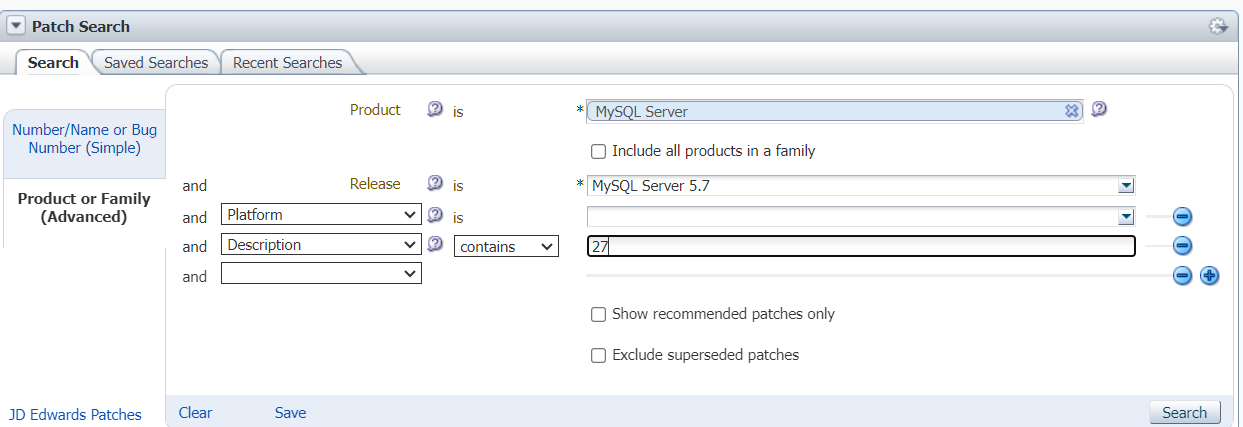
- In the Patch Search section, click on the Product or Family (Advanced Search) link that is just to the right of the box where you can enter a search term.
- Type MySQL into the Product drop down list and you will see a list of MySQL-related choices. Choose MySQL Server for most operating systems, including no-install (ZIP) Windows versions, or MySQL Installer for the integrated installer for Windows for server 5.5 or 5.6 and later. Older Windows versions are under the MySQL Server selection instead, including the non-integrated 5.5 and earlier installer alternative. The 5.5 or 5.6 integrated installer lets you choose from a range of components.
- Expand the options in the Release drop down list and chose one or more releases. Chose one of the "MySQL Server" releases for MySQL Server, and "MySQL Shell ..." for MySQL Shell. If downloading the Windows Installer, choose the latest MySQL Installer release unless you really need one of the older ones.
- Optionally, use the Platform is option to pick one or more platforms, like Windows or Linux, which includes RHEL and Oracle Linux. If you want a Windows 5.6 installer and see only a ZIP version (no installer) go back to the product selection and choose the MySQL Installer, not MySQL Server. If you are looking for the Docker images, choose Linux x86-64 as the platform (see also Note 2537182.1).
- Optionally, recommended, if you are searching for a specific version, click on the + button, choose Description as the field to search and enter the full version number like 5.6.25 as what to search for.
- These examples search for all MySQL Server 5.1 releases for Mac with 57 in the description, looking for 5.1.57, and for the Windows Installer 1.1 for any Server version
- Click the Search button.
- The list of possible matches may be limited. If you still do not see what you are looking for try clicking on the Edit search link then on the + icon and choose Description as the field to search. Enter a version number like 5.1.57 if you are looking for a specific version or Red Hat or some other specific Linux type if necessary. Click on Search again.
- Use Edit search and + again to add more restrictions if required.
- If you do not find what you are looking for, typically if you receive no results at all, try again using the Include all products in family check box.
- Click on the version you need. The most recent versions will often be near the bottom of the list, check the updated column or version number. You should normally pick the Advanced version of the server, see later for more details.
- In the small bar showing up below the selected row, click on Download. A new window will open.
- Click on the name of the file and it will be downloaded.
If you need an older version than those on MOS please open a service request and we will make it available there.
Oracle Software Delivery Cloud (formerly called E-Delivery)
Oracle Software Delivery Cloud only provides the most recent versions of the MySQL Enterprise products and is often updated more slowly than MOS. If the version needed is not available, then either My Oracle Support or the community web site should be used. To access the available MySQL products and version in Oracle E-Delivery perform the following steps:
- Log in to Oracle Software Delivery Cloud at https://edelivery.oracle.com/ .
- Select MySQL Database as the product pack.
- Select the appropriate platform.
- Click on Go.
- Download the necessary files.
Community Server
The non-Enterprise products can also be downloaded from the download section of community web site. Using the community web site does not require a login. The Windows 32-bit installer can install the 64 bit version of the server.
Which version should you download?
Download MySQL Database 8.0, 5.7 or 5.6 with the highest release number, unless you are an OEM distributing the MySQL Server with your product or know that you need 5.5 or earlier. You should use it in a way consistent with your license. If you do not know the latest release number you can find it in the release notes for 5.7, 5.7, 5.6, for older versions check in the archives. Note that MySQL Server 5.1 and earlier are now in Sustaining support and not receiving bug fixes, including security fixes. You should choose a later version if at all possible.
If you are an OEM you may need the Classic, Pro or Advanced Server depending on your distribution agreement; check with Sales if unsure.
If you are not an OEM but have one of the pre-Oracle support contracts that we no longer offer - Enterprise Basic, Enterprise Silver, Enterprise Gold and Enterprise Platinum - you can choose MySQL 5.1 Pro server if you wish. You can also download Advanced and use it in a way consistent with your agreement instead. Please contact your Sales representative with any questions about which versions your agreement says you can use. In general, the 5.1 and earlier server versions are sufficiently old that the Support team recommends upgrading to 5.5 or later if possible but if you need to use those on one of the newer contracts please do discuss your needs with your Sales representative.
If you need MySQL Cluster, choose that product instead of MySQL Server when picking what to download.
Next steps
If this is a new installation please refer to Installing and Upgrading MySQL. Use the page for the version you downloaded: 8.0, 5.7, 5.6, for older versions check in the archives.
If it is an upgrade please see Upgrading or Downgrading MySQL. The checking whether tables or indexes must be rebuilt part is particularly important. Use the page for the version you downloaded: 8.0, 5.7, 5.6, for older versions check in the archives. Additional tips for upgrading are in Note 1319877.1.
Recommended settings can be found in document 1531329.1.
Releases covered
Some of the release numbers covered by this document include these past and possible future versions:
- MySQL 8.0: 8.0.45, 8.0.44, 8.0.43, 8.0.42, 8.0.41, 8.0.40, 8.0.39, 8.0.38, 8.0.37, 8.0.36, 8.0.35, 8.0.34, 8.0.33, 8.0.32, 8.0.31, 8.0.30, 8.0.29, 8.0.28, 8.0.27, 8.0.26, 8.0.25, 8.0.24, 8.0.23, 8.0.22, 8.0.21, 8.0.20, 8.0.19, 8.0.18, 8.0.17, 8.0.16, 8.0.15, 8.0.14, 8.0.13, 8.0.12, 8.0.11
- MySQL 5.7: 5.7.45, 5.7.44, 5.7.43, 5.7.42, 5.7.41, 5.7.40, 5.7.39, 5.7.38, 5.7.37, 5.7.36, 5.7.35, 5.7.34, 5.7.33, 5.7.32, 5.7.31, 5.7.30, 5.7.29, 5.7.28, 5.7.27, 5.7.26, 5.7.25, 5.7.24, 5.7.23, 5.7.22, 5.7.21, 5.7.20, 5.7.19, 5.7.18, 5.7.17, 5.7.16, 5.7.15, 5.7.14, 5.7.13, 5.7.12, 5.7.11, 5.7.10, 5.7.9
- MySQL 5.6: 5.6.40, 5.6.39, 5.6.38, 5.6.37, 5.6.36, 5.6.35, 5.6.34, 5.6.33, 5.6.32, 5.6.31, 5.6.30, 5.6.29, 5.6.28, 5.6.27, 5.6.26, 5.6.25, 5.6.24, 5.6.23, 5.6.22, 5.6.21, 5.6.20, 5.6.19, 5.6.18, 5.6.17, 5.6.16, 5.6.15, 5.6.14, 5.6.13, 5.6.12, 5.6.11, 5.6.10 (only post-GA versions will be available this way, version numbers given may be pre-GA)
- MySQL 5.5: 5.5.55, 5.5.54, 5.5.53, 5.5.52, 5.5.51, 5.5.50, 5.5.49, 5.5.48, 5.5.47, 5.5.46, 5.5.45, 5.5.44, 5.5.43, 5.5.42, 5.5.41, 5.5.40, 5.5.39, 5.5.38, 5.5.37, 5.5.36, 5.5.35, 5.5.34, 5.5.33, 5.5.32, 5.5.31, 5.5.30, 5.5.29, 5.5.28, 5.5.27, 5.5.26, 5.5.25, 5.5.24, 5.5.23, 5.5.22, 5.5.21, 5.5.20, 5.5.19, 5.5.18, 5.5.17, 5.5.16, 5.5.15, 5.5.14, 5.5.13, 5.5.12, 5.5.11, 5.5.10, 5.5.9, 5.5.8.
- MySQL 5.1: 5.1.74, 5.1.73, 5.1.72, 5.1.71, 5.1.70, 5.1.69, 5.1.68, 5.1.67, 5.1.66, 5.1.65, 5.1.64, 5.1.63, 5.1.62, 5.1.61, 5.1.60, 5.1.59, 5.1.58, 5.1.57, 5.1.56, 5.1.55, 5.1.54, 5.1.53, 5.1.52SP1, 5.1.52, 5.1.51, 5.1.50, 5.1.49SP1, 5.1.49, 5.1.48; 5.1.47, 5.1.46SP1, 5.1.46, 5.1.45, 5.1.44, 5.1.43SP1, 5.1.43, 5.1.42, 5.1.41, 5.1.40SP1, 5.1.40, 5.1.39, 5.1.38, 5.1.37SP1, 5.1.37, 5.1.36, 5.1.35, 5.1.34SP1, 5.1.34, 5.1.33, 5.1.32, 5.1.31SP1, 5.1.31, 5.1.30.
- MySQL 5.0, 5: 5.0.97, 5.0.96, 5.0.94, 5.0.93, 5.0.92, 5.0.91, 5.0.90, 5.0.89, 5.0.88, 5.0.87SP1, 5.0.87, 5.0.86.
This is not a complete list and it includes some future release numbers that have not been released or which may never be used.
REFERENCES
NOTE:2299920.1 - Cannot Find MySQL Standard Edition - Where Can MySQL Standard Edition be Found and Downloaded?
NOTE:2537182.1 - How to Use MySQL Commercial Builds with Docker?
https://dev.mysql.com/doc/relnotes/mysql/5.7/en/
NOTE:1589556.1 - How does Patching Work in MySQL?; How to Apply All the Latest Patches?; How to Find the Latest Patches/Releases
NOTE:2149334.1 - Does MySQL Have Patch Set Updates (PSUs)?
https://dev.mysql.com/doc/refman/5.7/en/upgrading-downgrading.html
https://www.mysql.com/products/
https://dev.mysql.com/doc/refman/5.7/en/installing.html
https://dev.mysql.com/doc/refman/8.0/en/upgrading-downgrading.html
https://dev.mysql.com/doc/refman/8.0/en/installing.html
