



查看和修改 OceanBase 集群参数
查看 OceanBase 集群参数的命令是 :show parameters [ like '%参数名特征%' ] ; 或 show parameters where name in ( '参数名1' , '参数名2' ) ; 。 不带 like 子句就是查看所有参数。
下面以查看参数 memory_limit 和 memory_limit_percentage 为例。
首先这两个参数是指定进程 observer 启动后能获取的最大内存,如果分配不出来进程可能会启动失败或运行异常。这个内存可以指定大小,也可以指定总可用内存的比例。不管那种方法,要确保实际可以拿到的内存不少于 8G 。 这两个参数实际只有一个生效,取最低值。memory_limit 设置为 0 的话就是不限制。使用哪个参数控制进程 observer 内存大小由运维决定。生产环境,机器内存很大的时候,通常是通过 memory_limit_percentage 控制,默认值是 80(表示总可用内存的 80%)。
MySQL [oceanbase]> show parameters like 'memory_limit%';
+-------+----------+---------------+----------+-------------------------+-----------+-------+--------------------------------------------------------------------------------------------------------------------------------+----------+---------+---------+-------------------+
| zone | svr_type | svr_ip | svr_port | name | data_type | value | info | section | scope | source | edit_level |
+-------+----------+---------------+----------+-------------------------+-----------+-------+--------------------------------------------------------------------------------------------------------------------------------+----------+---------+---------+-------------------+
| zone1 | observer | 172.20.249.50 | 2882 | memory_limit_percentage | NULL | 80 | the size of the memory reserved for internal use(for testing purpose). Range: [10, 90] | OBSERVER | CLUSTER | DEFAULT | DYNAMIC_EFFECTIVE |
| zone1 | observer | 172.20.249.50 | 2882 | memory_limit | NULL | 8G | the size of the memory reserved for internal use(for testing purpose), 0 means follow memory_limit_percentage. Range: 0, [8G,) | OBSERVER | CLUSTER | DEFAULT | DYNAMIC_EFFECTIVE |
+-------+----------+---------------+----------+-------------------------+-----------+-------+--------------------------------------------------------------------------------------------------------------------------------+----------+---------+---------+-------------------+
2 rows in set (0.002 sec)
MySQL [oceanbase]> show parameters where name in ('memory_limit','memory_limit_percentage')\G
*************************** 1. row ***************************
zone: zone1
svr_type: observer
svr_ip: 172.20.249.50
svr_port: 2882
name: memory_limit_percentage
data_type: NULL
value: 80
info: the size of the memory reserved for internal use(for testing purpose). Range: [10, 90]
section: OBSERVER
scope: CLUSTER
source: DEFAULT
edit_level: DYNAMIC_EFFECTIVE
*************************** 2. row ***************************
zone: zone1
svr_type: observer
svr_ip: 172.20.249.50
svr_port: 2882
name: memory_limit
data_type: NULL
value: 8G
info: the size of the memory reserved for internal use(for testing purpose), 0 means follow memory_limit_percentage. Range: 0, [8G,)
section: OBSERVER
scope: CLUSTER
source: DEFAULT
edit_level: DYNAMIC_EFFECTIVE
2 rows in set (0.002 sec)
上面参数输出结果简单说明:
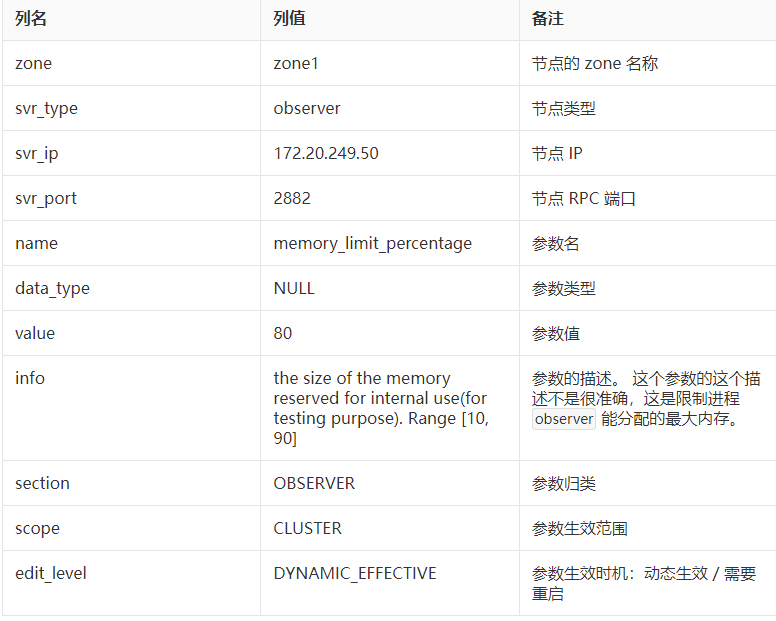
OB 集群参数的修改可以通过命令:alter system set 参数名='参数值' [ server = '节点IP:节点RPC端口' ] ; 。不指定 server 子句就是表示参数修改应用于所有 OceanBase 集群节点。 比如说下面调整参数 syslog_level 值为 USER_ERROR 。
MySQL [oceanbase]> alter system set syslog_level = 'USER_ERR' server='172.20.249.50:2882' ;
Query OK, 0 rows affected (0.021 sec)
MySQL [oceanbase]> show parameters like 'syslog_level'\G
*************************** 1. row ***************************
zone: zone1
svr_type: observer
svr_ip: 172.20.249.50
svr_port: 2882
name: syslog_level
data_type: NULL
value: USER_ERR
info: specifies the current level of logging. There are DEBUG, TRACE, INFO, WARN, USER_ERR, ERROR, six different log levels.
section: OBSERVER
scope: CLUSTER
source: DEFAULT
edit_level: DYNAMIC_EFFECTIVE
1 row in set (0.002 sec)
OceanBase 集群参数文件
上面这些参数修改都是立即生效的,并且参数修改也会持久化到 OceanBase 集群节点自己的参数文件。注意不是指前面提到的 OBD 集群部署参数文件。 通常 OceanBase 集群每个节点的启动目录下会有一个目录 etc ,这里面保存了该节点进程的参数文件 observer.config.bin 。这是一个 binary 类型的文件,不能直接用 cat 命令读取,需要使用 strings 命令。 这个文件也不建议直接修改,而是通过上面提到的参数修改命令。
[admin@obce00 oceanbase-ce]$ pwd
/home/admin/oceanbase-ce
[admin@obce00 oceanbase-ce]$ tree -L 2
.
├── bin
│ └── observer -> /home/admin/.obd/repository/oceanbase-ce/3.1.0/84bd2fe27f8b8243cc57d8a3f68b4c50f94aab80/bin/observer
├── etc
│ ├── observer.config.bin
│ └── observer.config.bin.history
├── etc2
│ ├── observer.conf.bin
│ └── observer.conf.bin.history
├── etc3
│ ├── observer.conf.bin
│ └── observer.conf.bin.history
<省略掉无关内容>
9 directories, 20 files
从上图看,启动目录下有三个文件夹:etc etc2 etc3 ,下面都有参数文件以及其历史文件备份。进程 observer 默认会读取文件夹 etc 中的参数文件,其他两个目录是参数文件的备份,这个备份路径也是通过参数 config_additional_dir 指定的,默认值是同一个启动目录的 etc2 和 etc3 。生产环境一般会设置到其他磁盘,安全一些。当前 OBD 版本还是把它放到同一块盘,这个并不是很有意义,用户可以自己修改这个目录。 此外,要注意的是 etc2 和 etc3 下的参数文件名跟 etc 下参数文件名并不完全一致,这个推测是早期开发者的失误。
MySQL [oceanbase]> show parameters like 'config_additional_dir'\G
*************************** 1. row ***************************zone: zone1svr_type: observersvr_ip: 172.20.249.50svr_port: 2882name: config_additional_dirdata_type: NULLvalue: etc2;etc3info: additional directories of configure filesection: OBSERVERscope: CLUSTERsource: DEFAULT
edit_level: DYNAMIC_EFFECTIVE
1 row in set (0.002 sec)
[admin@obce00 oceanbase-ce]$ strings etc/observer.config.bin | grep -n memory_limit
25:memory_limit=8G
[admin@obce00 oceanbase-ce]$ strings etc2/observer.conf.bin | grep -n memory_limit
25:memory_limit=8G
[admin@obce00 oceanbase-ce]$ strings etc3/observer.conf.bin | grep -n memory_limit
25:memory_limit=8G
查看实际参数文件内容可以看出,不是所有参数都在这个参数文件里。只有那些被 alter system set 命令修改过的参数,以及在进程 observer 启动时通过 -o 指定的参数,才会记录在参数文件里。其他参数都是取自默认值(写在进程 observer 的代码里)。
使用 OBD 修改 OceanBase 集群参数
注意:上面直接在 OceanBase 集群里修改参数后,会立即同步到集群节点自身的参数文件中,但是不会同步到 OBD 的集群部署配置文件中(后期 OBD 可能会改进这个功能)。所以,如果使用 OBD 工具重启 OceanBase 集群的时候,默认又会带参数启动进程 observer 。如果前面在 OceanBase 集群里修改的参数在 OBD 集群部署配置文件中也有,并且后者的值还是老的,那就意味着那个参数又被调整回原来的设置值了。 运维需要理解这里变化的原理。 针对这个,OBD 提供两个解决思路:
- 手动同步修改 OBD 集群部署配置文件中的参数值。以后工具可能会自动同步。
- OBD 重启集群的时候不带参数启动节点进程。
OBD 提供命令编辑集群部署配置文件:obd cluster edit-config ,退出时会保存到上面工作目录中。
obd cluster edit-config obce-single
保存时输出:
oceanbase-ce-3.1.0 already installed.
Search param plugin and load ok
Parameter check ok
Save deploy "obce-single" configuration
deploy "need reload"
edit-config 命令退出后会提示 reload 集群配置。
[admin@obce00 ~]$ obd cluster reload obce-single
Get local repositories and plugins ok
Open ssh connection ok
Cluster status check ok
Connect to observer ok
obce-single reload
提示: 如果 OBD 命令运行出错,可以查看 日志。日志查看方法: tail -n 50 ~/.obd/log/obd 。
进程启动时指定参数
前面介绍过了, OBD 在启动集群节点进程 observer 的时候,会在命令行下通过 -o 指定参数。对于运维来说,如果某个节点的进程 observer 因为某种原因退出了,启动进程是当务之急。可能需要调整某个参数再启动一次。通过 OBD 工具就有点效率低下了。 所以,掌握 OceanBase 集群节点进程 observer 的启动方法还是很有必要的。
首先要进入到工作目录。必须在上一次启动进程 observer 的工作目录(假设它是正确的)下再次尝试。前面分析过,工作目录在 OBD 集群部署配置文件中指定 home_path 。本课程里工作目录都默认是 /home/admin/oceanbase-ce 。进程 observer 启动后会在这个目录找目录 etc ,找默认的参数文件 observer.config.bin 。启动后的日志会默认写到 log/{observer.log, rootservice.log, election.log} 。所以,工作目录不能错,目录的权限也不能错。
下面示例不带参数启动进程 observer 方法。为了模拟故障,先强行杀掉进程 observer 。
[admin@obce00 ~]$ cd
[admin@obce00 ~]$ cd oceanbase-ce/
[admin@obce00 oceanbase-ce]$ kill -9 `pidof observer`
[admin@obce00 oceanbase-ce]$ sleep 3
[admin@obce00 oceanbase-ce]$ ps -ef|grep observer
admin 35278 28904 0 11:26 pts/2 00:00:00 grep --color=auto observer
[admin@obce00 oceanbase-ce]$ pwd
/home/admin/oceanbase-ce
[admin@obce00 oceanbase-ce]$ bin/observer
bin/observer
[admin@obce00 oceanbase-ce]$ ps -ef|grep observer
admin 35280 1 99 11:26 ? 00:00:06 bin/observer
admin 35848 28904 0 11:26 pts/2 00:00:00 grep --color=auto observer
[admin@obce00 oceanbase-ce]$ netstat -ntlp
(Not all processes could be identified, non-owned process info
will not be shown, you would have to be root to see it all.)
Active Internet connections (only servers)
Proto Recv-Q Send-Q Local Address Foreign Address State PID/Program name
tcp 0 0 0.0.0.0:22 0.0.0.0:* LISTEN -
tcp 0 0 0.0.0.0:2881 0.0.0.0:* LISTEN 35280/bin/observer
tcp 0 0 0.0.0.0:2882 0.0.0.0:* LISTEN 35280/bin/
