



Tutorialspoint Spring Batch 教程
来源:易百教程
Spring Batch教程™
Spring Batch是一个轻量级框架,用于在开发企业应用程序中批处理应用程序。 本教程解释了Spring Batch的基本概念,并展示了如何在实际环境中使用它。
面向读者
本教程对于那些需要处理大量涉及诸如事务管理,作业处理统计,资源管理等重复操作的记录的专业人员来说尤其有用。Spring Batch是处理大容量的非常有效的框架 批量作业。
前提条件
Spring Batch建立在Spring Framework之上,因此您应该要了解Spring的特性和功能。 如果不熟悉Spring Framework,那么可以从这里开始学习。
问题反馈
我们不能保证您在学习此 Spring Batch 教程的过程中不会遇到任何问题。本教程中的讲解,示例和代码等只是根据作者的理解来概括写出。由于作者水平和能力有限,因此不保正所有编写的文章都准确无误。但是如果有遇到任何错误或问题,请反馈给我们,我们会及时纠正以方便后续读者阅读。
易百教程移动端:请扫描本页面底部(右侧)二维码并关注微信公众号,回复:"教程" 选择相关教程阅读或直接访问:http://m.yiibai.com 。
Spring Batch简介 - Spring Batch教程™
批处理是一种处理模式,它涉及一系列自动复杂作业的执行而无需用户交互。 批处理过程处理批量数据并运行很长时间。
一些企业应用程序需要处理大量数据来执行操作,涉及 -
- 基于时间的事件,如周期性计算。
- 在大型数据集上重复处理的定期应用程序。
- 处理和验证事务中可用数据的应用程序。
因此,批处理在企业应用程序中用于执行此类事务。
什么是Spring批处理
Spring批处理是一个轻量级框架,用于开发在企业应用程序中使用的批处理应用程序。
除了批量处理外,该框架还提供以下功能 -
- 包括日志和跟踪
- 事务管理
- 作业处理统计
- 作业重启
- 跳过和资源管理
您还可以使用其分割技术缩放弹簧批量应用程序。
Spring Batch的特点
以下是Spring Batch的显着特点 -
- 灵活性 - Spring批处理应用程序非常灵活。只需更改XML文件即可更改应用程序中的处理顺序。
- 可维护性 - Spring批量应用程序易于维护。 Spring Batch作业包括步骤,每个步骤都可以进行分离,测试和更新,而不影响其他步骤。
- 可伸缩性 - 使用分区技术,可以缩放Spring Batch应用程序。 这些技术可以让你 -
- 并行执行作业的步骤。
- 并行执行单个线程。
- 可靠性 - 如果发生任何故障,可以通过拆除步骤来从停止的地方重新开始作业。
- 支持多种文件格式 - Spring Batch为XML,Flat文件,CSV,MYSQL,Hibernate,JDBC,Mongo,Neo4j等大量写入器和读取器提供支持。
- 多种启动作业的方式 - 可以使用Web应用程序,Java程序,命令行等来启动Spring Batch作业。
除此之外,Spring Batch应用程序支持 -
- 失败后自动重试。
- 跟踪批次执行期间和完成批次处理后的状态和统计数据。
- 运行并行作业。
- 一些服务,诸如日志记录,资源管理,跳过和重新启动处理等。
易百教程移动端:请扫描本页面底部(右侧)二维码并关注微信公众号,回复:"教程" 选择相关教程阅读或直接访问:http://m.yiibai.com 。
Spring Batch开发环境 - Spring Batch教程™
在本章中,我们将演示如何在Eclipse IDE中设置Spring Batch环境。 在继续安装之前,请确保您已在系统中安装了Eclipse。 如果没有,请在您的系统中下载并安装Eclipse。
有关Eclipse的更多信息,请参阅我们的Eclipse教程。
在Eclipse上设置Spring Batch批处理
按照下面给出的步骤在Eclipse上设置Spring Batch环境。
第1步 - 安装Eclipse并打开一个新项目,如以下屏幕截图所示。
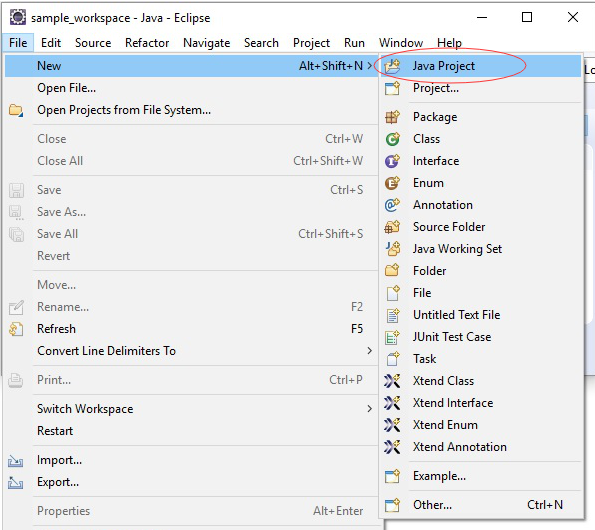
第2步 - 创建一个示例Spring Batch项目,如下所示。
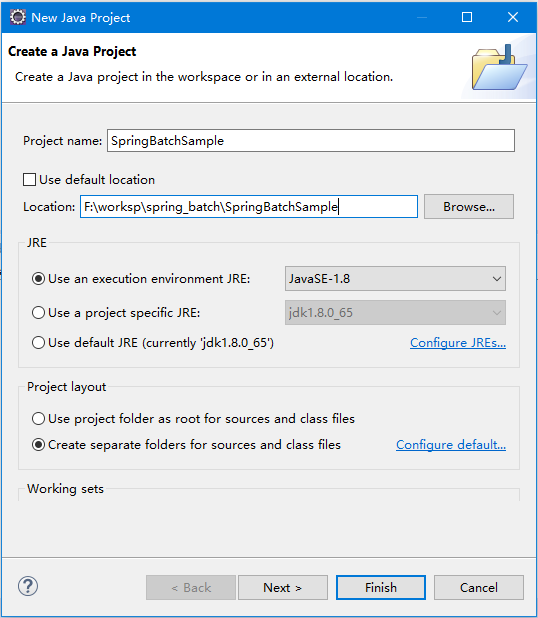
第3步 - 右键单击项目并将其转换为Maven项目,如下所示。当将它成功转换成Maven项目之后,它会给自动创建一个文件:pom.xml,它用于配置所需的依赖关系。修改并保存后,这些jar文件将自动下载到您的项目中。
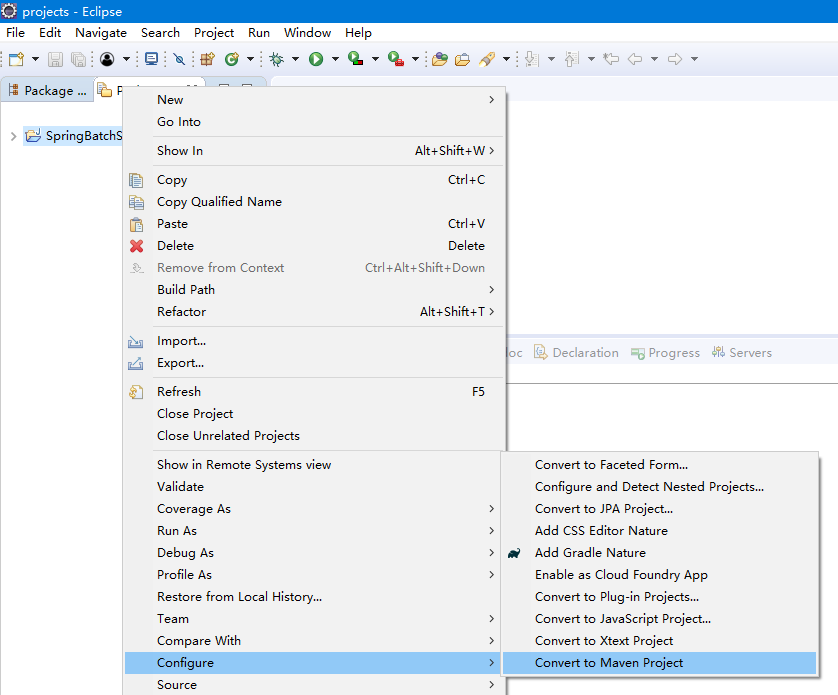
按默认,点击完成 -
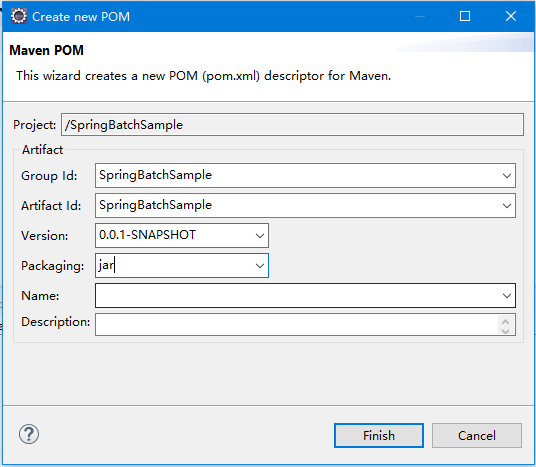
第4步 - 现在,在项目的pom.xml中,复制并粘贴以下内容(Spring批处理应用程序的依赖项)并刷新项目。
<project xmlns = "http://maven.apache.org/POM/4.0.0"
xmlns:xsi = "http://www.w3.org/2001/XMLSchema-instance"
xsi:schemaLocation = "http://maven.apache.org/POM/4.0.0
http://maven.apache.org/maven-v4_0_0.xsd">
<modelVersion>4.0.0</modelVersion>
<groupId>com.yiibai</groupId>
<artifactId>SpringBatchSample</artifactId>
<packaging>jar</packaging>
<version>1.0-SNAPSHOT</version>
<name>SpringBatchExample</name>
<url>http://maven.apache.org</url>
<properties>
<jdk.version>1.8</jdk.version>
<spring.version>4.3.8.RELEASE</spring.version>
<spring.batch.version>3.0.7.RELEASE</spring.batch.version>
<mysql.driver.version>5.1.25</mysql.driver.version>
<junit.version>4.11</junit.version>
</properties>
<dependencies>
<!-- Spring Core -->
<dependency>
<groupId>org.springframework</groupId>
<artifactId>spring-core</artifactId>
<version>${spring.version}</version>
</dependency>
<!-- Spring jdbc, for database -->
<dependency>
<groupId>org.springframework</groupId>
<artifactId>spring-jdbc</artifactId>
<version>${spring.version}</version>
</dependency>
<!-- Spring XML to/back object -->
<dependency>
<groupId>org.springframework</groupId>
<artifactId>spring-oxm</artifactId>
<version>${spring.version}</version>
</dependency>
<!-- MySQL database driver -->
<dependency>
<groupId>mysql</groupId>
<artifactId>mysql-connector-java</artifactId>
<version>${mysql.driver.version}</version>
</dependency>
<!-- Spring Batch dependencies -->
<dependency>
<groupId>org.springframework.batch</groupId>
<artifactId>spring-batch-core</artifactId>
<version>${spring.batch.version}</version>
</dependency>
<dependency>
<groupId>org.springframework.batch</groupId>
<artifactId>spring-batch-infrastructure</artifactId>
<version>${spring.batch.version}</version>
</dependency>
<!-- Spring Batch unit test -->
<dependency>
<groupId>org.springframework.batch</groupId>
<artifactId>spring-batch-test</artifactId>
<version>${spring.batch.version}</version>
</dependency>
<!-- Junit -->
<dependency>
<groupId>junit</groupId>
<artifactId>junit</artifactId>
<version>${junit.version}</version>
<scope>test</scope>
</dependency>
</dependencies>
<build>
<finalName>spring-batch</finalName>
<plugins>
<plugin>
<groupId>org.apache.maven.plugins</groupId>
<artifactId>maven-eclipse-plugin</artifactId>
<version>2.9</version>
<configuration>
<downloadSources>true</downloadSources>
<downloadJavadocs>false</downloadJavadocs>
</configuration>
</plugin>
<plugin>
<groupId>org.apache.maven.plugins</groupId>
<artifactId>maven-compiler-plugin</artifactId>
<version>2.3.2</version>
<configuration>
<source>${jdk.version}</source>
<target>${jdk.version}</target>
</configuration>
</plugin>
</plugins>
</build>
</project>
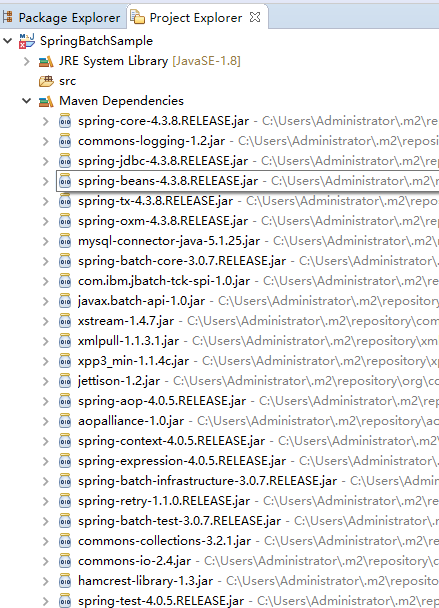
最后,如果观察Maven的依赖关系,可以观察到所有需要的jar文件都下载了。如下图所示 -
易百教程移动端:请扫描本页面底部(右侧)二维码并关注微信公众号,回复:"教程" 选择相关教程阅读或直接访问:http://m.yiibai.com 。
Spring Batch架构 - Spring Batch教程™
以下是Spring Batch体系结构的图示。 如图中所示,该体系结构包含三个主要组件,即应用程序(Application),批核(Batch Core)和批处理基础架构(Batch Infrastructure)。
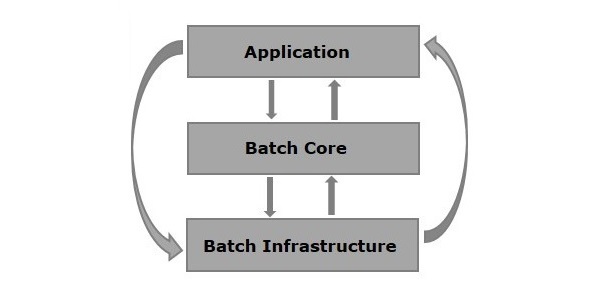
- 应用程序 - 此组件包含所有作业和使用Spring Batch框架编写的代码。
- 批核 - 该组件包含控制和启动批作业所需的所有API类。
- 批处理基础结构 - 此组件包含应用程序和批处理核心组件使用的读取器,写入器和服务。
Spring Batch的组件
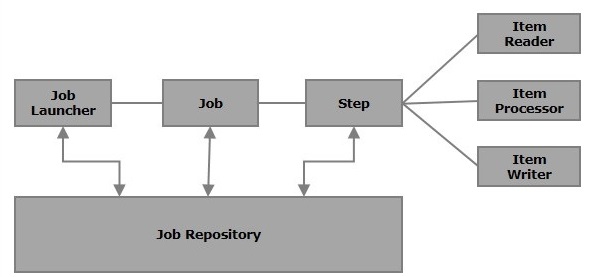
下图显示了Spring Batch的不同组件以及它们如何相互连接。
作业
在Spring Batch应用程序中,作业是要执行的批处理过程。 它从头至尾无间断运行。 作业进一步分为几个步骤(或一个作业包含的步骤)。
我们将使用XML文件或Java类在Spring Batch中配置作业。 以下是Spring批处理作业的XML配置。
<job id = "jobid">
<step id = "step1" next = "step2"/>
<step id = "step2" next = "step3"/>
<step id = "step3"/>
</job>
批处理作业在标记<job> </ job>中配置。 它有一个名称为id的属性。 在这些标签中,我们定义了步骤的定义和顺序。
可重新启动 - 通常,当作业正在运行时,我们尝试再次启动它,这被认为是重新启动,并且会重新启动。 为避免这种情况,您需要将restartable的值设置为false,如下所示。
<job id = "jobid" restartable = "false" >
</job>
步骤
步骤是作业的独立部分,其中包含定义和执行作业(其一部分)的必要信息。
如图所示,每个步骤由ItemReader,ItemProcessor(可选)和ItemWriter组成。作业可能包含一个或多个步骤。
读取器,写入器和处理者
项目读取器将数据从特定源代码读取到Spring Batch应用程序中,而项目写入器将数据从Spring Batch应用程序写入特定目标。
Item处理器是一个包含处理代码的类,该代码处理读入spring批处理的数据。 如果应用程序读取“n”个记录,则处理器中的代码将在每条记录上执行。
当没有读取器和写入器时,有一个tasklet充当SpringBatch的处理器。 它只处理一个任务。 例如,假设我们正在用一个简单的步骤来写一份作业,从MySQL数据库读取数据并处理它并将其写入文件(平面),那么使用的步骤如下 -
- 从MySQL数据库读取的读取器。
- 一个写入文件的写入器。
- 根据意愿定制处理器来处理数据。
<job id = "helloWorldJob">
<step id = "step1">
<tasklet>
<chunk reader = "mysqlReader" writer = "fileWriter"
processor = "CustomitemProcessor" ></chunk>
</tasklet>
</step>
</ job>
Spring Batch提供了一长串读取器和写入器。 使用这些预定义的类,可以为它们定义bean。 我们将在接下来的章节中更详细地讨论读取器和写入器。
JobRepository
Spring Batch中的作业存储库为JobLauncher,Job和Step实现提供了创建,检索,更新和删除(CRUD)操作。 我们将在XML文件中定义一个作业存储库,如下所示。
<job-repository id = "jobRepository"/>
除id外,还有更多选项(可选)可用。 以下是包含所有选项及其默认值的作业存储库配置。
<job-repository id = "jobRepository"
data-source = "dataSource"
transaction-manager = "transactionManager"
isolation-level-for-create = "SERIALIZABLE"
table-prefix = "BATCH_"
max-varchar-length = "1000"/>
内存中存储库 - 如果您不想在数据库中保留Spring Batch的域对象,则可以配置内存版本的jobRepository,如下所示。
<bean id = "jobRepository"
class = "org.springframework.batch.core.repository.support.MapJobRepositoryFactoryBean ">
<property name = "transactionManager" ref = "transactionManager"/>
</bean>
JobLauncher
JobLauncher是一个接口,它使用给定的一组参数启动Spring Batch作业。 SampleJoblauncher是实现JobLauncher接口的类。 以下是JobLauncher的配置。
<bean id = "jobLauncher"
class = "org.springframework.batch.core.launch.support.SimpleJobLauncher">
<property name = "jobRepository" ref = "jobRepository" />
</bean>
JobInstance
JobIinstance表示作业的逻辑运行; 它是在我们运行作业时创建的。 每个作业实例都由作业的名称和运行时传递给它的参数来区分。
如果JobInstance执行失败,则可以再次执行相同的JobInstance。 因此,每个JobInstance可以有多个作业执行。
JobExecution和StepExecution
JobExecution和StepExecution是执行作业/步骤的代表。 它们包含作业/步骤的运行信息,例如(作业/步骤)的开始时间,(作业/步骤的)结束时间。
易百教程移动端:请扫描本页面底部(右侧)二维码并关注微信公众号,回复:"教程" 选择相关教程阅读或直接访问:http://m.yiibai.com 。
Spring Batch应用程序 - Spring Batch教程™
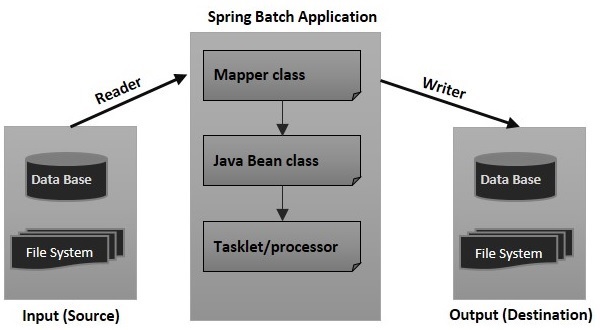
本教程中的几乎所有示例都包含以下文件 -
- 配置文件(XML文件)
- Tasklet/processor(Java类)
- 带有setter和getters的Java类(Java bean类)
- Mapper类(Java类)
- Launcher类(Java类)
1. 配置文件
配置文件(XML)包含以下内容 -
- 作业和步骤定义。
- Bean类定义读取器和写入器。
- 组件的定义如:JobLauncher,JobRepository,事务管理器和数据源。
在我们的示例中,为了更好地理解,将它分为两个文件:job.xml文件(定义作业,步骤,读取器和写入器)和context.xml文件(作业启动器,作业存储库,事务管理器和数据源)。
2. Mapper类
根据读取器,Mapper类实现了诸如行映射器,字段集映射器等接口。它包含从读取器获取数据并使用setter和getter方法(Java Bean)将其设置为Java类的代码。
3. Java Bean类
具有setter和getters(Java bean)的Java类表示具有多个值的数据。 它充当助手类。 我们将把这个数据从一个组件(reader,writer,processer)传递给这个类的对象。
4. Tasklet/processor
Tasklet/processor类包含Spring Batch应用程序的处理代码。 processor是一个类,它接受包含读取数据的对象,对其进行处理,并返回处理后的数据(在表单对象中)。
5. Launcher类
这个类(App.java)包含启动Spring Batch应用程序的代码。参考下图所示 -
易百教程移动端:请扫描本页面底部(右侧)二维码并关注微信公众号,回复:"教程" 选择相关教程阅读或直接访问:http://m.yiibai.com 。
Spring Batch配置 - Spring Batch教程™
在编写Spring Batch应用程序时,我们将使用Spring Batch命名空间中提供的XML标记来配置作业,步骤,JobLauncher,JobRepository,事务管理器,读取器和写入器。 因此,您需要将此名称空间包含在XML文件中,如下所示。
<beans xmlns = "http://www.springframework.org/schema/beans"
xmlns:batch = "http://www.springframework.org/schema/batch"
xmlns:xsi = "http://www.w3.org/2001/XMLSchema-instance"
xsi:schemaLocation = "http://www.springframework.org/schema/batch
http://www.springframework.org/schema/batch/spring-batch-2.2.xsd
http://www.springframework.org/schema/bean
http://www.springframework.org/schema/beans/spring-beans-3.2.xsd">
在下面的章节中,我们将讨论Spring Batch命名空间中可用的各种标签,它们的属性和示例。
作业
<job>标签用于定义/配置SpringBatch的作业。 它包含一系列步骤(step),可以使用JobLauncher启动。
<job>标签有2个属性,如下所列 -
编号 | 属性 | 描述 |
1 | id | 它是作业的标识,必须指定该属性的值。 |
2 | restartable | 这是用于指定作业是否可重新启动的属性。 该属性是可选的。 |
以下是Spring Batch作业的XML配置。
<job id = "jobid" restartable = "false" >
. . . . . . . .
. . . . . . . .
. . . . . . . . // Step definitions
</job>
步骤
<step>标签用于定义/配置Spring Batch作业的步骤。 它有以下三个属性 -
编号 | 属性 | 描述 |
1 | id | 它是作业的标识,必须指定该属性的值。 |
2 | next | 这是指定下一步的快捷方式。 |
3 | parent | 它用于指定配置应从其继承的父bean的名称。 |
以下是Spring Batch步骤的XML配置。
<job id = "jobid">
<step id = "step1" next = "step2"/>
<step id = "step2" next = "step3"/>
<step id = "step3"/>
</job>
Chunk
这个标签用于定义/配置一个tasklet块。它有以下四个属性 -
编号 | 属性 | 描述 |
1 | reader | 它表示项目读取器bean的名称。 它接受org.springframework.batch.item.ItemReader类型的值。 |
2 | writer | 它代表项目写入器bean的名称。 它接受org.springframework.batch.item.ItemWriter类型的值。 |
3 | processor | 它代表项目读取器bean的名称。 它接受类型org.springframework.batch.item.ItemProcessor的值。 |
4 | commit-interval |
以下是Spring Batch块的XML配置。
<batch:step id = "step1">
<batch:tasklet>
<batch:chunk reader = "xmlItemReader"
writer = "mysqlItemWriter" processor = "itemProcessor" commit-interval = "10">
</batch:chunk>
</batch:tasklet>
</batch:step>
JobRepository
JobRepository Bean用于使用关系数据库来配置JobRepository。 这个bean与org.springframework.batch.core.repository.JobRepository类型的类相关联。
编号 | 属性 | 描述 |
1 | dataSource | 它用于指定定义数据源的bean名称。 |
2 | transactionManager | 它用于指定定义事务管理器的bean的名称。 |
3 | databaseType | 它指定作业存储库中使用的关系数据库的类型。 |
以下是JobRepository的示例配置。
<bean id = "jobRepository"
class = "org.springframework.batch.core.repository.support.JobRepositoryFactoryBean">
<property name = "dataSource" ref = "dataSource" />
<property name = "transactionManager" ref="transactionManager" />
<property name = "databaseType" value = "mysql" />
</bean>
JobLauncher
JobLauncher bean用于配置JobLauncher。 它与类org.springframework.batch.core.launch.support.SimpleJobLauncher(在我们的程序中)相关联。 这个bean有一个名为jobrepository的属性,它用来指定定义jobrepository的bean的名字。
以下是jobLauncher的示例配置。
<bean id = "jobLauncher"
class = "org.springframework.batch.core.launch.support.SimpleJobLauncher">
<property name = "jobRepository" ref = "jobRepository" />
</bean>
事务管理
TransactionManager bean用于使用关系数据库来配置TransactionManager。 这个bean与类型为org.springframework.transaction.platform.TransactionManager的类相关联。
<bean id = "transactionManager"
class = "org.springframework.batch.support.transaction.ResourcelessTransactionManager" />
数据源
数据源bean用于配置数据源。 这个bean与类型为org.springframework.jdbc.datasource.DriverManagerDataSource的类相关联。
编号 | 属性 | 描述 |
1 | driverClassName | 这指定用于连接数据库的驱动程序的类名称。 |
2 | url | 这指定了数据库的URL。 |
3 | username | 这指定了连接数据库的用户名。 |
4 | password | 这指定了与数据库连接的密码。 |
以下是数据源的示例配置。
<bean id = "dataSource"
class = "org.springframework.jdbc.datasource.DriverManagerDataSource">
<property name = "driverClassName" value = "com.mysql.jdbc.Driver" />
<property name = "url" value = "jdbc:mysql://localhost:3306/details" />
<property name = "username" value = "myuser" />
<property name = "password" value = "password" />
</bean>
易百教程移动端:请扫描本页面底部(右侧)二维码并关注微信公众号,回复:"教程" 选择相关教程阅读或直接访问:http://m.yiibai.com 。
Spring Batch读取器,写入器和处理器 - Spring Batch教程™
项目读取器将数据从特定源代码读入Spring批处理应用程序,而项目写入器将数据从Spring Batch应用程序写入特定目标。
Item处理器是一个包含处理代码的类,该代码处理读入spring批处理的数据。 如果应用程序读取n条记录,则处理器中的代码将在每条记录上执行。
块(chunk)是该tasklet的子元素。 它用于执行读取,写入和处理操作。 可以在如下所示的步骤中配置使用此元素的读取器,写入器和处理器。
<batch:job id = "helloWorldJob">
<batch:step id = "step1">
<batch:tasklet>
<batch:chunk reader = "cvsFileItemReader" writer = "xmlItemWriter"
processor = "itemProcessor" commit-interval = "10">
</batch:chunk>
</batch:tasklet>
</batch:step>
</batch:job>
Spring Batch为读取器和写入器提供读写MongoDB,Neo4j,MySQL,XML,flatfile,CSV等各种文件系统/数据库的数据。
要在应用程序中包含读取器,需要为该读取器定义一个bean,为该bean中的所有必需属性提供值,并将该bean的id作为值传递给chunk元素的readers属性(或writer属性)。
ItemReader
它是读取数据的一个步骤(批处理过程)的实体。 ItemReader每次读取一个项目。 Spring Batch提供了一个ItemReader接口。 所有的读者都实现这个接口。
以下是由Spring Batch提供的一些预定义的ItemReader类,用于从各种源读取。
读取器 | 目的 |
FlatFIleItemReader | 从文件中读取数据。 |
StaxEventItemReader | 从XML文件读取数据。 |
StoredProcedureItemReader | 从数据库的存储过程读取数据。 |
JDBCPagingItemReader | 从关系数据库中读取数据。 |
MongoItemReader | 从MongoDB读取数据。 |
Neo4jItemReader | 从Neo4j读取数据。 |
需要通过创建bean来配置ItemReaders。 以下是从XML文件读取数据的StaxEventItemReader示例。
<bean id = "mysqlItemWriter"
class = "org.springframework.batch.item.xml.StaxEventItemWriter">
<property name = "resource" value = "file:xml/outputs/userss.xml" />
<property name = "marshaller" ref = "reportMarshaller" />
<property name = "rootTagName" value = "Tutorial" />
</bean>
<bean id = "reportMarshaller"
class = "org.springframework.oxm.jaxb.Jaxb2Marshaller">
<property name = "classesToBeBound">
<list>
<value>Tutorial</value>
</list>
</property>
</bean>
正如所观察到的,在配置时,我们需要指定所需阅读器的相应类名,并且需要为所有必需的属性提供值。
ItemWriter
这是写入数据的批处理步骤的要素。 ItemWriter一次写入一个项目。 Spring Batch提供了一个ItemWriter接口。 所有的作家都实现了这个接口。
以下是由Spring Batch提供的一些预定义的ItemWriter类,用于从各种源读取。
写入器 | 目的 |
FlatFIleItemWriter | 将数据写入文件。 |
StaxEventItemWriter | 将数据写入XML文件 |
StoredProcedureItemWriter | 将数据写入数据库的存储过程。 |
JDBCPagingItemWriter | 将数据写入关系数据库数据库。 |
MongoItemWriter | 将数据写入MongoDB。 |
Neo4jItemWriter | 将数据写入Neo4j。 |
同样,需要通过创建bean来配置ItemWriters。 以下是将数据写入MySQL数据库的JdbcCursorItemReader示例。
<bean id = "dbItemReader"
class = "org.springframework.batch.item.database.JdbcCursorItemReader" scope = "step">
<property name = "dataSource" ref = "dataSource" />
<property name = "sql" value = "select * from tutorialsdata" />
<property name = "rowMapper">
<bean class = "TutorialRowMapper" />
</property>
</bean>
项目处理器
ItemProcessor:ItemProcessor用于处理数据。 当给定的项目无效时,它返回null,否则它处理给定的项目并返回处理结果。 接口ItemProcessor <I,O>表示处理器。
Tasklet类 - 当没有给出读写器时,Tasklet充当SpringBatch的处理器。 它只处理单个任务。
可以通过实现包org.springframework.batch.item.ItemProcessor的接口ItemProcessor来定义一个自定义项目处理器。ItemProcessor类接受一个对象并处理数据并将处理后的数据作为另一个对象返回。
在批处理过程中,如果读取了“n”个记录或数据元素,那么对于每个记录,它将读取数据,处理数据并将数据写入写入器。 为了处理数据,它在通过的处理器上进行中继。
例如,假设您已经编写了代码来加载特定的PDF文档,创建一个新页面,并以表格格式将该数据项写入PDF中。 如果执行此应用程序,它将读取XML文档中的所有数据项,将它们存储在MySQL数据库中,并将它们打印到单个页面中给定的PDF文档中。
示例
以下是一个ItemProcessor类示例。
import org.springframework.batch.item.ItemProcessor;
public class CustomItemProcessor implements ItemProcessor<Tutorial, Tutorial> {
@Override
public Tutorial process(Tutorial item) throws Exception {
System.out.println("Processing..." + item);
return item;
}
}
易百教程移动端:请扫描本页面底部(右侧)二维码并关注微信公众号,回复:"教程" 选择相关教程阅读或直接访问:http://m.yiibai.com 。
Spring Batch入门程序 - Spring Batch教程™
本章向您演示如何编辑一个基本的Spring Batch应用程序。 它将简单地执行一个tasklet来显示一条消息。
这个Spring Batch应用程序包含以下文件 -
- 配置文件 - 这是一个XML文件,在这个文件定义作业和作业的步骤(如果应用程序也包括读取器和写入器,那么读取器和写入器的配置也包含在这个文件中。)
- Context.xml - 在这个文件中,我们将定义像作业存储库,作业启动器和事务管理器的bean。
- Tasklet类 - 在这个类中,编写处理代码作业(在这个示例中,它显示一个简单的消息)
- Launcher类 - 在这个类中,通过运行Job启动器来启动批处理应用程序。
完整的项目目录结构如下所示 -
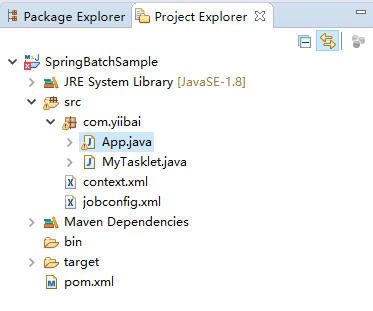
jobconfig.xml
以下是这个Spring Batch应用程序示例的配置文件。
<beans xmlns = "http://www.springframework.org/schema/beans"
xmlns:batch = "http://www.springframework.org/schema/batch"
xmlns:xsi = "http://www.w3.org/2001/XMLSchema-instance"
xsi:schemaLocation = "http://www.springframework.org/schema/batch
http://www.springframework.org/schema/batch/spring-batch-2.2.xsd
http://www.springframework.org/schema/beans
http://www.springframework.org/schema/beans/spring-beans-3.2.xsd ">
<import resource="context.xml" />
<!-- Defining a bean -->
<bean id = "tasklet" class = "com.yiibai.MyTasklet" />
<!-- Defining a job-->
<batch:job id = "helloWorldJob">
<!-- Defining a Step -->
<batch:step id = "step1">
<tasklet ref = "tasklet"/>
</batch:step>
</batch:job>
</beans>
context.xml
以下是Spring Batch应用程序的context.xml文件内容。
<beans xmlns = "http://www.springframework.org/schema/beans"
xmlns:xsi = http://www.w3.org/2001/XMLSchema-instance"
xsi:schemaLocation = "http://www.springframework.org/schema/beans
http://www.springframework.org/schema/beans/spring-beans-3.2.xsd">
<bean id = "jobRepository"
class="org.springframework.batch.core.repository.support.MapJobRepositoryFactoryBean">
<property name = "transactionManager" ref = "transactionManager" />
</bean>
<bean id = "transactionManager"
class = "org.springframework.batch.support.transaction.ResourcelessTransactionManager" />
<bean id = "jobLauncher"
class = "org.springframework.batch.core.launch.support.SimpleJobLauncher">
<property name = "jobRepository" ref = "jobRepository" />
</bean>
</beans>
MyTasklet.java
以下是显示简单消息的Tasklet类。
package com.yiibai;
import org.springframework.batch.core.StepContribution;
import org.springframework.batch.core.scope.context.ChunkContext;
import org.springframework.batch.core.step.tasklet.Tasklet;
import org.springframework.batch.repeat.RepeatStatus;
public class MyTasklet implements Tasklet {
@Override
public RepeatStatus execute(StepContribution arg0, ChunkContext arg1) throws Exception {
System.out.println("Hello This is a sample example of spring batch");
return RepeatStatus.FINISHED;
}
}
App.java
以下是启动批处理过程的代码。
package com.yiibai;
import org.springframework.batch.core.Job;
import org.springframework.batch.core.JobExecution;
import org.springframework.batch.core.JobParameters;
import org.springframework.batch.core.launch.JobLauncher;
import org.springframework.context.ApplicationContext;
import org.springframework.context.support.ClassPathXmlApplicationContext;
public class App {
public static void main(String[] args)throws Exception {
// System.out.println("hello");
String[] springConfig = {"context.xml", "jobconfig.xml"};
// Creating the application context object
ApplicationContext context = new ClassPathXmlApplicationContext(springConfig);
// Creating the job launcher
JobLauncher jobLauncher = (JobLauncher) context.getBean("jobLauncher");
// Creating the job
Job job = (Job) context.getBean("helloWorldJob");
// Executing the JOB
JobExecution execution = jobLauncher.run(job, new JobParameters());
System.out.println("Exit Status : " + execution.getStatus());
}
}
在执行时,上面的SpringBatch程序将产生以下输出 -
四月 27, 2018 10:09:54 上午 org.springframework.context.support.ClassPathXmlApplicationContext prepareRefresh
信息: Refreshing org.springframework.context.support.ClassPathXmlApplicationContext@26a1ab54: startup date [Fri Apr 27 10:09:54 CST 2018]; root of context hierarchy
四月 27, 2018 10:09:54 上午 org.springframework.beans.factory.xml.XmlBeanDefinitionReader loadBeanDefinitions
信息: Loading XML bean definitions from class path resource [context.xml]
四月 27, 2018 10:09:54 上午 org.springframework.beans.factory.xml.XmlBeanDefinitionReader loadBeanDefinitions
信息: Loading XML bean definitions from class path resource [jobconfig.xml]
四月 27, 2018 10:09:54 上午 org.springframework.beans.factory.xml.XmlBeanDefinitionReader loadBeanDefinitions
信息: Loading XML bean definitions from class path resource [context.xml]
四月 27, 2018 10:09:55 上午 org.springframework.batch.core.launch.support.SimpleJobLauncher afterPropertiesSet
信息: No TaskExecutor has been set, defaulting to synchronous executor.
四月 27, 2018 10:09:55 上午 org.springframework.batch.core.launch.support.SimpleJobLauncher run
信息: Job: [FlowJob: [name=helloWorldJob]] launched with the following parameters: [{}]
四月 27, 2018 10:09:55 上午 org.springframework.batch.core.job.SimpleStepHandler handleStep
信息: Executing step: [step1]
Hello This is a sample example of Spring Batch
四月 27, 2018 10:09:55 上午 org.springframework.batch.core.launch.support.SimpleJobLauncher run
信息: Job: [FlowJob: [name=helloWorldJob]] completed with the following parameters: [{}] and the following status: [COMPLETED]
Exit Status : COMPLETED
易百教程移动端:请扫描本页面底部(右侧)二维码并关注微信公众号,回复:"教程" 选择相关教程阅读或直接访问:http://m.yiibai.com 。
Spring Batch XML到MySQL - Spring Batch教程™
在本章中,我们将创建一个使用XML Reader和MySQL Writer的Spring Batch应用程序。
读取器 - 在应用程序中使用的读取器是StaxEventItemReader,用于从XML文档读取数据。
以下是应用程序中使用的输入XML文档。 此文档包含指定详细信息的数据记录,如教程ID,教程作者,教程标题,提交日期,教程图标和教程说明。
完整的项目目录结构如下所示 -
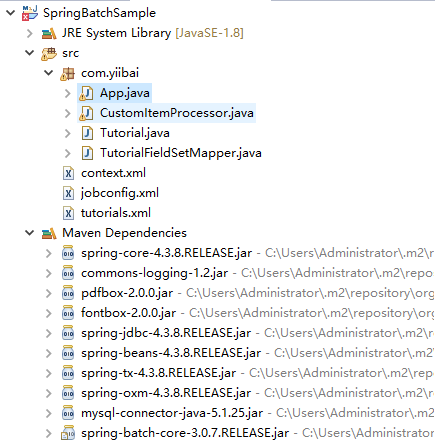
文件:tutorials.xml -
<?xml version="1.0" encoding="UTF-8"?>
<tutorials>
<tutorial>
<tutorial_id>1001</tutorial_id>
<tutorial_author>Sansu</tutorial_author>
<tutorial_title>Learn Java</tutorial_title>
<submission_date>06-05-2007</submission_date>
<tutorial_icon>https://www.yiibai.com/java/images/java-minilogo.jpg</tutorial_icon>
<tutorial_description>Java is a high-level programming language originally
developed by Sun Microsystems and released in 1995.
Java runs on a variety of platforms.
This tutorial gives a complete understanding of Java.');</tutorial_description>
</tutorial>
<tutorial>
<tutorial_id>1002</tutorial_id>
<tutorial_author>Maxsu</tutorial_author>
<tutorial_title>MySQL学习</tutorial_title>
<submission_date>19-04-2007</submission_date>
<tutorial_icon>https://www.yiibai.com/mysql/images/mysql-minilogo.jpg</tutorial_icon>
<tutorial_description>MySQL is the most popular
Open Source Relational SQL database management system.
MySQL is one of the best RDBMS being used for developing web-based software applications.
This tutorial will give you quick start with MySQL
and make you comfortable with MySQL programming.</tutorial_description>
</tutorial>
<tutorial>
<tutorial_id>1003</tutorial_id>
<tutorial_author>Kobe</tutorial_author>
<tutorial_title>Learn JavaFX</tutorial_title>
<submission_date>06-07-2017</submission_date>
<tutorial_icon>https://www.yiibai.com/javafx/images/javafx-minilogo.jpg</tutorial_icon>
<tutorial_description>JavaFX is a Java library used to build Rich Internet Applications.
The applications developed using JavaFX can run on various devices
such as Desktop Computers, Mobile Phones, TVs, Tablets, etc.
This tutorial, discusses all the necessary elements of JavaFX that are required
to develop effective Rich Internet Applications</tutorial_description>
</tutorial>
</tutorials>
Writer - 在应用程序中使用的写入器是JdbcBatchItemWriter,用于将数据写入MySQL数据库。 假设在testdb的数据库中创建了一个tutorials表。使用以下SQL语句创建创建表:
CREATE TABLE testdb.tutorials(
tutorial_id int(10) NOT NULL,
tutorial_author VARCHAR(20),
tutorial_title VARCHAR(50),
submission_date VARCHAR(20),
tutorial_icon VARCHAR(200),
tutorial_description VARCHAR(1000)
);
处理器 - 在应用程序中使用的处理器是一个自定义处理器,它将每个记录的数据写入PDF文档。
在批处理过程中,如果读取了“n”个记录或数据元素,那么对于每个记录,它将读取数据,处理数据并将数据写入Writer。要处理数据,它在通过的处理器上进行中继。 在这种情况下,在自定义处理器类中,我们编写代码来加载特定的PDF文档,创建新页面,并以表格格式将数据项写入PDF。
最后,如果您执行此应用程序,它将读取XML文档中的所有数据项,将它们存储在MySQL数据库中,并将它们打印到单个页面中给定的PDF文档中。
jobconfig.xml
以下是示例Spring Batch应用程序的配置文件。 在这个文件中,我们将定义Job和step。 除此之外,还为ItemReader,ItemProcessor和ItemWriter定义了bean。 (在这里,我们将它们与它们各自的类相关联,并传递所需属性的值来配置它们。)
<beans xmlns = "http://www.springframework.org/schema/beans"
xmlns:batch = "http://www.springframework.org/schema/batch"
xmlns:xsi = "http://www.w3.org/2001/XMLSchema-instance"
xmlns:util = "http://www.springframework.org/schema/util"
xsi:schemaLocation = "http://www.springframework.org/schema/batch
http://www.springframework.org/schema/batch/spring-batch-2.2.xsd
http://www.springframework.org/schema/beans
http://www.springframework.org/schema/beans/spring-beans-3.2.xsd
http://www.springframework.org/schema/util
http://www.springframework.org/schema/util/spring-util-3.0.xsd ">
<import resource = "context.xml" />
<bean id = "itemProcessor" class = "com.yiibai.CustomItemProcessor" />
<batch:job id = "helloWorldJob">
<batch:step id = "step1">
<batch:tasklet>
<batch:chunk reader = "xmlItemReader" writer = "mysqlItemWriter" processor = "itemProcessor" commit-interval="10000">
</batch:chunk>
</batch:tasklet>
</batch:step>
</batch:job>
<bean id = "xmlItemReader"
class = "org.springframework.batch.item.xml.StaxEventItemReader">
<property name = "fragmentRootElementName" value = "tutorial" />
<property name = "resource" value = "classpath:tutorials.xml" />
<property name = "unmarshaller" ref = "customUnMarshaller" />
</bean>
<bean id = "customUnMarshaller" class = "org.springframework.oxm.xstream.XStreamMarshaller">
<property name = "aliases">
<util:map id = "aliases">
<entry key = "tutorial" value ="com.yiibai.Tutorial" />
</util:map>
</property>
</bean>
<bean id = "mysqlItemWriter" class = "org.springframework.batch.item.database.JdbcBatchItemWriter">
<property name = "dataSource" ref = "dataSource" />
<property name = "sql">
<value>
<![CDATA[insert into testdb.tutorials (tutorial_id, tutorial_author, tutorial_title,
submission_date, tutorial_icon, tutorial_description)
values (:tutorial_id, :tutorial_author, :tutorial_title, :submission_date,
:tutorial_icon, :tutorial_description);]]>
</value>
</property>
<property name = "itemSqlParameterSourceProvider">
<bean class = "org.springframework.batch.item.database.BeanPropertyItemSqlParameterSourceProvider" />
</property>
</bean>
</beans>
context.xml 文件
以下是Spring Batch应用程序的context.xml的内容。 在这个文件中,我们将定义bean,如作业存储库,作业启动器和事务管理器。
<beans xmlns="http://www.springframework.org/schema/beans"
xmlns:jdbc="http://www.springframework.org/schema/jdbc" xmlns:xsi="http://www.w3.org/2001/XMLSchema-instance"
xsi:schemaLocation="http://www.springframework.org/schema/beans
http://www.springframework.org/schema/beans/spring-beans-3.2.xsd
http://www.springframework.org/schema/jdbc
http://www.springframework.org/schema/jdbc/spring-jdbc-3.2.xsd">
<!-- stored job-meta in database -->
<bean id="jobRepository"
class="org.springframework.batch.core.repository.support.JobRepositoryFactoryBean">
<property name="dataSource" ref="dataSource" />
<property name="transactionManager" ref="transactionManager" />
<property name="databaseType" value="mysql" />
</bean>
<bean id="transactionManager"
class="org.springframework.batch.support.transaction.ResourcelessTransactionManager" />
<bean id="jobLauncher"
class="org.springframework.batch.core.launch.support.SimpleJobLauncher">
<property name="jobRepository" ref="jobRepository" />
</bean>
<!-- connect to MySQL database -->
<bean id="dataSource"
class="org.springframework.jdbc.datasource.DriverManagerDataSource">
<property name="driverClassName" value="com.mysql.jdbc.Driver" />
<property name="url" value="jdbc:mysql://localhost:3306/testdb" />
<property name="username" value="root" />
<property name="password" value="123456" />
</bean>
<!-- create job-meta tables automatically -->
<jdbc:initialize-database data-source="dataSource">
<jdbc:script location="org/springframework/batch/core/schema-drop-mysql.sql" />
<jdbc:script location="org/springframework/batch/core/schema-mysql.sql" />
</jdbc:initialize-database>
</beans>
文件:CustomItemProcessor.java
以下是处理器类。 在这个类中,在应用程序中编写处理代码。 在这里,我们正在加载一个PDF文档,创建一个新页面,创建一个表格,并为每条记录插入以下值:教程ID,教程名称,作者,表格中的提交日期。
package com.yiibai;
import java.io.File;
import java.io.IOException;
import org.apache.pdfbox.pdmodel.PDDocument;
import org.apache.pdfbox.pdmodel.PDPage;
import org.apache.pdfbox.pdmodel.PDPageContentStream;
import org.apache.pdfbox.pdmodel.font.PDType1Font;
import org.springframework.batch.item.ItemProcessor;
public class CustomItemProcessor implements ItemProcessor<Tutorial, Tutorial> {
public static void drawTable(PDPage page, PDPageContentStream contentStream, float y, float margin,
String[][] content) throws IOException {
final int rows = content.length;
final int cols = content[0].length;
final float rowHeight = 50;
final float tableWidth = page.getMediaBox().getWidth() - (2 * margin);
final float tableHeight = rowHeight * rows;
final float colWidth = tableWidth / (float) cols;
final float cellMargin = 5f;
// draw the rows
float nexty = y;
for (int i = 0; i <= rows; i++) {
contentStream.drawLine(margin, nexty, margin + tableWidth, nexty);
nexty -= rowHeight;
}
// draw the columns
float nextx = margin;
for (int i = 0; i <= cols; i++) {
contentStream.drawLine(nextx, y, nextx, y - tableHeight);
nextx += colWidth;
}
// now add the text
contentStream.setFont(PDType1Font.HELVETICA_BOLD, 12);
float textx = margin + cellMargin;
float texty = y - 15;
for (int i = 0; i < content.length; i++) {
for (int j = 0; j < content[i].length; j++) {
String text = content[i][j];
contentStream.beginText();
contentStream.moveTextPositionByAmount(textx, texty);
contentStream.drawString(text);
contentStream.endText();
textx += colWidth;
}
texty -= rowHeight;
textx = margin + cellMargin;
}
}
@Override
public Tutorial process(Tutorial item) throws Exception {
System.out.println("Processing..." + item);
// Creating PDF document object
//PDDocument doc = PDDocument.load(new File("D:/test.pdf"));
// Creating a blank page
PDPage page = new PDPage();
//doc.addPage(page);
//PDPageContentStream contentStream = new PDPageContentStream(doc, page);
String[][] content = { { "Id", "" + item.getTutorial_id() }, { "Title", item.getTutorial_title() },
{ "Authour", item.getTutorial_author() }, { "Submission Date", item.getSubmission_date() } };
//drawTable(page, contentStream, 700, 100, content);
//contentStream.close();
//doc.save("D:/test.pdf");
System.out.println("Hello");
return item;
}
}
文件:TutorialFieldSetMapper.java
以下是将数据设置为Tutorial类的ReportFieldSetMapper类的代码实现。
import org.springframework.batch.item.file.mapping.FieldSetMapper;
import org.springframework.batch.item.file.transform.FieldSet;
import org.springframework.validation.BindException;
public class TutorialFieldSetMapper implements FieldSetMapper<Tutorial> {
@Override
public Tutorial mapFieldSet(FieldSet fieldSet) throws BindException {
// instantiating the Tutorial class
Tutorial tutorial = new Tutorial();
// Setting the fields from XML
tutorial.setTutorial_id(fieldSet.readInt(0));
tutorial.setTutorial_title(fieldSet.readString(1));
tutorial.setTutorial_author(fieldSet.readString(2));
tutorial.setTutorial_icon(fieldSet.readString(3));
tutorial.setTutorial_description(fieldSet.readString(4));
return tutorial;
}
}
文件:Tutorial.java
以下是Tutorial类。 这是一个带有setter和getter方法的简单类。
public class Tutorial {
private int tutorial_id;
private String tutorial_author;
private String tutorial_title;
private String submission_date;
private String tutorial_icon;
private String tutorial_description;
@Override
public String toString() {
return " [id=" + tutorial_id + ", author=" + tutorial_author
+ ", title=" + tutorial_title + ", date=" + submission_date + ", icon ="
+tutorial_icon +", description = "+tutorial_description+"]";
}
public int getTutorial_id() {
return tutorial_id;
}
public void setTutorial_id(int tutorial_id) {
this.tutorial_id = tutorial_id;
}
public String getTutorial_author() {
return tutorial_author;
}
public void setTutorial_author(String tutorial_author) {
this.tutorial_author = tutorial_author;
}
public String getTutorial_title() {
return tutorial_title;
}
public void setTutorial_title(String tutorial_title) {
this.tutorial_title = tutorial_title;
}
public String getSubmission_date() {
return submission_date;
}
public void setSubmission_date(String submission_date) {
this.submission_date = submission_date;
}
public String getTutorial_icon() {
return tutorial_icon;
}
public void setTutorial_icon(String tutorial_icon) {
this.tutorial_icon = tutorial_icon;
}
public String getTutorial_description() {
return tutorial_description;
}
public void setTutorial_description(String tutorial_description) {
this.tutorial_description = tutorial_description;
}
}
文件:App.java
以下是启动批处理过程的代码。 在这个类中,我们将通过运行JobLauncher来启动批处理应用程序。
package com.yiibai;
import org.springframework.batch.core.Job;
import org.springframework.batch.core.JobExecution;
import org.springframework.batch.core.JobParameters;
import org.springframework.batch.core.launch.JobLauncher;
import org.springframework.context.ApplicationContext;
import org.springframework.context.support.ClassPathXmlApplicationContext;
public class App {
public static void main(String[] args) throws Exception {
String[] springConfig = {"jobconfig.xml" };
// Creating the application context object
ApplicationContext context = new ClassPathXmlApplicationContext(springConfig);
// Creating the job launcher
JobLauncher jobLauncher = (JobLauncher) context.getBean("jobLauncher");
// Creating the job
Job job = (Job) context.getBean("helloWorldJob");
// Executing the JOB
JobExecution execution = jobLauncher.run(job, new JobParameters());
System.out.println("Exit Status : " + execution.getStatus());
}
}
在执行这个应用程序时,它将产生以下输出 -
信息: Executed SQL script from class path resource [org/springframework/batch/core/schema-mysql.sql] in 5074 ms.
四月 28, 2018 10:15:26 上午 org.springframework.batch.core.launch.support.SimpleJobLauncher run
信息: Job: [FlowJob: [name=helloWorldJob]] launched with the following parameters: [{}]
四月 28, 2018 10:15:27 上午 org.springframework.batch.core.job.SimpleStepHandler handleStep
信息: Executing step: [step1]
Processing... [id=1001, author=Sansu, title=Learn Java, date=06-05-2007, icon =https://www.yiibai.com/java/images/java-minilogo.jpg
, description = Java is a high-level programming language
originally
developed by Sun Microsystems and released in 1995.
Java runs on a variety of platforms.
This tutorial gives a complete understanding of Java.');
]
Hello
Processing... [id=1002, author=Maxsu, title=MySQL学习, date=19-04-2007, icon =https://www.yiibai.com/mysql/images/mysql-minilogo.jpg
, description = MySQL is the most popular
Open Source Relational SQL database management system.
MySQL is one of the best RDBMS being used for developing web-based
software applications.
This tutorial will give you quick start with MySQL
and make you comfortable with MySQL programming.
]
Hello
Processing... [id=1003, author=Kobe, title=Learn JavaFX, date=06-07-2017, icon =https://www.yiibai.com/javafx/images/javafx-minilogo.jpg
, description = JavaFX is a Java library used to build Rich
Internet Applications.
The applications developed using JavaFX can run on various devices
such as Desktop Computers, Mobile Phones, TVs, Tablets, etc.
This tutorial, discusses all the necessary elements of JavaFX that are
required
to develop effective Rich Internet Applications
]
Hello
四月 28, 2018 10:15:30 上午 org.springframework.batch.core.launch.support.SimpleJobLauncher run
信息: Job: [FlowJob: [name=helloWorldJob]] completed with the following parameters: [{}] and the following status: [COMPLETED]
Exit Status : COMPLETED
如果打开数据库中的test.tutorial表,应该会看到以下内容 -
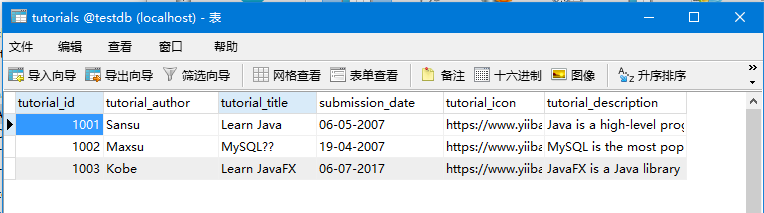
Maven依赖配置文件:pom.xml -
<project xmlns="http://maven.apache.org/POM/4.0.0" xmlns:xsi="http://www.w3.org/2001/XMLSchema-instance"
xsi:schemaLocation="http://maven.apache.org/POM/4.0.0
http://maven.apache.org/maven-v4_0_0.xsd">
<modelVersion>4.0.0</modelVersion>
<groupId>com.yiibai</groupId>
<artifactId>SpringBatchSample</artifactId>
<packaging>jar</packaging>
<version>1.0-SNAPSHOT</version>
<name>SpringBatchExample</name>
<url>http://maven.apache.org</url>
<properties>
<jdk.version>1.8</jdk.version>
<spring.version>4.3.8.RELEASE</spring.version>
<spring.batch.version>3.0.7.RELEASE</spring.batch.version>
<mysql.driver.version>5.1.25</mysql.driver.version>
<junit.version>4.11</junit.version>
</properties>
<dependencies>
<!-- Spring Core -->
<dependency>
<groupId>org.springframework</groupId>
<artifactId>spring-core</artifactId>
<version>${spring.version}</version>
</dependency>
<!-- https://mvnrepository.com/artifact/pdfbox/pdfbox -->
<dependency>
<groupId>org.apache.pdfbox</groupId>
<artifactId>pdfbox</artifactId>
<version>2.0.0</version>
</dependency>
<!-- Spring jdbc, for database -->
<dependency>
<groupId>org.springframework</groupId>
<artifactId>spring-jdbc</artifactId>
<version>${spring.version}</version>
</dependency>
<!-- Spring XML to/back object -->
<dependency>
<groupId>org.springframework</groupId>
<artifactId>spring-oxm</artifactId>
<version>${spring.version}</version>
</dependency>
<!-- MySQL database driver -->
<dependency>
<groupId>mysql</groupId>
<artifactId>mysql-connector-java</artifactId>
<version>${mysql.driver.version}</version>
</dependency>
<!-- Spring Batch dependencies -->
<dependency>
<groupId>org.springframework.batch</groupId>
<artifactId>spring-batch-core</artifactId>
<version>${spring.batch.version}</version>
</dependency>
<dependency>
<groupId>org.springframework.batch</groupId>
<artifactId>spring-batch-infrastructure</artifactId>
<version>${spring.batch.version}</version>
</dependency>
<!-- Spring Batch unit test -->
<dependency>
<groupId>org.springframework.batch</groupId>
<artifactId>spring-batch-test</artifactId>
<version>${spring.batch.version}</version>
</dependency>
<!-- Junit -->
<dependency>
<groupId>junit</groupId>
<artifactId>junit</artifactId>
<version>${junit.version}</version>
<scope>test</scope>
</dependency>
</dependencies>
<build>
<finalName>spring-batch</finalName>
<plugins>
<plugin>
<groupId>org.apache.maven.plugins</groupId>
<artifactId>maven-eclipse-plugin</artifactId>
<version>2.9</version>
<configuration>
<downloadSources>true</downloadSources>
<downloadJavadocs>false</downloadJavadocs>
</configuration>
</plugin>
<plugin>
<groupId>org.apache.maven.plugins</groupId>
<artifactId>maven-compiler-plugin</artifactId>
<version>2.3.2</version>
<configuration>
<source>${jdk.version}</source>
<target>${jdk.version}</target>
</configuration>
</plugin>
</plugins>
<defaultGoal>compile</defaultGoal>
</build>
</project>
易百教程移动端:请扫描本页面底部(右侧)二维码并关注微信公众号,回复:"教程" 选择相关教程阅读或直接访问:http://m.yiibai.com 。
Spring Batch CSV到XML - Spring Batch教程™
在本章中,我们将创建一个使用CSV Reader和XML Writer的简单Spring Batch应用程序。
阅读器 - 在应用程序中使用的阅读器是FlatFileItemReader,用于从CSV文件中读取数据。
以下是在此应用程序中使用的输入CSV文件。 本文档包含指定详细信息的数据记录,如教程编号,教程作者,教程标题,提交日期,教程图标和教程说明。
完整的项目目录结构如下:
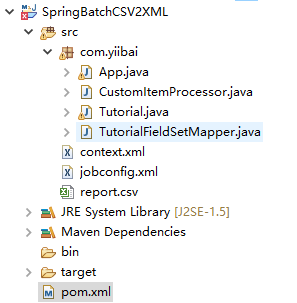
创建一个Maven项目,使用以下配置文件(pom.xml):
<project xmlns="http://maven.apache.org/POM/4.0.0" xmlns:xsi="http://www.w3.org/2001/XMLSchema-instance"
xsi:schemaLocation="http://maven.apache.org/POM/4.0.0
http://maven.apache.org/maven-v4_0_0.xsd">
<modelVersion>4.0.0</modelVersion>
<groupId>com.yiibai</groupId>
<artifactId>SpringBatchCSV2XML</artifactId>
<packaging>jar</packaging>
<version>1.0-SNAPSHOT</version>
<name>SpringBatch CSV to XML</name>
<url>http://maven.apache.org</url>
<properties>
<jdk.version>1.8</jdk.version>
<spring.version>4.3.8.RELEASE</spring.version>
<spring.batch.version>3.0.7.RELEASE</spring.batch.version>
<mysql.driver.version>5.1.25</mysql.driver.version>
<junit.version>4.11</junit.version>
</properties>
<dependencies>
<!-- Spring Core -->
<dependency>
<groupId>org.springframework</groupId>
<artifactId>spring-core</artifactId>
<version>${spring.version}</version>
</dependency>
<!-- https://mvnrepository.com/artifact/pdfbox/pdfbox -->
<dependency>
<groupId>org.apache.pdfbox</groupId>
<artifactId>pdfbox</artifactId>
<version>2.0.0</version>
</dependency>
<!-- Spring jdbc, for database -->
<dependency>
<groupId>org.springframework</groupId>
<artifactId>spring-jdbc</artifactId>
<version>${spring.version}</version>
</dependency>
<!-- Spring XML to/back object -->
<dependency>
<groupId>org.springframework</groupId>
<artifactId>spring-oxm</artifactId>
<version>${spring.version}</version>
</dependency>
<!-- MySQL database driver -->
<dependency>
<groupId>mysql</groupId>
<artifactId>mysql-connector-java</artifactId>
<version>${mysql.driver.version}</version>
</dependency>
<!-- Spring Batch dependencies -->
<dependency>
<groupId>org.springframework.batch</groupId>
<artifactId>spring-batch-core</artifactId>
<version>${spring.batch.version}</version>
</dependency>
<dependency>
<groupId>org.springframework.batch</groupId>
<artifactId>spring-batch-infrastructure</artifactId>
<version>${spring.batch.version}</version>
</dependency>
<!-- Spring Batch unit test -->
<dependency>
<groupId>org.springframework.batch</groupId>
<artifactId>spring-batch-test</artifactId>
<version>${spring.batch.version}</version>
</dependency>
<!-- Junit -->
<dependency>
<groupId>junit</groupId>
<artifactId>junit</artifactId>
<version>${junit.version}</version>
<scope>test</scope>
</dependency>
</dependencies>
<build>
<finalName>spring-batch</finalName>
<plugins>
<plugin>
<groupId>org.apache.maven.plugins</groupId>
<artifactId>maven-eclipse-plugin</artifactId>
<version>2.9</version>
<configuration>
<downloadSources>true</downloadSources>
<downloadJavadocs>false</downloadJavadocs>
</configuration>
</plugin>
<plugin>
<groupId>org.apache.maven.plugins</groupId>
<artifactId>maven-compiler-plugin</artifactId>
<version>2.3.2</version>
<configuration>
<source>${jdk.version}</source>
<target>${jdk.version}</target>
</configuration>
</plugin>
</plugins>
<defaultGoal>compile</defaultGoal>
</build>
</project>
文件:report.csv -
1001, "Sansu", "Learn Java", 16/12/2017
1002, "Leejas", "Learn MySQL", 19/04/2017
1003, "Kobe", "Learn JavaFX", 16/07/2018
- Writer - 在应用程序中使用的Writer是StaxEventItemWriter,用于将数据写入XML文件。
- Processor - 在应用程序中使用的处理器是一个自定义处理器,它只是打印从CSV文件中读取的记录。
jobconfig.xml
以下是Spring Batch应用程序示例的配置文件。 在这个文件中,我们将定义Job和Step。 除此之外,还为ItemReader,ItemProcessor和ItemWriter定义了bean。 (在这里,我们将它们与相应的类相关联,并传递所需属性的值来配置它们。)
文件:jobconfig.xml -
<beans xmlns = "http://www.springframework.org/schema/beans"
xmlns:batch = "http://www.springframework.org/schema/batch"
xmlns:xsi = "http://www.w3.org/2001/XMLSchema-instance"
xmlns:util = "http://www.springframework.org/schema/util"
xsi:schemaLocation = "http://www.springframework.org/schema/batch
http://www.springframework.org/schema/batch/spring-batch-2.2.xsd
http://www.springframework.org/schema/beans
http://www.springframework.org/schema/beans/spring-beans-3.2.xsd
http://www.springframework.org/schema/util
http://www.springframework.org/schema/util/spring-util-3.0.xsd ">
<import resource="context.xml" />
<bean id="report" class="Report" scope="prototype" />
<bean id="itemProcessor" class="com.yiibai.CustomItemProcessor" />
<batch:job id="helloWorldJob">
<batch:step id="step1">
<batch:tasklet>
<batch:chunk reader="cvsFileItemReader" writer="xmlItemWriter"
processor="itemProcessor" commit-interval="10">
</batch:chunk>
</batch:tasklet>
</batch:step>
</batch:job>
<bean id="cvsFileItemReader" class="org.springframework.batch.item.file.FlatFileItemReader">
<property name="resource" value="classpath:report.csv" />
<property name="lineMapper">
<bean class="org.springframework.batch.item.file.mapping.DefaultLineMapper">
<property name="lineTokenizer">
<bean
class="org.springframework.batch.item.file.transform.DelimitedLineTokenizer">
<property name="names"
value="tutorial_id,
tutorial_author, Tutorial_title, submission_date" />
</bean>
</property>
<property name="fieldSetMapper">
<bean class="com.yiibai.TutorialFieldSetMapper" />
</property>
</bean>
</property>
</bean>
<bean id="xmlItemWriter" class="org.springframework.batch.item.xml.StaxEventItemWriter">
<property name="resource" value="file:xml/tutorials.xml" />
<property name="marshaller" ref="reportMarshaller" />
<property name="rootTagName" value="tutorials" />
</bean>
<bean id="reportMarshaller" class="org.springframework.oxm.jaxb.Jaxb2Marshaller">
<property name="classesToBeBound">
<list>
<value>com.yiibai.Tutorial</value>
</list>
</property>
</bean>
</beans>
以下是Spring Batch应用程序的context.xml。 在这个文件中,我们将定义bean,如作业存储库,作业启动器和事务管理器。
<beans xmlns = "http://www.springframework.org/schema/beans"
xmlns:jdbc = "http://www.springframework.org/schema/jdbc"
xmlns:xsi = "http://www.w3.org/2001/XMLSchema-instance"
xsi:schemaLocation = "http://www.springframework.org/schema/beans
http://www.springframework.org/schema/beans/spring-beans-3.2.xsd
http://www.springframework.org/schema/jdbc
http://www.springframework.org/schema/jdbc/spring-jdbc-3.2.xsd">
<!-- stored job-meta in database -->
<bean id = "jobRepository"
class = "org.springframework.batch.core.repository.support.JobRepositoryFactoryBean">
<property name = "dataSource" ref = "dataSource" />
<property name = "transactionManager" ref = "transactionManager" />
<property name = "databaseType" value = "mysql" />
</bean>
<bean id = "transactionManager"
class = "org.springframework.batch.support.transaction.ResourcelessTransactionManager" />
<bean id = "jobLauncher"
class = "org.springframework.batch.core.launch.support.SimpleJobLauncher">
<property name = "jobRepository" ref = "jobRepository" />
</bean>
<bean id = "dataSource" class = "org.springframework.jdbc.datasource.DriverManagerDataSource">
<property name = "driverClassName" value = "com.mysql.jdbc.Driver" />
<property name = "url" value = "jdbc:mysql://localhost:3306/testdb" />
<property name = "username" value = "root" />
<property name = "password" value = "123456" />
</bean>
<!-- create job-meta tables automatically -->
<jdbc:initialize-database data-source = "dataSource">
<jdbc:script location = "org/springframework/batch/core/schema-drop-mysql.sql" />
<jdbc:script location = "org/springframework/batch/core/schema-mysql.sql" />
</jdbc:initialize-database>
</beans>
CustomItemProcessor.java
以下是处理器类。 在这个类中,在应用程序中编写处理代码。 在这里,打印每条记录的内容。
import org.springframework.batch.item.ItemProcessor;
public class CustomItemProcessor implements ItemProcessor<Tutorial, Tutorial> {
public Tutorial process(Tutorial item) throws Exception {
System.out.println("Processing..." + item);
return item;
}
}
TutorialFieldSetMapper.java
以下是TutorialFieldSetMapper类,它将数据设置为Tutorial类。
import org.springframework.batch.item.file.mapping.FieldSetMapper;
import org.springframework.batch.item.file.transform.FieldSet;
import org.springframework.validation.BindException;
public class TutorialFieldSetMapper implements FieldSetMapper<Tutorial> {
public Tutorial mapFieldSet(FieldSet fieldSet) throws BindException {
//Instantiating the report object
Tutorial tutorial = new Tutorial();
//Setting the fields
tutorial.setTutorial_id(fieldSet.readInt(0));
tutorial.setTutorial_author(fieldSet.readString(1));
tutorial.setTutorial_title(fieldSet.readString(2));
tutorial.setSubmission_date(fieldSet.readString(3));
return tutorial;
}
}
Tutorial.java类
以下是Tutorial类。 它是一个简单的带有setter和getter方法的Java类。 在这个类中,我们使用注释来将这个类的方法与XML文件的标签关联起来。
import javax.xml.bind.annotation.XmlAttribute;
import javax.xml.bind.annotation.XmlElement;
import javax.xml.bind.annotation.XmlRootElement;
@XmlRootElement(name = "tutorial")
public class Tutorial {
private int tutorial_id;
private String tutorial_author;
private String tutorial_title;
private String submission_date;
@XmlAttribute(name = "tutorial_id")
public int getTutorial_id() {
return tutorial_id;
}
public void setTutorial_id(int tutorial_id) {
this.tutorial_id = tutorial_id;
}
@XmlElement(name = "tutorial_author")
public String getTutorial_author() {
return tutorial_author;
}
public void setTutorial_author(String tutorial_author) {
this.tutorial_author = tutorial_author;
}
@XmlElement(name = "tutorial_title")
public String getTutorial_title() {
return tutorial_title;
}
public void setTutorial_title(String tutorial_title) {
this.tutorial_title = tutorial_title;
}
@XmlElement(name = "submission_date")
public String getSubmission_date() {
return submission_date;
}
public void setSubmission_date(String submission_date) {
this.submission_date = submission_date;
}
@Override
public String toString() {
return " [Tutorial id=" + tutorial_id + ",
Tutorial Author=" + tutorial_author + ",
Tutorial Title=" + tutorial_title + ",
Submission Date=" + submission_date + "]";
}
}
App.java
以下是启动批处理过程的代码。 在这个类中,通过运行JobLauncher来启动批处理应用程序。
package com.yiibai;
import org.springframework.batch.core.Job;
import org.springframework.batch.core.JobExecution;
import org.springframework.batch.core.JobParameters;
import org.springframework.batch.core.launch.JobLauncher;
import org.springframework.context.ApplicationContext;
import org.springframework.context.support.ClassPathXmlApplicationContext;
public class App {
public static void main(String[] args) throws Exception {
String[] springConfig = {"context.xml", "jobconfig.xml" };
// Creating the application context object
ApplicationContext context = new ClassPathXmlApplicationContext(springConfig);
// Creating the job launcher
JobLauncher jobLauncher = (JobLauncher) context.getBean("jobLauncher");
// Creating the job
Job job = (Job) context.getBean("helloWorldJob");
// Executing the JOB
JobExecution execution = jobLauncher.run(job, new JobParameters());
System.out.println("Exit Status : " + execution.getStatus());
}
}
在执行这个应用程序时,它将产生以下输出。
信息: Executed SQL script from class path resource [org/springframework/batch/core/schema-mysql.sql] in 7040 ms.
四月 28, 2018 2:32:15 下午 org.springframework.oxm.jaxb.Jaxb2Marshaller createJaxbContextFromClasses
信息: Creating JAXBContext with classes to be bound [class com.yiibai.Tutorial]
四月 28, 2018 2:32:17 下午 org.springframework.batch.core.launch.support.SimpleJobLauncher run
信息: Job: [FlowJob: [name=helloWorldJob]] launched with the following parameters: [{}]
四月 28, 2018 2:32:17 下午 org.springframework.batch.core.job.SimpleStepHandler handleStep
信息: Executing step: [step1]
Processing... [Tutorial id=1001, Tutorial Author=Sansu, Tutorial Title=Learn Java, Submission Date=16/12/2017]
Processing... [Tutorial id=1002, Tutorial Author=Leejas, Tutorial Title=Learn MySQL, Submission Date=19/04/2017]
Processing... [Tutorial id=1003, Tutorial Author=Kobe, Tutorial Title=Learn JavaFX, Submission Date=16/07/2018]
四月 28, 2018 2:32:18 下午 org.springframework.batch.core.launch.support.SimpleJobLauncher run
信息: Job: [FlowJob: [name=helloWorldJob]] completed with the following parameters: [{}] and the following status: [COMPLETED]
Exit Status : COMPLETED
这将生成一个包含以下内容的XML文件。
易百教程移动端:请扫描本页面底部(右侧)二维码并关注微信公众号,回复:"教程" 选择相关教程阅读或直接访问:http://m.yiibai.com 。
Spring Batch MySQL到XML - Spring Batch教程™
在本章中,我们将创建一个使用MySQL读取器和XML Writer的Spring Batch应用程序。
Reader - 在应用程序中使用的读取器是JdbcCursorItemReader,用于从MySQL数据库读取数据。
假设我们在MySQL数据库中创建了一个表,如下所示 -
CREATE TABLE details.xml_mysql(
person_id int(10) NOT NULL,
sales VARCHAR(20),
qty int(3),
staffName VARCHAR(20),
date VARCHAR(20)
);
假设已经在其中插入了以下记录。
mysql> select * from tutorialsdata;
+-------------+-----------------+----------------+-----------------+
| tutorial_id | tutorial_author | tutorial_title | submission_date |
+-------------+-----------------+----------------+-----------------+
| 101 | Sanjay | Learn Java | 06-05-2007 |
| 102 | Abdul S | Learn MySQL | 19-04-2007 |
| 103 | Krishna Kasyap | Learn JavaFX | 06-07-2017 |
+-------------+-----------------+----------------+-----------------+
3 rows in set (0.00 sec)
Writer - 在应用程序中使用的Writer是StaxEventItemWriter,用于将数据写入XML文件。
Processor - 在应用程序中使用的处理器是一个自定义处理器,它只是打印从CSV文件中读取的记录。
jobconfig.xml
以下是Spring Batch应用程序的配置文件。 在这个文件中,我们将定义Job和Steps。 除此之外,我们还为ItemReader,ItemProcessor和ItemWriter定义了bean。 (在这里,我们将它们与它们各自的类相关联,并传递所需属性的值来配置它们。)
<beans xmlns = "http://www.springframework.org/schema/beans"
xmlns:batch = "http://www.springframework.org/schema/batch"
xmlns:xsi = "http://www.w3.org/2001/XMLSchema-instance"
xmlns:util = "http://www.springframework.org/schema/util"
xsi:schemaLocation = " http://www.springframework.org/schema/batch
http://www.springframework.org/schema/batch/spring-batch-2.2.xsd
http://www.springframework.org/schema/beans
http://www.springframework.org/schema/beans/spring-beans-3.2.xsd">
<import resource = "context.xml" />
<bean id = "report" class = "Report" scope = "prototype" />
<bean id = "itemProcessor" class = "CustomItemProcessor" />
<batch:job id = "helloWorldJob">
<batch:step id = "step1">
<batch:tasklet>
<batch:chunk reader = "dbItemReader"
writer = "mysqlItemWriter" processor = "itemProcessor" commit-interval = "10">
</batch:chunk>
</batch:tasklet>
</batch:step>
</batch:job>
<bean id = "dbItemReader"
class = "org.springframework.batch.item.database.JdbcCursorItemReader" scope = "step">
<property name = "dataSource" ref = "dataSource" />
<property name = "sql" value = "select * from tutorials_data" />
<property name = "rowMapper">
<bean class = "TutorialRowMapper" />
</property>
</bean>
<bean id = "mysqlItemWriter"
class = "org.springframework.batch.item.xml.StaxEventItemWriter">
<property name = "resource" value = "file:xml/outputs/tutorials.xml" />
<property name = "marshaller" ref = "reportMarshaller" />
<property name = "rootTagName" value = "Tutorial" />
</bean>
<bean id = "reportMarshaller" class = "org.springframework.oxm.jaxb.Jaxb2Marshaller">
<property name = "classesToBeBound">
<list>
<value>Tutorial</value>
</list>
</property>
</bean>
</beans>
context.xml
以下是Spring Batch应用程序的context.xml。 在这个文件中,我们将定义bean,如作业存储库,作业启动器和事务管理器。
<beans xmlns = " http://www.springframework.org/schema/beans"
xmlns:jdbc = "http://www.springframework.org/schema/jdbc"
xmlns:xsi = "http://www.w3.org/2001/XMLSchema-instance"
xsi:schemaLocation = "http://www.springframework.org/schema/beans
http://www.springframework.org/schema/beans/spring-beans-3.2.xsd
http://www.springframework.org/schema/jdbc
http://www.springframework.org/schema/jdbc/spring-jdbc-3.2.xsd ">
<!-- stored job-meta in database -->
<bean id = "jobRepository"
class = "org.springframework.batch.core.repository.support.JobRepositoryFactoryBean">
<property name = "dataSource" ref = "dataSource" />
<property name = "transactionManager" ref = "transactionManager" />
<property name = "databaseType" value = "mysql" />
</bean>
<bean id = "transactionManager"
class = "org.springframework.batch.support.transaction.ResourcelessTransactionMana ger" />
<bean id = "jobLauncher"
class = "org.springframework.batch.core.launch.support.SimpleJobLauncher">
<property name = "jobRepository" ref = "jobRepository" />
</bean>
<!-- connect to MySQL database -->
<bean id = "dataSource"
class = "org.springframework.jdbc.datasource.DriverManagerDataSource">
<property name = "driverClassName" value = "com.mysql.jdbc.Driver" />
<property name = "url" value = "jdbc:mysql://localhost:3306/details" />
<property name = "username" value = "myuser" />
<property name = "password" value = "123456" />
</bean>
<!-- create job-meta tables automatically -->
<jdbc:initialize-database data-source = "dataSource">
<jdbc:script location = "org/springframework/batch/core/schema-drop-mysql.sql" />
<jdbc:script location = "org/springframework/batch/core/schema-mysql.sql" />
</jdbc:initialize-database>
</beans>
CustomItemProcessor.java
以下是处理器类。 在这个类中,我们在应用程序中编写处理代码。 在这里,打印每条记录的内容。
import org.springframework.batch.item.ItemProcessor;
public class CustomItemProcessor implements ItemProcessor<Tutorial, Tutorial> {
@Override
public Tutorial process(Tutorial item) throws Exception {
System.out.println("Processing..." + item);
return item;
}
}
CustomIteTutorialRowMapper.java
以下是TutorialRowMapper类,它将数据设置为Tutorial类。
import java.sql.ResultSet;
import java.sql.SQLException;
import org.springframework.jdbc.core.RowMapper;
public class TutorialRowMapper implements RowMapper<Tutorial> {
@Override
public Tutorial mapRow(ResultSet rs, int rowNum) throws SQLException {
Tutorial tutorial = new Tutorial();
tutorial.setTutorial_id(rs.getInt("tutorial_id"));
tutorial.setTutorial_author(rs.getString("tutorial_author"));
tutorial.setTutorial_title(rs.getString("tutorial_title"));
tutorial.setSubmission_date(rs.getString("submission_date"));
return tutorial;
}
}
Tutorial.java
以下是Tutorial类。 它是一个简单的带有setter和getter方法的Java类。 在这个类中,我们使用注释来将这个类的方法与XML文件的标签关联起来。
import javax.xml.bind.annotation.XmlAttribute;
import javax.xml.bind.annotation.XmlElement;
import javax.xml.bind.annotation.XmlRootElement;
@XmlRootElement(name = "details")
public class Tutorial {
int tutorial_id;
String tutorial_author;
String submission_date;
@XmlAttribute(name = "tutorial_id")
public int getTutorial_id() {
return tutorial_id;
}
public void setTutorial_id(int tutorial_id) {
this.tutorial_id = tutorial_id;
}
@XmlElement(name = "tutorial_author")
public String getTutorial_author() {
return tutorial_author;
}
public void setTutorial_author(String tutorial_author) {
this.tutorial_author = tutorial_author;
}
@XmlElement(name = "tutorial_title")
public String getTutorial_title() {
return tutorial_title;
}
public void setTutorial_title(String tutorial_title) {
this.tutorial_title = tutorial_title;
}
@XmlElement(name = "submission_date")
public String getSubmission_date() {
return submission_date;
}
public void setSubmission_date(String submission_date) {
this.submission_date = submission_date;
}
public String toString() {
return " [Tutorial Id=" + tutorial_id + ",
Tutorial Author =" + tutorial_author + ",
Tutorial Title =" + tutorial_title + ",
Submission Date =" + submission_date + "]";
}
}
App.java
以下是启动批处理过程的代码。 在这个类中,我们将通过运行JobLauncher来启动批处理应用程序。
import org.springframework.batch.core.Job;
import org.springframework.batch.core.JobExecution;
import org.springframework.batch.core.JobParameters;
import org.springframework.batch.core.launch.JobLauncher;
import org.springframework.context.ApplicationContext;
import org.springframework.context.support.ClassPathXmlApplicationContext;
public class App {
public static void main(String[] args) throws Exception {
String[] springConfig = { "jobs/job_hello_world.xml" };
// Creating the application context object
ApplicationContext context = new ClassPathXmlApplicationContext(springConfig);
// Creating the job launcher
JobLauncher jobLauncher = (JobLauncher) context.getBean("jobLauncher");
// Creating the job
Job job = (Job) context.getBean("helloWorldJob");
// Executing the JOB
JobExecution execution = jobLauncher.run(job, new JobParameters());
System.out.println("Exit Status : " + execution.getStatus());
}
}
在执行这个应用程序时,它将产生以下输出。
May 08, 2017 11:32:06 AM org.springframework.context.support.ClassPathXmlApplicationContext prepareRefresh
INFO: Refreshing org.springframework.context.support.ClassPathXmlApplicationContext@3d646c37:
startup date [Mon May 08 11:32:06 IST 2017]; root of context hierarchy
May 08, 2017 11:32:06 AM org.springframework.beans.factory.xml.XmlBeanDefinitionReader loadBeanDefinitions
INFO: Loading XML bean definitions from class path resource [jobs/job_hello_world.xml]
May 08, 2017 11:32:07 AM org.springframework.beans.factory.xml.XmlBeanDefinitionReader loadBeanDefinitions
May 08, 2017 11:32:14 AM org.springframework.batch.core.job.SimpleStepHandler handleStep
INFO: Executing step: [step1]
Processing... [Tutorial Id=101, Tutorial Author=Sanjay,
Tutorial Title=Learn Java, Submission Date=06-05-2007]
Processing... [Tutorial Id=102, Tutorial Author=Abdul S,
Tutorial Title=Learn MySQL, Submission Date=19-04-2007]
Processing... [Tutorial Id=103, Tutorial Author=Krishna Kasyap,
Tutorial Title=Learn JavaFX, Submission Date=06-07-2017]
May 08, 2017 11:32:14 AM org.springframework.batch.core.launch.support.SimpleJobLauncher run
INFO: Job: [FlowJob: [name=helloWorldJob]] completed with the following parameters:
[{}] and the following status: [COMPLETED]
Exit Status : COMPLETED
这将生成一个包含以下内容的XML文件。
<?xml version = "1.0" encoding = "UTF-8"?>
<Tutorial>
<details tutorial_id = "101">
<submission_date>06-05-2007</submission_date>
<tutorial_author>Sanjay</tutorial_author>
<tutorial_title>Learn Java</tutorial_title>
</details>
<details tutorial_id = "102">
<submission_date>19-04-2007</submission_date>
<tutorial_author>Abdul S</tutorial_author>
<tutorial_title>Learn MySQL</tutorial_title>
</details>
<details tutorial_id = "103">
<submission_date>06-07-2017</submission_date>
<tutorial_author>Krishna Kasyap</tutorial_author>
<tutorial_title>Learn JavaFX</tutorial_title>
</details>
</Tutorial>
易百教程移动端:请扫描本页面底部(右侧)二维码并关注微信公众号,回复:"教程" 选择相关教程阅读或直接访问:http://m.yiibai.com 。
Spring Batch MySQL到文件 - Spring Batch教程™
在本章中,我们将创建一个使用MySQL Reader和Flatfile Writer(.txt)的Spring Batch应用程序。
Reader - 在应用程序中使用的Reader是JdbcCursorItemReader,用于从MySQL数据库读取数据。
假设在MySQL数据库中创建了一个表,如下所示。
CREATE TABLE details.xml_mysql(
person_id int(10) NOT NULL,
sales VARCHAR(20),
qty int(3),
staffName VARCHAR(20),
date VARCHAR(20)
);
假设已经在其中插入了以下记录。
mysql> select * from tutorialsdata;
+-------------+-----------------+----------------+-----------------+
| tutorial_id | tutorial_author | tutorial_title | submission_date |
+-------------+-----------------+----------------+-----------------+
| 101 | Sanjay | Learn Java | 06-05-2007 |
| 102 | Abdul S | Learn MySQL | 19-04-2007 |
| 103 | Krishna Kasyap | Learn JavaFX | 06-07-2017 |
+-------------+-----------------+----------------+-----------------+
3 rows in set (0.00 sec)
Writer - 在应用程序中使用的Writer是FlatFileItemWriter,用于将数据写入flatfile(.txt)。
Processor - 在应用程序中使用的处理器是一个自定义处理器,它只是打印从CSV文件中读取的记录。
jobconfig.xml
以下是Spring Batch应用程序的配置文件。 在这个文件中,我们将定义Job和Steps。 除此之外,还为ItemReader,ItemProcessor和ItemWriter定义了bean。 (在这里,将它们与相应的类相关联,并传递所需属性的值来配置它们。)
<beans xmlns = "http://www.springframework.org/schema/beans"
xmlns:batch = "http://www.springframework.org/schema/batch"
xmlns:xsi = "http://www.w3.org/2001/XMLSchema-instance"
xmlns:util = "http://www.springframework.org/schema/util"
xsi:schemaLocation = "http://www.springframework.org/schema/batch
http://www.springframework.org/schema/batch/spring-batch-2.2.xsd
http://www.springframework.org/schema/beans
http://www.springframework.org/schema/beans/spring-beans-3.2.xsd">
<import resource = "context.xml" />
<bean id = "tutorial" class = "Tutorial" scope = "prototype" />
<bean id = "itemProcessor" class = "CustomItemProcessor" />
<batch:job id = "helloWorldJob">
<batch:step id = "step1">
<batch:tasklet>
<batch:chunk reader = "mysqlItemReader"
writer = "flatFileItemWriter" processor = "itemProcessor"
commit-interval = "10">
</batch:chunk>
</batch:tasklet>
</batch:step>
</batch:job>
<bean id = "mysqlItemReader"
class = "org.springframework.batch.item.database.JdbcCursorItemReader" >
<property name = "dataSource" ref = "dataSource" />
<property name = "sql" value = "select * from details.tutorialsdata" />
<property name = "rowMapper">
<bean class = "TutorialRowMapper" />
</property>
</bean>
<bean id = "flatFileItemWriter"
class = " org.springframework.batch.item.file.FlatFileItemWriter">
<property name = "resource" value = "file:target/outputfiles/employee_output.txt"/>
<property name = "lineAggregator">
<bean class = " org.springframework.batch.item.file.transform.PassThroughLineAggregator"/>
</property>
</bean>
</beans>
context.xml
以下是Spring Batch应用程序的context.xml。 在这个文件中,我们将定义bean,如作业存储库,作业启动器和事务管理器。
<beans xmlns = "http://www.springframework.org/schema/beans"
xmlns:xsi = "http://www.w3.org/2001/XMLSchema-instance"
xmlns:jdbc = "http://www.springframework.org/schema/jdbc"
xsi:schemaLocation = "http://www.springframework.org/schema/beans
http://www.springframework.org/schema/beans/spring-beans-3.2.xsd
http://www.springframework.org/schema/jdbc
http://www.springframework.org/schema/jdbc/spring-jdbc-3.2.xsd ">
<!-- stored job-meta in database -->
<bean id = "jobRepository"
class = "org.springframework.batch.core.repository.support.JobRepositoryFactoryBean">
<property name = "dataSource" ref = "dataSource" />
<property name = "transactionManager" ref = "transactionManager" />
<property name = "databaseType" value = "mysql" />
</bean>
<bean id = "transactionManager"
class = "org.springframework.batch.support.transaction.ResourcelessTransactionManager" />
<bean id = "dataSource"
class = "org.springframework.jdbc.datasource.DriverManagerDataSource">
<property name = "driverClassName" value = "com.mysql.jdbc.Driver" />
<property name = "url" value = "jdbc:mysql://localhost:3306/details" />
<property name = "username" value = "myuser" />
<property name = "password" value = "123456" />
</bean>
<bean id = "jobLauncher"
class = "org.springframework.batch.core.launch.support.SimpleJobLauncher">
<property name = "jobRepository" ref = "jobRepository" />
</bean>
<!-- create job-meta tables automatically -->
<jdbc:initialize-database data-source = "dataSource">
<jdbc:script location = "org/springframework/batch/core/schema-drop-mysql.sql" />
<jdbc:script location = "org/springframework/batch/core/schema-mysql.sql" />
</jdbc:initialize-database>
</beans>
CustomItemProcessor.java
以下是处理器类。 在这个类中,我们在应用程序中编写处理代码。 在这里,我们正在打印每条记录的内容。
import org.springframework.batch.item.ItemProcessor;
// Implementing the ItemProcessor interface
public class CustomItemProcessor implements ItemProcessor<Tutorial, Tutorial> {
@Override
public Tutorial process(Tutorial item) throws Exception {
System.out.println("Processing..." + item);
return item;
}
}
TutorialRowMapper.java
以下是TutorialRowMapper类,它将数据设置为Tutorial类。
public class TutorialRowMapper implements RowMapper<Tutorial> {
@Override
public Tutorial mapRow(ResultSet rs, int rowNum) throws SQLException {
Tutorial tutorial = new Tutorial();
tutorial.setTutorial_id(rs.getInt("tutorial_id"));
tutorial.setTutorial_title(rs.getString("tutorial_title"));
tutorial.setTutorial_author(rs.getString("tutorial_author"));
tutorial.setSubmission_date(rs.getString("submission_date"));
return tutorial;
}
}
Tutorial.java
以下是Tutorial类。 它是一个简单的带有setter和getter方法的Java类。 在这个类中,我们使用注释来将这个类的方法与XML文件的标签关联起来。
public class Tutorial {
private int tutorial_id;
private String tutorial_title;
private String tutorial_author;
private String submission_date;
public int getTutorial_id() {
return tutorial_id;
}
public void setTutorial_id(int tutorial_id) {
this.tutorial_id = tutorial_id;
}
public String getTutorial_title() {
return tutorial_title;
}
public void setTutorial_title(String tutorial_title) {
this.tutorial_title = tutorial_title;
}
public String getTutorial_author() {
return tutorial_author;
}
public void setTutorial_author(String tutorial_author) {
this.tutorial_author = tutorial_author;
}
public String getSubmission_date() {
return submission_date;
}
public void setSubmission_date(String submission_date) {
this.submission_date = submission_date;
}
@Override
public String toString() {
return " [id=" + tutorial_id + ", title=" +
tutorial_title + ",
author=" + tutorial_author + ", date=" +
submission_date + "]";
}
}
App.java
以下是启动批处理过程的代码。 在这个类中,我们将通过运行JobLauncher来启动批处理应用程序。
import org.springframework.batch.core.Job;
import org.springframework.batch.core.JobExecution;
import org.springframework.batch.core.JobParameters;
import org.springframework.batch.core.launch.JobLauncher;
import org.springframework.context.ApplicationContext;
import org.springframework.context.support.ClassPathXmlApplicationContext;
public class App {
public static void main(String[] args) throws Exception {
String[] springConfig = { "context.xml", "jobcontext.xml" };
// Creating the application context object
ApplicationContext context = new ClassPathXmlApplicationContext(springConfig);
// Creating the job launcher
JobLauncher jobLauncher = (JobLauncher) context.getBean("jobLauncher");
// Creating the job
Job job = (Job) context.getBean("helloWorldJob");
// Executing the JOB
JobExecution execution = jobLauncher.run(job, new JobParameters());
System.out.println("Exit Status : " + execution.getStatus());
}
}
在执行这个应用程序时,它将产生以下输出。
May 09, 2017 5:44:48 PM org.springframework.context.support.ClassPathXmlApplicationContext prepareRefresh
INFO: Refreshing org.springframework.context.support.ClassPathXml
ApplicationContext@3d646c37: startup date [Tue May
09 17:44:48 IST 2017]; root of context hierarchy
May 09, 2017 5:44:48 PM org.springframework.beans.factory.xml.XmlBeanDefinitionReader loadBeanDefinitions
May 09, 2017 5:44:56 PM org.springframework.batch.core.launch.support.SimpleJobLauncher run
INFO: Job: [FlowJob: [name=helloWorldJob]] launched
with the following parameters: [{}]
May 09, 2017 5:44:56 PM org.springframework.batch.core.job.SimpleStepHandler handleStep
INFO: Executing step: [step1]
Processing...Report [id=101, title=Learn Java, author=Sanjay, date=06-05-2007]
Processing...Report [id=102, title=Learn MySQL, author=Abdul S, date=19-04-2007]
Processing...Report [id=103, title=Learn JavaFX, author=Krishna Kasyap, date=0607-2017]
May 09, 2017 5:44:57 PM org.springframework.batch.core.launch.support.SimpleJobLauncher run
INFO: Job: [FlowJob: [name=helloWorldJob]] completed with the following parameters:
[{}] and the following status: [COMPLETED]
Hello
Exit Status : COMPLETED
易百教程移动端:请扫描本页面底部(右侧)二维码并关注微信公众号,回复:"教程" 选择相关教程阅读或直接访问:http://m.yiibai.com 。
