



由于项目要求需要安装老古董Rocks,一个6年前的软件http://www.rocksclusters.org/
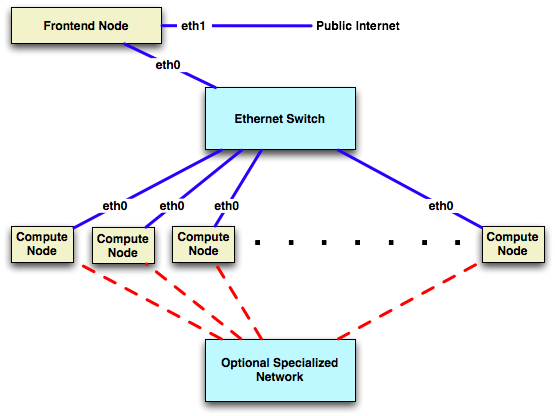
测试环境:
| ip | 用途 |
|---|---|
| 192.168.52.168 | http服务器 |
| 192.168.52.169/10.1.1.1 | 前端master服务器 |
| 10.1.1.xxx | 计算服务器1 |
| 10.1.1.xxx | 计算服务器2 |
经过网上一顿找,基本思路确定了。
1.需搭个内网http服务器准备rolls(本地没法安装,有知道本地安装方法的欢迎指导,只能通过http网络方式)
参考文档:https://github.com/rocksclusters/roll-server
最后结果:
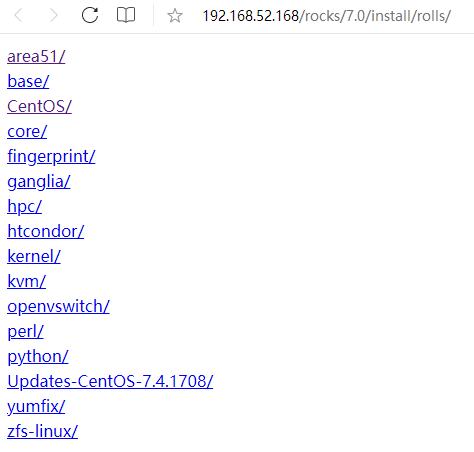
步骤如下:
yum install git httpd wget -y
systemctl disable firewalld
systemctl stop firewalld
setenforce 0
vi /etc/selinux/config
	SELINUX=disabled

git clone https://github.com/rocksclusters/roll-server.git
cd roll-server/
ll /var/www/html/
mkdir -p /var/www/html/rocks/7.0
ll *.iso
./rollcopy.sh area51-7.0-0.x86_64.disk1.iso /var/www/html/rocks/7.0/
./rollcopy.sh base-7.0-2.x86_64.disk1.iso /var/www/html/rocks/7.0/
./rollcopy.sh CentOS-7.4.1708-0.x86_64.disk1.iso /var/www/html/rocks/7.0/
./rollcopy.sh core-7.0-2.x86_64.disk1.iso /var/www/html/rocks/7.0/
./rollcopy.sh fingerprint-7.0-0.x86_64.disk1.iso /var/www/html/rocks/7.0/
./rollcopy.sh zfs-linux-0.7.3-2.x86_64.disk1.iso /var/www/html/rocks/7.0/
./rollcopy.sh yumfix-7.0-0.x86_64.disk1.iso /var/www/html/rocks/7.0/
./rollcopy.sh Updates-CentOS-7.4.1708-2017-12-01-0.x86_64.disk1.iso /var/www/html/rocks/7.0/
./rollcopy.sh python-7.0-2.x86_64.disk1.iso /var/www/html/rocks/7.0/
./rollcopy.sh perl-7.0-0.x86_64.disk1.iso /var/www/html/rocks/7.0/
./rollcopy.sh ganglia-7.0-2.x86_64.disk1.iso /var/www/html/rocks/7.0/
./rollcopy.sh hpc-7.0-0.x86_64.disk1.iso /var/www/html/rocks/7.0/
./rollcopy.sh htcondor-8.6.8-1.x86_64.disk1.iso /var/www/html/rocks/7.0/
./rollcopy.sh kernel-7.0-0.x86_64.disk1.iso /var/www/html/rocks/7.0/
./rollcopy.sh kvm-7.0-0.x86_64.disk1.iso /var/www/html/rocks/7.0/
./rollcopy.sh openvswitch-2.8.0-0.x86_64.disk1.iso /var/www/html/rocks/7.0/
cp index.cgi /var/www/html/rocks/7.0/install/rolls
./httpdconf.sh rocks-7-0.my.org /var/www/html/rocks/7.0

vi /etc/httpd/conf/httpd.conf
----------------------------------------
[root@http conf]# tail -15 /etc/httpd/conf/httpd.conf
#EnableMMAP off
EnableSendfile on

# Supplemental configuration
#
# Load config files in the "/etc/httpd/conf.d" directory, if any.
IncludeOptional conf.d/*.conf

# allow all access to the rolls RPMS
<Directory /var/www/html/rocks/7.0/install/rolls>
        AddHandler cgi-script .cgi
        Options FollowSymLinks Indexes ExecCGI
        DirectoryIndex /rocks/7.0/install/rolls/index.cgi
        Allow from all
</Directory>

------------------------------------------


./unpack-guides.sh /var/www/html/rocks/7.0/install/rolls /var/www/html/rocks/7.0

systemctl status httpd
systemctl start httpd
systemctl enable httpd

wget -O - http://central-7-0-x86-64.rocksclusters.org/install/rolls
wget -O - http://192.168.52.168/rocks/7.0/install/rolls

--2023-07-27 02:29:13--  http://192.168.52.168/rocks/7.0/install/rolls
Connecting to 192.168.52.168:80... connected.
HTTP request sent, awaiting response... 301 Moved Permanently
Location: http://192.168.52.168/rocks/7.0/install/rolls/ [following]
--2023-07-27 02:29:13--  http://192.168.52.168/rocks/7.0/install/rolls/
Reusing existing connection to 192.168.52.168:80.
HTTP request sent, awaiting response... 200 OK
Length: 883 [text/html]
Saving to:

 0% [                                                                                                                      ] 0           --.-K/s              <html><body><table><tr><td>
<a href="area51/">area51/</a>
</td></tr>
<tr><td>
<a href="base/">base/</a>
</td></tr>
<tr><td>
<a href="CentOS/">CentOS/</a>
</td></tr>
<tr><td>
<a href="core/">core/</a>
</td></tr>
<tr><td>
<a href="fingerprint/">fingerprint/</a>
</td></tr>
<tr><td>
<a href="ganglia/">ganglia/</a>
</td></tr>
<tr><td>
<a href="hpc/">hpc/</a>
</td></tr>
<tr><td>
<a href="htcondor/">htcondor/</a>
</td></tr>
<tr><td>
<a href="kernel/">kernel/</a>
</td></tr>
<tr><td>
<a href="kvm/">kvm/</a>
</td></tr>
<tr><td>
<a href="openvswitch/">openvswitch/</a>
</td></tr>
<tr><td>
<a href="perl/">perl/</a>
</td></tr>
<tr><td>
<a href="python/">python/</a>
</td></tr>
<tr><td>
<a href="Updates-CentOS-7.4.1708/">Updates-CentOS-7.4.1708/</a>
</td></tr>
<tr><td>
<a href="yumfix/">yumfix/</a>
</td></tr>
<tr><td>
<a href="zfs-linux/">zfs-linux/</a>
</td></tr>
100%[=====================================================================================================================>] 883         --.-K/s   in 0s

2023-07-27 02:29:13 (275 MB/s) - written to stdout [883/883]

[root@http conf]#
2.安装前端master服务器
参考:http://central-7-0-x86-64.rocksclusters.org/roll-documentation/base/7.0/install-frontend-7.html
注意点:
1.必须选择 英文 安装(用中文有bug,安装的时候会缺失包)
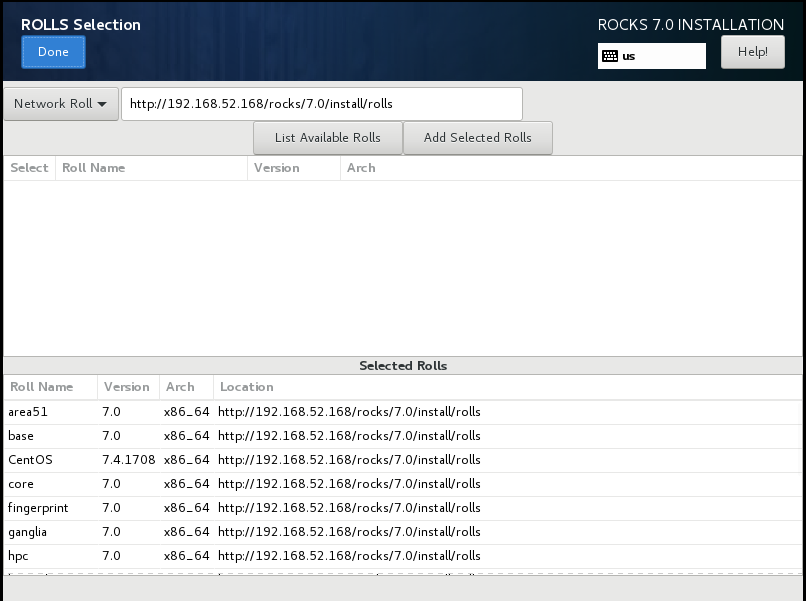
2.ROOLS Selection选择前面搭建的rolls地址http://192.168.52.168/rocks/7.0/install/rolls/
3.安装计算节点:
参考:http://central-7-0-x86-64.rocksclusters.org/roll-documentation/base/7.0/install-compute-nodes.html
在前端机器执行命令insert-ethers增加计算节点时报错:

error - unable to download kickstart.
Verify httpd is running with 'service httpd start'
处理办法:逗号改成空格,reboot操作系统后正常。
vi /usr/lib/systemd/system/ip6tables.service (bug for RedHat 7.4):
将
After=syslog.target,iptables.service
改成
After=syslog.target iptables.service
上述bug参考说明:https://github.com/rocksclusters/base/issues/35
解决上述问题后,正常界面:
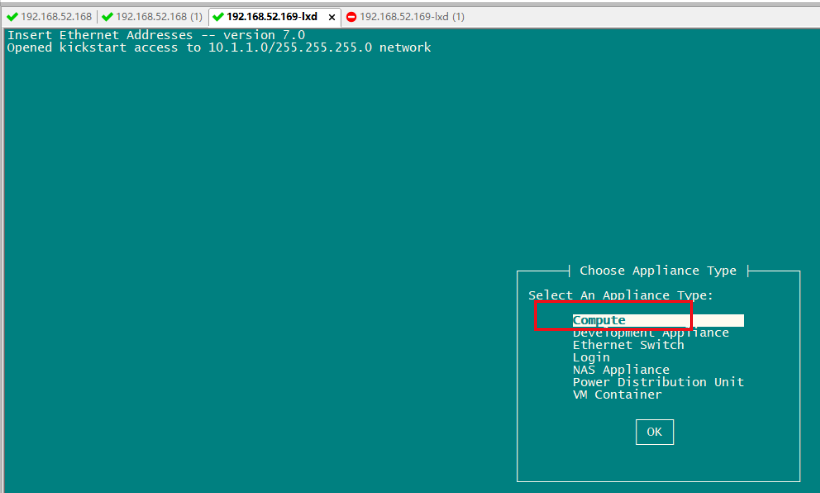
计算节点准备:
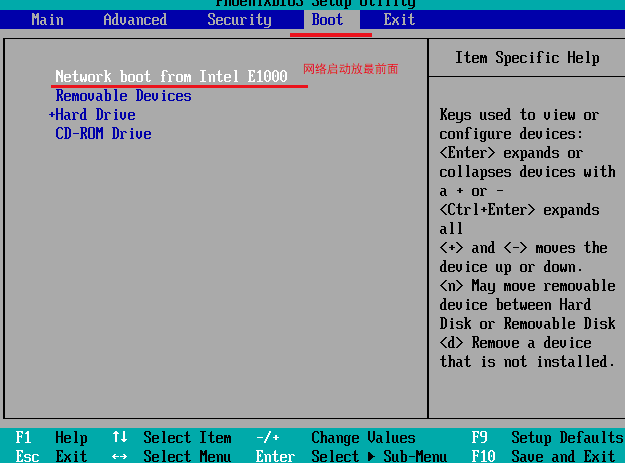
进入bios设置网络启动
选择Compute
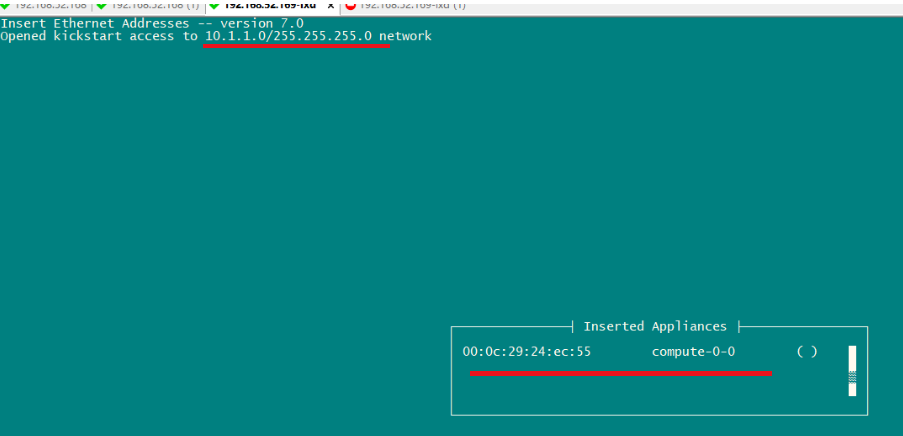
安装顺利过程中则显示*号
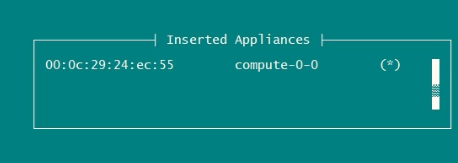
完成后可看到:

4.计算节点挂接前端共享目录:(ssh到每个计算节点操作)
前端检查:
[root@compute-0-1 ~]# df -h
Filesystem            Size  Used Avail Use% Mounted on
/dev/sda1              16G  3.1G   12G  21% /
devtmpfs              1.9G     0  1.9G   0% /dev
tmpfs                 1.9G     0  1.9G   0% /dev/shm
tmpfs                 1.9G  8.5M  1.9G   1% /run
tmpfs                 1.9G     0  1.9G   0% /sys/fs/cgroup
/dev/sda2             7.8G  138M  7.2G   2% /var
/dev/sda5             6.8G   32M  6.4G   1% /state/partition1
tmpfs                 380M     0  380M   0% /run/user/0
10.10.207.10:/export   20G   12G  7.5G  60% /export
[root@rocks ~]# cat /etc/exports
/export 10.10.207.10(rw,async,no_root_squash) 10.10.207.0/255.255.255.0(rw,async)
[root@rocks ~]# cat /etc/auto
autofs.conf            auto.home              auto.master.d/         auto.net               auto.smb
autofs_ldap_auth.conf  auto.master            auto.misc              auto.share
[root@rocks ~]# cat /etc/auto.s
auto.share  auto.smb
[root@rocks ~]# cat /etc/auto.share
apps rocks.local:/export/&

[root@compute-0-1 ~]# rocks list host
HOST         MEMBERSHIP CPUS RACK RANK RUNACTION INSTALLACTION
rocks:       Frontend   8    0    0    os        install
compute-0-1: Compute    1    0    1    os        install
compute-0-2: Compute    1    0    2    os        install
计算节点挂接前端共享目录:
[root@rocks ~]# ssh compute-0-1
@@@@@@@@@@@@@@@@@@@@@@@@@@@@@@@@@@@@@@@@@@@@@@@@@@@@@@@@@@@
@    WARNING: REMOTE HOST IDENTIFICATION HAS CHANGED!     @
@@@@@@@@@@@@@@@@@@@@@@@@@@@@@@@@@@@@@@@@@@@@@@@@@@@@@@@@@@@
IT IS POSSIBLE THAT SOMEONE IS DOING SOMETHING NASTY!
Someone could be eavesdropping on you right now (man-in-the-middle attack)!
It is also possible that a host key has just been changed.
The fingerprint for the ECDSA key sent by the remote host is
SHA256:hGEGKg9mN1hXikvTfqG5klFfPczfEU1mpsZcWqwf60c.
Please contact your system administrator.
Add correct host key in /root/.ssh/known_hosts to get rid of this message.
Offending ECDSA key in /root/.ssh/known_hosts:1
Password authentication is disabled to avoid man-in-the-middle attacks.
Keyboard-interactive authentication is disabled to avoid man-in-the-middle attacks.
Agent forwarding is disabled to avoid man-in-the-middle attacks.
X11 forwarding is disabled to avoid man-in-the-middle attacks.
Last login: Fri Jul 28 00:20:19 2023 from rocks.local
Rocks Compute Node
Rocks 7.0 (Manzanita)
Profile built 11:53 28-Jul-2023

Kickstarted 00:02 28-Jul-2023
[root@compute-0-1 ~]# df -h
Filesystem      Size  Used Avail Use% Mounted on
/dev/sda1        16G  3.1G   12G  21% /
devtmpfs        1.9G     0  1.9G   0% /dev
tmpfs           1.9G     0  1.9G   0% /dev/shm
tmpfs           1.9G  8.5M  1.9G   1% /run
tmpfs           1.9G     0  1.9G   0% /sys/fs/cgroup
/dev/sda2       7.8G  138M  7.2G   2% /var
/dev/sda5       6.8G   32M  6.4G   1% /state/partition1
tmpfs           380M     0  380M   0% /run/user/0
[root@compute-0-1 ~]# mkdir /export
[root@compute-0-1 ~]# cat /etc/hosts
127.0.0.1       localhost.localdomain localhost
192.168.207.167 rocks
10.10.207.253   compute-0-1.local compute-0-1
[root@compute-0-1 ~]# mount -t nfs 10.10.207.10:/export /export
[root@compute-0-1 ~]# df -h
Filesystem            Size  Used Avail Use% Mounted on
/dev/sda1              16G  3.1G   12G  21% /
devtmpfs              1.9G     0  1.9G   0% /dev
tmpfs                 1.9G     0  1.9G   0% /dev/shm
tmpfs                 1.9G  8.5M  1.9G   1% /run
tmpfs                 1.9G     0  1.9G   0% /sys/fs/cgroup
/dev/sda2             7.8G  138M  7.2G   2% /var
/dev/sda5             6.8G   32M  6.4G   1% /state/partition1
tmpfs                 380M     0  380M   0% /run/user/0
10.10.207.10:/export   20G   12G  7.5G  60% /export

随系统启动自动挂nfs

方法1:
[root@compute-0-1 ~]# ll /etc/rc.local
lrwxrwxrwx 1 root root 13 Jul 27 23:56 /etc/rc.local -> rc.d/rc.local
[root@compute-0-1 ~]# ll /etc/rc.d/rc.local
-rw-r--r-- 1 root root 473 Oct 19  2017 /etc/rc.d/rc.local
[root@compute-0-1 ~]# chmod +x /etc/rc.d/rc.local
[root@compute-0-1 ~]# vi /etc/rc.d/rc.local
#!/bin/bash
# THIS FILE IS ADDED FOR COMPATIBILITY PURPOSES
#
# It is highly advisable to create own systemd services or udev rules
# to run scripts during boot instead of using this file.
#
# In contrast to previous versions due to parallel execution during boot
# this script will NOT be run after all other services.
#
# Please note that you must run 'chmod +x /etc/rc.d/rc.local' to ensure
# that this script will be executed during boot.

touch /var/lock/subsys/local
mount -t nfs 10.10.207.10:/export /export
~
"/etc/rc.d/rc.local" 14L, 515C written
[root@compute-0-1 ~]# cat /etc/rc.local
#!/bin/bash
# THIS FILE IS ADDED FOR COMPATIBILITY PURPOSES
#
# It is highly advisable to create own systemd services or udev rules
# to run scripts during boot instead of using this file.
#
# In contrast to previous versions due to parallel execution during boot
# this script will NOT be run after all other services.
#
# Please note that you must run 'chmod +x /etc/rc.d/rc.local' to ensure
# that this script will be executed during boot.

touch /var/lock/subsys/local
mount -t nfs 10.10.207.10:/export /export
[root@compute-0-1 ~]#

方法2:
vi /etc/fstab
10.10.207.10:/export /export                    nfs    defaults        1 2
5. Rocks的管理维护
1.添加节点
如果要向cluster添加节点,在主节点上使用

insert-ethers
然后在子节点设定网络启动。实现自动化安装。
2.添加用户
用一般的添加用户的命令进行操作。

adduser username
passwd username
rocks sync users
特别最后一行命令用来通知子节点添加的用户信息,否则该用户是无法登陆子节点的。

3.删除节点
rocks remove host compute-0-0
rocks sync config
删除子节点并更新数据库,必须更新数据库,否则下次添加节点的时候可能会出现问题。
4.强制子节点重启安装
rocks set host pxeboot compute-0-0 action=install
rocks set host pxeboot compute-0-0 action=os
第一条命令是子节点网络启动重新安装系统,后一个是子节点网络启动直接进入系统。这个可在集群断电
之后子节点重启直接进入grub的情况下使用。
批量重新安装 与重启
# rocks set host boot compute action=install
# rocks run host compute "shutdown -r now"


删除节点
# rocks remove host compute-0-0
# rocks sync config
删除子节点并更新数据库,必须更新数据库,否则下次添加节点的时候可能会出现问题。
insert-ethers -hostname="compute-0-3"   #安装计算节点指定名称
5.显示集群节点列表
rocks list host
rocks相关维护参考:
https://wap.sciencenet.cn/home.php?mod=space&do=blog&id=482121
https://www.omicsclass.com/article/333
https://blog.csdn.net/weixin_42290322/article/details/116943967
